undn och mal Danke schön.

Nova Anpassungen
-
mpt -
29. September 2026 um 16:48 -
Erledigt
-
-
undn och mal Danke schön.

-

Es ist nur so, dass ich bisher noch keine positive Äußerung über Nova gelesen habe.
Ich schon, und das nicht nur eine. Aber nochmal: Dieses Forum ist ein Support-Forum. Hier handeln schätzungsweise 99,9 Prozent der Beiträge von Problemen und Änderungswünschen. Und dennoch, auch in dem Punkt wiederhole ich mich, gab es hier auch nicht so viele Beiträge, gemessen am Ausmaß der Änderung, für immerhin das größte und wichtigste Firefox-Forum im gesamten deutschsprachigen Raum. Und die Beiträge, die hier kamen, kamen außerdem größtenteils von Nutzern, die ihren Firefox vorher schon individuell angepasst haben.
-

Und die Beiträge, die hier kamen, kamen außerdem größtenteils von Nutzern, die ihren Firefox vorher schon individuell angepasst haben.
Das war mir so nicht bewusst.
-
Könnt ihr mir bitte helfen? Ich habe stunden jetzt verbracht das einzustellen aber ich verstehe das nicht und pfusche mehr rum als dass es funktioniert.

Mein Ziel ist folgendes:
roter Pfeil: die dunkelgraue Farbe durchgehend in der Leiste
grüner Pfeil: die blaue Linie weg, diese endet wie auf dem Bild also ist nicht ein kompletter Rahmen
oranger Pfeil: Menü Button mit Farbe wie links/rechts von der Adressleiste
ohne Pfeil: aktives Tab (ohne Rahmen) mit Farbe wie links/rechts von der AdressleisteSozusagen der Nachbau des Proton-Theme per userChrome.css Code. Die gewünschten Grau Angaben habe ich per RGB/Hex eingetragen aber wohl an falschen Stellen oder mit falschem Befehlen.
Die Rahmenlinie um das Adressfeld habe ich beabsichtigt mit einem helleren Blau festgelegt, aber woher die andere blaue Linie kommt ist mir rätselhaft.Gibt es bei Angaben aus der userChrome.css für Windows unterschiede? Ich bin mir sich auf einem Windows 11 sah das so aus, wie ich es wollte ohne Fehler und auf Windows 10 sieht es aus wie auf dem Screenshot.
Anbei mein vermurkster und aktueller Code.
Spoiler anzeigen
/* Tab-Höhe festlegen */
:root {
--tab-min-height: 34px !important; /* Höhe anpassen, original: 44px */
--tab-toolbar-navbar-overlap: 0px !important; /* für Vollbildmodus */
}/* Tab-Breite festlegen */
.tabbrowser-tab:not([pinned]) {
flex-grow: 0 !important;
min-width: 150px !important; /* Breite anpassen, original: 221*/
}/* Tabs und Suchfeld eckig */
:root {
--toolbarbutton-border-radius: 3px !important;
}/* Lesezeichenabstand verringern */
menupopup > menuitem, menupopup > menu {
padding-block: 3px !important;
}
:root {
--arrowpanel-menuitem-padding: 4px 8px !important;
}/* Lautsprechersymbol größer bei Sound */
.tab-icon-overlay[soundplaying] {
fill: green !important;
transform: scale(1.3, 1.3) !important;
}/* Lautsprechersymbol größer bei Stumm */
.tab-icon-overlay[muted] {
fill: red !important;
transform: scale(1.3, 1.3) !important;
}/* Kontextmenü-Einträge entfernen */
#context-openlinkprivate,
#frame-sep,
#context-inspect,
#context-inspect-a11y,
#context-viewsource,
#context-viewpartialsource-selection {
display: none !important;
}#ublock0_raymondhill_net-menuitem-_uBlock0-blockElement,
#context-media-eme-separator {
display: none !important;
}#_73a6fe31-595d-460b-a920-fcc0f8843232_-menuitem-_noscript-ctx-menu {
display: none !important;
}#contentAreaContextMenu menuitem[label="In privatem Fenster suchen"] {
display: none !important;
}#contentAreaContextMenu menu[label="KeePassXC-Browser"] {
display: none !important;
}#contentAreaContextMenu menuitem[label="Passwörter verwalten"] {
display: none !important;
}#context-copy-link-to-highlight {
display: none !important;
}
#context-copy-clean-link-to-highlight {
display: none !important;
}#context-sep-selectall,
#context-sep-screenshots,
#frame-sep {
display: none !important;
}/* Hintergrundfarbe aktueller Tab */
.tab-background[selected] {
background-color: #F9F9FB !important;
background-image: none !important;
}#alltabs-button {
display: none !important;
}/* Rubrik Empfehlungen in Addons entfernen */
#category-discover {
display:none !important;
}/* Abstand der Addon-Icons verringern */
:root {
--toolbarbutton-outer-padding: 3px !important;
--toolbarbutton-inner-padding: 6px !important;
}/* Suchmaschinen-Icon in Adressfeld entfernen */
toolbarbutton.searchmode-switcher {
display: none !important;
}/* Firefox-Icon in Tab anzeigen */
tab.tabbrowser-tab img {
display: block !important;
}.tab-icon-image {
&:not([src]), &:-moz-broken {
content: url("chrome://branding/content/icon32.png")!important;
}
}/* Kein Farbverlauf */
:root:not([theme-image-in-toolbox]) body,
:root[theme-image-in-toolbox] #navigator-toolbox {
background-image: none !important;
}/* Rahmenfarben Adressleiste */
#urlbar > div {
border: 2px solid #7cadfa !important;
}/* aktiver Tab ohne Rahmen + mit Hintergrundfarbe */
.tabbrowser-tab:is([visuallyselected], [multiselected]) .tab-background {
background-color: #F9F9FB !important;
outline: none !important;
border: none !important;
}/* Menüleiste */
#toolbar-menubar {
background: #F9F9FB !important;
}
#TabsToolbar {
background-color: #F9F9FB !important;
}/* Tableiste */
#TabsToolbar-customization-target {
background: #EAEAED !important;
}/* Adressleiste */
#nav-bar-customization-target {
background: #F9F9FB !important;
}/* Lesezeichenleiste */
#PersonalToolbar {
background: #F9F9FB !important;
}/* Abrunden der Ecken */
:root {
--border-radius-xsmall: 1px !important; /* Minimale Rundung für sehr kleine Elemente */
--border-radius-small: 2px !important; /* Kleine Rundung (z.B. für Checkboxen/Buttons) */
--border-radius-medium: 3px !important; /* Mittlere Rundung (z.B. für Popups/Dropdowns) */
--border-radius-large: 4px !important; /* Standard-Rundung (z.B. für die Adressleiste) */
--border-radius-xlarge: 6px !important; /* Maximale Rundung für große Oberflächen-Elemente wie Tabs*/#urlbar .urlbar-input-container {
background-color: #ECECEE !important;
color: black !important;
}.urlbarView-row {
&[selected] {
background-color: #EAEAED !important;
color: black !important;
}
}#urlbar > div:focus-within {
background-color: #FFFFFF !important;
color: black !important;
outline: none !important;
}
} -
-
oh ich hab gedacht im Spoiler wird mein ganzer Code angezeigt. Dann hier nochmal, mehr habe ich nicht und mir fehlt auch das Verstöndnis für Befehle.
CSS
Alles anzeigen/* Tab-Höhe festlegen */ :root { --tab-min-height: 34px !important; /* Höhe anpassen, original: 44px */ --tab-toolbar-navbar-overlap: 0px !important; /* für Vollbildmodus */ } /* Tab-Breite festlegen */ .tabbrowser-tab:not([pinned]) { flex-grow: 0 !important; min-width: 150px !important; /* Breite anpassen, original: 221*/ } /* Tabs und Suchfeld eckig */ :root { --toolbarbutton-border-radius: 3px !important; } /* Lesezeichenabstand verringern */ menupopup > menuitem, menupopup > menu { padding-block: 3px !important; } :root { --arrowpanel-menuitem-padding: 4px 8px !important; } /* Lautsprechersymbol größer bei Sound */ .tab-icon-overlay[soundplaying] { fill: green !important; transform: scale(1.3, 1.3) !important; } /* Lautsprechersymbol größer bei Stumm */ .tab-icon-overlay[muted] { fill: red !important; transform: scale(1.3, 1.3) !important; } /* Kontextmenü-Einträge entfernen */ #context-openlinkprivate, #frame-sep, #context-inspect, #context-inspect-a11y, #context-viewsource, #context-viewpartialsource-selection { display: none !important; } #ublock0_raymondhill_net-menuitem-_uBlock0-blockElement, #context-media-eme-separator { display: none !important; } #_73a6fe31-595d-460b-a920-fcc0f8843232_-menuitem-_noscript-ctx-menu { display: none !important; } #contentAreaContextMenu menuitem[label="In privatem Fenster suchen"] { display: none !important; } #contentAreaContextMenu menu[label="KeePassXC-Browser"] { display: none !important; } #contentAreaContextMenu menuitem[label="Passwörter verwalten"] { display: none !important; } #context-copy-link-to-highlight { display: none !important; } #context-copy-clean-link-to-highlight { display: none !important; } #context-sep-selectall, #context-sep-screenshots, #frame-sep { display: none !important; } /* Hintergrundfarbe aktueller Tab */ .tab-background[selected] { background-color: #F9F9FB !important; background-image: none !important; } #alltabs-button { display: none !important; } /* Rubrik Empfehlungen in Addons entfernen */ #category-discover { display:none !important; } /* Abstand der Addon-Icons verringern */ :root { --toolbarbutton-outer-padding: 3px !important; --toolbarbutton-inner-padding: 6px !important; } /* Suchmaschinen-Icon in Adressfeld entfernen */ toolbarbutton.searchmode-switcher { display: none !important; } /* Firefox-Icon in Tab anzeigen */ tab.tabbrowser-tab img { display: block !important; } .tab-icon-image { &:not([src]), &:-moz-broken { content: url("chrome://branding/content/icon32.png")!important; } } /* Kein Farbverlauf */ :root:not([theme-image-in-toolbox]) body, :root[theme-image-in-toolbox] #navigator-toolbox { background-image: none !important; } /* Rahmenfarben Adressleiste */ #urlbar > div { border: 2px solid #7cadfa !important; } /* aktiver Tab ohne Rahmen + mit Hintergrundfarbe */ .tabbrowser-tab:is([visuallyselected], [multiselected]) .tab-background { background-color: #F9F9FB !important; outline: none !important; border: none !important; } /* Menüleiste */ #toolbar-menubar { background: #F9F9FB !important; } #TabsToolbar { background-color: #F9F9FB !important; } /* Tableiste */ #TabsToolbar-customization-target { background: #EAEAED !important; } /* Adressleiste */ #nav-bar-customization-target { background: #F9F9FB !important; } /* Lesezeichenleiste */ #PersonalToolbar { background: #F9F9FB !important; } /* Abrunden der Ecken */ :root { --border-radius-xsmall: 1px !important; /* Minimale Rundung für sehr kleine Elemente */ --border-radius-small: 2px !important; /* Kleine Rundung (z.B. für Checkboxen/Buttons) */ --border-radius-medium: 3px !important; /* Mittlere Rundung (z.B. für Popups/Dropdowns) */ --border-radius-large: 4px !important; /* Standard-Rundung (z.B. für die Adressleiste) */ --border-radius-xlarge: 6px !important; /* Maximale Rundung für große Oberflächen-Elemente wie Tabs*/ #urlbar .urlbar-input-container { background-color: #ECECEE !important; color: black !important; } .urlbarView-row { &[selected] { background-color: #EAEAED !important; color: black !important; } } #urlbar > div:focus-within { background-color: #FFFFFF !important; color: black !important; outline: none !important; } } -
- Hilfreichste Antwort
oh ich hab gedacht
Alles ist gut

Teste bitte mal diesen kompl. Code
CSS
Alles anzeigen#TabsToolbar .titlebar-spacer[type="pre-tabs"], #TabsToolbar .titlebar-spacer[type="post-tabs"] { display: none !important; } /* Tab-Höhe festlegen */ :root { --tab-min-height: 34px !important; /* Höhe anpassen, original: 44px */ --tab-toolbar-navbar-overlap: 0px !important; /* für Vollbildmodus */ } /* Tab-Breite festlegen */ .tabbrowser-tab:not([pinned]) { flex-grow: 0 !important; min-width: 150px !important; /* Breite anpassen, original: 221*/ } /* Tabs und Suchfeld eckig */ :root { --toolbarbutton-border-radius: 3px !important; } /* Lesezeichenabstand verringern */ menupopup > menuitem, menupopup > menu { padding-block: 3px !important; } :root { --arrowpanel-menuitem-padding: 4px 8px !important; } /* Lautsprechersymbol größer bei Sound */ .tab-icon-overlay[soundplaying] { fill: green !important; transform: scale(1.3, 1.3) !important; } /* Lautsprechersymbol größer bei Stumm */ .tab-icon-overlay[muted] { fill: red !important; transform: scale(1.3, 1.3) !important; } /* Kontextmenü-Einträge entfernen */ #context-openlinkprivate, #frame-sep, #context-inspect, #context-inspect-a11y, #context-viewsource, #context-viewpartialsource-selection { display: none !important; } #ublock0_raymondhill_net-menuitem-_uBlock0-blockElement, #context-media-eme-separator { display: none !important; } #_73a6fe31-595d-460b-a920-fcc0f8843232_-menuitem-_noscript-ctx-menu { display: none !important; } #contentAreaContextMenu menuitem[label="In privatem Fenster suchen"] { display: none !important; } #contentAreaContextMenu menu[label="KeePassXC-Browser"] { display: none !important; } #contentAreaContextMenu menuitem[label="Passwörter verwalten"] { display: none !important; } #context-copy-link-to-highlight { display: none !important; } #context-copy-clean-link-to-highlight { display: none !important; } #context-sep-selectall, #context-sep-screenshots, #frame-sep { display: none !important; } /* Hintergrundfarbe aktueller Tab */ .tab-background[selected] { background-color: #F9F9FB !important; background-image: none !important; } #alltabs-button { display: none !important; } /* Rubrik Empfehlungen in Addons entfernen */ #category-discover { display:none !important; } /* Abstand der Addon-Icons verringern */ :root { --toolbarbutton-outer-padding: 3px !important; --toolbarbutton-inner-padding: 6px !important; } /* Suchmaschinen-Icon in Adressfeld entfernen */ toolbarbutton.searchmode-switcher { display: none !important; } /* Firefox-Icon in Tab anzeigen */ tab.tabbrowser-tab img { display: block !important; } .tab-icon-image { &:not([src]), &:-moz-broken { content: url("chrome://branding/content/icon32.png")!important; } } /* Kein Farbverlauf */ :root:not([theme-image-in-toolbox]) body, :root[theme-image-in-toolbox] #navigator-toolbox { background-image: none !important; } /* Rahmenfarben Adressleiste */ #urlbar > div { border: none !important; } /* aktiver Tab ohne Rahmen + mit Hintergrundfarbe */ .tabbrowser-tab:is([visuallyselected], [multiselected]) .tab-background { background: #F9F9FB !important; outline: none !important; border: none !important; } /* Menüleiste */ #toolbar-menubar { background: #F9F9FB !important; } #TabsToolbar { background-color: #F9F9FB !important; } /* Tableiste */ .titlebar-buttonbox-container, #TabsToolbar-customization-target { background: #EAEAED !important; } /* Adressleiste */ #nav-bar-customization-target { background: #F9F9FB !important; } /* Lesezeichenleiste */ #PersonalToolbar { background: #F9F9FB !important; } /* Abrunden der Ecken */ :root { --border-radius-xsmall: 1px !important; /* Minimale Rundung für sehr kleine Elemente */ --border-radius-small: 2px !important; /* Kleine Rundung (z.B. für Checkboxen/Buttons) */ --border-radius-medium: 3px !important; /* Mittlere Rundung (z.B. für Popups/Dropdowns) */ --border-radius-large: 4px !important; /* Standard-Rundung (z.B. für die Adressleiste) */ --border-radius-xlarge: 6px !important; /* Maximale Rundung für große Oberflächen-Elemente wie Tabs*/ } #urlbar .urlbar-input-container { background-color: #ECECEE !important; color: black !important; } .urlbarView-row { &[selected] { background-color: #EAEAED !important; color: black !important; } } -
Hallo,
wenn man etwas in die Adressleiste eingibt als auch im Such-Fenster öffnet sich darunter immer ein zusätzliches Feld welches unterlegt wird.
Kann man das bitte komplett deaktivieren? Ich würde gerne einfach nur den Begriff im jeweiligen Feld eingeben wollen, ohne zusätzliche Einblendung.
Danke
JD

-
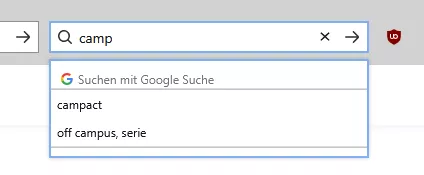
Wie kommt man das eigentlich bei der seperaten Searchbar so hin, dass es auch so Überhangmäßig ausschaut wie bei der Urlbar?
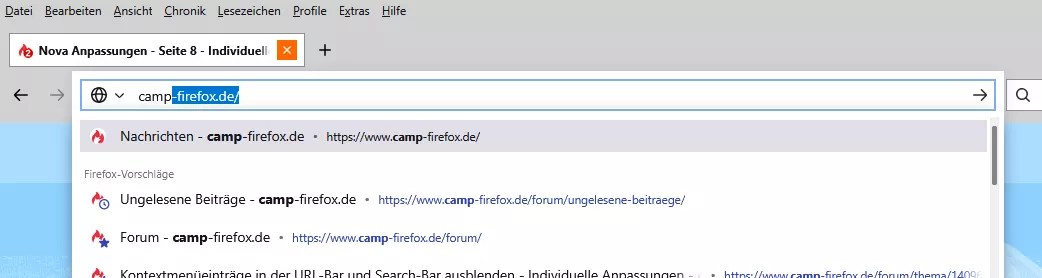
Auch wenn ich den ganzen angepassten Code für die Searchbar entferne, sieht es nicht so aus.
Mit angepassten Code sieht es ja so aus wie zuvor.
-

Wie kommt man das eigentlich bei der seperaten Searchbar so hin, dass es auch so Überhangmäßig ausschaut wie bei der Urlbar?
Auch wenn ich den ganzen angepassten Code für die Searchbar entferne, sieht es nicht so aus.
Mit angepassten Code sieht es ja so aus wie zuvor.
Hat mich auch interessiert, habe festgestellt es ist davon abhängig welches Firefox Theme du gewählst hast, je nach Theme ändert sich dann dort auch die Farbe.
-
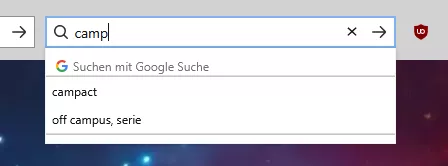
Um die Farbe selbst geht es mir gar nicht, ist Proton installiert und von mir angepasst, sondern um das Aussehen, dieses Ausklappen und das überstehen bei der Urlbar, was bei meiner Searchbar nicht ist, auch nicht wenn ich den ganzen individuellen Code bei mir entferne. Da hängt dann nur das untere mit vorherigen Suchen direkt am Suchfeld, ohne irgendeinen Überhang.
-
Mr. Cutty Mal doch mal ein Bild, wie Du Dir das vorstellst.
Ich könnte Dir jetzt zig Zeilen Code um die Ohren hauen, aber damit wäre Dir auch nicht geholfen
und zum Ziel würde das auch nur über zig Umwege führen.Und am besten für beide Popups. Adressfeld & Suchfeld.
-
-
ohne irgendeinen Überhang.
Was genau meinst du mit Überhang, die Breite

Das Popup ist immer so breit, wie die jeweilige Leiste:

Und wenn du die Breite vom Suchfeld änderst, dann wird das Poup unter der Urlbar schmaler:

Sollte ich dich aber falsch verstanden haben, dann sorry.

Kann man das bitte komplett deaktivieren?
Meinst du das so?
-

ohne irgendeinen Überhang.
Was genau meinst du mit Überhang, die Breite
Das Popup ist immer so breit, wie die jeweilige Leiste:
Darüber, links und rechts sieht man so einen Überhang. Das meine ich damit. Den gibt es bei mir nur bei der Urlbar.

-
Dann hast du entweder browser.search.widget.new auf false gesetzt oder eine andere Anpassung ist Schuld daran. Denn so wie im Screenshot von Andreas ist es Standard.
-
Den gibt es bei mir nur bei der Urlbar.
So sieht das hier mit deinem CSS-Code und Nova aktiviert aus:

-
Das war's, ja.
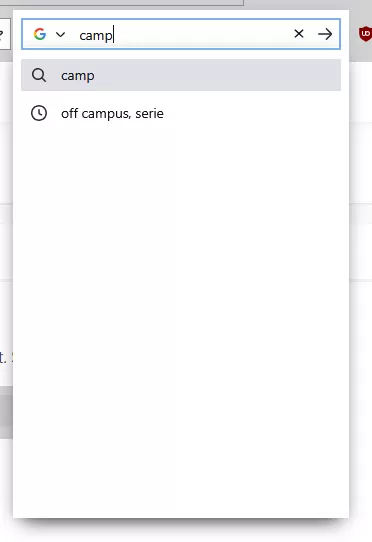
Jetzt muss ich es nur so anpassen, damit es wieder passt. So sieht es nun aus bei mir:
Inaktiv:

Aktiv:
-
Dann hast du entweder browser.search.widget.new auf false gesetzt oder eine andere Anpassung ist Schuld daran. Denn so wie im Screenshot von Andreas ist es Standard.
Mh
Steht bei mir auf true
Habe kein CSS am Laufen!
Und habe diesen weißen Rand nicht, egal welches Theme ich nutze. -