

vielem Dank. Jetzt passt es.
Beiträge von mpt
-
-
und bei mir wie beschrieben 😐️
wenn ich einen neuen Tab öffne, dann blitzt kurz der Hintergrund in weiß auf und wird dann grau.
funkt da was in der userchrome dazwischen?
kann man per user.js darauf Einfluss nehmen? -
ja per user.js
user_pref("browser.startup.page", 0);
user_pref("browser.newtabpage.enabled", false); -


userChrome.css
Der Code gehört wenn dann in die userContent.css

also so?
Edit: Erste Seite bleibt weiterhin weiss, ab dem 2. Tab hat jeder Tab die graue Startseite.🤔
CSS
Alles anzeigen/* Rubrik Empfehlungen und Plugins entfernen */ [data-l10n-id="addon-category-discover-title"], [data-l10n-id="addon-category-plugin-title"] { display: none !important; } /* Mozilla Labs in Einstellungen entfernen */ [data-l10n-id="settings-pane-labs-title"] { display: none !important; } /* Abrunden der Ecken */ :root { --border-radius-xsmall: 1px !important; /* Minimale Rundung für sehr kleine Elemente */ --border-radius-small: 2px !important; /* Kleine Rundung (z.B. für Checkboxen/Buttons) */ --border-radius-medium: 3px !important; /* Mittlere Rundung (z.B. für Popups/Dropdowns) */ --border-radius-large: 4px !important; /* Standard-Rundung (z.B. für die Adressleiste) */ --border-radius-xlarge: 6px !important; /* Maximale Rundung für große Oberflächen-Elemente wie Tabs*/ } /* Farbwahl in den Menüs */ :root { --color-accent-primary: lightsteelblue !important; --button-background-color-primary-hover: lightsteelblue !important; --button-background-color-primary-active: aliceblue !important; --button-background-color-ghost-hover: lightsteelblue !important; --button-background-color-ghost-active:lightsteelblue !important; --button-background-color-hover: #7FB0EF !important; --button-background-color-active: #7FB0EF !important; --button-text-color-ghost-hover: black !important; --button-text-color-ghost-active: aliceblue !important; --button-text-color-primary-hover: black !important; } /* Farbe Startseite */ @-moz-document url("chrome://browser/content/blanktab.html"), url("about:newtab"), url("about:home") { body { background-color: #EAEAED !important; } } -
Hier mein userChrome.css als Datei
CSS
Alles anzeigen#TabsToolbar .titlebar-spacer[type="pre-tabs"], #TabsToolbar .titlebar-spacer[type="post-tabs"] { display: none !important; } .toolbarbutton-1, toolbarbutton, #trust-icon-container, #identity-box { fill: #545454 !important; } #page-action-buttons { color: #545454 !important; } /* Tab-Höhe festlegen */ :root { --tab-min-height: 34px !important; /* Höhe anpassen, original: 44px */ --tab-toolbar-navbar-overlap: 0px !important; /* für Vollbildmodus */ } /* Tab-Breite festlegen */ .tabbrowser-tab:not([pinned]) { flex-grow: 0 !important; min-width: 150px !important; /* Breite anpassen, original: 221*/ } /* Tabs und Suchfeld eckig */ :root { --toolbarbutton-border-radius: 3px !important; } /* Lesezeichenabstand verringern */ menupopup > menuitem, menupopup > menu { padding-block: 3px !important; } :root { --arrowpanel-menuitem-padding: 4px 8px !important; } /* Lautsprechersymbol größer bei Sound */ .tab-icon-overlay[soundplaying] { fill: green !important; transform: scale(1.4, 1.4) !important; } /* Lautsprechersymbol größer bei Stumm */ .tab-icon-overlay[muted] { fill: red !important; transform: scale(1.4, 1.4) !important; } /* Kontextmenü-Einträge entfernen */ #context-openlinkprivate, #frame-sep, #context-inspect, #context-inspect-a11y, #context-viewsource, #context-viewpartialsource-selection { display: none !important; } #ublock0_raymondhill_net-menuitem-_uBlock0-blockElement, #context-media-eme-separator { display: none !important; } #_73a6fe31-595d-460b-a920-fcc0f8843232_-menuitem-_noscript-ctx-menu { display: none !important; } #contentAreaContextMenu menuitem[label="In privatem Fenster suchen"] { display: none !important; } #contentAreaContextMenu menu[label="KeePassXC-Browser"] { display: none !important; } #contentAreaContextMenu menuitem[label="Passwörter verwalten"] { display: none !important; } #context-copy-link-to-highlight { display: none !important; } #context-copy-clean-link-to-highlight { display: none !important; } #context-sep-selectall, #context-sep-screenshots, #frame-sep { display: none !important; } /* Hintergrundfarbe aktueller Tab */ .tab-background[selected] { background-color: #F9F9FB !important; background-image: none !important; } #alltabs-button { display: none !important; } /* Rubrik Empfehlungen in Addons entfernen */ #category-discover { display:none !important; } /* Abstand der Addon-Icons verringern */ :root { --toolbarbutton-outer-padding: 3px !important; --toolbarbutton-inner-padding: 6px !important; } /* Suchmaschinen-Icon in Adressfeld entfernen */ toolbarbutton.searchmode-switcher { display: none !important; } /* Firefox-Icon in Tab anzeigen */ tab.tabbrowser-tab img { display: block !important; } .tab-icon-image { &:not([src]), &:-moz-broken { content: url("chrome://branding/content/icon32.png")!important; } } /* Kein Farbverlauf */ :root:not([theme-image-in-toolbox]) body, :root[theme-image-in-toolbox] #navigator-toolbox { background-image: none !important; } /* Rahmenfarben Adressleiste */ #urlbar > div { border: none !important; } :root { --focus-outline-color: #7FB0EF !important; } /* aktiver Tab ohne Rahmen + mit Hintergrundfarbe */ .tabbrowser-tab:is([visuallyselected], [multiselected]) .tab-background { background: #F9F9FB !important; outline: none !important; border: none !important; } /* Menüleiste */ #toolbar-menubar { background: #F9F9FB !important; } #TabsToolbar { background-color: #F9F9FB !important; } /* Tableiste */ .titlebar-buttonbox-container, #TabsToolbar-customization-target { background: #EAEAED !important; } #PanelUI-menu-button { background-color: #F9F9FB !important; } /* Adressleiste */ #nav-bar-customization-target { background: #F9F9FB !important; } #urlbar > div:focus-within { background-color: white !important; } /* Lesezeichenleiste */ #PersonalToolbar { background: #F9F9FB !important; } /* Abrunden der Ecken */ :root { --border-radius-xsmall: 1px !important; /* Minimale Rundung für sehr kleine Elemente */ --border-radius-small: 2px !important; /* Kleine Rundung (z.B. für Checkboxen/Buttons) */ --border-radius-medium: 3px !important; /* Mittlere Rundung (z.B. für Popups/Dropdowns) */ --border-radius-large: 4px !important; /* Standard-Rundung (z.B. für die Adressleiste) */ --border-radius-xlarge: 6px !important; /* Maximale Rundung für große Oberflächen-Elemente wie Tabs*/ } #urlbar .urlbar-input-container { background-color: #ECECEE !important; color: black !important; } /* Suchbegriffe nicht darunter anzeigen */ .urlbarView-row { &[selected] { background-color: #EAEAED !important; color: black !important; } } .urlbarView-row { &[selected] { display: none !important; } } .urlbarView-row[dynamicType="actions"] > .urlbarView-row-inner, [data-l10n-id="urlbar-result-action-search-w-engine"], .urlbarView-title-separator, [data-l10n-id="urlbar-group-search-suggestions"] { display: none !important; } /* Adressfeld ohne weißen Rand */ #urlbar:not(.megabar) #urlbar-results, #urlbar:not(.megabar) .search-one-offs { display: none !important; } .urlbar-background { .urlbar[popover-open] > & { --urlbar-background-overhang-open:none !important; } } .urlbarView-background { .urlbar > .urlbarView > & { --urlbar-joint-background-overlap: none !important; } } .urlbarView-background { --urlbarView-joint-background-outset-inline: none !important; } /* Farbwahl in den Menüs */ :root { --color-accent-primary: lightsteelblue !important; --button-background-color-primary-hover: lightsteelblue !important; --button-background-color-primary-active: aliceblue !important; --button-background-color-ghost-hover: lightsteelblue !important; --button-background-color-ghost-active:lightsteelblue !important; --button-background-color-hover: #7FB0EF !important; --button-background-color-active: #7FB0EF !important; --button-text-color-ghost-hover: black !important; --button-text-color-ghost-active: aliceblue !important; --button-text-color-primary-hover: black !important; } @-moz-document url("chrome://browser/content/blanktab.html"), url("about:newtab"), url("about:home") { body { background-color: #EAEAED !important; } } -
das klappt leider nicht, muss der Code an einer bestimmten Stelle rein gesetzt werden oder hat die Anordnung der Zeilen im Code eine Rolle?
bei mir stehen die 3 url Angaben (Zeile 1-3)mnicht wie bei dir direkt untereinander. Die Leerzeile 4 ist notwendig?
-
danke, du bist der Hammer!
Noch eine kosmetische Frage: kann man einstellen dass die leere Seite beim Start/neuen Tab anstatt weiss die Farbe #EAEAED?
-
mit deinem Code wurden alle Symbole wieder grau. Aber hinter dem.gtrauwn Hamburger Menü ist ein weisses Viereck. Wie kann ich das an den Hintergrund der restlichen Leiste anpassen?
aber so sah es zuvor aus
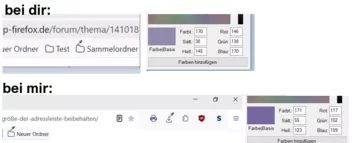
-
ich wusste es lag an mir

Aus irgendwelchem Grund ist
1.) Adressleiste-Rahmenfarbe, Lesezeichenordner, Hamburger Menü, Download Icpn, Erweitungen Puzzle, Drucken Symboll alle lila.
2.) Eingegeben Adresse laden-Pfeil, Lesezeichen setzen-Stern, Lesenasicht und Übersetzung Icon in der Adressleiste alle schwarz
Ich will diese ganzen Icons in dunkelgrau....
Kannst du mir bitte anhand meines Codes helfen? Ich verzweifel gerade.
-
mit welchem Code kann man denn die Symbole (Lesezeichen-Ordner, Download, Erweiterungen, Drucken) von lila in dunkelgrau bekommen?
Und wie färbt man die Symbole in der Adressleiste (Pfeil, Stern, Übersetzung) ein?
Ich habe wohl in meinem userChrome was kaputt gemacht:
CSS
Alles anzeigen#TabsToolbar .titlebar-spacer[type="pre-tabs"], #TabsToolbar .titlebar-spacer[type="post-tabs"] { display: none !important; } /* Tab-Höhe festlegen */ :root { --tab-min-height: 34px !important; /* Höhe anpassen, original: 44px */ --tab-toolbar-navbar-overlap: 0px !important; /* für Vollbildmodus */ } /* Tab-Breite festlegen */ .tabbrowser-tab:not([pinned]) { flex-grow: 0 !important; min-width: 150px !important; /* Breite anpassen, original: 221*/ } /* Tabs und Suchfeld eckig */ :root { --toolbarbutton-border-radius: 3px !important; } /* Lesezeichenabstand verringern */ menupopup > menuitem, menupopup > menu { padding-block: 3px !important; } :root { --arrowpanel-menuitem-padding: 4px 8px !important; } /* Lautsprechersymbol größer bei Sound */ .tab-icon-overlay[soundplaying] { fill: green !important; transform: scale(1.4, 1.4) !important; } /* Lautsprechersymbol größer bei Stumm */ .tab-icon-overlay[muted] { fill: red !important; transform: scale(1.4, 1.4) !important; } /* Kontextmenü-Einträge entfernen */ #context-openlinkprivate, #frame-sep, #context-inspect, #context-inspect-a11y, #context-viewsource, #context-viewpartialsource-selection { display: none !important; } #ublock0_raymondhill_net-menuitem-_uBlock0-blockElement, #context-media-eme-separator { display: none !important; } #_73a6fe31-595d-460b-a920-fcc0f8843232_-menuitem-_noscript-ctx-menu { display: none !important; } #contentAreaContextMenu menuitem[label="In privatem Fenster suchen"] { display: none !important; } #contentAreaContextMenu menu[label="KeePassXC-Browser"] { display: none !important; } #contentAreaContextMenu menuitem[label="Passwörter verwalten"] { display: none !important; } #context-copy-link-to-highlight { display: none !important; } #context-copy-clean-link-to-highlight { display: none !important; } #context-sep-selectall, #context-sep-screenshots, #frame-sep { display: none !important; } /* Hintergrundfarbe aktueller Tab */ .tab-background[selected] { background-color: #F9F9FB !important; background-image: none !important; } #alltabs-button { display: none !important; } /* Rubrik Empfehlungen in Addons entfernen */ #category-discover { display:none !important; } /* Abstand der Addon-Icons verringern */ :root { --toolbarbutton-outer-padding: 3px !important; --toolbarbutton-inner-padding: 6px !important; } /* Suchmaschinen-Icon in Adressfeld entfernen */ toolbarbutton.searchmode-switcher { display: none !important; } /* Firefox-Icon in Tab anzeigen */ tab.tabbrowser-tab img { display: block !important; } .tab-icon-image { &:not([src]), &:-moz-broken { content: url("chrome://branding/content/icon32.png")!important; } } /* Kein Farbverlauf */ :root:not([theme-image-in-toolbox]) body, :root[theme-image-in-toolbox] #navigator-toolbox { background-image: none !important; } /* Rahmenfarben Adressleiste */ #urlbar > div { border: none !important; } :root { --focus-outline-color: #7FB0EF !important; } /* aktiver Tab ohne Rahmen + mit Hintergrundfarbe */ .tabbrowser-tab:is([visuallyselected], [multiselected]) .tab-background { background: #F9F9FB !important; outline: none !important; border: none !important; } /* Menüleiste */ #toolbar-menubar { background: #F9F9FB !important; } #TabsToolbar { background-color: #F9F9FB !important; } /* Tableiste */ .titlebar-buttonbox-container, #TabsToolbar-customization-target { background: #EAEAED !important; } /* Adressleiste */ #nav-bar-customization-target { background: #F9F9FB !important; } #urlbar > div:focus-within { background-color: white !important; } /* Lesezeichenleiste */ #PersonalToolbar { background: #F9F9FB !important; } /* Abrunden der Ecken */ :root { --border-radius-xsmall: 1px !important; /* Minimale Rundung für sehr kleine Elemente */ --border-radius-small: 2px !important; /* Kleine Rundung (z.B. für Checkboxen/Buttons) */ --border-radius-medium: 3px !important; /* Mittlere Rundung (z.B. für Popups/Dropdowns) */ --border-radius-large: 4px !important; /* Standard-Rundung (z.B. für die Adressleiste) */ --border-radius-xlarge: 6px !important; /* Maximale Rundung für große Oberflächen-Elemente wie Tabs*/ } #urlbar .urlbar-input-container { background-color: white !important; color: black !important; } /* Suchbegriffe nicht darunter anzeigen */ .urlbarView-row { &[selected] { background-color: #EAEAED !important; color: black !important; } } .urlbarView-row { &[selected] { display: none !important; } } .urlbarView-row[dynamicType="actions"] > .urlbarView-row-inner, [data-l10n-id="urlbar-result-action-search-w-engine"], .urlbarView-title-separator, [data-l10n-id="urlbar-group-search-suggestions"] { display: none !important; } /* Adressfeld ohne weißen Rand */ #urlbar:not(.megabar) #urlbar-results, #urlbar:not(.megabar) .search-one-offs { display: none !important; } .urlbar-background { .urlbar[popover-open] > & { --urlbar-background-overhang-open:none !important; } } .urlbarView-background { .urlbar > .urlbarView > & { --urlbar-joint-background-overlap: none !important; } } .urlbarView-background { --urlbarView-joint-background-outset-inline: none !important; } /* Farbwahl in den Menüs */ :root { --color-accent-primary: lightsteelblue !important; --button-background-color-primary-hover: lightsteelblue !important; --button-background-color-primary-active: aliceblue !important; --button-background-color-ghost-hover: lightsteelblue !important; --button-background-color-ghost-active:lightsteelblue !important; --button-background-color-hover: #7FB0EF !important; --button-background-color-active: #7FB0EF !important; --button-text-color-ghost-hover: black !important; --button-text-color-ghost-active: aliceblue !important; --button-text-color-primary-hover: black !important; } -
ich habe meinen Beitrag editiert und mein aktuellen Code gepostet. Vielleiicht habe ich was falsch gemacht.
-
leider nein: inaktiv und aktiv ist sie weiss
CSS
Alles anzeigen#TabsToolbar .titlebar-spacer[type="pre-tabs"], #TabsToolbar .titlebar-spacer[type="post-tabs"] { display: none !important; } /* Tab-Höhe festlegen */ :root { --tab-min-height: 34px !important; /* Höhe anpassen, original: 44px */ --tab-toolbar-navbar-overlap: 0px !important; /* für Vollbildmodus */ } /* Tab-Breite festlegen */ .tabbrowser-tab:not([pinned]) { flex-grow: 0 !important; min-width: 150px !important; /* Breite anpassen, original: 221*/ } /* Tabs und Suchfeld eckig */ :root { --toolbarbutton-border-radius: 3px !important; } /* Lesezeichenabstand verringern */ menupopup > menuitem, menupopup > menu { padding-block: 3px !important; } :root { --arrowpanel-menuitem-padding: 4px 8px !important; } /* Lautsprechersymbol größer bei Sound */ .tab-icon-overlay[soundplaying] { fill: green !important; transform: scale(1.4, 1.4) !important; } /* Lautsprechersymbol größer bei Stumm */ .tab-icon-overlay[muted] { fill: red !important; transform: scale(1.4, 1.4) !important; } /* Kontextmenü-Einträge entfernen */ #context-openlinkprivate, #frame-sep, #context-inspect, #context-inspect-a11y, #context-viewsource, #context-viewpartialsource-selection { display: none !important; } #ublock0_raymondhill_net-menuitem-_uBlock0-blockElement, #context-media-eme-separator { display: none !important; } #_73a6fe31-595d-460b-a920-fcc0f8843232_-menuitem-_noscript-ctx-menu { display: none !important; } #contentAreaContextMenu menuitem[label="In privatem Fenster suchen"] { display: none !important; } #contentAreaContextMenu menu[label="KeePassXC-Browser"] { display: none !important; } #contentAreaContextMenu menuitem[label="Passwörter verwalten"] { display: none !important; } #context-copy-link-to-highlight { display: none !important; } #context-copy-clean-link-to-highlight { display: none !important; } #context-sep-selectall, #context-sep-screenshots, #frame-sep { display: none !important; } /* Hintergrundfarbe aktueller Tab */ .tab-background[selected] { background-color: #F9F9FB !important; background-image: none !important; } #alltabs-button { display: none !important; } /* Rubrik Empfehlungen in Addons entfernen */ #category-discover { display:none !important; } /* Abstand der Addon-Icons verringern */ :root { --toolbarbutton-outer-padding: 3px !important; --toolbarbutton-inner-padding: 6px !important; } /* Suchmaschinen-Icon in Adressfeld entfernen */ toolbarbutton.searchmode-switcher { display: none !important; } /* Firefox-Icon in Tab anzeigen */ tab.tabbrowser-tab img { display: block !important; } .tab-icon-image { &:not([src]), &:-moz-broken { content: url("chrome://branding/content/icon32.png")!important; } } /* Kein Farbverlauf */ :root:not([theme-image-in-toolbox]) body, :root[theme-image-in-toolbox] #navigator-toolbox { background-image: none !important; } /* Rahmenfarben Adressleiste */ #urlbar > div { border: none !important; } :root { --focus-outline-color: #7FB0EF !important; } /* aktiver Tab ohne Rahmen + mit Hintergrundfarbe */ .tabbrowser-tab:is([visuallyselected], [multiselected]) .tab-background { background: #F9F9FB !important; outline: none !important; border: none !important; } /* Menüleiste */ #toolbar-menubar { background: #F9F9FB !important; } #TabsToolbar { background-color: #F9F9FB !important; } /* Tableiste */ .titlebar-buttonbox-container, #TabsToolbar-customization-target { background: #EAEAED !important; } /* Adressleiste */ #nav-bar-customization-target { background: #F9F9FB !important; } #urlbar > div:focus-within { background-color: white !important; } /* Lesezeichenleiste */ #PersonalToolbar { background: #F9F9FB !important; } /* Abrunden der Ecken */ :root { --border-radius-xsmall: 1px !important; /* Minimale Rundung für sehr kleine Elemente */ --border-radius-small: 2px !important; /* Kleine Rundung (z.B. für Checkboxen/Buttons) */ --border-radius-medium: 3px !important; /* Mittlere Rundung (z.B. für Popups/Dropdowns) */ --border-radius-large: 4px !important; /* Standard-Rundung (z.B. für die Adressleiste) */ --border-radius-xlarge: 6px !important; /* Maximale Rundung für große Oberflächen-Elemente wie Tabs*/ } #urlbar .urlbar-input-container { background-color: white !important; color: black !important; } /* Suchbegriffe nicht darunter anzeigen */ .urlbarView-row { &[selected] { background-color: #EAEAED !important; color: black !important; } } .urlbarView-row { &[selected] { display: none !important; } } .urlbarView-row[dynamicType="actions"] > .urlbarView-row-inner, [data-l10n-id="urlbar-result-action-search-w-engine"], .urlbarView-title-separator, [data-l10n-id="urlbar-group-search-suggestions"] { display: none !important; } /* Adressfeld ohne weißen Rand */ #urlbar:not(.megabar) #urlbar-results, #urlbar:not(.megabar) .search-one-offs { display: none !important; } .urlbar-background { .urlbar[popover-open] > & { --urlbar-background-overhang-open:none !important; } } .urlbarView-background { .urlbar > .urlbarView > & { --urlbar-joint-background-overlap: none !important; } } .urlbarView-background { --urlbarView-joint-background-outset-inline: none !important; } /* Farbwahl in den Menüs */ :root { --color-accent-primary: lightsteelblue !important; --button-background-color-primary-hover: lightsteelblue !important; --button-background-color-primary-active: aliceblue !important; --button-background-color-ghost-hover: lightsteelblue !important; --button-background-color-ghost-active:lightsteelblue !important; --button-background-color-hover: #7FB0EF !important; --button-background-color-active: #7FB0EF !important; --button-text-color-ghost-hover: black !important; --button-text-color-ghost-active: aliceblue !important; --button-text-color-primary-hover: black !important; } -
Danke. Und wie bekomme ich die Adressleiste bei Nichteingabe wieder grau?
-

Ich war etwas voreilig!
Aber dennoch hast Du mich auf eine Idee gebracht!CSS
Alles anzeigen:root { --color-accent-primary: red !important; --button-background-color-primary-hover: yellow !important; --button-background-color-primary-active: orange !important; --button-background-color-ghost-hover: lime !important; --button-background-color-ghost-active: cyan !important; --button-background-color-hover: DeepSkyBlue !important; --button-background-color-active: cyan !important; --button-text-color-ghost-hover: magenta !important; --button-text-color-ghost-active: cyan !important; }Einer von den "cyan" ist der von mir gesuchte!
hat da eine Zeile auch Auswirkungen auf die Hintergrund Farbe vom Hamburger Menü?
-
ich habe gedacht damit lege ich Farbe bei inaktiver URL Adressleiste fest. Weil ich hätte gern den Effekt:
URL Bar -> keine Eingabe -> #ECECEE
URL Bar -> Eingabe -> white -
ich habe das standard Theme mir dem Code:
CSS
Alles anzeigen#TabsToolbar .titlebar-spacer[type="pre-tabs"], #TabsToolbar .titlebar-spacer[type="post-tabs"] { display: none !important; } /* Tab-Höhe festlegen */ :root { --tab-min-height: 34px !important; /* Höhe anpassen, original: 44px */ --tab-toolbar-navbar-overlap: 0px !important; /* für Vollbildmodus */ } /* Tab-Breite festlegen */ .tabbrowser-tab:not([pinned]) { flex-grow: 0 !important; min-width: 150px !important; /* Breite anpassen, original: 221*/ } /* Tabs und Suchfeld eckig */ :root { --toolbarbutton-border-radius: 3px !important; } /* Lesezeichenabstand verringern */ menupopup > menuitem, menupopup > menu { padding-block: 3px !important; } :root { --arrowpanel-menuitem-padding: 4px 8px !important; } /* Lautsprechersymbol größer bei Sound */ .tab-icon-overlay[soundplaying] { fill: green !important; transform: scale(1.3, 1.3) !important; } /* Lautsprechersymbol größer bei Stumm */ .tab-icon-overlay[muted] { fill: red !important; transform: scale(1.3, 1.3) !important; } /* Kontextmenü-Einträge entfernen */ #context-openlinkprivate, #frame-sep, #context-inspect, #context-inspect-a11y, #context-viewsource, #context-viewpartialsource-selection { display: none !important; } #ublock0_raymondhill_net-menuitem-_uBlock0-blockElement, #context-media-eme-separator { display: none !important; } #_73a6fe31-595d-460b-a920-fcc0f8843232_-menuitem-_noscript-ctx-menu { display: none !important; } #contentAreaContextMenu menuitem[label="In privatem Fenster suchen"] { display: none !important; } #contentAreaContextMenu menu[label="KeePassXC-Browser"] { display: none !important; } #contentAreaContextMenu menuitem[label="Passwörter verwalten"] { display: none !important; } #context-copy-link-to-highlight { display: none !important; } #context-copy-clean-link-to-highlight { display: none !important; } #context-sep-selectall, #context-sep-screenshots, #frame-sep { display: none !important; } /* Hintergrundfarbe aktueller Tab */ .tab-background[selected] { background-color: #F9F9FB !important; background-image: none !important; } #alltabs-button { display: none !important; } /* Rubrik Empfehlungen in Addons entfernen */ #category-discover { display:none !important; } /* Abstand der Addon-Icons verringern */ :root { --toolbarbutton-outer-padding: 3px !important; --toolbarbutton-inner-padding: 6px !important; } /* Suchmaschinen-Icon in Adressfeld entfernen */ toolbarbutton.searchmode-switcher { display: none !important; } /* Firefox-Icon in Tab anzeigen */ tab.tabbrowser-tab img { display: block !important; } .tab-icon-image { &:not([src]), &:-moz-broken { content: url("chrome://branding/content/icon32.png")!important; } } /* Kein Farbverlauf */ :root:not([theme-image-in-toolbox]) body, :root[theme-image-in-toolbox] #navigator-toolbox { background-image: none !important; } /* Rahmenfarben Adressleiste */ #urlbar > div { border: none !important; } /* aktiver Tab ohne Rahmen + mit Hintergrundfarbe */ .tabbrowser-tab:is([visuallyselected], [multiselected]) .tab-background { background: #F9F9FB !important; outline: none !important; border: none !important; } /* Menüleiste */ #toolbar-menubar { background: #F9F9FB !important; } #TabsToolbar { background-color: #F9F9FB !important; } /* Tableiste */ .titlebar-buttonbox-container, #TabsToolbar-customization-target { background: #EAEAED !important; } /* Adressleiste */ #nav-bar-customization-target { background: #F9F9FB !important; } /* Lesezeichenleiste */ #PersonalToolbar { background: #F9F9FB !important; } /* Abrunden der Ecken */ :root { --border-radius-xsmall: 1px !important; /* Minimale Rundung für sehr kleine Elemente */ --border-radius-small: 2px !important; /* Kleine Rundung (z.B. für Checkboxen/Buttons) */ --border-radius-medium: 3px !important; /* Mittlere Rundung (z.B. für Popups/Dropdowns) */ --border-radius-large: 4px !important; /* Standard-Rundung (z.B. für die Adressleiste) */ --border-radius-xlarge: 6px !important; /* Maximale Rundung für große Oberflächen-Elemente wie Tabs*/ } #urlbar .urlbar-input-container { background-color: #ECECEE !important; color: black !important; } .urlbarView-row { &[selected] { background-color: #EAEAED !important; color: black !important; } } #urlbar:not(.megabar) #urlbar-results, #urlbar:not(.megabar) .search-one-offs { display: none !important; } .urlbar-background { .urlbar[popover-open] > & { --urlbar-background-overhang-open:none !important; } } .urlbarView-background { .urlbar > .urlbarView > & { --urlbar-joint-background-overlap: none !important; } } .urlbarView-background { --urlbarView-joint-background-outset-inline: none !important; } -
was ist denn der Code für den Farbhintergrund der Adressleise wenn man dort tippt?
Bei mir ist der Hintergrund momentan bei inaktiven und aktiven Zustand grau. Und ich hätte es gern klassisch, dass das Adressfeld bei Eingabe weiß ist.
Vielen Dank.
-
was ist denn der Code für den Farbhintergrund der Adressleise wenn man rein klickt/tippt?
-
kann man auch dauerhaft (bei Nicht-/Eingabe) den Globus anzeigen lassen anstatt eine Lupe oder das Suchmaschinen Symbol?
-
Genau so!
Vielen Dank!!!