


wer oder was hatte es denn auf false gestellt
Du kannst Fragen stellen . Ich nicht, denn es ist ja in allen meinen Profilen auf false. Wenn du aber so fragst, dann muss ja eine Einstellung im Fox das bewirkt haben. Keine Ahnung!

wer oder was hatte es denn auf false gestellt
Du kannst Fragen stellen. Ich nicht, denn es ist ja in allen meinen Profilen auf false. Wenn du aber so fragst, dann muss ja eine Einstellung im Fox das bewirkt haben. Keine Ahnung!

Wenn du aber so fragst, dann muss ja eine Einstellung im Fox das bewirkt haben.
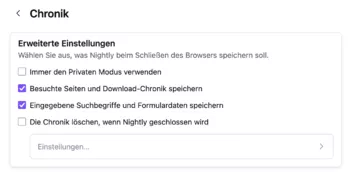
„Eingegebene Suchbegriffe und Formulardaten speichern”
Das war (ist) das Problem.
Ihr immer mit euren Basteleien am Firefox
Ihr immer mit euren Basteleien am Firefox
Echt schlimm manchmal.
Übrigens habe ich jetzt festgestellt, das Script aus #2 funktioniert auch, aber es erstellt in der Searchbar den Button, der dort im Bild angezeigt wird.
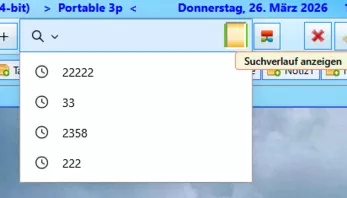
Das Alice ebenfalls die Schreibweise " show_SearchBar_Hist r ory_Dropmarker.uc.js" präferiert, finde ich schon merkwürdig.. Fehler ist fett und mit Leerstellen, da es sonst nicht auffällt.

finde ich schon merkwürdig.
Du meinst, ihm dürfte kein Schreibfehler passieren
Nö, aber mir würde das vermutlich auf meiner Webseite auffallen...
show_SearchBar_Hist r ory_
Dropmarker.uc.js
Dropmarket
Bei dem Script aus #2 habe ich jetzt (wo ich weiß es funktioniert) Anpassungen vorgenommen. Den Button mit in das Script für für Änderungen eingebaut. So sieht es i.M. aus:
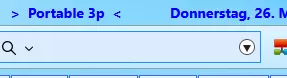
...das Script dazu:
// ==UserScript==
// @name         ShowSearchBarHistoryByClick_FF149.uc.js
// @description  Zeigt den Suchverlauf per Button in der Suchleiste (FF149+)
// @charset      UTF-8
// @include      main
// @version      1.1.0
// ==/UserScript==

(function () {
  "use strict";

  const BTN_ID = "searchbar-history-dropmarker";
  const createButton = true;

  // Prefs
  const noLimitResult = true;
  const timeSeries = true;

  applySearchPrefs();

  if (window.gBrowserInit?.delayedStartupFinished) {
    init();
  } else {
    const obs = {
      observe(subject, topic) {
        if (topic === "browser-delayed-startup-finished" && subject === window) {
          Services.obs.removeObserver(obs, topic);
          init();
        }
      },
    };
    Services.obs.addObserver(obs, "browser-delayed-startup-finished");
  }

  window.addEventListener(
    "aftercustomization",
    () => window.setTimeout(installButton, 0),
    false
  );

  function init() {
    injectArrowCSS(); // <- neu
    installButton();
  }

  function getSearchBar() {
    return document.getElementById("searchbar-new") || document.getElementById("searchbar");
  }

  function getSearchInput(bar) {
    if (!bar) return null;
    return bar?._textbox || bar?.inputField || bar;
  }

  function injectArrowCSS() {
    const STYLE_ID = "searchbar-history-arrow-css";
    if (document.getElementById(STYLE_ID)) return;

    const style = document.createElement("style");
    style.id = STYLE_ID;

    // Pfeil nach unten
    style.textContent = `
      #${BTN_ID}::before {
        content: "";
        position: absolute;
        left: 50%;
        top: 50%;
        transform: translate(-50%, -50%);

        width: 0;
        height: 0;

        border-left: 4px solid transparent;
        border-right: 4px solid transparent;
        border-top: 7px solid #222;

        pointer-events: none;
        z-index: 2;
      }

      #${BTN_ID}:hover::before {
        border-top-color: #000;
      }
    `;

    document.documentElement.appendChild(style);
  }

  function styleButton(btn) {
    btn.style.MozAppearance = "none";
    btn.style.appearance = "none";

    btn.style.width = "16px";
    btn.style.height = "16px";
    btn.style.minWidth = "16px";
    btn.style.minHeight = "16px";

    btn.style.padding = "0";
    btn.style.margin = "6px 4px 0px 0px";
    btn.style.boxSizing = "border-box";

    btn.style.backgroundColor = "white";
    btn.style.border = "1px solid #555";
    btn.style.borderRadius = "50px";

    // Wichtig für ::before
    btn.style.position = "relative";
    btn.style.overflow = "visible";

    btn.style.display = "flex";
    btn.style.alignItems = "center";
    btn.style.justifyContent = "center";

    btn.style.pointerEvents = "auto";
    btn.style.zIndex = "100";
    btn.style.transform = "translateZ(0)";
  }

  function installButton() {
    if (!createButton) return;

    const bar = getSearchBar();
    if (!bar) {
      window.setTimeout(installButton, 300);
      return;
    }

    let btn = document.getElementById(BTN_ID);
    if (!btn) {
      btn = document.createXULElement("toolbarbutton");

      btn.setAttribute("id", BTN_ID);
      btn.setAttribute(
        "class",
        "toolbarbutton-1 chromeclass-toolbar-additional urlbar-page-action"
      );

      // <- entfernt: image/Icon, weil wir den Pfeil per CSS zeichnen
      btn.setAttribute("tooltiptext", "Suchverlauf anzeigen");
      btn.setAttribute("removable", "true");
      btn.setAttribute("cui-areatype", "toolbar");

      styleButton(btn);

      btn.addEventListener(
        "mousedown",
        (ev) => {
          ev.preventDefault();
          ev.stopPropagation();
        },
        true
      );

      btn.addEventListener(
        "click",
        (ev) => {
          ev.preventDefault();
          ev.stopPropagation();
          showHistory();
        },
        false
      );

      btn.style.marginInlineStart = "4px";
      btn.style.order = "9999";
    }

    const legacyGoContainer = bar.querySelector?.(".search-go-container");
    if (legacyGoContainer) {
      if (btn.parentNode !== legacyGoContainer) legacyGoContainer.appendChild(btn);
    } else {
      const goButton = bar.querySelector?.(".urlbar-go-button");
      if (goButton && goButton.parentNode) {
        const parent = goButton.parentNode;
        if (btn.parentNode !== parent) {
          parent.insertBefore(btn, goButton.nextSibling);
        } else if (btn.previousSibling !== goButton) {
          parent.insertBefore(btn, goButton.nextSibling);
        }
      } else if (btn.parentNode !== bar) {
        bar.appendChild(btn);
      }
    }

    if (noLimitResult) {
      const input = getSearchInput(bar);
      if (input?.popup) input.popup.setAttribute("nomaxresults", "true");
    }
  }

  function showHistory() {
    const bar = getSearchBar();
    if (!bar) return;

    const input = getSearchInput(bar);
    if (!input) return;

    if (typeof input.showHistoryPopup === "function") {
      try {
        const old = input.value || "";
        input.value = "";
        input.showHistoryPopup();
        input.value = old;
      } catch (ex) {
        console.error("showHistoryPopup failed:", ex);
      }
      return;
    }

    try {
      const oldValue = input.value || "";
      input.value = "";

      if (typeof input.focus === "function") input.focus();

      const down = new KeyboardEvent("keydown", {
        key: "ArrowDown",
        code: "ArrowDown",
        keyCode: 40,
        which: 40,
        bubbles: true,
        cancelable: true,
      });

      input.dispatchEvent(down);
      input.value = oldValue;
    } catch (ex) {
      console.error("ShowSearchBarHistoryByClick (fallback) error:", ex);
    }
  }

  function applySearchPrefs() {
    if (timeSeries) {
      setPref("browser.formfill.bucketSize", "int", -1);
      setPref("browser.formfill.maxTimeGroupings", "int", -1);
      setPref("browser.formfill.timeGroupingSize", "int", -1);
    } else {
      clearPref("browser.formfill.bucketSize");
      clearPref("browser.formfill.maxTimeGroupings");
      clearPref("browser.formfill.timeGroupingSize");
    }

    if (noLimitResult) {
      setPref("browser.urlbar.recentsearches.maxResults", "int", 9999);
    } else {
      clearPref("browser.urlbar.recentsearches.maxResults");
    }
  }

  function setPref(aPrefString, aPrefType, aValue) {
    try {
      switch (aPrefType) {
        case "int":
          return Services.prefs.setIntPref(aPrefString, parseInt(aValue, 10));
        case "str":
          return Services.prefs.setStringPref(aPrefString, String(aValue));
        case "bool":
        default:
          return Services.prefs.setBoolPref(aPrefString, !!aValue);
      }
    } catch (e) {}
    return null;
  }

  function clearPref(aPrefString) {
    try {
      Services.prefs.clearUserPref(aPrefString);
    } catch (e) {}
  }
})();FuchsFan Das funktioniert bei mir. Vielen Dank.
Aber wie kann man den Zeilenabstand in der Liste verringern und die Anzahl der Einträge erhöhen? Darf ich da auch noch auf Hilfe hoffen?
Offtopic: Die neue Anzeige der Suchergebnisse ist grausig.
Offtopic: Die neue Anzeige der Suchergebnisse ist grausig.
Es ging nur um die Funktionsweise des Skriptes, für das Popup-Menü muss natürlich mit css-Code eine Anpassung vorgenommen werden.
den Zeilenabstand in der Liste verringern
Teste bitte mal:
Teste bitte mal:
Hallo 2002Andreas.
Habe mich mal bedient.
Funktioniert hier besten.
Vielen Dank!
Mfg.
Endor

Funktioniert hier besten.
Freut mich
Leider zeigt der 3-Zeiler bei mir keine Wirkung. Aber gut, ich werde mich daran gewöhnen.
Vielen Dank an alle die mir geholfen haben.
Das wollte hier auch nicht funktionieren, nun habe ich auch mal versucht, und das ist das Ergebnis. Wenn es jetzt bei dir auch laufen sollte, dann kannst du die Farben anpassen, dafür habe ich extra die Klarnamen eingebaut, so leichter zu finden. Das Ganze in die userChrome.css.
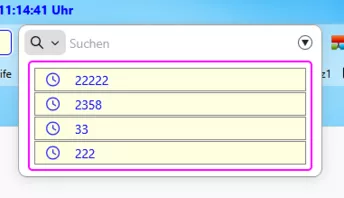
/* ===== Popup Container Searchbar-New ===== */
    #urlbar-results.urlbarView-results{
      border: 2px solid magenta !important;
      border-radius: 5px !important;
	  padding: 5px !important;
	  margin: 0 6px 6px 6px !important;
      box-shadow: none !important;
      overflow: hidden !important;
	}

    /* ===== im Popup die Button (Item) ===== */
    #urlbar-results.urlbarView-results div.urlbarView-row {
      padding: 0 !important;
      min-height: 24px !important;
	  max-height: 24px !important;
	  background-color: lightyellow !important;
	  margin: 1px 0 0 0 !important;
	  border: 1px solid grey !important;
	  border-radius: 0 !important;
	  color: blue !important;
      display: flex !important;
      align-items: center !important;
    }

	#urlbar-results.urlbarView-results div.urlbarView-row:hover {
	  background-color: AliceBlue !important;
      color: brown !important;
} Danke, jetzt passt der Abstand. Die Farbigkeit werde ich etwas zurücknehmen.