

Auch von meiner Seite vielen Dank.
Meins läuft mit der Änderung von hier: RE: BackupProfile.uc.js - div. Fragen dazu
auch wieder einwandfrei.
Mfg.
Endor

BackupProfile.uc.js - div. Fragen dazu
-
2002Andreas -
20. Oktober 2021 um 18:45 -
Erledigt
-
-
Skript ProfileBackup@Fu.uc.js
=============================// wurde mit KI erstellt
Vor Nutzung des Skriptes müssen zwei Ordner für die Sicherungen eingerichtet werden ( Beispiele aus dem Skript ersichtlich ). In den ersten Ordner wird dann der vollständige Profilordner hinein kopiert (kein ZIP), wobei ganz wichtig ist, den richtigen Namen des Profils in das Skript einzutragen (about:profiles aufrufen und Namen entnehmen, z.B. qtqwpmy7.default-release). Bei jedem neuen Backup wird
der Profilordner hier überschrieben. Auch portable können mit entsprechenden Angaben (Pfade) gesichert werden.
Der zweite Ordner gilt als doppelte Sicherung, hier wird auch der Profilordner hinein kopiert, hat als Endung aber eine fortlaufende Nummerierung mit Datum und Uhrzeit (wichtig wenn mehrmals gesichert wird).
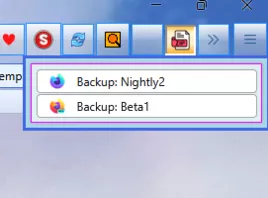
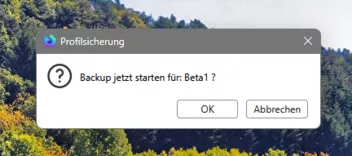
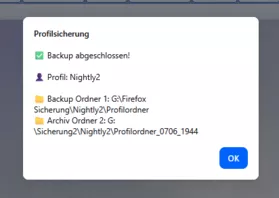
Die Pfade zu diesen Ordnern sind bei jedem Profil in das Skript einzutragen.Das Skript wird über den Button in der Navbar gestartet, es öffnet sich ein Menü (Grafik 1) über das eine Auswahl für ein Backup getroffen werden kann, bei Klick darauf erscheint ein Bestätigungs-Dialog (Grafik 2), der bedient werden muss. Bei OK startet das Backup, bei Erfolg wird dann über Windows eine Benachrichtigung ausgegeben (Grafik 3).
Menü in der Navbar:
Grafik 2:
Grafik 3:
 JavaScript
Alles anzeigen// ==UserScript== // @name ProfileBackup@Fu.uc.js // @description Firefox Profil sichern (Backup + Archiv als Ordner, gesperrte Dateien ignoriert) // @version 2026.07-icons-css-ordner-fixed // ==/UserScript== (function () { "use strict"; if (location.href !== "chrome://browser/content/browser.xhtml") return; if (typeof CustomizableUI === "undefined") return; if (!window.gBrowser) return; // ========================= // Pro Profil konfigurieren // ========================= const PROFILES = [ { label: "Reserve 3", profilePath: "C:\\Users\\Old Man\\AppData\\Roaming\\Mozilla\\Firefox\\Profiles\\Reserve 3", profileName: "Reserve 3", backup1Path: "G:\\Firefox Sicherung\\Reserve 3", archiveRootPath: "G:\\Sicherung2\\Reserve 3", iconPath: "file:///C:/FoxIcons2/Finale.png" }, { label: "Nightly2", profilePath: "G:\\Firefox Test\\Nightly2\\Profilordner", profileName: "Profilordner", backup1Path: "G:\\Firefox Sicherung\\Nightly2", archiveRootPath: "G:\\Sicherung2\\Nightly2", iconPath: "file:///C:/FoxIcons2/Nightly.png" }, { label: "Beta1", profilePath: "G:\\Firefox Test\\Beta1\\Profilordner", profileName: "Profilordner", backup1Path: "G:\\Firefox Sicherung\\Beta1", archiveRootPath: "G:\\Sicherung2\\Beta1", iconPath: "file:///C:/FoxIcons2/Beta.png" } // Weitere Profile hier ergänzen: // { // label: "Stable", // profilePath: "D:\\Firefox\\Stable\\Profilordner", // profileName: "Stable_Profil", // backup1Path: "D:\\Firefox Sicherung\\Stable", // archiveRootPath: "D:\\Sicherung2\\Stable", // iconPath: "file:///C:/FoxIcons2/002.png" // } ]; // ========================= // UI IDs // ========================= const BTN_ID = "profilebackup_menu_button_icons_final"; const POPUP_ID = BTN_ID + "_popup"; // ========================= // Button-Icon // ========================= const btnIconPath = "file:///C:/FoxIcons2/backup.png"; // ========================= // Helpers // ========================= function showAlert(text) { try { let w = null; try { w = Services.wm.getMostRecentWindow("navigator:browser"); } catch (_) {} Services.prompt.alert(w || null, "Profilsicherung", text); } catch (e) { console.error("Alert Fehler:", e); } } function pad(n) { return String(n).padStart(2, "0"); } // ========================= // Backup-Logik // ========================= function getArchiveFolder(root, profileName) { const d = new Date(); const timestamp = pad(d.getMonth() + 1) + pad(d.getDate()) + "_" + pad(d.getHours()) + pad(d.getMinutes()); const archiveTarget = root.clone(); archiveTarget.append(profileName + "_" + timestamp); return archiveTarget; } function copyDirectoryContents(srcDir, destDir) { let entries = srcDir.directoryEntries; while (entries.hasMoreElements()) { let entry = entries.getNext().QueryInterface(Ci.nsIFile); // gesperrte / WAL / shm ignorieren if ( entry.leafName === "parent.lock" || entry.leafName === "lock" || entry.leafName === "recovery.jsonlz4" || entry.leafName.endsWith(".sqlite-wal") || entry.leafName.endsWith(".sqlite-shm") ) { continue; } const newFile = destDir.clone(); newFile.append(entry.leafName); try { if (entry.isDirectory()) { if (!newFile.exists()) newFile.create(Ci.nsIFile.DIRECTORY_TYPE, 0o755); copyDirectoryContents(entry, newFile); } else { entry.copyTo(destDir, entry.leafName); } } catch (e) { console.warn("⚠️ Datei konnte nicht kopiert werden (gesperrt?): " + entry.path, e); } } } function runBackup(profile) { try { const profileDir = new FileUtils.File(profile.profilePath); if (!profileDir.exists()) { throw new Error("Profilordner existiert nicht: " + profile.profilePath); } const backupRoot = new FileUtils.File(profile.backup1Path); if (!backupRoot.exists()) backupRoot.create(Ci.nsIFile.DIRECTORY_TYPE, 0o755); const archiveRoot = new FileUtils.File(profile.archiveRootPath); if (!archiveRoot.exists()) archiveRoot.create(Ci.nsIFile.DIRECTORY_TYPE, 0o755); // BACKUP 1: immer gleicher Zielordner const backupTarget = backupRoot.clone(); backupTarget.append(profile.profileName); if (backupTarget.exists()) backupTarget.remove(true); backupTarget.create(Ci.nsIFile.DIRECTORY_TYPE, 0o755); copyDirectoryContents(profileDir, backupTarget); // BACKUP 2: Zeitstempel-Ordner im Archivroot const archiveTarget = getArchiveFolder(archiveRoot, profile.profileName); archiveTarget.create(Ci.nsIFile.DIRECTORY_TYPE, 0o755); copyDirectoryContents(profileDir, archiveTarget); // Alert nachträglich (robuster) setTimeout(() => { showAlert( "✅ Backup abgeschlossen!\n\n" + "👤 Profil: " + profile.label + "\n\n" + "📁 Backup Ordner 1: " + backupTarget.path + "\n" + "📁 Archiv Ordner 2: " + archiveTarget.path ); }, 50); } catch (e) { console.error("Backup Fehler:", e); setTimeout(() => showAlert("❌ Fehler: " + e.message), 0); } } // ========================= // Menü bauen // ========================= function createMenu(doc) { const menupopup = doc.createXULElement("menupopup"); menupopup.setAttribute("id", POPUP_ID); PROFILES.forEach((profile) => { const menuitem = doc.createXULElement("menuitem"); menuitem.setAttribute("label", "Backup: " + profile.label); menuitem.setAttribute("class", "menuitem-iconic"); if (profile.iconPath) { menuitem.setAttribute("image", profile.iconPath); } menuitem.addEventListener("command", () => { let ok = false; try { ok = Services.prompt.confirm( null, "Profilsicherung", "Backup jetzt starten für: " + profile.label + " ?" ); } catch (_) { ok = true; // Fallback } if (ok) runBackup(profile); }); menupopup.appendChild(menuitem); }); return menupopup; } // ========================= // Button patchen // ========================= function patchButton(btn) { if (!btn) return false; const oldPopup = btn.querySelector("#" + POPUP_ID); if (oldPopup) oldPopup.remove(); btn.setAttribute("type", "menu"); btn.setAttribute("aria-haspopup", "true"); btn.setAttribute("tooltiptext", "Profile auswählen (Backup starten)"); btn.setAttribute("image", btnIconPath); btn.appendChild(createMenu(btn.ownerDocument)); btn.addEventListener("click", (ev) => { if (ev.button !== 0) return; try { const p = btn.querySelector("#" + POPUP_ID); if (p) p.openPopup(btn, "after_start", 0, 0, false, false); } catch (_) {} }, false); return true; } // ========================= // Alte Instanz entfernen + Widget erstellen // ========================= try { if (CustomizableUI.getWidget && CustomizableUI.getWidget(BTN_ID)) { try { CustomizableUI.destroyWidget(BTN_ID); } catch (_) {} } } catch (_) {} try { const el = document.getElementById(BTN_ID); if (el) el.remove(); } catch (_) {} CustomizableUI.createWidget({ id: BTN_ID, defaultArea: CustomizableUI.AREA_NAVBAR, label: "Profilsicherung", tooltiptext: "Profile auswählen (Backup starten)", onCreated: (button) => setTimeout(() => patchButton(button), 0) }); // ========================= // CSS Styles (Button & Popup) // ========================= const css = ` #${BTN_ID} .toolbarbutton-icon { width: 31px !important; height: 31px !important; padding: 5px !important; } #${POPUP_ID} { max-width: 250px !important; min-width: 250px !important; } #${POPUP_ID} menuitem.menuitem-iconic img.menu-icon { margin-left: -28px !important; } #${POPUP_ID} menuitem.menuitem-iconic label.menu-text { margin-left: 6px !important; } `; const sss = Cc["@mozilla.org/content/style-sheet-service;1"].getService(Ci.nsIStyleSheetService); const ios = Cc["@mozilla.org/network/io-service;1"].getService(Ci.nsIIOService); const uri = ios.newURI("data:text/css;charset=utf-8," + encodeURIComponent(css), null, null); sss.loadAndRegisterSheet(uri, sss.USER_SHEET); })(); -

Skript ProfileBackup@Fu.uc.js
Fehler in der Konsole, Schaltfläche wird nicht angezeigt, funktioniert nicht, v152, v153beta9

-

Fehler in der Konsole
Dann nenne den Fehler doch bitte auch.
-
Fehler in der Konsole, Schaltfläche wird nicht angezeigt, funktioniert nicht, v152, v153beta9
Das kann durchaus richtig sein, denn ich habe es nur in der 154 aufgebaut und getestet. Sorry , das werde ich nacharbeiten, stelle es dann hier wieder rein.
-
Script in #362 getauscht, Button wird nun auch in Version 152 und 153 gezeigt.
-
Wer dann doch lieber ein ZIP-Archiv im zweiten Sicherungsordner haben möchte, der kann dann dafür dieses Script nutzen. Ansonsten hat sich gegenüber dem Script aus #362 nichts geändert.
// wurde mit KI erstellt
JavaScript
Alles anzeigen// ==UserScript== // @name ProfileBackup@Fu_ZIP.uc.js // @description Firefox Profil sichern: Backup (Ordner) + Archiv (ZIP pro Tag/01..), gesperrte Dateien ignoriert // @version 2026.07-zip-nsizipwriter // ==/UserScript== (function () { "use strict"; if (location.href !== "chrome://browser/content/browser.xhtml") return; if (typeof CustomizableUI === "undefined") return; if (!window.gBrowser) return; // ========================= // Pro Profil konfigurieren // ========================= const PROFILES = [ { label: "Reserve 3", profilePath: "C:\\Users\\Old Man\\AppData\\Roaming\\Mozilla\\Firefox\\Profiles\\Reserve 3", profileName: "Reserve 3", backup1Path: "G:\\Firefox Sicherung\\Reserve 3", archiveRootPath: "G:\\Sicherung2\\Reserve 3", iconPath: "file:///C:/FoxIcons2/Finale.png" }, { label: "Nightly2", profilePath: "G:\\Firefox Test\\Nightly2\\Profilordner", profileName: "Profilordner", backup1Path: "G:\\Firefox Sicherung\\Nightly2", archiveRootPath: "G:\\Sicherung2\\Nightly2", iconPath: "file:///C:/FoxIcons2/Nightly.png" }, { label: "Beta1", profilePath: "G:\\Firefox Test\\Beta1\\Profilordner", profileName: "Profilordner", backup1Path: "G:\\Firefox Sicherung\\Beta1", archiveRootPath: "G:\\Sicherung2\\Beta1", iconPath: "file:///C:/FoxIcons2/Beta.png" } ]; // ========================= // UI IDs // ========================= const BTN_ID = "profilebackup_menu_button_icons_final"; const POPUP_ID = BTN_ID + "_popup"; // ========================= // Button-Icon // ========================= const btnIconPath = "file:///C:/FoxIcons2/backup.png"; // ========================= // UI Helpers // ========================= function showAlert(text) { try { let w = null; try { w = Services.wm.getMostRecentWindow("navigator:browser"); } catch (_) {} Services.prompt.alert(w || null, "Profilsicherung", text); } catch (e) { console.error("Alert Fehler:", e); } } function pad2(n) { return String(n).padStart(2, "0"); } function getDateStrYYYYMMDD(d) { return d.getFullYear() + "-" + pad2(d.getMonth() + 1) + "-" + pad2(d.getDate()); } function escapeRegExp(s) { return String(s).replace(/[.*+?^${}()|[\]\\]/g, "\\$&"); } // ========================= // gesperrte Dateien + WAL/SHM ignorieren // ========================= function shouldSkipEntry(entry) { const name = entry.leafName; if (name === "parent.lock") return true; if (name === "lock") return true; if (name === "recovery.jsonlz4") return true; if (name.endsWith(".sqlite-wal")) return true; if (name.endsWith(".sqlite-shm")) return true; return false; } // ========================= // Backup 1: Ordnerkopie (wie bisher) // ========================= function copyDirectoryContents(srcDir, destDir) { let entries = srcDir.directoryEntries; while (entries.hasMoreElements()) { let entry = entries.getNext().QueryInterface(Ci.nsIFile); if (shouldSkipEntry(entry)) continue; const newFile = destDir.clone(); newFile.append(entry.leafName); try { if (entry.isDirectory()) { if (!newFile.exists()) newFile.create(Ci.nsIFile.DIRECTORY_TYPE, 0o755); copyDirectoryContents(entry, newFile); } else { entry.copyTo(destDir, entry.leafName); } } catch (e) { console.warn("⚠️ Datei konnte nicht kopiert werden (gesperrt?): " + entry.path, e); } } } // ========================= // ZIP-Name-Zähler pro Tag (01..) // ========================= function getNextDailyZipIndex(archiveRootFile, profileName, dateStr) { let max = 0; const re = new RegExp( "^" + escapeRegExp(profileName) + "_" + escapeRegExp(dateStr) + "_(\\d{2})\\.zip$" ); let entries = archiveRootFile.directoryEntries; while (entries.hasMoreElements()) { let entry = entries.getNext().QueryInterface(Ci.nsIFile); if (!entry.isFile()) continue; const m = re.exec(entry.leafName); if (m) { const n = parseInt(m[1], 10); if (!isNaN(n) && n > max) max = n; } } return max + 1; } // ========================= // ZIP-Erstellung mit nsIZipWriter // Packt den Inhalt des Profilordners relativ ein (ohne zusätzlichen Root-Ordner) // ========================= function zipProfileFolder(profileDir, zipFile, baseDirPathForRel) { // Basis: Wir brauchen relativ zu baseDirPathForRel // baseDirPathForRel = profileDir.path const zipWriter = Cc["@mozilla.org/zipwriter;1"].createInstance(Ci.nsIZipWriter); const PR_WRONLY = 0x02; const PR_CREATE_FILE = 0x08; const PR_TRUNCATE = 0x20; if (zipFile.exists()) { zipFile.remove(true); } zipWriter.open(zipFile, PR_WRONLY | PR_CREATE_FILE | PR_TRUNCATE); // Rekursiv: Dateien hinzufügen function addRecursive(currentDir) { let entries = currentDir.directoryEntries; while (entries.hasMoreElements()) { let entry = entries.getNext().QueryInterface(Ci.nsIFile); if (shouldSkipEntry(entry)) continue; if (entry.path === zipFile.path) continue; if (entry.isDirectory()) { addRecursive(entry); } else { // Relativer Pfad im ZIP let rel = entry.path.replace(baseDirPathForRel, ""); rel = rel.replace(/^([\\\/])/, ""); // führenden Slash entfernen // ZIP verlangt forward slashes rel = rel.replace(/\\/g, "/"); try { zipWriter.addEntryFile( rel, Ci.nsIZipWriter.COMPRESSION_FASTEST, entry, false ); } catch (e) { // gesperrt → ignorieren (wie im Vorlage-Script) } } } } addRecursive(profileDir); zipWriter.close(); } // ========================= // runBackup // ========================= function runBackup(profile) { let backupTarget = null; let archiveRootFile = null; try { const now = new Date(); const profileDir = new FileUtils.File(profile.profilePath); if (!profileDir.exists()) throw new Error("Profilordner existiert nicht: " + profile.profilePath); const backupRoot = new FileUtils.File(profile.backup1Path); if (!backupRoot.exists()) backupRoot.create(Ci.nsIFile.DIRECTORY_TYPE, 0o755); archiveRootFile = new FileUtils.File(profile.archiveRootPath); if (!archiveRootFile.exists()) archiveRootFile.create(Ci.nsIFile.DIRECTORY_TYPE, 0o755); // ------------------------- // BACKUP 1 (Ordner) // ------------------------- backupTarget = backupRoot.clone(); backupTarget.append(profile.profileName); if (backupTarget.exists()) backupTarget.remove(true); backupTarget.create(Ci.nsIFile.DIRECTORY_TYPE, 0o755); copyDirectoryContents(profileDir, backupTarget); // ------------------------- // BACKUP 2 (ZIP, täglich + 01..) // ------------------------- const dateStr = getDateStrYYYYMMDD(now); const nextIdx = getNextDailyZipIndex(archiveRootFile, profile.profileName, dateStr); const idxStr = pad2(nextIdx); const zipFileName = profile.profileName + "_" + dateStr + "_" + idxStr + ".zip"; const zipFile = archiveRootFile.clone(); zipFile.append(zipFileName); zipProfileFolder(profileDir, zipFile, profileDir.path); if (!zipFile.exists()) { throw new Error("ZIP wurde nicht erstellt: " + zipFile.path); } setTimeout(() => { showAlert( "✅ Backup abgeschlossen!\n\n" + "👤 Profil: " + profile.label + "\n\n" + "📁 Backup Ordner 1: " + backupTarget.path + "\n" + "📦 Archiv ZIP: " + zipFile.path ); }, 50); } catch (e) { console.error("Backup Fehler:", e); try { // optional: staging o.ä. gäbe es hier nicht; also best-effort cleanup nicht nötig } catch (_) {} setTimeout(() => showAlert("❌ Fehler: " + e.message), 0); } } // ========================= // Menü erstellen // ========================= function createMenu(doc) { const menupopup = doc.createXULElement("menupopup"); menupopup.setAttribute("id", POPUP_ID); PROFILES.forEach((profile) => { const menuitem = doc.createXULElement("menuitem"); menuitem.setAttribute("label", "Backup: " + profile.label); menuitem.setAttribute("class", "menuitem-iconic"); if (profile.iconPath) { menuitem.setAttribute("image", profile.iconPath); } menuitem.addEventListener("command", () => { let ok = false; try { ok = Services.prompt.confirm( null, "Profilsicherung", "Backup jetzt starten für: " + profile.label + " ?" ); } catch (_) { ok = true; // Fallback } if (ok) runBackup(profile); }); menupopup.appendChild(menuitem); }); return menupopup; } // ========================= // Button patchen (öffnet Popup) // ========================= function patchButton(btn) { if (!btn) return false; const oldPopup = btn.querySelector("#" + POPUP_ID); if (oldPopup) oldPopup.remove(); btn.setAttribute("type", "menu"); btn.setAttribute("aria-haspopup", "true"); btn.setAttribute("tooltiptext", "Profile auswählen (Backup starten)"); btn.setAttribute("image", btnIconPath); btn.appendChild(createMenu(btn.ownerDocument)); btn.addEventListener("click", (ev) => { if (ev.button !== 0) return; try { const p = btn.querySelector("#" + POPUP_ID); if (p) p.openPopup(btn, "after_start", 0, 0, false, false); } catch (_) {} }, false); return true; } // ========================= // Alte Instanz entfernen + Widget erstellen // ========================= try { if (CustomizableUI.getWidget && CustomizableUI.getWidget(BTN_ID)) { try { CustomizableUI.destroyWidget(BTN_ID); } catch (_) {} } } catch (_) {} try { const el = document.getElementById(BTN_ID); if (el) el.remove(); } catch (_) {} CustomizableUI.createWidget({ id: BTN_ID, defaultArea: CustomizableUI.AREA_NAVBAR, label: "Profilsicherung", tooltiptext: "Profile auswählen (Backup starten)", onCreated: (button) => setTimeout(() => patchButton(button), 0) }); // ========================= // CSS Styles (Button & Popup) – wie bei dir // ========================= const css = ` #${BTN_ID} .toolbarbutton-icon { width: 31px !important; height: 31px !important; padding: 5px !important; } #${POPUP_ID} { max-width: 250px !important; min-width: 250px !important; } #${POPUP_ID} menuitem.menuitem-iconic img.menu-icon { margin-left: -28px !important; } #${POPUP_ID} menuitem.menuitem-iconic label.menu-text { margin-left: 6px !important; } `; const sss = Cc["@mozilla.org/content/style-sheet-service;1"].getService(Ci.nsIStyleSheetService); const ios = Cc["@mozilla.org/network/io-service;1"].getService(Ci.nsIIOService); const uri = ios.newURI("data:text/css;charset=utf-8," + encodeURIComponent(css), null, null); sss.loadAndRegisterSheet(uri, sss.USER_SHEET); })(); -
Wer dann doch lieber ein ZIP-Archiv im zweiten Sicherungsordner haben möchte,
Jetzt ist alles in Ordnung. Danke

-
Hallo FuchsFan.
Habe Dein Scripte getestet. Prima Sache. Beide sind gut.
Aber wenn die Profilbezeichnung ein Leerzeichen enthält funktioniert es nicht.
zbs. Firefox 152 dann kommt nur die Meldung :❌ Fehler: Profilordner existiert nicht: C:\Users\xxxx\AppData\Roaming\Mozilla\Firefox\Profiles\Firefox 152
Lässt sich das eventuell noch beheben?
Mfg.
Endor -

Aber wenn die Profilbezeichnung ein Leerzeichen enthält funktioniert es nicht.
zbs. Firefox 152 dann kommt nur die Meldung :In meinem Script habe ich z.B das stehen: profilePath: "C:\\Users\\Old Man\\AppData\\Roaming\\Mozilla\\Firefox\\Profiles\\Reserve 3",
Name lautet "Reserve 3", und hat ein Leerzeichen, funktioniert aber ohne Fehler. Ich werde aber trotzdem noch mit anderen testen, melde mich wieder.
Edit:
Und auch hiermit profilePath: "C:\\Users\\Old Man\\AppData\\Roaming\\Mozilla\\Firefox\\Profiles\\ooaxewl1.Reserve-Profil 2", keine Probleme, weder mit Script aus #362 noch aus #367. Es sind im Pfad ja insgesamt 2 Leerzeichen enthalten, deswegen ja zwingend vorgeschrieben die Anführungszeichen. Heißt der Profilordner bei dir wirklich "Firefox 152"?
Eventuell hat ja noch jemand getestet, dann bitte kommentieren.
-
Und auch hiermit profilePath: "C:\\Users\\Old Man\\AppData\\Roaming\\Mozilla\\Firefox\\Profiles\\ooaxewl1.Reserve-Profil 2",
Das war die Lösung. Habe meinen Profilpfad nun auch ganz angegeben und damit geht es.
Eine Frage noch: Im ersten Backup Ordner erstellt das Script keine Zip Datei, kopiert nur
die Dateien rein.
Im zweiten Backup Ordner wird eine Zip Datei erstellt. Ist das so gewollt?
Vielen Dank.
Mfg.
Endor -
Eine Frage noch: Im ersten Backup Ordner erstellt das Script keine Zip Datei, kopiert nur
die Dateien rein.
Im zweiten Backup Ordner wird eine Zip Datei erstellt. Ist das so gewollt?So funktioniert das. Die Daten im ersten Ordner werden bei jeder Sicherung überschrieben, während sich die Archive im zweiten Ordner ansammeln.
-
Danke lenny2.
Mfg.
Endor -
Das war die Lösung. Habe meinen Profilpfad nun auch ganz angegeben und damit geht es.
Alles wird gut.

Im ersten Backup Ordner erstellt das Script keine Zip Datei, kopiert nur
die Dateien rein.Ja, Endor, das ist so gewollt, und zwar aus folgendem Grund. Schon lange nutze ich PowerShell-Scripte, um ein erstelltes Backup, um schnell wieder den Profilordner zurück zu bringen. Und da muss der Ordner genau so zur Verfügung stehen, wie er im System vorhanden ist. Ich gebe dir mal ein Beispiel aus dem Skript aus #362 für das Profil Reserve 3 profilePath: "C:\\Users\\Old Man\\AppData\\Roaming\\Mozilla\\Firefox\\Profiles\\Reserve 3",, dafür würde das ps1-Script dann so aussehen:
Code
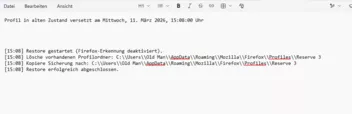
Alles anzeigen# Reserve 3 Retour.ps1 # ========================= # Einstellungen (Restore) # ========================= # 1. Ziel-Profilordner (wird überschrieben) $ProfilePath = "C:\\Users\\Old Man\\AppData\\Roaming\\Mozilla\\Firefox\\Profiles\\Reserve 3" # 2. Quelle: gesicherter Profilordner $BackupProfile = "G:\\Firefox Sicherung\\Reserve 3\\Reserve 3" # 3. Pfad für Log-Datei $LogPfad = "G:\\Firefox Sicherung\\Reserve 3" # ============================= # Ab hier besser nichts ändern # ============================= Add-Type -AssemblyName System.Windows.Forms function Show-Info { param([string]$Msg) Write-Host ("{0} - {1}" -f (Get-Date -Format 'yyyy-MM-dd HH:mm:ss'), $Msg) } # Feste Log-Datei für Restore $LogFile = Join-Path $LogPfad "Retour.txt" # Alte Log-Datei löschen, falls vorhanden if (Test-Path -Path $LogFile) { Remove-Item -Path $LogFile -Force } Start-Sleep -Seconds 1 # neue Log-Datei anlegen $LogFile = (New-Item $LogFile -ItemType File -Force).FullName # Überschrift für das LogFile Add-Content $LogFile ("Profil in alten Zustand versetzt am {0} Uhr`n" -f (Get-Date -Format "dddd, dd. MMMM yyyy, HH:mm:ss")) Add-Content $LogFile "`n`n" function Write-Log { param([string]$Text) Add-Content -Path $LogFile -Value ("[{0}] {1}" -f (Get-Date -Format "HH:mm"), $Text) } Show-Info "Starte Restore des Firefox-Profils (Firefox-Erkennung deaktiviert)." Write-Log "Restore gestartet (Firefox-Erkennung deaktiviert)." # ========================= # Restore-Teil # ========================= # prüfen, ob Sicherungsprofil existiert if (-not (Test-Path -LiteralPath $BackupProfile)) { Show-Info "Sicherungsprofil nicht gefunden: $BackupProfile" Write-Log "FEHLER: Sicherungsprofil nicht gefunden: $BackupProfile" [System.Windows.Forms.MessageBox]::Show( "Sicherungsprofil wurde nicht gefunden:`n$BackupProfile", "Firefox-Restore", [System.Windows.Forms.MessageBoxButtons]::OK, [System.Windows.Forms.MessageBoxIcon]::Error ) | Out-Null exit 1 } # vorhandenes Ziel-Profil löschen if (Test-Path -LiteralPath $ProfilePath) { Show-Info "Lösche vorhandenen Profilordner: $ProfilePath" Write-Log "Lösche vorhandenen Profilordner: $ProfilePath" Remove-Item -LiteralPath $ProfilePath -Recurse -Force Start-Sleep -Seconds 2 } else { Show-Info "Zielprofil existiert noch nicht – nichts zu löschen." Write-Log "Hinweis: Zielprofil existiert noch nicht – nichts zu löschen." } # Sicherungsprofil zurückkopieren Show-Info "Kopiere Sicherung nach: $ProfilePath" Write-Log "Kopiere Sicherung nach: $ProfilePath" Copy-Item -LiteralPath $BackupProfile -Destination $ProfilePath -Recurse -Force # Erfolgsmeldung Show-Info "Restore erfolgreich abgeschlossen." Write-Log "Restore erfolgreich abgeschlossen." [System.Windows.Forms.MessageBox]::Show( "Firefox-Profil erfolgreich zurückgespielt.`n`nZielprofil: $ProfilePath`nLog: $LogFile`n`n⚠️ Hinweis: Firefox-Erkennung deaktiviert - manuell schließen!", "Firefox-Restore", [System.Windows.Forms.MessageBoxButtons]::OK, [System.Windows.Forms.MessageBoxIcon]::Information ) | Out-NullDiese ps1-Datei kann von überall aus gestartet werden. Oberstes Gebot ist, der Firefox muss beendet sein ( sollte besser auch bei der Sicherung sein). Wenn das Backup dann wieder zurück übertragen wurde wird eine Log-Datei geschrieben ( Ordner muss angegeben werden, wo sie abgelegt werden soll), die das zum Inhalt hat.
-
Skript: ProfileBackupRestore@Fu_combo_zip2.uc.js (mit KI erstellt)
=====================================================================Vorab ein wichtiger Hinweis, und zugleich als Empfehlung, das Script nur in dem Profil einzusetzen (starten), welches nicht selbst für ein Backup oder ein Restore vorgesehen ist. Der Grund ist der, dass für Restore der Firefox zwingend beendet sein muss, und für ein Backup es auch von Vorteil ist, um Komplikationen zu vermeiden.
==============================================================
Edit:
Ich bin immer von der Logik ausgegangen, dass es so sein muss, wegen Datenverlust, usw. Jetzt habe ich bei installierten, als auch bei portablen Profilen im laufenden Betrieb Backup getestet, läuft ohne Fehler durch. Und genau so verhält es sich bei Restore, nur einen Restart danach und alles läuft fehlerfrei.
==============================================================
Dieses Script ist eine Kombination für Backup und Restore (Profilordner zurück spielen). Vorteil hierbei ist, es werden für jedes Profil nur einmal die Pfade benötigt, die sorgfältig eingetragen werden sollten.
Vor Nutzung des Skriptes müssen zwei Ordner für die Sicherungen eingerichtet werden ( Beispiele aus dem Skript ersichtlich ). In den ersten Ordner wird dann der vollständige Profilordner hinein kopiert (kein ZIP), wobei ganz wichtig ist, den richtigen Namen des Profils in das Skript einzutragen (about:profiles aufrufen und Namen entnehmen, z.B. qtqwpmy7.default-release). Bei jedem neuen Backup wird
der Profilordner hier überschrieben. Auch portable können mit entsprechenden Angaben (Pfade) gesichert werden.
Der zweite Ordner gilt als doppelte Sicherung, hier wird auch der Profilordner hinein kopiert (als ZIP-Archiv), hat als Endung aber eine fortlaufende Nummerierung mit Datum und Zähler (wichtig wenn mehrmals gesichert wird).
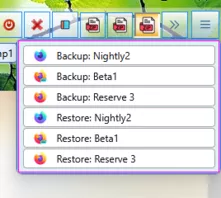
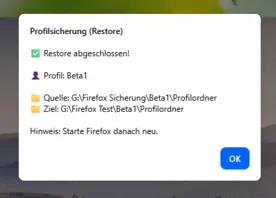
Die Pfade zu diesen Ordnern sind bei jedem Profil in das Skript einzutragen.Das Skript wird über den Button in der Navbar gestartet, es öffnet sich ein Menü (Grafik 1) über das eine Auswahl für Backup oder Restore getroffen werden kann, bei Klick darauf erscheint ein Bestätigungs-Dialog (Grafik 2), der bedient werden muss. Bei OK startet das Backup oder der Restore-Vorgang, bei Erfolg wird dann über Windows eine Benachrichtigung ausgegeben (Grafik 3). Außerdem wird eine Log-Datei im Sicherungsordner 1 angelegt, die bei jeder Aktion fortgeschrieben wird (Grafik 4).
...das Menü:
Grafik 2: 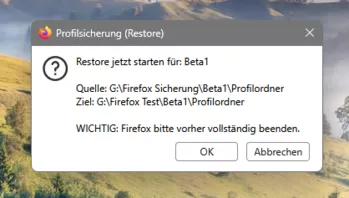
Grafik 3:
Grafik 4: 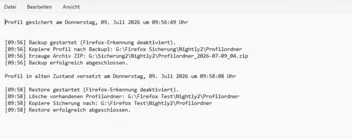 JavaScript
Alles anzeigen// ==UserScript== // @name ProfileBackupRestore@Fu_combo_zip2.uc.js // @description Navbar: Backup (Backup1 Ordner + Archiv ZIP) + Restore aus Backup1 (überschreibt Profil) + Log in Backup1 // @version 2026.07-combo-zip2 // ==/UserScript== (function () { "use strict"; if (location.href !== "chrome://browser/content/browser.xhtml") return; if (typeof CustomizableUI === "undefined") return; if (!window.gBrowser) return; // ========================= // Pro Profil konfigurieren // ========================= const PROFILES = [ { label: "Nightly2", profilePath: "G:\\Firefox Test\\Nightly2\\Profilordner", profileName: "Profilordner", backup1Path: "G:\\Firefox Sicherung\\Nightly2", archiveRootPath: "G:\\Sicherung2\\Nightly2", iconPath: "file:///C:/FoxIcons2/Nightly.png" }, { label: "Beta1", profilePath: "G:\\Firefox Test\\Beta1\\Profilordner", profileName: "Profilordner", backup1Path: "G:\\Firefox Sicherung\\Beta1", archiveRootPath: "G:\\Sicherung2\\Beta1", iconPath: "file:///C:/FoxIcons2/Beta.png" }, { label: "Reserve 3", profilePath: "C:\\Users\\Old Man\\AppData\\Roaming\\Mozilla\\Firefox\\Profiles\\Reserve 3", profileName: "Reserve 3", backup1Path: "G:\\Firefox Sicherung\\Reserve 3", archiveRootPath: "G:\\Sicherung2\\Reserve 3", iconPath: "file:///C:/FoxIcons2/Finale.png" } ]; // ========================= // UI IDs // ========================= const BTN_ID = "profilebackup_restore_combo_button_fixed_zip2_noroot_withlog"; const POPUP_ID = BTN_ID + "_popup"; const btnIconPath = "file:///C:/FoxIcons2/backup.png"; // ========================= // Helpers: Logging // ========================= function pad2(n) { return String(n).padStart(2, "0"); } function timeHHMM(d) { return "[" + pad2(d.getHours()) + ":" + pad2(d.getMinutes()) + "]"; } function formatHeaderDateGermanLong(d) { // Ziel: "am Mittwoch, 08. Juli 2026, 09:26:01 Uhr" try { return "am " + d.toLocaleString("de-DE", { weekday: "long", year: "numeric", month: "long", day: "2-digit", hour: "2-digit", minute: "2-digit", second: "2-digit" }) + " Uhr"; } catch (_) { // Fallback, falls toLocaleString Optionen nicht sauber unterstützt werden const weekdays = ["Sonntag", "Montag", "Dienstag", "Mittwoch", "Donnerstag", "Freitag", "Samstag"]; const wd = weekdays[d.getDay()] || ""; const day = pad2(d.getDate()); const monthNames = ["Januar","Februar","März","April","Mai","Juni","Juli","August","September","Oktober","November","Dezember"]; const mn = monthNames[d.getMonth()] || ""; return "am " + wd + ", " + day + ". " + mn + " " + d.getFullYear() + ", " + pad2(d.getHours()) + ":" + pad2(d.getMinutes()) + ":" + pad2(d.getSeconds()) + " Uhr"; } } function getLogFile(profile) { // Log-Datei im Ordner 1 (backup1Path) let f = new FileUtils.File(profile.backup1Path); f.append("ProfileBackupRestore.log"); return f; } function ensureLogFileExists(file) { if (!file.exists()) { // parent muss existieren; backup1Path sollte existieren file.create(Ci.nsIFile.NORMAL_FILE_TYPE, 0o644); } } function appendTextToFile(file, text) { ensureLogFileExists(file); const fos = Cc["@mozilla.org/network/file-output-stream;1"].createInstance(Ci.nsIFileOutputStream); // write (0x02) | create (0x08) | append (0x10) fos.init(file, 0x02 | 0x08 | 0x10, 0o644, 0); const conv = Cc["@mozilla.org/intl/converter-output-stream;1"].createInstance(Ci.nsIConverterOutputStream); conv.init(fos, "UTF-8", 0, 0); conv.writeString(text); conv.close(); try { fos.close(); } catch (_) {} } function logBackup(profile, zipPath) { const d = new Date(); const logFile = getLogFile(profile); const header = "Profil gesichert " + formatHeaderDateGermanLong(d) + "\n\n"; const lines = [ timeHHMM(d) + " Backup gestartet (Firefox-Erkennung deaktiviert).\n", timeHHMM(d) + " Kopiere Profil nach Backup1: " + profile.backup1Path + "\\" + profile.profileName + "\n", timeHHMM(d) + " Erzeuge Archiv ZIP: " + (zipPath || "(unbekannt)") + "\n", timeHHMM(new Date()) + " Backup erfolgreich abgeschlossen.\n" ].join(""); appendTextToFile(logFile, header + "\n" + lines + "\n"); } function logRestore(profile, sourceDirPath, destDirPath) { const d = new Date(); const logFile = getLogFile(profile); const header = "Profil in alten Zustand versetzt " + formatHeaderDateGermanLong(d) + "\n\n"; const lines = [ timeHHMM(d) + " Restore gestartet (Firefox-Erkennung deaktiviert).\n", timeHHMM(d) + " Lösche vorhandenen Profilordner: " + destDirPath + "\n", timeHHMM(d) + " Kopiere Sicherung nach: " + destDirPath + "\n", timeHHMM(new Date()) + " Restore erfolgreich abgeschlossen.\n" ].join(""); // Hinweis: sourceDirPath ist enthalten, aber nach deinem Muster stehen nur die drei Zeilen. // Falls du es zusätzlich willst, sag kurz Bescheid. appendTextToFile(logFile, header + lines + "\n"); } // ========================= // UI Helpers: Alert // ========================= function showAlert(text) { try { let w = null; try { w = Services.wm.getMostRecentWindow("navigator:browser"); } catch (_) {} Services.prompt.alert(w || null, "Profilsicherung", text); } catch (e) { console.error("Alert Fehler:", e); } } // ========================= // Date/ZIP helpers // ========================= function pad2Str(n) { const x = parseInt(n, 10); return pad2(isNaN(x) ? 0 : x); } function getDateStrYYYYMMDD(d) { return d.getFullYear() + "-" + pad2(d.getMonth() + 1) + "-" + pad2(d.getDate()); } function escapeRegExp(s) { return String(s).replace(/[.*+?^${}()|[\]\\]/g, "\\$&"); } // ========================= // gesperrte Dateien ignorieren // ========================= function shouldSkipEntryByName(name) { if ( name === "parent.lock" || name === "lock" || name === "recovery.jsonlz4" || name.endsWith(".sqlite-wal") || name.endsWith(".sqlite-shm") ) return true; return false; } // ========================= // Copy helpers (Ordnerkopie) // ========================= function copyDirectoryContents(srcDir, destDir) { let entries = srcDir.directoryEntries; while (entries.hasMoreElements()) { let entry = entries.getNext().QueryInterface(Ci.nsIFile); if (shouldSkipEntryByName(entry.leafName)) continue; const destEntry = destDir.clone(); destEntry.append(entry.leafName); try { if (entry.isDirectory()) { if (!destEntry.exists()) destEntry.create(Ci.nsIFile.DIRECTORY_TYPE, 0o755); copyDirectoryContents(entry, destEntry); } else { if (destEntry.exists()) destEntry.remove(false); entry.copyTo(destDir, entry.leafName); } } catch (e) { console.warn("⚠️ Datei konnte nicht kopiert werden:", entry.path, e); } } } function clearDirectoryContents(dir) { let entries = dir.directoryEntries; while (entries.hasMoreElements()) { let entry = entries.getNext().QueryInterface(Ci.nsIFile); try { entry.remove(true); } catch (e) { console.warn("⚠️ Clear fehlgeschlagen:", entry.path, e); } } } // ========================= // Backup2 ZIP-Index pro Tag (01..) // Muster: <profileName>_YYYY-MM-DD_XX.zip // ========================= function getNextDailyZipIndex(archiveRootFile, profileName, dateStr) { let max = 0; const re = new RegExp("^" + escapeRegExp(profileName) + "_" + escapeRegExp(dateStr) + "_(\\d{2})\\.zip$"); let entries = archiveRootFile.directoryEntries; while (entries.hasMoreElements()) { let entry = entries.getNext().QueryInterface(Ci.nsIFile); if (!entry.isFile()) continue; const m = re.exec(entry.leafName); if (m) { const n = parseInt(m[1], 10); if (!isNaN(n) && n > max) max = n; } } return max + 1; } // ========================= // ZIP-Erstellung: Inhalt ohne Root-Ebene // ========================= function zipDirectoryNoRoot(sourceDir, zipFile) { // ZIP Inhalt: relativ zu sourceDir, ohne Extra Root-Ordner const baseDirPath = sourceDir.path; if (zipFile.exists()) zipFile.remove(true); const zipWriter = Cc["@mozilla.org/zipwriter;1"].createInstance(Ci.nsIZipWriter); const PR_WRONLY = 0x02; const PR_CREATE_FILE = 0x08; const PR_TRUNCATE = 0x20; zipWriter.open(zipFile, PR_WRONLY | PR_CREATE_FILE | PR_TRUNCATE); function walk(dir) { let entries = dir.directoryEntries; while (entries.hasMoreElements()) { let entry = entries.getNext().QueryInterface(Ci.nsIFile); if (entry.path === zipFile.path) continue; if (shouldSkipEntryByName(entry.leafName)) continue; let relPath = entry.path.replace(baseDirPath, ""); if (!relPath) continue; if (relPath[0] === "\\" || relPath[0] === "/") relPath = relPath.substring(1); const saveInZipAs = relPath.replace(/\\/g, "/"); try { if (entry.isDirectory()) { // Verzeichniseintrag ist optional; wir laufen rekursiv weiter walk(entry); } else { zipWriter.addEntryFile( saveInZipAs, Ci.nsIZipWriter.COMPRESSION_FASTEST, entry, false ); } } catch (_) { // gesperrte Dateien o.ä. ignorieren } } } walk(sourceDir); zipWriter.close(); } // ========================= // Backup & Restore // ========================= function runBackup(profile) { let backupTarget = null; let zipFile = null; try { const now = new Date(); const profileDir = new FileUtils.File(profile.profilePath); if (!profileDir.exists()) throw new Error("Profilordner existiert nicht: " + profile.profilePath); const backupRoot = new FileUtils.File(profile.backup1Path); if (!backupRoot.exists()) backupRoot.create(Ci.nsIFile.DIRECTORY_TYPE, 0o755); const archiveRoot = new FileUtils.File(profile.archiveRootPath); if (!archiveRoot.exists()) archiveRoot.create(Ci.nsIFile.DIRECTORY_TYPE, 0o755); // BACKUP 1 (Ordner) backupTarget = backupRoot.clone(); backupTarget.append(profile.profileName); if (backupTarget.exists()) backupTarget.remove(true); backupTarget.create(Ci.nsIFile.DIRECTORY_TYPE, 0o755); copyDirectoryContents(profileDir, backupTarget); // BACKUP 2 (ZIP in archiveRootPath) const dateStr = getDateStrYYYYMMDD(now); const nextIdx = getNextDailyZipIndex(archiveRoot, profile.profileName, dateStr); const idxStr = pad2Str(nextIdx); const zipName = profile.profileName + "_" + dateStr + "_" + idxStr + ".zip"; zipFile = archiveRoot.clone(); zipFile.append(zipName); // ZIP-Inhalt aus backupTarget (ohne Root-Ebene) zipDirectoryNoRoot(backupTarget, zipFile); if (!zipFile.exists()) { throw new Error("ZIP wurde nicht erstellt: " + zipFile.path); } // Log schreiben try { logBackup(profile, zipFile.path); } catch (_) {} setTimeout(() => { showAlert( "✅ Backup abgeschlossen!\n\n" + "👤 Profil: " + profile.label + "\n\n" + "📁 Backup Ordner 1: " + backupTarget.path + "\n" + "📦 Archiv ZIP: " + zipFile.path ); }, 50); } catch (e) { console.error("Backup Fehler:", e); try { if (zipFile && zipFile.exists()) zipFile.remove(false); } catch (_) {} setTimeout(() => showAlert("❌ Backup Fehler: " + e.message), 0); } } function runRestore(profile) { let profileDir = null; let backupRootDir = null; let backupProfileDir = null; try { profileDir = new FileUtils.File(profile.profilePath); if (!profileDir.exists()) throw new Error("Zielprofil existiert nicht: " + profile.profilePath); backupRootDir = new FileUtils.File(profile.backup1Path); if (!backupRootDir.exists()) throw new Error("Backup1 Ordner existiert nicht: " + profile.backup1Path); // Backup1 enthält typischerweise <profileName>/... -> backupProfileDir ist diese Ebene backupProfileDir = backupRootDir.clone(); backupProfileDir.append(profile.profileName); // Fallback falls Backup1 doch schon direkt der Root ist if (!backupProfileDir.exists()) backupProfileDir = backupRootDir; const ok = Services.prompt.confirm( null, "Profilsicherung (Restore)", "Restore jetzt starten für: " + profile.label + "\n\n" + "Quelle: " + backupProfileDir.path + "\n" + "Ziel: " + profileDir.path + "\n\n" + "WICHTIG: Firefox bitte vorher vollständig beenden.\nFortfahren?" ); if (!ok) return; // Ziel leeren clearDirectoryContents(profileDir); // Zurückkopieren copyDirectoryContents(backupProfileDir, profileDir); // Log schreiben (wie im Muster: alte Zustand...) try { logRestore(profile, backupProfileDir.path, profileDir.path); } catch (_) {} setTimeout(() => { showAlert( "✅ Restore abgeschlossen!\n\n" + "👤 Profil: " + profile.label + "\n\n" + "📁 Quelle: " + backupProfileDir.path + "\n" + "📁 Ziel: " + profileDir.path + "\n\n" + "Hinweis: Starte Firefox danach neu." ); }, 50); } catch (e) { console.error("Restore Fehler:", e); setTimeout(() => showAlert("❌ Restore Fehler: " + e.message), 0); } } // ========================= // Menü erstellen // ========================= function createMenu(doc) { const menupopup = doc.createXULElement("menupopup"); menupopup.setAttribute("id", POPUP_ID); // Backup Gruppe PROFILES.forEach((profile) => { const menuitem = doc.createXULElement("menuitem"); menuitem.setAttribute("label", "Backup: " + profile.label); menuitem.setAttribute("class", "menuitem-iconic"); if (profile.iconPath) menuitem.setAttribute("image", profile.iconPath); menuitem.addEventListener("command", () => { const ok = Services.prompt.confirm( null, "Profilsicherung", "Backup jetzt starten für: " + profile.label + " ?" ); if (ok) runBackup(profile); }); menupopup.appendChild(menuitem); }); const sep = doc.createXULElement("menuseparator"); menupopup.appendChild(sep); // Restore Gruppe PROFILES.forEach((profile) => { const menuitem = doc.createXULElement("menuitem"); menuitem.setAttribute("label", "Restore: " + profile.label); menuitem.setAttribute("class", "menuitem-iconic"); if (profile.iconPath) menuitem.setAttribute("image", profile.iconPath); menuitem.addEventListener("command", () => runRestore(profile)); menupopup.appendChild(menuitem); }); return menupopup; } // ========================= // Button patchen // ========================= function patchButton(btn) { if (!btn) return false; const oldPopup = btn.querySelector("#" + POPUP_ID); if (oldPopup) oldPopup.remove(); btn.setAttribute("type", "menu"); btn.setAttribute("aria-haspopup", "true"); btn.setAttribute("tooltiptext", "Backup & Restore"); btn.setAttribute("image", btnIconPath); btn.appendChild(createMenu(btn.ownerDocument)); btn.addEventListener("click", (ev) => { if (ev.button !== 0) return; try { const p = btn.querySelector("#" + POPUP_ID); if (p) p.openPopup(btn, "after_start", 0, 0, false, false); } catch (_) {} }, false); return true; } // ========================= // Widget erstellen // ========================= try { if (CustomizableUI.getWidget && CustomizableUI.getWidget(BTN_ID)) { try { CustomizableUI.destroyWidget(BTN_ID); } catch (_) {} } } catch (_) {} try { const el = document.getElementById(BTN_ID); if (el) el.remove(); } catch (_) {} CustomizableUI.createWidget({ id: BTN_ID, defaultArea: CustomizableUI.AREA_NAVBAR, label: "Profilsicherung", tooltiptext: "Backup & Restore (mit Log)", onCreated: (button) => setTimeout(() => patchButton(button), 0) }); // ========================= // CSS (wie bei dir) // ========================= const css = ` #${BTN_ID} .toolbarbutton-icon { width: 31px !important; height: 31px !important; padding: 5px !important; } #${POPUP_ID} { max-width: 250px !important; min-width: 250px !important; } #${POPUP_ID} menuitem.menuitem-iconic img.menu-icon { margin-left: -28px !important; } #${POPUP_ID} menuitem.menuitem-iconic label.menu-text { margin-left: 6px !important; } `; const sss = Cc["@mozilla.org/content/style-sheet-service;1"].getService(Ci.nsIStyleSheetService); const ios = Cc["@mozilla.org/network/io-service;1"].getService(Ci.nsIIOService); const uri = ios.newURI("data:text/css;charset=utf-8," + encodeURIComponent(css), null, null); sss.loadAndRegisterSheet(uri, sss.USER_SHEET); })(); -
FuchsFan Ich finde Deine Bemühungen um ein Skript zum Sichern des Profils ja echt klasse,
aber es gibt schon ein Skript welches so gar im laufenden Betrieb das Profil sichert.Und für ein Backup "aller" Profile inkl. Installationsordner, gibt es sogar ein PowerShell Script.
Da ich selber mit PowerShell nicht so per Du bin, habe ich es bisher noch nicht geschafft,
ein "gutes" Restore-Skript zu zaubern.
Daher mache ich so etwas von Hand.
Verschiedene Links:BeitragRE: BackupProfile.uc.js - div. Fragen dazu
Versuch mal diese Version:
(Quelltext, 125 Zeilen)
Speicherpfad, Archivname und das Icon mußt du dir natürlich anpassen...
 grisu2099
8. Juli 2023 um 14:57 Das PowerShell-Script funktioniert bei mir bestens!
 Mira_Belle
3. Juli 2024 um 22:08
Und dann gäbe es da ja auch noch MozBackup,
aber da weiß ich nicht so genau, ob es da noch weiter geht.
Letzte Version noch Beta und vom 27. Januar 2026!
MozBackup - Backup tool for Firefox and Thunderbird -
aber es gibt schon ein Skript welches so gar im laufenden Betrieb das Profil sichert.
Ich habe nicht gesagt, dass es mit meinem Script nicht geht, Backup geht natürlich auch, aber ich würde es nicht bei laufendem Betrieb machen. Und Backup zurück spielen, da erübrigt sich ja wohl eine Kommentierung.
habe ich es bisher noch nicht geschafft,
ein "gutes" Restore-Skript zu zaubern.Da musst du hier RE: BackupProfile.uc.js - div. Fragen dazu schauen. Und nur zur Kenntnis, ich arbeite nur mit PowerShell-Scripten.
Ich finde Deine Bemühungen um ein Skript zum Sichern des Profils ja echt klasse,
aber es gibt schon ein SkriptDanke, ja das kenne ich alles. Es wird niemand gezwungen mein Script zu nutzen, freie Entscheidung.
-
Mittlerweile hat Firefox so was sogar selbst an Bord - falls das unbemerkt geblieben sein sollte...
-
falls das unbemerkt geblieben sein sollte...
Ist es wirklich, kläre mich auf.
-
Einstellungen -> Konto und Synchronisation -> ganz unten...
-