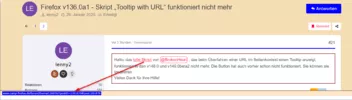
Hallo, das tolle Skript von BrokenHeart , das beim Überfahren einer URL im Seitenkontext einen Tooltip anzeigt, funktioniert in den v148.0 und v149.0beta2 nicht mehr. Die Button hat auch vorher schon nicht funktioniert, Sie können sie ignorieren.
Vielen Dank für Ihre Hilfe!

Firefox v136.0a1 - Skript „Tooltip with URL“ funktioniert nicht mehr
-
lenny2 -
26. Januar 2025 um 13:56 -
Erledigt
-
-
Hallo lenny2
Könntest Du bitte mal diese Version testen:
JavaScript
Alles anzeigen// ==UserScript== // // @description Displays target URL in tooltip, when hovering over a link // Button has “tooltips on”/“tooltips off” positions // ==/UserScript== (function() { if (!window.gBrowser){ return; } try { CustomizableUI.createWidget(({ label: "Links in pop-up tooltips", localized: false, id: "URLTooltip", pref: "URLTooltip.enabled", get state() { return Services.prefs.getBoolPref(this.pref, true); // Standardmäßig aktiviert }, setIcon(btn, state = this.state) { btn.setAttribute("image", "data:image/svg+xml;charset=utf-8,<svg xmlns='http://www.w3.org/2000/svg' width='16' height='16' style='fill:context-fill rgb(142, 142, 152);'><path d='M9.618 6.721a2.483 2.483 0 0 0-.39-.317l-.735.734A1.486 1.486 0 0 1 8.91 9.55l-2.12 2.122a1.486 1.486 0 0 1-2.122 0 1.486 1.486 0 0 1 0-2.121l.605-.605a3.53 3.53 0 0 1-.206-1.209L3.961 8.843a2.506 2.506 0 0 0 0 3.535 2.506 2.506 0 0 0 3.535 0l2.122-2.121a2.506 2.506 0 0 0 0-3.536z'/><path d='M6.79 9.55c.12.121.25.226.389.317l.734-.734a1.486 1.486 0 0 1-.417-2.411L9.618 4.6a1.486 1.486 0 0 1 2.121 0 1.486 1.486 0 0 1 0 2.121l-.605.605c.137.391.211.798.206 1.209l1.106-1.107a2.506 2.506 0 0 0 0-3.535 2.506 2.506 0 0 0-3.535 0L6.789 6.014a2.506 2.506 0 0 0 0 3.536z'/><circle style='fill:none;stroke:context-fill rgb(142, 142, 152);stroke-width:1.2;stroke-linecap:round;stroke-linejoin:round' cx='8' cy='8' r='7.4'/></svg>"); btn.style.setProperty("fill", `${state ? "color-mix(in srgb, currentColor 20%, #e31b5d)" : ""}`); }, onCreated(btn) { this.setIcon(btn), this.btn = btn, btn.owner = this; //btn.setAttribute("oncommand", "owner.toggle()"); btn.addEventListener('command', () => { this.toggle(); }); btn.addEventListener('mouseenter', () => { this.mouseenter(); }); }, mouseenter() { this.btn.tooltipText = this.label +' – '+ `${this.state ? "enabled" : "disabled"}`; }, toggle() { Services.prefs.setBoolPref(this.pref, !this.state); }, observe(s, topic) { if (topic.startsWith("q")) return this.destroy(); var {state} = this; for(var {node} of CustomizableUI.getWidget(this.id).instances) this.setIcon(node, state); state ? this.initTooltip() : this.destroyTooltip(); }, init() { Services.prefs.addObserver(this.pref, this); Services.obs.addObserver(this, "quit-application-granted", false); this.state && this.initTooltip(); delete this.init; return this; }, destroy() { Services.prefs.removeObserver(this.pref, this); Services.obs.removeObserver(this, "quit-application-granted"); }, initTooltip() { var url = this.initURL = this.createURL("psInit"); (this.initTooltip = () => Services.ppmm.loadProcessScript(url, true))(); }, destroyTooltip() { var url = this.createURL("psDestroy"); (this.destroyTooltip = () => { Services.ppmm.removeDelayedProcessScript(this.initURL); Services.ppmm.loadProcessScript(url, false); })(); delete this.createURL; }, createURL: function createURL(meth) { var subst = this.id + "-" + meth; (createURL.rph || (createURL.rph = Services.io.getProtocolHandler("resource") .QueryInterface(Ci.nsIResProtocolHandler) )).setSubstitution(subst, Services.io.newURI("data:text/javascript;charset=utf-8," + encodeURIComponent( `(${this[meth]})(ChromeUtils.importESModule("resource://gre/modules/TooltipTextProvider.sys.mjs").TooltipTextProvider.prototype)` ))); delete this[meth]; return "resource://" + subst; }, psInit: proto => { if (proto.getTextPlus) return proto.getNodeText = proto.getTextPlus.newGetNodeText; //================[ start content ]================ proto.getTextPlus = node => { var href = getHref(node); if (!href || href == "#" || skipRe.test(href)) return; if (href.startsWith("data:")) return crop(href, 64); return crop(decode(href)); } var skipRe = /^(?:javascript|addons):/; var getHref = node => {do { if (HTMLAnchorElement.isInstance(node) && node.href) return node.href; } while (node = node.flattenedTreeParentNode)} var crop = (url, max = 128) => url.length <= max ? url : url.slice(0, --max) + "\u2026"; // ellipsis var decode = url => { var ios = Cc["@mozilla.org/network/io-service;1"].getService(Ci.nsIIOService); var ldu = ChromeUtils.importESModule("moz-src:///browser/components/urlbar/UrlbarInput.sys.mjs", {}).losslessDecodeURI; return (decode = url => {try {return ldu(ios.newURI(url));} catch {return url;}})(url); } //================[ end content ]================== var func = proto.getTextPlus.getNodeText = proto.getNodeText; proto.getTextPlus.newGetNodeText = proto.getNodeText = function(node, text) { var res = func.apply(this, arguments); if (!res && !(node?.localName != "browser" && node.ownerGlobal && node.ownerDocument)) return false; var txt = this.getTextPlus(node), add = ""; return txt ? text.value = res ? text.value + "\n" + txt + add : txt + add : res; } }, psDestroy: proto => { proto.getNodeText = proto.getTextPlus.getNodeText; } }).init())} catch(ex) {Cu.reportError(ex);} })();Hoffe die funktioniert.
Mfg.
Endor -

Könntest Du bitte mal diese Version testen:
Leider funktioniert es nicht

-
Schade. Aber ich vermute mal, da ich den Schalter in About:config:
security.allow_unsafe_dangerous_privileged_evil_eval
auf true habe, funktioniert es hier noch in Firefox 148.
Weil hier funktionieren die Schaltflächen und die Einblendung des Tototipps.In Firefox 149 beta2 funktioniert es auch so nicht mehr. Schade.
Vielleicht kann da jemand anderes weiter helfen.
Mfg.
Endor -
Was macht denn das Skript genau: Das hier?
Meine Version des Skriptes ist diese:
JavaScript
Alles anzeigen// ==UserScript== // // @description Displays target URL in tooltip, when hovering over a link // Button has “tooltips on”/“tooltips off” positions // ==/UserScript== try {CustomizableUI.createWidget(({ label: "Links in pop-up tooltips", localized: false, id: "URLTooltip", pref: "URLTooltip.enabled", get state() { return Services.prefs.getBoolPref(this.pref, true); // по-умолчанию включено }, setIcon(btn, state = this.state) { btn.setAttribute("image", "data:image/svg+xml;charset=utf-8,<svg xmlns='http://www.w3.org/2000/svg' width='16' height='16' style='fill:context-fill rgb(142, 142, 152);'><path d='M9.618 6.721a2.483 2.483 0 0 0-.39-.317l-.735.734A1.486 1.486 0 0 1 8.91 9.55l-2.12 2.122a1.486 1.486 0 0 1-2.122 0 1.486 1.486 0 0 1 0-2.121l.605-.605a3.53 3.53 0 0 1-.206-1.209L3.961 8.843a2.506 2.506 0 0 0 0 3.535 2.506 2.506 0 0 0 3.535 0l2.122-2.121a2.506 2.506 0 0 0 0-3.536z'/><path d='M6.79 9.55c.12.121.25.226.389.317l.734-.734a1.486 1.486 0 0 1-.417-2.411L9.618 4.6a1.486 1.486 0 0 1 2.121 0 1.486 1.486 0 0 1 0 2.121l-.605.605c.137.391.211.798.206 1.209l1.106-1.107a2.506 2.506 0 0 0 0-3.535 2.506 2.506 0 0 0-3.535 0L6.789 6.014a2.506 2.506 0 0 0 0 3.536z'/><circle style='fill:none;stroke:context-fill rgb(142, 142, 152);stroke-width:1.2;stroke-linecap:round;stroke-linejoin:round' cx='8' cy='8' r='7.4'/></svg>"); btn.style.setProperty("fill", `${state ? "color-mix(in srgb, currentColor 20%, #e31b5d)" : ""}`); }, onCreated(btn) { this.setIcon(btn), this.btn = btn, btn.owner = this; //btn.setAttribute("oncommand", "owner.toggle()"); btn.addEventListener('command', () => { this.toggle(); }); // btn.setAttribute("onmouseenter", "owner.mouseenter()"); btn.addEventListener('mouseenter', () => { this.mouseenter(); }); }, mouseenter() { this.btn.tooltipText = this.label +' – '+ `${this.state ? "enabled" : "disabled"}`; }, toggle() { Services.prefs.setBoolPref(this.pref, !this.state); }, observe(s, topic) { if (topic.startsWith("q")) return this.destroy(); var {state} = this; for(var {node} of CustomizableUI.getWidget(this.id).instances) this.setIcon(node, state); state ? this.initTooltip() : this.destroyTooltip(); }, init() { Services.prefs.addObserver(this.pref, this); Services.obs.addObserver(this, "quit-application-granted", false); this.state && this.initTooltip(); delete this.init; return this; }, destroy() { Services.prefs.removeObserver(this.pref, this); Services.obs.removeObserver(this, "quit-application-granted"); }, initTooltip() { var url = this.initURL = this.createURL("psInit"); (this.initTooltip = () => Services.ppmm.loadProcessScript(url, true))(); }, destroyTooltip() { var url = this.createURL("psDestroy"); (this.destroyTooltip = () => { Services.ppmm.removeDelayedProcessScript(this.initURL); Services.ppmm.loadProcessScript(url, false); })(); delete this.createURL; }, createURL: function createURL(meth) { var subst = this.id + "-" + meth; (createURL.rph || (createURL.rph = Services.io.getProtocolHandler("resource") .QueryInterface(Ci.nsIResProtocolHandler) )).setSubstitution(subst, Services.io.newURI("data:text/javascript;charset=utf-8," + encodeURIComponent( `(${this[meth]})(ChromeUtils.importESModule("resource://gre/modules/TooltipTextProvider.sys.mjs").TooltipTextProvider.prototype)` ))); delete this[meth]; return "resource://" + subst; }, psInit: proto => { if (proto.getTextPlus) return proto.getNodeText = proto.getTextPlus.newGetNodeText; //================[ start content ]================ proto.getTextPlus = node => { var href = getHref(node); if (!href || href == "#" || skipRe.test(href)) return; if (href.startsWith("data:")) return crop(href, 64); return crop(decode(href)); } var skipRe = /^(?:javascript|addons):/; var getHref = node => {do { if (HTMLAnchorElement.isInstance(node) && node.href) return node.href; } while (node = node.flattenedTreeParentNode)} var crop = (url, max = 128) => url.length <= max ? url : url.slice(0, --max) + "\u2026"; // ellipsis var decode = url => { var ios = Cc["@mozilla.org/network/io-service;1"].getService(Ci.nsIIOService); var ldu = ChromeUtils.importESModule("moz-src:///browser/components/urlbar/UrlbarInput.sys.mjs", {}).losslessDecodeURI; return (decode = url => {try {return ldu(ios.newURI(url));} catch {return url;}})(url); } //================[ end content ]================== var func = proto.getTextPlus.getNodeText = proto.getNodeText; proto.getTextPlus.newGetNodeText = proto.getNodeText = function(node, text) { var res = func.apply(this, arguments); if (!res && !(node?.localName != "browser" && node.ownerGlobal && node.ownerDocument)) return false; var txt = this.getTextPlus(node), add = ""; return txt ? text.value = res ? text.value + "\n" + txt + add : txt + add : res; } }, psDestroy: proto => { proto.getNodeText = proto.getTextPlus.getNodeText; } }).init())} catch(ex) {Cu.reportError(ex);}Die von Endor genannte Einstellung steht bei mir im NIghtly auf false.
-
Hallo milupo.
Und wie steht die Einstellung bei Dir:security.browser_xhtml_csp.enabled
true oder false?
Standard ist true und so ist auch hier bei mir.
Mfg.
Endor -
Was macht denn das Skript genau:
Siehe den Screenshot in Beitrag Nr. 1.
Hier funktioniert keines der obigen Skripte im Fx .

-
Und wie steht die Einstellung bei Dir:
security.browser_xhtml_csp.enabled
true oder false?
Steht auf true.
-
Habe Deine Version hier in 149beta2 getestet da funktioniert sie nicht.
Schaltfläche ist da aber es wird keine URL als Popup angezeigt.2002Andreas.
Bei mir war beim ersten mal die Schaltfläche im Anpassenfenster.
Musste die erst auf die Symbolleiste ziehen.Mfg.
Endor -

Siehe den Screenshot in Beitrag Nr. 1.
Ganz genau, das Skript fügt einen Tooltip neben dem Mauszeiger hinzu.
-
Bei mir war beim ersten mal die Schaltfläche im Anpassenfenster.
War hier auch so, trotzdem funktioniert das Skript hier nicht.
PS:
Allerdings nutze ich es ansonsten auch nicht.
-
Meine Version des Skriptes ist diese:
Analog, klein und ohne Button. Wird in der Status Bar angezeigt.
-
Ganz genau, das Skript fügt einen Tooltip neben dem Mauszeiger hinzu.
Also meint ihr nicht den Pfad der links unten angezeigt wird? Ich habe doch extra in Beitrag #25 gefragt.
-
Ich habe doch extra in Beitrag #25 gefragt.
Und ich dir in 27 geantwortet darauf

-
Und ich dir in 27 geantwortet darauf
„Siehe in Beitrag 1“ sagt mir aber gar nichts. Dort ist zwar der Pfad neben dem Link zu sehen, aber einen Linkpfad sehe ich auch, nur nicht neben dem Link. Und es steht nirgendwo, dass der Pfad neben dem LInk sein muss.
-
dass der Pfad neben dem LInk sein muss.
das Skript fügt einen Tooltip neben dem Mauszeiger hinzu.
-
Das steht aber nicht in Beitrag #1. Muss man wirklich den ganzen Roman lesen, wenn man eine bestimmte Buchstelle haben will?
-
Also eine Fehlerursache könnte sein, dass der Pfad zur Datei UrlbarInput.sys.mjs nicht stimmt, siehe Beitrag #22 von Endor, Zeile 94. Ich finde diese Datei gar nicht mehr. Sie wurde wahrscheinlich umbenannt in UrlbarInput.mjs. Die Dateinamen unterscheiden sich nur durch das jetzige Fehlen der Dateierweiterung .sys. Aber auch der Pfad ist anders: chrome://browser/content/browser/urlbar/UrlbarInput.mjs.
-
Aber auch der Pfad ist anders: chrome://browser/content/browser/urlbar/UrlbarInput.mjs.
Ich hoffe, ich habe den Namen und den Pfad richtig geändert, aber es hat nichts genützt.
-
aber es hat nichts genützt.
Mit einer Erweiterung geht es:
 URL Tooltip WE – Get this Extension for 🦊 Firefox (en-US)Download URL Tooltip WE for Firefox. Displays target URL in tooltip, when hovering over a link.addons.mozilla.org
 -