- Firefox-Version
- 144.0
- Betriebssystem
- Linux Mint 22.1 Xia, base: Ubuntu 24.04 noble
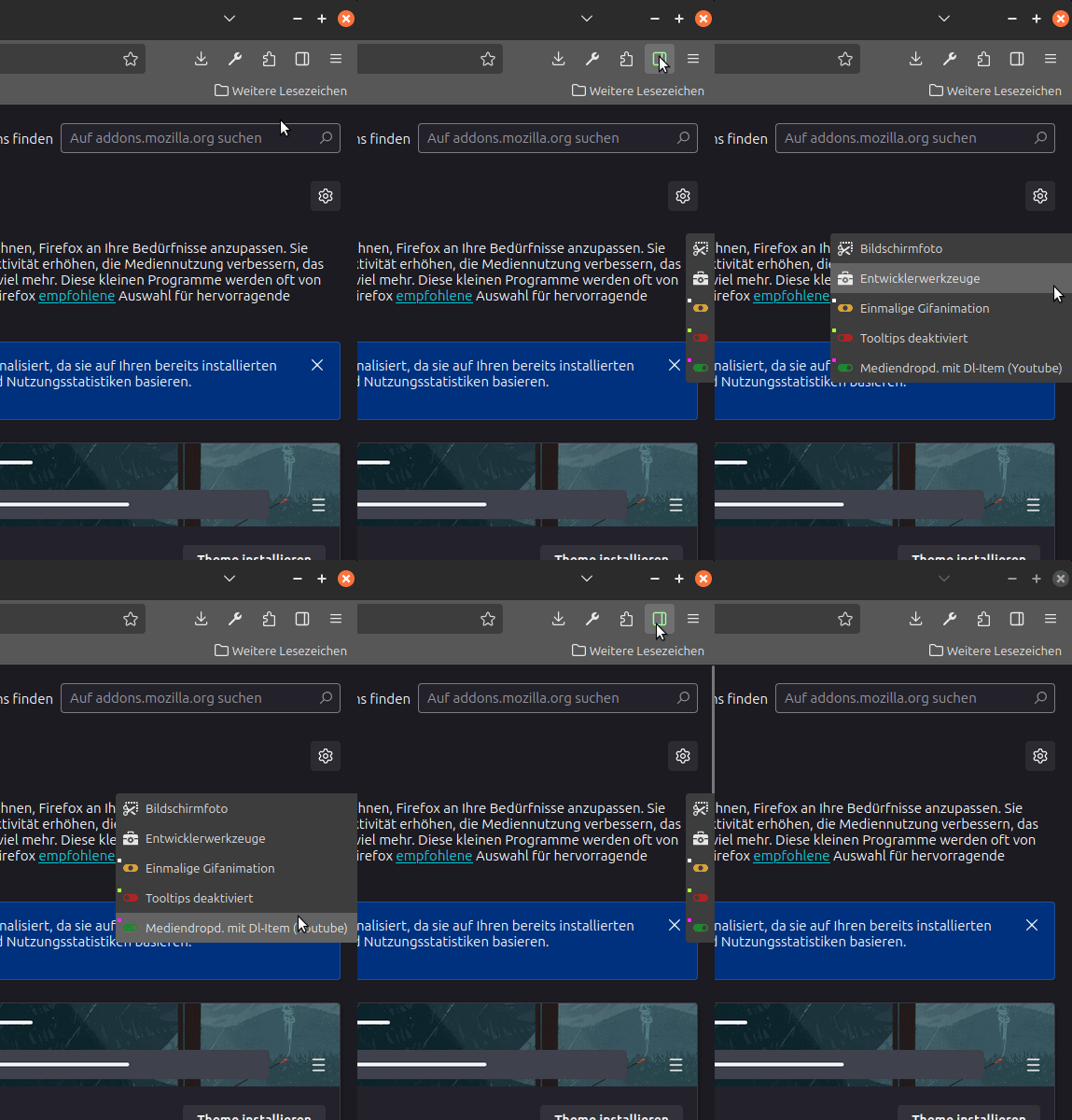
Die Overlay-Zusatzleiste liegt über dem Seiteninhalt (und verdeckt diesen partiell), verschiebt den Content der Seite jedoch nicht.
EDIT: 2025-12-05: Neue Version (Die vertikale Position der Leiste kann jetzt gescrollt werden).
Updatehistorie
EDIT: 2025-06-06: Neue Version (mit zusätzlichem Feature: Mittelklick verschiebt die Tb an den gegenüberliegenden Fensterrand; Rechtsklick wieder zurück).
EDIT: 2025-09-20: Neue Version (beim Verkleinern des Fensters bleibt die Buttongröße erhalten, außerdem wird das Kontextmenü beim Rechtsklick ausgeblendet).
EDIT: 2025-09-25: Neue Version (Der Startzustand der TB (on/off) ist in den 'UserConfigurations' einstellbar).
EDIT: 2025-10-25: Neue Version (Der On/Off-Status sowie die horizontale Position der TB werden beim Beenden des Browsers gespeichert und beim Start wiederhergestellt).
EDIT: 2025-11-07: Neue Version (Die Links/Rechts-funktion arbeitet jetzt [ebenso wie die On/Off-funktion] in einem zweiten geöffneten Fenster unabhängig vom Ersten).
EDIT: 2025-12-05: Neue Version (Die vertikale Position der Leiste kann jetzt gescrollt werden).
EDIT: 2025-12-17: Neue Version (Usability bei gesetztem border verbessert).
Updatehinweis ab Vers 5.1
Änderung in Vers. 5.1: Usability bei gesetztem border verbessert: Die Buttons werden jetzt horizontal mittig dargestellt ohne die Breite der Leiste manuell verändern zu müssen.
Update bis Vers 5.0
Die 'UserConfiguration TOOLBAR' kann mit den eigenen CSS-Anpassungen per copy/paste (1:1) überschrieben werden.
Update ab Vers 5.1
Die 'UserConfiguration TOOLBAR' kann mit den eigenen CSS-Anpassungen wieder per copy/paste überschrieben werden; ab der Vers. 5.1 muss jedoch eine ÄNDERUNG im Quellcode der 'UserConfiguration TOOLBAR' gemacht werden:
A. Bei Leiste OHNE sichtbaren border Zeile 193:
[--vt-border-width: 0; /*Leistenrandbreite*/] muss geändert werden in
[--vt-border-width: 0px;/*Leistenrandbreite*/]
oder
B. Bei Leiste MIT sichtbarem border Zeile 187:
[--vt-toolbar-min-width: 32px; /*Leistenbreite bei mouseout*/] hier sollte die reale Buttonbreite (Standardwert: 32px) eingetragen werden.
// JavaScript Document
// 00_FlyVertToolbarWithButton_lite.uc.js
// FF 139+
// Vers. 5.1

// Quelle: https://www.....

// Idee von Horstmann: https://www.camp-firefox.de/forum/thema/137714-seitennavigation-fly-out-men%C3%BC/?postID=1246875#post1246875

// Das Script erstellt eine - über dem Seiteninhalt liegende - vertikale Toolbar, die sich per Button ein/ausblenden lässt. Im eingeblendeten Zustand sind nur die Buttons sichtbar, beim Mouseover auf die B.'s werden die Labels aller B.'s 'ausgeklappt'. Die Verzögerungszeit vom Mouseover bis zum 'Ausklappzeitpunkt' der Labels kann konfiguriert werden [--vt-delay_min_max-width: 1.5s; /*Verzögerung bei mouseover*/]. Z.B so, dass die Labels der Buttons erst nach > 5.0s mouseover sichtbar sind - also eigentlich nie; oder nach < 0.5s - fast sofort.
// Die TB ist in der in der Höhe flexibel (je nach Anzahl der Buttons).
// Die vertikale Startposition (oben/unten) ist prozentual einstellbar. Zusätzlich kann die TB mit dem Mausrad (Mauszeiger auf Leiste) vertikal verschoben werden (temporär, wird beim Beenden des Browsers nicht gespeichert).
// Die horizontale Position der TB (links/rechts) ist per Rechtsklick wählbar.
// Der On/Off-Status sowie die horizontale Position der TB werden beim Beenden des Browsers gespeichert und beim Start wiederhergestellt.
// Beide Funktionen arbeiten in weiteren geöffneten Fenster unabhängig vom Ersten.
// Das .svg-Icon des Buttons zum Ein/Ausblenden der Bar kann - je nach Hover-Zustand - mit zwei unterschiedlichen Farben gefüllt werden [fill/stroke].
// WICHTIG: Die TB ist im 'Anpassenfenster' nur im eingeschalteten Zustand sichtbar (vermeidet Verdeckung/Überlagerung anderer Symbole).

// ACHTUNG: Einige Systembuttons lassen sich in zusätzliche/eigene Tb's zwar noch verschieben, haben aber KEINE Funktion. Dazu gibt es einen Patch von @BrokenHeart:  https://www.camp-firefox.de/forum/thema/138875-fix-toolbar-buttons-reagieren-nicht-mehr-ab-ff-134/

(function() {
  if (!window.gBrowser)
	return;
const
// ■■ START UserConfiguration ■■■■■■■■■■■■■■■■■■■■■■■■■■■■■■■■
         id = 'vert_toolbar_button', // Id des Buttons
      label = 'Vertikale Overlay Toolbar', // Bezeichnung des Buttons
tooltiptext = 'Vertikale Overlay Toolbar\n\nLinksklick: ein/aus\nRechtsklick: links/rechts\nMausrad(Mauszeiger auf Leiste): oben/unten',
// Icon-------------------------------------------------------
       icon = '16_ci-bar-right_moz.svg', // [Name.Dateiendung] des Symbols
   iconPath = '/chrome/icons/', // Pfad zum Ordner der das Icon beinhaltet
  iconColOu = 'currentColor', // Farbe des Icons (nur .svg-Datei mit [moz-context-properties], bei anderen Icons hat const iconColOu keine Funktion)
  iconColOv = '#9aff9a', // Farbe des Icons beim Überfahren des Buttons (nur .svg-Datei mit [moz-context-properties], bei anderen Icons hat const iconColOv keine Funktion)
// Toolbar----------------------------------------------------
	 isPosV = '50%', // Toolbar mittig zur Fensterhöhe;
//   isPosV = '0%',     Toolbar am oberen Fensterrand;
//   isPosV = '100%',   Toolbar am unteren Fensterrand;
wheelFactor = 0.2,   // Scrollfunktion (bei Mauszeiger auf Leiste), je höher der Wert desto größer die Schrittweite der Rasterung des Mausrades;
// ■■ END UserConfiguration ■■■■■■■■■■■■■■■■■■■■■■■■■■■■■■■■■■
 curProfDir = PathUtils.toFileURI(PathUtils.join(PathUtils.profileDir));
//Pref '.svg.context-...' prüfen/setzen
if (Services.prefs.getBoolPref('svg.context-properties.content.enabled') == false) {
	Services.prefs.setBoolPref('svg.context-properties.content.enabled', true );
}
//userPrefs
Services.prefs.getDefaultBranch('userchrome.flyvert-toolbar.').setBoolPref('visible', true);
Services.prefs.getDefaultBranch('userchrome.flyvert-toolbar.').setBoolPref('horizontal', true); //true=left/false=right

const
boolPrefVis = 'userchrome.flyvert-toolbar.visible',
 getPrefVis = Services.prefs.getBoolPref(boolPrefVis),
    setPref = Services.prefs.setBoolPref,

boolPrefHor = 'userchrome.flyvert-toolbar.horizontal',
 getPrefHor = Services.prefs.getBoolPref(boolPrefHor);
//TOOLBAR
const toolbar = document.createXULElement('toolbar');
      toolbar.id = 'vert_toolbar';
	  toolbar.setAttribute('orient', 'vertical');
      toolbar.setAttribute('customizable', true);
	  toolbar.setAttribute('mode', 'icons');
	  toolbar.setAttribute('context', 'toolbar-context-menu');
	  toolbar.setAttribute('class','toolbar-primary chromeclass-toolbar browser-toolbar customization-target');
//TOOLBOX
const toolbox = document.createXULElement('toolbox');
	  toolbox.id = 'vert_toolbox';
      toolbox.setAttribute('orient','mirror');

	  toolbox.appendChild(toolbar);

document.getElementById('browser').parentNode.appendChild(toolbox);
//reg
CustomizableUI.registerArea('vert_toolbar', {legacy: true});
CustomizableUI.registerToolbarNode(toolbar);
//start on/off
switch (getPrefVis) {
	case true:
		vert_toolbar.classList.toggle('button-on');
	break;
	case false:
		vert_toolbar.classList.toggle('button-off');
	break;
};
//start left/right(A)
switch (getPrefHor) {
	case true:
		vert_toolbar.classList.toggle('bar-left');
		vert_toolbox.classList.toggle('bar-left');
	break;
	case false:
		vert_toolbar.classList.toggle('bar-right');
		vert_toolbox.classList.toggle('bar-right');
	break;
};
//BUTTON
try {
	CustomizableUI.createWidget({
		id: id,
		defaultArea: CustomizableUI.AREA_NAVBAR,
		label: label,
		tooltiptext: tooltiptext,

		onCreated: (button) => {
			button.style.MozContextProperties = 'fill, stroke, fill-opacity, stroke-opacity';
			button.style.listStyleImage = 'url("' + curProfDir + iconPath + icon + '")';
			button.style.stroke = iconColOu;
			button.style.minWidth = 'fit-content';
		}
	});
} catch(e) {};

const button = document.getElementById(id);
//start left/right(B)
switch (getPrefHor) {
	case true:
		button.classList.toggle('bar-left');
	break;
	case false:
		button.classList.toggle('bar-right');
	break;
};
//over
button.addEventListener('mouseover', () => {
		button.style.stroke = iconColOv;
});
//out
button.addEventListener('mouseout', () => {
		button.style.stroke = iconColOu;
});
//contextmenu
button.addEventListener('contextmenu', e => {
	if (event.button === 2) {
		e.preventDefault();
	}
});
//click
button.addEventListener('click', () => {
	if (event.button === 0) {
		event.target.ownerGlobal.vert_toolbar.classList.toggle('button-off');
		event.target.ownerGlobal.vert_toolbar.classList.toggle('button-on');

			const getPrefVis = Services.prefs.getBoolPref(boolPrefVis);
			switch (getPrefVis) {
				case true:
					setPref(boolPrefVis, false);
				break;
				case false:
					setPref(boolPrefVis, true);
				break;
			}
	}
	else
	if ((event.button === 2) && (event.target.ownerGlobal.vert_toolbar.classList.contains('button-on') === true )) {
		event.target.ownerGlobal.vert_toolbar.classList.toggle('bar-left');
		event.target.ownerGlobal.vert_toolbar.classList.toggle('bar-right');
		event.target.ownerGlobal.vert_toolbox.classList.toggle('bar-left');
		event.target.ownerGlobal.vert_toolbox.classList.toggle('bar-right');
		event.target.ownerGlobal.vert_toolbar_button.classList.toggle('bar-left');
		event.target.ownerGlobal.vert_toolbar_button.classList.toggle('bar-right');

			const getPrefHor = Services.prefs.getBoolPref(boolPrefHor);
			switch (getPrefHor) {
				case true:
					setPref(boolPrefHor, false);
				break;
				case false:
					setPref(boolPrefHor, true);
				break;
			}
		css();
	}
});
//wheel
toolbox.addEventListener('wheel', (event) => {
	event.preventDefault();

	let curPos = toolbox.offsetTop;
		curPos = parseInt(curPos)-(event.wheelDelta*wheelFactor);

	toolbox.style.top = curPos + 'px';
});

function css (){
let css =`
	#vert_toolbar {
/* ■■ START UserConfiguration TOOLBAR ■■■■■■■■■■■■■■■■■■■■■■■ Dark Theme */
		--vt-toolbar-min-width: 32px; /*Leistenbreite bei mouseout*/
		--vt-toolbar-max-width: 260px; /*Leistenbreite bei mouseover*/
		--vt-delay_min_max-width: 1.5s; /*Verzögerung bei mouseover*/
		--vt-row-height: 32px; /*Zeilenhöhe*/
		--vt-bg-color: #3d3d3d; /*Leistenhintergrundfarbe*/
		--vt-bg-color-hover: #57575766; /*Zeilenhintergrundfarbe bei mouseover*/
		--vt-border-width: 0px; /*Leistenrandbreite*/
		--vt-border-radius: 4px; /*Leistenrandeckenhalbdurchmesser*/
		--vt-border-color: purple; /*Leistenrandfarbe*/
		--vt-customizing-bg-color: #3d3d3d; /*Leistenhintergrundfarbe im Anpassenfenster*/
		--vt-customizing-border-color: #E9E9E9; /*Leistenrandfarbe im Anpassenfenster*/
		--vt-toolbarbutton-inner-padding: 8px; /*Zentrierungsmöglichkeit der eingefügten Buttons (wenn Buttonbreite < 32px => --vt-toolbarbutton-inner-padding < 8px) */
/* ■■ END UserConfiguration TOOLBAR ■■■■■■■■■■■■■■■■■■■■■■■■■ */
	}

	#vert_toolbox {
		position: fixed !important;
		display: flex !important;
		top: ${isPosV};
		transform: translateY(-${isPosV});
		height: fit-content !important;
		width: fit-content !important;
		z-index: 6516516511 !important;
	}

	#vert_toolbox.bar-left {
		left: 0 !important;
		right: unset !important;
	}
	#vert_toolbox.bar-right {
		right: 0 !important;
		left: unset !important;
	}

	#vert_toolbar {
		display: flex !important;
		min-width: 0px !important;
		width: calc(var(--vt-toolbar-min-width) + 2*var(--vt-border-width)) !important;
		padding: 0 !important;
		background-color: var(--vt-bg-color) !important;
		border: var(--vt-border-width) solid var(--vt-border-color) !important;
		transition: width .5s ease-in-out .2s !important;
	}

	#vert_toolbar.bar-right {
		border-top-right-radius: 0 !important;
		border-top-left-radius: var(--vt-border-radius) !important;
		border-bottom-right-radius: 0 !important;
		border-bottom-left-radius: var(--vt-border-radius) !important;
		margin-left: calc(var(--vt-toolbar-min-width) * -1) !important;
		margin-right: unset !important;
	}
	#vert_toolbar.bar-left {
		border-top-left-radius: 0 !important;
		border-top-right-radius: var(--vt-border-radius) !important;
		border-bottom-left-radius: 0 !important;
		border-bottom-right-radius: var(--vt-border-radius) !important;
		margin-right: calc(var(--vt-toolbar-min-width) * -1) !important;
		margin-left: unset !important;
	}

	#vert_toolbar:not([customizing]):hover {
		width: var(--vt-toolbar-max-width) !important;
		transition-delay: var(--vt-delay_min_max-width) !important;
	}

	#vert_toolbar.button-on {
		display: flex !important;
	}
	#vert_toolbar.button-off  {
		display: none !important;
	}

	#vert_toolbar:not([customizing]) .toolbarbutton-1  {
		justify-content: flex-start !important;
		min-width: var(--vt-toolbar-min-width) !important;
		height: var(--vt-row-height) !important;
		min-height: var(--vt-row-height) !important;
		max-height: var(--vt-row-height) !important;
		overflow: hidden !important;
		border: none !important;
		box-shadow: none !important;
		--toolbarbutton-inner-padding: var(--vt-toolbarbutton-inner-padding) !important;
	 	--toolbarbutton-outer-padding: 0 !important;
	 	--toolbarbutton-border-radius: 0 !important;
	}
	#vert_toolbar:not([customizing]) .toolbarbutton-1:hover {
		background-color: var(--vt-bg-color-hover) !important;
	}

	#vert_toolbar:not([customizing]).bar-left .toolbarbutton-1:first-of-type {
		border-top-right-radius: var(--vt-border-radius) !important;
		border-top-left-radius: 0 !important;
	}
	#vert_toolbar:not([customizing]).bar-right .toolbarbutton-1:first-of-type {
		border-top-right-radius: 0 !important;
		border-top-left-radius: var(--vt-border-radius)!important;
	}
	#vert_toolbar:not([customizing]).bar-left .toolbarbutton-1:last-of-type {
		border-bottom-left-radius: 0 !important;
		border-bottom-right-radius: var(--vt-border-radius) !important;
	}
	#vert_toolbar:not([customizing]).bar-right .toolbarbutton-1:last-of-type {
		border-bottom-right-radius: 0 !important;
		border-bottom-left-radius: var(--vt-border-radius) !important;
		}

	#vert_toolbar:not([customizing]) .toolbarbutton-1 .toolbarbutton-text {
		display: flex !important;
		opacity: 0 !important;
		transition: opacity .5s ease-in-out .2s !important;
		text-overflow: ellipsis !important;
		align-items: center !important;
		padding: 0 !important;
	 	border-radius: 0 !important;
	}
	#vert_toolbar:not([customizing]):hover .toolbarbutton-1 .toolbarbutton-text {
		opacity: 1 !important;
		transition: opacity .5s ease-in-out var(--vt-delay_min_max-width) !important;
	}
	#vert_toolbar[customizing] {
		min-height: 38px !important;
		min-width: 38px !important;
		max-width: 38px !important;
		margin-right: 0 !important;
		margin-left: 0 !important;
		padding-bottom: 38px !important;
		background: var(--vt-customizing-bg-color) !important;
		border: 1px dashed var(--vt-customizing-border-color) !important;
	}

	#vert_toolbar_button.bar-left .toolbarbutton-icon {
		transform: scaleX(-1) !important;
	}
	#vert_toolbar_button.bar-right .toolbarbutton-icon {
		transform: scaleX(1) !important;
	}
`;
const sss = Cc['@mozilla.org/content/style-sheet-service;1'].getService(Ci.nsIStyleSheetService);
const uri = makeURI('data:text/css;charset=UTF=8,' + encodeURIComponent(css));
sss.loadAndRegisterSheet(uri, sss.AUTHOR_SHEET);
};

css();

})();