


Nutzt du auch das hier verwendete CSS?
Nein
Steht dort evtl. etwas dazu im Code?
Nein
Nutzt du auch das hier verwendete CSS?
Nein
Steht dort evtl. etwas dazu im Code?
Nein
Hier öffnet ein Lesezeichen aus der neuen Sidebar mit Mittelklick in einem neuen Tab (Linux).
lionsson Jetzt?
Und so?
/*** opt_noSendToDevice.css ***/
/* #context-sendaudio,    /* Email Audio */
/* #context-sendvideo,    /* Email Video */
/* #context-sendimage,    /* Email Image */
#context-sendpagetodevice,
#context-sep-sendpagetodevice,
#context-sendlinktodevice,
#context-sep-sendlinktodevice,
#context_sendTabToDevice,
#context_sendTabToDevice_separator,
#pageAction-panel-sendToDevice,
/* #pageAction-panel-emailLink,    /* Email Link */
#leave_this_dummy_here
{ display: none !important; }aus:
simpleMenuWizard: userChrome.css tweaks to remove context menu items in Firefox.

Das Script (kein zusätzliches css benötigt) aus diesem Beitrag funzt auch ( auch i.d. Nightly): Link
.

Schau mal, was ich daraus gemacht habe!
Erklärungen gibt es ein anderes Mal (Morgen?)
Warum postest Du eigentlich immer nur halbfertige Scripts? Das verwirrt den User nur und wenn dann doch noch endlich das endgültige S. vorliegt, interessiert sich wirklich niemand mehr dafür.
Oder geht es Dir mehr ums:
Schau mal, was ich daraus gemacht habe!
So sei es!
Aahmeehn... 😵💫
Aber ist jetzt egal, es soll ja nicht in einen Wettstreit ausarten.
Gegen eine richtig bediente AI für JS-Programmierung, deren Ergebnis dann nochmal von einem Programmierer geprüft und verifiziert wurde, wäre der Mensch allein wohl chancenlos? Jedenfall bei komplexeren Codes. Aber es soll ja in erster Linie auch 'Spass machen'. Der Weg ist das Ziel.
Zumal beide Skripte in etwa gleich viele Zeilen Code haben!

Lösung, die mit wenigen grundlegenden Zeilen Javascript auskommt
Hier liegt der Unterschied.
Ist es denn wirklich so, dass ein kaputtes Skript zu "reparieren" wichtiger ist, als eine funktionierende Lösung anbieten zu können?
Das Script aus Beitrag #36 ist keinesfalls ein repariertes Script sondern eine neue, funktionierende Lösung, die mit wenigen grundlegenden Zeilen Javascript auskommt, deshalb wahrscheinlich robuster bei Updates ist.

Kein Eintrag für: Linke Tabs schließen vorhanden.
Danke, da bin ich ja mal gespannt wie sich das weiter entwickeln wird...
2002Andreas Hallo, ich bin jetzt auf 156.0a1 (2026-08-27) und unter Linux funktioniert nach wie vor das Script aus Beitrag #26. Vom TE höre ich auch nichts; war das evtl. bloß ein temporäres Problem auf Windows und hat sich in Luft aufgelöst?
Dolly Parton - Jolene
Externer Inhalt
www.youtube.com
Inhalte von externen Seiten werden ohne deine Zustimmung nicht automatisch geladen und angezeigt.
Durch die Aktivierung der externen Inhalte erklärst du dich damit einverstanden, dass personenbezogene Daten an Drittplattformen übermittelt werden. Mehr Informationen dazu haben wir in unserer Datenschutzerklärung zur Verfügung gestellt.
The Rocky Horror Picture Show "Sweet Transvestite"
Lege ich einen neuen Ordner z.B. 'css_test' an und verschiebe einige css Dateien dorthin, funzt es wie es soll.
Deshalb funzt das also bei mir. Die verschobenen Dateien haben dann keine Verbindung über die Import-Regeln mehr zur userChrome, weil sie sich nicht mehr im importierten Ordner befinden, sondern in einem sozusagen unabhängigen Order ohne Anbindung.
Wenn ich hier let cssFolder = den vorh. Ordner 'css' eintrage habe dies Probl. wie Andreas und Lenny auch. Lege ich einen neuen Ordner z.B. 'css_test' an und verschiebe einige css Dateien dorthin, funzt es wie es soll.

Habe diese Meldung bei vielen Scripten hier gesehen.
Diese Fehlermeldung erscheint wenn eine Funktion ohne z.B. if (!window.gBrowser) return;oder if (location.href !== 'chrome://browser/content/browser.xhtml') return; initiiert wird. Diese Fehlermeldung habe ich oft bei Fremdscripten. Früher habe ich die S. noch korrigiert, jetzt nicht mehr.... 
Dies ist dann die 'große' Lösung:
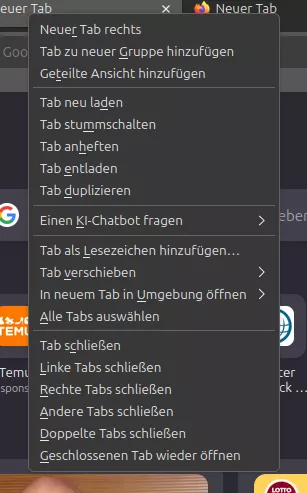
// JavaScript Document
// developed without AI-based applications or tools


// T_TabContext_CloseLeftRightOther.uc.js
// FF 154+
// Quelle: https://www...

// Das Script verschiebt die Schließenmenüeinträge aus dem Untermenü '#context_closeTabOptions' ins Tabkontextmenü unter den Eintrag 'Tab schließen' und löscht den entsprechenden Menüeintrag 'Mehrere Tabs schließen'. Nicht auswählbare [disabled] Einträge werden ausgeblendet.


(function() {
  if (!window.gBrowser)
	return;
const
 origStart = document.getElementById('context_closeTabsToTheStart'),
   origEnd = document.getElementById('context_closeTabsToTheEnd'),
 origOther = document.getElementById('context_closeOtherTabs'),

cloneStart = origStart.cloneNode(),
  cloneEnd = origEnd.cloneNode(),
cloneOther = origOther.cloneNode(),

	   ref = document.getElementById('context_closeTab');// end const


// Reihenfolge der 3 folgenden Zeilen hier beeinflusst die Reihenfolge im Kontextmenü
	tabContextMenu.insertBefore(cloneOther, ref.nextSibling);
	tabContextMenu.insertBefore(cloneEnd, ref.nextSibling);
	tabContextMenu.insertBefore(cloneStart, ref.nextSibling);

    var css =`
		#context_closeTabOptions {
			display: none !important;
		}
		#context_closeTabsToTheStart[disabled],
		#context_closeTabsToTheEnd[disabled],
		#context_closeOtherTabs[disabled] {
			display: none !important;
		}
    `;
    var sss = Cc['@mozilla.org/content/style-sheet-service;1'].getService(Ci.nsIStyleSheetService);
    var uri = makeURI('data:text/css;charset=UTF=8,' + encodeURIComponent(css));
sss.loadAndRegisterSheet(uri, sss.AUTHOR_SHEET);

})();Sieht dort so aus:
Funktioniert, super.
Aber ist das auch das vom TE gewünschte Ergebnis?