

@Horstmann Habe ich auch schon gemacht, ändert aber nichts.

Seitennavigation - Fly Out Menü
-
Dicken -
19. März 2024 um 22:28 -
Erledigt
-
-

@Horstmann Habe ich auch schon gemacht, ändert aber nichts.
Benutzt du das komplette Script aus #137, nicht nur Teile davon?

-
Irgendwie müsste da was mit "#flybox_new" gehen.
Wenn ausgeblendet, "#flybox_new" => display: none;
aus #137?
Äh, das hier:JavaScript
Alles anzeigen// New switchable toolbar rechts/links – Version mit gleitendem Slide‑In/Out‑Effekt (function() { if (!window.gBrowser) return; const // ■■ START UserConfiguration ■■■■■■■■■■■■■■■■■■■■■■■■■■■■■■■■ id = 'NewToolbar_fly_button', label = 'Toggle New Toolbar', tooltiptext = 'Toggle New toolbar', // Icon------------------------------------------------------- icon = 'Dock Side Right.svg', // Icon-Dateiname iconPath = '/chrome/icons/', tbWidth = '34px', // Sichtbare Leistenbreite isPosH = 0, // 0 = rechts, 1 = links isPosV = '30%', // vertikale Position der Leiste // isPosV = '0%', Leiste am oberen Fensterrand; // isPosV = '50%', Leiste mittig zur Fensterhöhe; // isPosV = '100%', Leiste am unteren Fensterrand; delay = '0.6s'; // Dauer (schneller/langsamer) // ■■ END UserConfiguration ■■■■■■■■■■■■■■■■■■■■■■■■■■■■■■■■■■ const curProfDir = PathUtils.toFileURI(PathUtils.join(PathUtils.profileDir)); if (Services.prefs.getBoolPref('svg.context-properties.content.enabled') == false) { Services.prefs.setBoolPref('svg.context-properties.content.enabled', true); } const flybox_new = document.createXULElement('toolbox'); flybox_new.setAttribute('orient','horizontal'); flybox_new.id = 'flybox_new'; const toolbar = document.createXULElement('toolbar'); toolbar.id = 'new_flybar'; toolbar.setAttribute('orient', 'vertical'); toolbar.setAttribute('customizable', true); toolbar.setAttribute('mode', 'icons'); toolbar.setAttribute('context', 'toolbar-context-menu'); toolbar.setAttribute('class','toolbar-primary chromeclass-toolbar browser-toolbar customization-target'); toolbar.setAttribute('toolboxid', 'navigator-toolbox'); toolbar.setAttribute('toolbarname', 'New Toolbar'); toolbar.setAttribute('label', 'New Toolbar'); let savedState = false; try { savedState = Services.prefs.getBoolPref("userChrome.newFlybar.off"); } catch(e) {} if (savedState) toolbar.classList.add("fly_off_mode"); flybox_new.appendChild(toolbar); document.getElementById('browser').parentNode.appendChild(flybox_new); CustomizableUI.registerArea(toolbar.id, {legacy: true}); CustomizableUI.registerToolbarNode(toolbar); try { CustomizableUI.createWidget({ id, defaultArea: CustomizableUI.AREA_NAVBAR, label, tooltiptext, onCreated: (button) => { button.style.MozContextProperties = 'fill, stroke, fill-opacity'; button.style.listStyleImage = 'url("' + curProfDir + iconPath + icon + '")'; button.style.minWidth = 'fit-content'; } }); } catch(e) {}; document.getElementById('NewToolbar_fly_button').addEventListener("click", flybar); function flybar(event) { if (event.button === 0) { const new_flybar = document.getElementById('new_flybar'); new_flybar.classList.toggle("fly_off_mode"); const state = new_flybar.classList.contains("fly_off_mode"); Services.prefs.setBoolPref("userChrome.newFlybar.off", state); } } if (isPosH === 1) flybox_new.classList.add("fly_left"); else flybox_new.classList.remove("fly_left"); const css = ` :root { --ug-toolbar_width: ${tbWidth}; --ug-bg_color: #2b2b2b; --ug-border_width: 3px; --ug-border_radius: 8px; --ug-border_color: #f3a200; } #flybox_new { position: fixed !important; display: flex !important; ${isPosH === 0 ? `right: 0 !important; margin-right: calc(-1 * var(--ug-border_width));` : `left: 0 !important; margin-left: calc(-1 * var(--ug-border_width));`} top: ${isPosV} !important; transform: translateY(-${isPosV}) !important; height: fit-content !important; z-index: 2 !important; } #new_flybar { display: flex; width: calc(var(--ug-toolbar_width) + 2*var(--ug-border_width)); min-width: 0 !important; overflow: hidden !important; justify-content: center !important; padding-block: 4px; background-color: var(--ug-bg_color) !important; border: var(--ug-border_width) solid var(--ug-border_color) !important; ${isPosH === 0 ? `border-radius: var(--ug-border_radius) 0 0 var(--ug-border_radius);` : `border-radius: 0 var(--ug-border_radius) var(--ug-border_radius) 0;`} transition: transform ${delay} ease-in-out, opacity ${delay} ease-in-out, border-width ${delay} ease-in-out; transform: translateX(0); opacity: 1; } #new_flybar.fly_off_mode { transform: ${isPosH === 0 ? 'translateX(100%)' : 'translateX(-100%)'}; opacity: 0; border-width: 0 !important; pointer-events: none; } #new_flybar > :is(.toolbarbutton-1, toolbaritem), #new_flybar toolbarpaletteitem > :is(.toolbarbutton-1, toolbaritem) { margin-inline: 0px !important; margin-block: 2px !important; padding: 0px !important; /* opacity: 1 !important; */ transition: none; } /*--- customizing ---*/ #main-window[customizing] #flybox_new.fly_left { left: unset !important; right: 0px !important; margin-inline: 0px calc(-1 * var(--ug-fly_border_width)) !important; } #new_flybar[customizing] { align-items: center !important; width: calc(var(--ug-toolbar_width) + var(--ug-fly_border_width)) !important; min-height: var(--ug-toolbar_width) !important; padding-bottom: 48px !important; border-radius: var(--ug-border_radius) 0 0 var(--ug-border_radius) !important; transition: none !important; } #main-window:not([customizing]) #new_flybar.fly_off_mode[customizing] { transition: none !important; opacity: 0 !important; } #customization-content-container { margin-right: var(--ug-toolbar_width) !important; } `; const sss = Cc['@mozilla.org/content/style-sheet-service;1'].getService(Ci.nsIStyleSheetService); const uri = Services.io.newURI('data:text/css,' + encodeURIComponent(css)); sss.loadAndRegisterSheet(uri, sss.AGENT_SHEET); })(); -
Sorry, #37 ...
Moment, ich sehe das gleiche Problem in deinem Originalscript, ohne meine Anpassungen.
Edit, nochmal Moment, ich sehe das Problem; denke es ist translate.
Display none ginge, lässt sich aber nicht animieren, ausser mit viel tricksen.
Evtl. testen:
JavaScript
Alles anzeigen// New switchable toolbar rechts/links – Version mit gleitendem Slide‑In/Out‑Effekt // TEST mit Anpassenfenster (function() { if (!window.gBrowser) return; const // ■■ START UserConfiguration ■■■■■■■■■■■■■■■■■■■■■■■■■■■■■■■■ id = 'NewToolbar_fly_button', label = 'Toggle New Toolbar', tooltiptext = 'Toggle New toolbar', // Icon------------------------------------------------------- icon = 'Dock Side Right.svg', // Icon-Dateiname //icon = 'flower-satt32.png'; iconPath = '/chrome/icons/', visible = '38px', // Sichtbare Leistenbreite isPosH = 0, // 0 = rechts, 1 = links isPosV = '30%', // vertikale Position der Leiste // isPosV = '0%', Leiste am oberen Fensterrand; // isPosV = '50%', Leiste mittig zur Fensterhöhe; // isPosV = '100%', Leiste am unteren Fensterrand; delay = '0.6s'; // Dauer (schneller/langsamer) // ■■ END UserConfiguration ■■■■■■■■■■■■■■■■■■■■■■■■■■■■■■■■■■ const curProfDir = PathUtils.toFileURI(PathUtils.join(PathUtils.profileDir)); if (Services.prefs.getBoolPref('svg.context-properties.content.enabled') == false) { Services.prefs.setBoolPref('svg.context-properties.content.enabled', true); } const flybox_new = document.createXULElement('toolbox'); flybox_new.setAttribute('orient','horizontal'); flybox_new.id = 'flybox_new'; const fly_bar = document.createXULElement('toolbar'); fly_bar.id = 'new_flybar'; fly_bar.setAttribute('orient', 'vertical'); fly_bar.setAttribute('customizable', true); fly_bar.setAttribute('mode', 'icons'); fly_bar.setAttribute('context', 'toolbar-context-menu'); fly_bar.setAttribute('class','toolbar-primary chromeclass-toolbar browser-toolbar customization-target'); fly_bar.setAttribute('toolboxid', 'navigator-toolbox'); fly_bar.setAttribute('toolbarname', 'New Toolbar'); fly_bar.setAttribute('label', 'New Toolbar'); let savedState = false; try { savedState = Services.prefs.getBoolPref("userChrome.newFlybar.off"); } catch(e) {} if (savedState) fly_bar.classList.add("fly_off_mode"); flybox_new.appendChild(fly_bar); document.getElementById('browser').parentNode.appendChild(flybox_new); CustomizableUI.registerArea(fly_bar.id, {legacy: true}); CustomizableUI.registerToolbarNode(fly_bar); try { CustomizableUI.createWidget({ id, defaultArea: CustomizableUI.AREA_NAVBAR, label, tooltiptext, onCreated: (button) => { button.style.MozContextProperties = 'fill, stroke, fill-opacity, stroke-opacity'; button.style.listStyleImage = 'url("' + curProfDir + iconPath + icon + '")'; button.style.minWidth = 'fit-content'; } }); } catch(e) {}; document.getElementById('NewToolbar_fly_button').addEventListener("click", flybar); function flybar(event) { if (event.button === 0) { const new_flybar = document.getElementById('new_flybar'); new_flybar.classList.toggle("fly_off_mode"); const state = new_flybar.classList.contains("fly_off_mode"); Services.prefs.setBoolPref("userChrome.newFlybar.off", state); } } if (isPosH === 1) flybox_new.classList.add("fly_left"); else flybox_new.classList.remove("fly_left"); const css = ` :root { --ug-toolbar_width: ${visible}; /*--ug-bg_fly_color: #2b2b2b;*/ --ug-bg_fly_color: lightblue; --ug-fly_border_width: 2px; --ug-border_radius: 8px; --ug-border_color: #f3a200; } #flybox_new { position: fixed !important; display: flex !important; ${isPosH === 0 ? `right: 0 ; margin-right: calc(-1 * var(--ug-fly_border_width));` : `left: 0 ; margin-left: calc(-1 * var(--ug-fly_border_width));`} top: ${isPosV} !important; transform: translateY(-${isPosV}) !important; height: fit-content !important; z-index: 4 !important; pointer-events: none; /*outline: 4px solid red !important;*/ } #new_flybar { display: flex; width: calc(var(--ug-toolbar_width) + 2*var(--ug-fly_border_width)); min-width: 0px !important; overflow: hidden !important; justify-content: center !important; padding-block: 4px; background-color: var(--ug-bg_fly_color) !important; border: var(--ug-fly_border_width) solid var(--ug-border_color) !important; ${isPosH === 0 ? `border-radius: var(--ug-border_radius) 0 0 var(--ug-border_radius);` : `border-radius: 0 var(--ug-border_radius) var(--ug-border_radius) 0;`} transition: transform ${delay} ease-in-out, opacity ${delay} ease-in-out, border-width ${delay} ease-in-out, width ${delay} ease-in-out; transform: translateX(0); opacity: 1; pointer-events: auto; } #new_flybar.fly_off_mode:not([customizing]) { transform: ${isPosH === 0 ? 'translateX(100%)' : 'translateX(-100%)'}; opacity: 0; border-width: 0px !important; /*width: 0px !important;*/ } #new_flybar > :is(.toolbarbutton-1, toolbaritem), #new_flybar toolbarpaletteitem > :is(.toolbarbutton-1, toolbaritem) { margin-inline: 0px !important; margin-block: 2px !important; padding: 0px !important; /*transition: none;*/ } /*--- customizing ---*/ #main-window[customizing] #flybox_new.fly_left { left: unset !important; right: 0px !important; margin-inline: 0px calc(-1 * var(--ug-fly_border_width)) !important; } #new_flybar[customizing] { align-items: center !important; /*width: calc(var(--ug-toolbar_width) + 2*var(--ug-fly_border_width)) !important;*/ min-width: calc(var(--ug-toolbar_width) + 2*var(--ug-fly_border_width)) !important; width: initial !important; min-height: var(--ug-toolbar_width) !important; padding-bottom: 48px !important; border-radius: var(--ug-border_radius) 0 0 var(--ug-border_radius) !important; transition: none !important; } #main-window:not([customizing]) #new_flybar.fly_off_mode[customizing] { transition: none !important; opacity: 0 !important; } #customization-content-container { margin-right: var(--ug-toolbar_width) !important; } `; const sss = Cc['@mozilla.org/content/style-sheet-service;1'].getService(Ci.nsIStyleSheetService); const uri = Services.io.newURI('data:text/css,' + encodeURIComponent(css)); sss.loadAndRegisterSheet(uri, sss.AGENT_SHEET); })(); -
-
Evtl. testen:
Danke.
Gerne doch.

Ich hab mal noch etwas dazugeschrieben in's Script.
Wenn du in Zeile 113 die outline aktivierst, siehst du was passiert, der Container(?) #flybox_new behält Grösse und Position, da ja der Inhalt #new_flybar nur verschoben wird.Mit display:none - oder in Zeile 141 width aktivieren als Test - wird die Grösse vom Container mit veringert.
Bei Benutzung no width würde man dann translate damit ersetzen, wenn man das konsequent umsetzen würde. -
Wenn du in Zeile 113 die outline aktivierst, siehst du was passiert, der Container(?) #flybox_new behält Grösse und Position, da ja der Inhalt #new_flybar nur verschoben wird.
Ich sehe und glaube zu verstehen.
Mit display:none - oder in Zeile 141 width aktivieren als Test - wird die Grösse vom Container mit veringert.
Ja, auch gesehen, aber dann (display:none) ist der schöne Effekt weg (sanftes ein- und ausblenden)
Bei Benutzung no width würde man dann translate damit ersetzen, wenn man das konsequent umsetzen würde.
Das wiederum kapiere ich nicht! no width ?
Ich werde die Version nutzen, die Du ursprünglich gepostest hat.
Die funktioniert wunderbar und ich bin happy,
also noch einmal vielen lieben Dank dafür. -
Bei Benutzung no width würde man dann translate damit ersetzen, wenn man das konsequent umsetzen würde.
Das wiederum kapiere ich nicht! no width ?
Ich werde die Version nutzen, die Du ursprünglich gepostest hat.Von width hätte das heissen sollen,...

Eine wichtige Korrektur habe ich noch gemacht; wo jetzt :
width: calc(var(--ug-toolbar_width) + 2*var(--ug-fly_border_width)); steht, hatte ich die falsche Variable für border width benutzt ... Ganz dicker Fehler.
Plus noch ein paar Kleinigkeiten, daher würde ich den aktualisierten Code komplett übernehmen, mit deinen Präferenzen eben.
Am Rest hat sich nichts geändert.
Die transition für border-width läuft auch nicht sauber, weil flybox_new nicht animiert ist, würde ich evtl. rausnehmen. -
... daher würde ich den aktualisierten Code komplett übernehmen ...
OK, wird gemacht. Danke.
-
... daher würde ich den aktualisierten Code komplett übernehmen ...
OK, wird gemacht.
Sorry für das hin und her, aber manchmal braucht's ein paar Schritte mehr bis es passt.
So sollte hoffentlich auch die Animation im Anpassenfenster klappen, wenn man Buttons in die Leiste zieht. -
Sorry für das hin und her, aber manchmal braucht's ein paar Schritte mehr bis es passt.
Wem "sagst" Du das? Ist doch bei all meinen JS nicht anders!
Da klappt so manches nicht von Anfang an und es bedarf mehrere Anläufe.So sollte hoffentlich auch die Animation im Anpassenfenster klappen, .....
Das klappte schon vorher sehr gut.
Du hast das CSS arg geändert, jedoch mag mein Auge in der Ausführung des Codes keine Veränderungen wahrnehmen.
Aber sehr wahrscheinlich ist nun der Code robuster und sauberer,
aber was weiß ich schon? Mit solchem komplexen CSS komme ich einfach nicht zurecht.
Mal was per CSS verschieben, ausblenden oder einfach eine Farbe zu weisen, das bekomme ich noch hin,
aber dann hört es auch schon auf. -
Wenn man jetzt noch eine frei verschiebbare Leiste hätte, die man beliebig mit der Maus im Browserfenster platzieren kann.
Das geht aber nicht!
Oder etwa doch? -
Oder etwa doch?

-
Oder etwa doch?
Nuja.
Button in der neuen Leiste oben anschalten, dann mit rechter Maustaste verschieben, dann den Button ausschalten.Edit: Ersten Button in der neuen Leiste oben anschalten, um mit Maustasten verschieben zu können, dann den Button ausschalten, um den Verschieben Modus zu beenden.
Andere Leistenscripts vorher besser deaktivieren.
Ziemlich grob und buggy.JavaScript
Alles anzeigen//00-dragger-leiste-test5c.uc.js // Dragleiste Test 5c // Enable dragging by clicking drag button ==> // drag with right mouse button // Bugs / Test !!! (function() { if (!window.gBrowser) return; // Custom Icon, expected in profile-name/chrome/icons folder ("icons" folder needs to be created) let ButtonIcon = 'flower-satt32.png'; let ProfilePath = PathUtils.toFileURI(PathUtils.join(PathUtils.profileDir)); let IconPath = '/chrome/icons/'; //let ImagePath = ProfilePath + IconPath + ButtonIcon; let ImagePath = "chrome://browser/skin/sidebars-right.svg"; let flybox_New = document.createXULElement('toolbox'); flybox_New.setAttribute('orient','horizontal'); flybox_New.setAttribute('id','flybox_new'); let tb = document.createXULElement('toolbar'); let tb_label = "New Toolbar"; tb.id = 'new_flybar'; tb.setAttribute('customizable', true); tb.setAttribute("class","toolbar-primary chromeclass-toolbar browser-toolbar customization-target"); tb.setAttribute('orient', 'vertical'); tb.setAttribute('mode', 'icons'); tb.setAttribute('context', 'toolbar-context-menu'); tb.setAttribute("toolbarname", tb_label); tb.setAttribute("label", tb_label); flybox_New.appendChild(tb); const drag_element = document.createElement("div"); drag_element.id = "drag_diver"; drag_element.appendChild(flybox_New); let savedState = false; try { savedState = Services.prefs.getBoolPref("userChrome.newFlybar.off"); } catch(e) {} if (savedState) drag_element.classList.add("dragbar_off_mode"); document.getElementById('browser').parentNode.appendChild(drag_element); CustomizableUI.registerArea('new_flybar', {legacy: true}); CustomizableUI.registerToolbarNode(tb); try { CustomizableUI.createWidget({ id: 'NewToolbar_fly_button', defaultArea: CustomizableUI.AREA_NAVBAR, tooltiptext: 'Toggle Dragbar', label: 'Toggle Dragbar', onCreated: (this_button) => { this_button.style.setProperty('list-style-image', 'url("' + ImagePath + '")'); } }); } catch(e) { } document.getElementById('NewToolbar_fly_button').addEventListener( "click", flybar ); function flybar(event) { if (event.button === 0) { const new_dragbar = document.getElementById('drag_diver'); new_dragbar.classList.toggle("dragbar_off_mode"); const state = new_dragbar.classList.contains("dragbar_off_mode"); Services.prefs.setBoolPref("userChrome.newFlybar.off", state); } } try { CustomizableUI.createWidget({ id: 'ntb_drag_btn', defaultArea: CustomizableUI.AREA_NAVBAR, tooltiptext: 'Drag Me', label: 'Drag Toolbar', removable: false, }); } catch(e) { } // 1st child let add_parent = document.getElementById('new_flybar'); let add_btn = document.getElementById('ntb_drag_btn'); add_parent.insertBefore(add_btn, add_parent.firstChild); document.getElementById('ntb_drag_btn').addEventListener( "click", let_drag); function let_drag() { if (event.button === 0 ) { drag_diver.classList.toggle("drag_mode"); } }; // if (drag_element.classList.contains("drag_mode")) { const PREF_X = "userchrome.drag_diver.x"; const PREF_Y = "userchrome.drag_diver.y"; // Gespeicherte Position laden (Fallback: 100 / 100) let startX = 100; let startY = 300; try { if (Services.prefs.prefHasUserValue(PREF_X)) { startX = Services.prefs.getIntPref(PREF_X); } if (Services.prefs.prefHasUserValue(PREF_Y)) { startY = Services.prefs.getIntPref(PREF_Y); } } catch (ex) {} drag_element.style.left = startX + "px"; drag_element.style.top = startY + "px"; let isDragging = false; let offsetX = 0; let offsetY = 0; function clampPosition(left, top) { const winWidth = window.innerWidth; const winHeight = window.innerHeight; const elemWidth = drag_element.offsetWidth; const elemHeight = drag_element.offsetHeight; // Dynamische obere Begrenzung basierend auf der Firefox-Navigationsleiste const navbar = document.getElementById("navigator-toolbox"); const TOP_LIMIT = navbar ? navbar.getBoundingClientRect().bottom + 0 : 100; // Begrenzungen anwenden if (left < 0) left = 0; if (top < TOP_LIMIT) top = TOP_LIMIT; if (left > winWidth - elemWidth) left = winWidth - elemWidth; if (top > winHeight - elemHeight) top = winHeight - elemHeight; return { left, top }; } // drag_element.addEventListener("mousedown", e => { // // Nur reagieren, wenn rechte Maustaste (button === 2) // // if (e.button !== 2) return; // // // // Anpassen Fenster auch betroffen // if (!drag_element.classList.contains("drag_mode")) return; // // // geht nur Rechts Klick // //if (!drag_element.classList.contains("drag_mode") || (e.button !== 2)) return; // // e.preventDefault(); // Kontextmenü verhindern // isDragging = true; // offsetX = e.clientX - drag_element.offsetLeft; // offsetY = e.clientY - drag_element.offsetTop; // drag_element.style.transition = "none"; // }); // drag_element.addEventListener("mousedown", e => { // Im Anpassungsmodus gar nicht erst draggen if (document.documentElement.hasAttribute("customizing")) { return; } if (!drag_element.classList.contains("drag_mode")) return; e.preventDefault(); isDragging = true; offsetX = e.clientX - drag_element.offsetLeft; offsetY = e.clientY - drag_element.offsetTop; drag_element.style.transition = "none"; }); // Optional: Standard-Kontextmenü unterdrücken //drag_element.addEventListener("contextmenu", e => e.preventDefault()); // Standard-Kontextmenü nur unterdrücken, wenn drag_mode aktiv ist drag_element.addEventListener("contextmenu", e => { if (drag_element.classList.contains("drag_mode")) { e.preventDefault(); } }); window.addEventListener("mousemove", e => { if (!isDragging) return; let newLeft = e.clientX - offsetX; let newTop = e.clientY - offsetY; const pos = clampPosition(newLeft, newTop); drag_element.style.left = pos.left + "px"; drag_element.style.top = pos.top + "px"; }); window.addEventListener("mouseup", () => { if (!isDragging) return; isDragging = false; // Endposition holen, begrenzen und speichern let left = drag_element.offsetLeft; let top = drag_element.offsetTop; const pos = clampPosition(left, top); drag_element.style.left = pos.left + "px"; drag_element.style.top = pos.top + "px"; try { Services.prefs.setIntPref(PREF_X, pos.left); Services.prefs.setIntPref(PREF_Y, pos.top); } catch (ex) {} }); // Optional: beim Resize noch einmal clampen window.addEventListener("resize", () => { let left = drag_element.offsetLeft; let top = drag_element.offsetTop; const pos = clampPosition(left, top); drag_element.style.left = pos.left + "px"; drag_element.style.top = pos.top + "px"; }); const css = ` :root { --ug-newbar_inner_width: 38px; /* minimum 32px */ --ug-newbar_max_width: calc(var(--ug-newbar_inner_width) + 2*var(--ug-fly_border_width)); --ug-arrow_left: url(chrome://global/skin/icons/arrow-left.svg); --ug-arrow_right: url(chrome://global/skin/icons/arrow-right.svg); --ug-newbar_bg_color: lightblue; --ug-newbar_radius: 8px; --ug-fly_border_width: 2px; --ug-fly_border_color: orange; } #drag_diver { position: fixed; display: flex; height: fit-content; width: fit-content; z-index: 4 !important; cursor: move; -moz-window-dragging: no-drag; } :root[customizing] #drag_diver { outline: 4px solid red; visibility: hidden; } /* #drag_diver::before { position: absolute; content: ""; bottom: 100% !important; left: 0px !important; background-color: orange !important; height: 30% !important; width: 100% !important; } */ #flybox_new { display: flex; z-index: 5 !important; height: fit-content; width: fit-content; visibility: visible; } #new_flybar { display: flex; /* min-width: 0px !important; */ width: var(--ug-newbar_max_width); justify-content: center !important; background-color: var(--ug-newbar_bg_color) !important; border-color: var(--ug-fly_border_color); border-style: solid !important; border-width: var(--ug-fly_border_width); border-radius: var(--ug-newbar_radius); cursor: default; } #new_flybar { min-height: var(--ug-newbar_max_width) !important; overflow: hidden !important; padding-block: 4px 4px; } #new_flybar > :is(.toolbarbutton-1, toolbaritem), #new_flybar toolbarpaletteitem > :is(.toolbarbutton-1, toolbaritem) { margin-inline: 0px !important; margin-block: 2px !important; padding-inline: 0px !important; /* z-index: 6 !important; */ } /* drag button */ #main-window #ntb_drag_btn { list-style-image: var(--ug-arrow_right); cursor: move; padding-bottom: 12px !important; fill-opacity: 0.4; } /* #ntb_drag_btn::before { content: "/" ; display: flex; position: absolute; justify-content: center !important; top: 16px; left: 0%; width: 100% !important; height: 100% !important; color: black !important; } */ /*-- drag mode --*/ :root:not([customizing]) #flybox_new { margin: calc(-1*var(--ug-fly_border_width)); } :root:not([customizing]) #drag_diver.drag_mode #ntb_drag_btn { list-style-image: var(--ug-arrow_left); cursor: default; color: red !important; fill-opacity: 1; } :root:not([customizing]) #drag_diver.drag_mode #new_flybar { border-color: red !important; } :root:not([customizing]) #drag_diver.drag_mode #ntb_drag_btn image { outline: 1px solid red !important; } :root:not([customizing]) #drag_diver.drag_mode toolbarbutton:not(#ntb_drag_btn) { pointer-events: none !important; } /*-- off mode --*/ :root:not([customizing]) #drag_diver.dragbar_off_mode { display: none; } /*--- customizing ---*/ :root[customizing] #flybox_new { position: fixed; top: 50%; right: calc(-1*var(--ug-fly_border_width)); transform: translateY(-50%); } #new_flybar[customizing] { align-items: center !important; min-width: calc(var(--ug-newbar_max_width) + 0*var(--ug-fly_border_width)) !important; width: initial !important; min-height: var(--ug-newbar_max_width) !important; padding-bottom: 48px !important; padding-right: var(--ug-fly_border_width) !important; border-radius: var(--ug-newbar_radius) 0 0 var(--ug-newbar_radius) !important; } /* #new_flybar toolbarpaletteitem > :is(.toolbarbutton-1, toolbaritem), #new_flybar toolbarpaletteitem[removable="false"]{ opacity: 1 !important; } */ #customization-content-container { margin-right: var(--ug-newbar_max_width) !important; } /* #new_flybar[customizing] #ntb_drag_btn { display: none !important; } */ /*- test colors -*/ /* #flybox_new image { outline-offset: -1px !important; outline: 1px solid green !important; } */ `; const sss = Cc['@mozilla.org/content/style-sheet-service;1'].getService(Ci.nsIStyleSheetService); const uri = Services.io.newURI('data:text/css,' + encodeURIComponent(css)); sss.loadAndRegisterSheet(uri, sss.AGENT_SHEET); })(); -
Ziemlich grob und buggy.
Nightly v148, bei Einschalten Leiste ca. 5cm vom linken Rand platziert, lässt sich nicht von der Stelle bewegen (rechte Maus).
Irrtum, Bedienungsfehler, funktioniert doch.
-

Irrtum, Bedienungsfehler, funktioniert doch.
Die Bedienung bekomme ich momentan leider nicht einfacher hin.
Jetzt auch zart korrigiert in #54.Und wie immer: danke für's Testen!

-
Die Bedienung bekomme ich momentan leider nicht einfacher hin.
Ist doch einfach, Leiste über Button aktivieren, dann mit linker Maus verschieben. Geht doch!
Nun wird für dich aber die Aufgabe bestehen, das auch für die horizontale Nutzung einzurichten. Also frisch voran!
-
Nuja.
Oh sorry!
Ich habe Dich total falsch verstanden
Dachte Du meinst es so, wie Mitlesers Leiste funktioniert. -
Nun wird für dich aber die Aufgabe bestehen, das auch für die horizontale Nutzung einzurichten. Also frisch voran!
Der Druck ...
Also denne, verschieben wieder mit dem ersten Button in der Leiste aktivieren/deaktivieren, Ausrichtung horizontal/vertikal über Kontextmenü (Rechtsklick).
Ein paar User Einstellungen gibt es oben im JS Teil, und unten im CSS Bereich.Icons hängen an, können auch im JS Bereich auf Fx Icons umgestellt, oder eben für eigene Icons getauscht werden.
JavaScript
Alles anzeigen// Firefox Javascript // 00-dragger_leiste_test7.uc.js // Draggable toolbar // Show / hide toolbar button // Enable/disable dragging by clicking drag button in the new toolbar // Rotate dragbar via context menu of the new toolbar or toolbar button // ATTENTION: Some system buttons can still be moved to additional/custom toolbars, but they will have no function. // There is a patch by @BrokenHeart: https://www.camp-firefox.de/forum/thema/138875-fix-toolbar-buttons-reagieren-nicht-mehr-ab-ff-134/ // User settings located at the beginning of JS and CSS code blocks // Dragleiste Test 7 (function() { if (!window.gBrowser) return; if (Services.prefs.getBoolPref('svg.context-properties.content.enabled') == false) { Services.prefs.setBoolPref('svg.context-properties.content.enabled', true ); } // User settings JS // After script changes, restart with Clear StartUp Cache => about:support // false = use Firefox Icon, true = Custom Icon let custom_drag_icon = false; // On/Off Button let custom_drag_icon_drag = false; // Drag switch button in toolbar // Custom Icons let ButtonIcon = 'toolbar_4.svg'; // On/Off Button let ButtonIconDrag = 'drag_1.svg'; // Drag switch button // Firefox icons let ButtonIcon_Fx = 'chrome://browser/skin/sidebars-right.svg'; // On/Off Button let ButtonIconDrag_Fx = 'chrome://global/skin/icons/autoscroll.svg'; // Drag switch button // Custom Icons expected in profile-name/chrome/icons folder ("icons" folder needs to be created) // Get path to profile folder let ProfilePath = PathUtils.toFileURI(PathUtils.join(PathUtils.profileDir)); // Path to icon folder named "icons" inside profile folder let IconPath = '/chrome/icons/'; // Custom background color: false = Off ; true = On let drag_bg_color = true; // User settings JS end let ImagePath = ProfilePath + IconPath + ButtonIcon; if (!custom_drag_icon) { ImagePath = ButtonIcon_Fx; } let ImagePath_drag = ProfilePath + IconPath + ButtonIconDrag; if (!custom_drag_icon_drag) { ImagePath_drag = ButtonIconDrag_Fx; } // Toolbar let dragbox_New = document.createXULElement('toolbox'); dragbox_New.setAttribute('orient','horizontal'); dragbox_New.setAttribute('id','dragbox_New'); let dragtb = document.createXULElement('toolbar'); dragtb.id = 'new_dragbar'; dragtb.setAttribute('customizable', true); dragtb.setAttribute("class","toolbar-primary chromeclass-toolbar browser-toolbar customization-target"); dragtb.setAttribute('orient', 'vertical'); dragtb.setAttribute('mode', 'icons'); dragtb.setAttribute('context', 'toolbar-context-menu'); dragtb.setAttribute("toolbarname", "Drag Toolbar"); dragtb.setAttribute("label", "Drag Toolbar"); dragbox_New.appendChild(dragtb); const drag_element = document.createElement("div"); drag_element.id = "drag_diver"; drag_element.appendChild(dragbox_New); document.getElementById('browser').parentNode.appendChild(drag_element); CustomizableUI.registerArea('new_dragbar', {legacy: true}); CustomizableUI.registerToolbarNode(dragtb); // On/Off button try { CustomizableUI.createWidget({ id: 'dragbar_off_button', defaultArea: CustomizableUI.AREA_NAVBAR, tooltiptext: 'Toggle Dragbar', label: 'Toggle Dragbar', onCreated: (this_button) => { this_button.style.setProperty('list-style-image', 'url("' + ImagePath + '")'); this_button.style.MozContextProperties = 'fill, stroke, fill-opacity, stroke-opacity'; this_button.style.minWidth = 'fit-content'; } }); } catch(e) { } document.getElementById('dragbar_off_button').addEventListener( "click", drag_offbar ); function drag_offbar(event) { if (event.button === 0) { const new_dragbarer = document.getElementById('drag_diver'); new_dragbarer.classList.toggle("dragbar_off_mode"); const new_dragbarerBtn = document.getElementById('dragbar_off_button'); new_dragbarerBtn.classList.toggle("dragbar_off_mode"); const state = new_dragbarer.classList.contains("dragbar_off_mode"); Services.prefs.setBoolPref("userChrome.drag_diver.off", state); } }; let savedState = false; try { savedState = Services.prefs.getBoolPref("userChrome.drag_diver.off"); } catch(e) {} if (savedState) { drag_element.classList.add("dragbar_off_mode"); document.getElementById('dragbar_off_button').classList.add("dragbar_off_mode"); }; // Drag On/Off button try { CustomizableUI.createWidget({ id: 'ntb_drag_btn', defaultArea: CustomizableUI.AREA_NAVBAR, label: 'Drag Toolbar', tooltiptext: 'Drag-mode On/Off', removable: false, onCreated: (drag_button) => { drag_button.style.setProperty('list-style-image', 'url("' + ImagePath_drag + '")'); drag_button.style.MozContextProperties = 'fill, stroke, fill-opacity, stroke-opacity'; drag_button.style.minWidth = 'fit-content'; } }); } catch(e) { } // Button in toolbar let add_parent = document.getElementById('new_dragbar'); let add_btn = document.getElementById('ntb_drag_btn'); let separator_dragbtn = document.createXULElement("toolbarseparator"); separator_dragbtn.setAttribute('id', 'dragbtn_separator'); // separator_dragbtn.setAttribute("class","chromeclass-toolbar-additional"); // separator_dragbtn.setAttribute("customizableui-areatype","toolbar"); // Button 1st child add_parent.insertBefore(separator_dragbtn, add_parent.firstChild); add_parent.insertBefore(add_btn, separator_dragbtn); // Button last child // setTimeout(() => { // add_parent.appendChild(add_btn); // add_parent.insertBefore(separator_dragbtn, add_btn); // }, 50); document.getElementById('ntb_drag_btn').addEventListener( "click", let_drag); function let_drag() { if (event.button === 0 ) { drag_diver.classList.toggle("drag_mode"); } }; // Context menu menuitem let menuitem_drag = document.createXULElement("menuitem"); menuitem_drag.setAttribute('id', 'Drag_direction_Context'); menuitem_drag.setAttribute('closemenu', 'none'); menuitem_drag.setAttribute('label', 'Rotate Toolbar'); menuitem_drag.style.setProperty('-moz-context-properties', 'fill, stroke, fill-opacity, stroke-opacity'); menuitem_drag.classList.add('menuitem-iconic'); let menu_drag = document.getElementById('toolbar-context-menu'); let menu_refitem = document.querySelector('.viewCustomizeToolbar'); menu_drag.insertBefore(menuitem_drag, menu_refitem); let menuseparator_drag = document.createXULElement("menuseparator"); menuseparator_drag.setAttribute('id', 'drag_separator'); menu_drag.insertBefore(menuseparator_drag, menuitem_drag.nextSibling); // fix rotation right edge document.getElementById('Drag_direction_Context').addEventListener("click", rota_bar); function rota_bar(event) { if (event.button === 0 || event.button === 2) { const new_dragbarer = document.getElementById('drag_diver'); new_dragbarer.classList.toggle("dragbar_rotate"); if (dragtb.getAttribute('orient') === 'vertical') { dragtb.setAttribute('orient', 'horizontal'); } else { dragtb.setAttribute('orient', 'vertical'); } const isRotated = new_dragbarer.classList.contains("dragbar_rotate"); Services.prefs.setBoolPref("userChrome.rotate_drag_diver", isRotated); setTimeout(() => { const pos = clampPosition(drag_element.offsetLeft, drag_element.offsetTop); drag_element.style.left = pos.left + "px"; drag_element.style.top = pos.top + "px"; }, 50); } }; // fix rotation right edge customize window.addEventListener("aftercustomization", () => { const drag_element = document.getElementById("drag_diver"); if (!drag_element) return; setTimeout(() => { const pos = clampPosition(drag_element.offsetLeft, drag_element.offsetTop); drag_element.style.left = pos.left + "px"; drag_element.style.top = pos.top + "px"; }, 100); }); let savedState_r = false; try { savedState_r = Services.prefs.getBoolPref("userChrome.rotate_drag_diver"); } catch(e) {} if (savedState_r) { drag_element.classList.add("dragbar_rotate"); dragtb.setAttribute('orient', 'horizontal'); } else { dragtb.setAttribute('orient', 'vertical'); } // Context menuitem only vivible in this button and toolbar menu_drag.addEventListener("popupshowing", (event) => { let trigger = menu_drag.triggerNode; let isntbButton = trigger && trigger.id === "dragbar_off_button"; let isInsideNewToolbar = false; if (trigger) { let toolbar = trigger.closest("#new_dragbar"); isInsideNewToolbar = !!toolbar; } let visible = isntbButton || isInsideNewToolbar; menuitem_drag.hidden = !visible; menuseparator_drag.hidden = !visible; }); // Drag functions const PREF_REL_X = "userchrome.drag_diver.relX"; const PREF_REL_Y = "userchrome.drag_diver.relY"; // Fallback position let relX = 0.1; let relY = 0.3; try { if (Services.prefs.prefHasUserValue(PREF_REL_X)) { relX = parseFloat(Services.prefs.getCharPref(PREF_REL_X)); } if (Services.prefs.prefHasUserValue(PREF_REL_Y)) { relY = parseFloat(Services.prefs.getCharPref(PREF_REL_Y)); } } catch (ex) {} function clampPosition(left, top) { const winWidth = window.innerWidth; const winHeight = window.innerHeight; const elemWidth = drag_element.offsetWidth; const elemHeight = drag_element.offsetHeight; const navbar = document.getElementById("navigator-toolbox"); const TOP_LIMIT = navbar ? navbar.getBoundingClientRect().bottom + 0 : 100; if (left < 0) left = 0; if (top < TOP_LIMIT) top = TOP_LIMIT; if (left > winWidth - elemWidth) left = winWidth - elemWidth; if (top > winHeight - elemHeight) top = winHeight - elemHeight; return { left, top }; } function applyPositionFromRelative() { const winWidth = window.innerWidth; const winHeight = window.innerHeight; let left = relX * winWidth; let top = relY * winHeight; const pos = clampPosition(left, top); drag_element.style.left = pos.left + "px"; drag_element.style.top = pos.top + "px"; } // hide / delay at startup / new window setTimeout(() => { applyPositionFromRelative(); dragtb.classList.add("complete"); }, 100); let isDragging = false; let offsetX = 0; let offsetY = 0; // mouse in element #3 drag_element.addEventListener("mousedown", e => { if (document.documentElement.hasAttribute("customizing")) return; if (!drag_element.classList.contains("drag_mode")) return; if (e.target.closest("#ntb_drag_btn")) return; e.preventDefault(); isDragging = true; const measure = () => { const rect = drag_element.getBoundingClientRect(); if (rect.width === 0 || rect.height === 0) { setTimeout(measure, 100); return; } // offsetX = e.clientX - rect.left; // offsetY = e.clientY - rect.top; offsetX = rect.width / 2; offsetY = rect.height / 2; drag_element.style.transition = "none"; }; measure(); }); window.addEventListener("mousemove", e => { if (!isDragging) return; let newLeft = e.clientX - offsetX; let newTop = e.clientY - offsetY; const pos = clampPosition(newLeft, newTop); drag_element.style.left = pos.left + "px"; drag_element.style.top = pos.top + "px"; }); window.addEventListener("mouseup", () => { if (!isDragging) return; isDragging = false; let left = drag_element.offsetLeft; let top = drag_element.offsetTop; const pos = clampPosition(left, top); drag_element.style.left = pos.left + "px"; drag_element.style.top = pos.top + "px"; const winWidth = window.innerWidth; const winHeight = window.innerHeight; relX = pos.left / winWidth; relY = pos.top / winHeight; try { Services.prefs.setCharPref(PREF_REL_X, String(relX)); Services.prefs.setCharPref(PREF_REL_Y, String(relY)); } catch (ex) {} }); window.addEventListener("resize", () => { applyPositionFromRelative(); }); let css = ` :root { --ug-dragbar_min_width: calc(2 * var(--toolbarbutton-inner-padding) + 16px); --ug-dragbar_width: calc(var(--ug-dragbar_min_width) + 2*var(--ug-drag_border_width) + 2*var(--ug-dragbar_add_width)); /*-- User settings CSS --*/ --ug-dragbar_add_width: 2px; /* add width, 0px => inner toolbar = button-width */ --ug-dragbar_btn_distance: 2px; /* distance between buttons */ --ug-dragbar_bg_color: gainsboro; /* background, corner radius */ --ug-dragbar_radius: 8px; --ug-drag_border_width: 1px; /* border */ --ug-drag_border_color: grey; --ug-drag_active_color: darkorange; /* highlight color in drag mode */ } /*-- User settings CSS end --*/ #drag_diver { position: fixed; display: flex; z-index: 4 !important; user-select: none !important; -moz-window-dragging: no-drag; } #dragbox_New { display: flex; flex-direction: column !important; z-index: 5 !important; margin: calc(-1*var(--ug-drag_border_width)); } #new_dragbar { display: flex; min-width: var(--ug-dragbar_width) !important; width: var(--ug-dragbar_width); min-height: var(--ug-dragbar_width) !important; overflow: hidden !important; padding: 4px 0px; justify-content: center !important; border-color: var(--ug-drag_border_color); border-style: solid !important; border-width: var(--ug-drag_border_width); border-radius: var(--ug-dragbar_radius); opacity: 0; transition: opacity 0.2s ease-in; } #new_dragbar.complete { opacity: 1; } #new_dragbar > :is(.toolbarbutton-1, toolbaritem), #new_dragbar toolbarpaletteitem > :is(.toolbarbutton-1, toolbaritem) { margin: var(--ug-dragbar_btn_distance) 0px !important; padding-inline: 0px !important; } /*-- rotate mode --*/ #main-window:not([customizing]) #drag_diver.dragbar_rotate #new_dragbar { height: var(--ug-dragbar_width) !important; width: fit-content !important; padding: 0px 4px; } #main-windowt:not([customizing]) #drag_diver.dragbar_rotate #new_dragbar > :is(.toolbarbutton-1, toolbaritem) { margin: 0px var(--ug-dragbar_btn_distance) !important; } /*-- menu item rotate --*/ #Drag_direction_Context :is(image, img) { list-style-image: url(chrome://global/skin/icons/reload.svg); content: url(chrome://global/skin/icons/reload.svg) !important; height: 14px !important; width: 14px !important; fill: currentColor !important; transform: rotate(0deg); transition: fill 0.25s ease, transform 0.25s ease !important; } #Drag_direction_Context:active :is(image, img) { fill: var(--ug-drag_active_color) !important; transform: rotate(110deg); } #Drag_direction_Context label { padding-inline: 2px !important; } /*-- drag button --*/ #main-window #ntb_drag_btn { cursor: move; } #main-window:not([customizing]) #drag_diver:not(.drag_mode) #ntb_drag_btn:not(:hover, :active) image { opacity: 0.5; } /*-- drag mode --*/ #main-window:not([customizing]) #drag_diver.drag_mode { cursor: grab; } #main-window:not([customizing]) #drag_diver.drag_mode #new_dragbar { outline: 2px solid var(--ug-drag_active_color) !important; outline-offset: -1px !important; } :root:not([customizing]) #drag_diver.drag_mode toolbarbutton:not(#ntb_drag_btn) { pointer-events: none !important; } /* drag button drag mode */ #main-window:not([customizing]) #drag_diver.drag_mode #ntb_drag_btn { color: var(--ug-drag_active_color) !important; opacity: 1; } #main-window:not([customizing]) #drag_diver.drag_mode #ntb_drag_btn image { outline: 1px solid var(--ug-drag_active_color) !important; outline-offset: -1px !important; } /*-- off mode --*/ #main-window:not([customizing]) #drag_diver.dragbar_off_mode { /*display: none;*/ visibility: hidden; } #dragbar_off_button.dragbar_off_mode { opacity: 0.5; } /*--- customizing ---*/ #main-window[customizing] #drag_diver { visibility: hidden; } #main-window[customizing] #dragbox_New { position: fixed; top: 50%; left: 0px; transform: translateY(-50%); visibility: visible; } #new_dragbar[customizing] { flex-direction: column !important; align-items: center !important; width: initial !important; padding-bottom: 48px !important; border-radius: 0 var(--ug-dragbar_radius) var(--ug-dragbar_radius) 0 !important; } #customization-content-container { margin-left: var(--ug-dragbar_width) !important; } #new_dragbar[customizing] #dragbtn_separator { width: calc(var(--ug-dragbar_width) - 8px - 2*var(--ug-drag_border_width)) !important; margin-inline: 0px !important; } #main-window[customizing] :is(#Drag_direction_Context, #drag_separator) { display: none !important; } /*- test colors -*/ /* #dragbox_New image { outline-offset: -1px !important; outline: 1px solid green !important; } */ `; if (drag_bg_color) { css += ` /*- Custom background color -*/ #new_dragbar { background-color: var(--ug-dragbar_bg_color) !important; } `; } const sss = Cc['@mozilla.org/content/style-sheet-service;1'].getService(Ci.nsIStyleSheetService); const uri = Services.io.newURI('data:text/css,' + encodeURIComponent(css)); sss.loadAndRegisterSheet(uri, sss.AGENT_SHEET); })(); -
Der Druck ...
Ja, ja!
Nun brauche ich nur noch hübsch zu machen, funktioniert. Prima!
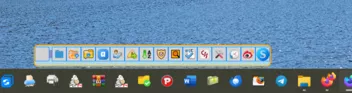

-
 Danke.