- Firefox-Version
- Alle
- Betriebssystem
- Windows 10 & Windows 11
Hallo, ich möchte hier ein neues Skript vorstellen.
Zu aller erst aber ein  liches Danke an einen Unbekannten
 (Er möchte nicht genannt werden)
Um das Skript nutzen zu können, müssen natürlich einige Vorbereitungen getroffen werden!
Firefox sollte JavaSkript unterstützen.
Bisher funktioniert das Skript nur auf Windowssystemen.
Um es auch kompatibel zu MacOS oder Linux zu machen, bräuchte ich Tester und Helfer. 
Nun die erforderlichen Angaben.
Wichtig
Alle hier von mir zur Verfügung gestellte Skripte sind unter zu Hilfenahme von KI erstellt!
Genauere Quellenangaben wird es nicht geben, da sehr oft mehrere KI's, neben den Hilfen von verschiedenen Nutzern
dieses Boards, aber auch einiger anderen Quellen, genutzt werden.
Und es hilft niemandem, wenn ich eine Liste von Internetadressen als Quelle hier oder in den JS schreibe.
Nun denn, hier mein Skript.
// FoxInstanzStarter.uc.js
// Das Script erstellt einen Button, der ein Menü zur Auswahl weiterer Instanzen öffnet.
//
// Source file https://www.camp-firefox.de/forum/thema/xxx

/* ----------------------------------------------------------------------------------- */
/*     Zu beachten ist, dass die Pade auf eigene Umgebung geändert werden müssen       */
/*               aus z.B. "C:\Programme\Mozilla Firefoxfirefox.exe" wird               */
/*                  "C:\\Program Files\\Mozilla Firefox\\firefox.exe"                  */
/* ----------------------------------------------------------------------------------- */

/* ----------------------------------------------------------------------------------- */
/*  IMPORTANT!               This script was created using AI                          */
/* ----------------------------------------------------------------------------------- */


(function () {
  if (!window.gBrowser || !CustomizableUI) return;

  const
  // ■■ START UserConfiguration ■■■■■■■■■■■■■■■■■■■■■■■■■■■■■■■■
           id = 'aboutprofiles-Start', // Id des Buttons
        label = 'Profil zusätzlich starten', // Bezeichnung des Buttons
  tooltiptext = 'Firefox Profile starten (Auswahl)',
  // Icon-------------------------------------------------------
   buttonIcon = 'logo.svg', // [Name.Dateiendung] des Symbols
     iconPath = 'file:///C:/PortableApps/icon/', // Pfad zum Ordner der die Icons beinhaltet

  // Firefox-Profile
/* ----------------------------------------------------------------------------------- */
/*  Installierte Anwendung                                                             */
/* ----------------------------------------------------------------------------------- */
    instApps = [
      {
        name: "Mira",
        exe: "C:\\Program Files\\Mozilla Firefox\\firefox.exe",
        profile: "C:\\Users\\Mira\\AppData\\Roaming\\Mozilla\\Firefox\\Profiles\\Mira",
        icon: "Finale.svg"
      },
      {
        name: "Testprofil",
        exe: "C:\\Program Files\\Mozilla Firefox\\firefox.exe",
        profile: "C:\\Users\\Mira\\AppData\\Roaming\\Mozilla\\Firefox\\Profiles\\Testprofil",
        icon: "Finale.svg"
      },
      {
        name: "TEST_24-03-29",
        exe: "C:\\Program Files\\Mozilla Firefox\\firefox.exe",
        profile: "C:\\Users\\Mira\\AppData\\Roaming\\Mozilla\\Firefox\\Profiles\\yd7mkrc6.TEST_24-03-29",
        icon: "Finale.svg"
      },
      {
        name: "Nightly",
        exe: "C:\\Program Files\\Firefox Nightly\\firefox.exe",
        profile: "C:\\Users\\Mira\\AppData\\Roaming\\Mozilla\\Firefox\\Profiles\\umilg7ve.Nightly",
        icon: "Nightly.svg"
      },
    ],

/* ----------------------------------------------------------------------------------- */
/*  Portable Anwendung                                                                 */
/* ----------------------------------------------------------------------------------- */
    portableApps = [
      {
        name: "Version 53.0 💛",
        exe: "C:\\PortableApps\\v.56.0\\Firefox\\firefox.exe",
        profile: "C:\\PortableApps\\v.56.0\\Profilordner",
        icon: "Finale.svg"
      },
      {
        name: "Version 100.0 💛",
        exe: "C:\\PortableApps\\v.100.0\\Firefox\\firefox.exe",
        profile: "C:\\PortableApps\\v.100.0\\Profilordner",
        icon: "Finale.svg"
      },
      {
        name: "Beta 151.0b10  💙",
        exe: "C:\\PortableApps\\Beta\\Firefox\\firefox.exe",
        profile: "C:\\PortableApps\\Beta\\Profilordner",
        icon: "Beta.svg"
      },
      {
        name: "Nightly 152.0a1 (2026-05-13) 💜",
        exe: "C:\\PortableApps\\Nightly\\Firefox\\firefox.exe",
        profile: "C:\\PortableApps\\Nightly\\Profilordner",
        icon: "Nightly.svg"
      }
    ];
  // ■■ END UserConfiguration ■■■■■■■■■■■■■■■■■■■■■■■■■■■■■■■■■■

  const profiles = [...instApps, ...portableApps];

  if (document.getElementById(id)) return;

  // SVG-Kontext-Eigenschaften aktivieren
  try {
    if (!Services.prefs.getBoolPref("svg.context-properties.content.enabled", false)) {
      Services.prefs.setBoolPref("svg.context-properties.content.enabled", true);
    }
  } catch (e) {}

  // Navbar suchen
  const navbar = document.getElementById("nav-bar-customization-target");
  if (!navbar) return;


  // Button als customizable Element registrieren
  CustomizableUI.createWidget({
    id: id,
    type: "custom",
    defaultArea: CustomizableUI.AREA_NAVBAR,
    label: label,
    tooltiptext: tooltiptext,
    onBuild: function(aDocument) {
      const button = aDocument.createXULElement("toolbarbutton");
      button.id = id;
      button.setAttribute("class", "toolbarbutton-1 chromeclass-toolbar-additional");
      button.setAttribute("label", label);
      button.setAttribute("tooltiptext", tooltiptext);
      button.setAttribute("type", "menu");
      button.style.listStyleImage = `url("${iconPath}${buttonIcon}")`;
      button.style.MozContextProperties = "fill, stroke, fill-opacity";
      button.style.minWidth = "fit-content";
      button.style.color = "#fca800";

      // Menü erstellen
      const popup = aDocument.createXULElement("menupopup");
      popup.id = `${id}-popup`;

      // für jeden Menüeintrag eine eigene Schaltfläche erstellen
      for (const item of profiles) {
        const menuitem = aDocument.createXULElement("menuitem");
        menuitem.setAttribute("label", item.name);
        menuitem.setAttribute("class", "menuitem-iconic");
        menuitem.setAttribute("image", `${iconPath}${item.icon}`);
        menuitem.style.listStyleImage = `url("${iconPath}${item.icon}")`;

        // Profil starten
        menuitem.addEventListener("command", () => launchProfile(item));
        popup.appendChild(menuitem);
      }

      // Menü an Button anhängen
      button.appendChild(popup);
      return button;
    }
  });

  // Funktion zum Starten des Browsers mit dem ausgewählten Profil
  function launchProfile(item) {
    try {
      const exeFile = Cc["@mozilla.org/file/local;1"].createInstance(Ci.nsIFile);
      exeFile.initWithPath(item.exe);

      const process = Cc["@mozilla.org/process/util;1"].createInstance(Ci.nsIProcess);
      process.init(exeFile);

      const isFirefox = item.exe.toLowerCase().includes("firefox.exe");
      const isProfilePath = item.profile && (item.profile.includes("\\") || item.profile.includes("/"));

      // -new-instance für neue Instanzen (wie von Mozilla empfohlen)
      let args = ["-new-instance"];

      if (isFirefox && isProfilePath) {
        // Portable/Profile per Pfad
        args.push("-profile", item.profile);
      } else if (isFirefox) {
        // Installierte Profile per Name
        args.push("-P", item.profile);
      /*  args.push("-P", item.profile.split("\\").pop()); */
      }

      args.push("-foreground");
      process.run(false, args, args.length);
    } catch (e) {
      console.error("[FoxStarter]", e);
    }
  }
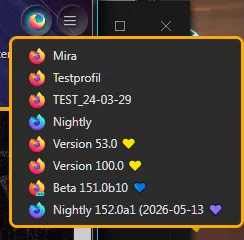
})();Und so könnte das Aussehen.
Weitere Symbole 🛠️ und Sonderzeichen 🍀:

oder