Danke!
Gern geschehen. Es ist doch immer wieder eine Freude, wenn man helfen kann. 
Danke!
Gern geschehen. Es ist doch immer wieder eine Freude, wenn man helfen kann.
Mal eine Frage so in die Runde!
Muss das "event.target.ownerGlobal" bzw. "event.target.documentGlobal." überhaupt sein?
Ich frage, weil beim Durchforsten meiner genutzten Skripte auch welche dabei waren,
da fehlte dies!
Diese Skripte funktionierten sowohl in der aktuellen 150.01 als auch im Nightly 152.
Ergänzte ich diese Skripte um "event.target.ownerGlobal." bzw. "event.target.documentGlobal." ,
änderte sich das.
Entweder funktionierten sie in der aktuellen Versin oder eben im Nightly.
Also, kann man "event.target.ownerGlobal" bzw. "event.target.documentGlobal." nicht einfach weglassen?

Muss das "event.target.ownerGlobal" bzw. "event.target.documentGlobal." überhaupt sein?
Ich denke, dass es seine Bewandtnis hat. Da ich da auch keine Ahnung habe, habe ich mal mit Google im KI Modus gesucht:
Google Search
Danke milupo
Ich habe dann mal weiter mit dieser KI gearbeitet und es kam dabei ein Wrapper raus!
Also eine Abfrage ob "event.target.ownerGlobal" bzw. "event.target.documentGlobal." genutzt wird!
Vorher:
      button.addEventListener('click', (event) => {
        if (event.button === 0) {
          event.target.ownerGlobal.openTrustedLinkInopenTrustedLinkIn(link, "tab");
        //  event.target.documentGlobal.openTrustedLinkInopenTrustedLinkIn(link, "tab");   ab Version 152
        }
      });
Nachher:
      button.addEventListener('click', (event) => {
        if (event.button === 0) {
          // DER WRAPPER: Prüft erst documentGlobal (Neu), dann ownerGlobal (Alt), dann Fallback
          const win = event.target.documentGlobal || event.target.ownerGlobal || window;

          // Aufruf über das erkannte Fenster-Objekt
          win.openTrustedLinkIn(link, "tab");
        }
      });
Somit funktionieren die Skripte jetzt und auch später, und ich muss dann nicht mehr basteln.
Somit funktionieren die Skripte jetzt und auch später, und ich muss dann nicht mehr basteln.
Na, das ist doch dann mal was.
Beispiele!
// Button_for_Profilfolder.us.js
// Das Script erstellt einen Button, der direkt den "Profilordner" öffnet.

// Source file https://www.camp-firefox.de/forum/thema/140072/?postID=1282691#post1282691

/* ----------------------------------------------------------------------------------- */
/*     Zu beachten ist, dass die Grafiken sich im richtigen Ordner befinden müssen     */
/*            %appdata%\Mozilla\Firefox\Profiles\"Profilname"\chrome\icons             */
/* ----------------------------------------------------------------------------------- */

(function() {

  if (!window.gBrowser)
    return;

  const
  // ■■ START UserConfiguration ■■■■■■■■■■■■■■■■■■■■■■■■■■■■■■■■
           id = 'profilefolder-ToolBarButton', // Id des Buttons
        label = 'Profil-Ordner öffnen', // Bezeichnung des Buttons
  tooltiptext = 'Profil-Ordner öffnen',
  // Icon-------------------------------------------------------
         icon = 'user.svg',  // [Name.Dateiendung] des Symbols
     iconPath = '/chrome/icons/', // Pfad zum Ordner der das Icon beinhaltet
  // ■■ END UserConfiguration ■■■■■■■■■■■■■■■■■■■■■■■■■■■■■■■■■■
  curProfDir = PathUtils.toFileURI(PathUtils.join(PathUtils.profileDir));

	if (Services.prefs.getBoolPref('svg.context-properties.content.enabled') == false) {
		Services.prefs.setBoolPref('svg.context-properties.content.enabled', true );
	}
  //BUTTON
	try {
    CustomizableUI.createWidget({
      id: id,
      defaultArea: CustomizableUI.AREA_NAVBAR,
      label: label,
      tooltiptext: tooltiptext,

      onCreated: (button) => {
        button.style.MozContextProperties = 'fill, stroke, fill-opacity';
        button.style.listStyleImage = 'url("' + curProfDir + iconPath + icon + '")';
        button.style.minWidth = 'fit-content';
      //  button.style.color = '#ff5a79'; // Farbe für das SVG-Icon setzen
      }
    });
	} catch(e) {};

  (function click_button() {
    const button = document.getElementById(id);
    if (button) {
      button.style.fill = '#ff5a79';  // hier die Farbe setzen
      /* Oder diese Lösung wenn ganz sicher nur das Icon-Element angesprochen werden soll */
      /*
      let iconNode = button.querySelector('.toolbarbutton-icon');
      if (iconNode) {
        iconNode.style.fill = '#ff5a79';
      } */
      // click
      button.addEventListener('click', (event) => {
        if (event.button === 0) {
          // DER WRAPPER: Prüft erst documentGlobal (Neu), dann ownerGlobal (Alt)
          const win = event.target.documentGlobal || event.target.ownerGlobal;

          // Aufruf über das erkannte Fenster-Objekt
          win.Services.dirsvc.get("ProfD", Ci.nsIFile).launch();
        }
      });
    } else {
      // Wenn der Button noch nicht existiert, später nochmal probieren
      setTimeout(click_button, 100);
    }
  })();

})();oder
// QuickLinkButton-about-config.uc.js
// Das Script erstellt einen Button, der einen Tab mit "About:Config" öffnet.

// Source file https://www.camp-firefox.de/forum/thema/140072/?postID=1282691#post1282691

/* ----------------------------------------------------------------------------------- */
/*     Zu beachten ist, dass die Grafiken sich im richtigen Ordner befinden müssen     */
/*            %appdata%\Mozilla\Firefox\Profiles\"Profilname"\chrome\icons             */
/* ----------------------------------------------------------------------------------- */

/* ----------------------------------------------------------------------------------- */
/*  IMPORTANT!               This script was created using AI                          */
/* ----------------------------------------------------------------------------------- */

(function() {

  if (!window.gBrowser)
    return;

  const
  // ■■ START UserConfiguration ■■■■■■■■■■■■■■■■■■■■■■■■■■■■■■■■
           id = 'aboutconfig_button', // Id des Buttons
         link = 'about:config', // Linkziel des Buttons
        label = 'Quicklink: about:config', // Bezeichnung des Buttons
  tooltiptext = 'Quicklink:\nabout:config',
  // Icon-------------------------------------------------------
         icon = 'skull-crossbones.svg',  // [Name.Dateiendung] des Symbols
     iconPath = '/chrome/icons/', // Pfad zum Ordner der das Icon beinhaltet
  // ■■ END UserConfiguration ■■■■■■■■■■■■■■■■■■■■■■■■■■■■■■■■■■
  curProfDir = PathUtils.toFileURI(PathUtils.join(PathUtils.profileDir));

	if (Services.prefs.getBoolPref('svg.context-properties.content.enabled') == false) {
		Services.prefs.setBoolPref('svg.context-properties.content.enabled', true );
	}
  // Button erstellen
	try {
    CustomizableUI.createWidget({
      id: id,
      defaultArea: CustomizableUI.AREA_NAVBAR,
      label: label,
      tooltiptext: tooltiptext,

      onCreated: (button) => {
        // Optik
        button.style.MozContextProperties = 'fill, stroke, fill-opacity';
        button.style.listStyleImage = 'url("' + curProfDir + iconPath + icon + '")';
      //  button.style.listStyleImage = 'url("chrome://global/skin/icons/heart.svg")';  // ist nur zum testen !!
        button.style.minWidth = 'fit-content';
        button.style.fill = '#ffff00';  // hier die Farbe setzen
      }
    });
	} catch(e) {};

  //click
  (function click_button() {

    const button = document.getElementById(id);
    if (button) {
  //    button.style.fill = '#ffff00';  // oder hier die Farbe setzen

      button.addEventListener('click', (event) => {
        if (event.button === 0) {
          // DER WRAPPER: Prüft erst documentGlobal (Neu), dann ownerGlobal (Alt)
          const win = event.target.documentGlobal || event.target.ownerGlobal;

          // Aufruf über das erkannte Fenster-Objekt
          win.openTrustedLinkIn(link, "tab");
        }
      });
    } else {
      // Wenn der Button noch nicht existiert, später nochmal probieren
      setTimeout(click_button, 100);
    }
  })();

})();oder
// Addons-UpDate-Check.uc.js
// Das Script erstellt einen Button, der einen UpDate-Check ausführt und dies in einem neuen Tab anzeigt.

// Source file https://www.camp-firefox.de/forum/thema/140072/?postID=1282691#post1282691

/* ----------------------------------------------------------------------------------- */
/*     Zu beachten ist, dass die Grafiken sich im richtigen Ordner befinden müssen     */
/*            %appdata%\Mozilla\Firefox\Profiles\"Profilname"\chrome\icons             */
/* ----------------------------------------------------------------------------------- */

(function() {

  if (!window.gBrowser)
	return;

   const
   // ■■ START UserConfiguration ■■■■■■■■■■■■■■■■■■■■■■■■■■■■■■■■
            id = 'addons-update-button', // Id des Buttons
          link = 'about:addons', // Linkziel des Buttons
         label = 'Add-ons Update', // Bezeichnung des Buttons
   tooltiptext = 'Add-ons aktualisieren',
   // Icon-------------------------------------------------------
          icon = 'sync.svg',  // [Name.Dateiendung] des Symbols
      iconPath = '/chrome/icons/', // Pfad zum Ordner der das Icon beinhaltet
   // ■■ END UserConfiguration ■■■■■■■■■■■■■■■■■■■■■■■■■■■■■■■■■■
   curProfDir = PathUtils.toFileURI(PathUtils.join(PathUtils.profileDir));

	if (Services.prefs.getBoolPref('svg.context-properties.content.enabled') == false) {
		Services.prefs.setBoolPref('svg.context-properties.content.enabled', true );
	}
   //BUTTON
	try {
      CustomizableUI.createWidget({
         id: id,
         defaultArea: CustomizableUI.AREA_NAVBAR,
         label: label,
         tooltiptext: tooltiptext,

         onCreated: (button) => {
            button.style.MozContextProperties = 'fill, stroke, fill-opacity';
            button.style.listStyleImage = 'url("' + curProfDir + iconPath + icon + '")';
            button.style.minWidth = 'fit-content';
            button.style.color = '#ffe10f'; // Farbe für das SVG-Icon setzen
         }
      });
	} catch(e) {};

// click
  (function click_button() {
    const button = document.getElementById(id);
    if (button) {
      button.addEventListener('click', (event) => {
        if (event.button !== 0) {
          return;
        }
        // DER WRAPPER: Prüft erst documentGlobal (Neu), dann ownerGlobal (Alt)
        const win = event.target.documentGlobal || event.target.ownerGlobal;

        // Aufruf über das erkannte Fenster-Objekt
        win.openTrustedLinkIn(link, 'tab');

        window.addEventListener('pageshow', function onPageshow(e) {
          const doc = e.target;
          if (doc.URL !== 'about:addons') {
            return;
          }
          window.removeEventListener('pageshow', onPageshow);
          doc.querySelector('addon-page-options panel-item[action="view-recent-updates"]').click();
          doc.querySelector('addon-page-options panel-item[action="check-for-updates"]').click();
          content.setTimeout(function () {
            const categories = doc.getElementById('categories');
            categories
              .querySelector('button[viewid="addons://updates/recent"]')
              .click();
            categories
              .querySelector('button[viewid="addons://updates/available"]')
              .click();
          }, 1500);
        });
      });
    } else {
      setTimeout(click_button, 100);
    }
  })();

})();Moin, Mira_Belle , ich habe nun mal dein Script genommen, in den Zeilen 23 - 24 mein gewünschtes Symbol hinterlegt, dieses wird auch angezeigt, allerdings funktioniert der Button nicht. Es passiert einfach nichts. Wo könnte die Lösung legen?
// Addons-UpDate-Check.uc.js
// Das Script erstellt einen Button, der einen UpDate-Check ausführt und dies in einem neuen Tab anzeigt.

// Source file https://www.camp-firefox.de/forum/thema/140072/?postID=1282691#post1282691

/* ----------------------------------------------------------------------------------- */
/*     Zu beachten ist, dass die Grafiken sich im richtigen Ordner befinden müssen     */
/*            %appdata%\Mozilla\Firefox\Profiles\"Profilname"\chrome\icons             */
/* ----------------------------------------------------------------------------------- */

(function() {

  if (!window.gBrowser)
	return;

   const
   // ■■ START UserConfiguration ■■■■■■■■■■■■■■■■■■■■■■■■■■■■■■■■
            id = 'addons-update-button', // Id des Buttons
          link = 'about:addons', // Linkziel des Buttons
         label = 'Add-ons Update', // Bezeichnung des Buttons
   tooltiptext = 'Add-ons aktualisieren',
   // Icon-------------------------------------------------------
		  icon = '0060.png',  // [Name.Dateiendung] des Symbols
      iconPath = '/chrome/icons/', // Pfad zum Ordner der das Icon beinhaltet
   // ■■ END UserConfiguration ■■■■■■■■■■■■■■■■■■■■■■■■■■■■■■■■■■
   curProfDir = PathUtils.toFileURI(PathUtils.join(PathUtils.profileDir));

	if (Services.prefs.getBoolPref('svg.context-properties.content.enabled') == false) {
		Services.prefs.setBoolPref('svg.context-properties.content.enabled', true );
	}
   //BUTTON
	try {
      CustomizableUI.createWidget({
         id: id,
         defaultArea: CustomizableUI.AREA_NAVBAR,
         label: label,
         tooltiptext: tooltiptext,

         onCreated: (button) => {
            button.style.MozContextProperties = 'fill, stroke, fill-opacity';
            button.style.listStyleImage = 'url("' + curProfDir + iconPath + icon + '")';
            button.style.minWidth = 'fit-content';
            button.style.color = '#ffe10f'; // Farbe für das SVG-Icon setzen
         }
      });
	} catch(e) {};

// click
  (function click_button() {
    const button = document.getElementById(id);
    if (button) {
      button.addEventListener('click', (event) => {
        if (event.button !== 0) {
          return;
        }
        // DER WRAPPER: Prüft erst documentGlobal (Neu), dann ownerGlobal (Alt)
        const win = event.target.documentGlobal || event.target.ownerGlobal;

        // Aufruf über das erkannte Fenster-Objekt
        win.openTrustedLink(link, 'tab');

        window.addEventListener('pageshow', function onPageshow(e) {
          const doc = e.target;
          if (doc.URL !== 'about:addons') {
            return;
          }
          window.removeEventListener('pageshow', onPageshow);
          doc.querySelector('addon-page-options panel-item[action="view-recent-updates"]').click();
          doc.querySelector('addon-page-options panel-item[action="check-for-updates"]').click();
          content.setTimeout(function () {
            const categories = doc.getElementById('categories');
            categories
              .querySelector('button[viewid="addons://updates/recent"]')
              .click();
            categories
              .querySelector('button[viewid="addons://updates/available"]')
              .click();
          }, 1500);
        });
      });
    } else {
      setTimeout(click_button, 100);
    }
  })();

})();Wo könnte die Lösung legen?
Das Skript von Mira funktioniert mit eigenem Icon einwandfrei hier.
In deinem Skript stimmt die Zeile 60 nicht.
Hast du das Skript nicht richtig kopiert
Ein weiteres Script funktioniert nicht mehr:
// ==UserScript==
// @name           downloadSoundPlay_Fx 138.uc.js
// @namespace      http://space.geocities.yahoo.co.jp/gl/alice0775
// @description    Downloads überwachen und Ton Dateien für Download-Manager abspielen
// @include        main
// @compatibility  Firefox 115
// @author         Alice0775
// @version        2023/10/13 use ChromeUtils.import instead of XPCOMUtils.defineLazyModuleGetter
// @version        2016/03/15 hack of selection chanhe
// @version        2015/01/15 1:00 Fixed strictmode
// @version        2013/12/18 11:00 defineLazyModuleGetter for Firefox26
// @version        2013/12/18 Firefox26
// @version        2009/11/28
// ==/UserScript==

var downloadPlaySound = {
  // -- config --
  DL_START : null,
  DL_DONE  : "file:///G:/xxxx/Sounds/skill.wav",
  DL_CANCEL: null,
  DL_FAILED: "file:///G:/xxxx/Sounds/DICE2.wav/",
  // -- config --

  _list: null,
  init: function sampleDownload_init() {
    const { Downloads } = ChromeUtils.importESModule(
    "resource://gre/modules/Downloads.sys.mjs");

    //window.removeEventListener("load", this, false);
    window.addEventListener("unload", this, false);

    //**** Download-Überwachung hinzufügen
    if (!this._list) {
      Downloads.getList(Downloads.ALL).then(list => {
        this._list = list;
        return this._list.addView(this);
      }).then(null, Cu.reportError);
    }
  },

  uninit: function() {
    window.removeEventListener("unload", this, false);
    if (this._list) {
      this._list.removeView(this);
    }
  },

  onDownloadAdded: function (aDownload) {
    //**** Startereignis herunterladen
    if (this.DL_START)
      this.playSoundFile(this.DL_START);
  },

  onDownloadChanged: function (aDownload) {
    //**** Download abbrechen
    if (aDownload.canceled && this.DL_CANCEL)
      this.playSoundFile(this.DL_CANCEL)
    //**** Herunterladen fehlgeschlagen
    if (aDownload.error && this.DL_FAILED)
      this.playSoundFile(this.DL_FAILED)
    //**** Download abgeschlossen
    if (typeof aDownload.downloadPlaySound == "undefined" &&
        aDownload.succeeded && aDownload.stopped && this.DL_DONE) {
      aDownload.downloadPlaySound = true;
      this.playSoundFile(this.DL_DONE);
    }
  },

  playSoundFile: function(aFilePath) {
    if (!aFilePath)
      return;
    var ios = Components.classes["@mozilla.org/network/io-service;1"]
              .createInstance(Components.interfaces["nsIIOService"]);
    try {
      var uri = ios.newURI(aFilePath, "UTF-8", null);
    } catch(e) {
      return;
    }
    var file = uri.QueryInterface(Components.interfaces.nsIFileURL).file;
    if (!file.exists())
      return;

    this.play(uri);
   },

  play: function(aUri) {
    var sound = Components.classes["@mozilla.org/sound;1"]
              .createInstance(Components.interfaces["nsISound"]);
    sound.play(aUri);
  },

  handleEvent: function(event) {
    switch (event.type) {
      case "unload":
        this.uninit();
        break;
    }
  }
}
downloadPlaySound.init();
Das Skript von Mira funktioniert mit eigenem Icon einwandfrei hier.
In deinem Skript stimmt die Zeile 60 nicht.
Hm, ich kann keinen Unterschied sehen, kopiert habe ich es aus #26
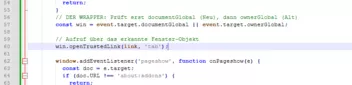
Dein Eintrag:
win.openTrustedLink(link, 'tab');
Der von Mira:
win.openTrustedLinkIn(link, 'tab');
Du siehst den Unterschied!?
Ein weiteres Script funktioniert nicht mehr:
Ich habe das mal per KI anpassen lassen, funktioniert hier
// ==UserScript==
// @name           downloadSoundPlay_Fx 152.uc.js
// @namespace      https://github.com/alice0775/userChrome.js
// @description    Downloads überwachen und Ton Dateien für Download-Manager abspielen
// @include        main
// @compatibility  Firefox 152
// @author         Alice0775
// @version        2023/10/13 use ChromeUtils.import instead of XPCOMUtils.defineLazyModuleGetter
// @version        2016/03/15 hack of selection chanhe
// @version        2015/01/15 1:00 Fixed strictmode
// @version        2013/12/18 11:00 defineLazyModuleGetter for Firefox26
// @version        2013/12/18 Firefox26
// @version        2009/11/28
// geändert per    KI ChatGPT 06.05.2026
// ==/UserScript==

var downloadPlaySound = {
  // -- config --
  DL_START : null,
  DL_DONE  : "file:///C:/Windows/Media/tada.wav",
  // DL_CANCEL: "file:///C:/Windows/Media/Windows Notify Calendar.wav",
  // DL_FAILED: "file:///C:/Windows/Media/Windows Notify Calendar.wav",
  // -- config --

  _list: null,

  async init() {
    const { Downloads } = ChromeUtils.importESModule(
      "resource://gre/modules/Downloads.sys.mjs"
    );

    window.addEventListener("unload", this);

    try {
      this._list = await Downloads.getList(Downloads.ALL);
      this._list.addView(this);
    } catch (e) {
      console.error("DownloadPlaySound init error:", e);
    }
  },

  uninit() {
    window.removeEventListener("unload", this);
    if (this._list) {
      this._list.removeView(this);
    }
  },

  onDownloadAdded(download) {
    if (this.DL_START) {
      this.playSoundFile(this.DL_START);
    }
  },

  onDownloadChanged(download) {
    if (download.canceled && this.DL_CANCEL) {
      this.playSoundFile(this.DL_CANCEL);
    }

    if (download.error && this.DL_FAILED) {
      this.playSoundFile(this.DL_FAILED);
    }

    if (
      !download._soundPlayed &&
      download.succeeded &&
      download.stopped &&
      this.DL_DONE
    ) {
      download._soundPlayed = true;
      this.playSoundFile(this.DL_DONE);
    }
  },

  playSoundFile(path) {
    if (!path) return;

    try {
      // moderner Ansatz: Audio statt nsISound
      let audio = new Audio(path);
      audio.volume = 1.0;
      audio.play().catch(e => console.error("Audio play failed:", e));
    } catch (e) {
      console.error("playSoundFile error:", e);
    }
  },

  handleEvent(event) {
    if (event.type === "unload") {
      this.uninit();
    }
  }
};

downloadPlaySound.init();2x Ja...... 😀
Vielen Dank! 🩷
Allerdings habe ich keinen Unterschied gesehen. Auch im Screenshot vom Script bei Mira fehlte in Zeile 60 das In...
Egal, beide Scripte funktionieren nun mit deiner Hilfe.
Hatte nochmal editiert
Dieser Screenshot ist aus dem Script in 26# ???
Ich verstehe es nicht... wenn ich in #26 das Script anschaue, ist in Zeile 60 kein "openTrustedLinkIn(link, 'tab');" zu sehen,
Ich sehe da "openTrustedLink(link, 'tab');"
Vielleicht bin ich ja auch nur alt und blind 😀
Jetzt habe ich doch glatt meinen Kaffee verschüttet! 
Aber es hat sich ja geklärt und ich habe ausnahmsweise mal keinen Fehler gemacht. 
Ich verstehe es nicht... wenn ich in #26 das Script anschaue, ist in Zeile 60 kein "openTrustedLinkIn(link, 'tab');" zu sehen,
Ich sehe da "openTrustedLink(link, 'tab');"Vielleicht bin ich ja auch nur alt und blind 😀
Doch, doch, das steht da!
Du bist definitiv blind, ob alt kann ich nicht beurteilen. 
Direkt da rauskoppiert:
ist in Zeile 60 kein "openTrustedLinkIn(link, 'tab');" zu sehen,
Verstehe ich nicht
Aber egal, es funktioniert ja jetzt.
ich habe ausnahmsweise mal keinen Fehler gemacht.
Naja, so oft passiert dir das ja nun auch nicht.
Fehler kann jeder mal machen, dann wird er behoben...und alles ist wieder gut