- Firefox-Version
- 158
- Betriebssystem
- Win 11
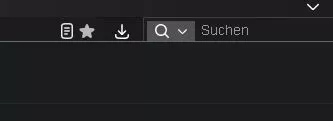
Hallo, ich habe festgestellt dass der Lesezeichenstern (wenn aktuelle Seite LZ ist)
und der Downloadpfeil (nach erfolgtem Download) nicht mehr eingefärbt dargestellt werden.
Kann einer der CSS Profis in meiner Datei die Ursache erkennen?
Vielen Dank fürs drüberschauen ...
CSS
/* Erzwingt eckige Kanten für alle Firefox-Menüs, Popups und UI-Elemente */
* {
    border-radius: 0px !important;
}

/* Spezifischer Fix für neuere Firefox-Menü-Variablen */
:root {
    --arrowpanel-border-radius: 0px !important;
    --arrowpanel-menuitem-border-radius: 0px !important;
}

.titlebar-spacer[type="pre-tabs"],
.titlebar-spacer[type="post-tabs"] {
    display: none !important;
}

sidebarheader, #history-Panel > hbox { display: none !important; }

sidebarheader, #bookmarksPanel > hbox { display: none !important; }

/* Höhe und Abstand der Tableiste*/
#TabsToolbar {
  height: 20px !important;
}

.tabbrowser-tab  {
  max-height: 25px !important;
}

.tabbrowser-tab[selected] .tab-content {
  background: #000088 !important;
 }

#TabsToolbar {
  margin-top: -8px !important;
  margin-bottom: -8px !important;
}

#nav-bar {
  max-height: 26px !important;
  margin-top: 0px !important;
  margin-bottom: -2px !important;
}

#search-container {
  min-width: 250px !important;
  max-width: 250px !important;
}

#PopupAutoComplete richlistbox.autocomplete-richlistbox richlistitem.autocomplete-richlistitem div.two-line-wrapper div.labels-wrapper div.label-row.line2-label {
  display: none !important;

}


#sidebar-panel-header {
	display: none !important;
}

/* Lesezeichen Sidebar öffnende Dreiecke entfernen */


#bookmarksPanel treechildren::-moz-tree-twisty(closed),
#bookmarksPanel treechildren::-moz-tree-twisty(open){
height:0!important;
width:0!important;
display:none!important;
}

#sidebar-box {
  max-width: 170px!important;
  min-width: 0 !important;
}

@-moz-document url("chrome://browser/content/places/bookmarksSidebar.xhtml") {

.sidebar-placesTree {
  margin-top: -50px !important;
}
}

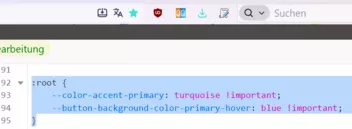
:root {
    --color-accent-primary: turquoise !important;
    --button-background-color-primary-hover: blue !important;
}

/* Entfernt die farbigen Rahmen bei allen aktiven Eingabefeldern */
input:not([type="file"], [type="image"]):focus-visible,
select:focus-visible,
button:focus-visible,
textarea:focus-visible {
    outline-style: none !important;
}


#urlbar > div {
   border: none !important;
}

#searchbar-new {
   --toolbar-field-border-color-focus: none !important;
}