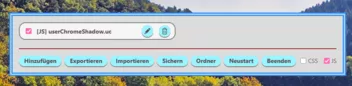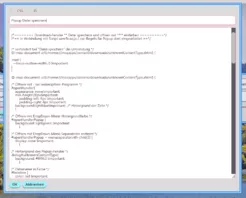
- Firefox-Version
- 146.0.1/148.0a1
- Betriebssystem
- Windows 11
AI-Generated UserChrome Manager
[!CAUTION]
Disclaimer: This project is entirely AI-generated. It may contain unexpected bugs or issues. Please use with caution and back up your configuration.
This is a customized UserChrome (UC) Manager created using AI to suit my personal workflow. It is designed for streamlined management of CSS and JS tweaks.
Note: Unlike traditional managers, this tool does not auto-scan or load local files from the chrome folder. All rules must be manually added or imported. All data is stored in:
chrome/userchromerules.json
✨ Key Features
- Unified Management: Manage both CSS and JS within a single interface.
- Dynamic Toggling: Supports real-time enabling/disabling of JS scripts (requires the script to return a cleanup function).
- Custom Storage: Keeps your browser directory clean by centralizing rules in a JSON file.
🚀 How to Use
Method 1: Standard Installation
- Preferences: Move config-prefs.js to your Firefox installation directory:
- Firefox/defaults/pref/config-prefs.js
- Script: Move UserChromeRules.uc.js to the Firefox installation root:
- Firefox/UserChromeRules.uc.js
- Launch: Restart Firefox. You will find the "UC Manager" option in the Main Menu (directly under the "Settings" item).
Method 2: Script Loader
If you already use another script manager, simply load UserChromeRules.uc.js as you would with any other .uc.js script.
🛠 Technical Details
For JS developers: To take advantage of the dynamic disable feature, ensure your script follows this pattern:
JavaScript
(function() {
    // Your code here
    return function() {
        // Cleanup code to run when disabled
    };
})();
📦 Included / Sample Scripts
Here are a few scripts you can add to the manager:
1. UserChromeRulesKitty.css
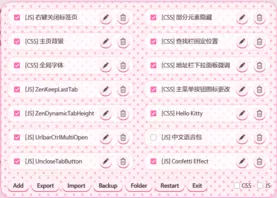
A Hello Kitty themed style for the manager interface.
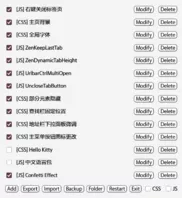
Layout Customization: By default, the manager uses a single-column layout. If you have many scripts and prefer a multi-column view, simply add the following CSS rule:
CSS
2. UserChromeRulesButton.uc.js
Adds a toolbar button to Firefox, allowing you to open the UC Manager interface quickly and easily.
A German language pack is provided below. By adding this as a new rule, you can switch the interface language to German:
JavaScript
// Only for UserChromeRules.uc.js (German Localization)

(function() {
  window.UCM_I18N.update({
    menu_label: "UC-Manager",
    btn_add: "Hinzufügen",
    btn_export: "Exportieren",
    btn_import: "Importieren",
    btn_backup: "Sichern",
    btn_folder: "Ordner",
    btn_restart: "Neustart",
    btn_exit: "Beenden",
    btn_modify: "Bearbeiten",
    btn_delete: "Löschen",
    btn_ok: "OK",
    btn_cancel: "Abbrechen",
    placeholder_name: "Regelname",
    tip_restart_js: "Diese Regel erfordert einen Neustart des Browsers, um sie vollständig zu deaktivieren.",
    confirm_restart: "Möchten Sie Firefox wirklich neu starten?",
    confirm_delete: (type, name) => `Möchten Sie den ${type}-Eintrag "${name}" wirklich löschen?`,
    confirm_overwrite: "Backup-Datei existiert bereits. Überschreiben?",
    msg_export_ok: (n) => `${n} Regel(n) erfolgreich exportiert.`,
    msg_backup_ok: "Backup erfolgreich erstellt!",
    picker_folder: "Export-Ordner auswählen",
    picker_file: "Datei auswählen",
    picker_type: "Dateityp"
  });
  return () => window.UCM_I18N.reset();
})();Note: The content above was translated by AI. If anything is unclear, please feel free to submit it to an AI for further translation.
Hinweis: Der obige Inhalt wurde von einer KI übersetzt. Falls etwas unverständlich sein sollte, leiten Sie den Text bitte zur erneuten Übersetzung an eine KI weiter.