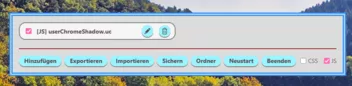
Works on stable and nightly.

aboutconfig/FocusNewTabSearch.uc.js at main · lindongbin/aboutconfig
Contribute to lindongbin/aboutconfig development by creating an account on GitHub.
github.com
Works on stable and nightly.

Ich habe das jetzt mal für einen Test installiert, funktioniert, ist aber mMn sehr gewöhnungsbedürftig. Ganz besonders wenn der Editor genutzt wird, denn hier ist man doch an notepad++ gewöhnt. Wenn das noch umgesetzt werden könnte, dann sieht die Sache schon anders aus. Ist nur mein erster Eindruck, gibt bestimmt andere Meinungen dazu.
Hello friend! As I mentioned in the main post, the primary purpose of this UC Manager is to simplify the management of CSS and JS. To achieve this, I store all the code within a single JSON file.
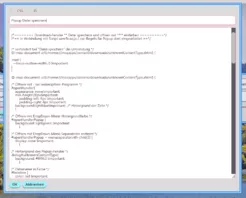
The "Edit" function is mainly designed to make it easier to paste code from other sources, rather than being a full-fledged environment for active coding. Therefore, if you need to frequently edit or debug your code, this manager might not be the best fit for you; in that case, I recommend using UC loaders developed by other experts.
Additionally, the code for this manager is fully open-source, so feel free to modify and customize it to your liking. Since this script was generated by AI, it certainly cannot compete with the UC loaders created by experienced developers. Therefore, I still recommend using those professional loaders to better meet your needs.
Hallo mein Freund! Wie ich bereits im Hauptbeitrag erwähnt habe, dient dieser UC-Manager primär der einfachen Verwaltung von CSS und JS. Daher speichere ich den gesamten Code in einer einzigen JSON-Datei.
Die Bearbeitungsfunktion ist hauptsächlich dafür gedacht, Code bequem aus anderen Quellen zu kopieren und einzufügen – sie ist nicht als vollwertiger Editor konzipiert. Wenn du also häufig Code bearbeiten oder debuggen musst, ist dieser Manager möglicherweise nicht die richtige Wahl für dich. In diesem Fall solltest du eher die UC-Loader anderer Experten verwenden.
Darüber hinaus ist der Code dieses Managers vollständig quelloffen (Open Source), sodass du ihn ganz nach deinen eigenen Vorlieben anpassen und umgestalten kannst. Da dieses Skript von einer KI generiert wurde, kann es sicherlich nicht mit den UC-Loadern der erfahrenen Entwickler (den "Profis") mithalten. Daher empfehle ich dir weiterhin, die Loader dieser Experten zu verwenden, um deine Anforderungen optimal zu erfüllen.
[!CAUTION]
Disclaimer: This project is entirely AI-generated. It may contain unexpected bugs or issues. Please use with caution and back up your configuration.
This is a customized UserChrome (UC) Manager created using AI to suit my personal workflow. It is designed for streamlined management of CSS and JS tweaks.
Note: Unlike traditional managers, this tool does not auto-scan or load local files from the chrome folder. All rules must be manually added or imported. All data is stored in:
chrome/userchromerules.json
If you already use another script manager, simply load UserChromeRules.uc.js as you would with any other .uc.js script.
For JS developers: To take advantage of the dynamic disable feature, ensure your script follows this pattern:
JavaScript
(function() {
    // Your code here
    return function() {
        // Cleanup code to run when disabled
    };
})();Here are a few scripts you can add to the manager:
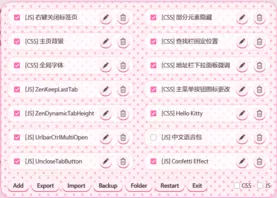
A Hello Kitty themed style for the manager interface.
Layout Customization: By default, the manager uses a single-column layout. If you have many scripts and prefer a multi-column view, simply add the following CSS rule:
CSS
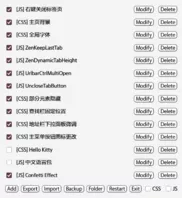
Adds a toolbar button to Firefox, allowing you to open the UC Manager interface quickly and easily.
A German language pack is provided below. By adding this as a new rule, you can switch the interface language to German:
JavaScript
// Only for UserChromeRules.uc.js (German Localization)

(function() {
  window.UCM_I18N.update({
    menu_label: "UC-Manager",
    btn_add: "Hinzufügen",
    btn_export: "Exportieren",
    btn_import: "Importieren",
    btn_backup: "Sichern",
    btn_folder: "Ordner",
    btn_restart: "Neustart",
    btn_exit: "Beenden",
    btn_modify: "Bearbeiten",
    btn_delete: "Löschen",
    btn_ok: "OK",
    btn_cancel: "Abbrechen",
    placeholder_name: "Regelname",
    tip_restart_js: "Diese Regel erfordert einen Neustart des Browsers, um sie vollständig zu deaktivieren.",
    confirm_restart: "Möchten Sie Firefox wirklich neu starten?",
    confirm_delete: (type, name) => `Möchten Sie den ${type}-Eintrag "${name}" wirklich löschen?`,
    confirm_overwrite: "Backup-Datei existiert bereits. Überschreiben?",
    msg_export_ok: (n) => `${n} Regel(n) erfolgreich exportiert.`,
    msg_backup_ok: "Backup erfolgreich erstellt!",
    picker_folder: "Export-Ordner auswählen",
    picker_file: "Datei auswählen",
    picker_type: "Dateityp"
  });
  return () => window.UCM_I18N.reset();
})();Note: The content above was translated by AI. If anything is unclear, please feel free to submit it to an AI for further translation.
Hinweis: Der obige Inhalt wurde von einer KI übersetzt. Falls etwas unverständlich sein sollte, leiten Sie den Text bitte zur erneuten Übersetzung an eine KI weiter.