


- Firefox-Version
- Firefox 159.0
- Betriebssystem
- Windows 11 Pro 64 Bit
Hallo zusammen,
kann man verhindern, das eine Website die Breite der Scrollbar beeinflussen kann, wenn es denn die Website macht?
Guckt Ihr dort ↓.
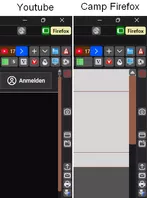
Das ↓ Javascript passt die Scrollbar an.
JavaScript
// Scrollbar.uc.js

"use strict";
/* Custom Scrollbars for Firefox ********************************************************************************************* */
/*																															   */
/* Version: v2.0.8.b.uc.js for Firefox 143+ 																				   */
/*																															   */
/* Scrollbar.v2.0.8.b.uc.js	  https://www.camp-firefox.de/forum/thema/139766/?postID=1280302#post1280302					   */
/*																															   */
/* ******************************************************************************************************************************

    README

        about:config >
            widget.windows.overlay-scrollbars.enabled > false (Windows)
            widget.gtk.overlay-scrollbars.enabled > false (Linux)
        [!] The above preferences have to be set to 'false' for this code to work
        [!] Die genannten Einstellungen müssen auf 'false' gesetzt werden, damit dieser Code funktioniert.

        user.js >
            user_pref("widget.non-native-theme.win.scrollbar.use-system-size", false);	// false schaltet die Systemeinstellung aus
            user_pref("widget.non-native-theme.scrollbar.size.override", 22);			// 22 setzt die Scrollbarbreite auf 22px)
        [!] The above entries must be set in user.js for this code to work.
        [!] Die oben genannten Einträge müssen in der user.js gesetzt werden, damit dieser Code funktioniert.

            /* ----------------------------------------------------------------------------------- */
            /*     Zu beachten ist, dass die Grafiken sich im richtigen Ordner befinden müssen     */
            /*            %appdata%\Mozilla\Firefox\Profiles\"Profilname"\chrome\icons             */
            /*                                                                                     */
            /*   Auch müssen die Dateinamen im Skript mit jenen im Ordner "icons" übereinstimmen   */
            /* ----------------------------------------------------------------------------------- */

/* *************************************************************************************************************************** */

(function() {

    /* **** Konfiguration **** */

    // PROFILE PHATH "CALCULATE"
    let ProfileDirectory = PathUtils.toFileURI(PathUtils.join(PathUtils.profileDir, 'chrome', 'icons'));

    // CUSTOM SCROLLBAR COLORS/GRADIENTS
    // - scrollbar
    let cs_scrollbar_arrows_color = 					"#D3D3D3"				   ;// "#7c7c7c"	"#1e90ff"
    let cs_scrollbar_arrows_hover_color = 				"#ffa600"				   ;// "#ffa600"	"#bebebe"
    let cs_scrollbar_size =								17							;// Important!	See README !!
    // - background
    let cs_background_color = 							"#1A1920"				   ;// default: cs_background_color = "#DDDDDD"	/ "#AEC5FA"
    let cs_background_roundness = 						4							;// default: cs_background_roundness = 0 / in px	/ 9
    let cs_ignore_color_gradients = 					true						;// default: cs_ignore_color_gradients = false / true 'flat' scrollbars
    // - corner
    let cs_corner_background_color = 					"#1C1B22"				   ;// default: cs_corner_background_color = "#DDDDDD" / - corner	/ "#CCCCCC"
    // - thumb/slider
    let cs_thumb_color = 								"#915C47"				   ;// default: cs_thumb_color = "#33CCFF" / thumb/slider
    let cs_thumb_hover_color = 							"#0082FC"				   ;// default: cs_thumb_hover_color = "#66FFFF"
    let cs_thumb_border_color = 						"#5b5b66"				   ;// default: cs_thumb_border_color = "#33CCFF"
    let cs_thumb_border = 								0							;// default: cs_thumb_border = 0 / in px 1
    let cs_thumb_roundness = 							4							;// default: cs_thumb_roundness = 0 / in px 9
    let cs_thumb_minimal_size = 						17							;// default: cs_thumb_minimal_size = 17 / in px
    // - buttons
    let cs_buttons_color = 								"#5B5B66"				   ;// default: cs_buttons_color = "#66FFFF" "Bahama Blue";/ buttons
    let cs_buttons_hover_color = 						"#0082FC"				   ;// default: cs_buttons_hover_color = "#33CCFF"	/ "#bfffff"
    let cs_button_size =								17							;// in px // default: cs_button_size = 17 / in px
    let cs_buttons_border = 							0							;// default: cs_buttons_border = 0 / in px
    let cs_buttons_roundness = 							4							;// default: cs_buttons_roundness = 0 / in px

    /* **** Ende Konfiguration **** */

    /* *************************************************************************************************************************** */
    // FIXED SCROLL BAR COLORS/COLOR GRADIENTS
    // - fixed values for background image gradients
    let GRADIENT_VERTICAL = 							"linear-gradient(to right,transparent,rgba(255,255,255,0.5),transparent)";
    let GRADIENT_HORINZONTAL = 							"linear-gradient(to bottom,transparent,rgba(255,255,255,0.5),transparent)";
    // - background
    let cs_background_image_vertical = 					GRADIENT_VERTICAL			;// default: cs_background_image_vertical = "linear-gradient(to right,transparent,rgba(255,255,255,0.5),transparent)"
    let cs_background_image_horizontal = 				GRADIENT_HORINZONTAL		;// default: cs_background_image_horizontal = "linear-gradient(to bottom,transparent,rgba(255,255,255,0.5),transparent)"
    // - corner
    let cs_corner_background_image = 					"linear-gradient(45deg,transparent 30%,rgba(255,255,255,0.5) 50%,transparent 70%),linear-gradient(-45deg,transparent 30%,rgba(255,255,255,0.5) 50%,transparent 70%)"						;// default: cs_corner_background_image = "linear-gradient(45deg,transparent 30%,rgba(255,255,255,0.5) 50%,transparent 70%),linear-gradient(-45deg,transparent 30%,rgba(255,255,255,0.5) 50%,transparent 70%)"
    // - thumb/slider
    let cs_thumb_image_vertical = 						GRADIENT_VERTICAL			;// default: cs_thumb_image_vertical = "linear-gradient(to right,transparent,rgba(255,255,255,0.5),transparent)"
    let cs_thumb_image_horizontal = 					GRADIENT_HORINZONTAL		;// default: cs_thumb_image_horizontal = "linear-gradient(to bottom,transparent,rgba(255,255,255,0.5),transparent)"
    let cs_thumb_hover_image_vertical = 				GRADIENT_VERTICAL			;// default: cs_thumb_hover_image_vertical = "linear-gradient(to right,transparent,rgba(255,255,255,0.5),transparent)"
    let cs_thumb_hover_image_horizontal = 				GRADIENT_HORINZONTAL		;// default: cs_thumb_hover_image_horizontal = "linear-gradient(to bottom,transparent,rgba(255,255,255,0.5),transparent)"
    // - buttons
    let cs_buttons_image_vertical = 					GRADIENT_VERTICAL			;// default: cs_buttons_image_vertical = "linear-gradient(to right,transparent,rgba(255,255,255,0.5),transparent)"
    let cs_buttons_image_horizontal = 					GRADIENT_HORINZONTAL		;// default: cs_buttons_image_horizontal = "linear-gradient(to bottom,transparent,rgba(255,255,255,0.5),transparent)"
    let cs_buttons_hover_image_vertical = 				GRADIENT_VERTICAL			;// default: cs_buttons_hover_image_vertical = "linear-gradient(to right,transparent,rgba(255,255,255,0.5),transparent)"
    let cs_buttons_hover_image_horizontal =				GRADIENT_HORINZONTAL		;// default: cs_buttons_hover_image_horizontal = "linear-gradient(to bottom,transparent,rgba(255,255,255,0.5),transparent)"

    // unset background image color gradients -> flat scrollbars
    if(cs_ignore_color_gradients === true)
        cs_background_image_vertical
        = cs_background_image_horizontal
        = cs_corner_background_image
        = cs_thumb_image_vertical
        = cs_thumb_image_horizontal
        = cs_thumb_hover_image_vertical
        = cs_thumb_hover_image_horizontal
        = cs_buttons_image_vertical
        = cs_buttons_image_horizontal
        = cs_buttons_hover_image_vertical
        = cs_buttons_hover_image_horizontal
        = "unset";

    let custom_scrollbars_code='';
    let custom_scrollbar_arrows_code='';

    custom_scrollbars_code=`
        scrollcorner,
        scrollbar > slider,
        scrollbar > slider > thumb,
        scrollbar > scrollbarbutton {
            /*  appearance: auto; */
            -moz-default-appearance: none !important;
        }
        scrollbar > slider {
            background-color: ${cs_background_color} !important;
            background-image: ${cs_background_image_horizontal} !important;
            border-radius: ${cs_background_roundness}px !important;
        }
        scrollbar[vertical] > slider {
            background-image: ${cs_background_image_vertical} !important;
            border-radius: ${cs_background_roundness}px !important;
        }
        scrollcorner {
            background-color: ${cs_corner_background_color} !important;
            background-image: ${cs_corner_background_image} !important;
        }
        scrollbar > slider > thumb {
            background-color: ${cs_thumb_color} !important;
            border-radius: ${cs_thumb_roundness}px !important;
            box-shadow: inset 0 0 0 ${cs_thumb_border}px ${cs_thumb_border_color} !important;
        }
        scrollbar[vertical] > slider > thumb {
            background-image: ${cs_thumb_image_vertical} !important;
            min-height: ${cs_thumb_minimal_size}px !important;
        }
        scrollbar > slider > thumb {
            background-image: ${cs_thumb_image_horizontal} !important;
            min-width: ${cs_thumb_minimal_size}px !important;
        }
        scrollbar > slider > thumb:hover, scrollbar > slider > thumb:active {
            background-color: ${cs_thumb_hover_color} !important;
        }
        scrollbar > slider > thumb[vertical]:hover, scrollbar > slider > thumb[vertical]:active {
            background-image: ${cs_thumb_hover_image_vertical} !important;
        }
        scrollbar > slider > thumb[horizontal]:hover, scrollbar > slider > thumb[horizontal]:active {
            background-image: ${cs_thumb_hover_image_horizontal} !important;
        }
        scrollbar > scrollbarbutton {
            background-color: ${cs_buttons_color} !important;
            border-radius: ${cs_buttons_roundness}px !important;
            box-shadow: inset 0 0 0 ${cs_buttons_border}px !important;
        }
        scrollbar[vertical] scrollbarbutton {
            background-image: ${cs_buttons_image_vertical} !important;
        }
        scrollbar[horizontal] scrollbarbutton {
            background-image: ${cs_buttons_image_horizontal} !important;
        }
        scrollbar > scrollbarbutton:hover {
            background-color: ${cs_buttons_hover_color} !important;
        }
        scrollbar[vertical] scrollbarbutton:hover {
            background-image: ${cs_buttons_hover_image_vertical} !important;
        }
        scrollbar[horizontal] scrollbarbutton:hover {
            background-image: ${cs_buttons_hover_image_horizontal} !important;
        }
    `;

    custom_scrollbar_arrows_code=`

        scrollbar > scrollbarbutton {
            background-repeat: no-repeat !important;
            background-position: center center !important;
        }
        scrollbar[vertical] > scrollbarbutton[type="decrement"] {
            background-image: url("${ProfileDirectory}/up.svg") !important;
            -moz-context-properties: fill, fill-opacity;
            fill: ${cs_scrollbar_arrows_color} !important;
            fill-opacity: 1 !important;
            background-position: top !important;
            min-width: ${cs_scrollbar_size}px !important;
            min-height: ${cs_scrollbar_size}px !important;
        }
        scrollbar[vertical] > scrollbarbutton[type="increment"] {
            background-image: url("${ProfileDirectory}/down.svg") !important;
            -moz-context-properties: fill, fill-opacity;
            fill: ${cs_scrollbar_arrows_color} !important;
            fill-opacity: 1 !important;
            background-position: bottom !important;
            min-width: ${cs_scrollbar_size}px !important;
            min-height: ${cs_scrollbar_size}px !important;
        }
        scrollbar > scrollbarbutton[type="decrement"] {
            background-image: url("${ProfileDirectory}/left.svg") !important;
            -moz-context-properties: fill, fill-opacity;
            fill: ${cs_scrollbar_arrows_color} !important;
            fill-opacity: 1 !important;
            background-position: left !important;
            min-width: ${cs_scrollbar_size}px !important;
            min-height: ${cs_scrollbar_size}px !important;
        }
        scrollbar > scrollbarbutton[type="increment"] {
            background-image: url("${ProfileDirectory}/right.svg") !important;
            -moz-context-properties: fill, fill-opacity;
            fill: ${cs_scrollbar_arrows_color} !important;
            fill-opacity: 1 !important;
            background-position: right !important;
            min-width: ${cs_scrollbar_size}px !important;
            min-height: ${cs_scrollbar_size}px !important;
        }

        /* Hover */
        scrollbar[vertical] > scrollbarbutton[type="decrement"]:hover {
            background-image: url("${ProfileDirectory}/up.svg") !important;
            -moz-context-properties: fill, fill-opacity;
            fill: ${cs_scrollbar_arrows_hover_color} !important;
            fill-opacity: 1 !important;
            background-position: top !important;
        }
        scrollbar[vertical] > scrollbarbutton[type="increment"]:hover {
            background-image: url("${ProfileDirectory}/down.svg") !important;
            -moz-context-properties: fill, fill-opacity;
            fill: ${cs_scrollbar_arrows_hover_color} !important;
            fill-opacity: 1 !important;
            background-position: bottom !important;
        }
        scrollbar > scrollbarbutton[type="decrement"]:hover {
            background-image: url("${ProfileDirectory}/left.svg") !important;
            -moz-context-properties: fill, fill-opacity;
            fill: ${cs_scrollbar_arrows_hover_color} !important;
            fill-opacity: 1 !important;
            background-position: left !important;
        }
        scrollbar > scrollbarbutton[type="increment"]:hover {
            background-image: url("${ProfileDirectory}/right.svg") !important;
            -moz-context-properties: fill, fill-opacity;
            fill: ${cs_scrollbar_arrows_hover_color} !important;
            fill-opacity: 1 !important;
            background-position: right !important;
        }
        scrollbar > scrollbarbutton {
            min-width: ${cs_button_size}px !important;
            min-height: ${cs_button_size}px !important;
        }

    `;

    Components.classes["@mozilla.org/content/style-sheet-service;1"]
        .getService(Components.interfaces.nsIStyleSheetService)
            .loadAndRegisterSheet(Services.io.newURI("data:text/css;charset=utf-8," + encodeURIComponent(`
                ${custom_scrollbars_code}
                ${custom_scrollbar_arrows_code}
            `), null, null),
    Components.classes["@mozilla.org/content/style-sheet-service;1"]
        .getService(Components.interfaces.nsIStyleSheetService).AGENT_SHEET);

})();