1. Nachrichten
  2. Forum
    1. Unerledigte Themen
    2. Forenregeln
  3. Spenden
  • Anmelden
  • Registrieren
  • Suche
Alles
  • Alles
  • Artikel
  • Seiten
  • Forum
  • Erweiterte Suche
  1. camp-firefox.de
  2. juzzlukin

Beiträge von juzzlukin

  • Which files are safe to transfer/update to a backup profile

    • juzzlukin
    • 16. Juni 2026 um 23:43
    Zitat von Sören Hentzschel

    Und falls man doch manuell Daten sichern möchte, gibt es hier eine Übersicht über die wichtigsten Dateien:

    https://support.mozilla.org/de/kb/wichtige…-firefox-profil

    Die Dateien activity-stream.contile.json und notificationstore.json zu sichern, ergibt meines Erachtens nicht viel Sinn.

    Thanks, and you essentially confirmed my decisions for the proper handling of about activity-stream.contile.json and notificationstore.json.

    The only two left I'm wondering about are autofill-profiles.json & content-prefs.sqlite. Can I get your opinion please?

    Danke, und du hast im Grunde meine Entscheidungen bezüglich der korrekten Handhabung von „activity-stream.contile.json“ und „notificationstore.json“ bestätigt.

    Die einzigen beiden Dateien, bei denen ich mir noch Gedanken mache, sind „autofill-profiles.json“ und „content-prefs.sqlite“. Könntest du mir bitte deine Meinung dazu sagen?


  • Which files are safe to transfer/update to a backup profile

    • juzzlukin
    • 16. Juni 2026 um 20:52

    I believe these files are appropriate for transfer from a default profile to a backup

    Ich glaube, diese Dateien eignen sich für die Übertragung aus einem Standardprofil in ein Backup.

    places.sqlite
    cert9.db
    cookies.sqlite
    formhistory.sqlite
    key4.db
    logins.json
    permissions.sqlite
    persdict.dat
    sessionstore.jsonlz4

    Do these qualify as well as well? Any restrictions or special handling required?

    Sind diese ebenfalls zulässig? Gibt es Einschränkungen oder sind besondere Vorkehrungen erforderlich?

    activity-stream.contile.json
    autofill-profiles.json
    favicons: favicons.sqlite
    content-prefs.sqlite
    handlers.json
    notificationstore.json
    search.json.mozlz4

    Any others?

    Gibt es noch andere?

  • extensionsUpdateChecker.uc.js no longer works

    • juzzlukin
    • 14. Juni 2026 um 21:06
    Zitat von Mira_Belle

    juzzlukin It will now take a few days until I can implement my idea.
    Be patient.

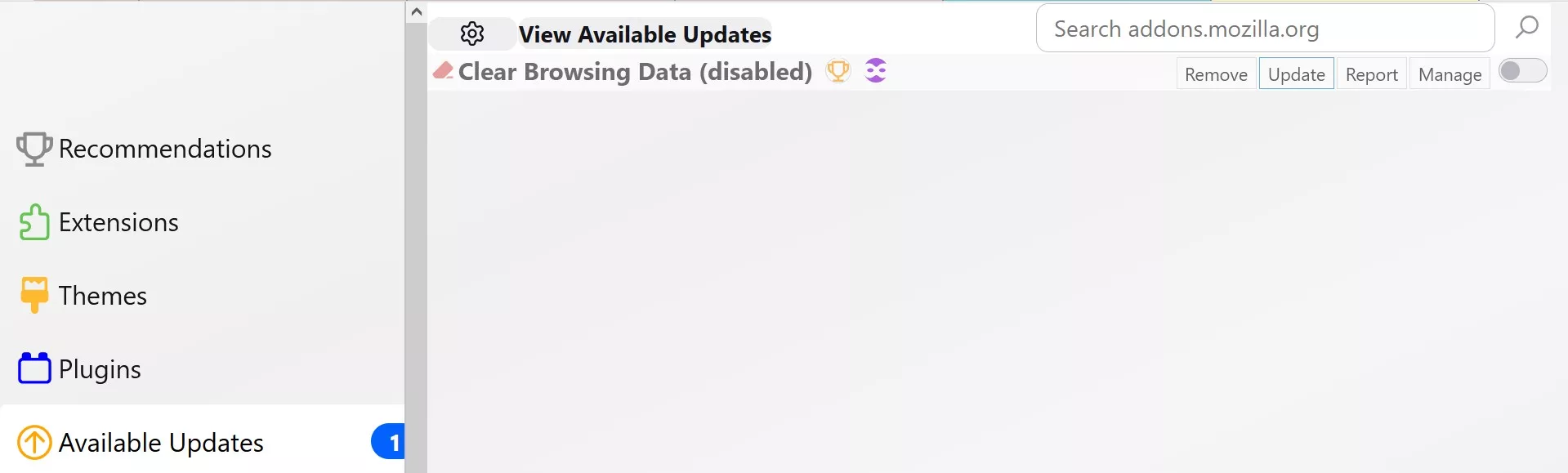
    Sorry about the previous post. I deleted it. Take all the time you need. Thanks.

  • extensionsUpdateChecker.uc.js no longer works

    • juzzlukin
    • 14. Juni 2026 um 20:49
    Zitat von 2002Andreas
    Zitat von juzzlukin

    dass diese Einstellung der Ausgangspunkt für alle Aktionen ist.

    Nein.

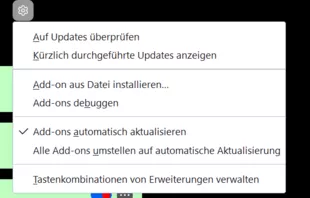
    Diese Einstellung betrifft nur den Firefox, aber nicht die Erweiterungen.

    Für Erweiterungen sieht das so aus:

    Alles anzeigen

    My apologies. Embarrassing. I got mixed up with my other post running here about not receiving browser update notifications.

    Entschuldigung. Peinlich. Ich habe das mit meinem anderen Beitrag hier verwechselt, in dem es darum ging, dass ich keine Benachrichtigungen über Browser-Updates erhalte.

    Of course, you want this deselected when using the script.

    Natürlich sollte diese Option deaktiviert sein, wenn Sie das Skript verwenden

  • extensionsUpdateChecker.uc.js no longer works

    • juzzlukin
    • 14. Juni 2026 um 02:07
    Zitat von Mira_Belle

    Ok, am liebsten wäre Dir, wenn das Script aus #1 wieder funktionieren würde.
    Verstanden. Wird nicht einfach werden.
    Wahrscheinlich wird das auch so gar nicht mehr möglich sein.
    Mozilla hat da ein paar Hürden eingebaut, die das eventuell verhindern.
    Kannst Du noch mitteilen ab welcher Version des FF das Script nicht mehr funktionierte?

    I can't recall, but it's been months. It's not unusual for updates to be delayed, so I can't say how long it was before i realized it was not working, Can you tell me how you expect your script to work? How it functions...how it differs from xiaoxiaoflood?

    Ich kann mich nicht mehr genau erinnern, aber es ist schon Monate her. Es ist nicht ungewöhnlich, dass sich Updates verzögern, daher kann ich nicht sagen, wie lange es gedauert hat, bis mir aufgefallen ist, dass es nicht funktioniert. Kannst du mir sagen, wie dein Skript deiner Vorstellung nach funktionieren soll? Wie es funktioniert … und wie es sich von xiaoxiaoflood unterscheidet?

  • extensionsUpdateChecker.uc.js no longer works

    • juzzlukin
    • 13. Juni 2026 um 21:33
    Zitat von Mitleser

    Here's a working button:
    JavaScript // JavaScript Document // B_AddonsUpdate.uc.js

    Forgive me for not being clear. On my system, both of the buttons I mentioned to do the same thing.

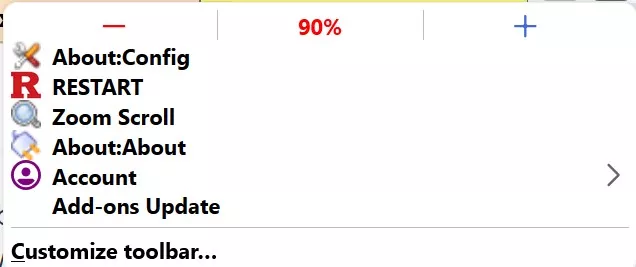
    Your button, B_AddonsUpdate.uc.js,

    Entschuldige bitte, dass ich mich nicht klar ausgedrückt habe. Auf meinem System haben beide Schaltflächen, die ich erwähnt habe, dieselbe Funktion.

    Deine Schaltfläche, B_AddonsUpdate.uc.js,

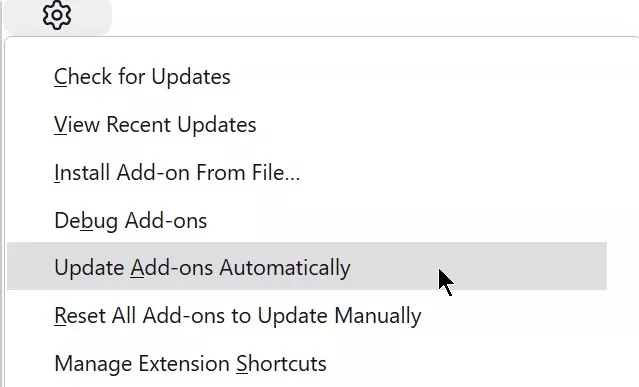
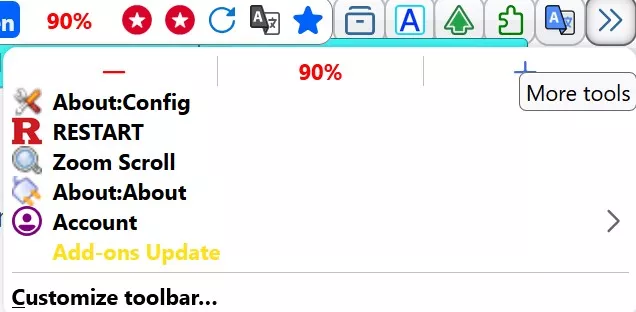
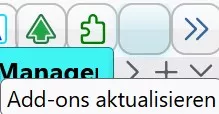
    represented by "Add-ons Update" in the menu, as I explained earlier, will not recognize the out of date addon.

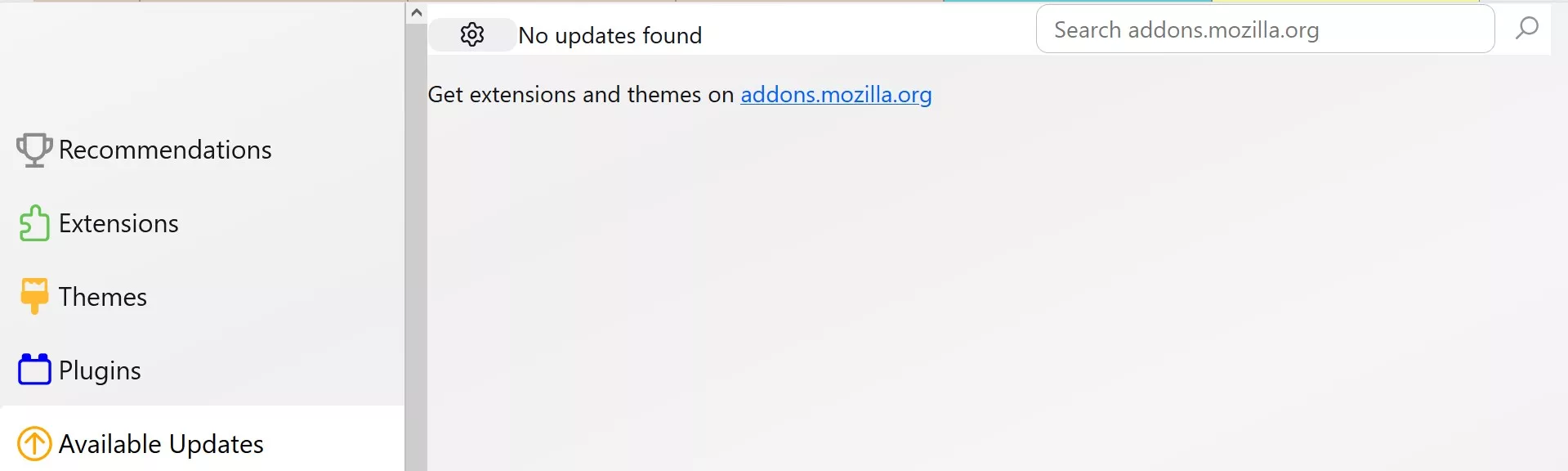
    I do not want automatic updates. I prefer the way extensionsUpdateChecker.uc.js operated. When an update is available, you are "automatically" taken to the"available updates" page. Then, the user controls things from there.

    That's why I was hoping extensionsUpdateChecker.uc.js could be made compatible for the latest Firefox variation.

    die im Menü als „Add-ons aktualisieren“ bezeichnet wird, erkennt, wie ich bereits erläutert habe, das veraltete Add-on nicht.

    Ich möchte keine automatischen Updates. Mir gefiel die Funktionsweise von „extensionsUpdateChecker.uc.js“ besser. Wenn ein Update verfügbar ist, wird man „automatisch“ auf die Seite „Verfügbare Updates“ weitergeleitet. Von dort aus kann der Nutzer dann selbst entscheiden, was geschehen soll.

    Deshalb hatte ich gehofft, dass „extensionsUpdateChecker.uc.js“ mit der neuesten Firefox-Version kompatibel gemacht werden könnte.

    Bilder

    • OVERFLOW2.jpg
      • 27,99 kB
      • 636 × 267
  • No browser update notification

    • juzzlukin
    • 13. Juni 2026 um 21:02
    Zitat von TPD-Andy

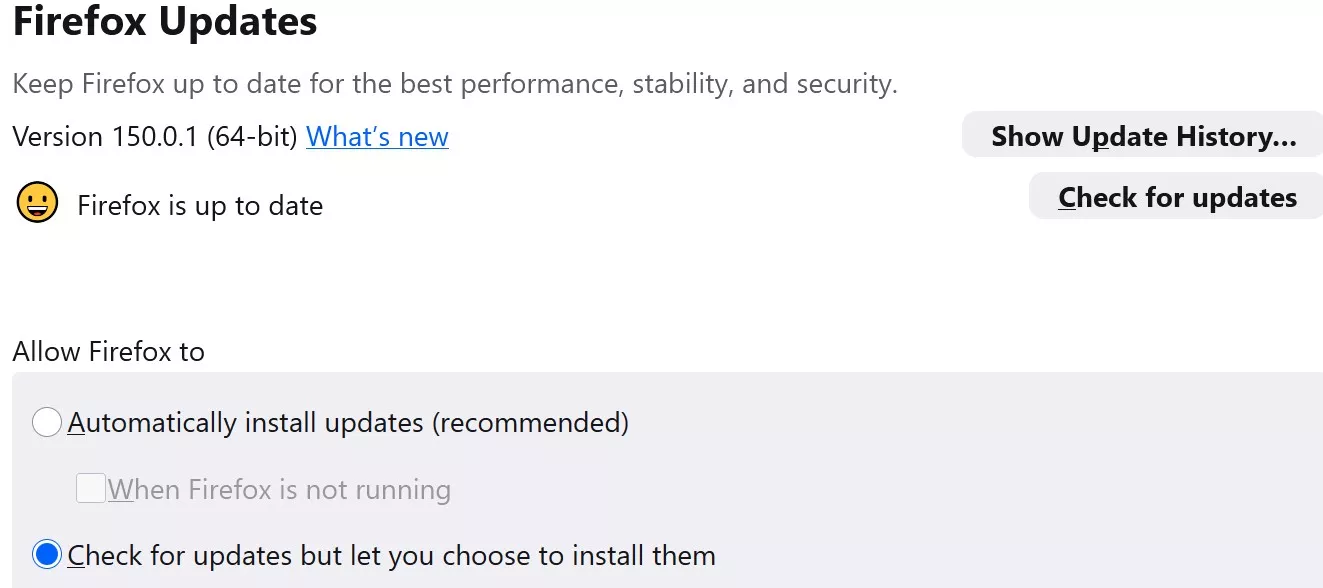
    No, Firefox Portable cannot use the Mozilla Maintenance Service installed by Windows

    Thank you for that confirmation. I choose to run portables whenever I can.

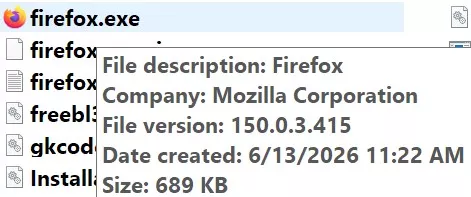
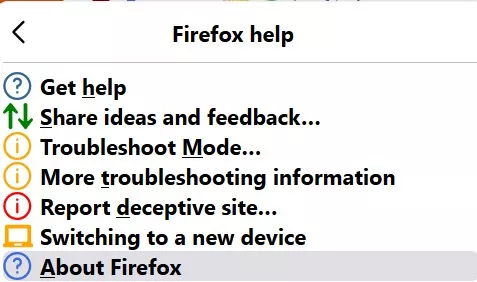
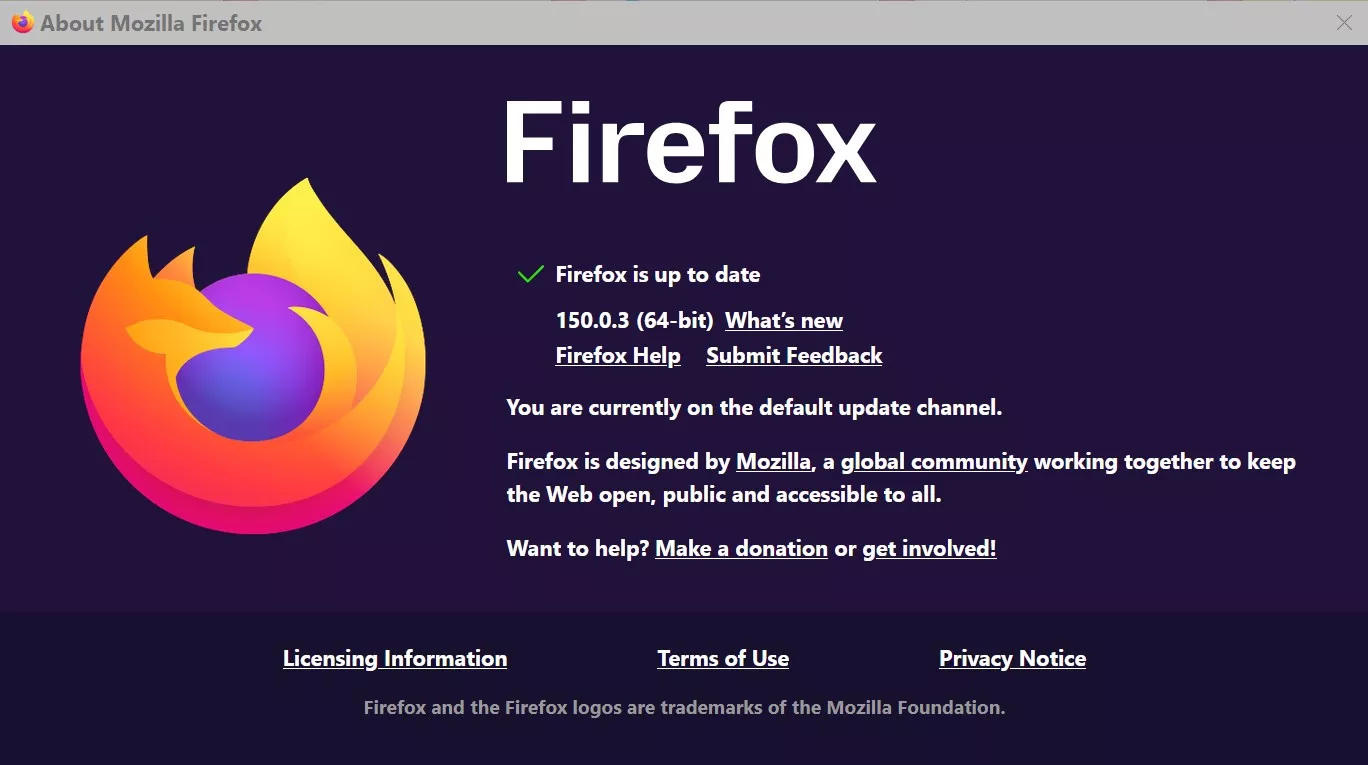
    You are far more knowledgeable than I. Out of curiosity, would you be so kind as to educate me about why Firefox knows what my version is (by reading the executable),

    Vielen Dank für diese Bestätigung. Ich versuche, wann immer möglich, portable Versionen zu verwenden.

    Sie kennen sich damit viel besser aus als ich. Nur aus Neugier: Würden Sie mir bitte erklären, warum Firefox weiß, welche Version ich habe (indem er die ausführbare Datei ausliest)?

    but, unlike virtually any of my other portables, in the "about" section

    aber im Gegensatz zu so gut wie allen meinen anderen tragbaren Geräten steht im Abschnitt „Über“

    it says Firefox is up to date, when it is not, and there is no "Check for updates" option?

    Es wird angezeigt, dass Firefox auf dem neuesten Stand ist, obwohl das nicht stimmt, und es gibt keine Option „Nach Updates suchen“?

    Zitat von .DeJaVu

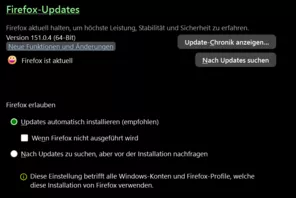
    PS 151.0.2 was already "old" when this post was written. And now version 151.0.4 is the current version.

    Yes. I was trying to make the point that while v151.0.2 was due for an update, regardless of my settings, I was not receiving notifications.

    Ja. Ich wollte damit sagen, dass ich zwar eine Benachrichtigung erhalten sollte, dass für Version 151.0.2 ein Update fällig war, aber unabhängig von meinen Einstellungen keine Benachrichtigung erhalten habe.

  • No browser update notification

    • juzzlukin
    • 13. Juni 2026 um 02:35
    Zitat von .DeJaVu

    Check your system, can be anything. A stupid antiovirus, a stupid cleaner.

    @. DeJaVu

    I use the Firefox Profile Manager. The profile is portable. I'm not expecting Firefox to update itself, but simply to notify me when an update is available.

    Ich verwende den Firefox-Profil-Manager. Das Profil ist portabel. Ich erwarte nicht, dass Firefox sich selbst aktualisiert, sondern lediglich, dass ich benachrichtigt werde, wenn ein Update verfügbar ist.

  • extensionsUpdateChecker.uc.js no longer works

    • juzzlukin
    • 13. Juni 2026 um 02:19
    Zitat von Boersenfeger

    For me, this works, among other things. Script in the current version of Firefox and in Nightly

    Zitat von Mitleser

    Here is a working button

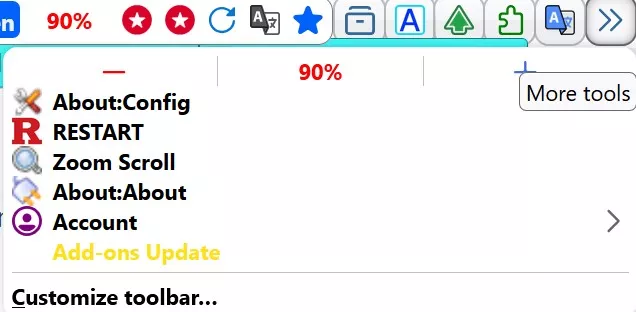
    I was mistaken about the button not displaying on the toolbar. I did not expect to be looking for this, the yellow entry, without an icon.

    Ich habe mich geirrt, was die Schaltfläche betrifft, die nicht in der Symbolleiste angezeigt wurde. Ich hätte nicht gedacht, dass ich nach diesem gelben Eintrag ohne Symbol suchen müsste.

    Can you please explain how we can expect the button to work. I ask because the original xiaoxiaoflood script would automatically transfer the user to the about:addons "available updates" page, and only when an update becomes available.

    Currently, with your buttons, the only activity is when it takes me to the available updates page after I select the toolbar button, regardless of whether there is an update or not

    Könntest du bitte erklären, wie die Schaltfläche funktionieren soll? Ich frage, weil das ursprüngliche „xiaoxiaoflood“-Skript den Nutzer automatisch auf die Seite „Verfügbare Updates“ unter „about:addons“ weitergeleitet hat – und zwar nur dann, wenn ein Update verfügbar war.

    Derzeit ist die einzige Funktion Ihrer Schaltflächen, dass ich nach dem Anklicken der Schaltfläche in der Symbolleiste zur Seite mit den verfügbaren Updates weitergeleitet werde, unabhängig davon, ob ein Update vorliegt oder nicht

  • extensionsUpdateChecker.uc.js no longer works

    • juzzlukin
    • 12. Juni 2026 um 22:06

    @Mira_Belle 

    Sorry to report, I believe we have a problem. When I first tried the script, for testing purposes, I deliberately installed an earlier version of an addon.

    Example: Since the browser opened here,. and displayed the addon that required the update, I assumed the script was operating properly

    Leider muss ich berichten, dass wir wohl ein Problem haben. Als ich das Skript zum ersten Mal zu Testzwecken ausprobierte, habe ich absichtlich eine ältere Version eines Add-ons installiert.

    Beispiel: Da sich der Browser hier öffnete und das Add-on anzeigte, das aktualisiert werden musste, ging ich davon aus, dass das Skript ordnungsgemäß funktionierte

    However, I soon discovered that every time I launch the browser, It opens here, even when there are no updates.

    Ich habe jedoch bald festgestellt, dass sich der Browser jedes Mal, wenn ich ihn starte, hier öffnet, auch wenn keine Updates vorliegen.

  • extensionsUpdateChecker.uc.js no longer works

    • juzzlukin
    • 11. Juni 2026 um 23:07
    Zitat von Mira_Belle

    Sorry, my English is terrible, so I'm using DeepL.

    For now, I've only translated the first and most important notes in the script!

    Zitat von Mira_Belle

    He would have only had to exchange the "Icon" for one that he has on record.
    But the way I understood it, the script after which he edited it works,
    No more.

    Mira_Belle

    Vielen Dank für den Tipp mit DeepL. Ich hatte ziemliche Schwierigkeiten, mit dem integrierten Übersetzer korrekte Übersetzungen zu erhalten. Es waren viele Korrekturen nötig. Ich werde versuchen, meine Beiträge mit DeepL ins Deutsche zu übersetzen. Bitte lass mich wissen, ob sie verständlich sind.

    Herzlichen Glückwunsch!! 👍️ Das Skript funktioniert hervorragend. Viel besser als die Version von xiaoxiaoflood.

    Ich habe die leere Schaltfläche nur erwähnt, weil ich dachte, dass dich das interessiert. Da die Schaltfläche an sich keinen Zweck erfüllt, besteht das einzige Problem darin, dass sie verschwindet, sobald sie in das Überlaufmenü verschoben wird. Daher gibt es keinen visuellen Hinweis darauf, dass die Schaltfläche vom System erkannt wird.

    Können Sie mir sagen, wie ich das Skript so bearbeiten muss, dass es auf ein Symbol verweist?

  • extensionsUpdateChecker.uc.js no longer works

    • juzzlukin
    • 11. Juni 2026 um 01:16
    Zitat von Boersenfeger

    For me, this works, among other things. Script in the current version of Firefox and in Nightly

    It does not appear on my toolbar. I translated it into English. I'm concerned that it may have been altered. Will it work for me in German?

    Zitat von Mira_Belle

    And here's the script for anyone who wants to try and test it.

    @Mira_Belle

    How do I test it? By installing an older version of one of the addons? How long should we expect it to inform of an update?

    EDIT: I just tested it. I installed an older version of an addon. I changed to another tab, away from about:addons, and relaunched Firefox. The browser went directly to about:addons to the "Available Updates" page to update the addon. Great! Thank you! :saint:

    The button on the toolbar is blank.

  • extensionsUpdateChecker.uc.js no longer works

    • juzzlukin
    • 9. Juni 2026 um 19:44

    Can any adjustments be made to fix this

    JavaScript
    // ==UserScript==
    // Name Extensions Update Checker
    // @author xiaoxiaoflood
    // @include main
    // @shutdown UC.ExtensionsUpdateChecker.destroy();
    // @onlyonce
    // ==/UserScript==
    UC.ExtensionsUpdateChecker = {
    ignoreList: [],
    PREF_AUTOUPDATE: 'extensions.update.autoUpdateDefault',
    OBS_TOPIC_BG_UPD_COMPLETE: 'addons-background-update-complete',
    observe: async function () {
    const { AddonManager, BrowserAddonUI } = Services.wm.getMostRecentBrowserWindow();
    let addons = await AddonManager.getAllAddons();
    if (addons.some(addon => addon.updateInstall && !this.ignoreList.includes(addon.name)))
    BrowserAddonUI.openAddonsMgr('addons://updates/available');
    },
    init: function () {
    xPref.lock(this.PREF_AUTOUPDATE, false);
    Services.obs.addObserver(this, this.OBS_TOPIC_BG_UPD_COMPLETE, false);
    },
    destroy: function () {
    xPref.unlock(this.PREF_AUTOUPDATE);
    Services.obs.removeObserver(this, this.OBS_TOPIC_BG_UPD_COMPLETE, false);
    delete UC.ExtensionsUpdateChecker;
    }
    }
    UC.ExtensionsUpdateChecker.init();
    Alles anzeigen
  • No browser update notification

    • juzzlukin
    • 9. Juni 2026 um 19:32

    Despite this setting, I receive no update notification

  • Firefox crashes

    • juzzlukin
    • 12. April 2026 um 23:30
    Zitat von .DeJaVu

    There can be no extensions: d61e3bef-cce6-487a-b719-69a690260401 [@shutdownhang | mozilla::SpinEventLoopUntil(nsNSTSubstring<T> const&, (anonymous namespace)::ParentImpl::ShutdownBackgroundThread::<T>&&, nsIThread*) | (anonymous namespace) In Firefox 149.0 (default) 20260318190823 crash-stats.mozilla.org

    However, what can't be true if you look at the "telemetry", have formatted this

    Es tut mir leid, vielleicht ist es die Übersetzung, aber ich verstehe nicht, wenn Sie sagen: "Es kann keine Erweiterungen geben"

    Ist das ein Verweis auf diese https://crash-stats.mozilla.org/report/index/d…#tab-extensions

    Ich habe keine Ahnung, worauf sich das bezieht

    Ich verstehe auch nicht: "Aber was kann nicht wahr sein, wenn man sich die "Telemetrie" ansieht, hat dies formatiert." Bitte erklären Sie es. Ich habe keine Ahnung, was ich mir mit dem Code ansehe, den du gepostet hast.

    Zitat von .DeJaVu

    Pointless ending with the axe. This results in "bak-rebuild". The profile is scrap. The entire system is junk when Firefox takes so long to quit. I still think that the hardware is no longer running round, and if not, then it is Windows that should be installed from scratch.

    Wie kommt man zu dem Schluss, dass "das System Junk ist", wenn dies nur dann auftritt, wenn dieses eine Firefox-Profil verwendet wird? Ich habe nie etwas in der Nähe davon, unabhängig davon, welche Art von Aufgaben ich ausführe, es sei denn, ich verwende dieses spezifische Firefox-Profil.

    Was schließen Sie daraus? Bitwarden stürzt Firefox ab

  • Firefox crashes

    • juzzlukin
    • 12. April 2026 um 01:17
    Zitat von Mira_Belle
    Zitat von juzzlukin

    Is there any way to determine if Bitwarden is causing the issues? I can publish the extension list if that will help.

    Mache ein Backup dieses Profils, installiere Bitwarden und dann schau, was passiert.
    Ganz ehrlich, ich glaube nicht, dass Bitwarden die Ursache ist.

    Und wenn dann dieses Pofil ohne Abstürze funktioniert und es ja identisch ist, mache das defekte Profil platt.
    Zu Sicherheit vorher ein Backup machen:!:Inkl. der "profiles.ini".

    Translated with DeepL:

    Back up this profile, install Bitwarden, and see what happens.
    Honestly, I don't think Bitwarden is the cause.

    Das war schon vor dem Posten hier erledigt. Ich habe mit mehreren Profilen getestet, sie verglichen, in einem Prozess des Versuchs und Irrtums hin und her gegangen. Ich habe zuvor beschrieben, dass ich ein anderes Profil habe, das regelmäßig verwendet wird und diese Verhaltensprobleme nie manifestiert hat, unabhängig davon, wie viele Stunden ich benutze.

    Ich habe ein Backup dieses Profils erstellt und diese Dateien durch die aus dem schlechten Profil ersetzt, wonach ich Bitwarden und ein paar andere Addons installiert habe, die nicht an anderer Stelle synchronisiert oder kommuniziert werden.

    Das umgewandelte Profil zeigt nun die gleichen Symptome, die zur Belastung der CPU beitragen. Ich bot an, die about:addons-Listen für beide Profile zu veröffentlichen, aber niemand bekundete Interesse.

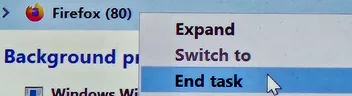
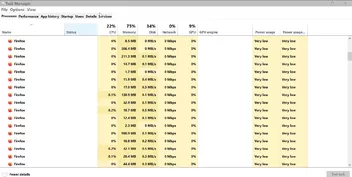
    Ich bat auch um eine Erklärung dieser Abnormalität. Ich habe 34 dieser "firefox"-Einträge in dieser Task-Manager-Liste gezählt, die dort bleiben und den Relaunch des Browsers für bis zu 10 Minuten verhindern können, bis der RAM wiederhergestellt ist, es sei denn, wie ich erklärt habe, beende ich Aufgaben manuell auf 2-3 dieser Einträge.

    Ich glaube, dies ist eine kritische Information, um dieses Rätsel zu lösen., aber es wurde hier ignoriert.

    Ich habe Daten vom Zuverlässigkeitsmonitor und Event Viewer für den Tag des Absturzes gesammelt, den ich gemeldet habe. Bitte lassen Sie mich wissen, welche Teile der Daten Sie veröffentlichen möchten.

    Ich habe mein Bestes mit der deutschen Übersetzung gegeben. Bitte lassen Sie mich wissen, ob ich mich verbessern muss.

    Danke.

  • Firefox crashes

    • juzzlukin
    • 9. April 2026 um 01:27
    Zitat von .DeJaVu

    Firefox crasht im Haupt-Thread -> Timeout und das bei CFI. CFI kenne ich nur als "Control-flow integrity" und das ist Windows.

    Inwiefern die Unmenge an Erweiterungen und Userscripten eine sehr wahrscheinliche Ursache ist, muss er selbst rausfinden.

    Da das öfters passieren zu scheint, würde ich auch Windows, RAM, Festplatte nicht ausschliessen. Das ist aber nicht mehr Firefox.

    IMO ist das System von 2014 laut Specs, kann mich aber auch falsch erinnern.

    I've done all the diagnostics suggested here. I don't know where to look in the Event Viewer, or how to start an analysis on the Mozilla Crash Stats - Firefox Crash Data webpage.

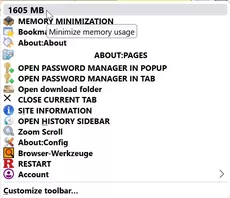
    I believe a Firefox extension is responsible. I have several Firefox profiles. The problems only happen with one of them. Shortly after launching the problem browser, the memory usage changes from this

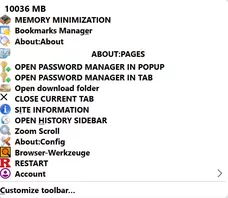
    to this

    I have another profile that is almost identical. The memory stays around 2000. The one main difference I can see is that the broken profile has the Bitwarden Password Manager installed. The good profile does not. I don't believe any other extension is using the resources like Bitwarden.

    Is there any way to determine if Bitwarden is causing the issues? I can publish the extension list if that will help.

    Thank you.

  • Custom buttons not recognized, do not appear on toolbar

    • juzzlukin
    • 7. April 2026 um 00:38
    Zitat von Mira_Belle

    @Horstmann 
    So the JavaScript from Aris works for me.
    And the symbol that is used twice is this one =>
    But if I got that right with my broken English, it's about such a red R,
    Or?

    But that has to be used in a different script, if I understand that correctly.
    At least I understand it that way.

    Zitat von juzzlukin

    But this one has the "R" icon I like. If possible, can I post the codes to get instruction on how to do the change?

    Zitat von juzzlukin

    I now have 2 restart buttons. I prefer this one, because it does not have a cache clearing option

    And what script is that?
    I'm confused.

    Zitat von juzzlukin

    because RestartFirefox_plus.uc.js

    Alles anzeigen

    Hi Mira ,

    Please allow me to clarify further, to clear up any confusion. This script, restart_button.uc.js, works fine. However, I wish to change it's toolbar button icon.

    // Restart button script for Firefox 60+ by Aris
    //
    // left-click on restart button: normal restart
    // middle-click on restart button: restart + clear caches
    // right-click on restart button: no special function
    //
    // based on 'Quit' button code by 2002Andreas
    // restart code from Classic Theme Restorer add-on
    // invalidate caches from Session Saver add-on

    (function() {

    try {
     var sss = Components.classes["@mozilla.org/content/style-sheet-service;1"].getService(Components.interfaces.nsIStyleSheetService);
     var appversion = parseInt(Services.appinfo.version);

     var button_label = "Restart";

     CustomizableUI.createWidget({
        id: "uc-restart", // button id
        defaultArea: CustomizableUI.AREA_NAVBAR,
        removable: true,
        label: button_label, // button title
        tooltiptext: button_label, // tooltip title
        onClick: function(event) {
          
          var cancelQuit   = Components.classes["@mozilla.org/supports-PRBool;1"].createInstance(Components.interfaces.nsISupportsPRBool);
          var observerSvc  = Components.classes["@mozilla.org/observer-service;1"].getService(Components.interfaces.nsIObserverService);
                
          if(event.button=='1') { // middle-click - clear caches
            Components.classes["@mozilla.org/xre/app-info;1"].getService(Components.interfaces.nsIXULRuntime).invalidateCachesOnRestart();
          }
          
          if(event.button=='0' || event.button=='1') { // left/middle-click - restart
            observerSvc.notifyObservers(cancelQuit, "quit-application-requested", "restart");
                
            if(cancelQuit.data) return false;
                    
            Services.startup.quit(Services.startup.eRestart | Services.startup.eAttemptQuit);
          }
        },
        onCreated: function(button) {
          return button;
        }
            
     });

     var icon = "chrome://global/skin/icons/reload.svg";

     if(appversion < 92) icon = "chrome://browser/skin/reload.svg";

     // style button icon
     var uri = Services.io.newURI("data:text/css;charset=utf-8," + encodeURIComponent('\
        \
          #uc-restart .toolbarbutton-icon {\
            list-style-image: url("'+icon+'"); /* icon / path to icon */ \
            transform: scaleX(-1); /* icon mirroring */\
            fill: red; /* icon color name/code */\
          }\
        \
     '), null, null);

     sss.loadAndRegisterSheet(uri, sss.AGENT_SHEET);

    } catch (e) {
        Components.utils.reportError(e);
    };

    })();

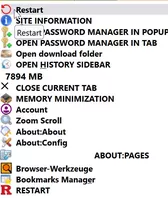
    The restart_button.uc.js script is the one at the top of this menu.

    The other restart button, RestartFirefox_plus.uc.js, at the bottom of the menu, is the script with the base64 icon.

    I want that red "R" for the restart_button.uc.js icon. As I mentioned earlier, I have this favicon file. I was hoping that we could relocate that favicon file somewhere in the chrome\image folder, or wherever you determine is the best location, in order to edit the script to point to that file location. If you need to have the the file extension changed to make it compatible, please let me know. Perhaps to .svg? I will require instruction to do so.

    Dateien

    R- RED 7.ico 59,59 kB – 60 Downloads
  • Firefox crashes

    • juzzlukin
    • 6. April 2026 um 21:58

    This has been happening regularly for a long time. This is with my main profile. I have another profile that doesn't seem to have a problem. The main profile has more addons.

    The pattern is it seems to occur after extended periods of use, or extended periods of being open, but idle.

    Sometimes it will just freeze. If I wait long enough, it could be 2-10 minutes, it may go back to normal. Sometimes it will crash my system. If I can't get to the task manager to end task, I usually decide to reboot the OS manually with the power button on the device.

    Or, more often, it occurs when I attempt to close the browser, and either the freeze will occur, or the responses to my mouse or keyboard are severely delayed, accompanied by that little blue spinning circle. or "Page is not responding". In that scenario, it may eventually close.

    However, after that type of episode, it will usually not launch for an extended length of time, due to the following.

    That is only a fraction of the 40-50 "Firefox" entries there to be revealed by scrolling. In order to relaunch, I must manually "End Task" on 2-3 of them.

    Occasionally, I get the repeated messaged that a "website page is slowing things down". I don't know if that is related to the other symptoms.

    Firefox 149.0 Crash Report [@ shutdownhang | mozilla::SpinEventLoopUntil(nsTSubstring<T> const&, (anonymous namespace)::ParentImpl::ShutdownBackgroundThread::<T>&&, nsIThread*) | (anonymous namespace)::ParentImpl::ShutdownBackgroundThread ]

    Since it happens randomly, and I cannot create it the situation, about:support does not help.

    Would it be helpful if I posted an image of my about:addons list?

  • Custom buttons not recognized, do not appear on toolbar

    • juzzlukin
    • 6. April 2026 um 20:51
    Zitat von Horstmann

    Please state which button you want to do what, and where Inside your Chrome folder the icon is located, eg profile-folder -> chrome -> folder "myIcons" -> iconRedR.svgor search.

    I can't find iconRedR.svg, I believe, because RestartFirefox_plus.uc.js has this type of code:

    style: 'list-style-image: url(data:image/

    I have a favicon.

    The icon for restart_button.uc.js is in chrome\image\icons_fx88\reload.svg. I put the favicon there. I tried to edit like this, but, of course, it did not work

    var icon = "chrome://global/skin/icons/RED.ico";

    // Restart button script for Firefox 60+ by Aris
    //
    // left-click on restart button: normal restart
    // middle-click on restart button: restart + clear caches
    // right-click on restart button: no special function
    //
    // based on 'Quit' button code by 2002Andreas
    // restart code from Classic Theme Restorer add-on
    // invalidate caches from Session Saver add-on

    (function() {

    try {
     var sss = Components.classes["@mozilla.org/content/style-sheet-service;1"].getService(Components.interfaces.nsIStyleSheetService);
     var appversion = parseInt(Services.appinfo.version);

     var button_label = "Restart";

     CustomizableUI.createWidget({
        id: "uc-restart", // button id
        defaultArea: CustomizableUI.AREA_NAVBAR,
        removable: true,
        label: button_label, // button title
        tooltiptext: button_label, // tooltip title
        onClick: function(event) {
          
          var cancelQuit   = Components.classes["@mozilla.org/supports-PRBool;1"].createInstance(Components.interfaces.nsISupportsPRBool);
          var observerSvc  = Components.classes["@mozilla.org/observer-service;1"].getService(Components.interfaces.nsIObserverService);
                
          if(event.button=='1') { // middle-click - clear caches
            Components.classes["@mozilla.org/xre/app-info;1"].getService(Components.interfaces.nsIXULRuntime).invalidateCachesOnRestart();
          }
          
          if(event.button=='0' || event.button=='1') { // left/middle-click - restart
            observerSvc.notifyObservers(cancelQuit, "quit-application-requested", "restart");
                
            if(cancelQuit.data) return false;
                    
            Services.startup.quit(Services.startup.eRestart | Services.startup.eAttemptQuit);
          }
        },
        onCreated: function(button) {
          return button;
        }
            
     });

     var icon = "chrome://global/skin/icons/reload.svg";

     if(appversion < 92) icon = "chrome://browser/skin/reload.svg";

     // style button icon
     var uri = Services.io.newURI("data:text/css;charset=utf-8," + encodeURIComponent('\
        \
          #uc-restart .toolbarbutton-icon {\
            list-style-image: url("'+icon+'"); /* icon / path to icon */ \
            transform: scaleX(-1); /* icon mirroring */\
            fill: red; /* icon color name/code */\
          }\
        \
     '), null, null);

     sss.loadAndRegisterSheet(uri, sss.AGENT_SHEET);

    } catch (e) {
        Components.utils.reportError(e);
    };

    })();

    //      RestartFirefox_plus.uc.js   2

       (function() {

          if (location != 'chrome://browser/content/browser.xhtml') return;
          
          try {
             CustomizableUI.createWidget({
                id: 'restart-button',
                type: 'custom',
                defaultArea: CustomizableUI.AREA_NAVBAR,
                onBuild: function(aDocument) {         
                   var toolbaritem = aDocument.createElementNS('http://www.mozilla.org/keymaster/gatekeeper/there.is.only.xul', 'toolbarbutton');
                   let props = {
                      id: 'restart-button',
                      class: 'toolbarbutton-1 chromeclass-toolbar-additional',
                      removable: false,
                      label: 'RESTART',
                      tooltiptext: 'Restart (right-click and middle-click clear the userChrome.js cache))',
                      style: 'list-style-image: url(data:image/png;base64,iVBORw0KGgoAAAANSUhEUgAAABAAAAAQCAYAAAAf8%2F9hAAAACXBIWXMAAAsTAAALEwEAmpwYAAAKT2lDQ1BQaG90b3Nob3AgSUNDIHByb2ZpbGUAAHjanVNnVFPpFj333vRCS4iAlEtvUhUIIFJCi4AUkSYqIQkQSoghodkVUcERRUUEG8igiAOOjoCMFVEsDIoK2AfkIaKOg6OIisr74Xuja9a89%2BbN%2FrXXPues852zzwfACAyWSDNRNYAMqUIeEeCDx8TG4eQuQIEKJHAAEAizZCFz%2FSMBAPh%2BPDwrIsAHvgABeNMLCADATZvAMByH%2Fw%2FqQplcAYCEAcB0kThLCIAUAEB6jkKmAEBGAYCdmCZTAKAEAGDLY2LjAFAtAGAnf%2BbTAICd%2BJl7AQBblCEVAaCRACATZYhEAGg7AKzPVopFAFgwABRmS8Q5ANgtADBJV2ZIALC3AMDOEAuyAAgMADBRiIUpAAR7AGDIIyN4AISZABRG8lc88SuuEOcqAAB4mbI8uSQ5RYFbCC1xB1dXLh4ozkkXKxQ2YQJhmkAuwnmZGTKBNA%2Fg88wAAKCRFRHgg%2FP9eM4Ors7ONo62Dl8t6r8G%2FyJiYuP%2B5c%2BrcEAAAOF0ftH%2BLC%2BzGoA7BoBt%2FqIl7gRoXgugdfeLZrIPQLUAoOnaV%2FNw%2BH48PEWhkLnZ2eXk5NhKxEJbYcpXff5nwl%2FAV%2F1s%2BX48%2FPf14L7iJIEyXYFHBPjgwsz0TKUcz5IJhGLc5o9H%2FLcL%2F%2Fwd0yLESWK5WCoU41EScY5EmozzMqUiiUKSKcUl0v9k4t8s%2BwM%2B3zUAsGo%2BAXuRLahdYwP2SycQWHTA4vcAAPK7b8HUKAgDgGiD4c93%2F%2B8%2F%2FUegJQCAZkmScQAAXkQkLlTKsz%2FHCAAARKCBKrBBG%2FTBGCzABhzBBdzBC%2FxgNoRCJMTCQhBCCmSAHHJgKayCQiiGzbAdKmAv1EAdNMBRaIaTcA4uwlW4Dj1wD%2FphCJ7BKLyBCQRByAgTYSHaiAFiilgjjggXmYX4IcFIBBKLJCDJiBRRIkuRNUgxUopUIFVIHfI9cgI5h1xGupE7yAAygvyGvEcxlIGyUT3UDLVDuag3GoRGogvQZHQxmo8WoJvQcrQaPYw2oefQq2gP2o8%2BQ8cwwOgYBzPEbDAuxsNCsTgsCZNjy7EirAyrxhqwVqwDu4n1Y8%2BxdwQSgUXACTYEd0IgYR5BSFhMWE7YSKggHCQ0EdoJNwkDhFHCJyKTqEu0JroR%2BcQYYjIxh1hILCPWEo8TLxB7iEPENyQSiUMyJ7mQAkmxpFTSEtJG0m5SI%2BksqZs0SBojk8naZGuyBzmULCAryIXkneTD5DPkG%2BQh8lsKnWJAcaT4U%2BIoUspqShnlEOU05QZlmDJBVaOaUt2ooVQRNY9aQq2htlKvUYeoEzR1mjnNgxZJS6WtopXTGmgXaPdpr%2Bh0uhHdlR5Ol9BX0svpR%2BiX6AP0dwwNhhWDx4hnKBmbGAcYZxl3GK%2BYTKYZ04sZx1QwNzHrmOeZD5lvVVgqtip8FZHKCpVKlSaVGyovVKmqpqreqgtV81XLVI%2BpXlN9rkZVM1PjqQnUlqtVqp1Q61MbU2epO6iHqmeob1Q%2FpH5Z%2FYkGWcNMw09DpFGgsV%2FjvMYgC2MZs3gsIWsNq4Z1gTXEJrHN2Xx2KruY%2FR27iz2qqaE5QzNKM1ezUvOUZj8H45hx%2BJx0TgnnKKeX836K3hTvKeIpG6Y0TLkxZVxrqpaXllirSKtRq0frvTau7aedpr1Fu1n7gQ5Bx0onXCdHZ4%2FOBZ3nU9lT3acKpxZNPTr1ri6qa6UbobtEd79up%2B6Ynr5egJ5Mb6feeb3n%2Bhx9L%2F1U%2FW36p%2FVHDFgGswwkBtsMzhg8xTVxbzwdL8fb8VFDXcNAQ6VhlWGX4YSRudE8o9VGjUYPjGnGXOMk423GbcajJgYmISZLTepN7ppSTbmmKaY7TDtMx83MzaLN1pk1mz0x1zLnm%2Beb15vft2BaeFostqi2uGVJsuRaplnutrxuhVo5WaVYVVpds0atna0l1rutu6cRp7lOk06rntZnw7Dxtsm2qbcZsOXYBtuutm22fWFnYhdnt8Wuw%2B6TvZN9un2N%2FT0HDYfZDqsdWh1%2Bc7RyFDpWOt6azpzuP33F9JbpL2dYzxDP2DPjthPLKcRpnVOb00dnF2e5c4PziIuJS4LLLpc%2BLpsbxt3IveRKdPVxXeF60vWdm7Obwu2o26%2FuNu5p7ofcn8w0nymeWTNz0MPIQ%2BBR5dE%2FC5%2BVMGvfrH5PQ0%2BBZ7XnIy9jL5FXrdewt6V3qvdh7xc%2B9j5yn%2BM%2B4zw33jLeWV%2FMN8C3yLfLT8Nvnl%2BF30N%2FI%2F9k%2F3r%2F0QCngCUBZwOJgUGBWwL7%2BHp8Ib%2BOPzrbZfay2e1BjKC5QRVBj4KtguXBrSFoyOyQrSH355jOkc5pDoVQfujW0Adh5mGLw34MJ4WHhVeGP45wiFga0TGXNXfR3ENz30T6RJZE3ptnMU85ry1KNSo%2Bqi5qPNo3ujS6P8YuZlnM1VidWElsSxw5LiquNm5svt%2F87fOH4p3iC%2BN7F5gvyF1weaHOwvSFpxapLhIsOpZATIhOOJTwQRAqqBaMJfITdyWOCnnCHcJnIi%2FRNtGI2ENcKh5O8kgqTXqS7JG8NXkkxTOlLOW5hCepkLxMDUzdmzqeFpp2IG0yPTq9MYOSkZBxQqohTZO2Z%2Bpn5mZ2y6xlhbL%2BxW6Lty8elQfJa7OQrAVZLQq2QqboVFoo1yoHsmdlV2a%2FzYnKOZarnivN7cyzytuQN5zvn%2F%2FtEsIS4ZK2pYZLVy0dWOa9rGo5sjxxedsK4xUFK4ZWBqw8uIq2Km3VT6vtV5eufr0mek1rgV7ByoLBtQFr6wtVCuWFfevc1%2B1dT1gvWd%2B1YfqGnRs%2BFYmKrhTbF5cVf9go3HjlG4dvyr%2BZ3JS0qavEuWTPZtJm6ebeLZ5bDpaql%2BaXDm4N2dq0Dd9WtO319kXbL5fNKNu7g7ZDuaO%2FPLi8ZafJzs07P1SkVPRU%2BlQ27tLdtWHX%2BG7R7ht7vPY07NXbW7z3%2FT7JvttVAVVN1WbVZftJ%2B7P3P66Jqun4lvttXa1ObXHtxwPSA%2F0HIw6217nU1R3SPVRSj9Yr60cOxx%2B%2B%2Fp3vdy0NNg1VjZzG4iNwRHnk6fcJ3%2FceDTradox7rOEH0x92HWcdL2pCmvKaRptTmvtbYlu6T8w%2B0dbq3nr8R9sfD5w0PFl5SvNUyWna6YLTk2fyz4ydlZ19fi753GDborZ752PO32oPb%2B%2B6EHTh0kX%2Fi%2Bc7vDvOXPK4dPKy2%2BUTV7hXmq86X23qdOo8%2FpPTT8e7nLuarrlca7nuer21e2b36RueN87d9L158Rb%2F1tWeOT3dvfN6b%2FfF9%2FXfFt1%2Bcif9zsu72Xcn7q28T7xf9EDtQdlD3YfVP1v%2B3Njv3H9qwHeg89HcR%2FcGhYPP%2FpH1jw9DBY%2BZj8uGDYbrnjg%2BOTniP3L96fynQ89kzyaeF%2F6i%2FsuuFxYvfvjV69fO0ZjRoZfyl5O%2FbXyl%2FerA6xmv28bCxh6%2ByXgzMV70VvvtwXfcdx3vo98PT%2BR8IH8o%2F2j5sfVT0Kf7kxmTk%2F8EA5jz%2FGMzLdsAAAAEZ0FNQQAAsY58%2B1GTAAAAIGNIUk0AAHolAACAgwAA%2Bf8AAIDpAAB1MAAA6mAAADqYAAAXb5JfxUYAAAN8SURBVHjaVJFNTBxlAIafb2Z29gd2l4VdYCkokAUt1AJplQRTrVqjUWMPPWHSCzb21IOn9qIHY2xMahoTTb00NmkUm5qAjdpUI61VaCxCpCVYixt%2ByvKzCwu7LDs7zMw3HmhM%2Bt6fJ0%2FyCp69wiOzZBCPcqSmIXg0HPHuC4R8nkLWyOXyYiIzfuVHzMIA%2BZsLtH18EApntUdhpzUSD5577nDLi%2FGWKjx%2BHVfR8HpFwNwsxTMzza%2BOXJ1%2B58Ev2sVEV%2ByEawXqxf8FllNWEQ9ePXzsqQOecIDU8jampSAVD76Al2BIIx4Dv2Nz7%2FYq%2B5%2BP8sNXE6WdAhdQlOM9rzUdaGiN8M9UjnKvQjzuA0UjV3AxDIcHywqRoEbXoVrKgyBtKXYEUvprmiN9oaoyvr9wl62NHJbtJeDzOo17YmprVzWOppLO2RRNwf1FSOzSUAXsCIR4QdP13UPfjhUde2mjuBXUjcXNEabOnJmq7Y4Nd7z1fu%2BJ%2FR2Jpgrm0jauAI8GlnSlBi4I0bO6sLBWHc9esxRdmjOZf5n%2B5CLWzCzOvsbKupBZ1xgmElUoC%2BgoKtRGQfNomoaND8P8XS%2Bby1olO7O6GHTl1DejGDOrNB%2BvpO7I%2Ba31%2FDP9Z28YUmqoqhCKcG2EYD6ZMUTojZ8WHmsqD%2BI6wnWFajugCkuuZaV%2FZS47wp99R7E3LbxPV6rtr7dV1pmyuBWs3hr7dZ380LC2tzseffvUHm86C1JC2A%2FrGcn509cn%2BPvTk9ibc1R06qL91Ms1CadF000ll9rVS2VykLzVr0lHOgtpuJ9yUFyXxqhKZjbH2nJRI9IZwyw2kXjvXV%2FIOWgaBcc2a%2BtjdVXR1J3iBDx8QUpQUJAuJJclseogxz441H5vrPO72cm0VSyVPJq27ZaHm8ST3Y0M9d9Kkr19A1A1x4VIObTGBfNrsJ5XmE9b6KqgvrOGhr1Vns2sgeNIkXiigvHf1liZuHWZYjINSEXRVLewZjN6bYmYbvN4rcDvVzFKLnOpErMLBpvbklClznyyyPDA6DjTX3wJWICr%2Bnb3ffjXSGpl5Nxnn88uh2ORUCBaHfVQU%2BsjVuGhKqJT5lFYShr8fGH4j42bH53EnJ4EtgEEPQOTzHx9mqXLl9AT9TS82RvreOmVcMTXVh4JhIr5kp3LFu6u3Lk%2ByMylQazU3ENYAvw3AFUTimFqj5i7AAAAAElFTkSuQmCC)',
                      /* onclick: 'if (event.button == 0) { \
                                     Services.startup.quit(Ci.nsIAppStartup.eRestart | Ci.nsIAppStartup.eAttemptQuit); \
                                 }; \
                                 if (event.button == 1 || event.button == 2) { \
                                     Services.appinfo.invalidateCachesOnRestart(); \
                                     Services.startup.quit(Ci.nsIAppStartup.eRestart | Ci.nsIAppStartup.eAttemptQuit); \
                                 };' */
                   };            
                   for (var p in props)
                      toolbaritem.setAttribute(p, props[p]);
                   
                   toolbaritem.addEventListener('click', event => {
                       if (event.button == 1) {
                         Services.startup.quit(Ci.nsIAppStartup.eRestart | Ci.nsIAppStartup.eAttemptQuit);
                       }
                   
                       if (event.button == 0 || event.button == 2) {
                         event.preventDefault();
                         Services.appinfo.invalidateCachesOnRestart();
                         Services.startup.quit(Ci.nsIAppStartup.eRestart | Ci.nsIAppStartup.eAttemptQuit);
                       }
                     });               
                   return toolbaritem;
                }      
             });
          } catch(e) { };   
                 
          var menuitem = document.createXULElement('menuitem');   
          var props = {
             id: 'restartfirefox-fileMenu2',
             label: 'RESTART',
           tooltiptext: 'Restart (right-click and middle-click clear the userChrome.js cache))',         
          };

                 menuitem.addEventListener('click', event => {
                            if (event.button == 0) { 
                                     Services.startup.quit(Ci.nsIAppStartup.eRestart | Ci.nsIAppStartup.eAttemptQuit); 
                                 }
                                 if (event.button == 1 || event.button == 2) { 
                                     Services.appinfo.invalidateCachesOnRestart(); 
                                     Services.startup.quit(Ci.nsIAppStartup.eRestart | Ci.nsIAppStartup.eAttemptQuit);
                                 }                              
                        });            
          for (var p in props)
             menuitem.setAttribute(p, props[p]);      
          document.getElementById('menu_FilePopup').insertBefore(menuitem, 
           document.getElementById('menu_FileQuitItem'));

          var menuitem = document.createXULElement('toolbarbutton');
    menuitem.id = 'restartfirefox-fileMenu';
    menuitem.classList.add('subviewbutton', 'subviewbutton-iconic');
    menuitem.setAttribute('label' , 'RESTART');
    menuitem.setAttribute('tooltiptext' , 'RESTART');
    menuitem.style.listStyleImage= 'url(\'data:image/png;base64,iVBORw0KGgoAAAANSUhEUgAAABAAAAAQCAYAAAAf8%2F9hAAAACXBIWXMAAAsTAAALEwEAmpwYAAAKT2lDQ1BQaG90b3Nob3AgSUNDIHByb2ZpbGUAAHjanVNnVFPpFj333vRCS4iAlEtvUhUIIFJCi4AUkSYqIQkQSoghodkVUcERRUUEG8igiAOOjoCMFVEsDIoK2AfkIaKOg6OIisr74Xuja9a89%2BbN%2FrXXPues852zzwfACAyWSDNRNYAMqUIeEeCDx8TG4eQuQIEKJHAAEAizZCFz%2FSMBAPh%2BPDwrIsAHvgABeNMLCADATZvAMByH%2Fw%2FqQplcAYCEAcB0kThLCIAUAEB6jkKmAEBGAYCdmCZTAKAEAGDLY2LjAFAtAGAnf%2BbTAICd%2BJl7AQBblCEVAaCRACATZYhEAGg7AKzPVopFAFgwABRmS8Q5ANgtADBJV2ZIALC3AMDOEAuyAAgMADBRiIUpAAR7AGDIIyN4AISZABRG8lc88SuuEOcqAAB4mbI8uSQ5RYFbCC1xB1dXLh4ozkkXKxQ2YQJhmkAuwnmZGTKBNA%2Fg88wAAKCRFRHgg%2FP9eM4Ors7ONo62Dl8t6r8G%2FyJiYuP%2B5c%2BrcEAAAOF0ftH%2BLC%2BzGoA7BoBt%2FqIl7gRoXgugdfeLZrIPQLUAoOnaV%2FNw%2BH48PEWhkLnZ2eXk5NhKxEJbYcpXff5nwl%2FAV%2F1s%2BX48%2FPf14L7iJIEyXYFHBPjgwsz0TKUcz5IJhGLc5o9H%2FLcL%2F%2Fwd0yLESWK5WCoU41EScY5EmozzMqUiiUKSKcUl0v9k4t8s%2BwM%2B3zUAsGo%2BAXuRLahdYwP2SycQWHTA4vcAAPK7b8HUKAgDgGiD4c93%2F%2B8%2F%2FUegJQCAZkmScQAAXkQkLlTKsz%2FHCAAARKCBKrBBG%2FTBGCzABhzBBdzBC%2FxgNoRCJMTCQhBCCmSAHHJgKayCQiiGzbAdKmAv1EAdNMBRaIaTcA4uwlW4Dj1wD%2FphCJ7BKLyBCQRByAgTYSHaiAFiilgjjggXmYX4IcFIBBKLJCDJiBRRIkuRNUgxUopUIFVIHfI9cgI5h1xGupE7yAAygvyGvEcxlIGyUT3UDLVDuag3GoRGogvQZHQxmo8WoJvQcrQaPYw2oefQq2gP2o8%2BQ8cwwOgYBzPEbDAuxsNCsTgsCZNjy7EirAyrxhqwVqwDu4n1Y8%2BxdwQSgUXACTYEd0IgYR5BSFhMWE7YSKggHCQ0EdoJNwkDhFHCJyKTqEu0JroR%2BcQYYjIxh1hILCPWEo8TLxB7iEPENyQSiUMyJ7mQAkmxpFTSEtJG0m5SI%2BksqZs0SBojk8naZGuyBzmULCAryIXkneTD5DPkG%2BQh8lsKnWJAcaT4U%2BIoUspqShnlEOU05QZlmDJBVaOaUt2ooVQRNY9aQq2htlKvUYeoEzR1mjnNgxZJS6WtopXTGmgXaPdpr%2Bh0uhHdlR5Ol9BX0svpR%2BiX6AP0dwwNhhWDx4hnKBmbGAcYZxl3GK%2BYTKYZ04sZx1QwNzHrmOeZD5lvVVgqtip8FZHKCpVKlSaVGyovVKmqpqreqgtV81XLVI%2BpXlN9rkZVM1PjqQnUlqtVqp1Q61MbU2epO6iHqmeob1Q%2FpH5Z%2FYkGWcNMw09DpFGgsV%2FjvMYgC2MZs3gsIWsNq4Z1gTXEJrHN2Xx2KruY%2FR27iz2qqaE5QzNKM1ezUvOUZj8H45hx%2BJx0TgnnKKeX836K3hTvKeIpG6Y0TLkxZVxrqpaXllirSKtRq0frvTau7aedpr1Fu1n7gQ5Bx0onXCdHZ4%2FOBZ3nU9lT3acKpxZNPTr1ri6qa6UbobtEd79up%2B6Ynr5egJ5Mb6feeb3n%2Bhx9L%2F1U%2FW36p%2FVHDFgGswwkBtsMzhg8xTVxbzwdL8fb8VFDXcNAQ6VhlWGX4YSRudE8o9VGjUYPjGnGXOMk423GbcajJgYmISZLTepN7ppSTbmmKaY7TDtMx83MzaLN1pk1mz0x1zLnm%2Beb15vft2BaeFostqi2uGVJsuRaplnutrxuhVo5WaVYVVpds0atna0l1rutu6cRp7lOk06rntZnw7Dxtsm2qbcZsOXYBtuutm22fWFnYhdnt8Wuw%2B6TvZN9un2N%2FT0HDYfZDqsdWh1%2Bc7RyFDpWOt6azpzuP33F9JbpL2dYzxDP2DPjthPLKcRpnVOb00dnF2e5c4PziIuJS4LLLpc%2BLpsbxt3IveRKdPVxXeF60vWdm7Obwu2o26%2FuNu5p7ofcn8w0nymeWTNz0MPIQ%2BBR5dE%2FC5%2BVMGvfrH5PQ0%2BBZ7XnIy9jL5FXrdewt6V3qvdh7xc%2B9j5yn%2BM%2B4zw33jLeWV%2FMN8C3yLfLT8Nvnl%2BF30N%2FI%2F9k%2F3r%2F0QCngCUBZwOJgUGBWwL7%2BHp8Ib%2BOPzrbZfay2e1BjKC5QRVBj4KtguXBrSFoyOyQrSH355jOkc5pDoVQfujW0Adh5mGLw34MJ4WHhVeGP45wiFga0TGXNXfR3ENz30T6RJZE3ptnMU85ry1KNSo%2Bqi5qPNo3ujS6P8YuZlnM1VidWElsSxw5LiquNm5svt%2F87fOH4p3iC%2BN7F5gvyF1weaHOwvSFpxapLhIsOpZATIhOOJTwQRAqqBaMJfITdyWOCnnCHcJnIi%2FRNtGI2ENcKh5O8kgqTXqS7JG8NXkkxTOlLOW5hCepkLxMDUzdmzqeFpp2IG0yPTq9MYOSkZBxQqohTZO2Z%2Bpn5mZ2y6xlhbL%2BxW6Lty8elQfJa7OQrAVZLQq2QqboVFoo1yoHsmdlV2a%2FzYnKOZarnivN7cyzytuQN5zvn%2F%2FtEsIS4ZK2pYZLVy0dWOa9rGo5sjxxedsK4xUFK4ZWBqw8uIq2Km3VT6vtV5eufr0mek1rgV7ByoLBtQFr6wtVCuWFfevc1%2B1dT1gvWd%2B1YfqGnRs%2BFYmKrhTbF5cVf9go3HjlG4dvyr%2BZ3JS0qavEuWTPZtJm6ebeLZ5bDpaql%2BaXDm4N2dq0Dd9WtO319kXbL5fNKNu7g7ZDuaO%2FPLi8ZafJzs07P1SkVPRU%2BlQ27tLdtWHX%2BG7R7ht7vPY07NXbW7z3%2FT7JvttVAVVN1WbVZftJ%2B7P3P66Jqun4lvttXa1ObXHtxwPSA%2F0HIw6217nU1R3SPVRSj9Yr60cOxx%2B%2B%2Fp3vdy0NNg1VjZzG4iNwRHnk6fcJ3%2FceDTradox7rOEH0x92HWcdL2pCmvKaRptTmvtbYlu6T8w%2B0dbq3nr8R9sfD5w0PFl5SvNUyWna6YLTk2fyz4ydlZ19fi753GDborZ752PO32oPb%2B%2B6EHTh0kX%2Fi%2Bc7vDvOXPK4dPKy2%2BUTV7hXmq86X23qdOo8%2FpPTT8e7nLuarrlca7nuer21e2b36RueN87d9L158Rb%2F1tWeOT3dvfN6b%2FfF9%2FXfFt1%2Bcif9zsu72Xcn7q28T7xf9EDtQdlD3YfVP1v%2B3Njv3H9qwHeg89HcR%2FcGhYPP%2FpH1jw9DBY%2BZj8uGDYbrnjg%2BOTniP3L96fynQ89kzyaeF%2F6i%2FsuuFxYvfvjV69fO0ZjRoZfyl5O%2FbXyl%2FerA6xmv28bCxh6%2ByXgzMV70VvvtwXfcdx3vo98PT%2BR8IH8o%2F2j5sfVT0Kf7kxmTk%2F8EA5jz%2FGMzLdsAAAAEZ0FNQQAAsY58%2B1GTAAAAIGNIUk0AAHolAACAgwAA%2Bf8AAIDpAAB1MAAA6mAAADqYAAAXb5JfxUYAAAN8SURBVHjaVJFNTBxlAIafb2Z29gd2l4VdYCkokAUt1AJplQRTrVqjUWMPPWHSCzb21IOn9qIHY2xMahoTTb00NmkUm5qAjdpUI61VaCxCpCVYixt%2ByvKzCwu7LDs7zMw3HmhM%2Bt6fJ0%2FyCp69wiOzZBCPcqSmIXg0HPHuC4R8nkLWyOXyYiIzfuVHzMIA%2BZsLtH18EApntUdhpzUSD5577nDLi%2FGWKjx%2BHVfR8HpFwNwsxTMzza%2BOXJ1%2B58Ev2sVEV%2ByEawXqxf8FllNWEQ9ePXzsqQOecIDU8jampSAVD76Al2BIIx4Dv2Nz7%2FYq%2B5%2BP8sNXE6WdAhdQlOM9rzUdaGiN8M9UjnKvQjzuA0UjV3AxDIcHywqRoEbXoVrKgyBtKXYEUvprmiN9oaoyvr9wl62NHJbtJeDzOo17YmprVzWOppLO2RRNwf1FSOzSUAXsCIR4QdP13UPfjhUde2mjuBXUjcXNEabOnJmq7Y4Nd7z1fu%2BJ%2FR2Jpgrm0jauAI8GlnSlBi4I0bO6sLBWHc9esxRdmjOZf5n%2B5CLWzCzOvsbKupBZ1xgmElUoC%2BgoKtRGQfNomoaND8P8XS%2Bby1olO7O6GHTl1DejGDOrNB%2BvpO7I%2Ba31%2FDP9Z28YUmqoqhCKcG2EYD6ZMUTojZ8WHmsqD%2BI6wnWFajugCkuuZaV%2FZS47wp99R7E3LbxPV6rtr7dV1pmyuBWs3hr7dZ380LC2tzseffvUHm86C1JC2A%2FrGcn509cn%2BPvTk9ibc1R06qL91Ms1CadF000ll9rVS2VykLzVr0lHOgtpuJ9yUFyXxqhKZjbH2nJRI9IZwyw2kXjvXV%2FIOWgaBcc2a%2BtjdVXR1J3iBDx8QUpQUJAuJJclseogxz441H5vrPO72cm0VSyVPJq27ZaHm8ST3Y0M9d9Kkr19A1A1x4VIObTGBfNrsJ5XmE9b6KqgvrOGhr1Vns2sgeNIkXiigvHf1liZuHWZYjINSEXRVLewZjN6bYmYbvN4rcDvVzFKLnOpErMLBpvbklClznyyyPDA6DjTX3wJWICr%2Bnb3ffjXSGpl5Nxnn88uh2ORUCBaHfVQU%2BsjVuGhKqJT5lFYShr8fGH4j42bH53EnJ4EtgEEPQOTzHx9mqXLl9AT9TS82RvreOmVcMTXVh4JhIr5kp3LFu6u3Lk%2ByMylQazU3ENYAvw3AFUTimFqj5i7AAAAAElFTkSuQmCC\')';
    menuitem.addEventListener('click', event => {
                            if (event.button == 0) { 
                                     Services.startup.quit(Ci.nsIAppStartup.eRestart | Ci.nsIAppStartup.eAttemptQuit); 
                                 }
                                 if (event.button == 1 || event.button == 2) { 
                                     Services.appinfo.invalidateCachesOnRestart(); 
                                     Services.startup.quit(Ci.nsIAppStartup.eRestart | Ci.nsIAppStartup.eAttemptQuit);
                                 }                              
                        });
    var refItem = document.getElementById('appMenu-viewCache').content.getElementById('appMenu-quit-button2');
    refItem.parentNode.insertBefore(menuitem, refItem);
    })();

Unterstütze uns!

Jährlich (2026)

69,4 %

69,4% (538,17 von 775 EUR)

Jetzt spenden
  1. Kontakt
  2. Datenschutz
  3. Impressum
Community-Software: WoltLab Suite™
Mastodon