


Just a quick one
Thank you. I cleaned things up. That the kind of assistance i was seeking.
Just a quick one
Thank you. I cleaned things up. That the kind of assistance i was seeking.


Er muss liefern, ....
Seh' ich auch so.
Denn nur das CSS kann nicht die Ursache für das Desaster sein.
Er muss liefern, oder das Thema hat sich erledigt. Dass er Scripte nutzt, sollte inzwischen mehr als bekannt sein. Aber allein dieses CSS da oben ist nicht mit Scaling kompatibel.
We are overthinking this. I have already stated that the contents of the Chrome folder were created to be compatible with the 156% scaling of my "old" install.
I am not asking for a solution to the scaling issue. I simply posted that "my_userChrome.css" to get assistance "adjusting" the way certain settings in "my_userChrome.css" affect the display in terms of size, i.e. the toolbar and tab bar. I also have certain menus where I would like to make the spacing between entries more compact.
Currently, I have to reduce most webpages to 80-90% to reduce display distortion.. I have to open BItwarden in the side bar, because the BItwarden toolbar menu is so big that the bottom of the menu is hidden under bottom border of the web page. But this is not strictly a Firefox problem. It affects other software as well.
I am not asking for help with these scaling related problems in this forum, but adjusting selected contents of the "my_userChrome.css" will help a bit. Just let me know which settings "my_userChrome.css" relate to what I have mentioned, and i will make the adjustments with a trial and error method to get things closer, visually, to what I need.
Wir machen uns zu viele Gedanken darüber. Ich habe bereits erklärt, dass der Inhalt des Chrome-Ordners so angelegt wurde, dass er mit der 156-prozentigen Skalierung meiner „alten“ Installation kompatibel ist.
Ich bitte nicht um eine Lösung für das Skalierungsproblem. Ich habe die Datei „my_userChrome.css“ lediglich gepostet, um Hilfe dabei zu erhalten, die Auswirkungen bestimmter Einstellungen in „my_userChrome.css“ auf die Darstellung hinsichtlich der Größe – d. h. der Symbolleiste und der Registerkartenleiste – anzupassen. Außerdem gibt es bestimmte Menüs, bei denen ich den Abstand zwischen den Einträgen verringern möchte.
Derzeit muss ich die meisten Webseiten auf 80–90 % verkleinern, um Darstellungsverzerrungen zu vermeiden. Ich muss BItwarden in der Seitenleiste öffnen, da das BItwarden-Symbolleistenmenü so groß ist, dass der untere Rand des Menüs unter dem unteren Rand der Webseite verborgen ist. Das ist jedoch nicht ausschließlich ein Problem von Firefox. Es betrifft auch andere Programme.
Ich bitte in diesem Forum nicht um Hilfe bei diesen Problemen mit der Skalierung, aber das Anpassen ausgewählter Inhalte in der Datei „my_userChrome.css“ wird ein wenig helfen. Sagt mir einfach, welche Einstellungen in „my_userChrome.css“ sich auf das beziehen, was ich erwähnt habe, und ich werde die Anpassungen nach dem Prinzip „Versuch und Irrtum“ vornehmen, um das Ergebnis optisch näher an das heranzubringen, was ich brauche.


Wenn ich jetzt die Datei „my_userChrome.css“ auf Pastebin hochlade
Bitte direkt hier im Forum hochladen!
/*****************************************MY TWEAKS*******************************************************/
/* ADJUST HISTORY SIDEBAR MENU SPACING */
#history-view treechildren::-moz-tree-row {
  height: 20px !important; /* Adjust height as needed */
  min-height: 20px !important;
}

/* Increase tab font size */
.tab-text.tab-label{
    font-size: 14px;
}

/* Make all Firefox GUI fonts bold */
* {
  font-weight: bold !important;
}

/* Enable yellow folder ixons on bookmark folders */

.bookmark-item[container] > :is(.menu-icon, .toolbarbutton-icon){ content: url("./image/folder-item.png") !important; }

:root[uidensity="compact"] .unified-extensions-item-row-wrapper {
	margin-inline: -2px !important
}

/* Enable Go Button or arrow in the address bar */

#urlbar-go-button {
 display: inline-block !important;
 /*list-style-image: url("chrome://global/skin/icons/search-glass.svg") !important;
 transform: scaleX(-1) !important;*/
}

/* enable Mute Button on active tab */

.tab-icon-overlay {
  :is(
    :root[uidensity=compact],
    #tabbrowser-tabs[secondarytext-unsupported],
    :root:not([uidensity=compact]) #tabbrowser-tabs:not([secondarytext-unsupported]) .tabbrowser-tab
  ) .tab-icon-stack[indicator-replaces-favicon] > :not(&) {
    opacity: 0 !important;
  }

  :root:not([uidensity=compact]) #tabbrowser-tabs:not([secondarytext-unsupported]) .tabbrowser-tab:not(:hover) &[indicator-replaces-favicon] {
    opacity: 1.0 !important;
  }
}

/* hide pinned tabs on tab barbar v119.0 ok */

.tabbrowser-tab[pinned] {display: none !important;}

/* hide pinned tabs on tab barbar v118.0 ok */

/* .tabbrowser-tab[pinned="true"] {
display: none !important;} */

/* hide multi-container button in urlbar */
#page-action-buttons > #pageActionSeparator ~ .urlbar-page-action,
#pageAction-urlbar-_testpilot-containers {
  display: none !important;
} */

 /*** hide with unlock place on URL bar ***/

#picture-in-picture-button {
    display: none !important
}

#picture-in-picture-button {
    visibility: collapse !important
}

#picture-in-picture-button {
    visibility: hidden !important
}
/* these fallback may works with z-index: */
#picture-in-picture-button, #picture-in-picture-button * {
    height: 0 !important;
    width: 0 !important;
    margin: 0 !important;
    padding: 0 !important
}

/*** fails for disable use Tab key ***/

    #picture-in-picture-button {
        position: absolute !important;
        top: -1900px !important
    }
    /* "top:" removes background under possible other URL bar buttons */

    #picture-in-picture-button {
        position: absolute !important;
        clip: rect(0,0,0,0) !important
    }
    /* clip removes background under possible other URL bar buttons */

    #picture-in-picture-button {
        position: absolute !important;
        clip-path: circle(0) !important
    }
    /* clip-path removes background under possible other URL bar buttons */
    /* recommended is convert clip to clip-path as "clip" is deprecated */

   /*** hide only icon, but place still reserved (annoying on small window) - needed fallback with resize like for "visibility: hidden !important"
 ***/

    #picture-in-picture-button {
        top: -1900px !important;
        position: relative !important
    }

    #picture-in-picture-button {
        z-index: -214748364 !important
    }

    #picture-in-picture-button {
        opacity: 0 !important;
        pointer-events: none !important;
        user-select: none !important
    }

/*** FIREFOX TRANSLATION BAR BELOW THE NAVBAR ***/

/*** :root {
  --tab_below_navigation_toolbar_bottom_padding: 35px !important;
} ***/

/*** MAKE SIDEBAR BOOKMARKS, HISTORY, AND "MANAGE HISTORY FOLDERS MORE COMPACT ***/

/** treechildren::-moz-tree-row,
treechildren::-moz-tree-cell,
treechildren::-moz-tree-cell-text,
treechildren,
treechildren *,
.bookmark-item,
.bookmark-item * {
  appearance: unset !important;
  margin: 0 !important;
  padding: 0 !important;
  min-height: unset !important;
  height: unset !important;
} */

treechildren::-moz-tree-row,
treechildren::-moz-tree-cell,
treechildren::-moz-tree-cell-text,
treechildren,
treechildren *,
.bookmark-item,
.bookmark-item * {
  appearance: unset !important;
  margin: 1 !important;
  padding: 0 !important;
  min-height: unset !important;
  height: unset !important;
}

/*** CHANGE THE COLOR OF THE ADDRESS BAR & OVERFLOW MENU ZOOM BUTTON LEVEL NUMBER BUTTON TO RED  ***/
#zoom-reset-button {
  color: red !important;
}

#urlbar-zoom-button{
  color: red !important;
}

/*** Scrollbar for long Bookmark menu "popups" ***/

[placespopup="true"] {
    --allow-scroll-bar: auto;
}

scrollbox[part="scrollbox"] {
  overflow-y: var(--allow-scroll-bar, inherit) !important;
}

/* CORRECT SEARCH FIELD FROM BEING VERTICALLY OFF CENTER  - 2-3-23 */

.searchbar-textbox {
  margin-top: 1px !important;
}

/* ADJUST MENUBAR HEIGHT  - 12-2-24 */

#toolbar-menubar {
  height: 25px !important;
  min-height: unset !important;
}

/* CORRECT MENUBAR FROM BEING VERTICALLY OFF CENTER  - 12-2-24 */

#main-window #toolbar-menubar .toolbarbutton-1 {
  margin-top: 3px !important;
}

/* INCREASE RIGHT SIDE MENUBAR SPACING BETWEEN MIN-MAX-CLOSE BUTTONS AND BUTTON TO THE LEFT - 11-29-24 */

/* .titlebar-buttonbox {
   padding-left: 3px !important;
   padding-right: 3px !important;
} */

/* MOVE MENUBAR BUTTONS CLOSER TOGETHER (ARIS) */
#toolbar-menubar > toolbaritem,
#toolbar-menubar > toolbarbutton,
#toolbar-menubar > toolbaritem toolbarbutton {
  padding: 0 !important;
  margin: 0 !important;
}

/* MAKE ALL MENUS COMPACT - MINIMAL SPACE BETWEEN ENTRIES VERTICALLY - 12-14-24*/

/* override default browser code - normal popups */
menupopup {

  @media (-moz-platform: windows) {
    > menu,
    > menuitem {
      padding-block: 0px !important;
    }
  }

}

/* override default browser code - panel popups */
.toolbar-menupopup :is(menu, menuitem),
.subview-subheader,
panelview .toolbarbutton-1,
.subviewbutton,
.widget-overflow-list .toolbarbutton-1 {
  min-height: 0px !important;
  padding: 0px !important;
}

/* override context_bfrsb_*.css options */
#context-navigation > .menuitem-iconic > .menu-iconic-left > .menu-iconic-icon {
  margin-top: 0px !important;
  margin-bottom: 0px !important;
}

/* MAKE ALL MENUS COMPACT - MINIMAL SPACE BETWEEN ENTRIES VERTICALLY */

/* menupopup > menuitem,
menupopup > menu {
	padding-top: 0px !important;
	padding-bottom: 4px !important;
}  */

/* MAKE ALL MENUS COMPACT - MINIMAL SPACE  BETWEEN ENTRIES VERTICALLY - 10-20-22 */
/* #scrollbutton-up[disabled="true"],
#scrollbutton-down[disabled="true"] {
  opacity: 1.0 !important;
  fill-opacity: 1.0 !important;
} */

/* CUSTOMIZE THE RESTART BUTTON ICON */
#restart-button > .toolbarbutton-icon {
list-style-image: url("R- RED 7.png") !important;
}

/* NIGHTLY 72 UPDATE FIX TOP FINDBAR */
:-moz-any(.browserContainer,#viewSource) :-moz-any(findbar,#FindToolbar) {
  z-index: 10000 !important;
}

/* REMOVE LASTPASS FROM PAGE CONTEXT MENU (Lastpass "Hide Context Menu Option" not working) */
menu[label="LastPass"] {
  display: none !important;
}

/* MAKE SEARCH BAR DROP DOWN SEARCH ENGINE LABELS BLACK */
#PopupSearchAutoComplete,
#PopupSearchAutoComplete * {
  color: black !important;
}

/* MAKE ADDRESS BAR SUGGESTIONS CLOSER TOGETHER */
.urlbarView-row {
  min-height: 14px !important;
  height: unset !important;
  padding-top: 2px !important;
  padding-bottom: 2px !important;
}

/* From [TABS BELOW NAVIGATION AND BOOKMARKS TOOLBARS] conflicts with menu bar -
https://github.com/Aris-t2/CustomCSSforFx/issues/132 */

/* don't show back or forward buttons if there's nothing to go back or forward to show */
#ctraddon_back-button[disabled="true"],
#ctraddon_forward-button[disabled="true"],
#back-button[disabled="true"],
#forward-button[disabled="true"] {
 display: none !important;
}

/* close icon */
#TabsToolbar #tabbrowser-tabs .tabbrowser-tab:not([pinned]) .tab-close-button {
  -moz-box-ordinal-group: 0 !important;
  -moz-margin-start: -9px !important;
  -moz-margin-end: 0px !important;
}

#main-window #navigator-toolbox #TabsToolbar .close-icon > .toolbarbutton-icon,
#main-window #navigator-toolbox #TabsToolbar .tab-content .close-icon  {
  min-width: 20px !important;
  width: 20px !important;
  min-height: 20px !important;
  height: 20px !important;
}

/* Tab numbers on tabs / Tabs numbers in 'all tabs' popup */
#tabbrowser-tabs,
#alltabs-popup, /*Fx60-61 */
#allTabsMenu-allTabsViewTabs, /*Fx62+ */
#allTabsMenu-allTabsView-tabs { /*Fx126+*/
  counter-reset: n_tabs 0;
}
.tabbrowser-tab .tab-content {
  -moz-padding-start: 0px;
}
.tabbrowser-tab .tab-content::before,
.alltabs-item::before, /*Fx60-61 */
.all-tabs-button::before { /*Fx62+ */
  display: -moz-box;
  -moz-padding-end: 8px;
  counter-increment: n_tabs;
  content: counter(n_tabs);
  font-weight: bold !important;
  font-size: 15px !important;
  margin-top: -2px !important;
}

/* REMOVE EDIT MENU (IF YOU ALREADY USE ALL THE KEYBOARD SHORTCUTS) */
#edit-menu { display: none !important; }
#file-menu { display: none !important; }
#view-menu { display: none !important; }
#history-menu { display: none !important; }
#bookmarksMenu { display: none !important; }
#profiles-menu { display: none !important; }


/* drag text encoding button to menu bar before editing userChrome.css */

toolbarbutton#characterencoding-button {
  -moz-binding: url("userChrome.xml#js");
}
#main-window:not([customizing="true"]) toolbarbutton#characterencoding-button {
  visibility: collapse;
}

/* fix tab toolbars button width/height for default tabs */

#navigator-toolbox #TabsToolbar .scrollbutton-up,
#navigator-toolbox #TabsToolbar .scrollbutton-down,
#navigator-toolbox #TabsToolbar #alltabs-button,
#navigator-toolbox #TabsToolbar #new-tab-button {
  padding: 0px !important;
}

#navigator-toolbox #TabsToolbar .scrollbutton-up > .toolbarbutton-icon,
#navigator-toolbox #TabsToolbar .scrollbutton-down > .toolbarbutton-icon,
#navigator-toolbox #TabsToolbar #alltabs-button > .toolbarbutton-icon,
#navigator-toolbox #TabsToolbar #new-tab-button > .toolbarbutton-icon,
#navigator-toolbox #TabsToolbar .tabs-newtab-button > .toolbarbutton-icon {
  padding: 0px !important;
  width: 16px !important;
  height: 16px !important;
}

/* hide empty space before and after tabs */
hbox[type="pre-tabs"],
hbox[type="post-tabs"] {
  min-width: 1px !important;
  width: 1px !important;
  max-width: 1px !important;
  opacity: 0 !important;
}

#main-window[tabsintitlebar][sizemode="normal"] #toolbar-menubar[autohide="true"][inactive="true"],
#main-window[tabsintitlebar][sizemode="maximized"] #toolbar-menubar[autohide="true"][inactive="true"] {
  margin-top: unset !important;
}

#main-window[lwtheme] #toolbar-menubar[autohide="true"][inactive="true"] ~ #nav-bar,

#main-window:not([lwtheme])[tabsintitlebar] #toolbar-menubar[autohide="true"][inactive="true"] ~ #nav-bar,
#main-window[tabsintitlebar] #toolbar-menubar[autohide="true"][inactive="true"] ~ #nav-bar {
  -moz-margin-end: 1px !important;
  -moz-appearance: none !important;
  background: transparent !important;
  border-top: unset !important;
}

#main-window[sizemode="normal"] #navigator-toolbox #nav-bar {
  border-left: 0px !important;
  border-right: 0px !important;
}

#main-window[tabsintitlebar] #toolbar-menubar[autohide="true"][inactive="true"] ~ #nav-bar #nav-bar-customization-target {
  -moz-padding-start: 50px !important;
}

/* selected tab text color ****************************/
/* text color */
  .tabbrowser-tab[selected] .tab-label {
  color: red !important;
}

/* ALTER THE URLBAR AND SEARCH BAR FONT SIZES */
    #searchbar { font-size: 15px !important; }
    #urlbar { font-size: 15px !important; }

/* MAKE THE BOX TO THE LEFT OF THE ADDRESS BAR NARROWER ******************************************************** */
/* Firefox Quantum userChrome.css tweaks ************************************************/
/* Github: https://github.com/Aris-t2/CustomCSSforFx/blob/master/classic/css/locationbar/identitybox_labels_hidden.css */

#identity-icon-labels {
  display: none !important;
}

#identity-box {
  padding-inline-end: 4px !important;
  margin-inline-end: 4px !important;
}

/**/

/* SHRINK MIN-MAX-CLOSE BUTTON - ARIS ******************************************************** */
.titlebar-button {
  padding: 0 !important; /* no more wasting space */
  color: black !important; /* set own color  */
}+ toolbarbutton#alltabs-button {

#tabContextMenu #context_bookmarkTab {

display: none !important;

}

/* RESTORE BOTTOM POSITION OF "AVAILABLE UPDATES" SIDEBAR ELEMENT OF ABOUT:ADDONS */
#category-availableUpdates {
  -moz-box-ordinal-group: 100 !important;
}

/* FIX APPLICATION/HAMBURGER BUTTON MENU BUTTON */
#PanelUI-button #whats-new-menu-button {
  display: none !important;
}

/* SHOW A NUMBER BEFORE TAB TEXT - ANOTHER CODE TO CREATE NUMBERED TABS IS THE CURRENT ONE EVER FAILS */

/* .tabbrowser-tab:first-child{ counter-reset: nth-tab 0 } /* Change to -1 for 0-indexing */
.tab-text::before{ content: counter(nth-tab) " "; counter-increment: nth-tab } */juzzlukin I would suggest you disable all CSS in Firefox.
Then you adjust the scaling in Windows to suit your needs.
Whether it is translation, or something else, we are not communicating efficiently . I am not assigning blame, but my point has not gotten across. This is not a CSS problem. In my post #16, I already did what you are requesting; a comparison of my Firefox toolbars and tab bar with my Chrome folder disabled, where you can see the discrepancy in size.
If you read my previous post, you know why I would never alter the operating systems default scaling.
Ob es nun um die Übersetzung geht oder um etwas anderes – wir verständigen uns nicht effizient. Ich möchte niemandem die Schuld geben, aber mein Standpunkt ist nicht rübergekommen. Das ist kein CSS-Problem. In meinem Beitrag Nr. 16 habe ich bereits das getan, worum du gebeten hast: einen Vergleich meiner Firefox-Symbolleisten und der Registerkartenleiste bei deaktiviertem Chrome-Ordner, wo man den Größenunterschied erkennen kann.
Wenn Sie meinen vorherigen Beitrag gelesen haben, wissen Sie, warum ich die Standardskalierung des Betriebssystems niemals ändern würde.
Here, the scaling is set to 100%, on my tablet it's 175%, but Firefox isn't installed; I'd have to reinstall it first to be able to comment more effectively. My custom CSS is based on 100%, as is Aris's. Anyone setting it differently should expect the unexpected.
I'm not trying to debate you one this subject. I'm not expecting you to solve this scaling issue. I was just hoping, someone, somewhere, might be able to give me as clue. I had to find out the hard way what happens when you alter the default, "recommended" scaling,
I never heard of your claim that Aris's CustomCSSforFx is based on 100%. But please, take note of the following AI response for what it's is worth.
Ich möchte mich mit dir nicht über dieses Thema streiten. Ich erwarte nicht, dass du dieses Skalierungsproblem löst. Ich hatte nur gehofft, dass mir vielleicht irgendwo jemand einen Hinweis geben könnte. Ich musste auf die harte Tour herausfinden, was passiert, wenn man die standardmäßige, „empfohlene“ Skalierung ändert,
Von deiner Behauptung, dass Aris’ „CustomCSSforFx“ auf 100 % basiert, habe ich noch nie gehört. Aber bitte beachte die folgende KI-Antwort, was auch immer sie wert sein mag.
"CustomCSSforFx (and Firefox's native CSS engine) is not exclusively tied to 100% system scaling. [1]
By default, Firefox's user interface scale is tied directly to your Operating System's UI scale (e.g., if Windows or macOS is scaled to 125%, Firefox scales to 1.25x). [1, 2]that"
Even if he could, why would Aris confine his creation to 100%, when there are so many obvious variations of the systems used by his prospective clients.
I will say this again. From a scaling/proportion standpoint, at 156%, I would not have changed a thing in my old operating system. However, the operational decay it caused forced me to create the new OS, which no longer has the behavioral problems of the old OS, but the scaling is a mess.
Selbst wenn er es könnte – warum sollte Aris seine Entwicklung auf 100 % beschränken, wo es doch so viele offensichtliche Varianten der von seinen potenziellen Kunden verwendeten Systeme gibt?
Ich sage es noch einmal: Was die Skalierung und Proportionen angeht, hätte ich bei 156 % an meinem alten Betriebssystem nichts geändert. Der dadurch verursachte Leistungsabfall zwang mich jedoch dazu, das neue Betriebssystem zu entwickeln, das zwar nicht mehr die Verhaltensprobleme des alten Betriebssystems aufweist, bei dem die Skalierung jedoch ein Chaos ist.
That's why it's so incredibly difficult to work with CSS in small chunks if you don't know the rest of the code. And Aris CTR is a huge collection; if it's not passed on to helpers exactly as it is, it won't work.
Right now, if I upload the "my_userChrome.css" file on paste bin, could you tel me what you think about the contents, and for now, specifically what needs to be adjusted for the tab bar and toolbars to shrink them up a bit. Not specific number, but which sections of the file that are related to those settings.
Wenn ich die Datei „my_userChrome.css“ jetzt auf Pastebin hochlade, könntest du mir dann sagen, was du von dem Inhalt hältst, und vor allem, was konkret angepasst werden muss, damit die Registerkartenleiste und die Symbolleisten etwas kleiner werden? Keine konkreten Zahlen, sondern welche Abschnitte der Datei sich auf diese Einstellungen beziehen.

It was just a suggestion , and it doesn't only apply to this thread. You don't have to follow it if you believe the German translation isn't good enough to accurately convey the meaning and content of your posts! I'm just wondering how you intend to determine if the German translation is correct or good if you don't speak German?
If you look at my recent posts, I was asked by a participant here to translate with DeepL, because of difficulties with how AI deciphers things on this site. I appreciate AI for what it is, but I rarely take what it offers without verification. It is clearly imperfect. DeepL is terrific, and, I expect it will continue to improve over time, but if you take a moment to validate it's results, you will often find it needs editing. A word change, a punctuation mark, etc., can alter the perception of what you are trying to say. You would be surprised how different the results are from what you expected.
Let me also say that I do not enjoy having to engage in this translation exercise. It's a pain in the neck. I easily spend double the amount of time or more posting here than in English speaking sites, but I understand it is necessary, and I respect those who offer to assist me here, so I will do what ever I need to do to make our exchanges as comfortable as possible.
Wenn ihr euch meine letzten Beiträge anschaut, wurde ich von einem Teilnehmer hier gebeten, mit DeepL zu übersetzen, da es Schwierigkeiten damit gab, wie die KI die Inhalte auf dieser Seite interpretiert. Ich schätze KI für das, was sie ist, aber ich übernehme ihre Ergebnisse selten ungeprüft. Sie ist ganz klar nicht perfekt. DeepL ist großartig, und ich gehe davon aus, dass es sich mit der Zeit weiter verbessern wird, aber wenn ihr euch einen Moment Zeit nehmt, um die Ergebnisse zu überprüfen, werdet ihr oft feststellen, dass sie überarbeitet werden müssen. Schon eine kleine Änderung im Wortlaut, ein Satzzeichen usw. kann die Wahrnehmung dessen, was Sie sagen wollen, verändern. Sie würden sich wundern, wie sehr sich die Ergebnisse von Ihren Erwartungen unterscheiden.
Ich möchte noch hinzufügen, dass es mir keinen Spaß macht, mich mit dieser Übersetzungsaufgabe beschäftigen zu müssen. . Es ist eine echte Qual. Ich verbringe hier leicht doppelt so viel Zeit oder sogar noch mehr als auf englischsprachigen Seiten, aber ich verstehe, dass es notwendig ist, und ich schätze diejenigen, die mir hier ihre Hilfe anbieten. Deshalb werde ich alles tun, was nötig ist, um unseren Austausch so angenehm wie möglich zu gestalten.
I'm just wondering how you intend to determine if the German translation is correct or good if you don't speak German?
Isn't that what preview is for? Not to mention, copying the German translation and running it through DeepL for the English translation, to check for inconsistency. Like I said, I do it because it is necessary. If I did not, I would be wasting my time here. Nothing would get accomplished.
Ist das nicht der Sinn der Vorschau? Ganz zu schweigen davon, dass man die deutsche Übersetzung kopiert und über DeepL ins Englische übersetzen lässt, um auf Unstimmigkeiten zu prüfen. Wie ich schon sagte, ich mache das, weil es notwendig ist. Wenn ich es nicht täte, würde ich hier meine Zeit verschwenden. Es würde nichts erreicht werden.
Honestly, not really.
Are the "first" screenshots the state your system should be in?
Or are they the "second" ones?
I thought I presented a thorough explanation. For instance, please tell me, when you see the two images of the Bitwarden toolbar menu, which one looks normal to you? The one with the view of the links on the bottom from the old operating system, or the image from the new operating system with the links that are blocked from view because the scaling is distorting the display? I thought mentioning that I can only access those links by opening them menu in the side panel was self edplanatory?
Ich dachte, ich hätte das ausführlich erklärt. Sagen Sie mir zum Beispiel bitte: Wenn Sie sich die beiden Bilder des Bitwarden-Symbolleistenmenüs ansehen, welches davon erscheint Ihnen normal? Das Bild aus dem alten Betriebssystem, auf dem die Links unten zu sehen sind, oder das Bild aus dem neuen Betriebssystem, auf dem die Links nicht sichtbar sind, weil die Skalierung die Darstellung verzerrt? Ich dachte, die Erwähnung, dass ich nur auf diese Links zugreifen kann, indem ich das Menü im Seitenbereich öffne, wäre selbsterklärend?
Is this a translation problem? What am I supposed to think of the BrokenHeart post? Is it not more convenient to post in both languages? Is that not what you preferred? I do the best I can with DeepL to get the translation understandable here, because what I write does not always get interpreted as I presented it in English, and I have to edit until I 'm satisfied that the result will be acceptable.
Ist das ein Übersetzungsproblem? Was soll ich von dem „BrokenHeart“-Beitrag halten? Wäre es nicht praktischer, in beiden Sprachen zu posten? Hättest du das nicht lieber gesehen? Ich gebe mein Bestes mit DeepL, damit die Übersetzung hier verständlich ist, denn was ich schreibe, wird nicht immer so interpretiert, wie ich es auf Englisch formuliert habe, und ich muss so lange daran feilen, bis ich davon überzeugt bin, dass das Ergebnis akzeptabel ist.
Furthermore, the question regarding the operating systems used has not yet been answered. Windows 10 is one, but what about the other?
Firefox-Version 151.0.4 operating system Windows 10
I took it for granted that when I posted this, it indicated Windows 10. That what I was dealing with was a newly created version of Windows 10. Both are Windows 10.
I should have mentioned CustomCSSforFx, if for nothing more than the sake of context, but, at the end of the day, it has nothing to do with my problem, scaling, which, as I have stated on various occasions, is not being caused by the content of the chrome folder.
I realize that this inquiry, in many respects, due to the circumstances, is not Firefox related, but I was hoping someone might have experienced something similar, and could guide me to a place where I might find a solution.
The following images were taken with the Chrome folder disabled
Toolbar from the old OS
Ich ging davon aus, dass sich mein Beitrag auf Windows 10 bezog. Dass es sich bei dem, womit ich zu tun hatte, um eine neu installierte Version von Windows 10 handelte. Beides ist Windows 10.
Ich hätte CustomCSSforFx erwähnen sollen, schon allein um den Kontext zu verdeutlichen, aber letztendlich hat es nichts mit meinem Problem zu tun, nämlich der Skalierung, die, wie ich bereits mehrfach erklärt habe, nicht durch den Inhalt des Chrome-Ordners verursacht wird.
Mir ist klar, dass diese Anfrage aufgrund der Umstände in vielerlei Hinsicht nichts mit Firefox zu tun hat, aber ich hatte gehofft, dass vielleicht jemand Ähnliches erlebt hat und mir einen Hinweis geben könnte, wo ich eine Lösung finden könnte.
Die folgenden Bilder wurden aufgenommen, als der Chrome-Ordner deaktiviert war.
Symbolleiste des alten Betriebssystems

Toolbar from the new OS. Noticeable difference in size.
Symbolleiste des neuen Betriebssystems. Deutlicher Größenunterschied.

Here's a more pronounced example of scaling distortion. From the old OS, The Bitwarden toolbar menu, from the Youtube website. Please take notice of the links on the bottom; Vault, Generator, Send, Settings
Hier ist ein deutlicheres Beispiel für eine Skalierungsverzerrung. Aus dem alten Betriebssystem: das Bitwarden-Symbolleistenmenü auf der YouTube-Website. Bitte beachten Sie die Links unten: „Vault“, „Generator“, „Senden“ und „Einstellungen“.
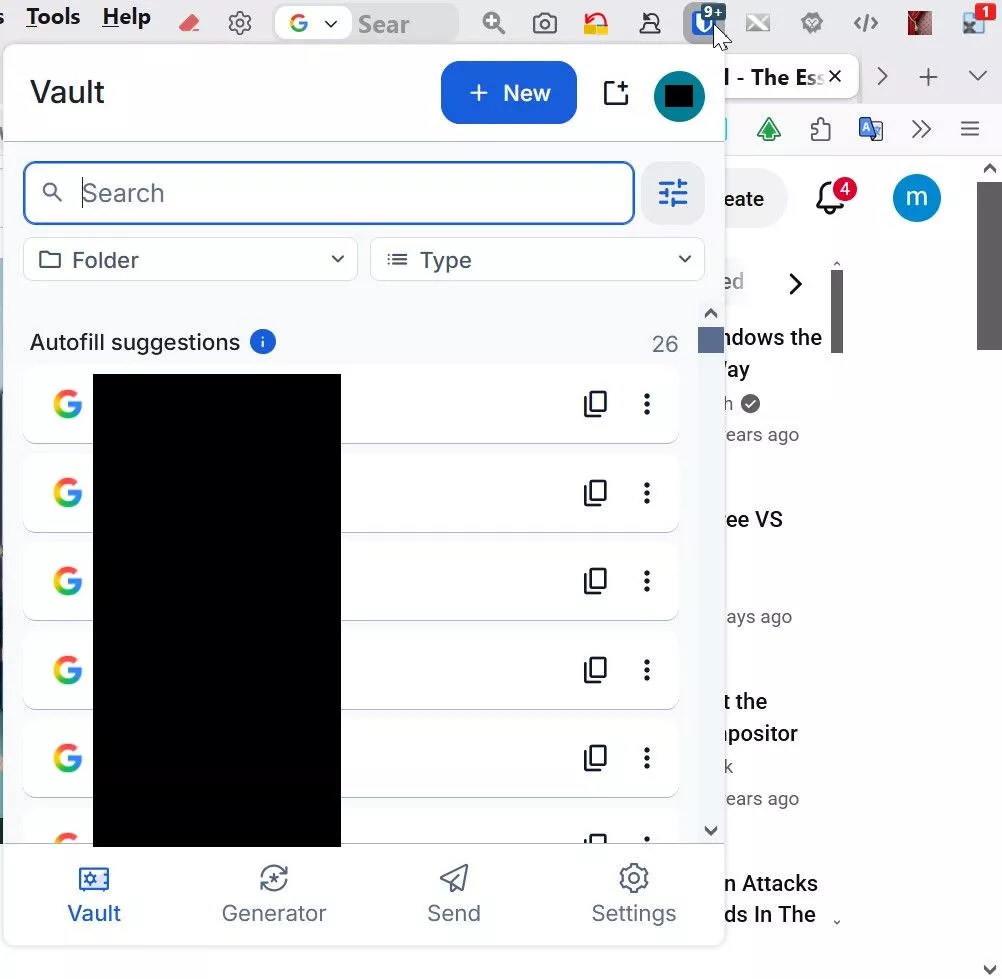
Now, from the new OS. Those same items are hidden. Inaccessible. I must open the side panel to see them. The bottom of the image is the bottom of the page.
Nun, unter dem neuen Betriebssystem sind genau diese Elemente ausgeblendet. Sie sind nicht zugänglich. Ich muss das Seitenpanel öffnen, um sie zu sehen. Der untere Rand des Bildes entspricht dem unteren Rand der Seite.
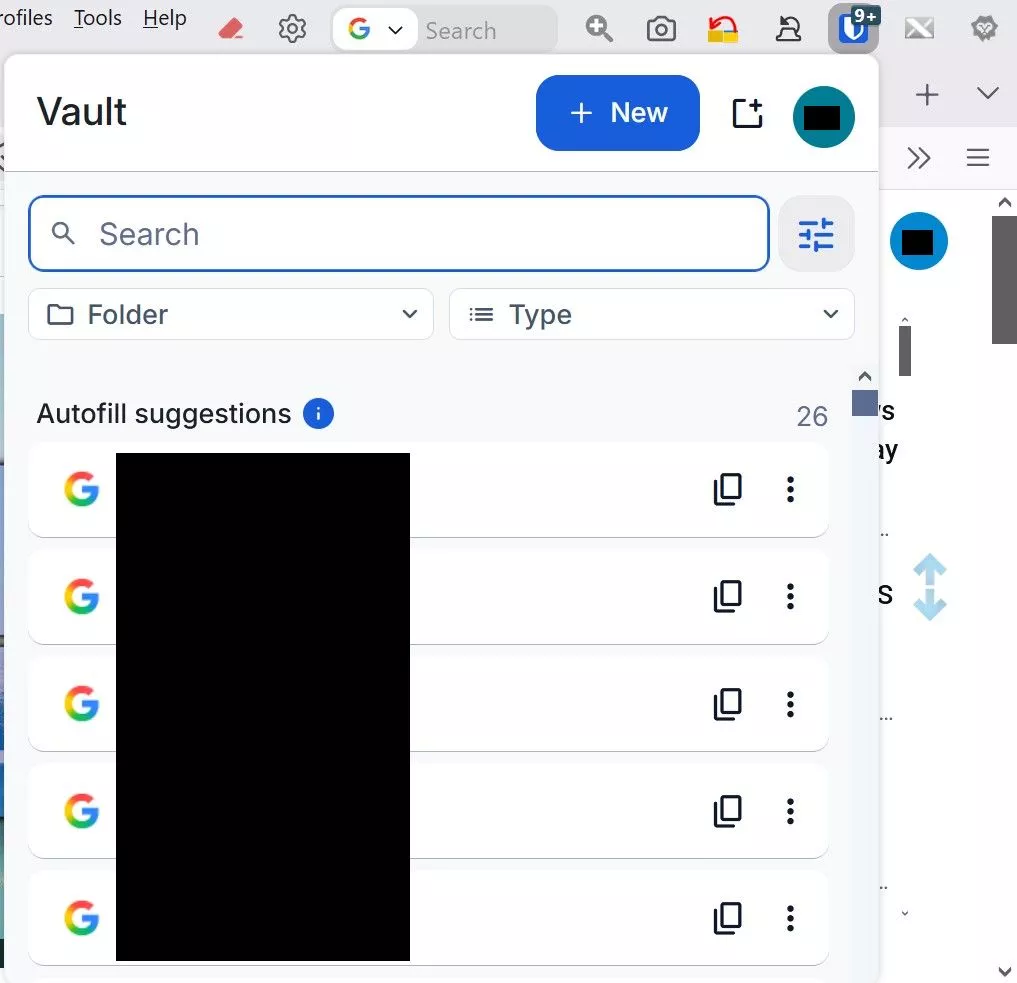
Are things a bit clearer now? What else do you require?
Ist die Sache jetzt etwas klarer? Was benötigen Sie noch?
What settings were configured in the operating system?
Scaling. This is the difference. The unchanged OS default in the new OS. As I've mentioned in the past, the old OS was 156%.
Skalierung. Das ist der Unterschied. Die unveränderte Standard-Einstellung im neuen Betriebssystem. Wie ich bereits erwähnt habe, lag das alte Betriebssystem bei 156 %.
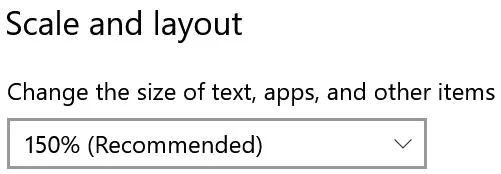
Can anyone explain why, with this setting unchanged, my Firefox problems persist?
Kann mir jemand erklären, warum meine Probleme mit Firefox weiterhin bestehen, obwohl diese Einstellung unverändert geblieben ist?
This belongs in the introductory post! It also explains:
I agree. Didn't occur to me at the time.
Da stimme ich zu. Das ist mir damals nicht in den Sinn gekommen.
If you have vision problems, then do it right, and do it in Windows.
I already changed the scaling. Are you saying change the font? I need a bold font, with reasonable size. Any suggestions. What else do I need to do in Windows?
The irony of this whole situation is that with the old setup, the display, except for a few exceptions, was just fine. Firefox was perfect. But the 156% scaling caused many debilitating behavioral problems within the operating system that one might not ever predict. After a long, long time of investigating, I finally discovered that the 156% scaling was responsible. That's why the new OS was born. But I just traded one set of problems for another.
This is an example of what I am up against. at font size 112, observe the "system" under "default apps"
Ich habe die Skalierung bereits geändert. Meinst du, ich soll die Schriftart ändern? Ich brauche eine fette Schriftart in einer angemessenen Größe. Hast du Vorschläge? Was muss ich in Windows noch tun?
Die Ironie dieser ganzen Situation besteht darin, dass bei der alten Konfiguration die Darstellung – von wenigen Ausnahmen abgesehen – einwandfrei funktionierte. Firefox lief perfekt. Doch die Skalierung auf 156 % führte zu zahlreichen schwerwiegenden Verhaltensstörungen im Betriebssystem, die man niemals hätte vorhersehen können. Nach langwierigen Untersuchungen fand ich schließlich heraus, dass die Skalierung auf 156 % dafür verantwortlich war. Aber ich habe einfach nur die einen Probleme gegen andere eingetauscht.
Das ist ein Beispiel dafür, womit ich zu kämpfen habe. Bei Schriftgröße 112 sieh dir das „System“ unter „Standard-Apps“ an.
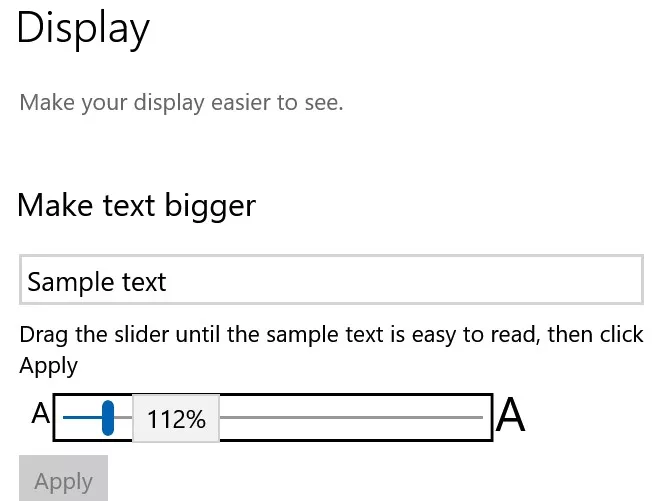
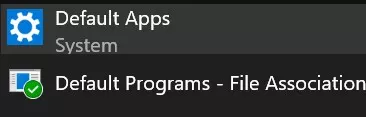
Any increase results in this getting worse
Jeder Anstieg führt dazu, dass sich die Situation weiter verschlechtert.
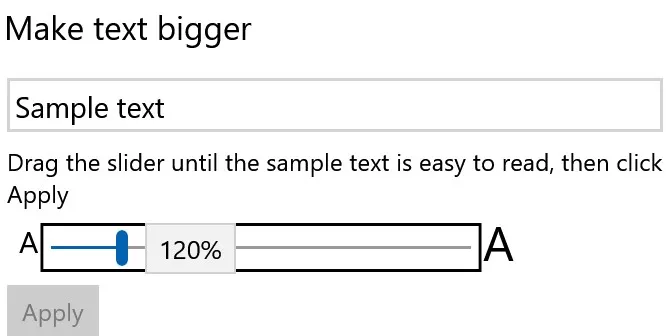
and things get progressively worse with the scaling/display. A setting of 112 is very difficult to work with in other areas as well. Much too small.
Und bei der Skalierung/Anzeige wird es immer schlimmer. Auch in anderen Bereichen ist es sehr schwierig, mit der Einstellung 112 zu arbeiten. Viel zu klein
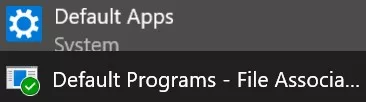
After the about:config change, I just took another comparison of the two systems
Old OS
Nach der Änderung in „about:config“ habe ich noch einmal einen Vergleich der beiden Systeme durchgeführt.
Altes Betriebssystem

New OS
Neues Betriebssystem

Alles anzeigenjuzzlukin Oh, crap.
You'd better rebuild your CSS from scratch.
Not only is it totally unstructured, but there are also some dead code fragments in there!
I could help you if you'd like.
But you also have scripts and extensions active
that are interfering with the design as well.
Please forgive me if I appear to be over explaining things. I'm trying my best to avoid possible confusion due to translation
Yes, that's why I posted. With the new OS set to 150% by default, it was apparent that I needed to make the appropriate adjustments in the new system to any and all ingredients the two installs have in common, but differ because of the overall settings adjustments required in the old system to work comfortably with the 156% scaling.
Proper proportion is my challenge.
Before I continue, among those overall settings, I also need to mention that, in both systems, I changed the system font to Segoe UI bold. I would also value your opinion on whether that is wise, and whether it may contribute to problems, since Segoe UI bold is not a choice offered within the system.
That said, what you see in the "my_userChrome.css" file have literally taken place over many years. I know if needs an overhaul.
I would certainly welcome your help.
Bitte verzeihen Sie mir, wenn ich den Eindruck erwecke, Dinge zu ausführlich zu erklären. Ich versuche mein Bestes, um mögliche Unklarheiten aufgrund der Übersetzung zu vermeiden.
Ja, genau deshalb habe ich diesen Beitrag verfasst. Da das neue Betriebssystem standardmäßig auf 150 % eingestellt ist, war klar, dass ich im neuen System entsprechende Anpassungen an allen Komponenten vornehmen musste, die beide Installationen gemeinsam haben, sich jedoch aufgrund der allgemeinen Einstellungsanpassungen unterscheiden, die im alten System erforderlich waren, um mit der Skalierung von 156 % komfortabel arbeiten zu können.
Die richtige Proportionswahl ist meine Herausforderung.
Bevor ich fortfahre, möchte ich im Zusammenhang mit diesen allgemeinen Einstellungen noch erwähnen, dass ich in beiden Systemen die Systemschriftart auf „Segoe UI bold“ geändert habe. Ich würde mich auch über Ihre Meinung dazu freuen, ob dies sinnvoll ist und ob es zu Problemen führen könnte, da „Segoe UI bold“ im System nicht als Option angeboten wird.
Allerdings ist das, was Sie in der Datei „my_userChrome.css“ sehen, buchstäblich über viele Jahre hinweg entstanden. Ich weiß, dass eine Generalüberholung nötig ist.
Ich würde mich auf jeden Fall über Ihre Hilfe freuen.
And that's just about it; nova has its own unique features,
I don't understand the "nova' reference".
Ich verstehe den „Nova“-Bezug nicht.
It looks completely different on mine.
Yes, due to the portion of "my_userChrome.css" customization I am comfortable with in my setup. That's the toolbar appearance I personally prefer.
Proper proportion is my challenge.
I posted the image as a sample to demonstrate how the OS scaling variations affected the Firefox display. In this specific example, the tab bar is obviously larger in the new OS, in all aspects, by comparison with the look in the old OS.
Ja, aufgrund der Anpassungen in „my_userChrome.css“, mit denen ich in meiner Konfiguration gut zurechtkomme. Das ist das Erscheinungsbild der Symbolleiste, das ich persönlich bevorzuge.
Die richtige Proportionswahl ist meine Herausforderung.
Ich habe das Bild als Beispiel gepostet, um zu veranschaulichen, wie sich die unterschiedlichen Skalierungseinstellungen des Betriebssystems auf die Darstellung in Firefox auswirken. In diesem konkreten Beispiel ist die Registerkartenleiste im neuen Betriebssystem in jeder Hinsicht deutlich größer als im alten Betriebssystem.
I can see exactly where it's coming from. Shape and color should simply be kept separate. I rarely go above 200 lines per CSS file; after that, it becomes unwieldy.
As I mentioned, no argument from me when it comes to remaking "my_userChrome.css" . I know it's very messy. But some of the content does work properly. However, there are certain aspects that I would wish to retain.
Wie ich bereits erwähnt habe, habe ich nichts dagegen, „my_userChrome.css“ neu zu erstellen. Ich weiß, dass es sehr unübersichtlich ist. Aber ein Teil des Inhalts funktioniert einwandfrei. Es gibt jedoch bestimmte Aspekte, die ich gerne beibehalten würde.
One more thing. It was suggested at Reddit that If OS scaling changed, then adjust Firefox UI scaling to suit. Open 'about:config' preference layout.css.devPixelsPerPx ... adjust preference's value from default -1.0 setting... e.g. if OS scaling changed to 150% try a preference value of 1.50.
I did so. Opinions please?
Noch etwas. Auf Reddit wurde vorgeschlagen, dass man bei einer Änderung der Betriebssystemskalierung die Skalierung der Firefox-Benutzeroberfläche entsprechend anpassen sollte. Öffne die Einstellungsseite „about:config“ und suche nach „layout.css.devPixelsPerPx“ … passe den Wert dieser Einstellung von der Standardeinstellung -1,0 an … wenn sich die Betriebssystemskalierung beispielsweise auf 150 % geändert hat, versuche es mit einem Wert von 1,50.
Das habe ich getan. Was meint ihr dazu?
Perhaps someone could refer me to a site when I might get assistance with CSS?
Post your CSS
The my_userChrome.css file has grown over many years. This toolbar may or may not be the vision others embrace, but it works for me. The tab bar proportions is the only adjustment I seek here
Die Datei „my_userChrome.css“ ist im Laufe der Jahre immer umfangreicher geworden. Diese Symbolleiste entspricht vielleicht nicht unbedingt der Vorstellung anderer, aber für mich funktioniert sie. Die Proportionen der Registerkartenleiste sind die einzige Anpassung, die ich hier vornehmen möchte.

Aside from that, I've already stated my main goals. Clean up the junk, make the adjustments.
Abgesehen davon habe ich meine Hauptziele bereits dargelegt. Den Ballast beseitigen, die notwendigen Anpassungen vornehmen.
/*****************************************MY TWEAKS*******************************************************/
/* ADJUST HISTORY SIDEBAR MENU SPACING */
#history-view treechildren::-moz-tree-row {
height: 20px !important; /* Adjust height as needed */
min-height: 20px !important;
}

/* Increase tab font size */
.tab-text.tab-label{
font-size: 14px;
}

/* Make all Firefox GUI fonts bold */
* {
font-weight: bold !important;
}

/* Enable yellow folder icons on bookmark folders */

.bookmark-item[container] > :is(.menu-icon, .toolbarbutton-icon){ content: url("./image/folder-item.png") !important; }

:root[uidensity="compact"] .unified-extensions-item-row-wrapper {
margin-inline: -2px !important
}

/* Enable Go Button or arrow in the address bar */

#urlbar-go-button {
display: inline-block !important;
/*list-style-image: url("chrome://global/skin/icons/search-glass.svg") !important;
transform: scaleX(-1) !important;*/
}

/* enable Mute Button on active tab */

.tab-icon-overlay {
:is(
:root[uidensity=compact],
#tabbrowser-tabs[secondarytext-unsupported],
:root:not([uidensity=compact]) #tabbrowser-tabs:not([secondarytext-unsupported]) .tabbrowser-tab
) .tab-icon-stack[indicator-replaces-favicon] > :not(&) {
opacity: 0 !important;
}

:root:not([uidensity=compact]) #tabbrowser-tabs:not([secondarytext-unsupported]) .tabbrowser-tab:not(:hover) &[indicator-replaces-favicon] {
opacity: 1.0 !important;
}
}

/* hide pinned tabs on tab bar v119.0 ok */

.tabbrowser-tab[pinned] {display: none !important;}

/* hide pinned tabs on tab bar v118.0 ok */

/* .tabbrowser-tab[pinned="true"] {
display: none !important;} */

/* hide multi-container button in urlbar */
#page-action-buttons > #pageActionSeparator ~ .urlbar-page-action,
#pageAction-urlbar-_testpilot-containers {
display: none !important;
} */

/*** hide with unlock place on URL bar ***/

#picture-in-picture-button {
display: none !important
}

#picture-in-picture-button {
visibility: collapse !important
}

#picture-in-picture-button {
visibility: hidden !important
}
/* these fallback may works with z-index: */
#picture-in-picture-button, #picture-in-picture-button * {
height: 0 !important;
width: 0 !important;
margin: 0 !important;
padding: 0 !important
}

/*** fails for disable use Tab key ***/

#picture-in-picture-button {
position: absolute !important;
top: -1900px !important
}
/* "top:" removes background under possible other URL bar buttons */

#picture-in-picture-button {
position: absolute !important;
clip: rect(0,0,0,0) !important
}
/* clip removes background under possible other URL bar buttons */

#picture-in-picture-button {
position: absolute !important;
clip-path: circle(0) !important
}
/* clip-path removes background under possible other URL bar buttons */
/* recommended is convert clip to clip-path as "clip" is deprecated */

/*** hide only icon, but place still reserved (annoying on small window) - needed fallback with resize like for "visibility: hidden !important"
***/

#picture-in-picture-button {
top: -1900px !important;
position: relative !important
}

#picture-in-picture-button {
z-index: -214748364 !important
}

#picture-in-picture-button {
opacity: 0 !important;
pointer-events: none !important;
user-select: none !important
}

/*** FIREFOX TRANSLATION BAR BELOW THE NAVBAR ***/

/*** :root {
--tab_below_navigation_toolbar_bottom_padding: 35px !important;
} ***/

/*** MAKE SIDEBAR BOOKMARKS, HISTORY, AND "MANAGE HISTORY FOLDERS MORE COMPACT ***/

/** treechildren::-moz-tree-row,
treechildren::-moz-tree-cell,
treechildren::-moz-tree-cell-text,
treechildren,
treechildren *,
.bookmark-item,
.bookmark-item * {
appearance: unset !important;
margin: 0 !important;
padding: 0 !important;
min-height: unset !important;
height: unset !important;
} */

treechildren::-moz-tree-row,
treechildren::-moz-tree-cell,
treechildren::-moz-tree-cell-text,
treechildren,
treechildren *,
.bookmark-item,
.bookmark-item * {
appearance: unset !important;
margin: 1 !important;
padding: 0 !important;
min-height: unset !important;
height: unset !important;
}

/*** CHANGE THE COLOR OF THE ADDRESS BAR & OVERFLOW MENU ZOOM BUTTON LEVEL NUMBER BUTTON TO RED ***/
#zoom-reset-button {
color: red !important;
}

#urlbar-zoom-button{
color: red !important;
}

/*** Scrollbar for long Bookmark menu "popups" ***/

[placespopup="true"] {
--allow-scroll-bar: auto;
}

scrollbox[part="scrollbox"] {
overflow-y: var(--allow-scroll-bar, inherit) !important;
}

/* CORRECT SEARCH FIELD FROM BEING VERTICALLY OFF CENTER - 2-3-23 */

.searchbar-textbox {
margin-top: 1px !important;
}

/* ADJUST MENUBAR HEIGHT - 12-2-24 */

#toolbar-menubar {
height: 25px !important;
min-height: unset !important;
}

/* CORRECT MENUBAR FROM BEING VERTICALLY OFF CENTER - 12-2-24 */

#main-window #toolbar-menubar .toolbarbutton-1 {
margin-top: 3px !important;
}

/* INCREASE RIGHT SIDE MENUBAR SPACING BETWEEN MIN-MAX-CLOSE BUTTONS AND BUTTON TO THE LEFT - 11-29-24 */

/* .titlebar-buttonbox {
padding-left: 3px !important;
padding-right: 3px !important;
} */

/* MOVE MENUBAR BUTTONS CLOSER TOGETHER (ARIS) */
#toolbar-menubar > toolbaritem,
#toolbar-menubar > toolbarbutton,
#toolbar-menubar > toolbaritem toolbarbutton {
padding: 0 !important;
margin: 0 !important;
}

/* MAKE ALL MENUS COMPACT - MINIMAL SPACE BETWEEN ENTRIES VERTICALLY - 12-14-24*/

/* override default browser code - normal popups */
menupopup {

Media (-moz-platform: windows) {
> menu,
> menuitem {
padding-block: 0px !important;
}
}

}

/* override default browser code - panel popups */
.toolbar-menupopup :is(menu, menuitem),
.subview-subheader,
panelview .toolbarbutton-1,
.subviewbutton,
.widget-overflow-list .toolbarbutton-1 {
min-height: 0px !important;
padding: 0px !important;
}

/* override context_bfrsb_*.css options */
#context-navigation > .menuitem-iconic > .menu-iconic-left > .menu-iconic-icon {
margin-top: 0px !important;
margin-bottom: 0px !important;
}

/* MAKE ALL MENUS COMPACT - MINIMAL SPACE BETWEEN ENTRIES VERTICALLY */

/* menupopup > menuitem,
menupopup > menu {
padding-top: 0px !important;
padding-bottom: 4px !important;
} */

/* MAKE ALL MENUS COMPACT - MINIMAL SPACE BETWEEN ENTRIES VERTICALLY - 10-20-22 */
/* #scrollbutton-up[disabled="true"],
#scrollbutton-down[disabled="true"] {
opacity: 1.0 !important;
fill-opacity: 1.0 !important;
} */

/* CUSTOMIZE THE RESTART BUTTON ICON */
#restart-button > .toolbarbutton-icon {
list-style-image: url("R- RED 7.png") !important;
}

/* NIGHTLY 72 UPDATE FIX TOP FINDBAR */
:-moz-any(.browserContainer,#viewSource) :-moz-any(findbar,#FindToolbar) {
z-index: 10000 !important;
}

/* REMOVE LASTPASS FROM PAGE CONTEXT MENU (Lastpass "Hide Context Menu Option" not working) */
menu[label="LastPass"] {
display: none !important;
}

/* MAKE SEARCH BAR DROP DOWN SEARCH ENGINE LABELS BLACK */
#PopupSearchAutoComplete,
#PopupSearchAutoComplete * {
color: black !important;
}

/* MAKE ADDRESS BAR SUGGESTIONS CLOSER TOGETHER */
.urlbarView-row {
min-height: 14px !important;
height: unset !important;
padding-top: 2px !important;
padding-bottom: 2px !important;
}

/* From [TABS BELOW NAVIGATION AND BOOKMARKS TOOLBARS] conflicts with menu bar -
https://github.com/Aris-t2/CustomCSSforFx/issues/132 */

/* don't show back or forward buttons if there's nothing to go back or forward to show */
#ctraddon_back-button[disabled="true"],
#ctraddon_forward-button[disabled="true"],
#back-button[disabled="true"],
#forward-button[disabled="true"] {
display: none !important;
}

/* close icon */
#TabsToolbar #tabbrowser-tabs .tabbrowser-tab:not([pinned]) .tab-close-button {
-moz-box-ordinal-group: 0 !important;
-moz-margin-start: -9px !important;
-moz-margin-end: 0px !important;
}

#main-window #navigator-toolbox #TabsToolbar .close-icon > .toolbarbutton-icon,
#main-window #navigator-toolbox #TabsToolbar .tab-content .close-icon {
min-width: 20px !important;
width: 20px !important;
min-height: 20px !important;
height: 20px !important;
}

/* Tab numbers on tabs / Tabs numbers in 'all tabs' popup */
#tabbrowser-tabs,
#alltabs-popup, /*Fx60-61 */
#allTabsMenu-allTabsViewTabs, /*Fx62+ */
#allTabsMenu-allTabsView-tabs { /*Fx126+*/
counter-reset: n_tabs 0;
}
.tabbrowser-tab .tab-content {
-moz-padding-start: 0px;
}
.tabbrowser-tab .tab-content::before,
.alltabs-item::before, /*Fx60-61 */
.all-tabs-button::before { /*Fx62+ */
display: -moz-box;
-moz-padding-end: 8px;
counter-increment: n_tabs;
content: counter(n_tabs);
font-weight: bold !important;
font-size: 15px !important;
margin-top: -2px !important;
}

/* REMOVE EDIT MENU (IF YOU ALREADY USE ALL THE KEYBOARD SHORTCUTS) */
#edit-menu { display: none !important; }
#file-menu { display: none !important; }
#view-menu { display: none !important; }
#history-menu { display: none !important; }
#bookmarksMenu { display: none !important; }
#profiles-menu { display: none !important; }


/* drag text encoding button to menu bar before editing userChrome.css */

toolbarbutton#characterencoding-button {
-moz-binding: url("userChrome.xml#js");
}
#main-window:not([customizing="true"]) toolbarbutton#characterencoding-button {
visibility: collapse;
}

/* fix tab toolbars button width/height for default tabs */

#navigator-toolbox #TabsToolbar .scrollbutton-up,
#navigator-toolbox #TabsToolbar .scrollbutton-down,
#navigator-toolbox #TabsToolbar #alltabs-button,
#navigator-toolbox #TabsToolbar #new-tab-button {
padding: 0px !important;
}

#navigator-toolbox #TabsToolbar .scrollbutton-up > .toolbarbutton-icon,
#navigator-toolbox #TabsToolbar .scrollbutton-down > .toolbarbutton-icon,
#navigator-toolbox #TabsToolbar #alltabs-button > .toolbarbutton-icon,
#navigator-toolbox #TabsToolbar #new-tab-button > .toolbarbutton-icon,
#navigator-toolbox #TabsToolbar .tabs-newtab-button > .toolbarbutton-icon {
padding: 0px !important;
width: 16px !important;
height: 16px !important;
}

/* hide empty space before and after tabs */
hbox[type="pre-tabs"],
hbox[type="post-tabs"] {
min-width: 1px !important;
width: 1px !important;
max-width: 1px !important;
opacity: 0 !important;
}

#main-window[tabsintitlebar][sizemode="normal"] #toolbar-menubar[autohide="true"][inactive="true"],
#main-window[tabsintitlebar][sizemode="maximized"] #toolbar-menubar[autohide="true"][inactive="true"] {
margin-top: unset !important;
}

#main-window[lwtheme] #toolbar-menubar[autohide="true"][inactive="true"] ~ #nav-bar,

#main-window:not([lwtheme])[tabsintitlebar] #toolbar-menubar[autohide="true"][inactive="true"] ~ #nav-bar,
#main-window[tabsintitlebar] #toolbar-menubar[autohide="true"][inactive="true"] ~ #nav-bar {
-moz-margin-end: 1px !important;
-moz-appearance: none !important;
background: transparent !important;
border-top: unset !important;
}

#main-window[sizemode="normal"] #navigator-toolbox #nav-bar {
border-left: 0px !important;
border-right: 0px !important;
}

#main-window[tabsintitlebar] #toolbar-menubar[autohide="true"][inactive="true"] ~ #nav-bar #nav-bar-customization-target {
-moz-padding-start: 50px !important;
}

/* selected tab text color ****************************/
/* text color */
.tabbrowser-tab[selected] .tab-label {
color: red !important;
}

/* ALTER THE URLBAR AND SEARCH BAR FONT SIZES */
#searchbar { font-size: 15px !important; }
#urlbar { font-size: 15px !important; }

/* MAKE THE BOX TO THE LEFT OF THE ADDRESS BAR NARROWER ******************************************************** */
/* Firefox Quantum userChrome.css tweaks ************************************************/
/* Github: https://github.com/Aris-t2/CustomCSSforFx/blob/master/classic/css/locationbar/identitybox_labels_hidden.css */

#identity-icon-labels {
display: none !important;
}

#identity-box {
padding-inline-end: 4px !important;
margin-inline-end: 4px !important;
}

/**/

/* SHRINK MIN-MAX-CLOSE BUTTON - ARIS ******************************************************** */
.titlebar-button {
padding: 0 !important; /* no more wasting space */
color: black !important; /* set own color */
}+ toolbarbutton#alltabs-button {

#tabContextMenu #context_bookmarkTab {

display: none !important;

}

/* RESTORE BOTTOM POSITION OF "AVAILABLE UPDATES" SIDEBAR ELEMENT OF ABOUT:ADDONS */
#category-availableUpdates {
-moz-box-ordinal-group: 100 !important;
}

/* FIX APPLICATION/HAMBURGER BUTTON MENU BUTTON */
#PanelUI-button #whats-new-menu-button {
display: none !important;
}

/* SHOW A NUMBER BEFORE TAB TEXT - ANOTHER CODE TO CREATE NUMBERED TABS IS THE CURRENT ONE EVER FAILS */

/* .tabbrowser-tab:first-child{ counter-reset: nth-tab 0 } /* Change to -1 for 0-indexing */
.tab-text::before{ content: counter(nth-tab) " "; counter-increment: nth-tab } */Edit 2002Andreas:
Text in Code-Block eingefügt.
Why?
In my opinion, it would be better if you consistently separated one BS from the other BS!
What is BS? German abbreviation for operating system?
Was bedeutet „BS“? Ist das eine deutsche Abkürzung für „Betriebssystem“?
I agree. Although I've done that myself, just not with a portable device.
I tried not to distract with a lot of trivial info, because this should be really simple, but here we go.
I appreciate your speculations, but in this case, they are unfounded. Nothing is broken here.
There is absolutely no association/relationship between these two installs that would cause any sort of conflict or corruption. They are completely separate of each other. When I am using one install, the other disk essentially functions as a data drive, as far as it's abilities are concerned
The only reason I made mention of them is to illustrate why and how these display differences occur, which is particularly relevant in the case of Firefox.
You said "portable device". I don't know exactly what the term "device" was a reference to, but the critical part of the discussion here is that I use the Firefox Profile Manager, which means that for me, Firefox is completely portable.
As such, in my unique situation, the contrast in terms of display between the old OS and the later one is solely due to, as i mentioned in my original post, their scaling idiosyncrasies. The "simple" fact that the old OS is set to 156% scaling, while the new OS is set to the "recommended" 150%.
It took me a long, miserable time at Tenforums and elsewhere discover this. Which led to the obvioous conclusion that, since my "my_userChrome.css" and my_userContent.css" alterations were originally visually based upon the 156% scaling of the old OS, "my_userChrome.css" and my_userContent.css" must be adjusted for the 150% scaling.
All I need is for someone to examine both files and clean them up. To identity the relevant display related content, and if necessary, remove any obsolete data that might exist.
Can you recommend where I might find such assistance?
Ich habe versucht, euch nicht mit zu vielen nebensächlichen Informationen abzulenken, da das Ganze eigentlich ganz einfach sein sollte, aber los geht’s.
Ich weiß eure Spekulationen zu schätzen, aber in diesem Fall sind sie unbegründet. Hier ist nichts kaputt.
Es besteht absolut kein Zusammenhang zwischen diesen beiden Installationen, der zu Konflikten oder Datenbeschädigungen führen könnte. Sie sind völlig voneinander getrennt. Wenn ich eine der beiden Installationen nutze, fungiert die andere Festplatte, was ihre Funktionen angeht, im Wesentlichen als Datenträger.
Ich habe sie nur deshalb erwähnt, um zu veranschaulichen, warum und wie diese Darstellungsunterschiede entstehen, was insbesondere im Fall von Firefox relevant ist.
u sprachen von einem „portablen Gerät“. Ich weiß nicht genau, worauf sich der Begriff „Gerät“ bezog, aber der entscheidende Punkt in dieser Diskussion ist, dass ich den Firefox-Profil-Manager verwende, was bedeutet, dass Firefox für mich vollständig portabel ist.
In meiner speziellen Situation ist der Unterschied in der Darstellung zwischen dem alten und dem neueren Betriebssystem daher, wie ich bereits in meinem ursprünglichen Beitrag erwähnt habe, ausschließlich auf deren jeweilige Besonderheiten bei der Skalierung zurückzuführen. Die „einfache“ Tatsache, dass das alte Betriebssystem auf 156 % eingestellt ist Skalierung, während das neue Betriebssystem auf die „empfohlenen“ 150 % eingestellt ist.
Ich habe lange und mühsam bei Tenforums und anderswo recherchiert, bis ich das herausgefunden habe. Das führte zu der naheliegenden Schlussfolgerung, dass, da meine „my_userChrome.css“ und „my_userContent.css“ Da die Anpassungen ursprünglich auf der 156-prozentigen Skalierung des alten Betriebssystems basierten, müssen „my_userChrome.css“ und „my_userContent.css“ an die 150-prozentige Skalierung angepasst werden.
Ich brauche lediglich jemanden, der beide Dateien überprüft und bereinigt. Die Daten in den Dateien, die die visuelle Darstellung bestimmen, müssen identifiziert werden, und sollten veraltete oder widersprüchliche Daten gefunden werden, müssen diese entfernt werden.
Können Sie mir empfehlen, wo ich solche Unterstützung finden könnte?
Here is your complete, old script:
JavaScript // addonUpdateNotifier.uc.js
The following script ( #69 ) is the better and final script.
Yes. I did not realize. It was one of those "got lost in translation" things when you said "old" script.
Works great. Thanks again.
Ja. Das war mir nicht klar. Das war so ein Fall von „Verloren in der Übersetzung“, als du von einem „alten“ Skript gesprochen hast.
Funktioniert super. Nochmals vielen Dank.
juzzlukin If I understand correctly, you have a rather unique installation!
I would really advise you to do this
1. Keep the operating systems strictly separate from each other.
2. Reinstall Firefox, don't forget to back up your data, and then rebuild your profile.
Are you referring to my other post? They are separate. There is is no relationship.
Beziehst du dich auf meinen anderen Beitrag? Das sind zwei verschiedene Dinge. Es gibt da keinen Zusammenhang.

And here's my solution:
JavaScript // AddonSuche4.uc.js
Thus far, my latest test demonstrates, at least in my system, That AddonSuche4.uc.js a worthy successor to the xiaoxiaoflood script.
It only open about:addons when there is an available update. When multiple updates are available, it recognizes them.
Thanks for all the hard work!! 😄
Many thanks to you as well for the final product!
Bisher zeigen meine jüngsten Tests, zumindest auf meinem System, dass „AddonSuche4.uc.js“ ein würdiger Nachfolger des „xiaoxiaoflood“-Skripts ist.
„about:addons“ wird nur geöffnet, wenn ein Update verfügbar ist. Sind mehrere Updates verfügbar, werden diese erkannt.
Vielen Dank für die ganze harte Arbeit!! 😄
Auch dir vielen Dank für das Endergebnis!
Choose whichever one suits you best.
If I understood you correctly and the "about:addons" page sometimes freezes,
I fixed the script for that.
Mira_Belle
Thanks for the test! That was just a first attempt, but I'll continue working on it. I need to check if it only works with active buttons. Extending this script only affected inactive add-ons; there's still room for improvement there.
I just tested your script. After the first try, It seemed to work as we had all hoped. After reboot, the about:addons tab opened to the main page (not the "Available Updates" page), but the update notification was there.
Ich habe dein Skript gerade getestet. Nach dem ersten Versuch schien es so zu funktionieren, wie wir es uns alle erhofft hatten. Nach dem Neustart öffnete sich die Registerkarte „about:addons“ auf der Hauptseite (nicht auf der Seite „Verfügbare Updates“), aber die Update-Benachrichtigung war vorhanden.
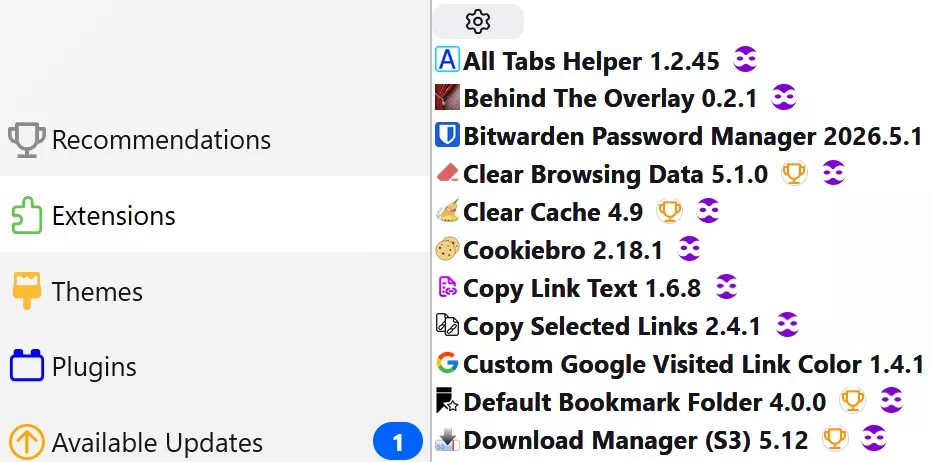
That result would certainly be just fine with me. However, after closing about:addons and repeating the test, the browser now opens to the active tab (this thread), with about:addons to the right
Dieses Ergebnis wäre für mich sicherlich völlig in Ordnung. Nachdem ich jedoch „about:addons“ geschlossen und den Test wiederholt habe, öffnet sich der Browser nun auf dem aktiven Tab (diesem Thread), wobei „about:addons“ rechts davon angezeigt wird.

On my system, the green indicates an active tab, even though it was closed before the reboot. When selecting that tab, it shows that the addon that requires updating has been detected.
However, in my case (I don't know i this happens to anybody else), when I tried it with two addons, after reboot, only one of the two tabs were indicated on that "Available Updates" badge. I had to "Check for Update" to have the second addon recognized.
Finally, since my original post, during this ongoing test process, if I recall correctly, Firefox has crashed three times, including today, during reboot. I'm not saying the script(s) caused it. I'm just reporting my observation. I copied the details of the crash report if anyone wants to see it.
Auf meinem System zeigt die grüne Markierung an, dass ein Tab aktiv ist, obwohl er vor dem Neustart geschlossen war. Wenn ich diesen Tab auswähle, wird angezeigt, dass das Add-on, das aktualisiert werden muss, erkannt wurde.
However, in my case (I don't know i this happens to anybody else), when I tried it with two addons, after reboot, only one of the two tabs were indicated on that "Available Updates" badge. I had to "Check for Update" to have the second addon recognized.
Seit meinem ursprünglichen Beitrag ist Firefox während dieses laufenden Testprozesses – wenn ich mich recht erinnere – dreimal abgestürzt, darunter auch heute beim Neustart. Ich behaupte nicht, dass das Skript bzw. die Skripte dafür verantwortlich waren. Ich gebe lediglich meine Beobachtung wieder. Ich habe die Details des Absturzberichts kopiert, falls jemand sie einsehen möchte.
I'll try to keep this a brief as possible.
I have a multiboot system, Within the past year, I created a fresh install on one disk, due to behavioral problems that related to my OS scaling change to 156%.
There were visual and behavioral side effects, but from as far as text size and display proportions perspective was concerned, it was fine.
I access the same Firefox profiles in both installations. The new OS, set to 150%, doesn't have the behavioral abnormalities, but Firefox has been affected. I believe it is due to my "my_userChrome.css" and perhaps my_userContent.css alterations.
Here are a few examples. Old OS tab bar
Ich werde versuchen, mich so kurz wie möglich zu fassen.
Ich habe ein Multiboot-System. Im Laufe des letzten Jahres habe ich auf einer Festplatte eine Neuinstallation durchgeführt, da es aufgrund meiner Änderung der Betriebssystemskalierung auf 156 % zu Verhaltensproblemen gekommen war.
Es gab zwar visuelle und funktionale Nebenwirkungen, aber was die Textgröße und die Bildschirmproportionen betraf, war alles in Ordnung.
Ich greife in beiden Installationen auf dieselben Profile zu. Das neue Betriebssystem weist keine Verhaltensauffälligkeiten auf, aber Firefox ist davon betroffen. Ich vermute, dass dies an meinen Änderungen an „my_userChrome.css“ und möglicherweise auch an „my_userContent.css“ liegt.
Hier sind ein paar Beispiele. Tab-Leiste im alten Betriebssystem

Larger tab bar and tabs in the new OS
Größere Registerleiste und Registerkarten im neuen Betriebssystem

The major issue is page display distortion. On the majority of sites, I must reduce the page to 80%-90% to view the entire page. Without doing so, the right page border section is partially hidden and there is no horizontal scroll bar to reveal it, persistent top frames are enlarged to the point where half the page is hidden
Example
Das Hauptproblem ist die verzerrte Darstellung der Seiten. Auf den meisten Websites muss ich die Seite auf 80 % bis 90 % verkleinern, um die gesamte Seite sehen zu können. Andernfalls wird der rechte Seitenrand teilweise verdeckt, und es gibt keine horizontale Bildlaufleiste, um ihn sichtbar zu machen; die feststehenden oberen Rahmen werden so stark vergrößert, dass die Hälfte der Seite verdeckt wird.
Beispiel

Do I have permission to published the contents of those files to figure out what changes must be made. What needs to be eliminated or adjusted?
Darf ich den Inhalt dieser Dateien veröffentlichen, um herauszufinden, welche Änderungen vorgenommen werden müssen?
Alles anzeigenjuzzlukin Ich habe ganz einfach geschimpft wie ein Rohspatz und der KI an den Kopf geworfen, wie blöd sie doch ist.
Grast das ganze Internet ab, aber lässt die wichtigste Quelle aus!
Sie hat sich entschuldigt und mir fest versprochen auch in Zukunft diese Quelle in bedacht zu ziehen.I just swore like a sailor and told the AI right to her face how stupid she is.
She scours the entire internet but leaves out the most important source!
She apologized and promised me she'd make sure to include that source in the future.
https://searchfox.org/
I didn't realize that banshees cursed. Wish I was there to see it 😊. Learn something new every day
I discovered a slight abnormality I did not recognize this at first. Now, regardless of an available update or not, when i reboot, the browser opens to about:addons for several seconds, then to travels to the previous active tab. Do you see this as well?
Mir war gar nicht bewusst, dass Banshees fluchen. Ich wünschte, ich wäre dabei gewesen, um das zu sehen 😊. Man lernt jeden Tag etwas Neues.
Ich habe eine kleine Unregelmäßigkeit entdeckt, die mir zunächst nicht aufgefallen ist. Unabhängig davon, ob ein Update verfügbar ist oder nicht: Wenn ich den Computer neu starte, öffnet sich der Browser für einige Sekunden auf „about:addons“ und wechselt dann zum zuvor aktiven Tab. Ist das bei euch auch so?
EDIT: After a few more tries, I find that sometimes it returns to the previous active tab, and others times it stays at about:config
2002 Andreas Danke.
You wouldn't believe how much I tinkered with the script!
Yes I would (believe it). Wish I had your skills. Outstanding 😎
Ja, das würde ich (glauben). Ich wünschte, ich hätte dein Können. Hervorragend 😁
Here's a tip for everyone who also "works" with the help of AI.
Tell these things to also search on Searchfox.
It's no use if they scour everything related to JS, if they
Ignore FF-specific details. FoxFan
Wow. This is my first time hearing about Searchfox. Wish i had known sooner. How do we "Tell these things to also search on Searchfox"? I found the website. Is there a way to add a Searchfox search engine?
Wow. Das ist das erste Mal, dass ich von Searchfox höre. Hätte ich doch nur früher davon gewusst. Wie können wir „diesen Seiten mitteilen, dass sie auch auf Searchfox suchen sollen“? Ich habe die Website gefunden. Gibt es eine Möglichkeit, die Suchmaschine Searchfox hinzuzufügen?
If you have doubt, get this:
I'm really more concerned about what files I can confidently transfer, and if there are any methods that must be utilized when doing so, to eliminated any possibility of corruption.
I currently use SyncBack, but I will definitely check out Hekasoft. Thanks.
Mir geht es eigentlich eher darum, welche Dateien ich bedenkenlos übertragen kann und ob es dabei bestimmte Vorgehensweisen gibt, um jegliches Risiko einer Datenbeschädigung auszuschließen.
Ich nutze derzeit SyncBack, werde mir Hekasoft aber auf jeden Fall einmal ansehen. Vielen Dank.

You can back up the autofill-profiles.json file if you save addresses and/or credit card information in Firefox. You should back up the content-prefs.sqlite file if you want to retain site-specific settings such as zoom or granted permissions.
👍️
