


Hab ich entsprechend abgeändert. Danke für die Info.
Beiträge von grisu2099
-
-
Fall gelöst!
Die Erweiterung "Bookmark search plus 2" hat sich da irgendwie eingemischt...

-
Merkwürdig...
Da muß ich nochmal in den Tiefen der CSS-Codes buddeln...
Danke.
-
Ich habe hier in 4 Profilen 3 verschiedene Ergebnisse. In 2 Profilen sogar ein englisches Kontextmenü!
Nur in einem Profil funktioniert der Code weiterhin so, wie er vorher in allen Profilen aussah...
Checkst du bitte mal das dunkle Thema?
-
Schau dir mal bitte das Kontextmenü an. Irgendwas auffälliges?
-
Kann mal bitte jemand den folgen CSS-Code für die Sidebar testen?
Ich habe hier mit identischem Code in jedem Profil ein anderes Aussehen...
CSS
Alles anzeigen@-moz-document url("chrome://browser/content/places/bookmarksSidebar.xhtml"), url("chrome://browser/content/bookmarks/bookmarksPanel.xhtml"), url("chrome://browser/content/browser.xhtml"), url("chrome://browser/content/history/history-panel.xhtml") { #sidebar-box { display: block !important; position: fixed! important; top: 172px !important; bottom: 29px !important; width: 0px !important; overflow-x: hidden !important; -moz-appearance: none !important; border: 1px solid green !important; border-left: 0 !important; opacity: 0 !important; transition: width .2s ease-out .2s, opacity .2s ease-out .2s !important; z-index: 2 !important; } #sidebar-box:hover { width: 330px !important; opacity: 1 !important; transition: width .2s ease-out .2s, opacity .2s ease-out .2s !important; } #sidebar-splitter { display: none !important; } #sidebar-header { display: none !important; width: 100%; border: 0 !important; } #sidebar { display: block !important; width: 100% !important; height: 99%; } #title { border-top: 1px solid green !important; } #search-box { -moz-appearance: none !important; background: black !important; color: white !important; margin-left: 30px !important; margin-right: 30px !important; border: 1px solid green !important; border-radius: 5px !important; } .textbox-input { -moz-box-ordinal-group: 1 !important; } .textbox-search-sign { -moz-box-ordinal-group: 2 !important; fill: rgb(0,200,0) !important; } .textbox-input::-moz-placeholder { color: transparent !important; } .sidebar-placesTree treechildren::-moz-tree-image(container, queryFolder_unfiled_____) { list-style-image: none !important; } .sidebar-placesTree treechildren::-moz-tree-cell-text(container, queryFolder_unfiled_____) { color: transparent !important; font-size: 0 !important; } treechildren::-moz-tree-image(container) { list-style-image: url("data:image/gif;base64,R0lGODlhEAAQAOZMAP/////MAF06AJhlAJNgAP//AP/lAP/UAJViAP/JANShAJRhAP/OAJRgAOy5AMaSAP/nAMyZAP/IAP/NAOazAP/RAMmVALaAAH5TAJNfAM2aAP/dT//XOv/KAOPOkMeRAP/nhOSxAOu4AP3KAOrTkv/nrv//1c6bAKdyAP/TAP/bPdWsMr6LA7iCALqGALiEAJNeAMCMAP/gcv/eYdGdAP/TEP/mgv/2y//gg/3JAP/ila97AP/aKsWPAJFbAJZgALeBAMiVAPC9AP/rOum2AHlQAP/4zP//z//jPpNdAP/LANixNP///wAAAAAAAAAAAAAAAAAAAAAAAAAAAAAAAAAAAAAAAAAAAAAAAAAAAAAAAAAAAAAAAAAAAAAAAAAAAAAAAAAAAAAAAAAAAAAAAAAAAAAAAAAAAAAAAAAAAAAAAAAAAAAAAAAAAAAAAAAAAAAAAAAAAAAAAAAAAAAAAAAAAAAAAAAAAAAAAAAAAAAAAAAAAAAAAAAAAAAAAAAAACH5BAEAAEwALAAAAAAQABAAAAefgEyCg4SFhoeFDQ0LjIiCCyU5IwEBBAiXCAOEBDohFBREIg6jQgibODQKqgonDz0fPkkwDQMEMhYRERpBMUsAv8C1Mw8uLUAXKwA2EgkJDJoEGy8swAAgCZQMz0wEKigkN8wJHZQBFZrcPDsAHErllBMT6AQ1HkYVKQf6++hMGUgAhhgYSBAChH4/TBwpwLAhw35MMAiYSLFiEUcYmQQCADs=") !important; } }Danke schon mal vorab!
-
Ja, kannst du. Sieht dann wie folgt aus:
/* Hamburger-Menü ausblenden */
-
Der Eintrag: "toolkit.legacyUserProfileCustomizations.stylesheets" in der about:config steht auf "true"??
-
Hab ich schon...


-
Macht es einen Unterschied, ob Win10 Home oder Pro genutzt wird?
Hier läuft Pro.
-
Bei mir schlug der Defender schon vor dem Download an...
-

Ist dies überhaupt noch möglich, da an dieser Stelle ja Seiteninformationen angezeigt werden? D. h. dieses Script kann man nicht mehr einsetzen?
Doch, das Skript kann man noch einsetzen.
-
Den aktiven Tab durch einfaches hovern mit der Maus wechseln.
-
Versuch mal diese Version. Die funktioniert hier bei mir
JavaScript
Alles anzeigenvar tab_hover = { event:null, tid:null, getTab: function(element) { while (element && element.localName != 'tab') { element = element.parentNode; }; return element; }, onLoad: function() { gBrowser.tabContainer.addEventListener("mouseout", tab_hover.onMouseOut, false); gBrowser.tabContainer.addEventListener("mouseover", tab_hover.onMouseOver, false); }, onUnload: function() { gBrowser.tabContainer.removeEventListener("mouseover", tab_hover.onMouseOver, false); gBrowser.tabContainer.removeEventListener("mouseout", tab_hover.onMouseOut, false); }, onMouseOver: function(event) { tab_hover.event = event.target; tab_hover.tid = setTimeout(function() { gBrowser.selectedTab = tab_hover.getTab(tab_hover.event); }, 100); }, onMouseOut: function() { clearTimeout(tab_hover.tid); } }; tab_hover.onLoad(); -
Ich hatte das in meiner Version anders angelegt...
Jetzt paßt es!
Danke!

-
FuchsFan :
Kannst du die betreffenden Zeilen bitte mal posten?
Ich habe mich daran auch schon erfolglos versucht...
-
Kein Problem. Antwort hast du ja jetzt...
-
Dann sind doch alle zufrieden - oder?
-
Komisch...
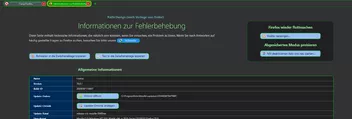
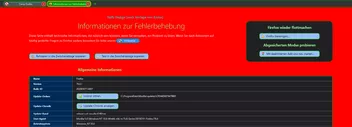
Schau mal die Screenshots an.
Der erste ist meine Normalansicht, beim zweiten habe ich die Farbe geändert. Ich sehe einen deutlichen Unterschied.
-
Dann ändere doch einfach mal die Farbe...
Das ist der Hintergrund der Seite (außerhalb jeglicher Rahmen).