

Und damit?
Die Button fehlen noch immer.
Und damit?
Die Button fehlen noch immer.
Vielen Dank für den Test!
Apropos Test, mir ist gerade aufgefallen das unter Windows, wenn die Titelleiste nicht angezeigt wird, die die Button zum Minimieren, Maximieren, Verkleinern und Schließen nicht angezeigt werden.
Hier dann der Code; Kommentare sehr willkommen.
Es ist ein Testcode, also nicht besonders sauber; Testfarben lassen sich ganz oben abschalten:
Funktioniert hier im hellen Theme soweit ohne Probleme, leider zu viel Nacharbeit für das dunkle Theme.

Wenn man Cookies ablehnt
Nimm sie mal an, was passiert dann?
Hast Du mal geguckt, ob die Anzeige noch immer Deine Sehgewohnheiten widerspiegelt? Ich habe mal ein wenig nach Videos gesucht und sie dann auch gehört, aber wenn ich mir das jetzt so anschaue, habe ich das Gefühl, das es nicht so wirklich die Anzeige von früher widerspiegelt.

unangemeldet?
Ja, unangemeldet und alles ist normal, sprich die Kacheln, die meine Sehgewohnheiten auf YT widerspiegeln sind zu sehen.

Bei der Rubrik Ausgabegeräte rauscht es rechts über den Rand.
Ist in dem Screenshot aber nicht ersichtlich.
Ab wann ist der klein?
Hierbei geht es aber wohl eher nicht um die Diagonale, sondern doch wohl eher um die Auflösung, oder?
ich wohne auch in Niedersachsen
Aber noch nicht der äußerste Norden, der beginnt im schönen Schleswig Holstein. 
Kann nicht sein - in Bremen klappt es ja
Weiter östlich von Hamburg auch. 
die Norddeutschen sind dann morgen erst dran
Hm, ich bin Norddeutscher, wo ist bei Dir "die Norddeutschen"?
Nightly ohne Anpassungen
So, bzgl. Verschiebungen, sieht es hier ohne und auch mit Anpassungen aus, sprich keine Verschiebungen mehr.

Wenn ich aber auf das Symbol mit dem Puzzle-Teil mit der rechten Maustaste klicke kommt ein anderes Fenster.
Du musst ja auch erst einmal Linksmausig auf den Puzzle-Button klicken, dort die genannte Erweiterung ausfindig machen und auf die dann Rechtsmausig klicken.
Mit Google Chrome funktioniert alles!!! --> also kein Problem mit Antivirus/Firewall etc.
Chrome ist nicht Firefox, es kann also durchaus an der Firewall/am Virenscanner liegen, also nochmal genauestens überprüfen.

Das ist sogar noch besser.
Schön wenn es Dir gefällt, war gerne geschehen.
das Ergebnis ist schön.
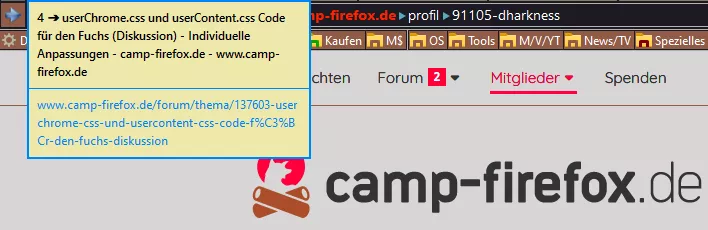
Mein Endergebnis sieht jetzt damit * so ** aus.
*
/* Tabvorschau */
.tab-preview-container {
    border-radius: 0 !important;
    border: 2px solid #0082FC !important;
    background-color: #EEE8AA !important;
    margin: 0 !important;
    padding: 0 !important;
}
.tab-preview-text-container {
    border-radius: 0 !important;
    border: 0 !important;
    background: none !important;
    margin: 0 !important;
    padding: 0 !important;
}
.tab-preview-title {
    max-height: 80px !important;
    word-break: break-word !important;
    border-bottom: 1px solid #0082FC !important;
    color: #000 !important;
    padding: 6px 8px 8px 8px !important;
    margin: 0 !important;
}
.tab-preview-uri {
    max-height: 80px !important;
    white-space: pre-line !important;
    color: #0082FC !important;
    padding: 6px 8px 8px 8px !important;
    margin: 0 !important;
}**
Vielen Dank
Aber gerne doch.
Brauche einen Stil für einen neuen Firefox v123.0 Tooltip. Einstellung der Hintergrundfarbe, des Tab-Namen-Textes, des Adress-Textes.
Teste mal das ↓.
da wo das Icon Grau ist, hat der STOP-Button nicht den Status [disabled="true"], sondern eben :not([disabled="true"]), dafür musst Du noch ein Icon einbauen.
Fehlt mir da noch ein Icon bzw. eine Farbe?
Dir fehlt wohl noch ein Icon für den Status :not([disabled=true"]).
Aber mir Opera kann ich mit einem Adblocker ohne Probleme Youtube sehen was mit Firefox nicht möglich ist
Dem widerspreche ich energisch, auch mit aktiviertem uBO funktioniert YouTube hier ohne Probleme.
