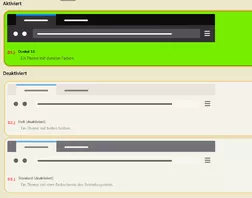
Danke für Börsis Hinweis. Nun klappt alles wieder.
Vielen lieben Dank. 

Danke für Börsis Hinweis. Nun klappt alles wieder.
Vielen lieben Dank.
Habe das Thema Uhr erstmal als erledigt gekennzeichnet, da das Grundthema als solches ja gelöst ist.
Die beiden Scripte betreffen ja andere Ursachen.
Ich habe zwei Scripte ausgemacht, die dieses Phänomen, jeweils unabhängig voneinander erzeugen.
Profilordner öffnen:
//       Profilordner oeffnen

(function() {


   if (location != AppConstants.BROWSER_CHROME_URL) return;


    try {


             CustomizableUI.createWidget({
             id: 'Profilordner',
             type: 'custom',
             defaultArea: CustomizableUI.AREAS,
             onBuild: function(aDocument) {
                var toolbaritem = aDocument.createElementNS('http://www.mozilla.org/keymaster/gatekeeper/there.is.only.xhtml', 'toolbarbutton');
                var props = {
                   id: 'Profilordner',
                   class: 'toolbarbutton-1 chromeclass-toolbar-additional',
                   removable: true,
                   label: 'Profil Button"',
                   tooltiptext: '',
                   style: 'list-style-image: url(data:image/gif;base64,R0lGODlhEAAQAOZMAP/////MAF06AJhlAJNgAP//AP/lAP/UAJViAP/JANShAJRhAP/OAJRgAOy5AMaSAP/nAMyZAP/IAP/NAOazAP/RAMmVALaAAH5TAJNfAM2aAP/dT//XOv/KAOPOkMeRAP/nhOSxAOu4AP3KAOrTkv/nrv//1c6bAKdyAP/TAP/bPdWsMr6LA7iCALqGALiEAJNeAMCMAP/gcv/eYdGdAP/TEP/mgv/2y//gg/3JAP/ila97AP/aKsWPAJFbAJZgALeBAMiVAPC9AP/rOum2AHlQAP/4zP//z//jPpNdAP/LANixNP///wAAAAAAAAAAAAAAAAAAAAAAAAAAAAAAAAAAAAAAAAAAAAAAAAAAAAAAAAAAAAAAAAAAAAAAAAAAAAAAAAAAAAAAAAAAAAAAAAAAAAAAAAAAAAAAAAAAAAAAAAAAAAAAAAAAAAAAAAAAAAAAAAAAAAAAAAAAAAAAAAAAAAAAAAAAAAAAAAAAAAAAAAAAAAAAAAAAAAAAAAAAACH5BAEAAEwALAAAAAAQABAAAAefgEyCg4SFhoeFDQ0LjIiCCyU5IwEBBAiXCAOEBDohFBREIg6jQgibODQKqgonDz0fPkkwDQMEMhYRERpBMUsAv8C1Mw8uLUAXKwA2EgkJDJoEGy8swAAgCZQMz0wEKigkN8wJHZQBFZrcPDsAHErllBMT6AQ1HkYVKQf6++hMGUgAhhgYSBAChH4/TBwpwLAhw35MMAiYSLFiEUcYmQQCADs=)',
                   oncommand: "Services.dirsvc.get('ProfD', Ci.nsIFile).launch();"
                };
                for (var p in props)
                   toolbaritem.setAttribute(p, props[p]);
                return toolbaritem;
             }
});
} catch(e) { };


})();und Restartbutton:
// //      RestartFirefox_plus.uc.js

    (function() {

       if (location != 'chrome://browser/content/browser.xhtml') return;

       try {
          CustomizableUI.createWidget({
             id: 'restart-button',
             type: 'custom',
             defaultArea: CustomizableUI.AREA_NAVBAR,
             onBuild: function(aDocument) {
                var toolbaritem = aDocument.createElementNS('http://www.mozilla.org/keymaster/gatekeeper/there.is.only.xhtml', 'toolbarbutton');
                var props = {
                   id: 'restart-button',
                   class: 'toolbarbutton-1 chromeclass-toolbar-additional',
                   removable: false,
                   label: 'Neustart',
                   tooltiptext: 'Neustart (mit Rechts- und Mittelklick wird userChrome.js-Cache geleert)',
                   style: 'list-style-image: url(data:image/png;base64,iVBORw0KGgoAAAANSUhEUgAAABAAAAAQCAYAAAAf8%2F9hAAAACXBIWXMAAAsTAAALEwEAmpwYAAAKT2lDQ1BQaG90b3Nob3AgSUNDIHByb2ZpbGUAAHjanVNnVFPpFj333vRCS4iAlEtvUhUIIFJCi4AUkSYqIQkQSoghodkVUcERRUUEG8igiAOOjoCMFVEsDIoK2AfkIaKOg6OIisr74Xuja9a89%2BbN%2FrXXPues852zzwfACAyWSDNRNYAMqUIeEeCDx8TG4eQuQIEKJHAAEAizZCFz%2FSMBAPh%2BPDwrIsAHvgABeNMLCADATZvAMByH%2Fw%2FqQplcAYCEAcB0kThLCIAUAEB6jkKmAEBGAYCdmCZTAKAEAGDLY2LjAFAtAGAnf%2BbTAICd%2BJl7AQBblCEVAaCRACATZYhEAGg7AKzPVopFAFgwABRmS8Q5ANgtADBJV2ZIALC3AMDOEAuyAAgMADBRiIUpAAR7AGDIIyN4AISZABRG8lc88SuuEOcqAAB4mbI8uSQ5RYFbCC1xB1dXLh4ozkkXKxQ2YQJhmkAuwnmZGTKBNA%2Fg88wAAKCRFRHgg%2FP9eM4Ors7ONo62Dl8t6r8G%2FyJiYuP%2B5c%2BrcEAAAOF0ftH%2BLC%2BzGoA7BoBt%2FqIl7gRoXgugdfeLZrIPQLUAoOnaV%2FNw%2BH48PEWhkLnZ2eXk5NhKxEJbYcpXff5nwl%2FAV%2F1s%2BX48%2FPf14L7iJIEyXYFHBPjgwsz0TKUcz5IJhGLc5o9H%2FLcL%2F%2Fwd0yLESWK5WCoU41EScY5EmozzMqUiiUKSKcUl0v9k4t8s%2BwM%2B3zUAsGo%2BAXuRLahdYwP2SycQWHTA4vcAAPK7b8HUKAgDgGiD4c93%2F%2B8%2F%2FUegJQCAZkmScQAAXkQkLlTKsz%2FHCAAARKCBKrBBG%2FTBGCzABhzBBdzBC%2FxgNoRCJMTCQhBCCmSAHHJgKayCQiiGzbAdKmAv1EAdNMBRaIaTcA4uwlW4Dj1wD%2FphCJ7BKLyBCQRByAgTYSHaiAFiilgjjggXmYX4IcFIBBKLJCDJiBRRIkuRNUgxUopUIFVIHfI9cgI5h1xGupE7yAAygvyGvEcxlIGyUT3UDLVDuag3GoRGogvQZHQxmo8WoJvQcrQaPYw2oefQq2gP2o8%2BQ8cwwOgYBzPEbDAuxsNCsTgsCZNjy7EirAyrxhqwVqwDu4n1Y8%2BxdwQSgUXACTYEd0IgYR5BSFhMWE7YSKggHCQ0EdoJNwkDhFHCJyKTqEu0JroR%2BcQYYjIxh1hILCPWEo8TLxB7iEPENyQSiUMyJ7mQAkmxpFTSEtJG0m5SI%2BksqZs0SBojk8naZGuyBzmULCAryIXkneTD5DPkG%2BQh8lsKnWJAcaT4U%2BIoUspqShnlEOU05QZlmDJBVaOaUt2ooVQRNY9aQq2htlKvUYeoEzR1mjnNgxZJS6WtopXTGmgXaPdpr%2Bh0uhHdlR5Ol9BX0svpR%2BiX6AP0dwwNhhWDx4hnKBmbGAcYZxl3GK%2BYTKYZ04sZx1QwNzHrmOeZD5lvVVgqtip8FZHKCpVKlSaVGyovVKmqpqreqgtV81XLVI%2BpXlN9rkZVM1PjqQnUlqtVqp1Q61MbU2epO6iHqmeob1Q%2FpH5Z%2FYkGWcNMw09DpFGgsV%2FjvMYgC2MZs3gsIWsNq4Z1gTXEJrHN2Xx2KruY%2FR27iz2qqaE5QzNKM1ezUvOUZj8H45hx%2BJx0TgnnKKeX836K3hTvKeIpG6Y0TLkxZVxrqpaXllirSKtRq0frvTau7aedpr1Fu1n7gQ5Bx0onXCdHZ4%2FOBZ3nU9lT3acKpxZNPTr1ri6qa6UbobtEd79up%2B6Ynr5egJ5Mb6feeb3n%2Bhx9L%2F1U%2FW36p%2FVHDFgGswwkBtsMzhg8xTVxbzwdL8fb8VFDXcNAQ6VhlWGX4YSRudE8o9VGjUYPjGnGXOMk423GbcajJgYmISZLTepN7ppSTbmmKaY7TDtMx83MzaLN1pk1mz0x1zLnm%2Beb15vft2BaeFostqi2uGVJsuRaplnutrxuhVo5WaVYVVpds0atna0l1rutu6cRp7lOk06rntZnw7Dxtsm2qbcZsOXYBtuutm22fWFnYhdnt8Wuw%2B6TvZN9un2N%2FT0HDYfZDqsdWh1%2Bc7RyFDpWOt6azpzuP33F9JbpL2dYzxDP2DPjthPLKcRpnVOb00dnF2e5c4PziIuJS4LLLpc%2BLpsbxt3IveRKdPVxXeF60vWdm7Obwu2o26%2FuNu5p7ofcn8w0nymeWTNz0MPIQ%2BBR5dE%2FC5%2BVMGvfrH5PQ0%2BBZ7XnIy9jL5FXrdewt6V3qvdh7xc%2B9j5yn%2BM%2B4zw33jLeWV%2FMN8C3yLfLT8Nvnl%2BF30N%2FI%2F9k%2F3r%2F0QCngCUBZwOJgUGBWwL7%2BHp8Ib%2BOPzrbZfay2e1BjKC5QRVBj4KtguXBrSFoyOyQrSH355jOkc5pDoVQfujW0Adh5mGLw34MJ4WHhVeGP45wiFga0TGXNXfR3ENz30T6RJZE3ptnMU85ry1KNSo%2Bqi5qPNo3ujS6P8YuZlnM1VidWElsSxw5LiquNm5svt%2F87fOH4p3iC%2BN7F5gvyF1weaHOwvSFpxapLhIsOpZATIhOOJTwQRAqqBaMJfITdyWOCnnCHcJnIi%2FRNtGI2ENcKh5O8kgqTXqS7JG8NXkkxTOlLOW5hCepkLxMDUzdmzqeFpp2IG0yPTq9MYOSkZBxQqohTZO2Z%2Bpn5mZ2y6xlhbL%2BxW6Lty8elQfJa7OQrAVZLQq2QqboVFoo1yoHsmdlV2a%2FzYnKOZarnivN7cyzytuQN5zvn%2F%2FtEsIS4ZK2pYZLVy0dWOa9rGo5sjxxedsK4xUFK4ZWBqw8uIq2Km3VT6vtV5eufr0mek1rgV7ByoLBtQFr6wtVCuWFfevc1%2B1dT1gvWd%2B1YfqGnRs%2BFYmKrhTbF5cVf9go3HjlG4dvyr%2BZ3JS0qavEuWTPZtJm6ebeLZ5bDpaql%2BaXDm4N2dq0Dd9WtO319kXbL5fNKNu7g7ZDuaO%2FPLi8ZafJzs07P1SkVPRU%2BlQ27tLdtWHX%2BG7R7ht7vPY07NXbW7z3%2FT7JvttVAVVN1WbVZftJ%2B7P3P66Jqun4lvttXa1ObXHtxwPSA%2F0HIw6217nU1R3SPVRSj9Yr60cOxx%2B%2B%2Fp3vdy0NNg1VjZzG4iNwRHnk6fcJ3%2FceDTradox7rOEH0x92HWcdL2pCmvKaRptTmvtbYlu6T8w%2B0dbq3nr8R9sfD5w0PFl5SvNUyWna6YLTk2fyz4ydlZ19fi753GDborZ752PO32oPb%2B%2B6EHTh0kX%2Fi%2Bc7vDvOXPK4dPKy2%2BUTV7hXmq86X23qdOo8%2FpPTT8e7nLuarrlca7nuer21e2b36RueN87d9L158Rb%2F1tWeOT3dvfN6b%2FfF9%2FXfFt1%2Bcif9zsu72Xcn7q28T7xf9EDtQdlD3YfVP1v%2B3Njv3H9qwHeg89HcR%2FcGhYPP%2FpH1jw9DBY%2BZj8uGDYbrnjg%2BOTniP3L96fynQ89kzyaeF%2F6i%2FsuuFxYvfvjV69fO0ZjRoZfyl5O%2FbXyl%2FerA6xmv28bCxh6%2ByXgzMV70VvvtwXfcdx3vo98PT%2BR8IH8o%2F2j5sfVT0Kf7kxmTk%2F8EA5jz%2FGMzLdsAAAAEZ0FNQQAAsY58%2B1GTAAAAIGNIUk0AAHolAACAgwAA%2Bf8AAIDpAAB1MAAA6mAAADqYAAAXb5JfxUYAAAN8SURBVHjaVJFNTBxlAIafb2Z29gd2l4VdYCkokAUt1AJplQRTrVqjUWMPPWHSCzb21IOn9qIHY2xMahoTTb00NmkUm5qAjdpUI61VaCxCpCVYixt%2ByvKzCwu7LDs7zMw3HmhM%2Bt6fJ0%2FyCp69wiOzZBCPcqSmIXg0HPHuC4R8nkLWyOXyYiIzfuVHzMIA%2BZsLtH18EApntUdhpzUSD5577nDLi%2FGWKjx%2BHVfR8HpFwNwsxTMzza%2BOXJ1%2B58Ev2sVEV%2ByEawXqxf8FllNWEQ9ePXzsqQOecIDU8jampSAVD76Al2BIIx4Dv2Nz7%2FYq%2B5%2BP8sNXE6WdAhdQlOM9rzUdaGiN8M9UjnKvQjzuA0UjV3AxDIcHywqRoEbXoVrKgyBtKXYEUvprmiN9oaoyvr9wl62NHJbtJeDzOo17YmprVzWOppLO2RRNwf1FSOzSUAXsCIR4QdP13UPfjhUde2mjuBXUjcXNEabOnJmq7Y4Nd7z1fu%2BJ%2FR2Jpgrm0jauAI8GlnSlBi4I0bO6sLBWHc9esxRdmjOZf5n%2B5CLWzCzOvsbKupBZ1xgmElUoC%2BgoKtRGQfNomoaND8P8XS%2Bby1olO7O6GHTl1DejGDOrNB%2BvpO7I%2Ba31%2FDP9Z28YUmqoqhCKcG2EYD6ZMUTojZ8WHmsqD%2BI6wnWFajugCkuuZaV%2FZS47wp99R7E3LbxPV6rtr7dV1pmyuBWs3hr7dZ380LC2tzseffvUHm86C1JC2A%2FrGcn509cn%2BPvTk9ibc1R06qL91Ms1CadF000ll9rVS2VykLzVr0lHOgtpuJ9yUFyXxqhKZjbH2nJRI9IZwyw2kXjvXV%2FIOWgaBcc2a%2BtjdVXR1J3iBDx8QUpQUJAuJJclseogxz441H5vrPO72cm0VSyVPJq27ZaHm8ST3Y0M9d9Kkr19A1A1x4VIObTGBfNrsJ5XmE9b6KqgvrOGhr1Vns2sgeNIkXiigvHf1liZuHWZYjINSEXRVLewZjN6bYmYbvN4rcDvVzFKLnOpErMLBpvbklClznyyyPDA6DjTX3wJWICr%2Bnb3ffjXSGpl5Nxnn88uh2ORUCBaHfVQU%2BsjVuGhKqJT5lFYShr8fGH4j42bH53EnJ4EtgEEPQOTzHx9mqXLl9AT9TS82RvreOmVcMTXVh4JhIr5kp3LFu6u3Lk%2ByMylQazU3ENYAvw3AFUTimFqj5i7AAAAAElFTkSuQmCC)',
                   onclick: 'if (event.button == 1 || event.button == 2) { \
                               event.preventDefault(); \
                               Cc["@mozilla.org/xre/app-info;1"].getService(Ci.nsIXULRuntime). \
                                  invalidateCachesOnRestart(); \
                             }; \
                             BrowserUtils.restartApplication();'
                };
                for (var p in props)
                   toolbaritem.setAttribute(p, props[p]);
                return toolbaritem;
             }
          });
       } catch(e) { };

       var menuitem = document.createXULElement('menuitem');
       var props = {
          id: 'restartfirefox-fileMenu2',
          label: 'Neustart',
          tooltiptext: 'Neustart (mit Rechts- und Mittelklick wird userChrome.js-Cache geleert)',
          onclick: 'if (event.button == 1 || event.button == 2) { \
                      event.preventDefault(); \
                      Cc["@mozilla.org/xre/app-info;1"].getService(Ci.nsIXULRuntime). \
                         invalidateCachesOnRestart(); \
                    }; \
                    BrowserUtils.restartApplication();'
       };
       for (var p in props)
          menuitem.setAttribute(p, props[p]);
       document.getElementById('menu_FilePopup').insertBefore(menuitem, document.getElementById('menu_FileQuitItem'));

       var pane1 = document.getElementById('appmenuPrimaryPane');
       if (pane1) {
          menuitem = document.createXULElement('menuitem');
          var props = {
             id: 'restartfirefox-fileMenu',
             class: 'menuitem-iconic',
             label: 'Neustart',
             tooltiptext: 'Neustart (mit Rechts- und Mittelklick wird userChrome.js-Cache geleert)',
             onclick: 'if (event.button == 1 || event.button == 2) { \
                         event.preventDefault(); \
                         Cc["@mozilla.org/xre/app-info;1"].getService(Ci.nsIXULRuntime). \
                            invalidateCachesOnRestart(); \
                       }; \
                       BrowserUtils.restartApplication();'
          };
          for (var p in props)
             menuitem.setAttribute(p, props[p]);
          pane1.insertBefore(menuitem, document.getElementById('appmenu-quit'));
       };

})();Wie gewünscht:
Einmal die CSS:
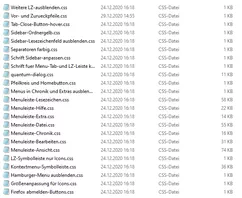
Hier die Scripte:
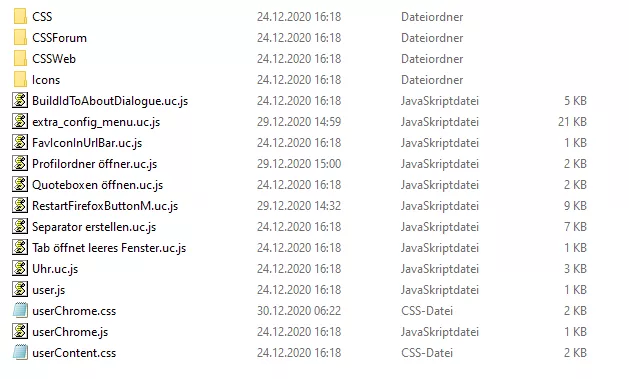
Danke erst einmal.
So, habe nochmal alles soweit erledigt, sieht fast gut aus. Allerdings hat er nun diese hier:
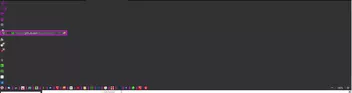
alles untereinander gepackt, statt nebeneinander.
Wenn ich auf Anpassen gehe, siehr es schick aus.

Wo habe ich den Fehler?
Ich habe die config-pref.js rausgenommen. Damit habe ich zwar meine Uhr nicht aber wenigstens wieder ein vernünfigtes Bild, so daß ich komplett arbeiten kann.
Hallo Endor, ich danke Dir,
das hatte ich auch so noch im Gedächtnis, war mir aber nicht ganz sicher.
Erst einmal ein freundliches Hallo.
Ich war aus diversen Gründen leider nicht so aktiv on, wie ich gerne wollte.
Musste auch meinen Rechner neu aufsetzen.
Firefox ist fast wieder so schön, wie ich ih liebe.
Nun klappen alle Scripte wieder allerdings laufen diverse Scripte nicht.
Jetzt hoffe ich, das ich Scripte und Code nicht verwechselt habe.
Zum Beispiel dieser hier:
 (function() {
    function doDatClock() {
        var timestr = new Date().toLocaleDateString( locale , options );
        const blanks = '   --  ';
        let i = timestr.lastIndexOf(',');
        timestr = timestr.substring(0,i) + blanks + timestr.substring(i+1);
        if( count == 1 ) {
            var counter = new Date( 1000 * sec ).toISOString().substr( 11 , 8 ); // .replace(/^[0:]+/, '') // if you want to replace zeroes and colons
            timestr = timestr + ' (' + counter + ')';
            sec++;
        }
        ClockLabel.setAttribute( 'value', timestr );
    }

    var count = 0 // if you don't want a counter set this to zero
    var agent = 1; // if you just want the clock set this to zero
    var language = 'de-DE'; // locale, e.g. 'de-DE' , 'en-US' , 'fr-FR'
    var personalText = '      >   Barbaras Firefox   <'; // your personal text here
    var cssColor = 'magenta'; // Font Color

    var css = 'padding-top: 4px !important; padding-left: 0px; color: ' + cssColor + '; font-weight:900; font-size:19px;text-shadow: none; width: 275px; margin-right:42px;';
    var cssA = 'margin-left:150px; width: auto;';

    var options = {
        weekday: 'long',
        year: 'numeric',
        month: 'long',
        day: 'numeric',
        hour: '2-digit',
        minute: '2-digit',
        second: '2-digit'
    };

    var sec = 0;

    var locale = language || window.navigator.languages[0];

    var position = document.getElementById('helpMenu');

    var ClockLabel = document.createXULElement('label');
    ClockLabel.setAttribute('id', 'statusbar-clock-display');
    ClockLabel.setAttribute('class', 'statusbarpanel-text');
    ClockLabel.setAttribute('style', css);
    position.parentNode.insertBefore(ClockLabel, position.nextSibling);

    if( agent == 1 ) {
        var AgentLabel = document.createXULElement('label');
        AgentLabel.setAttribute('id', 'statusbar-agent-display');
        AgentLabel.setAttribute('class', 'statusbarpanel-text');
        AgentLabel.setAttribute('style', css + cssA);
        var FFstr = window.navigator.userAgent.split(' ');
        var FF = FFstr[FFstr.length-1].replace( '/' , ' ' );
        // var text = "Firefox" + gAppInfo.version + personalText;
        // Cc["@mozilla.org/xre/app-info;1"].getService(Ci.nsIXULAppInfo).QueryInterface(Ci.nsIXULRuntime);

        var text = "Firefox   " + AppConstants.MOZ_APP_VERSION_DISPLAY + personalText;


        AgentLabel.setAttribute( 'value', text );
        position.parentNode.insertBefore(AgentLabel, position.nextSibling);
    }

    if( count == 1 ) {
        ClockLabel.addEventListener('dblclick', function() { sec = 0; });
    }

    window.setInterval( doDatClock , 1000 );
})();Wer kann helfen und muss ich den userscript Loader haben?
Auch von meiner Seite die besten Glückwünsche an bigpen und @edvoldie.
Hallo Börsi,
danke für den Hinweis. Gleich mal übernommen.
Für den Rest: Ich werde am Samstag mal den Fuchs komplett neu aufsetzen.
Also alles auf Anfang und das Stück für Stück ergänzen.
Danke erstmal für Eure Mithilfe.
Tach, tach zusammen.
Ich war längere Zeit Situationsbedingt nicht on, denn "es liegt was in der Luft": Dienstlich hatte ich nicht die Zeit gefunden, hier aktiv nach den Unstimmigkeiten zu suchen.
Bei mir haben sich einige Probleme eingeschlichen:
Unter anderem lassen sich diese Scripte nicht mehr laden:
a: extra_config-menu.uc.js
// ==UserScript==
// @name           extras_config_menu.uc.js
// @compatibility  Firefox 8.*, 9.*, 10.*, 11.*, 12.*, 13.*, 14.*, 15.*, 16.*, 17.*, 57.*
// @include        main
// @version        1.0.20180113
// ==/UserScript==

var uProfMenu = {
  // Beginn der Konfiguration
  // In der folgenden Zeile (11) den Pfad zum Texteditor eintragen (unter Ubuntu 10.04 z.B.: '/usr/bin/gedit'). Bei Fehleintrag wird view_source.editor.path ausgelesen:
  TextOpenExe: 'C:\\Programme\\Notepad++\\notepad++.exe',
  // Falls gewuenscht, in Zeile 15 einen Dateimanager eintragen (komplett leer lassen fuer Dateimanager des Systems) Beispiele:
  // vFileManager: 'C:\\TotalCommander\\Totalcmd64.exe',
  vFileManager: 'C:\\Total Commander\\Totalcmd64.exe',
  // In der folgenden Zeile (19) 'menu' eintragen, damit es unter "Extras" als Menue erscheint, sonst die id des gewuenschten
  // Elements *nach* dem der Button erscheinen soll (z.B. 'urlbar', 'searchbar', 'undoclosetab-button','abp-toolbarbutton')
  // Bitte nicht so etwas wie die Menue- oder Navigationsleiste (sondern einen Menuepunkt oder einen Button mit id auf diesen Leisten) eintragen:
  warpmenuto: 'urlbar',
 // Unter Linux sollte/kann versucht werden, die userChromeJS-Skripte zu sortieren, unter Windows ist das evtl. nicht noetig (die Sortierung wird Gross- und Kleinschreibung *nicht* beruecksichtigen - dazu wird die sort()-Funktion entsprechend mit einer Vergleichsfunktion aufgerufen)
  sortScripts: 0,   // 1 zum Erzwingen der Sortierung
  // Einbindung GM-Skripte-Ordner (0: nein, 1: Greasemonkey [Profil-Verzeichnis], 2: UserScriptLoader [Chrome-Verzeichnis], 3: Scriptish [Profil-Verzeichnis]):
  //gmOrdner: 0,
  // Einbindung CSS-Ordner (0: nein, 1: UserCSSLoader-Ordner im Chrome-Verzeichnis):
  cssOrdner: 1,
  CSSWebOrdner: 1,
  CSSForumOrdner: 1,
  // In Zeile 30 gueltige about:Adressen eintragen, die ebenfalls aufgerufen werden sollen.
  // - Zum Ausblenden: abouts: [],
  // - Damit die about:-Seiten nicht als Untermenue, sondern direkt als Menuepunkte aufgefuehrt werden, muss das erste Element '0' sein:
  // abouts: ['0','about:about','about:addons','about:cache','about:config','about:support'],
   abouts: ['about:about','about:addons','about:cache','about:config','about:crashes','about:home','about:memory','about:support','about:preferences','about:performance','about:profiles'],
  // Die normalen Firefox-Einstellungen auch zur Verfuegung stellen (0: nein, 1: ja):
  showNormalPrefs: 0,
  // Stellt "Skriptliste in Zwischenablage" zur Verfuegung (1: ja, 2: mit getrennter Nummerierung, 3: mit gemeinsamer Nummerierung) oder nicht (0):
  enableScriptsToClip: 1,
  // Um den Eintrag "Neustart" zu erzwingen (falls z.B. das andere Skript zu spaet eingebunden und nicht erkannt wird), auf 1 setzen:
  enableRestart: 0,
  // Ende der Konfiguration

  init: function() {
    if (this.warpmenuto.toLowerCase() == 'menu') {
      // aufgrund des gewaehlten warpmenuto als Untermenue von Extras anlegen
      var zielmenu = document.getElementById('menu_ToolsPopup');
      if (zielmenu==null) {
        userChrome.log("extras_config_menu.uc.js findet Zielmenue nicht, evtl. weil ein anderes Fenster als das Hauptfenster " +
                       "geoeffnet wurde. Falls dieser Fehler auch im Hauptfenster auftritt, bitte die vorgehende Definition " +
                       "von 'zielmenu' kontrollieren.");
        return;
      }
      var menu = zielmenu.appendChild(this.createME("menu","Config Men\u00FC",0,0,"ExtraConfigMenu"));
      menu.setAttribute("class","menu-iconic");
      menu.setAttribute("ondblclick","openTrustedLinkIn('about:config', 'tab');");
     } else {
      // als Button nach dem per warpmenuto gewaehlten Element anlegen (s. Kommentar ueber warpmenuto im Konfigurationsabschnitt)
      var zielmenu = document.getElementById(this.warpmenuto);
      if (zielmenu==null) {
        userChrome.log("extras_config_menu.uc.js findet Zielpunkt '"+this.warpmenuto+"' nicht, evtl. weil ein anderes Fenster als das Hauptfenster " +
                       "geoeffnet wurde. Falls dieser Fehler auch im Hauptfenster auftritt, bitte die vorgehende Definition " +
                       "von 'warpmenuto' kontrollieren.");
        return;
      }
      var menu = zielmenu.parentNode.insertBefore(document.createXULElement('toolbarbutton'), zielmenu.nextSibling);
      menu.setAttribute("id", "ExtraConfigMenu-button");
      menu.setAttribute("class", "toolbarbutton-1");
      menu.setAttribute("type", "menu");
      menu.setAttribute("tooltiptext", "Extra Config Menü\nMittelklick \öffnet about:config");
      menu.setAttribute("onclick", "if (event.button === 1 && !this.open) openTrustedLinkIn('about:config', 'tab');");
    }
    //ab hier ist alles gleich, egal ob Button oder Menue
    var css = " \
     #ExtraConfigMenu, #ExtraConfigMenu-button { \
        list-style-image:url(file:///F:/Icons/stift.png )!important; margin-left: 7px ! important;\
      } \
      #ExtraConfigMenu-button > dropmarker, #ExtraConfigMenu-button > hbox > .toolbarbutton-menu-dropmarker { \
        display: none !important; \
      }";
    var sss = Cc['@mozilla.org/content/style-sheet-service;1'].getService(Ci.nsIStyleSheetService);
    var uri = makeURI('data:text/css;charset=UTF=8,' + encodeURIComponent(css));
    sss.loadAndRegisterSheet(uri,sss.AGENT_SHEET);
    menu.setAttribute("onpopupshowing","uProfMenu.getScripts(0)");
    var menupopup = menu.appendChild(this.createME("menupopup",0,0,0,"ExtraConfigMenu-popup"));
    // menupopup.appendChild(this.createME("menuitem","userChrome.js","uProfMenu.edit(0,'userChrome.js');","uProfMenu_edit",0));
    // Anlegen von Untermenues fuer die userChromeJS-Skripte (befuellt werden sie spaeter)
    var submenu=menupopup.appendChild(this.createME("menu","uc.js",0,0,"submenu-ucjs"));
    var submenupopup = submenu.appendChild(this.createME("menupopup",0,0,0,"submenu-ucjs-items"));
    //var submenu=menupopup.appendChild(this.createME("menu","uc.xul",0,0,"submenu-ucxul"));
    //var submenupopup = submenu.appendChild(this.createME("menupopup",0,0,0,"submenu-ucxul-items"));
    if (this.enableScriptsToClip) menupopup.appendChild(this.createME("menuitem","Skriptliste in Zwischenablage","uProfMenu.getScripts(1)","uProfMenu_clipboard",0));
     // Ende Anlegen von Untermenues fuer die userChromeJS-Skripte
    menupopup.appendChild(document.createXULElement('menuseparator'));
    // Einbindung von Konfigdateien
    menupopup.appendChild(this.createME("menuitem","userChrome.css","uProfMenu.edit(0,'userChrome.css');","uProfMenu_edit",0));
    menupopup.appendChild(this.createME("menuitem","userContent.css","uProfMenu.edit(0,'userContent.css');","uProfMenu_edit",0));
    menupopup.appendChild(this.createME("menuitem","prefs.js","uProfMenu.edit(1,'prefs.js');","uProfMenu_edit",0));
    menupopup.appendChild(this.createME("menuitem","user.js","uProfMenu.edit(1,'user.js');","uProfMenu_edit"),0);
    menupopup.appendChild(this.createME("menuitem","userChrome.js","uProfMenu.edit(0,'userChrome.js');","uProfMenu_edit",0));
    // Ende Einbindung von Konfigdateien
    menupopup.appendChild(document.createXULElement('menuseparator'));
    // Einbindung von Ordnern
    switch (this.gmOrdner) {
      case 1:
        menupopup.appendChild(this.createME("menuitem","GM Skripte","uProfMenu.dirOpen(uProfMenu.getPrefDirectoryPath('ProfD')+uProfMenu.getDirSep()+'gm_scripts');","uProfMenu_folder"),0);
        break;
      case 2:
        menupopup.appendChild(this.createME("menuitem","USL Skripte","uProfMenu.dirOpen(uProfMenu.getPrefDirectoryPath('UChrm')+uProfMenu.getDirSep()+'UserScriptLoader');","uProfMenu_folder"),0);
        break;
      case 3:
        menupopup.appendChild(this.createME("menuitem","Scriptish Skripte","uProfMenu.dirOpen(uProfMenu.getPrefDirectoryPath('ProfD')+uProfMenu.getDirSep()+'scriptish_scripts');","uProfMenu_folder"),0);
        break;
    }
    if (this.cssOrdner) {
      menupopup.appendChild(this.createME("menuitem","CSS-Ordner öffnen","uProfMenu.dirOpen(uProfMenu.getPrefDirectoryPath('UChrm')+uProfMenu.getDirSep()+'CSS');","uProfMenu_folder"),0);
    }
    if (this.CSSWebOrdner) {
    menupopup.appendChild(this.createME("menuitem","CSSWeb-Ordner öffnen","uProfMenu.dirOpen(uProfMenu.getPrefDirectoryPath('UChrm')+uProfMenu.getDirSep()+'CSSWeb');","uProfMenu_folder"),0);
    }
    if (this.CSSForumOrdner) {
    menupopup.appendChild(this.createME("menuitem","CSSForum-Ordner öffnen","uProfMenu.dirOpen(uProfMenu.getPrefDirectoryPath('UChrm')+uProfMenu.getDirSep()+'CSSForum');","uProfMenu_folder"),0);
    }
    menupopup.appendChild(this.createME("menuitem","Chromeordner öffnen","uProfMenu.prefDirOpen('UChrm');","uProfMenu_folder"),0);
    menupopup.appendChild(this.createME("menuitem","Profilordner öffnen","uProfMenu.prefDirOpen('ProfD');","uProfMenu_folder"),0);
    menupopup.appendChild(this.createME("menuitem","Addonordner öffnen","uProfMenu.dirOpen(uProfMenu.getPrefDirectoryPath('ProfD')+uProfMenu.getDirSep()+'extensions');","uProfMenu_folder"),0);
    menupopup.appendChild(this.createME("menuitem","Installationsordner öffnen","uProfMenu.prefDirOpen('CurProcD');","uProfMenu_folder"),0);
    menupopup.appendChild(this.createME("menuitem","Startup-Cacheordner öffnen","uProfMenu.dirOpen(uProfMenu.getPrefDirectoryPath('ProfLD')+uProfMenu.getDirSep()+'startupCache');","uProfMenu_folder"),0);
    // Ende Einbindung von Ordnern
    // Einbindung von abouts
    if (this.abouts.length>0) {
      menupopup.appendChild(document.createXULElement('menuseparator'));
      // falls der erste Eintrag des arrays ='0' ist, dann kein Untermenue anlegen, sondern direkt als Menuepunkte einbinden
      if (this.abouts[0]=='0') {
        for (var i = 1; i < this.abouts.length; i++) {
         menupopup.appendChild(this.createME("menuitem",this.abouts[i],"openTrustedLinkIn('"+this.abouts[i]+"','tab')","uProfMenu_about"),0);
        }
       } else {
        // der erste Eintrag des arrays ist ungleich '0', deshalb als Untermenue einrichten
        var submenu=menupopup.appendChild(this.createME("menu","uc.js",0,0,"submenu-about"));
        var submenupopup = submenu.appendChild(this.createME("menupopup",0,0,0,"submenu-about-items"));
        this.fillMenu("submenu-about","submenu-about-items", "about:",this.abouts,"uProfMenu_about",1);
      }
    }
    // Ende Einbindung von abouts
    // Separator, falls dieser nicht schon durch abouts generiert wurde und weitere Menuepunkte folgen werden
    if (this.abouts.length==0 && (this.showNormalPrefs || typeof(ToolRstartMod) != "undefined")) menupopup.appendChild(document.createXULElement('menuseparator'));
    // Falls gewuenscht (s. Konfigurationsabschnitt), Zugriff auf die normalen Einstellungen
    if (this.showNormalPrefs) menupopup.appendChild(this.createME("menuitem","Einstellungen","try{openOptionsDialog();}catch(e){openPreferences();}","uProfMenu_prefs"),0);
    // Falls addRestartButton installiert ist, Neustart zur Verfuegung stellen (addRestartButton 1.0.20120105mod erforderlich)
    if(typeof(ToolRstartMod) != "undefined" || this.enableRestart) menupopup.appendChild(this.createME("menuitem","Neustart",
    "try{ToolRstartMod.restartApp(false);} catch(e){alert(e);}","uProfMenu_restart"),0);

  },


  getDirSep:function() {
    // Betriebssystem nach https://developer.mozilla.org/en/Code_snippets/Miscellaneous ermitteln
    var osString = Components.classes["@mozilla.org/xre/app-info;1"].getService(Components.interfaces.nsIXULRuntime).OS;
    var dirsep="/";
    switch(osString) {
      case "WINNT":
        dirsep="\\";
        break;
      case "Linux":
        dirsep="/";
        break;
      case "Darwin":
        dirsep="/";
        break;
    }
    return dirsep;
  },


  edit:function(OpenMode,Filename){
    var Path = "";
    var dSep = this.getDirSep();  // die Trennzeichen zwischen Ordnern abhaengig vom Betriebssystem machen
    switch (OpenMode){
      //Current is Chrome Directory
      case 0:
        var Path = this.getPrefDirectoryPath("UChrm") + dSep + Filename;
        break;
      //Current is Profile Directory
      case 1:
        var Path = this.getPrefDirectoryPath("ProfD") + dSep + Filename;
        break;
      //Current is Root
      case 2:
        var Path = Filename;
        break;
    }
    this.launch(this.TextOpenExe,Path);
  },


  dirOpen:function(Path){
    if (this.vFileManager.length != 0) {
      var file = Cc['@mozilla.org/file/local;1'].createInstance(Ci.nsIFile);
      var process = Cc['@mozilla.org/process/util;1'].createInstance(Ci.nsIProcess);
      var args=[Path];
      file.initWithPath(this.vFileManager);
      process.init(file);
      // Verzeichnis mit anderem Dateimanager oeffnen
      process.run(false, args, args.length);
     } else {
      // Verzeichnis mit Dateimanager des Systems oeffnen
      var dir = Cc["@mozilla.org/file/local;1"].createInstance(Ci.nsIFile);
      dir.initWithPath(Path);
      dir.launch();
    }
  },


  prefDirOpen:function(prefDir){
    Path = this.getPrefDirectoryPath(prefDir);
    this.dirOpen(Path);
  },


  getPrefDirectoryPath:function(str){
    // get profile directory
    var file = Components.classes["@mozilla.org/file/directory_service;1"]
      .getService(Components.interfaces.nsIProperties)
      .get(str, Components.interfaces.nsIFile);
    if (str == 'CurProcD') {
      file = file.parent;
    };
    return file.path;
  },


  launch:function(RanPath,OpenPath){
    var file = Components.classes["@mozilla.org/file/local;1"].createInstance(Components.interfaces.nsIFile);
    var proc = Components.classes["@mozilla.org/process/util;1"].createInstance(Components.interfaces.nsIProcess);
    var args = [OpenPath];
    file.initWithPath(RanPath);
    // falls der im Konfigurationsabschnitt definierte Editor nicht gefunden wird, auf Einstellung in about:config ausweichen:
    if (!file.exists()) {
      var pref = Components.classes["@mozilla.org/preferences-service;1"].getService(Components.interfaces.nsIPrefBranch);
      RanPath=pref.getCharPref("view_source.editor.path");
      file.initWithPath(RanPath);
    }
    proc.init(file);
    proc.run(false, args, args.length);
  },


  stringComparison:function(a, b){
    a = a.toLowerCase();
    a = a.replace(/ä/g,"a");
    a = a.replace(/ö/g,"o");
    a = a.replace(/ü/g,"u");
    a = a.replace(/ß/g,"s");
    b = b.toLowerCase();
    b = b.replace(/ä/g,"a");
    b = b.replace(/ö/g,"o");
    b = b.replace(/ü/g,"u");
    b = b.replace(/ß/g,"s");
    return(a==b)?0:(a>b)?1:-1;
  },


  getScripts:function(iType) {
    // Arrays (jeweils ein Array fuer uc.js und uc.xul) nehmen Namen der gefundenen Skripte auf
    let ucJsScripts = [];
    let ucXulScripts = [];
    // Suchmuster, also die Dateierweiterungen uc.js und uc.xul
    let extjs = /\.uc\.js$/i;
    let extxul= /\.uc\.xul$/i;
    let aFolder = Cc['@mozilla.org/file/local;1'].createInstance(Ci.nsIFile);
    aFolder.initWithPath(Services.dirsvc.get("UChrm", Ci.nsIFile).path);
    // files mit Eintraegen im Chrome-Ordner befuellen
    let files = aFolder.directoryEntries.QueryInterface(Ci.nsISimpleEnumerator);
    // Ordner bzw. files durchlaufen und kontrollieren, ob gesuchte Dateien dabei sind
    while (files.hasMoreElements()) {
      let file = files.getNext().QueryInterface(Ci.nsIFile);
      // keine gewuenschte Datei, deshalb continue
      if (!extjs.test(file.leafName) && !extxul.test(file.leafName)) continue;
      // uc.js gefunden -> im Array ablegen
      if (extjs.test(file.leafName)) ucJsScripts.push(file.leafName);
      // uc.xul gefunden -> im Array ablegen
      if (extxul.test(file.leafName)) ucXulScripts.push(file.leafName);
    }
    if (this.sortScripts) {
      ucJsScripts.sort(this.stringComparison);
      ucXulScripts.sort(this.stringComparison);
    }
    // Aufruf der naechsten Methoden um die beiden Untermenues oder die Zwischenablage zu befuellen
    if (iType==0) {
      this.fillMenu("submenu-ucjs","submenu-ucjs-items","Meine Scripte",ucJsScripts,"uProfMenu_ucjs",0);
      this.fillMenu("submenu-ucxul","submenu-ucxul-items", "uc.xul",ucXulScripts,"uProfMenu_ucxul",0);
     } else {
      var result=this.fillClipboardValue(ucJsScripts,ucXulScripts);
      Components.classes["@mozilla.org/widget/clipboardhelper;1"].getService(Components.interfaces.nsIClipboardHelper).copyString(result);
    }
  },


  fillMenu:function(whichsubmenu, whichsubmenuitems, strlabel, scriptArray,sClass,sTyp) {
    // Beschriftung des Untermenues mit Anzahl der gefundenen Dateien ergaenzen
    var e = document.getElementById(whichsubmenu);
    e.setAttribute('label',strlabel + ' (' + scriptArray.length + ')');
    var popup = document.getElementById(whichsubmenuitems);
    // zunaechst Untermenue zuruecksetzen
    while(popup.hasChildNodes()){
      popup.removeChild(popup.firstChild);
    }
    // Untermenue endlich befuellen
    for (var i = scriptArray.length-1; i > -1; i--) {
      // bisher nur eine Typunterscheidung (userChromeJS-Skript oder about:)
      if (sTyp==0){
        var mitem = this.createME("menuitem",scriptArray[i],"uProfMenu.edit(0,'"+scriptArray[i]+"')",sClass,0);
        mitem.setAttribute("onclick","uProfMenu.openAtGithub(event,'"+scriptArray[i]+"')");
        mitem.setAttribute("tooltiptext"," Linksklick: Bearbeiten,\n Mittelklick: https://github.com/.../"+this.cleanFileName(scriptArray[i])+" \u00F6ffnen,\n Rechtsklick: Suche auf GitHub");
       } else {
        var mitem = this.createME("menuitem",scriptArray[i],"openTrustedLinkIn('"+scriptArray[i]+"','tab')",sClass,0);
      }
      popup.insertBefore(mitem, popup.firstChild);
    }
  },


  fillClipboardValue:function(sArray,xArray) {
    var retValue;
    var s = 0;
    var x = 0;
    s = sArray.length;
    x = xArray.length;
    switch(this.enableScriptsToClip) {
      case 1:
        retValue = "userChromeJS/uc.js ("+s+"):\n------------------------\n"+sArray.join("\n")+
                   "\n\nuserChromeJS/uc.xul ("+x+"):\n-------------------------\n"+xArray.join("\n");
        break;
      default:
        retValue = "userChromeJS/uc.js ("+s+"):\n------------------------";
        for (var i = 0; i < s ; i++) {
          j = i + 1;
          retValue = retValue + "\n" + j + ". " + sArray[i];
        }
        retValue = retValue + "\n\nuserChromeJS/uc.xul ("+x+"):\n-------------------------";
        if (this.enableScriptsToClip==2) s = 0;
        for (var i = 0; i < x ; i++) {
          j = i + s + 1;
          retValue = retValue + "\n" + j + ". " + xArray[i];
        }
        break;
    }
    return retValue;
  },


  createME:function(sTyp,sLabel,sCommand,sClass,sId) {
    // Anlegen von menuitem, menu oder menupop - fuer bestimmte Typen nicht eingesetzte Parameter werden als 0 uebergeben
    const XUL_NS = "http://www.mozilla.org/keymaster/gatekeeper/there.is.only.xul";
    var m = document.createElementNS(XUL_NS, sTyp);
    switch (sTyp) {
      case "menuitem":
        // this.createME("menuitem","Label des Items","ZuzuweisenderCodeFueroncommand","GewuenschteKlasseDesItems",0)
        m.setAttribute('label', sLabel);
        m.setAttribute('oncommand',sCommand);
        m.setAttribute('class',sClass);
        break;
      case "menu":
        // this.createME("menu","Label des Menues",0,0,"GewuenschteIdDesMenues")
        m.setAttribute('label', sLabel);
        m.setAttribute('id', sId);
        break;
      case "menupopup":
        //this.createME("menupopup",0,0,0,"GewuenschteIdDesMenupopups");
        m.setAttribute('id', sId);
        break;
    }
    return m;
  },


  openAtGithub:function(e,sScript) {
    if (e.button==1){
      // Mittelklick - Seite auf GitHub oeffnen (funktionier nur, wenn Ordner- und bereinigter Dateiname [ohne Erweiterung] uebereinstimmen):
      var sUrl="https://github.com/ardiman/userChrome.js/tree/master/"+this.cleanFileName(sScript);
      openWebLinkIn(sUrl, 'tab');
    }
    if (e.button==2){
      // Rechtsklick - Suche auf GitHub starten (funktioniert nur, wenn der Dateiname im Code hinterlegt ist):
      e.preventDefault();
      var sUrl="https://github.com/search?langOverride=&language=&q="+sScript+"&repo=&start_value=1&type=Code";
      openWebLinkIn(sUrl, 'tab');
    }
  },


  cleanFileName:function(sName) {
    sName=sName.toLowerCase();
    /* Das folgende Array enthaelt regulaere Ausdruecke, um ungueltige Zeichenfolgen entfernen:
    /Datei-Erweiterungen am Ende/, /"ucjs_" am Anfang/, /"_"gefolgtVonZahlUndDanachBeliebigenZeichen/
    / "_fx"gefolgtVonZahl(en)/, /"-" oder "+" oder "."/, /"_v"gefolgtVonZahlen
    */
    var regs=[/\.uc\.js$/,/\.uc\.xul$/,/^ucjs_/,/_\d.+/,/_fx\d+/,/[-+\.]/g,/_v\d+/];
    for (var i = 0; i < regs.length; i++) {
      sName=sName.replace(regs[i],"");
    }
    return sName;
  }

};
uProfMenu.init();b: Uhr.uc.js
(function() {
    function doDatClock() {
        var timestr = new Date().toLocaleDateString( locale , options );
        const blanks = '   --  ';
        let i = timestr.lastIndexOf(',');
        timestr = timestr.substring(0,i) + blanks + timestr.substring(i+1);
        if( count == 1 ) {
            var counter = new Date( 1000 * sec ).toISOString().substr( 11 , 8 ); // .replace(/^[0:]+/, '') // if you want to replace zeroes and colons
            timestr = timestr + ' (' + counter + ')';
            sec++;
        }
        ClockLabel.setAttribute( 'value', timestr );
    }

    var count = 0 // if you don't want a counter set this to zero
    var agent = 1; // if you just want the clock set this to zero
    var language = 'de-DE'; // locale, e.g. 'de-DE' , 'en-US' , 'fr-FR'
    var personalText = '      >   Barbaras Firefox   <'; // your personal text here
    var cssColor = 'magenta'; // Font Color

    var css = 'padding-top: 4px !important; padding-left: 0px; color: ' + cssColor + '; font-weight:900; font-size:19px;text-shadow: none; width: 275px; margin-right:42px;';
    var cssA = 'margin-left:150px; width: auto;';

    var options = {
        weekday: 'long',
        year: 'numeric',
        month: 'long',
        day: 'numeric',
        hour: '2-digit',
        minute: '2-digit',
        second: '2-digit'
    };

    var sec = 0;

    var locale = language || window.navigator.languages[0];

    var position = document.getElementById('helpMenu');

    var ClockLabel = document.createXULElement('label');
    ClockLabel.setAttribute('id', 'statusbar-clock-display');
    ClockLabel.setAttribute('class', 'statusbarpanel-text');
    ClockLabel.setAttribute('style', css);
    position.parentNode.insertBefore(ClockLabel, position.nextSibling);

    if( agent == 1 ) {
        var AgentLabel = document.createXULElement('label');
        AgentLabel.setAttribute('id', 'statusbar-agent-display');
        AgentLabel.setAttribute('class', 'statusbarpanel-text');
        AgentLabel.setAttribute('style', css + cssA);
        var FFstr = window.navigator.userAgent.split(' ');
        var FF = FFstr[FFstr.length-1].replace( '/' , ' ' );
        // var text = "Firefox" + gAppInfo.version + personalText;
        // Cc["@mozilla.org/xre/app-info;1"].getService(Ci.nsIXULAppInfo).QueryInterface(Ci.nsIXULRuntime);

        var text = "Firefox   " + AppConstants.MOZ_APP_VERSION_DISPLAY + personalText;


        AgentLabel.setAttribute( 'value', text );
        position.parentNode.insertBefore(AgentLabel, position.nextSibling);
    }

    if( count == 1 ) {
        ClockLabel.addEventListener('dblclick', function() { sec = 0; });
    }

    window.setInterval( doDatClock , 1000 );
})();Geladen werden sie über den userscriptloader:
// ==UserScript==
// @name UserCSSLoader
// @description CSS Codes - Styles laden und verwalten
// @namespace http://d.hatena.ne.jp/Griever/
// @author Griever
// @include main
// @license MIT License
// @compatibility Firefox *.*
// @charset UTF-8
// @version 0.0.4f
// @note 0.0.4 Remove E4X
// @note CSSEntry-Klasse erstellt
// @note Style-Test-Funktion überarbeitet
// @note Wenn die Datei gelöscht wurde, CSS beim Neu erstellen und Löschen des Menüs abbrechen
// @note uc einlesen .uc.css temporäre Korrespondenz zum erneuten Lesen
// ==/UserScript==
/****** Bedienungsanleitung ******
Da der CSS-Ordner im Chrome-Ordner erstellt wurde, CSS-Dateien dort ablegen - speichern.
Diejenigen, deren Dateiname mit "xhtml-" beginnen, diejenigen, die mit ".as.css" enden, sind AGENT_SHEET,
andere außer USER_SHEET werden gelesen. Da der Inhalt der Datei nicht überprüft wird,
darauf achten, @ Namespace Angabe nicht zu vergessen!
CSS-Menü wird zur Menüleiste hinzugefügt
Linksklick auf Stil, zum aktivieren/deaktivieren
Mittelklick auf Stil zum aktivieren/deaktivieren, ohne Menü zu schließen
Rechtsklick auf Stil zum Öffnen im Editor
Verwenden des in "view_source.editor.path" angegebenen Editors
Ordner kann geändert werden, indem ein Pfad in "UserCSSLoader.FOLDER" eingefügt wird
**** Anleitung Ende ****/
(function(){
let { classes: Cc, interfaces: Ci, utils: Cu, results: Cr } = Components;
if (!window.Services)
Cu.import("resource://gre/modules/Services.jsm");
// Wenn beim Start ein anderes Fenster angezeigt wird (das zweite Fenster), wird es beendet
let list = Services.wm.getEnumerator("navigator:browser");
while(list.hasMoreElements()){ if(list.getNext() != window) return; }
if (window.UCL) {
window.UCL.destroy();
delete window.UCL;
}
window.UCL = {
// vFileManager: 'C:\\Programme\\totalcmd\\TOTALCMD.EXE',
vFileManager: 'C:\\Total Commander\\TOTALCMD64.exe',
USE_UC: "UC" in window,
AGENT_SHEET: Ci.nsIStyleSheetService.AGENT_SHEET,
USER_SHEET : Ci.nsIStyleSheetService.USER_SHEET,
readCSS : {},
get disabled_list() {
let obj = [];
try {
obj = this.prefs.getCharPref("disabled_list").split("|");
} catch(e) {}
delete this.disabled_list;
return this.disabled_list = obj;
},
get prefs() {
delete this.prefs;
return this.prefs = Services.prefs.getBranch("UserCSSLoader.")
},
get styleSheetServices(){
delete this.styleSheetServices;
return this.styleSheetServices = Cc["@mozilla.org/content/style-sheet-service;1"].getService(Ci.nsIStyleSheetService);
},
get FOLDER() {
let aFolder;
try {
// UserCSSLoader.FOLDER verwenden
let folderPath = this.prefs.getCharPref("FOLDER");
aFolder = Cc["@mozilla.org/file/local;1"].createInstance(Ci.nsIFile)
aFolder.initWithPath(folderPath);
} catch (e) {
aFolder = Services.dirsvc.get("UChrm", Ci.nsIFile);
aFolder.appendRelativePath("CSS");
}
if (!aFolder.exists() || !aFolder.isDirectory()) {
aFolder.create(Ci.nsIFile.DIRECTORY_TYPE, 0664);
}
delete this.FOLDER;
return this.FOLDER = aFolder;
},
getFocusedWindow: function() {
let win = document.commandDispatcher.focusedWindow;
if (!win || win == window) win = content;
return win;
},
init: function() {
const cssmenu = $C("menu", {
id: "usercssloader-menu",
label: "CSS",
accesskey: "C",
onclick: "if (event.button == 1) UCL.rebuild()"
});
const menupopup = $C("menupopup", {
id: "usercssloader-menupopup"
});
cssmenu.appendChild(menupopup);
let menu = $C("menu", {
label: "Style Loader Menü",
accesskey: "M"
});
menupopup.appendChild(menu);
let mp = $C("menupopup", { id: "usercssloader-submenupopup" });
menu.appendChild(mp);
mp.appendChild($C("menuitem", {
label: "Styles importieren",
accesskey: "R",
acceltext: "Alt + R",
oncommand: "UCL.rebuild();"
}));
mp.appendChild($C("menuseparator"));
mp.appendChild($C("menuitem", {
label: "CSS Datei erstellen",
accesskey: "D",
oncommand: "UCL.create();"
}));
mp.appendChild($C("menuitem", {
label: "CSS Ordner öffnen",
accesskey: "O",
oncommand: "UCL.openFolder();"
}));
mp.appendChild($C("menuitem", {
label: "userChrome.css bearbeiten",
hidden: false,
oncommand: "UCL.editUserCSS(\'userChrome.css\');"
}));
mp.appendChild($C("menuitem", {
label: "userContent.css bearbeiten",
hidden: false,
oncommand: "UCL.editUserCSS(\'userContent.css\');"
}));
mp.appendChild($C("menuseparator"));
mp.appendChild($C("menuitem", {
label: "Style Test (Chrome)",
id: "usercssloader-test-chrome",
hidden: true,
accesskey: "C",
oncommand: "UCL.styleTest(window);"
}));
mp.appendChild($C("menuitem", {
label: "Style Test (Web)",
id: "usercssloader-test-content",
hidden: true,
accesskey: "W",
oncommand: "UCL.styleTest();"
}));
mp.appendChild($C("menuitem", {
label: "Styles dieser Seite auf userstyles.org finden",
accesskey: "S",
oncommand: "UCL.searchStyle();"
}));
menu = $C("menu", {
label: ".uc.css",
accesskey: "U",
hidden: !UCL.USE_UC
});
menupopup.appendChild(menu);
mp = $C("menupopup", { id: "usercssloader-ucmenupopup" });
menu.appendChild(mp);
mp.appendChild($C("menuitem", {
label: "Importieren(.uc.js)",
oncommand: "UCL.UCrebuild();"
}));
mp.appendChild($C("menuseparator", { id: "usercssloader-ucseparator" }));
CustomizableUI.createWidget({
id: 'usercssloader-menu-item',
type: 'custom',
defaultArea: CustomizableUI.AREA_MENUBAR,
onBuild: function(aDocument) {
let toolbaritem = aDocument.createElementNS('http://www.mozilla.org/keymaster/gatekeeper/there.is.only.xhtml', 'toolbaritem');
toolbaritem.id = 'usercssloader-menu-item';
toolbaritem.className = 'chromeclass-toolbar-additional';
return toolbaritem;
}
});
$('usercssloader-menu-item').appendChild(cssmenu);
$("mainKeyset").appendChild($C("key", {
id: "usercssloader-rebuild-key",
oncommand: "UCL.rebuild();",
key: "R",
modifiers: "alt",
}));
this.rebuild();
this.initialized = true;
if (UCL.USE_UC) {
setTimeout(function() {
UCL.UCcreateMenuitem();
}, 1000);
}
window.addEventListener("unload", this, false);
},
uninit: function() {
const dis = [];
for (let x of Object.keys(this.readCSS)) {
if (!this.readCSS[x].enabled)
dis.push(x);
}
this.prefs.setCharPref("disabled_list", dis.join("|"));
window.removeEventListener("unload", this, false);
},
destroy: function() {
var i = document.getElementById("usercssloader-menu");
if (i) i.parentNode.removeChild(i);
var i = document.getElementById("usercssloader-rebuild-key");
if (i) i.parentNode.removeChild(i);
this.uninit();
},
handleEvent: function(event) {
switch(event.type){
case "unload": this.uninit(); break;
}
},
rebuild: function() {
let ext = /\.css$/i;
let not = /\.uc\.css/i;
let files = this.FOLDER.directoryEntries.QueryInterface(Ci.nsISimpleEnumerator);
while (files.hasMoreElements()) {
let file = files.getNext().QueryInterface(Ci.nsIFile);
if (!ext.test(file.leafName) || not.test(file.leafName)) continue;
let CSS = this.loadCSS(file);
CSS.flag = true;
}
for (let leafName of Object.keys(this.readCSS)) {
const CSS = this.readCSS[leafName];
if (!CSS.flag) {
CSS.enabled = false;
delete this.readCSS[leafName];
}
delete CSS.flag;
this.rebuildMenu(leafName);
}
if (this.initialized) {
if (typeof(StatusPanel) !== "undefined")
StatusPanel._label = "Style importiert";
else
XULBrowserWindow.statusTextField.label = "Styles importieren";
}
},
loadCSS: function(aFile) {
var CSS = this.readCSS[aFile.leafName];
if (!CSS) {
CSS = this.readCSS[aFile.leafName] = new CSSEntry(aFile);
if (this.disabled_list.indexOf(CSS.leafName) === -1) {
CSS.enabled = true;
}
} else if (CSS.enabled) {
CSS.enabled = true;
}
return CSS;
},
rebuildMenu: function(aLeafName) {
var CSS = this.readCSS[aLeafName];
var menuitem = document.getElementById("usercssloader-" + aLeafName);
if (!CSS) {
if (menuitem)
menuitem.parentNode.removeChild(menuitem);
return;
}
if (!menuitem) {
menuitem = document.createElement("menuitem");
menuitem.setAttribute("label", aLeafName);
menuitem.setAttribute("id", "usercssloader-" + aLeafName);
menuitem.setAttribute("class", "usercssloader-item " + (CSS.SHEET == this.AGENT_SHEET? "AGENT_SHEET" : "USER_SHEET"));
menuitem.setAttribute("type", "checkbox");
menuitem.setAttribute("autocheck", "false");
menuitem.setAttribute("oncommand", "UCL.toggle('"+ aLeafName +"');");
menuitem.setAttribute("onclick", "UCL.itemClick(event);");
document.getElementById("usercssloader-menupopup").appendChild(menuitem);
}
menuitem.setAttribute("checked", CSS.enabled);
},
toggle: function(aLeafName) {
var CSS = this.readCSS[aLeafName];
if (!CSS) return;
CSS.enabled = !CSS.enabled;
this.rebuildMenu(aLeafName);
},
itemClick: function(event) {
if (event.button == 0) return;
event.preventDefault();
event.stopPropagation();
let label = event.currentTarget.getAttribute("label");
if (event.button == 1) {
this.toggle(label);
}
else if (event.button == 2) {
closeMenus(event.target);
this.edit(this.getFileFromLeafName(label));
}
},
getFileFromLeafName: function(aLeafName) {
let f = this.FOLDER.clone();
f.QueryInterface(Ci.nsIFile); // use appendRelativePath
f.appendRelativePath(aLeafName);
return f;
},
styleTest: function(aWindow) {
aWindow || (aWindow = this.getFocusedWindow());
new CSSTester(aWindow, function(tester){
if (tester.saved)
UCL.rebuild();
});
},
searchStyle: function() {
let word;
try {
word = gBrowser.currentURI.host;
} catch {
word = gBrowser.currentURI.spec;
}
openLinkIn("https://userstyles.org/styles/search/" + word, "tab", {});
},
openFolder:function(){
if (this.vFileManager.length != 0) {
var file = Cc['@mozilla.org/file/local;1'].createInstance(Ci.nsIFile);
var process = Cc['@mozilla.org/process/util;1'].createInstance(Ci.nsIProcess);
var args=[this.FOLDER.path];
file.initWithPath(this.vFileManager);
process.init(file);
// Verzeichnis mit anderem Dateimanager öffnen
process.run(false, args, args.length);
} else {
// Verzeichnis mit Dateimanager des Systems öffnen
this.FOLDER.launch();
}
},
editUserCSS: function(aLeafName) {
let file = Services.dirsvc.get("UChrm", Ci.nsIFile);
file.appendRelativePath(aLeafName);
this.edit(file);
},
edit: function(aFile) {
var editor = Services.prefs.getCharPref("view_source.editor.path");
if (!editor) return alert("Unter about:config den vorhandenen Schalter:\n view_source.editor.path mit dem Editorpfad ergänzen");
try {
var UI = Cc["@mozilla.org/intl/scriptableunicodeconverter"].createInstance(Ci.nsIScriptableUnicodeConverter);
UI.charset = window.navigator.platform.toLowerCase().indexOf("win") >= 0? "Shift_JIS": "UTF-8";
var path = UI.ConvertFromUnicode(aFile.path);
var app = Cc["@mozilla.org/file/local;1"].createInstance(Ci.nsIFile);
app.initWithPath(editor);
var process = Cc["@mozilla.org/process/util;1"].createInstance(Ci.nsIProcess);
process.init(app);
process.run(false, [path], 1);
} catch (e) {}
},
create: function(aLeafName) {
if (!aLeafName) aLeafName = prompt("Name des Styles", dateFormat(new Date(), "%Y_%m%d_%H%M%S"));
if (aLeafName) aLeafName = aLeafName.replace(/\s+/g, " ").replace(/[\\/:*?\"<>|]/g, "");
if (!aLeafName || !/\S/.test(aLeafName)) return;
if (!/\.css$/.test(aLeafName)) aLeafName += ".css";
let file = this.getFileFromLeafName(aLeafName);
this.edit(file);
},
UCrebuild: function() {
let re = /^file:.*\.uc\.css(?:\?\d+)?$/i;
let query = "?" + new Date().getTime();
Array.slice(document.styleSheets).forEach(function(css){
if (!re.test(css.href)) return;
if (css.ownerNode) {
css.ownerNode.parentNode.removeChild(css.ownerNode);
}
let pi = document.createProcessingInstruction('xml-stylesheet','type="text/css" href="'+ css.href.replace(/\?.*/, '') + query +'"');
document.insertBefore(pi, document.documentElement);
});
UCL.UCcreateMenuitem();
},
UCcreateMenuitem: function() {
let sep = $("usercssloader-ucseparator");
let popup = sep.parentNode;
if (sep.nextSibling) {
let range = document.createRange();
range.setStartAfter(sep);
range.setEndAfter(popup.lastChild);
range.deleteContents();
range.detach();
}
let re = /^file:.*\.uc\.css(?:\?\d+)?$/i;
Array.slice(document.styleSheets).forEach(function(css) {
if (!re.test(css.href)) return;
let fileURL = decodeURIComponent(css.href).split("?")[0];
let aLeafName = fileURL.split("/").pop();
let m = document.createElement("menuitem");
m.setAttribute("label", aLeafName);
m.setAttribute("tooltiptext", fileURL);
m.setAttribute("id", "usercssloader-" + aLeafName);
m.setAttribute("type", "checkbox");
m.setAttribute("autocheck", "false");
m.setAttribute("checked", "true");
m.setAttribute("oncommand", "this.setAttribute('checked', !(this.css.disabled = !this.css.disabled));");
m.setAttribute("onclick", "UCL.UCItemClick(event);");
m.css = css;
popup.appendChild(m);
});
},
UCItemClick: function(event) {
if (event.button == 0) return;
event.preventDefault();
event.stopPropagation();
if (event.button == 1) {
event.target.doCommand();
}
else if (event.button == 2) {
closeMenus(event.target);
let fileURL = event.currentTarget.getAttribute("tooltiptext");
let file = Services.io.getProtocolHandler("file").QueryInterface(Ci.nsIFileProtocolHandler).getFileFromURLSpec(fileURL);
this.edit(file);
}
},
};
function CSSEntry(aFile) {
this.path = aFile.path;
this.leafName = aFile.leafName;
this.lastModifiedTime = 1;
this.SHEET = /^xul-|\.as\.css$/i.test(this.leafName) ?
Ci.nsIStyleSheetService.AGENT_SHEET:
Ci.nsIStyleSheetService.USER_SHEET;
}
CSSEntry.prototype = {
sss: Cc["@mozilla.org/content/style-sheet-service;1"].getService(Ci.nsIStyleSheetService),
_enabled: false,
get enabled() {
return this._enabled;
},
set enabled(isEnable) {
var aFile = Cc["@mozilla.org/file/local;1"].createInstance(Ci.nsIFile)
aFile.initWithPath(this.path);
var isExists = aFile.exists(); // Wenn die Datei existiert true
var lastModifiedTime = isExists ? aFile.lastModifiedTime : 0;
var isForced = this.lastModifiedTime != lastModifiedTime; // Wenn es eine Änderung in der Datei gibt true
var fileURL = Services.io.getProtocolHandler("file").QueryInterface(Ci.nsIFileProtocolHandler).getURLSpecFromFile(aFile);
var uri = Services.io.newURI(fileURL, null, null);
if (this.sss.sheetRegistered(uri, this.SHEET)) {
// Wenn diese Datei bereits gelesen wurde
if (!isEnable || !isExists) {
this.sss.unregisterSheet(uri, this.SHEET);
}
else if (isForced) {
// Nach Stornierung erneut einlesen
this.sss.unregisterSheet(uri, this.SHEET);
this.sss.loadAndRegisterSheet(uri, this.SHEET);
}
} else {
// Datei wurde nicht gelesen
if (isEnable && isExists) {
this.sss.loadAndRegisterSheet(uri, this.SHEET);
}
}
if (this.lastModifiedTime !== 1 && isEnable && isForced) {
log(this.leafName + " wurde aktualisiert");
}
this.lastModifiedTime = lastModifiedTime;
return this._enabled = isEnable;
},
};
function CSSTester(aWindow, aCallback) {
this.win = aWindow || window;
this.doc = this.win.document;
this.callback = aCallback;
this.init();
}
CSSTester.prototype = {
sss: Cc["@mozilla.org/content/style-sheet-service;1"].getService(Ci.nsIStyleSheetService),
preview_code: "",
saved: false,
init: function() {
this.dialog = openDialog(
"data:text/html;charset=utf8,"+encodeURIComponent('<!DOCTYPE HTML><html lang="ja"><head><title>CSSTester</title></head><body></body></html>'),
"",
"width=550,height=400,dialog=no");
this.dialog.addEventListener("load", this, false);
},
destroy: function() {
this.preview_end();
this.dialog.removeEventListener("unload", this, false);
this.previewButton.removeEventListener("click", this, false);
this.saveButton.removeEventListener("click", this, false);
this.closeButton.removeEventListener("click", this, false);
},
handleEvent: function(event) {
switch(event.type) {
case "click":
if (event.button != 0) return;
if (this.previewButton == event.currentTarget) {
this.preview();
}
else if (this.saveButton == event.currentTarget) {
this.save();
}
else if (this.closeButton == event.currentTarget) {
this.dialog.close();
}
break;
case "load":
var doc = this.dialog.document;
doc.body.innerHTML = '\
<style type="text/css">\
:not(input):not(select) { padding: 0px; margin: 0px; }\
table { border-spacing: 0px; }\
body, html, #main, #textarea { width: 100%; height: 100%; }\
#textarea { font-family: monospace; }\
</style>\
<table id="main">\
<tr height="100%">\
<td colspan="4"><textarea id="textarea"></textarea></td>\
</tr>\
<tr height="40">\
<td><input type="button" value="Vorschau" id="Vorschau"/></td>\
<td><input type="button" value="Speichern" id="Speichern"/></td>\
<td width="80%"><span class="log"></span></td>\
<td><input type="button" value="Schließen" id="Schliessen"/></td>\
</tr>\
</table>\
';
this.textbox = doc.querySelector("textarea");
this.previewButton = doc.querySelector('input[value="Vorschau"]');
this.saveButton = doc.querySelector('input[value="Speichern"]');
this.closeButton = doc.querySelector('input[value="Schließen"]');
this.logField = doc.querySelector('.log');
var code = "@namespace url(" + this.doc.documentElement.namespaceURI + ");\n";
code += this.win.location.protocol.indexOf("http") === 0?
"@-moz-document domain(" + this.win.location.host + ") {\n\n\n\n}":
"@-moz-document url(" + this.win.location.href + ") {\n\n\n\n}";
this.textbox.value = code;
this.dialog.addEventListener("unload", this, false);
this.previewButton.addEventListener("click", this, false);
this.saveButton.addEventListener("click", this, false);
this.closeButton.addEventListener("click", this, false);
this.textbox.focus();
let p = this.textbox.value.length - 3;
this.textbox.setSelectionRange(p, p);
break;
case "unload":
this.destroy();
this.callback(this);
break;
}
},
preview: function() {
var code = this.textbox.value;
if (!code || !/\:/.test(code))
return;
code = "data:text/css;charset=utf-8," + encodeURIComponent(this.textbox.value);
if (code == this.preview_code)
return;
this.preview_end();
var uri = Services.io.newURI(code, null, null);
this.sss.loadAndRegisterSheet(uri, Ci.nsIStyleSheetService.AGENT_SHEET);
this.preview_code = code;
this.log("Preview");
},
preview_end: function() {
if (this.preview_code) {
let uri = Services.io.newURI(this.preview_code, null, null);
this.sss.unregisterSheet(uri, Ci.nsIStyleSheetService.AGENT_SHEET);
this.preview_code = "";
}
},
save: function() {
var data = this.textbox.value;
if (!data) return;
var fp = Cc["@mozilla.org/filepicker;1"].createInstance(Ci.nsIFilePicker);
fp.init(window, "", Ci.nsIFilePicker.modeSave);
fp.appendFilter("CSS Files","*.css");
fp.defaultExtension = "css";
if (window.UCL)
fp.displayDirectory = UCL.FOLDER;
var res = fp.show();
if (res != fp.returnOK && res != fp.returnReplace) return;
var suConverter = Cc["@mozilla.org/intl/scriptableunicodeconverter"].createInstance(Ci.nsIScriptableUnicodeConverter);
suConverter.charset = "UTF-8";
data = suConverter.ConvertFromUnicode(data);
var foStream = Cc["@mozilla.org/network/file-output-stream;1"].createInstance(Ci.nsIFileOutputStream);
foStream.init(fp.file, 0x02 | 0x08 | 0x20, 0664, 0);
foStream.write(data, data.length);
foStream.close();
this.saved = true;
},
log: function() {
this.logField.textContent = dateFormat(new Date(), "%H:%M:%S") + ": " + $A(arguments);
}
};
UCL.init();
function $(id) { return document.getElementById(id); }
function $A(arr) { return Array.slice(arr); }
function $C(name, attr) {
var el = document.createElement(name);
if (attr) Object.keys(attr).forEach(function(n) { el.setAttribute(n, attr[n]) });
return el;
}
function dateFormat(date, format) {
format = format.replace("%Y", ("000" + date.getFullYear()).substr(-4));
format = format.replace("%m", ("0" + (date.getMonth()+1)).substr(-2));
format = format.replace("%d", ("0" + date.getDay()).substr(-2));
format = format.replace("%H", ("0" + date.getHours()).substr(-2));
format = format.replace("%M", ("0" + date.getMinutes()).substr(-2));
format = format.replace("%S", ("0" + date.getSeconds()).substr(-2));
return format;
}
function log() { Application.console.log(Array.slice(arguments)); }
})();Leider weis ich nicht, wo ich suchen soll.
Tach zusammen,
bedingt durch gewisse Umstände "die in der Luft liegen" war ich dienstlich ziemlich eingespannt. Von daher allen die besten Glückwünsche nachträglich zum Geburtstag.
Angel und Roadrunner und @all,
da ich einige Zeit nicht on war.
Allen die besten Glückwünsche zum Geburtstag auch noch nachträglich.
Bleibt weiterhin gesund.
Hallo Milupo,
Danke für den Hinweis.
Und Sicherung, ja nützt nichts. Der Kurzschluß hatte beide Festplatten, also auch die Sicherungsplatte geschrottet.
Werde deswegen, wenn alles wieder richtig läuft, eine zusätzliche externe Sicherung anlegen.
Tach zusammen,
nachdem ich mir einen neuen Rechner zulegen musste, da der alte, auf Grund eines Kurzschlusses, seinen Geist aufgegeben hatte, suche ich jetzt die Anpassungsdateien für das Profilverzeichnis. Um die .css und .js Dateien zu aktivieren
Was ich noch im Kopf habe, ist eine Eintrag der iregendwas mit `charm`oder so ähnlich zu hatte. War glaube ich in der user.js.
Bin mir aber nicht ganz sicher.
Denn trotz Sicherung ist mir einiges verlorengegangen.
Danke für Eure Hilfe.
Ich bin gerade dabei, mir dieses Script neu anzupassen.
Einiges läuft dort noch unrund.
/* Firefox Quantum userChrome.css tweaks **************/
/* Github: https://github.com/aris-t2/customcssforfx **/
/******************************************************/

@-moz-document url-prefix(chrome://mozapps/content/extensions/aboutaddons.html),
url-prefix(chrome://mozapps/content/extensions/extensions.xul),
url-prefix(about:addons) {


/**** Versionsnummer der Addons wird angezeigt ****/
    div:not([current-view="updates"]) .addon-name-link[title]::after,
    div:not([current-view="updates"]) .addon-name[title]::after {
    display: block !important;
    content: attr(title) !important;
    margin-top: -22px !important;
    }

/**** fortlaufende Nummerierung installierter Erweiterungen, Themes, usw. ****/
    body {
      counter-reset: section;
    }

   #main > div:nth-child(1) > addon-list:nth-child(1) > section:nth-child(2) > addon-card:nth-child(n+2) > div:nth-child(1) > div:nth-child(2)::before,
   #main > div:nth-child(1) > addon-list:nth-child(1) > section:nth-child(3) > addon-card:nth-child(n+2) > div:nth-child(1) > div:nth-child(2)::before {
      color: red !important;
      font-weight: bold !important;
      counter-increment: section;
      content: counter(section, decimal-leading-zero)".) ";
      padding-right: 20px !important;
      margin-top:5px!important; /* Lage im Container */
      margin-left: -5px !important; /* Abstand vom linken Rand */
    }

/**** Feld hinter den Containern Farbe anpassen ****/

    .sticky-container,
    .main-heading, html{
      background: lightgrey !important;
    }

/*** Hintergrund der Container bei Hover andere Farbe ****/
    addon-card:not([expanded="true"]) .addon.card:hover {
      background: grey !important;
      border: 1px solid green ! important;
    }

/*** Umrandung der Container bei Hover breiter Rand und andere Farbe ****/
    :root {
      --card-outline-color: DarkOrange !important;
    }

/***** weitere Einstellungen für die Container der rechten Seite *****/

/**** Ausdehnung der Container zum rechten Rand hin / alle Rubriken **** von BrokenHeart ****/
    :root {
      --section-width: -1 !important; /* nicht verändern */
    }
    .card-heading-image {
      height: 100px !important; /* ist für Rubrik Themes angepasst */
    }

/*** Abstand zwischen den Containern ********/
    addon-card .addon {
      margin: 5px !important;
      border: 1px solid grey !important;
      border-radius: 20px !important;
    }

/**** unter Themes die Grafiken versetzt ****/
    .card-heading-image {
       margin: -6px -6px 16px !important;
    }

/****** Höhe der Container ****/
    addon-list[type="extension"]{ --card-padding: 25px }
    addon-card .addon-card-collapsed{ margin-bottom: 2px !important; /* Button rechts Abstand vom oberen Rand */
    }

/**** Entfernt den Drei-Punkte-Button aus dem Container ****/
    addon-card .more-options-button {
      display: none !important;
    }

/**** remove button icon ****/
    addon-list panel-item {
      --icon: unset !important;
    }


/**** Hintergrund der Button auf der rechten Seite ****/
    addon-list addon-card:not([expanded="true"]) panel-list * {
      background: #ffefd5 !important; /* oder: / gold / #fffff0 / #fff68f */
      color: black !important; /* Schrift Farbe */
    }

    @supports -moz-bool-pref("browser.in-content.dark-mode") {
      @media (prefers-color-scheme: dark) {
        addon-list addon-card:not([expanded="true"]) panel-list *,
        .more-options-menu panel-item {
          background: black !important;
          color: white !important;
    }}}


    addon-list panel-item{
      margin: 0 10px !important; /* 10px Abstand zwischen den Button rechte Seite */
      /*box-shadow: inset 0 0 3px 3px grey; /* innerer Schatten der rechten Button */
      border-radius: 80px !important; /* Abrundung der Button */
      box-shadow: 5px 5px grey, inset 0 0 3px 3px grey; /* äußerer und innerer Schatten / Farbe / der rechten Button */

    }

/**** Größenänderung der Button rechte Seite ****/
    link:-moz-any([href$="panel-item.css"],[href$="panel-list.css"]) ~ button {
      width: unset !important;
      padding: 5px 25px !important; /* 5px ist die Höhe und 25px die Länge der rechten Button */
    }

/**** Anordnung der Button rechte Seite ****/
    div.arrow.top + div.list {
      display: flex !important;
      flex-flow: row wrap !important;
      justify-content: flex-start !important;
    }

/**** Hintergrund bei Hover rechte Button (außer bei Themes )****/
    button:focus,
    button:enabled:hover {
      background-color: #1e90ff  !important; /* beliebige Farbe eintragen */
      border-radius: 80px !important;
      color: white ! important;
      box-shadow: inset 0 0 3px 3px lightgrey;
    }

/**** Button Aktivieren/Deaktivieren unter Themes ****/
    html body div#main div addon-list section addon-card div.card.addon div.addon-card-collapsed div.card-contents div.addon-name-container button.theme-enable-button {
      background: #ffefd5 !important; /* beliebige Farbe eintragen */
      border: 1px solid #888 !important; /* farbige Umrandung */
      border-radius: 15px !important; /* Abrundung */
      width: 105px !important; /* Länge des Button */
      height: 29px ! important; /* Höhe des Button */
      box-shadow: 4px 4px grey, inset 0 0 3px 3px grey; /* äußerer und innerer Schatten */
    }

/* Veränderung des Hintergrundes bei Mouseover */
    html body div#main div addon-list section addon-card div.card.addon div.addon-card-collapsed div.card-contents div.addon-name-container button.theme-enable-button:hover {
      background-color: #1e90ff  !important; /* beliebige Farbe eintragen */
      border-radius: 80px !important;
      color: white ! important;
      box-shadow: 4px 4px grey, inset 0 0 3px 3px lightgrey; /* äußerer und innerer Schatten */
    }

/******************** Aussehen des Menü hinter dem Zahnrad **************************************/

    link:-moz-any([href$="panel-item.css"],[href$="panel-list.css"]) ~ button label[accesskey] {
      padding-top: 8px !important; /* Ausdehnung nach oben */
      padding-bottom: 8px !important; /* Ausdehnung nach unten */
      min-width: 340px !important;
      width: 400px !important; /* Länge der einzelnen Felder */
      /*background: gold ! important; /* Farbe des Hintergrundes */
      margin-left: 11% ! important; /** Schrift ausrichten ab linkem Rand **/
    }

    .sticky-container {
      z-index: 1000 !important;
    }

    addon-page-options panel-list panel-item {
      min-width: 340px !important;
      width: 448px !important; /* Länge der aktivierten Menü-Leiste */
      border-radius: 20px !important;
      box-shadow: 4px 4px grey, inset 0 0 3px 3px grey; /* äußerer und innerer Schatten */
    }

    addon-page-options panel-list {
      min-width: unset !important;
      width: auto !important;
      max-width: 450px !important; /* Ausdehnung der Felder nach rechts */
      background: #f8f8ff ! important; /* farbiger Hintergrund des Feldes */
      z-index: 1000 !important;

    }

/**** Button oben mit dem Zahnrad ****/
    .page-options-menu > .more-options-button {
      fill: red !important; /* rotes Zahnrad */
      border: 1px solid grey !important; /* farbige Umrandung */
      border-radius: 15px !important; /* Abrundung */
      width: 70px !important; /* Länge des Button */
      height: 30px ! important; /* Höhe des Button */
      box-shadow: inset 0 0 3px 3px grey; /* innerer Schatten */
    }

/**** Optionen-Button (Zahnrad) ****/
    button.more-options-button:nth-child(1) {
     position: absolute !important;
     left: 17% !important; /* Abstand zum linken Rand */
     margin-top: 18px !important; /* Abstand vom oberen Rand */
    }

/**** Button oben mit dem Zahnrad bei hover blau ****/
    .page-options-menu > .more-options-button:hover {
      fill: lime !important; /* Farbe des Zahnrades */
    }

/**** Hintergrund der einzelnen Boxen ****/
    addon-page-options panel-list panel-item[accesskey][checked] {
      background: unset !important;
    }

/**** Hintergrund Container und Umrandung ****/
    addon-list addon-card > .addon.card {
      background: #F8F8FF !important;
      border: 2px solid #EEAD0E !important;
      border-radius: 20px !important;
    }


/******************* Button auf der rechten Seite ****************************************************/

/**** Einsstellungen für den Block der rechten Button ****/
    addon-list addon-card:not([expanded="true"]) panel-list {
      position: absolute !important;
      display: block !important;
      overflow: hidden !important;
      background: unset !important;
      border: none !important;
      box-shadow: unset !important;
      min-width: unset !important;
      width: unset !important;
      left: unset !important;
      top: unset !important;
      right: 20px !important; /* Abstand der Button bei Erweiterungen vom rechten Rand */
      bottom: unset !important;
    }

/**** Abstand der Button vom rechten Rand bei Themes, Plugins, Wörterbücher, usw. *****/
    addon-list:-moz-any([type="theme"],[type="plugin"],[type="dictionary"]) addon-card:not([expanded="true"]) panel-list {
      right: 12px !important;
    }

/**** Abstand der Button vom oberen Rand bei  Plugins, Wörterbücher, usw. *****/
    addon-list addon-card:not([expanded="true"]) panel-list {
      margin-top: -60px !important;
    }

/**** Abstand der Button vom oberen Rand bei Themes *****/
    addon-list:-moz-any([type="theme"]) addon-card:not([expanded="true"]) panel-list {
      margin-top: -130px !important;
    }

/*** Button Deaktivieren/Aktivieren (kleiner blauer) ***/
    input[type="checkbox"].toggle-button {
      margin-right: 520px !important; /* Abstand vom rechten Rand */
    }

/************************* Die großen Button auf der linken Seite **************************/

/**** Abstand der Button zum linken Rand ****/
    #categories > .category, #preferencesButton, #helpButton, #addonsButton {
      margin-left: 1px !important;
    }

    #categories > .category:not([disabled]){
      background-color: gainsboro !important;/*Hintergrundfarbe vom Button*/
      margin-top: 1px !important; /*Abstand zum Button darüber*/
      border-radius: 60px !important;/*Rundung vom Button*/
      box-shadow: inset 0 0 5px 5px #888;
    }

/**** Aktiver Button rot, Schrift weiß ****/
    #categories > .category[selected]{
      color: white !important;
      background-color: red !important;
      margin-top: 1px !important;
      border-radius: 60px !important;
      box-shadow: inset 0 0 5px 5px #888;
    }

/**** Inaktive Button ****/
    #categories > .category:not([selected]),
    #preferencesButton,
    #helpButton,
    #addonsButton {
      background-color: gainsboro !important;
      margin-top:1px!important;
      border-radius:60px!important;
      box-shadow: inset 0 0 5px 5px #888;
    }

/**** Hintergrund der Button blau, Schrift weiß bei hover mit der Maus ****/
    #categories > .category:hover, #preferencesButton:hover, #helpButton:hover, #addonsButton:hover {
      color: white !important;
      background-color: blue !important;
      margin-top: 1px !important;
      border-radius: 60px !important;
      box-shadow: inset 0 0 5px 5px #888;
    }

/**** restore buttons ****/
    addon-list .more-options-menu :-moz-any(addon-options,plugin-options) panel-list {
      position: relative !important;
      display: block !important;
      overflow: hidden !important;
      margin-top: -25px;
      box-shadow: 0 0 5px 5px blue !important;
      background: unset !important;
      border: unset !important;
      box-shadow: unset !important;
      min-width: unset !important;
      width: unset !important;
    }

    panel-item[badged] {
      border: 1px solid Highlight !important;
    }

panel-item[badged]::after,
    :host([badged]) button::after,
    link:-moz-any([href$="panel-item.css"],[href$="panel-list.css"]) ~ button::after,
    :-moz-any(addon-options,plugin-options) button::after {
      display: none !important;
      content: unset !important;
    }

panel-item[action="preferences"] {
      order: -1;
    }

/**** blendet den Text für privates Browsing ein ****/
    .addon-badge-private-browsing-allowed::before {
      content: "(In privaten Fenstern erlaubt)" !important;
      margin-left: 10px !important; /* Entfernung nach rechts */
    }

    .addon-badge-private-browsing-allowed {
      min-width: 440px !important; /* lila Icon Entfernung nach rechts */
    }

/**** Detailanzeige unter Verwalten ****/
    addon-card[expanded] .addon.card {
      margin-top: 3% ! important; /* Zahnrad-Button nach unten verlagern */
    }

/**** manuelle Update-Suche Benachrichtigung (Text) nach links verlagern ****/
    #updates-message {
      margin-right: 60% ! important;
      margin-top: 2% ! important; /* senkrechte Lage */
      color: #00cd00 ! important; /* Farbe der Schrift */
      font-weight: bold !important; /* fette Schrift */
      margin-bottom: -3% ! important;
    }

/**** unter - Tastenkombination für Erweiterungen verwalten - den Zahnrad-Button senkrecht verlagern ****/
    .shortcut.card {
      margin-top: 50px !important;
    }

/**** Suchfeld für Erweiterungen wird ausgeblendet ****/
    .main-search {
      display: none !important;
    }

/**** Schrift und Abstand unter Plugins ****/
html body div#main div addon-list section addon-card div.card.addon div.addon-card-collapsed div.card-contents div.addon-name-container {
     margin-left: -9px !important;
    }

html body div#main div addon-list section addon-card div.card.addon div.addon-card-collapsed div.card-contents div.addon-name-container h3.addon-name a.addon-name-link {
    font-size: 13px !important; /* Schriftgröße */
    }

/**** Unter Plugins Nachfragen ob aktiviert werden soll entfernt ****/
    #main > div:nth-child(1) > addon-list:nth-child(1) > section:nth-child(2) > addon-card:nth-child(2) > div:nth-child(1) > plugin-options:nth-child(4) > panel-list:nth-child(1) > panel-item:nth-child(1),
    #main > div:nth-child(1) > addon-list:nth-child(1) > section:nth-child(2) > addon-card:nth-child(3) > div:nth-child(1) > plugin-options:nth-child(4) > panel-list:nth-child(1) > panel-item:nth-child(1) {
      display: none !important;
    }

}/* Firefox Quantum userChrome.css tweaks ************************************************/
/* Github: https://github.com/aris-t2/customcssforfx ************************************/
/****************************************************************************************/

/**** Feld hinter den Containern Farbe anpassen ****/
@-moz-document url-prefix(chrome://mozapps/content/extensions/aboutaddons.html),
url-prefix(chrome://mozapps/content/extensions/extensions.xul), url-prefix(about:addons) {

    .sticky-container,
    .main-heading, html{
      background: #eee8cd !important;
    }
}

@-moz-document url-prefix(chrome://mozapps/content/extensions/aboutaddons.html),
url-prefix(chrome://mozapps/content/extensions/extensions.xul), url-prefix(about:addons) {


/*** Hintergrund der Container bei Hover andere Farbe ****/
    addon-card:not([expanded="true"]) .addon.card:hover {
      background: #76ee00 !important;
      border: 1px solid green ! important;
    }

/*** Umrandung der Container bei Hover breiter Rand und andere Farbe ****/
    :root {
      --card-outline-color: DarkOrange !important;
    }

/***************** weitere Einstellungen für die Container der rechten Seite ********************/

/**** Ausdehnung der Container zum rechten Rand hin / alle Rubriken **** von BrokenHeart ****/
    :root {
      --section-width: -1 !important; /* nicht verändern */
    }
    .card-heading-image {
      height: 100px !important; /* ist für Rubrik Themes angepasst */
    }

/*** Abstand zwischen den Containern ********/
    addon-card .addon {
      margin: 5px !important;
      border: 1px solid grey !important;
      border-radius: 20px !important;
    }

/**** unter Themes die Grafiken versetzt ****/
    .card-heading-image {
       margin: -6px -6px 16px !important;
    }

/****** Höhe der Container ****/
    addon-list[type="extension"]{ --card-padding: 25px }
    addon-card .addon-card-collapsed{ margin-bottom: 2px !important; /* Button rechts Abstand vom oberen Rand */
    }

/**** Entfernt den Drei-Punkte-Button aus dem Container ****/
    addon-card .more-options-button {
      display: none !important;
    }

/**** remove button icon ****/
    addon-list panel-item {
      --icon: unset !important;
    }

/**** fortlaufende Nummerierung installierter Erweiterungen, Themes, usw. ****/
    body {
      counter-reset: section;
    }

   #main > div:nth-child(1) > addon-list:nth-child(1) > section:nth-child(2) > addon-card:nth-child(n+2) > div:nth-child(1) > div:nth-child(2)::before,
   #main > div:nth-child(1) > addon-list:nth-child(1) > section:nth-child(3) > addon-card:nth-child(n+2) > div:nth-child(1) > div:nth-child(2)::before {
      color: red !important;
      font-weight: bold !important;
      counter-increment: section;
      content: counter(section, decimal-leading-zero)".) ";
      padding-right: 20px !important;
      margin-top:5px!important; /* Lage im Container */
      margin-left: -5px !important; /* Abstand vom linken Rand */
    }

/**** Versionsnummer der Addons wird angezeigt ****/
    div:not([current-view="updates"]) .addon-name-link[title]::after,
    div:not([current-view="updates"]) .addon-name[title]::after {
    display: block !important;
    content: attr(title) !important;
    margin-top: -22px !important;
    }

/**** Hintergrund der Button auf der rechten Seite ****/
    addon-list addon-card:not([expanded="true"]) panel-list * {
      background: #ffefd5 !important; /* oder: / gold / #fffff0 / #fff68f */
      color: black !important; /* Schrift Farbe */
    }

    @supports -moz-bool-pref("browser.in-content.dark-mode") {
      @media (prefers-color-scheme: dark) {
        addon-list addon-card:not([expanded="true"]) panel-list *,
        .more-options-menu panel-item {
          background: black !important;
          color: white !important;
    }
    }}

    addon-list panel-item{
      margin: 0 10px !important; /* 10px Abstand zwischen den Button rechte Seite */
      /*box-shadow: inset 0 0 3px 3px grey; /* innerer Schatten der rechten Button */
      border-radius: 80px !important; /* Abrundung der Button */
      box-shadow: 5px 5px grey, inset 0 0 3px 3px grey; /* äußerer und innerer Schatten / Farbe / der rechten Button */

    }

/**** Größenänderung der Button rechte Seite ****/
    link:-moz-any([href$="panel-item.css"],[href$="panel-list.css"]) ~ button {
      width: unset !important;
      padding: 5px 25px !important; /* 5px ist die Höhe und 25px die Länge der rechten Button */
    }

/**** Anordnung der Button rechte Seite ****/
    div.arrow.top + div.list {
      display: flex !important;
      flex-flow: row wrap !important;
      justify-content: flex-start !important;
    }

/**** Hintergrund bei Hover rechte Button (außer bei Themes )****/
    button:focus,
    button:enabled:hover {
      background-color: #1e90ff  !important; /* beliebige Farbe eintragen */
      border-radius: 80px !important;
      color: white ! important;
      box-shadow: inset 0 0 3px 3px lightgrey;
    }

/**** Button Aktivieren/Deaktivieren unter Themes ****/
    html body div#main div addon-list section addon-card div.card.addon div.addon-card-collapsed div.card-contents div.addon-name-container button.theme-enable-button {
      background: #ffefd5 !important; /* beliebige Farbe eintragen */
      border: 1px solid #888 !important; /* farbige Umrandung */
      border-radius: 15px !important; /* Abrundung */
      width: 105px !important; /* Länge des Button */
      height: 29px ! important; /* Höhe des Button */
      box-shadow: 4px 4px grey, inset 0 0 3px 3px grey; /* äußerer und innerer Schatten */
    }

/* Veränderung des Hintergrundes bei Mouseover */
    html body div#main div addon-list section addon-card div.card.addon div.addon-card-collapsed div.card-contents div.addon-name-container button.theme-enable-button:hover {
      background-color: #1e90ff  !important; /* beliebige Farbe eintragen */
      border-radius: 80px !important;
      color: white ! important;
      box-shadow: 4px 4px grey, inset 0 0 3px 3px lightgrey; /* äußerer und innerer Schatten */
    }

/******************** Aussehen des Menü hinter dem Zahnrad **************************************/

    link:-moz-any([href$="panel-item.css"],[href$="panel-list.css"]) ~ button label[accesskey] {
      padding-top: 8px !important; /* Ausdehnung nach oben */
      padding-bottom: 8px !important; /* Ausdehnung nach unten */
      min-width: 340px !important;
      width: 400px !important; /* Länge der einzelnen Felder */
      /*background: gold ! important; /* Farbe des Hintergrundes */
      margin-left: 11% ! important; /** Schrift ausrichten ab linkem Rand **/
    }

    .sticky-container {
      z-index: 1000 !important;
    }

    addon-page-options panel-list panel-item {
      min-width: 340px !important;
      width: 448px !important; /* Länge der aktivierten Menü-Leiste */
      border-radius: 20px !important;
      box-shadow: 4px 4px grey, inset 0 0 3px 3px grey; /* äußerer und innerer Schatten */
    }

    addon-page-options panel-list {
      min-width: unset !important;
      width: auto !important;
      max-width: 450px !important; /* Ausdehnung der Felder nach rechts */
      background: #f8f8ff ! important; /* farbiger Hintergrund des Feldes */
      z-index: 1000 !important;

    }

/**** Button oben mit dem Zahnrad ****/
    .page-options-menu > .more-options-button {
      fill: red !important; /* rotes Zahnrad */
      border: 1px solid grey !important; /* farbige Umrandung */
      border-radius: 15px !important; /* Abrundung */
      width: 70px !important; /* Länge des Button */
      height: 30px ! important; /* Höhe des Button */
      box-shadow: inset 0 0 3px 3px grey; /* innerer Schatten */
    }

/**** Optionen-Button (Zahnrad) ****/
    button.more-options-button:nth-child(1) {
     position: absolute !important;
     left: 17% !important; /* Abstand zum linken Rand */
     margin-top: 18px !important; /* Abstand vom oberen Rand */
    }

/**** Button oben mit dem Zahnrad bei hover blau ****/
    .page-options-menu > .more-options-button:hover {
      fill: lime !important; /* Farbe des Zahnrades */
    }

/**** Hintergrund der einzelnen Boxen ****/
    addon-page-options panel-list panel-item[accesskey][checked] {
      background: unset !important;
    }

/**** Hintergrund Container und Umrandung ****/
    addon-list addon-card > .addon.card {
      background: #F8F8FF !important;
      border: 2px solid #EEAD0E !important;
      border-radius: 20px !important;
    }


/******************* Button auf der rechten Seite ****************************************************/

/**** Einsstellungen für den Block der rechten Button ****/
    addon-list addon-card:not([expanded="true"]) panel-list {
      position: absolute !important;
      display: block !important;
      overflow: hidden !important;
      background: unset !important;
      border: none !important;
      box-shadow: unset !important;
      min-width: unset !important;
      width: unset !important;
      left: unset !important;
      top: unset !important;
      right: 20px !important; /* Abstand der Button bei Erweiterungen vom rechten Rand */
      bottom: unset !important;
    }

/**** Abstand der Button vom rechten Rand bei Themes, Plugins, Wörterbücher, usw. *****/
    addon-list:-moz-any([type="theme"],[type="plugin"],[type="dictionary"]) addon-card:not([expanded="true"]) panel-list {
      right: 12px !important;
    }

/**** Abstand der Button vom oberen Rand bei  Plugins, Wörterbücher, usw. *****/
    addon-list addon-card:not([expanded="true"]) panel-list {
      margin-top: -60px !important;
    }

/**** Abstand der Button vom oberen Rand bei Themes *****/
    addon-list:-moz-any([type="theme"]) addon-card:not([expanded="true"]) panel-list {
      margin-top: -130px !important;
    }

/*** Button Deaktivieren/Aktivieren (kleiner blauer) ***/
    input[type="checkbox"].toggle-button {
      margin-right: 520px !important; /* Abstand vom rechten Rand */
    }

/************************* Die großen Button auf der linken Seite **************************/

/**** Abstand der Button zum linken Rand ****/
    #categories > .category, #preferencesButton, #helpButton, #addonsButton {
      margin-left: 1px !important;
    }

    #categories > .category:not([disabled]){
      background-color: gainsboro !important;/*Hintergrundfarbe vom Button*/
      margin-top: 1px !important; /*Abstand zum Button darüber*/
      border-radius: 60px !important;/*Rundung vom Button*/
      box-shadow: inset 0 0 5px 5px #888;
    }

/**** Aktiver Button rot, Schrift weiß ****/
    #categories > .category[selected]{
      color: white !important;
      background-color: red !important;
      margin-top: 1px !important;
      border-radius: 60px !important;
      box-shadow: inset 0 0 5px 5px #888;
    }

/**** Inaktive Button ****/
    #categories > .category:not([selected]),
    #preferencesButton,
    #helpButton,
    #addonsButton {
      background-color: gainsboro !important;
      margin-top:1px!important;
      border-radius:60px!important;
      box-shadow: inset 0 0 5px 5px #888;
    }

/**** Hintergrund der Button blau, Schrift weiß bei hover mit der Maus ****/
    #categories > .category:hover, #preferencesButton:hover, #helpButton:hover, #addonsButton:hover {
      color: white !important;
      background-color: blue !important;
      margin-top: 1px !important;
      border-radius: 60px !important;
      box-shadow: inset 0 0 5px 5px #888;
    }

/**** restore buttons ****/
    addon-list .more-options-menu :-moz-any(addon-options,plugin-options) panel-list {
      position: relative !important;
      display: block !important;
      overflow: hidden !important;
      margin-top: -25px;
      box-shadow: 0 0 5px 5px blue !important;
      background: unset !important;
      border: unset !important;
      box-shadow: unset !important;
      min-width: unset !important;
      width: unset !important;
    }

    panel-item[badged] {
      border: 1px solid Highlight !important;
    }

panel-item[badged]::after,
    :host([badged]) button::after,
    link:-moz-any([href$="panel-item.css"],[href$="panel-list.css"]) ~ button::after,
    :-moz-any(addon-options,plugin-options) button::after {
      display: none !important;
      content: unset !important;
    }

panel-item[action="preferences"] {
      order: -1;
    }

/**** blendet den Text für privates Browsing ein ****/
    .addon-badge-private-browsing-allowed::before {
      content: "(In privaten Fenstern erlaubt)" !important;
      margin-left: 10px !important; /* Entfernung nach rechts */
    }

    .addon-badge-private-browsing-allowed {
      min-width: 440px !important; /* lila Icon Entfernung nach rechts */
    }

/**** Detailanzeige unter Verwalten ****/
    addon-card[expanded] .addon.card {
      margin-top: 3% ! important; /* Zahnrad-Button nach unten verlagern */
    }

/**** manuelle Update-Suche Benachrichtigung (Text) nach links verlagern ****/
    #updates-message {
      margin-right: 60% ! important;
      margin-top: 2% ! important; /* senkrechte Lage */
      color: #00cd00 ! important; /* Farbe der Schrift */
      font-weight: bold !important; /* fette Schrift */
      margin-bottom: -3% ! important;
    }

/**** unter - Tastenkombination für Erweiterungen verwalten - den Zahnrad-Button senkrecht verlagern ****/
    .shortcut.card {
      margin-top: 50px !important;
    }

/**** Suchfeld für Erweiterungen wird ausgeblendet ****/
    .main-search {
      display: none !important;
    }

/**** Schrift und Abstand unter Plugins ****/
html body div#main div addon-list section addon-card div.card.addon div.addon-card-collapsed div.card-contents div.addon-name-container {
     margin-left: -9px !important;
    }

html body div#main div addon-list section addon-card div.card.addon div.addon-card-collapsed div.card-contents div.addon-name-container h3.addon-name a.addon-name-link {
    font-size: 13px !important; /* Schriftgröße */
    }

/**** Unter Plugins Nachfragen ob aktiviert werden soll entfernt ****/
    #main > div:nth-child(1) > addon-list:nth-child(1) > section:nth-child(2) > addon-card:nth-child(2) > div:nth-child(1) > plugin-options:nth-child(4) > panel-list:nth-child(1) > panel-item:nth-child(1),
    #main > div:nth-child(1) > addon-list:nth-child(1) > section:nth-child(2) > addon-card:nth-child(3) > div:nth-child(1) > plugin-options:nth-child(4) > panel-list:nth-child(1) > panel-item:nth-child(1) {
      display: none !important;
    }

}Meine Frage: Womit kann ich überprüfen, ob alle Klammern richtig gesetzt sind oder ob welche fehlen bzw. zu viel sind?
Am liebsten mit Notepad++
Dann habe ich hier:
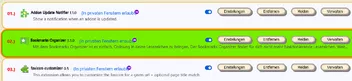
hinter den abgerundeten Buttons Schatten. Meine Vermutung, diese Schatten werden auch in der Schrift angezeigt.
Hätte ich gerne weg.
So, nach ausgiebigem testen habe ich endlich, endlich den Übeltäter gefunden.
Folgender Code haut mir alles durcheinander:
/*Schrift Aktiv für alle Webseiten */

* { text-shadow: transparent 0px 0px 0px, rgba(0,0,0,0.68) 0px 0px 0px !important }
Wenn der aktiv ist, wird zwar die Forenseite eingefärbt, wie es sein soll und auch die Addons-Verwaltung richtig angezeigt, allerdings mit dieser fiesen Schrift und bei der Seite: Testberichte.de dieses "verschrobene" Bild.
Ich werde von daher nochmal meine Forencodes prüfen, ob da in diesem Zusammenhang was nicht passt.
So, ich habe das Problem gefunden.
Es sind 2 Codes die sich nicht vertragen:
/*Suchmaschinenfenster kleiner*/

#engineList {
    min-height: 150px !important;
    max-height: 150px !important;
    }
Das ganze im Zusammenhang mit dem Pocketeintrag.
Egal, in welcher Kombination ich diese aktiviere, also ohne Suchmaschinenfenster oder ohne Pocket.
Beides Mal klappt es nicht.
Probiere ich gerne später aus. Habe gerade nebenher andere Anwendungen laufen, die ich dann "killen" würde.
Trotzdem schon mal Danke und bis denne.