

öffnet aber die Entwicklertools anstatt der Browser-Toolbox.
Entwickler-Werkzeuge = Linksklick
Browser-Werkzeuge = Rechtsklick
öffnet aber die Entwicklertools anstatt der Browser-Toolbox.
Entwickler-Werkzeuge = Linksklick
Browser-Werkzeuge = Rechtsklick
Nicht angekratzt sein, bitte.
Bin ich nicht
Wie wäre es mit einem aktualisiertem Header?
Ich habe deinen Vorschlag dazu oben im Skript eingefügt, danke.

dass die exe-Datei bei jedem Update neu erstellt wird.
Hallo Ingo.
So war es bei mir auch wieder
Ich habe 3 Profile mit 3 Verknüpfungen auf dem Desktop.
Die Verknüpfung mit dem Ziel:
"C:\Program Files\Mozilla Firefox\firefox.exe" -P "default"
wurde entfernt, und dafür die neue erstellt. Die beiden anderen sind geblieben.
Frage an Sören, kann man das in der config deaktivieren?
Script "browsertoolbox.uc.js" funktioniert nicht mehr
Hinweis siehe Zeile 8:
	// ==UserScript==
	// @name           Toolbox Button
	// @version        1.4.0
	// @author         aminomancer
	// @homepageURL    https://github.com/aminomancer/uc.css.js
	// @long-description
	// @description
	//                 Zeile 120 + 301 für Fx 152 ändern


	/*
	Adds a new toolbar button that 1) opens the content toolbox on left click; 2) opens the browser toolbox on right click; 3) toggles "Popup Auto-Hide" on middle click. Left click will open the toolbox for the active tab, or close it if it's already open. Right click will open the elevated browser toolbox if it's not already open. If it is already open, then instead of trying to start a new process and spawning an irritating dialog, it'll just show a brief notification saying the toolbox is already open. The button also shows a badge while a toolbox window is open. Middle click will toggle the preference for popup auto-hide: `ui.popup.disable_autohide`. This does the same thing as the "Disable Popup Auto-Hide" option in the menu at the top right of the browser toolbox, prevents popups from closing so you can debug them.

	If you want to change which mouse buttons execute which functions, search for `userChrome.toolboxButton.mouseConfig` in <about:config>. Change the 0, 1, and 2 values. 0 = left click, 1 = middle, and 2 = right. By default, when you open a browser toolbox window, the script will disable popup auto-hide, and then re-enable it when you close the toolbox. I find that I usually want popup auto-hide disabled when I'm using the toolbox, and never want it disabled when I'm not using the toolbox, so I made it automatic, instead of having to right click and then immediately middle click every time. If you don't like this automatic feature, you can turn it off by setting `userChrome.toolboxButton.popupAutohide.toggle-on-toolbox-launch` to false in about:config.

	You can force the browser toolbox to open in multiprocess mode by holding Shift and Accel (Ctrl/Cmd) when you right click (or whatever mouse button you set `browserToolbox` to for `userChrome.toolboxButton.mouseConfig`) the button.

	When you middle click, the button will show a notification telling you the current status of popup auto-hide, e.g. "Holding popups open." This is just so that people who use the feature a lot won't lose track of whether it's on or off, and won't need to open a popup and try to close it to test it. The toolbar button also changes appearance while popup auto-hide is disabled. It becomes blue like the downloads button and the icon changes into a popup icon. This change is animated, as long as the user doesn't have reduced motion enabled. All of these notifications use the native confirmation hint custom element, since it looks nice. That's the one that appears when you save a bookmark, `#confirmation-hint`. So you can customize them with that selector.
	*/
	// @downloadURL    https://cdn.jsdelivr.net/gh/aminomancer/uc.css.js@master/JS/atoolboxButton.uc.js
	// @updateURL      https://cdn.jsdelivr.net/gh/aminomancer/uc.css.js@master/JS/atoolboxButton.uc.js
	// @license        This Source Code Form is subject to the terms of the Creative Commons Attribution-NonCommercial-ShareAlike International License, v. 4.0. If a copy of the CC BY-NC-SA 4.0 was not distributed with this file, You can obtain one at http://creativecommons.org/licenses/by-nc-sa/4.0/ or send a letter to Creative Commons, PO Box 1866, Mountain View, CA 94042, USA.
	// ==/UserScript==


	(() => {
			// Modify these strings for easy localization. I tried to use built-in strings
			// for this so it would automatically localize itself, but I found that every
			// reference to the "Browser Toolbox" throughout the entire firefox UI is
			// derived from a single message in a single localization file, which doesn't
			// follow the standard format. It can only be parsed by the devtools' own
			// special l10n module, which itself can only be imported by a CJS module.
			// Requiring CJS just for a button seems ridiculous, plus there really aren't
			// any localized strings that work for these confirmation messages anyway, or
			// even the tooltip. So if your UI language isn't English you can modify all the
			// strings created by this script in the following object:
		const l10n = {
			// Confirmation hint. You receive this message when you right click the
			// toolbox button, but a toolbox process for the window is already open. You
			// can only have one toolbox open per-window. So if I have 3 windows open, and
			// I right-click the toolbox button in window 1, then it'll launch a browser
			// toolbox for window 1. If I then right-click the toolbox button in window 2,
			// it'll launch a browser toolbox for window 2. But if I go back to window 1
			// and right-click the toolbox button a second time, it will do nothing except
			// show a brief confirmation hint to explain the lack of action.
			alreadyOpenMsg: "Browser Werkzeuge sind bereits geöffnet.",
			// Confirmation hint. This appears when you first middle-click the toolbox
			// button. It signifies that popups are being kept open. That is, "popup
			// auto-hide" has been temporarily disabled.
			holdingOpenMsg: "Popups werden offen gehalten.",
			// Confirmation hint. This appears when you middle-click the toolbox button a
			// second time, toggling "popup auto-hide" back on, thereby allowing popups to
			// close on their own.
			lettingCloseMsg: "Popups werden automatisch geschlossen.",

			bundles: {},
			strings: new Map(),
			getString(name, where) {
				let string = this.strings.get(name);
				if (string) return string;
				string = this.bundles[where].GetStringFromName(name);
				this.strings.set(name, string);
				return string;
			},
			getFluentValue(id, args) {
				return this.fluentStrings.formatValueSync(id, args);
			},
			get defaultLabel() {
				return this.getString("toolbox.label", "toolbox");
			},
			get defaultTooltip() {
				return this.defaultLabel;
			},
		};
		ChromeUtils.defineLazyGetter(l10n.bundles, "menu", () =>
			Services.strings.createBundle("chrome://devtools/locale/menus.properties")
		);
		ChromeUtils.defineLazyGetter(l10n.bundles, "toolbox", () =>
			Services.strings.createBundle("chrome://devtools/locale/toolbox.properties")
		);
		ChromeUtils.defineLazyGetter(
			l10n,
			"fluentStrings",
			() => new Localization(["devtools/client/toolbox.ftl"], true)
		);

		if (
			/^chrome:\/\/browser\/content\/browser.(xul||xhtml)$/i.test(location) &&
			!CustomizableUI.getPlacementOfWidget("toolbox-button", true)
		) {
			const { loader } = ChromeUtils.importESModule(
				"resource://devtools/shared/loader/Loader.sys.mjs"
			);
			const lazy = {};
			ChromeUtils.defineESModuleGetters(lazy, {
				BrowserToolboxLauncher:
					"resource://devtools/client/framework/browser-toolbox/Launcher.sys.mjs",
			});
			for (const [key, val] of Object.entries({
				gDevToolsBrowser:
					"resource://devtools/client/framework/devtools-browser.js",
				Actor: "resource://devtools/shared/protocol/Actor.js",
				dumpn: "resource://devtools/shared/DevToolsUtils.js",
			})) {
				loader.lazyRequireGetter(lazy, key, val, true);
			}

			if (location.href !== 'chrome://browser/content/browser.xhtml') return;

			CustomizableUI.createWidget({
				id: "toolbox-button",
				type: "custom",
				defaultArea: CustomizableUI.AREA_NAVBAR,
				label: l10n.defaultLabel,
				removable: true,
				overflows: true,
				tooltiptext: l10n.defaultTooltip,
				onBuild(aDoc) {
					let CustomHint = {
						...aDoc.documentGlobal.ConfirmationHint,
						//...aDoc.ownerGlobal.ConfirmationHint,

						/**
						* Shows a transient, non-interactive confirmation hint anchored to an
						* element, usually used in response to a user action to reaffirm that
						* it was successful and potentially provide extra context.
						*
						* @param  anchor (DOM node, required)
						*         The anchor for the panel. A value of null will anchor to the
						*         viewpoint (see options.x below)
						* @param  message (string, required)
						*         The message to be shown.
						* @param  options (object, optional)
						*         An object with any number of the following optional properties:
						*         - event (DOM event): The event that triggered the feedback.
						*         - hideArrow (boolean): Optionally hide the arrow.
						*         - hideCheck (boolean): Optionally hide the checkmark.
						*         - description (string): If provided, show a more detailed
						*                                 description/subtitle with the passed text.
						*         - duration (numeric): How long the hint should stick around, in
						*                               milliseconds. Default is 1500 — 1.5 seconds.
						*         - position (string): One of a number of strings representing how the anchor point of the popup
						*                              is aligned relative to the anchor point of the anchor node.
						*                              Possible values for position are:
						*                                  before_start, before_end, after_start, after_end,
						*                                  start_before, start_after, end_before, end_after,
						*                                  overlap, after_pointer
						*                              For example, after_start means the anchor node's bottom left corner will
						*                              be aligned with the popup node's top left corner. overlap means their
						*                              top left corners will be lined up exactly, so they will overlap.
						*         - x (number): Horizontal offset in pixels, relative to the anchor.
						*                       If no anchor is provided, relative to the viewport.
						*         - y (number): Vertical offset in pixels, relative to the anchor. Negative
						*                       values may also be used to move to the left and upwards respectively.
						*                       Unanchored popups may be created by supplying null as the
						*                       anchor node. An unanchored popup appears at the position
						*                       specified by x and y, relative to the viewport of the document
						*                       containing the popup node. (ignoring the anchor parameter)
						*
						*/
						show(anchor, message, options = {}) {
							this._reset();
							this._message.removeAttribute("data-l10n-id");
							this._message.textContent = message;

							if (options.description) {
								this._description.removeAttribute("data-l10n-id");
								this._description.textContent = options.description;
								this._description.hidden = false;
								this._panel.classList.add("with-description");
							} else {
								this._description.hidden = true;
								this._panel.classList.remove("with-description");
							}

							if (options.hideArrow) {
								this._panel.setAttribute("hidearrow", "true");
							}

							if (options.hideCheck) {
								this._animationBox.setAttribute("hidden", "true");
								this._panel.setAttribute("data-message-id", "hideCheckHint");
							} else {
								this._animationBox.removeAttribute("hidden");
								this._panel.setAttribute("data-message-id", "checkmarkHint");
							}

							const DURATION = options.duration || 150000;
							this._panel.addEventListener(
								"popupshown",
								() => {
									this._animationBox.setAttribute("animate", "true");
									this._timerID = setTimeout(
										() => this._panel.hidePopup(true),
										DURATION + 120
									);
								},
								{ once: true }
							);

							this._panel.addEventListener("popuphidden", () => this._reset(), {
								once: true,
							});

							let { position, x, y } = options;
							this._panel.openPopup(null, {
								position,
								triggerEvent: options.event,
							});
							this._panel.moveToAnchor(anchor, position, x, y);
						},

						_reset() {
							if (this._timerID) {
								clearTimeout(this._timerID);
								this._timerID = null;
								this._animationBox.removeAttribute("hidden");
							}
							if (this.__panel) {
								this._panel.removeAttribute("hidearrow");
								this._animationBox.removeAttribute("animate");
								this._panel.removeAttribute("data-message-id");
								this._panel.hidePopup();
							}
						},

						_ensurePanel() {
							if (!this.__panel) {
								// hook into the built-in confirmation hint element
								let wrapper = document.getElementById(
									"confirmation-hint-wrapper"
								);
								wrapper?.replaceWith(wrapper.content);
								this.__panel = ConfirmationHint.__panel =
								document.getElementById("confirmation-hint");
							}
						},
					};

					let toolbarbutton = aDoc.createXULElement("toolbarbutton");
					let badgeStack = aDoc.createXULElement("stack");
					let icon = aDoc.createXULElement("image");
					let label = aDoc.createXULElement("label");
					let badgeLabel = aDoc.createElement("label");
					for (const [key, val] of Object.entries({
						class: "toolbarbutton-1 chromeclass-toolbar-additional",
						badged: true,
						label: l10n.defaultLabel,
						id: "toolbox-button",
						role: "button",
						icon: "toolbox",
						removable: true,
						overflows: true,
						tooltiptext: l10n.defaultTooltip,
					})) {
						toolbarbutton.setAttribute(key, val);
					}

					toolbarbutton.appendChild(badgeStack);
					badgeStack.after(label);
					badgeStack.appendChild(icon);
					icon.after(badgeLabel);
					badgeStack.setAttribute("class", "toolbarbutton-badge-stack");
					icon.setAttribute("class", "toolbarbutton-icon");
					badgeLabel.setAttribute("class", "toolbarbutton-badge");
					for (const [key, val] of Object.entries({
						class: "toolbarbutton-text",
						crop: "right",
						flex: "1",
						value: l10n.defaultLabel,
					})) {
						label.setAttribute(key, val);
					}

					let prefSvc = Services.prefs;
					let defaultPrefs = prefSvc.getDefaultBranch("");
					let obSvc = Services.obs;
					let toolboxBranch = "userChrome.toolboxButton";
					let autoHide = "ui.popup.disable_autohide";
					let autoTogglePopups =
						"userChrome.toolboxButton.popupAutohide.toggle-on-toolbox-launch";
					let mouseConfig = "userChrome.toolboxButton.mouseConfig";

					let onClick = function (e) {
						let { button } = e;
						let accel = e.getModifierState("Accel");
						let shift = e.getModifierState("Shift");
						if (accel) {
							if (button == 2 && !shift) {
								return;
							}
						if (button == 0 && AppConstants.platform == "macosx") {
							button = 2;
							accel = false;
						}
						}
						switch (button) {
							case this.mouseConfig.contentToolbox:
								// toggle the content toolbox
							lazy.gDevToolsBrowser.toggleToolboxCommand(
							aDoc.documentGlobal.gBrowser
							//	aDoc.ownerGlobal.gBrowser
							);
							break;
							case this.mouseConfig.browserToolbox:
							if (lazy.BrowserToolboxLauncher.getBrowserToolboxSessionState()) {
								// check if a browser toolbox window is already open. if so,
								// just show a hint that it's already open.
								CustomHint.show(toolbarbutton, l10n.alreadyOpenMsg, {
									event: e,
									hideCheck: true,
								});
							} else {
									// if not, launch a new one.
								lazy.BrowserToolboxLauncher.init({
									forceMultiprocess: accel && shift,
								});
							}
							break;
							case this.mouseConfig.popupHide:
							CustomHint.show(
								toolbarbutton,
								l10n[this.popupAutoHide ? "lettingCloseMsg" : "holdingOpenMsg"],
								{ event: e, hideCheck: this.popupAutoHide }
							);
								// toggle the pref
							prefSvc.setBoolPref(autoHide, !this.popupAutoHide);
								// animate the icon transformation
							this.triggerAnimation();
							break;
							default:
							return;
						}
						e.preventDefault();
					};

					if (AppConstants.platform === "macosx") {
						toolbarbutton.onmousedown = onClick;
						toolbarbutton.onclick = e => {
							if (e.getModifierState("Accel")) return;
							e.preventDefault();
						};
					} else {
						toolbarbutton.onclick = onClick;
					}

					toolbarbutton.triggerAnimation = function () {
						this.addEventListener(
							"animationend",
							() => this.removeAttribute("animate"),
							{ once: true }
						);
						this.setAttribute("animate", "true");
					};

					function getPref(root, pref) {
						switch (root.getPrefType(pref)) {
							case root.PREF_BOOL:
								return root.getBoolPref(pref);
							case root.PREF_INT:
								return root.getIntPref(pref);
							case root.PREF_STRING:
								return root.getStringPref(pref);
							default:
							return null;
						}
					}

					function prefObserver(sub, _top, pref) {
						let value = getPref(sub, pref);
						switch (pref) {
							case autoHide:
								if (value === null) value = false;
									toolbarbutton.popupAutoHide = value;
								if (value) {
										// change icon src to popup icon
									toolbarbutton.setAttribute("icon", "autohide");
										// highlight color
									icon.style.fill = "var(--toolbarbutton-icon-fill-attention)";
								} else {
										// change icon src to toolbox icon
									toolbarbutton.setAttribute("icon", "toolbox");
										// un-highlight color
									icon.style.removeProperty("fill");
								}
								break;
								case autoTogglePopups:
									if (value === null) value = true;
										toolbarbutton.autoTogglePopups = value;
								break;
								case mouseConfig:
									if (value === null) {
										value = {
											contentToolbox: 0,
											browserToolbox: 2,
											popupHide: 1,
										};
									}
									toolbarbutton.mouseConfig = JSON.parse(value);
									toolbarbutton.setStrings();
								break;
						}
					}

						// listen for toolboxes opening and closing
					function toolboxObserver(sub, top, _data) {
							// whether a toolbox is open
						let state =
						lazy.BrowserToolboxLauncher.getBrowserToolboxSessionState();
							// set toolbar button's badge content
						badgeLabel.textContent = state ? 1 : "";
							// if toolbox is open and autohide is not already enabled, enable it
						switch (top) {
							case "initial-load":
							return;
								// when a thread is created, set up its destroy method so it will
								// call the observer when it's destroyed. this ensures that if a
								// toolbox is closed while a content toolbox is inspecting the
								// system principal (such as on about:preferences), we will still
								// get notified that the toolbox has closed. otherwise, we wouldn't
								// get notified until the content toolbox also closes.
							case "devtools-thread-ready": {
								let threadActor = sub?.wrappedJSObject;
								if (threadActor) {
									if (threadActor.destroy.name !== "destroyThreadActor") {
										const STATES = {
											DETACHED: "detached",
											EXITED: "exited",
											RUNNING: "running",
											PAUSED: "paused",
										};

										threadActor.destroy = function destroyThreadActor() {
											lazy.dumpn("in ThreadActor.prototype.destroy");
											if (this._state == STATES.PAUSED) {
												this.doResume();
											}

											this.removeAllWatchpoints();
											this._xhrBreakpoints = [];
											this._updateNetworkObserver();
											this._activeEventBreakpoints = new Set();
											this._debuggerNotificationObserver.removeListener(
												this._eventBreakpointListener
											);

											for (const global of this.dbg.getDebuggees()) {
												try {
													this._debuggerNotificationObserver.disconnect(
														global.unsafeDereference()
													);
												} catch (e) {
												}
											}

											this.targetActor.off("window-ready", this._onWindowReady);
											this.targetActor.off("will-navigate", this._onWillNavigate);
											this.targetActor.off("navigate", this._onNavigate);
											this.sourcesManager.off("newSource", this.onNewSourceEvent);
											this.clearDebuggees();
											this._threadLifetimePool.destroy();
											this._threadLifetimePool = null;
											this._dbg = null;
											this._state = STATES.EXITED;

											lazy.Actor.prototype.destroy.call(this);
												// this leads back to toolboxObserver in 200ms
											setTimeout(() => Services.obs.notifyObservers(null, "devtools-thread-destroyed"), 200);
										}
									}
								}
								break;
							}
							default:
							break;
						}
						if (!toolbarbutton.autoTogglePopups) return;
						if (state && !toolbarbutton.popupAutoHide) {
							prefSvc.setBoolPref(autoHide, true);
						}
							// if toolbox just closed and autohide is not already disabled, disable it
						else if (!state && toolbarbutton.popupAutoHide) {
							prefSvc.setBoolPref(autoHide, false);
						}
					}

					toolbarbutton.setStrings = function () {
						let hotkey, labelString;
						for (const [key, val] of Object.entries(toolbarbutton.mouseConfig)) {
							if (val === 0) {
								switch (key) {
									case "contentToolbox":
										labelString = l10n.getString("toolbox.label", "toolbox");
										hotkey = aDoc.getElementById("key_toggleToolbox");
									break;
									case "browserToolbox":
										labelString = l10n.getString(
											"browserToolboxMenu.label",
											"menu"
										);
										hotkey = aDoc.getElementById("key_browserToolbox");
									break;
									case "popupHide":
										labelString = l10n.getFluentValue(
											"toolbox-meatball-menu-noautohide-label"
										);
									break;
								}
							}
						}
						let shortcut = hotkey
						? ` (${ShortcutUtils.prettifyShortcut(hotkey)})`
						: "";
						toolbarbutton.label = labelString;
						label.value = labelString;
						toolbarbutton.tooltipText = labelString + shortcut;
					};

						// remove this window's observers when the window closes, since observers are global
					function uninit() {
						prefSvc.removeObserver(autoHide, prefObserver);
						prefSvc.removeObserver(toolboxBranch, prefObserver);
						for (const topic of [
							"devtools-thread-ready",
							"devtools-thread-destroyed",
							"devtools:loader:destroy",
						]) {
							obSvc.removeObserver(toolboxObserver, topic);
						}
						window.removeEventListener("unload", uninit);
					}

					function toolboxInit() {
						prefObserver(prefSvc, null, autoHide);
						prefObserver(prefSvc, null, autoTogglePopups);
						prefObserver(prefSvc, null, mouseConfig);
						toolboxObserver(null, "initial-load");
					}

					defaultPrefs.setBoolPref(autoTogglePopups, true);
					defaultPrefs.setStringPref(
						mouseConfig,
						`{"contentToolbox": 0, "browserToolbox": 2, "popupHide": 1}`
					);
					window.addEventListener("unload", uninit);
					prefSvc.addObserver(autoHide, prefObserver);
					prefSvc.addObserver(toolboxBranch, prefObserver);
					for (const topic of [
						"devtools-thread-ready",
						"devtools-thread-destroyed",
						"devtools:loader:destroy",
					]) {
						obSvc.addObserver(toolboxObserver, topic);
					}
					if (gBrowserInit.delayedStartupFinished) {
						toolboxInit();
					} else {
						let delayedListener2 = (subject, topic) => {
							if (
								topic == "browser-delayed-startup-finished" &&
								subject == window
							) {
								obSvc.removeObserver(delayedListener2, topic);
								toolboxInit();
							}
						};
						obSvc.addObserver(
							delayedListener2,
							"browser-delayed-startup-finished"
						);
					}
					return toolbarbutton;
				},
			});
		}

		let styleSvc = Cc["@mozilla.org/content/style-sheet-service;1"].getService(
			Ci.nsIStyleSheetService
		);
		let toolboxCSS = /* css */ `

			.toolbarbutton-1#toolbox-button {
				--uc-toolbox-button: url('data:image/png;base64,iVBORw0KGgoAAAANSUhEUgAAABAAAAAQCAIAAACQkWg2AAAACXBIWXMAAA7EAAAOxAGVKw4bAAAAdUlEQVQokZVSwRHAIAgLPYfoXs7RCTpG53Avt7APrhaFU8gLMEEJAkEQgFbc7IxkVjt0r6Sp7VIVITumBpKt00FA2ThmjXzkfMMWO8EZFSj8LrUyjsG9b9DaJXq+qAIVxEUxtLHpaXE95dj1NcK2rmbwaGJ4Af0tIg00j/6iAAAAAElFTkSuQmCC');
				--uc-autohide-button: url('data:image/png;base64,iVBORw0KGgoAAAANSUhEUgAAABkAAAATCAYAAABlcqYFAAABeUlEQVQ4ja3UMSiEcRjH8Z8jKWU8q03JYEAhZ7PcZDFYrMpOWaTEgsEom4RFBmEjcSaEU0onFN0Rd9dFzr3er+Ut7vV/eS/vU7/l3/s8n/f/PvVKrkKKIm0hJZEoIUmkTaQO90w3MFniYK8MewHRgACQLKRmE7IRIALSkglJBYzcmhDPhrtwGJ6fIZeDTOYrwF5ri2dfSchBZxumOpoY5+mXvpKQ7NzID+Dl4Z6TitCvn8w3kpbIJS5dxBv7TbV/7sU3chOuAssqIqzMOfGZUV5W1yAWIzE4+D9kp6vLGf0KWLjrIx9nO9L4T6SmhrWePs7GI2A/FgHvJ/PEqwNaPBLHPZEi4HB6ipugdoJEQeJqZRYAO59kt7+B1B+AF+L5101UCgppwOYwWmceWubk6+zChKx7IamVXk6XxzgtD/Hh4wZOFkxIO5LtfjgrsdVdRjzkPdAA55HqfyAONIRU8Pmm2ObzPNKAEfgGNSMtIl37xZxcIy2YbvAJBGtcN/WRF/UAAAAASUVORK5CYII');
				list-style-image: var(--uc-toolbox-button);
				align-items: center;
			}
			.toolbarbutton-1#toolbox-button[icon="autohide"] {
				list-style-image: var(--uc-autohide-button);
			}
			.toolbarbutton-1#toolbox-button .toolbarbutton-badge-stack {
				justify-items: center;
			}
			.toolbarbutton-1#toolbox-button .toolbarbutton-icon {
				height: 16px;
				width: 16px;
				transition: fill 50ms ease-in-out 0s;
				background-image: var(--uc-toolbox-button), var(--uc-autohide-button);
				background-size: 0, 0;
			}
			@media (prefers-reduced-motion: no-preference) {
				.toolbarbutton-1#toolbox-button[animate] .toolbarbutton-icon {
					animation-name: toolboxButtonPulse;
					animation-duration: 200ms;
					animation-iteration-count: 1;
					animation-timing-function: ease-in-out;
				}
			}
			@keyframes toolboxButtonPulse {
				from {
					transform: scale(1);
				}
				40% {
					transform: scale(0.7);
				}
				to {
					transform: scale(1);
				}
			}
			#confirmation-hint[data-message-id="hideCheckHint"] #confirmation-hint-message {
				margin-inline: 0;
			}
				/* Anpassungen für das Hinweis-PopUp */
			#confirmation-hint-checkmark-animation-container {
				width: 16px !important;
				height: 16px !important;
			}
			#confirmation-hint-checkmark-animation-container[animate] > #confirmation-hint-checkmark-image {
				background-image: url("file:///E:/ICONS/FF/Checkbox.checked16-2.png") !important;
				min-width: 16px !important;
				max-width: 16px !important;
				min-height: 16px !important;
				max-height: 16px !important;
				animation-name: unset !important;
			}
		`;

		if (location.href !== 'chrome://browser/content/browser.xhtml') return;
		let styleURI = makeURI(
			`data:text/css;charset=UTF=8,${encodeURIComponent(toolboxCSS)}`
		);
		if (!styleSvc.sheetRegistered(styleURI, styleSvc.AUTHOR_SHEET)) {
			styleSvc.loadAndRegisterSheet(styleURI, styleSvc.AUTHOR_SHEET);
		}

		let observer = new MutationObserver(() => {
			if (document.getElementById("key_toggleToolbox")) {
				CustomizableUI.getWidget("toolbox-button")
				.forWindow(window)
				.node.setStrings();
				observer.disconnect();
				observer = null;
			}
		});
		observer.observe(document.body, { childList: true });
})();inkompatibel mit v152
Hinweis siehe Zeile 8.
// ==UserScript==
// @name           newTabFromHistory.uc.js
// @namespace      https://www.camp-firefox.de/forum/viewtopic.php?p=1090093#p1090093
// @description    Links aus Chronik in neuem Tab öffnen
// @author         aborix
// @Source         https://www.camp-firefox.de/forum/thema/138013/?postID=1251376#post1251376
// @Source_new     https://www.camp-firefox.de/forum/thema/139502/?postID=1273989#post1273989
// @compatibility  139-151
// @Note           Lines 44 and 45 have been updated due to an error message in the console
// @compatibility  152
// @Note           Lines 18 and 19 alternate starting at Fx 152
// @version        0.0.6 date 2026.05.23
// ==/UserScript==

(function() {

  if (location != 'chrome://browser/content/browser.xhtml')
    return;

  PlacesUIUtils.openNodeWithEvent = function PUIU_openNodeWithEvent(aNode, aEvent) {
	 let window = aEvent.target.documentGlobal;
    // let window = aEvent.target.ownerGlobal;
    let browserWindow = (window && window.document.documentElement.getAttribute('windowtype') == 'navigator:browser') ? window : BrowserWindowTracker.getTopWindow();
    let where = window.BrowserUtils.whereToOpenLink(aEvent, false, true);
    if (this.loadBookmarksInTabs) {
      if (where == 'current' && !aNode.uri.startsWith('javascript:')) {
        where = 'tab';
      }
      if (where == 'tab' && browserWindow.gBrowser.selectedTab.isEmpty) {
        where = 'current';
      }
    }
    this._openNodeIn(aNode, where, window);
  }

  let onPopupshowing = function() {
    let historyMenu = document.getElementById('history-menu');
    if (!historyMenu._placesView) {
      new HistoryMenu(event);
      historyMenu._placesView._onCommand = function HM__onCommand(aEvent) {
        let placesNode = aEvent.target._placesNode;
        if (placesNode) {
          PlacesUIUtils.openNodeWithEvent(placesNode, aEvent);
        };
      };
    };
  };

     let historyPopup = document.getElementById('historyMenuPopup');
     historyPopup?.addEventListener('popupshowing', onPopupshowing);

})();
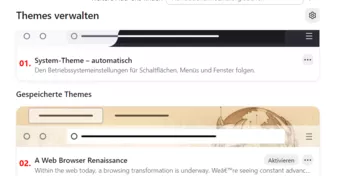
das bei Themes die Nummerierung weg ist.
Teste bitte:
@-moz-document url-prefix("about:addons") {

.addon-card-collapsed::before {
     font-size:18px!important;
     color: red !important;
     font-weight: bold !important;
     counter-increment: section;
     content: counter(section, decimal-leading-zero)". ";
     margin-left: -8px !important;
     padding-right: 8px !important;
     margin-top:4px!important;
    }

body {
    counter-reset: section;
    }
}
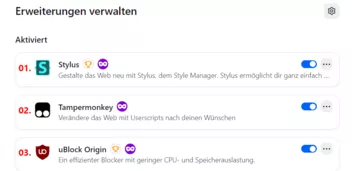
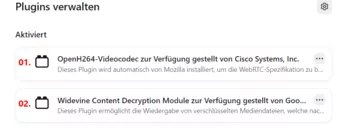
da ist wohl reichlich Code drin, der obsolet geworden ist.
So ist es
Zumindest alles auf der linken Seite müsste neu erstellt werden.
Empfehlungen und Hilfe für Addons müssen aber definitiv wech

WO also könnte
Welche Erweiterungen nutzt du denn?

die Karte ist unten am Ende:
Hallo und willkommen hier im Forum. 😊
Sieht hier so aus:

Das dient nur zum Testen, und ist keine Lösung des Problems!
Versuch es bitte mal damit: Firefox im Fehlerbehebungsmodus starten
Über: Hilfe..Fehlerbehebungsmodus ...
oder die Umschalt/Option-Taste gedrückt halten und den Firefox starten.
Aber Achtung, dann nicht auf den rechten Button zur Bereinigung klicken!
Die Schaltflächen in diesem Bedienfeld sind deutlich größer geworden. Auch die Schaltflächen in der Navigationsleiste sind größer geworden.
Sieht hier so aus in Fx 152:
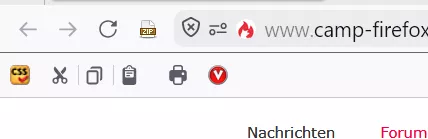
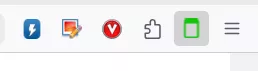
Die Symbole sind hier nicht größer als alle anderen

firefox ist aktuell
Aktuell ist Fx 151.0.1
Laut deinem User-Agenten nutzt du aber Fx 150.

verdächtig nach der Nightly aus
Würde passen
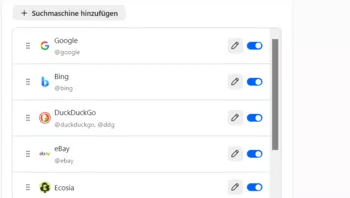
Und der Button zum Entfernen ist unten nicht mehr vorhanden:
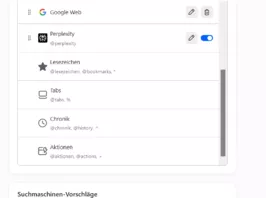
Ist dieses so gewollt?
Ich denke es liegt eher an einem CSS-Code bei dir.
Mag so sein und wird wohl stimmen
Es ist so. Und heute kam auch das offizielle Update auf Fx 152.
Als ich das geschrieben hatte, war es eben noch keine offizielle Version.
Und, du wirst dich jetzt sicherlich wundern:
Ich kenne diese Seiten wo man solche nicht offiziellen Seiten bekommt schon seit vielen Jahren.
Welche Unterschiede gibt es
Die Version auf dem Server kann jederzeit von Mozilla geändert werden, weil sie noch nicht offiziel ist, und evtl. Fehler enthält.
Solltest du aber eigentlich nach zig Jahren auch selber schon wissen.
Hast du vielleicht noch eine andere Idee im Kopf,
Leider nicht. Es gibt ja schon lange ein Problem mit den angepinnten Tabs.
Dein genutztes Skript wird ja auch nicht mehr angepasst, von daher musst du wohl damit leben
jemand in diesem Skript die Zeile reparieren
Teste bitte mal dieses Skript:
// ==UserScript==
// @name MultiRowTabLiteforFx.uc.js
// @namespace Based on Alice0775's zzzz-MultiRowTab_LiteforFx48.uc.js
// @description Mehrzeilige Tableiste - Experimentelle CSS Version
// @include main
// @compatibility Firefox141+
// @version 2025/06/30 16:58
// ==/UserScript==
"use strict";
MultiRowTabLiteforFx();
function MultiRowTabLiteforFx() {
if (!window.gBrowser) { return; }
// -- Config --
// Vergleichbarer CSS Code in userChrome.css Datei wird vorrangig behandelt!
const // Mehrzeilige Tableiste Ein/Aus Anzahl der Tabzeilen
MultiRowTab_OnOff_and_TabBar_Rows = -1 ,// [-1] = Mehrzeilige Tableiste aktiv unbegrenzte Anzahl von Zeilen.
// 0 = Mehrzeilige Tableiste aus.
// 1 = Mehrzeilige Tableiste aktiv. Standard = 1 Zeile. Bei Berührung
// der Tableiste mit der der Maus, werden die zweite und die folgenden
// Zeilen bis zur angegebenen Anzahl von Zeilen angezeigt.
// 2 = Mehrzeilige Tableiste aktiv. Anzahl der Tabzeilen angeben.
TabBar_Rows_on_MouseOver = 3 ,// Standard = 1 Zeile. Anzahl der Zeilen angeben, die angezeigt werden sollen,
// wenn der Mauszeiger über die Tableiste bewegt wird. Voraussetzung:
// „MultiRowTab_OnOff_and_TabBar_Rows“ auf „1“ setzen.
TabBar_DisplayTime_on_MouseOver = 1 ,// Sie können die Anzeigezeit (Sekunden) festlegen, wann die zweite und die
// folgenden Zeilen beim Mouseover angezeigt werden. Das Display zeigt den
// eingestellten Wert(Sekunden) an und kehrt dann zur ersten Zeile zurück.
// Position der Tab-Leiste.
TabBar_Position = 1 ,// [0] = Standard
// 1 = unter der Symbolleiste
// 2 = unter dem Fenster
// Positionen der Tab-Leiste und der Lesezeichen-Symbolleiste tauschen.
// sofern die Position der Tab-Leiste unterhalb der Symbolleiste festgelegt ist.
// Voraussetzung: "TabBar_Position" auf "1".
Bookmark_Toolbar_Position = true ,// [true] = Menüleiste, Navigationsleiste, Lesezeichenleiste, Tableiste
// false = Menüleiste, Navigationsleiste, Tableiste, Lesezeichensymbolleiste
// Tab-Höhe „UI-Dichte“
UI_Density_Compact = 32 ,// Standard = 29 Pixelbei Kompakt
UI_Density_Normal = 32 ,// Standard = 36 Pixel bei Normal
UI_Density_Touch = 41 ,// Standard = 41 Pixel bei Touch
// Tab-Breite
Tab_Min_Width = 165 ,// Standard - Mindestwert = 76px
Tab_Max_Width = 165 ,// Standard - Maxwert = 225px
// Bei gleichen Werten bei Min und Max, wird die Tabbreite fixiert!
// „Tab schließen“ Schaltfläche
Tab_Close_Button = 2 ,// [0] = Standard
// 1 = Ausgeblendet
// 2 = Auf allen Tabs anzeigen
// 3 = Nur bei Mausberührung anzeigen
// 4 = Aktive Tabs werden immer angezeigt, inaktive Tabs
// werden beim Mouseover angezeigt. *Standard für vertikalen Tab-Modus.
// ProtonUI Erscheinungsbild der Tabs ändern
Proton_Margins = true ,// [true] = Darstellung ProtonUI
// Die Höhe der Tab-Leiste entspricht der Höhe der UI-Dichte plus dem Leerraum darüber
// und darunter.
// false = Darstellung wie bei browser.proton.enabled auf false, was man vor Firefox 90
// noch einstellen konnte.
// Wenn der Leerraum um die Tabs auf 0 und die Höhe auf die UI-Dichte eingestellt
// ist, ist sie 4 Pixel breiter und 8 Pixel niedriger als die Standardeinstellung.
// Ränder auf der linken und rechten Seite der Tabs
Tab_Separators = false ,// [false] = Nicht anzeigen
// true = Anzeigen
// Rahmen CSS wurde extrahiert und angepasst, an Aussehen wie bei browser.proton.enabled
// auf false, was man vor Firefox 90 noch einstellen konnte.
// Voraussetzung: „TabBar_Position“ auf „0“ setzen.
TitleBar_Button_Autohide = false ,// [false] = Aktiviert
// true = Deaktiviert
// Äußeren Rahmen der Titelleistenschaltfläche [-□×] reduzieren und transparent machen.
TitleBar_Button_DisplayTime = 0.6 ,// Dauer der Anzeige in Sekunden, nach der Rückkehr zur Originalgröße und dem Aufheben
// der Transparenz per Mouseover angeben.
// Tab-Leiste von Anfang an auf die angegebene Höhe einstellen.
// Voraussetzung: „MultiRowTab_OnOff_and_TabBar_Rows“ auf „2“ oder höher setzen.
Set_the_TabBar_to_the_Specified_Height = false ,// [false] = Die Tab-Leiste wird höher, wenn der nächsten Zeile weitere Tabs hinzugefügt werden.
// true = Verwendung: Die Tab-Leiste wird von Anfang an auf die angegebene Höhe eingestellt
// „.tabDropIndicator“, der beim Ziehen und Ablegen eines Tabs angezeigt wird, ersetzen.
// Voraussetzung: „MultiRowTab_OnOff_and_TabBar_Rows“ auf einen anderen Wert als „0“ setzen.
Tab_Drop_Indicator = false ,// [false] = Stecknadel Symbol 📍
// true = Rote Linie (2px × 29px) als Symbol
// Position der angepinnten Tabs
// Voraussetzung: „MultiRowTab_OnOff_and_TabBar_Rows“ auf einen Wert ungleich „0“ setzen.
Separate_Tabs_and_PinnedTabs = false ,// [false] = Standard
// true = Angeheftete Tabs von der Tab-Leiste lösen und in die darüber liegende
// Zeile verschieben. Breite der angehefteten Tabs für die Position der
// angehefteten Tabs „true“ anpassen.
PinnedTab_Width = false ,// [false] = Kein Standard
// true = Breite angehefteter Tabs anpassen, z. B. „Tab-Breite“.
PinnedTab_Min_Width = 76 ,// Standard Mindestbreite = 76 Pixel
PinnedTab_Max_Width = 225 ,// Standard Maximalbreite = 225 Pixel
// Bei gleichen Werten ist die Breite fixiert.
// Angeheftete Tab, Schließen Schaltfläche
// Voraussetzung: „Separate_Tabs_and_PinnedTabs“ auf „true“ setzen.
PinnedTab_Close_Button = 0 ,// [0] = Standard
// 1 = auf allen Tabs sichtbar
// 2 = auf Tab bei Mouseover anzeigen
// 3 = Aktiver Tab immer sichtbar, inaktiver Tab bei Mouseover sichtbar
// *Standard für vertikalen Tab-Modus.
// Tab-Leisten-Ziehbereich
Left_Drag_Area = 0 ,// Linker Ziehbereich Breite: Standard 40 Pixel
Right_Drag_Area = 0 ,// Rechter Ziehbereich Breite: Standard 40 Pixel
Maximize_Left_Drag_Area = false ,// true = Linken Ziehbereich bei maximiertem Fenster anzeigen. Standard ausgeblendet.
Fullscreen_Drag_Area = false ,// true = Linken und rechten Ziehbereich bei Vollbild anzeigen. Standard ausgeblendet.
// Wenn die Titelleiste angezeigt wird, funktioniert sie nicht als Drag-Bereich, selbst
// wenn „.titlebar-spacer“ angezeigt wird. Daher habe ich dafür gesorgt, dass sie nichts bewirkt.
// -- Config Ende --
css = `
#pinned-tabs-container[orient="horizontal"] {
max-height: 37px !important;
}
#TabsToolbar:not([collapsed="true"]) {
:root[uidensity="compact"] & {
--tab-min-height: ${UI_Density_Compact}px;
}
:root:not([uidensity]) & {
--tab-min-height: ${UI_Density_Normal}px;
}
:root[uidensity="touch"] & {
--tab-min-height: ${UI_Density_Touch}px;
}
&[dragtarget] {
z-index: unset !important;
position: unset !important;
pointer-events: unset !important; /* avoid blocking dragover events on scroll buttons */
}
#tabbrowser-tabs[movingtab] & {
position: unset !important;
}
#tabbrowser-tabs[movingtab] &:is(:active, [multiselected]) {
position: relative;
z-index: 2;
pointer-events: none; /* avoid blocking dragover events on scroll buttons */
}
#tabbrowser-tabs {
min-height: calc(var(--tab-min-height) + ${Proton_Margins ? 8 : 0}px);
${MultiRowTab_OnOff_and_TabBar_Rows != 0 ? `
&[overflow] {
padding-inline: 0 !important;
& > #tabbrowser-arrowscrollbox {
& > .tabbrowser-tab[pinned] {
display: flex;
margin-inline-start: 0 !important;
position: static !important;
}
&::part(scrollbox) {
padding-inline: 0;
}
}
& + #new-tab-button {
display: none;
}
}
${Tab_Drop_Indicator ? `
& > .tab-drop-indicator {
background: url(
data:image/png;base64,iVBORw0KGgoAAAANSUhEUgAAAAIAAAAdCAIAAAAPVCo9AAAAAXNSR0IArs4c6QAAAARnQU1BAACxjwv8YQUAAAAJcEhZcwAADsMAAA7DAcdvqGQAAAASSURBVBhXY3growJEQ5+SUQEAOb1EM8kwskcAAAAASUVORK5CYII=
) no-repeat center;
}
` : ``}
#tabbrowser-arrowscrollbox {
&::part(scrollbox) {
& > slot {
flex-wrap: wrap;
}
${MultiRowTab_OnOff_and_TabBar_Rows != -1 ? `
${MultiRowTab_OnOff_and_TabBar_Rows == 1 ? `
${TabBar_Rows_on_MouseOver == 0 || TabBar_Rows_on_MouseOver == 1 ? `
max-height: calc((var(--tab-min-height) + ${Proton_Margins ? 8 : 0}px) * 2);
` : `
max-height: calc((var(--tab-min-height) + ${Proton_Margins ? 8 : 0}px) * ${TabBar_Rows_on_MouseOver});
`}
&:not(:hover) {
max-height: calc(var(--tab-min-height) + ${Proton_Margins ? 8 : 0}px) !important;
${Proton_Margins ? `scrollbar-width: none;` : ``}
transition: all 0s ease-in-out ${TabBar_DisplayTime_on_MouseOver}s;
}
` : `
${Set_the_TabBar_to_the_Specified_Height ? `
min-height: calc((var(--tab-min-height) + ${Proton_Margins ? 8 : 0}px) * ${MultiRowTab_OnOff_and_TabBar_Rows});
& > slot {
max-height: calc(var(--tab-min-height) + ${Proton_Margins ? 8 : 0}px);
}
` : `
max-height: calc((var(--tab-min-height) + ${Proton_Margins ? 8 : 0}px) * ${MultiRowTab_OnOff_and_TabBar_Rows});
`}
`}
overflow: hidden auto;
& scrollbar {
-moz-window-dragging: no-drag;
}
` : ``}
}
&::part(overflow-start-indicator),
&::part(overflow-end-indicator),
&::part(scrollbutton-up),
&::part(scrollbutton-down) {
display: none;
}
${Separate_Tabs_and_PinnedTabs ? `
&:has(> .tabbrowser-tab[fadein][pinned]) {
&::part(scrollbox) {
& > slot::after {
display: flow-root list-item;
content: "";
flex-basis: -moz-available;
height: 0;
overflow: hidden;
}
}
}
.tabbrowser-tab[fadein] {
&:not([pinned]) {
#tabbrowser-tabs[haspinnedtabs] & {
&, & + :not(#tabs-newtab-button) {
order: 1;
}
}
}
&[pinned] {
.tab-background:after {
content: "📌";
font-size: 11px;
right: -2px;
position: absolute;
top: -2px;
}
${PinnedTab_Width ? `
flex: 100 100;
max-width: ${PinnedTab_Max_Width}px;
min-width: ${PinnedTab_Min_Width}px;
.tab-throbber, .tab-icon-pending, .tab-icon-image, .tab-sharing-icon-overlay, .tab-icon-overlay {
margin-inline-end: 5.5px !important;
}
${PinnedTab_Close_Button == 1 ? `
.tab-close-button {
display: flex;
}
` : PinnedTab_Close_Button == 2 ? `
.tab-close-button {
display: none;
}
&:hover .tab-close-button {
display: flex;
}
` : PinnedTab_Close_Button == 3 ? `
&:not([selected]):hover,
&[selected] {
.tab-close-button {
display: flex;
}
}
` : ``}
` : ``}
}
}
` : ``}
#tabbrowser-tabs[haspinnedtabs]:not([positionpinnedtabs]):not([orient="vertical"]) > & {
& > .tabbrowser-tab:nth-child(1 of :not([pinned], [hidden])) {
margin-inline-start: 0 !important;
}
}
}
` : ``}
}
.tabbrowser-tab[fadein]:not([pinned]) {
max-width: ${Tab_Max_Width}px;
min-width: ${Tab_Min_Width}px;
${Tab_Close_Button == 1 ? `
.tab-close-button {
display: none;
}
` : Tab_Close_Button == 2 ? `
.tab-close-button {
display: flex;
}
` : Tab_Close_Button == 3 ? `
.tab-close-button {
display: none;
}
&:hover .tab-close-button {
display: flex;
}
` : Tab_Close_Button == 4 ? `
&:not([selected]):hover {
.tab-close-button {
display: flex;
}
}
` : ``}
}
${Tab_Separators ? `
.titlebar-spacer[type="pre-tabs"] {
border-inline-end: 1px solid color-mix(in srgb, currentColor 20%, transparent);
}
.tabbrowser-tab {
&::after,
&::before {
border-left: 1px solid color-mix(in srgb, currentColor 50%, transparent);
height: calc(var(--tab-min-height) - 15%);
margin-block: auto;
}
&:hover::after,
&[multiselected]::after,
#tabbrowser-tabs:not([movingtab]) &:has(+ .tabbrowser-tab:hover)::after,
#tabbrowser-tabs:not([movingtab]) &:has(+ [multiselected])::after {
height: 100%;
}
&::after,
#tabbrowser-tabs[movingtab] &[visuallyselected]::before {
display: flex;
content: "";
}
}
` : ``}
${Proton_Margins ? `` : `
.tabbrowser-tab,
.toolbarbutton-1 {
padding: 0;
}
.tabbrowser-tab,
#tabs-newtab-button {
height: var(--tab-min-height);
}
.tabbrowser-tab {
.tab-background {
box-shadow: none;
margin-block: 0;
}
.tab-label-container {
height: var(--tab-min-height);
max-height: 24px;
}
.tab-close-button {
height: 20px !important;
padding-block: 3px !important;
}
&[usercontextid] > .tab-stack > .tab-background > .tab-context-line {
margin-block-start: 1px !important;
}
}
`}
${TabBar_Position == 0 ? `
.titlebar-buttonbox-container {
height: calc(var(--tab-min-height) + ${Proton_Margins ? 8 : 0}px);
}
${TitleBar_Button_Autohide ? `
& > .titlebar-buttonbox-container {
background-color: color-mix(in srgb, currentColor 20%, transparent);
position: fixed;
right: 0;
&:not(:hover) {
height: 6px;
.titlebar-button {
padding: 0;
}
&,& .titlebar-button {
opacity: 0;
transition: all 0s ease-in-out ${TitleBar_Button_DisplayTime}s;
}
}
}
` : ``}
}` : `
${TabBar_Position == 1 || TabBar_Position == 2 ? `
& > .titlebar-buttonbox-container {
display: none;
}}
#nav-bar {
&:not(.browser-titlebar) {
:root[customtitlebar] #toolbar-menubar[autohide="true"] ~ &,
:root[inFullscreen] #toolbar-menubar ~ & {
& > .titlebar-buttonbox-container {
display: flex;
}
}
}
.titlebar-button {
padding-block: 0;
}
}
` : ``}
body:has(> #navigator-toolbox:not([tabs-hidden])) {
${TabBar_Position == 1 ? `
script, toolbar:not(#TabsToolbar ${Bookmark_Toolbar_Position ? `` : `, #PersonalToolbar`}) {
order: -1;
}
` : TabBar_Position == 2 ? `
& > #fullscr-toggler[hidden] + tabbox,
:root[inFullscreen] & > tabbox:hover {
border-top: 0.01px solid var(--chrome-content-separator-color);
}
& > tabbox > #navigator-toolbox {
border-block: none !important;
}
:root[inFullscreen] & {
& > #navigator-toolbox {
transition: none;
&:has(~ tabbox:hover) {
margin-top: 0 !important;
}
&:hover ~ tabbox > #navigator-toolbox {
display: flex;
}
}
& > tabbox:not(:hover) {
border-top: 0.01px solid transparent;
& > #navigator-toolbox {
display: none;
}
}
}
` : ``}
}
`}
toolbar[id$="bar"].browser-titlebar {
.titlebar-spacer {
&[type="pre-tabs"] {
width: ${Left_Drag_Area}px;
}
&[type="post-tabs"] {
width: ${Right_Drag_Area}px;
}
${Maximize_Left_Drag_Area ? `
:root[customtitlebar]:not([sizemode="normal"], [inFullscreen]) &[type="pre-tabs"] {
display: flex;
}
` : ``}
${Fullscreen_Drag_Area ? `
:root[customtitlebar][inFullscreen] & {
display: flex;
}
` : ``}
}
#navigator-toolbox[tabs-hidden] & {
#new-tab-button {
display: none;
}
}
}
`,
sss = Cc["@mozilla.org/content/style-sheet-service;1"].getService(Ci.nsIStyleSheetService),
uri = Services.io.newURI("data:text/css;charset=UTF=8," + encodeURIComponent(css));
["0", "2", "dragend", "SSTabRestored", "TabAttrModified"].find(eventType => {
if(!sss.sheetRegistered(uri, eventType)) sss.loadAndRegisterSheet(uri, eventType);
if (MultiRowTab_OnOff_and_TabBar_Rows > 0) {
gBrowser.tabContainer.addEventListener(eventType, (e) => {
e.target.scrollIntoView({ behavior: "instant", block: "nearest" })
})
}
})
if (TabBar_Position == 2) {
document.body.appendChild(
document.createXULElement("tabbox")
).appendChild(
document.importNode(document.getElementById("navigator-toolbox"))
).appendChild(
document.adoptNode(document.getElementById("TabsToolbar"))
)
}
gBrowser.tabContainer._getDropIndex = function(event) {
let tabToDropAt = getTabFromEventTarget(event, false);
if (tabToDropAt?.localName == "tab-group") {
tabToDropAt = tabToDropAt.previousSibling;
if (!tabToDropAt) {
tabToDropAt = gBrowser.visibleTabs[0];
}
}
if (!tabToDropAt) {
tabToDropAt = gBrowser.visibleTabs[gBrowser.visibleTabs.length - 1];
}
const tabPos = gBrowser.tabContainer.getIndexOfItem(tabToDropAt);
if (window.getComputedStyle(this).direction == "ltr") {
let rect = tabToDropAt.getBoundingClientRect();
if (event.clientX < rect.x + rect.width / 2)
return tabPos;
else
return tabPos + 1;
} else {
let rect = tabToDropAt.getBoundingClientRect();
if (event.clientX > rect.x + rect.width / 2)
return tabPos;
else
return tabPos + 1;
}
};
// We set this to check if the listeners were added before
let listenersActive = false;
gBrowser.tabContainer.startTabDrag = function startTabDrag(event, tab, { fromTabList = false } = {}) {
const isTab = element => gBrowser.isTab(element);
const isTabGroup = element => gBrowser.isTabGroup(element);
const isTabGroupLabel = element => gBrowser.isTabGroupLabel(element);
if (tab.multiselected) {
for (let multiselectedTab of gBrowser.selectedTabs.filter(
t => t.pinned != tab.pinned
)) {
gBrowser.removeFromMultiSelectedTabs(multiselectedTab);
}
}
let dataTransferOrderedTabs;
if (fromTabList || isTabGroupLabel(tab)) {
// Dragging a group label or an item in the all tabs menu doesn't
// change the currently selected tabs, and it's not possible to select
// multiple tabs from the list, thus handle only the dragged tab in
// this case.
dataTransferOrderedTabs = [tab];
} else {
this.selectedItem = tab;
let selectedTabs = gBrowser.selectedTabs;
let otherSelectedTabs = selectedTabs.filter(
selectedTab => selectedTab != tab
);
dataTransferOrderedTabs = [tab].concat(otherSelectedTabs);
}
let dt = event.dataTransfer;
for (let i = 0; i < dataTransferOrderedTabs.length; i++) {
let dtTab = dataTransferOrderedTabs[i];
dt.mozSetDataAt(TAB_DROP_TYPE, dtTab, i);
if (isTab(dtTab)) {
let dtBrowser = dtTab.linkedBrowser;
// We must not set text/x-moz-url or text/plain data here,
// otherwise trying to detach the tab by dropping it on the desktop
// may result in an "internet shortcut"
dt.mozSetDataAt(
"text/x-moz-text-internal",
dtBrowser.currentURI.spec,
i
);
}
}
// Set the cursor to an arrow during tab drags.
dt.mozCursor = "default";
// Set the tab as the source of the drag, which ensures we have a stable
// node to deliver the `dragend` event. See bug 1345473.
dt.addElement(tab);
// Create a canvas to which we capture the current tab.
// Until canvas is HiDPI-aware (bug 780362), we need to scale the desired
// canvas size (in CSS pixels) to the window's backing resolution in order
// to get a full-resolution drag image for use on HiDPI displays.
let scale = window.devicePixelRatio;
let canvas = this._dndCanvas;
if (!canvas) {
this._dndCanvas = canvas = document.createElementNS(
"http://www.w3.org/1999/xhtml",
"canvas"
);
canvas.style.width = "100%";
canvas.style.height = "100%";
canvas.mozOpaque = true;
}
canvas.width = 160 * scale;
canvas.height = 90 * scale;
let toDrag = canvas;
let dragImageOffset = -16;
let browser = isTab(tab) && tab.linkedBrowser;
if (isTabGroupLabel(tab)) {
toDrag = tab;
} else if (gMultiProcessBrowser) {
var context = canvas.getContext("2d");
context.fillStyle = "white";
context.fillRect(0, 0, canvas.width, canvas.height);
let captureListener;
let platform = AppConstants.platform;
// On Windows and Mac we can update the drag image during a drag
// using updateDragImage. On Linux, we can use a panel.
if (platform == "win" || platform == "macosx") {
captureListener = function () {
dt.updateDragImage(canvas, dragImageOffset, dragImageOffset);
};
} else {
// Create a panel to use it in setDragImage
// which will tell xul to render a panel that follows
// the pointer while a dnd session is on.
if (!this._dndPanel) {
this._dndCanvas = canvas;
this._dndPanel = document.createXULElement("panel");
this._dndPanel.className = "dragfeedback-tab";
this._dndPanel.setAttribute("type", "drag");
let wrapper = document.createElementNS(
"http://www.w3.org/1999/xhtml",
"div"
);
wrapper.style.width = "160px";
wrapper.style.height = "90px";
wrapper.appendChild(canvas);
this._dndPanel.appendChild(wrapper);
document.documentElement.appendChild(this._dndPanel);
}
toDrag = this._dndPanel;
}
// PageThumb is async with e10s but that's fine
// since we can update the image during the dnd.
PageThumbs.captureToCanvas(browser, canvas)
.then(captureListener)
.catch(e => console.error(e));
} else {
// For the non e10s case we can just use PageThumbs
// sync, so let's use the canvas for setDragImage.
PageThumbs.captureToCanvas(browser, canvas).catch(e =>
console.error(e)
);
dragImageOffset = dragImageOffset * scale;
}
dt.setDragImage(toDrag, dragImageOffset, dragImageOffset);
// _dragData.offsetX/Y give the coordinates that the mouse should be
// positioned relative to the corner of the new window created upon
// dragend such that the mouse appears to have the same position
// relative to the corner of the dragged tab.
let clientPos = ele => {
const rect = ele.getBoundingClientRect();
return this.verticalMode ? rect.top : rect.left;
};
let tabOffset = clientPos(tab) - clientPos(this);
let movingTabs = tab.multiselected ? gBrowser.selectedTabs : [tab];
let movingTabsSet = new Set(movingTabs);
tab._dragData = {
offsetX: this.verticalMode
? event.screenX - window.screenX
: event.screenX - window.screenX - tabOffset,
offsetY: this.verticalMode
? event.screenY - window.screenY - tabOffset
: event.screenY - window.screenY,
scrollPos:
this.verticalMode && tab.pinned
? this.verticalPinnedTabsContainer.scrollPosition
: this.arrowScrollbox.scrollPosition,
screenX: event.screenX,
screenY: event.screenY,
movingTabs,
movingTabsSet,
fromTabList,
tabGroupCreationColor: gBrowser.tabGroupMenu.nextUnusedColor,
expandGroupOnDrop: false,
};
event.stopPropagation();
}
// This sets when to apply the fix (by default a new row starts after the 23th open tab, unless you changed the min-size of tabs)
gBrowser.tabContainer.addEventListener("dragstart", () => {
// Multiple tab select fix
gBrowser.visibleTabs.forEach(t => t.style.transform = "");
// Event handling
if (!listenersActive) {
gBrowser.tabContainer.getDropEffectForTabDrag = function(){};
gBrowser.tabContainer._getDropEffectForTabDrag = function(){};
gBrowser.tabContainer.on_dragover = (dragoverEvent) => performTabDragOver(dragoverEvent);
gBrowser.tabContainer._onDragOver = (dragoverEvent) => performTabDragOver(dragoverEvent);
gBrowser.tabContainer.ondrop = (dropEvent) => performTabDropEvent(dropEvent);
gBrowser.tabContainer.ondragleave = (ondragleave) => {gBrowser.tabContainer._dragTime = 0};
gBrowser.tabContainer.ondragend = (ondragend) => clearTimeout(dragovertimer);
listenersActive = true;
}
});
}
var lastKnownIndex = null;
var lastGroupStart = null;
var lastGroupEnd = null;
let dragovertimer = null;
let lasttabgroup = null;
/**
* Gets the tab from the event target.
* @param {*} event The event.
* @returns The tab if it was part of the target or its parents, otherwise null
*/
function getTabFromEventTarget(event, { ignoreTabSides = false } = {}) {
let { target } = event;
if (target.nodeType != Node.ELEMENT_NODE) {
target = target.parentElement;
}
let tab = target?.closest("tab") || target?.closest("tab-group");
const selectedTab = gBrowser.selectedTab;
if (tab && ignoreTabSides) {
let { width, height } = tab.getBoundingClientRect();
if (
event.screenX < tab.screenX + width * 0.25 ||
event.screenX > tab.screenX + width * 0.75 ||
((event.screenY < tab.screenY + height * 0.25 ||
event.screenY > tab.screenY + height * 0.75) &&
gBrowser.tabContainer.verticalMode)
) {
return selectedTab;
}
}
return tab;
}
/**
* Performs the tab drag over event.
* @param {*} event The drag over event.
*/
function performTabDragOver(event) {
event.preventDefault();
event.stopPropagation();
let ind = gBrowser.tabContainer._tabDropIndicator;
let effects = orig_getDropEffectForTabDrag(event);
let tab;
if (effects == "link") {
tab = getTabFromEventTarget(event, true);
if (tab) {
if (!gBrowser.tabContainer._dragTime)
gBrowser.tabContainer._dragTime = Date.now();
if (!tab.hasAttribute("pendingicon") && // annoying fix
Date.now() >= gBrowser.tabContainer._dragTime + Services.prefs.getIntPref("browser.tabs.dragDrop.selectTab.delayMS")) {
gBrowser.selectedTab = tab;
ind.hidden = true;
return;
}
}
}
if (!tab) {
tab = getTabFromEventTarget(event, false);
}
if (tab?.nodeName == "tab-group") {
if(lasttabgroup !== tab) {
lasttabgroup = tab
clearTimeout(dragovertimer);
dragovertimer = setTimeout((tabgroup) => {
tabgroup.collapsed = !tabgroup.collapsed
}, Services.prefs.getIntPref("browser.tabs.dragDrop.expandGroup.delayMS"), tab);
}
} else {
clearTimeout(dragovertimer);
lasttabgroup = null;
}
let newIndex = gBrowser.tabContainer._getDropIndex(event);
if (newIndex == null)
return;
// Update the last known index and group position
lastKnownIndex = newIndex;
if (tab?.nodeName == "tab-group" && !lastGroupStart) {
lastGroupStart = tab.querySelector("tab:first-of-type")._tPos;
lastGroupEnd = tab.querySelector("tab:last-of-type")._tPos;
}
let tabs = gBrowser.tabs;
let ltr = (window.getComputedStyle(gBrowser.tabContainer).direction == "ltr");
let rect = gBrowser.tabContainer.arrowScrollbox.getBoundingClientRect();
let newMarginX, newMarginY;
if (newIndex == tabs.length) {
let tabRect = tabs[newIndex - 1].getBoundingClientRect();
if (ltr)
newMarginX = tabRect.right - rect.left;
else
newMarginX = rect.right - tabRect.left;
newMarginY = tabRect.top + tabRect.height - rect.top - rect.height; // multirow fix
if (CSS.supports("offset-anchor", "left bottom")) // Compatibility fix for FF72+
newMarginY += rect.height / 2 - tabRect.height / 2;
} else if (newIndex != null || newIndex != 0) {
let tabRect = tabs[newIndex].getBoundingClientRect();
if (ltr)
newMarginX = tabRect.left - rect.left;
else
newMarginX = rect.right - tabRect.right;
newMarginY = tabRect.top + tabRect.height - rect.top - rect.height; // multirow fix
if (CSS.supports("offset-anchor", "left bottom")) // Compatibility fix for FF72+
newMarginY += rect.height / 2 - tabRect.height / 2;
}
newMarginX += ind.clientWidth / 2;
if (!ltr)
newMarginX *= -1;
ind.hidden = false;
ind.style.transform = "translate(" + Math.round(newMarginX) + "px," + Math.round(newMarginY) + "px)"; // multirow fix
ind.style.marginInlineStart = (-ind.clientWidth) + "px";
}
/**
* Performs the tab drop event.
* @param {*} event The drop event.
*/
function performTabDropEvent(event) {
clearTimeout(dragovertimer);
let newIndex;
let dt = event.dataTransfer;
let dropEffect = dt.dropEffect;
let draggedTab;
if (dt.mozTypesAt(0)[0] == TAB_DROP_TYPE) {
draggedTab = dt.mozGetDataAt(TAB_DROP_TYPE, 0);
if (!draggedTab) {
return;
}
}
if (draggedTab && dropEffect != "copy" && draggedTab.container == gBrowser.tabContainer) {
newIndex = gBrowser.tabContainer._getDropIndex(event);
let selectedTabs = gBrowser.selectedTabs.length > 1 ? gBrowser.selectedTabs : [draggedTab];
let tabToMoveAt = gBrowser.tabContainer.getItemAtIndex(newIndex);
let tab = getTabFromEventTarget(event, false);
let tabgroup = tab?.closest("tab-group");
if (!tab) {
newIndex = gBrowser.tabs.length;
tabToMoveAt = null;
}
if (tab?.pinned && !selectedTabs[0].pinned) {
selectedTabs.forEach(t => gBrowser.pinTab(t));
if (tabToMoveAt == tab) {
selectedTabs.forEach(t => {gBrowser.moveTabBefore(t, tab)});
} else {
selectedTabs.forEach(t => {gBrowser.moveTabBefore(t, tabToMoveAt)});
}
return;
} else if(!tab?.pinned && selectedTabs[0].pinned) {
selectedTabs.forEach(t => gBrowser.unpinTab(t));
}
if (tabgroup && !tabgroup.previousSibling) {
newIndex = 0;
selectedTabs.forEach(t => {gBrowser.moveTabTo(t, { tabIndex: newIndex++,forceUngrouped:true});});
} else if (!tab ||
!tabgroup && !tabToMoveAt?.group ||
tabgroup && tabToMoveAt?.group) {
if (tab !== tabToMoveAt) {
tabToMoveAt = gBrowser.tabContainer.getItemAtIndex(newIndex -1);
selectedTabs.forEach(t => {gBrowser.moveTabAfter(t, tabToMoveAt); tabToMoveAt = t});
} else {
selectedTabs.forEach(t => {gBrowser.moveTabBefore(t, tabToMoveAt)});
}
} else {
tabToMoveAt = gBrowser.tabContainer.getItemAtIndex(newIndex -1);
selectedTabs.forEach(t => {gBrowser.moveTabAfter(t, tabToMoveAt); tabToMoveAt = t});
}
// Restart global vars
lastKnownIndex = null;
lastGroupStart = null;
lastGroupEnd = null;
}
}
// copy of the original and overrided _getDropEffectForTabDrag method
function orig_getDropEffectForTabDrag(event) {
let dt = event.dataTransfer;
let isMovingTabs = dt.mozItemCount > 0;
for (let i = 0; i < dt.mozItemCount; i++) {
// tabs are always added as the first type
let types = dt.mozTypesAt(0);
if (types[0] != TAB_DROP_TYPE) {
isMovingTabs = false;
break;
}
}
if (isMovingTabs) {
let sourceNode = dt.mozGetDataAt(TAB_DROP_TYPE, 0);
if (XULElement.isInstance(sourceNode) &&
sourceNode.localName == "tab" &&
sourceNode.ownerGlobal.isChromeWindow &&
sourceNode.ownerDocument.documentElement.getAttribute("windowtype") ==
"navigator:browser" &&
sourceNode.ownerGlobal.gBrowser.tabContainer == sourceNode.container) {
// Do not allow transfering a private tab to a non-private window
// and vice versa.
if (PrivateBrowsingUtils.isWindowPrivate(window) !=
PrivateBrowsingUtils.isWindowPrivate(sourceNode.ownerGlobal))
return "none";
if (window.gMultiProcessBrowser !=
sourceNode.ownerGlobal.gMultiProcessBrowser)
return "none";
if (window.gFissionBrowser != sourceNode.ownerGlobal.gFissionBrowser)
return "none";
return dt.dropEffect == "copy" ? "copy" : "move";
}
}
if (Services.droppedLinkHandler.canDropLink(event, true))
return "link";
return "none";
}Zeile 111 - 113 sind neu.

jetzt gefällt es mir noch besser


dann wieder die Weltkugel.
Ich werde doch langsam alt, wann erscheint denn die Weltkugel genau
Damit kannst du alle Icons ausblenden: