Beiträge von 2002Andreas
-
-

Ich meine wirklich ein ganz helles Grau.
Such dir eines aus:
-
-

auch einen eigene Hintergrundfarbe setzen?
Teste bitte:

-

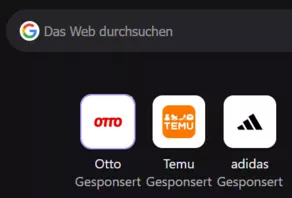
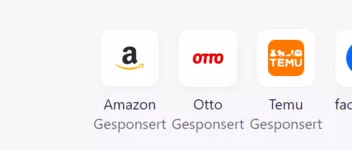
die Farbe der Kacheln auf der Neuer-Tab-Seite anzupassen
Welches Theme nutzt du denn?
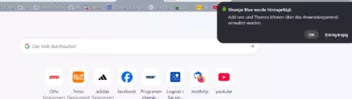
Standard sieht das so aus:
-
Hallo @ all..
dieses Skript:
JavaScript
Alles anzeigen// Angepasst durch aborix // ab Fx 133 wird in den Zeilen 57 und 58 pinnedTabCount statt _numPinnedTabs verwendet (function() { if (window.__SSi != 'window0') return; const lazy = {}; ChromeUtils.defineESModuleGetters(lazy, { BrowserGlue: "resource:///modules/BrowserGlue.sys.mjs" }); lazy.BrowserGlue.prototype._onQuitRequest = function BG__onQuitRequest(aCancelQuit, aQuitType) { // If user has already dismissed quit request, then do nothing if (aCancelQuit instanceof Ci.nsISupportsPRBool && aCancelQuit.data) { return; } // There are several cases where we won't show a dialog here: // 1. There is only 1 tab open in 1 window // 2. browser.warnOnQuit == false // 3. The browser is currently in Private Browsing mode // 4. The browser will be restarted. // 5. The user has automatic session restore enabled and // browser.sessionstore.warnOnQuit is not set to true. // 6. The user doesn't have automatic session restore enabled // and browser.tabs.warnOnClose is not set to true. // // Otherwise, we will show the "closing multiple tabs" dialog. // // aQuitType == "lastwindow" is overloaded. "lastwindow" is used to indicate // "the last window is closing but we're not quitting (a non-browser window is open)" // and also "we're quitting by closing the last window". if (aQuitType == "restart" || aQuitType == "os-restart") { return; } // browser.warnOnQuit is a hidden global boolean to override all quit prompts. if (!Services.prefs.getBoolPref("browser.warnOnQuit")) { return; } var windowcount = 0; var pagecount = 0; let pinnedcount = 0; for (let win of BrowserWindowTracker.orderedWindows) { if (win.closed) { continue; } windowcount++; let tabbrowser = win.gBrowser; if (tabbrowser) { pinnedcount += tabbrowser.pinnedTabCount; // bis Fx 132 wurde statt pinnedTabCount _numPinnedTabs verwendet pagecount += tabbrowser.visibleTabs.length - tabbrowser.pinnedTabCount; // bis Fx 132 wurde statt pinnedTabCount _numPinnedTabs verwendet } } // No windows open so no need for a warning. if (!windowcount) { return; } // browser.warnOnQuitShortcut is checked when quitting using the shortcut key. // The warning will appear even when only one window/tab is open. For other // methods of quitting, the warning only appears when there is more than one // window or tab open. let shouldWarnForShortcut = this._quitSource == "shortcut" && Services.prefs.getBoolPref("browser.warnOnQuitShortcut"); let shouldWarnForTabs = //pagecount >= 2 && Services.prefs.getBoolPref("browser.tabs.warnOnClose"); if (!shouldWarnForTabs && !shouldWarnForShortcut) { return; } if (!aQuitType) { aQuitType = "quit"; } let win = BrowserWindowTracker.getTopWindow(); // Our prompt for quitting is most important, so replace others. win.gDialogBox.replaceDialogIfOpen(); let titleId = { id: "tabbrowser-confirm-close-tabs-title", args: { tabCount: pagecount }, }; let quitButtonLabelId = "tabbrowser-confirm-close-tabs-button"; let closeTabButtonLabelId = "tabbrowser-confirm-close-tab-only-button"; let showCloseCurrentTabOption = false; if (windowcount > 1) { // More than 1 window. Compose our own message based on whether // the shortcut warning is on or not. if (shouldWarnForShortcut) { showCloseCurrentTabOption = true; titleId = "tabbrowser-confirm-close-warn-shortcut-title"; quitButtonLabelId = "tabbrowser-confirm-close-windows-warn-shortcut-button"; } else { titleId = { id: "tabbrowser-confirm-close-windows-title", args: { windowCount: windowcount }, }; quitButtonLabelId = "tabbrowser-confirm-close-windows-button"; } } else if (shouldWarnForShortcut) { if (win.gBrowser.visibleTabs.length > 1) { showCloseCurrentTabOption = true; titleId = "tabbrowser-confirm-close-warn-shortcut-title"; quitButtonLabelId = "tabbrowser-confirm-close-tabs-with-key-button"; } else { titleId = "tabbrowser-confirm-close-tabs-with-key-title"; quitButtonLabelId = "tabbrowser-confirm-close-tabs-with-key-button"; } } // The checkbox label is different depending on whether the shortcut // was used to quit or not. let checkboxLabelId; if (shouldWarnForShortcut) { const quitKeyElement = win.document.getElementById("key_quitApplication"); const quitKey = ShortcutUtils.prettifyShortcut(quitKeyElement); checkboxLabelId = { id: "tabbrowser-ask-close-tabs-with-key-checkbox", args: { quitKey }, }; } else { checkboxLabelId = "tabbrowser-ask-close-tabs-checkbox"; } const [title, quitButtonLabel, checkboxLabel] = win.gBrowser.tabLocalization.formatMessagesSync([ titleId, quitButtonLabelId, checkboxLabelId, ]); // Only format the "close current tab" message if needed let closeTabButtonLabel; if (showCloseCurrentTabOption) { [closeTabButtonLabel] = win.gBrowser.tabLocalization.formatMessagesSync([ closeTabButtonLabelId, ]); } let warnOnClose = { value: true }; let flags; if (showCloseCurrentTabOption) { // Adds buttons for quit (BUTTON_POS_0), cancel (BUTTON_POS_1), and close current tab (BUTTON_POS_2). // Also sets a flag to reorder dialog buttons so that cancel is reordered on Unix platforms. flags = (Services.prompt.BUTTON_TITLE_IS_STRING * Services.prompt.BUTTON_POS_0 + Services.prompt.BUTTON_TITLE_CANCEL * Services.prompt.BUTTON_POS_1 + Services.prompt.BUTTON_TITLE_IS_STRING * Services.prompt.BUTTON_POS_2) | Services.prompt.BUTTON_POS_1_IS_SECONDARY; Services.prompt.BUTTON_TITLE_CANCEL * Services.prompt.BUTTON_POS_1; } else { // Adds quit and cancel buttons flags = Services.prompt.BUTTON_TITLE_IS_STRING * Services.prompt.BUTTON_POS_0 + Services.prompt.BUTTON_TITLE_CANCEL * Services.prompt.BUTTON_POS_1; } // 1 Fenster mit höchstens 1 nicht angehefteter Tab if (windowcount == 1 && pagecount < 2 && this._quitSource != "shortcut") { title.value = "Fenster schließen?"; quitButtonLabel.value = "Schließen"; checkboxLabel.value = null; } let buttonPressed = Services.prompt.confirmEx( win, title.value, null, flags, quitButtonLabel.value, null, showCloseCurrentTabOption ? closeTabButtonLabel.value : null, checkboxLabel.value, warnOnClose ); // If the user has unticked the box, and has confirmed closing, stop showing // the warning. if (buttonPressed == 0 && !warnOnClose.value) { if (shouldWarnForShortcut) { Services.prefs.setBoolPref("browser.warnOnQuitShortcut", false); } else { Services.prefs.setBoolPref("browser.tabs.warnOnClose", false); } } // Close the current tab if user selected BUTTON_POS_2 if (buttonPressed === 2) { win.gBrowser.removeTab(win.gBrowser.selectedTab); } this._quitSource = "unknown"; aCancelQuit.data = buttonPressed != 0; } })();funktioniert im aktuellem Nightly nicht mehr.
Lässt sich das wieder anpassen?
Die Funktion davon ist:
Auch bei nur einem geöffneten Tab diese Warnung zu erhalten:
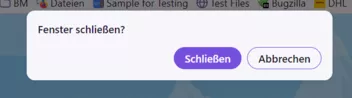
Für jegliche Hilfe wie immer herzlichen Dank.
-
Den Teil musst du entweder entfernen:

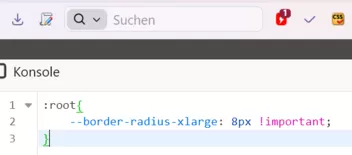
oder da 8px einsetzen statt 0
-
-
-

dann schwarz anstatt weiss ist?
Das noch zusätzlich einfügen:
--button-text-color-primary-hover: black !important;
-
aber außen weiter der 1px-Rahmen mit #B7B6BA.
Und damit?
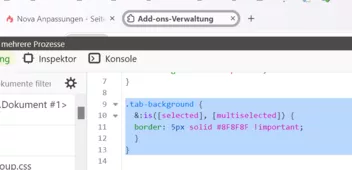
CSS.tab-background { &:is([selected], [multiselected]) { outline-color: transparent !important; border: 2px solid #8F8F8F !important; }
Das dunkle Grau ist auch recht dunkel
Teste dieses neue Theme von Mozilla doch mal:
Proton – Holen Sie sich dieses Theme für 🦊 Firefox (de)Laden Sie Proton für Firefox herunter. A classic grey palette for a calm, focused feel.addons.mozilla.org
-

bitte das vollständige CSS-Skript
Nimm den Code aus Beitrag Nr. 12, und füg ihn in die userChrome.css und die userContent.css ein.
-
-
eine andere Farbe hat.
Teste bitte:
-
-

Geht das?
Wir haben extra ein Unterforum: Anpassungen für solche Fragen

Und dort gab es schon reichlich Vorschläge dazu:
Z.B.:
2002Andreas30. September 2026 um 10:32 -

hast Du mich auf eine Idee gebracht!
Freut mich

Evtl. gibt es ja auch noch weitere Einträge, ich habe nicht alles überprüft.
-

auch noch etwas anrunden?
Teste bitte:
-
Danke
gerne wie immer
-