


Hallo heiko,
aber gerne doch. 
Hallo heiko,
aber gerne doch.
Hi geminus,
merkwürdig, die 2te Pref zeigt hier keine Wirkung, auch nach einem Neustart von Fx nicht.
Hallo heiko,
der Bezeichner ist nicht mehr .dialog-button, sondern einfach button, also einfach passend ändern.
Hallo hwww,
gerne doch und danke, Dir auch.
Jupp,
sieht hier auch gut aus, nur 2 Änderungen an meinem userChrome-Voodoo, ist mal was feines, nicht so viel anpassen zu müssen. 
Grrr, zu früh gefreut, auch unter about:addons muss ein klein wenig nachgebessert werden.  Es ist aber trotzdem nicht wirklich viel nötig.
Hi hegel,
Du solltest mal den doch recht alten Treiber für die Grafikkarte aktualisieren, mit einem Treiber-Datum von 27.8.2018 tut das Not. Die Website ↓ von Intel meint, das 27.04.2020 deutlich aktueller ist.
Intel® Grafik-Windows® 10 DCH-Treiber
Das setzen von webgl.disabled = false sollte dann auch wieder funktionieren, denn der derzeit installierte Treiber macht bei Dir da eh nicht mit.
Hallo @All,
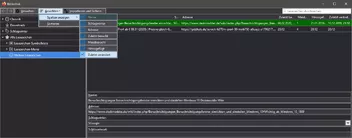
nachfolgend nun das komplette CSS für meine Bibliothek.
@-moz-document url("chrome://browser/content/places/places.xhtml") {
#organizeButton > image,
#viewMenu > image,
#maintenanceButton > image {
  background: #FFF !important;
}
#organizeButton:hover > image,
#viewMenu:hover > image,
#maintenanceButton:hover > image {
  background: #D1E2F2 !important;
}

#placesToolbar,
#detailsDeck,
#editBookmarkPanelContent,
#editBMPanel_namePicker,
#editBMPanel_locationField,
#editBMPanel_tagsField,
#editBMPanel_tagsSelector,
#editBMPanel_keywordField,
#downloadsRichListBox,
.downloadMainArea {
    -moz-appearance: none !important;
    background: #333333 !important;
    color: white !important;
}

#placesToolbar {
    border-bottom: 1px solid #B2B2B2 !important;
    padding: 0 0 0 1px !important;
}
#placesToolbar > toolbarbutton {
    -moz-appearance: none !important;
    border: 1px solid #B2B2B2 !important;
    background: #333333 !important;
    padding: 2px 2px 2px 2px !important;
    margin: 1px 1px 1px 0 !important;
}
#placesMenu > menu {
    -moz-appearance: none !important;
    border: 1px solid #B2B2B2 !important;
    background: #333333 !important;
    padding: 0 0 1px 2px !important;
    margin: 1px 1px 1px 0 !important;
}
#placesMenu > menu .menubar-text {
    color: #FFF !important;
}
#placesMenu > menu:hover .menubar-text {
    color: #000 !important;
}
#placesToolbar > toolbarbutton:hover,
#placesMenu > menu:hover {
    background: #D1E2F2 !important;
}

menupopup {
    -moz-appearance: none !important;
    border: 1px solid #B2B2B2 !important;
    background: #4A4A4F !important;
    color: #FFF !important;
    padding: 0 0 1px 0 !important;
    margin-top: -1px !important;
}
menupopup menuseparator {
    -moz-appearance: none !important;
    border: 0 !important;
    background: #B2B2B2 !important;
    padding: 1px 0 0 0 !important;
    margin: 1px 0 0 0 !important;
}
menupopup menu,
menupopup menuitem {
    -moz-appearance: none !important;
    border: 1px solid #B2B2B2 !important;
    background: #4A4A4F !important;
    color: #FFF !important;
    padding: 2px 3px !important;
    margin: 1px 1px 0 1px !important;
}
menupopup menu:hover,
menupopup menuitem:hover {
    background: #D1E2F2 !important;
    color: #000 !important;
}

#searchFilter {
    -moz-appearance: none !important;
    border: 1px solid #B2B2B2 !important;
    background: #333333 !important;
    color: white !important;
    padding: 2px 3px !important;
    margin: 1px 1px 1px 0 !important;
}

tree treecols {
border-bottom: 1px solid #B2B2B2 !important;
}
tree treecols treecol {
-moz-appearance: none !important;
border-right: 1px solid #B2B2B2 !important;
background-color: #38383D !important;
padding: 3px 6px !important;
}
tree treecols treecol:last-child,
tree treecols treecol#placesContentLastModified {
border-right: 0 !important;
}
tree treecols treecol .treecol-text {
-moz-appearance: none !important;
color: #FFF !important;
}
tree treecols treecol:hover {
-moz-appearance: none !important;
background-color: #D1E2F2 !important;
}
tree treecols treecol:hover .treecol-text {
-moz-appearance: none !important;
color: #000 !important;
}

tree treechildren {
-moz-appearance: none !important;
background-color: #2A2A2E !important;
}
tree treechildren::-moz-tree-row {
-moz-appearance: none !important;
fill: #FFF !important;
background-color: #2A2A2E !important;
border: 0 !important;
border-bottom: 1px dotted #F0F0F0 !important;
}
tree treechildren::-moz-tree-row(selected) {
-moz-appearance: none !important;
background-color: #4286E2 !important;
}
tree treechildren::-moz-tree-row(selected, focus) {
-moz-appearance: none !important;
background-color: #006800 !important;
}
tree treechildren::-moz-tree-cell-text,
tree treechildren::-moz-tree-cell-text(selected),
tree treechildren::-moz-tree-cell-text(selected, focus) {
-moz-appearance: none !important;
color: #FFF !important;
}
tree treechildren::-moz-tree-cell-text(hover),
tree treechildren::-moz-tree-cell-text(selected, hover),
tree treechildren::-moz-tree-cell-text(selected, focus, hover) {
-moz-appearance: none !important;
color: #000 !important;
}
tree treechildren::-moz-tree-row(hover),
tree treechildren::-moz-tree-row(selected, hover),
tree treechildren::-moz-tree-row(selected, focus, hover) {
-moz-appearance: none !important;
fill: #000 !important;
background-color: #D1E2F2 !important;
}

treechildren::-moz-tree-twisty,
treechildren::-moz-tree-image {
  fill: #FFF !important;
}
treechildren::-moz-tree-twisty(hover),
treechildren::-moz-tree-image(hover) {
  fill: #000 !important;
}

/* Linken Spaltenkopf ausblenden */
tree#placesList treecols,
tree#placesList treecols treecol {
border: 0 !important;
padding: 0 !important;
margin: 0 !important;
}

/* Das ↓ ist bei mir statt dem ↑ aktiv. */
/* Benennung des linken Spaltenkopfes */
/* tree treecols treecol[anonid="title"][hideheader="true"] {
border-right: 0 !important;
}
tree treecols treecol[anonid="title"][hideheader="true"] .treecol-text::after {
content: "Lesezeichen, Chronik, Schlagwörter und Downloads";
color: #FFF !important;
}
tree treecols treecol[anonid="title"][hideheader="true"]:hover {
background-color: #2A2A2E !important;
}
tree treecols treecol[anonid="title"][hideheader="true"]:hover .treecol-text::after {
color: #FFF !important;
} */
}Ich hoffe Ihr könnt was damit anfangen.
Hallo Andreas,
mein endgültiges Ergebnis sieht wie folgt aus.
Hi andyfirefoxie,
das Upgrade geht noch immer kostenlos.
Hi,
ich brauchte nur den passenden Hinweis und schon konnte ich es vervollständigen.
Hm,
das sieht bei mir nicht so aus.
Ich hatte extra zum Testen ein neues Profil angelegt.
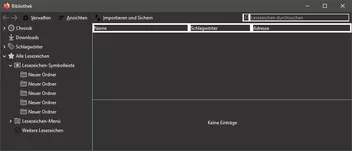
Wo könnte das Problem liegen?
Hi,
setze die → browser.tabs.loadBookmarksInTabs Pref in about:config, einzugeben in die Urlbar, auf true.
Hi geldhuegel,
Du meinst den blauen Stern in der Urlbar nach dem Aufrufen der Website? Wenn ja, sehr umständlich.
Ich suche Bookmarks über die ↓ Erweiterung in der Sidebar, über das Suchergebnis hovern, muss man in der Erweiterung einstellen, zeigt dann jeweils den Pfad an.
Hi Boersenfeger,

Dann geht der ganze Code nicht...
die geschweifte Klammer muss in der Tat weg, aber ans Ende Deiner Anpassungen fürs Camp muss dann dafür eine geschweifte Klammer gesetzt werden.
Hallo Andreas,
genau so habe ich das nämlich hier bei mir, deshalb war mir das auch nur aufgefallen, sieht halt einfach schöner/gleichmäßiger aus.
Auch Dir einen schönen und insbesondere einen gesunden Sonntag.

Und das war sein Wunsch:

würde ich sie gern verbreitern, auf das Doppelte bis Dreifache.
Ja richtig, aber er sprach von den Buttons und nicht von den Pfeilen in den Buttons, habe ich das zu wörtlich genommen, oder muss ich mir ein verschwimmendes verstehen angewöhnen?
Bitte nicht falsch verstehen, ich versuche nur gerade mich hier im Forum einzugewöhnen.
Hallo 2002Andreas,
sag mal warum verwendest Du dafür transform anstatt z.B. min-width, das überzeichnet doch die Pfeile, wie ich finde, viel zu stark? Ich empfinde das als Stilbruch zur restliche Oberfläche von Fx.

