Beiträge von BarbaraZ-
-
-
Hallo Andreas,
Selbst Werte bis 10000px haben keinen Erfolg.
Ich habe nun ALLE Codes entfernt und nur diesen eingesetzt:
CSS
Alles anzeigen/* Separatoren farbig, hinter Adressliste*/ @-moz-document url(chrome://browser/content/browser.xhtml) { /*#urlbar-container { max-width: 10000px !important; }*/ #nav-bar toolbarbutton::after { content: "|" !important; /*display: flex !important;*/ color: yellow !important; margin-left: 3px !important; margin-right: -1px !important; } #nav-bar .toolbarbutton-1 { opacity: 1 !important; } /* Separatoren für Menuleiste*/ #main-menubar > menu::after { content: "|" !important; display: flex !important; color: green !important; } /* Separatoren für LZ-Liste */ toolbarbutton.bookmark-item::after { content: "|" !important; display: flex !important; color: red !important; margin-left: 1px !important; margin-right: -7px !important; } }Dabei ist es sogar egal, ob ich oben "display: flex" wie jetzt oben, deaktiviere oder nicht. Die Icons schweben zwischen den Separatoren.
Heißt links und rechts bekomme ich ich die Abstände nicht angepasst.
-
Moin zusammen,
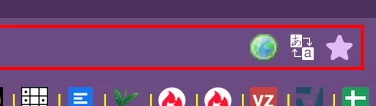
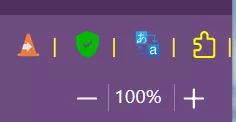
seit des aktuellen Updates werden Icons neben der Adressleiste zum Teil nicht mehr komplett angezeigt.
Darauf beruht, dass auch einige Separatoren verschwunden sind (nicht mehr angezeigt werden).
Ob es mit diesem Code einen zusammenhang gibt weiss ich leider nicht, denn dieses sieht auch mit deaktivierten Code nicht anders aus.
CSS
Alles anzeigen/* Separatoren farbig, hinter Adressliste*/ @-moz-document url(chrome://browser/content/browser.xhtml) { #nav-bar toolbarbutton::after { content: "|" !important; display: flex !important; color: yellow !important; margin-left: -3px !important; /*-3*/ margin-right: -8px !important; } /*#nav-bar .toolbarbutton-1 { opacity: 1 !important; }*/ /* Separatoren für Menuleiste*/ #main-menubar > menu::after { content: "|" !important; display: flex !important; color: green !important; }So, einen Fehler habe ich gefunden. Alles weiter nach links gerückt
Mit diesen Werten sind nur wenigstens die Separatoren wieder sichtbar aber die Felder viel zu gros, sodass die Icons nun mittig zwischen den Separatoren sitzen und etlicher Leerraum verschwendet wird, was die Adressleiste verkleinert.
-
FuchsFan Danke. Sieht gut aus. Sticht nichts mehr hervor.
Mira_Belle Danke für das Angebot. Bei mir sieht es jetzt so aus, wie es sein soll.
-
Ach ja, leftbox hätte ich nie und nimmer damit im Verbindung gebracht.
Ja, es funktioniert wieder richtig gut.
-
Moin,
FuchsFan, Danke passt perfekt und
@ Andreas, danke für den Hinweis.
Ja, Du hast recht, ich erinnere mich, es war neben dem Text.

-
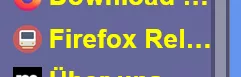
Moin, hier hat sich mit Firefox 107 bei mir was verstellt.:
Der Bereich: "Neu Funktionen und Änderungen" hat sich nach rechts verschoben.
Eigentlich sollte dieses unterhalb der Zeile: "Meine aktuelle ..." stehen.
Hier der Code dazu:
CSS
Alles anzeigen/* About:Dialog - über Firefox --- In Abwandlung von DeJaVu*/ @-moz-document url-prefix("chrome://browser/content/aboutDialog.xhtml"){ #bottomBox, #clientBox, #leftBox, #trademark, #updateBox > vbox:nth-child(2) > hbox:nth-child(2), #updateButton, #version, #version::before, #aboutDialog vbox, #aboutDialogContainer hbox, #clientBox vbox, #contributeDesc > label:nth-child(1), #contributeDesc > label:nth-child(2), #releasenotes, #trademark, #updateButton, label.bottom-link:nth-child(3), [href='about:credits'], [href='about:license'], [href='about:rights'], #contributeDesc > label:nth-child(1), #contributeDesc > label:nth-child(2), #releasenotes, label.bottom-link:nth-child(3), [href='about:credits'], [href='about:license'], [href='about:rights'], #aboutDialog, #aboutDialogContainer, #bottomBox, #clientBox, #trademark { background-color: DarkSykBlue !important; } label, .text-blurb, #trademark { font-size: 16px !important; } #version::before { content: 'Meine aktuelle Browser-Version ist die:'; font-size: 18px !important; font-weight: bold !important; color: LightCoral !important; margin-right: 6px !important; margin-left: -24px !important; } #version { font-size: 18px !important; margin-top: 30px !important; color: Yellow !important; } #bottomBox > hbox:nth-child(1) { margin-bottom: 25px !important; padding-top: 10px !important; padding-bottom: 10px !important; background-color: dodgerblue !important; } #updateBox > vbox:nth-child(2) > hbox:nth-child(2) { margin-top: -25px !important; margin-bottom: 20px !important; } #trademark { margin-top: 5px !important; margin-bottom: 10px !important; } #leftBox { margin-top: 60px !important; } #updateButton { appearance: none !important; /*Firefox Update*/ background: pimk url("../Icons/qd-lupe.gif")no-repeat !important; min-width: 360px !important; padding-left: 30px !important; background-position: 13px !important; border: 3px solid dodgerblue !important; border-width: 2px !important; color: coral !important; margin-bottom: 10px !important; margin-top: 0 !important; } #icons > .icon { margin-top: 12px !important; } #updateButton:hover { appearance: none !important; background: yellow url("../Icons/qd-lupe.gif")no-repeat !important; padding-left: 30px !important ; background-position: 13px !important; } #updateButton .button-box { padding-top: 0 !important; padding-bottom: 0 !important; -moz-padding-start: 3px !important; -moz-padding-end: 3px !important; } #updateBox vbox description.text-blurb label.text-link { display: none !important; } [href='about:license'] { appearance: none !important; /* Information zur Lizensierung */ background: lightgray url("../Icons/qd-info.png")no-repeat !important; color: dodgerblue !important; margin-top: 2px !important; padding-right: 10px !important; margin-left: 20px !important; padding-left: 30px !important; border-width: 2px !important; background-position: 10px 5px !important; border: 3px solid red !important; } [href='about:license']:hover { background: darkgray url("../Icons/qd-info.png")no-repeat !important; color: white !important; background-position: 10px 5px !important; } [href="about:rights"] { appearance: none !important; /* Endanwenderrechte */ background: CornflowerBlue url("../Icons/qd-endanwender.png")no-repeat !important; color: black !important; /*padding-top: 2px !important;*/ margin-right: 11px!important; margin-left: -28px !important; margin-top: 2px !important; padding-right: 20px !important; padding-left: 40px !important; border-color: red !important; border-width: 2px !important; background-position: 10px 5px !important; border: 3px solid yellow !important; } [href="about:rights"]:hover { appearance: none !important; background: darkgray url("../Icons/qd-endanwender.png") no-repeat !important; color: white !important; background-position: 10px 5px !important; } label.bottom-link:nth-child(3) { appearance: none !important; /* Datenschutzbestimmungen */ background: lightgray url("../Icons/qd-datenschutz.png")no-repeat !important; color: dodgerblue !important; margin-left: -2px !important; margin-right: -3px !important; margin-top: 2px !important; padding-right: 20px !important; padding-left: 40px !important; border-width: 2px !important; background-position: 10px 5px !important; border: 3px solid orange !important; } label.bottom-link:nth-child(3):hover { background: darkgray url("../Icons/qd-datenschutz.png")no-repeat !important; color: white !important; background-position: 10px 5px !important; } [href='https://www.mozilla.org/?utm_source=firefox-browser&utm_medium=firefox-desktop&utm_campaign=about-dialog'] { appearance: none !important; /* Mozilla */ background: lightgray url("../Icons/qd-mozilla.png")no-repeat !important; color: black !important; margin-right: 2px !important; padding-right: 15px !important; padding-left: 35px !important; border-width: 2px !important; background-position: 10px 5px !important; border: 3px solid magenta !important; } [href='https://www.mozilla.org/?utm_source=firefox-browser&utm_medium=firefox-desktop&utm_campaign=about-dialog']:hover { background: darkgray url("../Icons/qd-mozilla.png")no-repeat !important; color: white !important; background-position: 10px 5px !important; } [href='about:credits'] { appearance: none !important; /* globale Community */ background: lightgray url("../Icons/qd-community.png")no-repeat !important; color: black !important; margin-right: 2px !important; padding-right: 7px !important; padding-left: 35px !important; border-width: 2px !important; background-position: 10px 5px !important; border: 3px solid violet !important; } [href='about:credits']:hover { background: darkgray url("../Icons/qd-community.png")no-repeat !important; color: white !important; background-position: 10px 5px !important; } #contributeDesc > label:nth-child(2) { appearance: none !important; /* machen Sie mit */ background: lightgray url("../Icons/qd-mitmachen.png")no-repeat !important; color: black !important; margin-left: 2px !important; margin-right: 10px !important; padding-left: 35px !important; padding-right: 15px !important; border-color: cadetblue !important; border-width: 2px !important; background-position: 10px 5px !important; border: 3px solid dodgerblue !important; } #contributeDesc > label:nth-child(2):hover { background: darkgray url("../Icons/qd-mitmachen.png")no-repeat !important; color: white !important; background-position: 10px 5px !important; } #contributeDesc > label:nth-child(1) { appearance: none !important; /*Spenden Sie*/ background: yellow url("../Icons/qd-spenden.png")no-repeat !important; color: black !important; margin-right: -1px !important; padding-left: 35px !important; padding-right: 15px !important; border-width: 2px !important; background-position: 10px 5px !important; border: 3px solid pink !important; } #contributeDesc > label:nth-child(1):hover { background: darkgray url("../Icons/qd-spenden.png")no-repeat !important; color: black !important; background-position: 10px 5px !important; } #releasenotes { appearance: none !important; /*Neue Funktionen und Änderungen*/ background: darkgray url("../Icons/qd-info.png")no-repeat !important; margin-left: 10px !important; margin-right: 35px !important; padding-left: 30px !important; padding-right: 20px !important; padding-bottom: 1px !important; border-width: 2px !important; background-position: 10px 5px !important; border: 3px solid yellow!important; margin-top: 50px !important; /*Änderung*/ color: black !important; } #releasenotes:hover { background: lightgray url("../Icons/qd-info.png")no-repeat !important; color: dodgerblue !important; background-position: 10px 5px !important; } #rightBox { background-image: none !important; padding-top: 0px !important; margin-top: 10px !important; } #rightBox::before { content: "Firefox Browser" !important; font-size: 35px !important; font-weight: bold !important; text-shadow: 5px 5px 5px red !important; color: yellow !important; -webkit-transform: scale(1.08) !important; } #trademark { border: 3px solid red !important; max-width: 550px !important; margin-left: 270px !important; margin-right: 270px !important; color: Yellow !important; } #trademark::after { content: " Dialog-Design by Barbara " !important; font-size: 14px !important; color: red !important; } }Müsste ab Zeile 252 angesprochen werden.
-
Okay, Danke, dann bleibt es so und nochmal Danke für Euren Arbeitsaufwand.
Werde es dann als erledigt markieren.
-
Hallo Andreas, hallo alle Helfenden,
erst einmal Sorry für meine Dusseligkeit.
Ja es ist die LZ-Sidebar.Mit der Bemerkung aus #31 wusste ich, wo mein Fehler zu verorten ist.
Mein Denkfehler war folgender:
Ganz oben, unter Lesezeichen durchsuchen ist bei mir ein Ordner der Lesezeichen-Symbolleiste heißt.
Wenn ich diesen öffne, werden mir alle Icons aus der LZ-Symbolleiste angezeigt.
Daher bin ich der irrigen Annahme aufgesessen, es handelt sich um diese und nicht um die LZ-Sidebar.

Deshalb konnte es natürlich auch nicht klappen. Ich passe deshalb auch den Namens des Titelthemas an.
-
Zitat
Ich habe den Code aus #13 eingebunden und es klappt nicht.
Ja, hatte ich bereits im Beitrag #23, also über deinem letzten, geschrieben.
Sowohl direkt in der UserChrome.css als auch über Import.
Beide Möglichkeiten klappen nicht.
-
Ich habe den Code aus #13 eingebunden und es klappt nicht.
Ich werde ihn jetzt mal direkt über die UserChrome.css aufrufen. Vielleicht klappt es dann.
Und ja, wie ich css mit @import einbinde habe ich von euch gelernt. mit allen andern Codes klappt es ja auch.
So, direktes aufrufen über die UserChrome.css klappt auch nicht. Er behält die Standard-Ordner und löscht diese nicht im ersten Step.
Werde morgen weitermachen.
-
grisu2099 Das mit dem fehlenden / war nur ein Versuch. Beim richtigen Aufruf ist es natürlich drin.
-
Ich habe es jetzt so in die UserChrome.css eingebunden:
CSS
Alles anzeigen/* Privat */ #PlacesToolbarItems > toolbarbutton[label="Privat"] > image { display: none !important; } #PlacesToolbarItems > .bookmark-item[label="Privat"] image { padding: 0 0 16px 16px; /*margin-right: -2px !important; margin-left: 0px !important; content: '' !important; display: block !important; width: 19px !important; height: 15px !important;*/ background-image: url("file://F:/FavIcons/Letter-P-icon.png") !important; } /*#PlacesToolbarItems > .bookmark-item > .toolbarbutton-icon[label=Privat] { list-style-image: url('file:///F:/FavIcons/Letter-P-blue-icon.png') !important; }*/Leider klappt es nicht.
Ich werde morgen mal meine ganzen CSS Code deaktivieren und dann Stück für Stück zuschalten.
Der Fehler muss sich doch finden lassen.
Melde mich dann wieder.
Bis hierhin erst einmal Danbke für Eure Hilfe.
-
Nein, das Icon wird nicht entfernt mit dem Code.
harff182 Ich werde es nachher mal probieren.
Bin jetzt erst Mal weg. Bis später.
-
Es passt alles. Pfad richtig und die alten sind weg. Hier Standard. Hatte ich vorher schon geregelt.

-
Leider klappt es nicht. So sieht mein CSS-Code aus.
CSS
Alles anzeigen#PlacesToolbarItems > toolbarbutton[label="Privat"] > image { display: none !important; } #PlacesToolbarItems > toolbarbutton[label="Privat"]::before { margin-right: -2px !important; margin-left: 0px !important; content: '' !important; display: block !important; width: 19px !important; height: 15px !important; background-image: url("file:///F:/FavIcons/Letter-P-icon.png") !important; background-repeat: no-repeat !important; background-position: 0px 0px !important; background-size: 15px 15px !important; }So rufe ich diese über die UserChrome.css auf:
-
Danke für Deine Fleißarbeit

-
Moin,
ich möchte gerne die Symbole in der LZ-Symbolleiste individuell anpassen.
Die "Ordner gelb" habe ich mittlerweile deaktiviert.
Ich möchte gerne je Ordner einen individuelle Buchstaben zufügen.
z. B. für den Ordner Privat: Den Buchstaben P
Für den Ordner Gesundheit: Den Buchstaben G
Die Unterordner folgen im zweiten Schritt. Erst mal eine Fleißarbeit für mich die Buchstaben hier individuell zuzuordnen.
-
Andreas, da haben sich unsere beiden Beiträge überschnitten.
Hab jetzt alles ab Zeile 62 deaktiviert.
-
So ich habe den Übeltäter gefunden.
CSS
Alles anzeigen/*Menuleiste-Lesezeichen*/ @-moz-document url("chrome://browser/content/places/bookmarksSidebar.xhtml"), url-prefix("chrome://browser/content/places/places.xhtml"), url("chrome://browser/content/browser.xhtml") { #menu_EditPopup > menuitem { color: white !important; } #bookmarksShowAll{ /*Lesezeichen-Lesezeichen verwalten*/ -moz-appearance:none !important; background: url("file:///F:/ICONS/Firefox/Menue-Icons/Lesezeichen-Lesezeichen-verwalten.png") no-repeat !important; min-height: 24px !important; padding-left: 35px !important; background-position: 10px 10px !important;} #bookmarksShowAll:hover{ -moz-appearance:none !important; margin-right: -1px !important; background: red url("file:///F:/ICONS/Firefox/Menue-Icons/Lesezeichen-Lesezeichen-verwalten.png") no-repeat !important; border-width: thin !important; border-style: solid !important; min-height: 24px !important; padding-left: 35px !important; background-position: 10px 10px !important;} #menu_bookmarkThisPage{ /*Lesezeichen-Aktuellen Tab zufügen*/ -moz-appearance:none !important; background: url("file:///F:/ICONS/Firefox/Menue-Icons/Lesezeichen-Aktuellen Tab als Lesezeichen hinzufügen.png") no-repeat !important; min-height: 24px !important; padding-left: 35px !important; background-position: 10px 10px !important;} #menu_bookmarkThisPage:hover{ -moz-appearance:none !important; margin-right: -1px !important; background: red url("file:///F:/ICONS/Firefox/Menue-Icons/Lesezeichen-Aktuellen Tab als Lesezeichen hinzufügen.png") no-repeat !important; border-width: thin !important; border-style: solid !important; min-height: 24px !important; padding-left: 35px !important; background-position: 10px 10px !important;} #menu_bookmarkAllTabs{ display: none !important;} #menu_bookmarkAllTabs:hover{ display: none !important;} #toggle_PersonalToolbar{ display: none !important;} .restoreallitem{ display: none !important;} /* Rechtsklick Kontextmenü */ menuitem[label="Alle in Tabs öffnen"]{ display: none !important;} #placesContext_new\:bookmark{ display: none !important;} #placesContext_new\:folder{ display: none !important;} #placesContext_new\:separator{ display: none !important;} #placesContext_createBookmark{ display: none !important;} #placesContext_cut{ display: none !important;} #placesContext_copy{ display: none !important;} #placesContext_paste{ display: none !important;} #placesContext_delete{ display: none !important;} #placesContext_delete_history{ display: none !important;} #placesContext_deleteHost{ display: none !important;} #placesContext_sortBy\:name{ display: none !important;} #placesContext_show\:info{ display: none !important;} #placesContext_open{ display: none !important;} #placesContext_open\:newtab{ display: none !important;} #placesContext_openContainer\:tabs{ display: none !important;} #placesContext_openLinks\:tabs{ display: none !important;} #placesContext_open\:newwindow{ display: none !important;} #placesContext_open\:newprivatewindow{ display: none !important;} }Nun muss ich mal suchen. Jedenfalls schon mal Danke für die Richtung
Die Zeilen 65 und 66 deaktiviert. Danke an Milupo. Nun klappt es