1. Nachrichten
  2. Forum
    1. Unerledigte Themen
    2. Forenregeln
  3. Spenden
  • Anmelden
  • Registrieren
  • Suche
Alles
  • Alles
  • Artikel
  • Seiten
  • Forum
  • Erweiterte Suche
  1. camp-firefox.de
  2. edvoldi

Beiträge von edvoldi

  • About Seiten mit CSS Codes anpassen

    • edvoldi
    • 11. Dezember 2022 um 14:10

    Das,

    Zitat

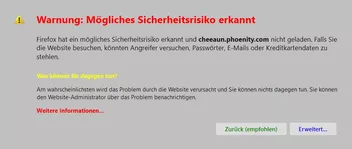
    Die Weiterleitungs-Warung bei kritischen Seiten.

    aboutCerterror.css

    hat mich auf eine Idee gebracht und ich habe die Seite

    "Sichere Website nicht verfügbar"

    für mich auch etwas angepasst.
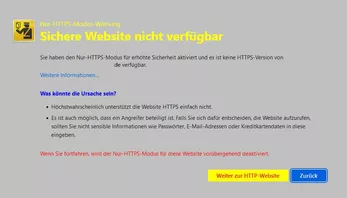
    Hier der Code, jetzt mit Icon:

    CSS
    /***   AGENT_SHEET   *********************/
    /***   Geändert von EDV-Oldie   **********/
    /***   Letzte Änderung am 11.12.2022   ***/
    
    
    /*   Sichere Website nicht verfügbar   */
    @namespace url(http://www.w3.org/1999/xhtml);
    @-moz-document url-prefix(about:httpsonlyerror) {
    
        html {
        background-color: silver !important;
        }
        
        
        .title {
        background: url("../../../Icons/Warning_gelb_64.png") no-repeat !important;
        }
    
        .title,
        .title-text {
        color: yellow !important;
        }
        .title-text {
        font-weight: bold !important;
        }
    
        .container > b:nth-child(4) {
        color: blue !important;
        font-weight: bold !important;
        }
        
        
        #explanation-continue {
        color: red !important;
        }
        
        
        #openInsecure {
        background: url("../../../Icons/Bild42.png") no-repeat !important;
        background-position: 2px 7px !important;
        color: red !important;
        background-color: yellow !important;
        }
        
        
        #goBack {
        background: url("../../../Icons/Bild71.png") no-repeat !important;
        background-position: 2px 7px !important;
        color: blue !important;
        background-color: gainsboro !important;
        }
        
        
    }
    Alles anzeigen

    Gruß

    EDV-Oldie

  • About Seiten mit CSS Codes anpassen

    • edvoldi
    • 11. Dezember 2022 um 12:19
    Zitat von Heinrich

    Das ist für die Textzeile ( Was können Sie dagegen tun? )

    Da wird bei mir aber nichts eingefärbt.

    Mit diesem Code funktioniert es bei mir:

    CSS
            #errorWhatToDoTitle {
            color: yellow !important;
            }

    Gruß

    EDV-Oldie

  • About Seiten mit CSS Codes anpassen

    • edvoldi
    • 11. Dezember 2022 um 12:00

    Hallo Heinrich,

    ich habe Deinen Code auch für mich angepasst.
    Ich finde nur nicht heraus wo für dieser Code:

    CSS
            #errorWhatToDoTitleText > strong:nth-child(1){
            color: blue !important;
            }

    benutz wird.

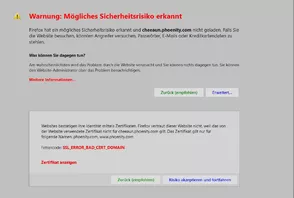
    Mein Code, jetzt mit Icon. 11.12.

    CSS
    /***   AGENT_SHEET   *********************/
    /***   Geändert von EDV-Oldie   **********/
    /***   Letzte Änderung am 11.12.2022   ***/
    
    
    /*Kritische Seite, Weiterleitungs-Warnung*/
    @namespace url(http://www.w3.org/1999/xhtml);
    @-moz-document url-prefix(about:certerror) {
    
        html {
        background-color: silver !important;
        }
        
        #advancedPanelContainer {
        background-color: rgba(233,219,205,1.00) !important;
        }
        
        #badCertAdvancedPanel {
        background-color: lightgrey !important;
        }
        
            
        body.certerror .title {
        background: url("../../../Icons/Warning_rot_32.png") no-repeat !important;
        background-position: 5px 2px !important;
        }
        .title-text,
        #learnMoreLink,
        #errorCode,
        #viewCertificate {
        color: red !important;
        font-weight: bold !important;
        }
        #errorWhatToDoTitle {
        color: blue !important;
        font-weight: bold !important;
        }
        
        
        #advancedPanelReturnButton,
        #returnButton {
        background: url("../../../Icons/Bild71.png") no-repeat !important;
        padding-left: 30px !important;
        background-position: 5px 7px !important;
        color: green !important;
        background-color: gainsboro !important;
        }
        #advancedPanelReturnButton:hover,
        #returnButton:hover {
        color: green !important;
        background-color: skyblue !important;
        }
        
        
        #advancedButton {
        background: url("../../../Icons/bearbeiten_1.png") no-repeat !important;
        padding-left: 30px !important;
        background-position: 5px 7px !important;
        color: blue !important;
        background-color: gainsboro !important;
        }
        
        #exceptionDialogButton {
        background: url("../../../Icons/Bild42.png") no-repeat !important;
        padding-left: 30px !important;
        background-position: 5px 7px !important;
        color: blue !important;
        background-color: gainsboro !important;
        } 
        
        #exceptionDialogButton:hover,
        #advancedButton:hover {
        color: blue !important;
        background-color: lightblue !important;
        }
            
    }
    Alles anzeigen


    Gruß

    EDV-Oldie

  • Der Glückwunsch-Thread

    • edvoldi
    • 3. September 2022 um 14:16

    Danke

    Gruß

    EDV-Oldie

  • Der Glückwunsch-Thread

    • edvoldi
    • 2. September 2022 um 19:33

    Noch einmal vielen Dank für Geburtstagswünsche und die Beileidsbekundungen,

    Gruß

    EDV-Oldie

  • Der Glückwunsch-Thread

    • edvoldi
    • 2. September 2022 um 13:19

    Ich möchte mich für alle Glückwünsche bedanken.

    Leider ist das ein traurige Tag für mich, da meine Frau am 15.8. plötzlich verstorben ist.

    Gruß

    EDV-Oldie

  • Firefox lädt Scripte nicht richtig

    • edvoldi
    • 22. Juli 2022 um 14:21
    Zitat von Horstmann

    Ich dachte man müsste das manuell machen, oder eben mit einem Script .

    Ein Start im Fehlerbehebungsmodus hilft auch.

    Gruß

    EDV-Oldie

  • About Seiten mit CSS Codes anpassen

    • edvoldi
    • 7. Januar 2022 um 22:00

    Stimmt, aber da habe ich, außer den Pfad nichts geändert, schaue ich morgen einmal nach

    Gruß

    EDV-Oldie

  • About Seiten mit CSS Codes anpassen

    • edvoldi
    • 7. Januar 2022 um 19:42

    Ich habe auch noch ein wenig geändert, da ich nicht im Vollbild arbeite, passte es so wie so nicht bei mir.

    Bei mir sieht es so aus:

    CSS
    /***   AGENT_SHEET   *********************/
    /***   Geändert von EDV-Oldie   **********/
    /***   Letzte Änderung am 21.11.2021   ***/
    /***   https://www.camp-firefox.de/forum/thema/130540-about-seiten-mit-css-codes-anpassen/   */
    
    /*   AGENT_SHEET   */
    /*   about:loginsimportreport   */
        
        @namespace url(http://www.w3.org/1999/xhtml);
        @-moz-document url-prefix(about:loginsimportreport) {
            
        .summary:before {
        content: "Design by Edv-Oldie";
        font-size: 25px!important;
        font-weight: bold!important;
        color: blue !important;
        }
    
        body {
        margin-left: 170px !important;
        margin-right: auto !important;
        max-height: 86vh !important;
        max-width: 1200px !important; /* Breite anpassen */
        margin-top: 40px !important;
        margin-bottom: 20px !important;
        padding-bottom: 20px !important;
        padding-top: 15px !important;
        padding-left: 5px !important;
        padding-right: 5px !important;
        background-color: gainsboro !important;
        border-left-color: lightblue !important;
        border-top-color: lightblue !important;
        border-right-color: dodgerblue !important;
        border-bottom-color: dodgerblue !important;
        border-radius: 20px !important;
        border-width:  4px !important;
        border-style: outset !important;
        }
        
        body:hover{
        border-left-color:  #bbddff !important;
        border-top-color:  #bbddff !important;
        border-right-color:  #11508d !important;
        border-bottom-color:  #11508d !important;}
        
        #report-body {
        background: gainsboro !important; 
        min-width: 650px !important;
        margin-left: -900px !important;
        }
        
        /* Nullen auf gleiche Höhe bringen */    
        .new-logins { margin-top: 210px !important;  margin-left: -25px !important;}
        
         .exiting-logins {margin-top: 210px !important;}
        
        .duplicate-logins {margin-top: 211px !important;}
        
        .errors-logins {margin-top: 212px !important;margin-left: 30px !important;}
        
        .logins-list{border-top: none !important;}
        
        .summary > div:nth-child(2){
        margin-top: 10px !important;
        color: #0059b3 !important; 
        font-weight: bold  !important;
        font-size: 16px !important;
        line-height: 6 !important;}
        
        /* Farbe Überschrift ändern */
        .summary > h2:nth-child(1){color: crimson !important; margin-top: 80px !important;}
    
        /* Farbe Nummern ändern */
        .new-logins > div:nth-child(1),
        .exiting-logins > div:nth-child(1),
        .duplicate-logins > div:nth-child(1),
        .errors-logins > div:nth-child(1){color: #0059b3 !important;}
    
        /* Schaltfläche anpassen */
        .about-logins-import-report-learn-more {
        appearance:none !important;
        text-decoration: none !important;
        max-width: 170px !important;
        background: #F0F0F0 url("../../../Icons/Bild34.png")no-repeat !important;
        padding-left:40px!important;
        padding-top:  2px!important; 
        padding-right: 20px !important; 
        padding-bottom: 4px!important; 
        background-position:14px 4px!important;
        font-size: 14px !important;
        border-style: outset !important;
        border-left-color:  lightblue!important;
        border-top-color:  lightblue!important;
        border-right-color:  dodgerblue!important;
        border-bottom-color:  dodgerblue!important;
        border-width:2px !important;
        border-radius:16px!important;
        color:black !important;}
    
        .about-logins-import-report-learn-more:hover{
        background: #B2EDFA url("../../../Icons/Bild34.png")no-repeat !important;
        appearance:none !important;
        text-decoration: none !important;
        max-width: 170px !important;
        border-style: outset !important;
        border-width:2px !important;
        border-left-color:  #bbddff !important;
        border-top-color:  #bbddff !important;
        border-right-color:  #11508d !important;
        border-bottom-color:  #11508d !important;
        background-position:14px 4px!important;}
        }
    Alles anzeigen


    Gruß

    EDV-Oldie

  • About Seiten mit CSS Codes anpassen

    • edvoldi
    • 6. Januar 2022 um 16:12
    Zitat von Endor

    Nur unten die Schaltfläche ist hier nicht zweizeilig.

    Ich habe dazu diese Code:

    Zitat

    .create-login-button-container {

    padding-left: 10px !important;

    padding-right: 70px !important;

    margin-bottom: 1px !important;

    }

    ausgeblendet.

  • Script-Button verschiebbar machen

    • edvoldi
    • 23. Dezember 2021 um 19:58
    Zitat von milupo

    Er hat Versionen, wo die Position des jeweiligen Symbols nach einem bestimmten Element mit der ID buttons:addons festgelegt ist.

    Das ist richtig, die Versionen für den Firefox funktionieren so im Thunderbird nicht.
    Sören hat einmal geschrieben, das dem Thunderbird eine Funktion fehlt, leider weiß ich nicht mehr genau welcher Befehl es war der im Thunderbird nicht oder noch nicht funktioniert.

    Gruß

    EDV-Oldie

  • Script-Button verschiebbar machen

    • edvoldi
    • 23. Dezember 2021 um 19:51

    Die Scripts in Thunderbird lassen sich auch nicht mit der Maus verschieben wie hier im Firefox.
    In Thunderbird muss man immer im Script angeben hinter oder vor welchen Button der Button vom Script eingefügt werden soll.

    Gruß

    EDV-Oldie

  • Bilder werden im Beitrag nicht angezeigt

    • edvoldi
    • 23. November 2021 um 18:52
    Zitat von 2002Andreas

    Sie werden angezeigt bei dir, oder nicht?

    Ich habe noch ein Bild eingefügt

    Beitrag

    RE: Bilder werden im Beitrag nicht angezeigt

    […]

    Nein, bei mir ist es genau so.


    Gruß

    EDV-Oldie
    edvoldi
    23. November 2021 um 18:49

    Gruß

    EDV-Oldie

  • Bilder werden im Beitrag nicht angezeigt

    • edvoldi
    • 23. November 2021 um 18:49
    Zitat von omar1979

    Kann es sein, dass das Problem evtl bei dir liegt? Kannst auch mal bitte mit einem anderen browser schauen?

    Nein, bei mir ist es genau so.

    Gruß

    EDV-Oldie

  • IrfanView

    • edvoldi
    • 23. November 2021 um 15:20

    Hallo omar1979,

    stell Dein IrfanView einmal um auf Deutsch.

    Gruß

    EDV-Oldie

  • ucjsDownloadsStatusModoki.uc.js

    • edvoldi
    • 19. November 2021 um 21:29

    Danke erstmal für die Informationen.

  • ucjsDownloadsStatusModoki.uc.js

    • edvoldi
    • 19. November 2021 um 21:24
    Zitat von Endor

    Also hier funktioniert die Schaltfläche zum löschen.

    Ich schrieb ja das die Anzeige in der Leiste gelöscht wird. Wird nur die Anzeige gelöscht?

    Oder auch die Temp Datei?

  • ucjsDownloadsStatusModoki.uc.js

    • edvoldi
    • 19. November 2021 um 18:06

    Hallo zusammen,

    ich habe da eine Frage.

    Was bewirkt der Löchen Button im Tab von dem oben genanntem Script?


    Gruß

    EDV-Oldie

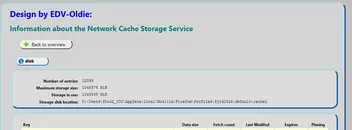
  • About Seiten mit CSS Codes anpassen

    • edvoldi
    • 14. November 2021 um 11:39
    Zitat von 2002Andreas

    Diesen Eintrag von dir finde ich allerdings nicht. :/


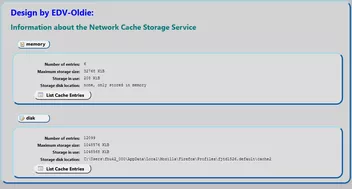
    body > h2:nth-child(3)

    Das kommt wenn man List Cache Entries klickt.

    Gruß

    EDV-Oldie

  • About Seiten mit CSS Codes anpassen

    • edvoldi
    • 14. November 2021 um 10:23
    Zitat von Dharkness
    Wenn fertig, immer her damit.

    als erstes habe ich festgestellt das dieser Code:

    CSS
    #submit{
    -moz-appearance:none!important;
    background: #efefef url("../../../Icons/Bild5.png")no-repeat !important;
    padding-left:35px!important;
    min-height: 30px!important;
    padding-right: 20px!important;
    background-position:10px 4px!important;
    font-size:14.0px!important;
    border-radius:14px!important;
    border-left-color: #E6E5E5 !important;
    border-top-color: #E6E5E5 !important;
    border-right-color: #5C5B5B !important;
    border-bottom-color: #5C5B5B !important;
    border-style: outset !important;
    border-width:2px !important;
    color:black !important;
    margin-left:8px !important;
    }
    Alles anzeigen

    scheinbar nicht mehr gebraucht wird.

    Das habe ich jetzt eingebaut:

    CSS
        h2 {
        -moz-appearance: none !important;
        background: #F0F0F0 !important;
        margin-left: 20px !important;
        max-width: 70px !important;
        padding-left: 10px !important;
        padding-bottom: 3px !important; 
        font-size: 14.0px !important;
        border-style: outset !important;
        border-left-color: lightblue!important;
        border-top-color: lightblue!important;
        border-right-color: dodgerblue!important;
        border-bottom-color: dodgerblue!important;
        border-width: 2px !important;
        border-radius: 12px !important;
        color: black !important;
        }
        body > h2:nth-child(2) {
        background: #efefef url("../../../Icons/content.png") no-repeat !important;
        background-position: 5px 3px !important;
        padding-left: 25px !important;
        }
        
        body > h2:nth-child(4) {
        background: #efefef url("../../../Icons/database_edit.png") no-repeat !important;
        background-position: 5px 3px !important;
        padding-left: 25px !important;
        }
        
        body > h2:nth-child(3) {
        background: #efefef url("../../../Icons/Bild34.png") no-repeat !important;
        background-position: 5px 3px !important;
        padding-left: 25px !important;
        }
    Alles anzeigen

    Da der Code im 2. Bild für Memory und Disk der gleiche ist, habe ich mich hier für dieses Symbole entschieden.
    Hat jemand eine andere Lösung hat?

    Bilder könnt Ihr dann nach Wahl einsetzen.

    Gruß

    EDV-Oldie

    Bilder

    • content.png
      • 1,55 kB
      • 16 × 16
    • database_edit.png
      • 838 Byte
      • 16 × 16

Unterstütze uns!

Jährlich (2026)

72,4 %

72,4% (560,79 von 775 EUR)

Jetzt spenden
  1. Kontakt
  2. Datenschutz
  3. Impressum
Community-Software: WoltLab Suite™
Mastodon