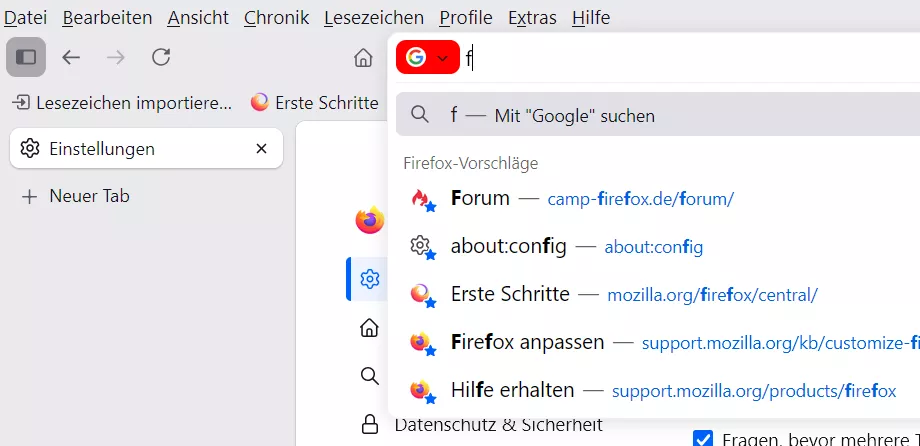
Scheint ab heute zu passieren.
Eben Update gemacht...der Wert steht jetzt auf true als Standard.
Scheint ab heute zu passieren.
Eben Update gemacht...der Wert steht jetzt auf true als Standard.
Links unten die Buttons sind nicht betroffen?

Vielen herzlichen Dank
Freut mich, war gern geschehen
nicht mehr sichtbar ist.
Zeile 106, das Icon gibt es nicht mehr.
Habe zwecks Test mal ein anderes genommen, kannst du ja austauschen:
//Toggle newtoolbar 8D Fix neu test browser

//Use filename starting with 000 !! =>
//000_extra_toolbars_test_D.uc.js

// TEST!!!

(function() {

    if (location.href !== 'chrome://browser/content/browser.xhtml')
        return;

        // Eigenes Icon
        let ProfilePath = PathUtils.toFileURI(PathUtils.join(PathUtils.profileDir, 'chrome', 'icons'));
        let icon_tb = 'newtoolbar.png';
        let ImagePath = ProfilePath +'/'+ icon_tb;

        let new_tb_loc = 1;        //  Position: 0 Rechts , 1 Links , 2 Bottom
        let new_tb_off = 0;        //  0 Startzustand On , 1 Startzustand Off

        if (Services.prefs.getBoolPref('svg.context-properties.content.enabled') == false) {
        	Services.prefs.setBoolPref('svg.context-properties.content.enabled', true );
        }

        let toolbox_new = document.createXULElement('toolbox');
        toolbox_new.setAttribute('id','toolbox_new');

        let browser_size = document.getElementById("browser");
        let rect = browser_size.getBoundingClientRect();

        let ntb = document.createXULElement('toolbar');
        ntb.id = 'newtoolbar';
        ntb.setAttribute('customizable', true);
        ntb.setAttribute("class","toolbar-primary chromeclass-toolbar browser-toolbar customization-target");
        ntb.setAttribute('mode', 'icons');
        ntb.setAttribute('context', 'toolbar-context-menu');

	      toolbox_new.appendChild(ntb);

        document.getElementById('browser').parentNode.appendChild(toolbox_new);

        //geht height #2 not dynamic ???
        //document.getElementById('toolbox_new').style.setProperty('--height_newbar', rect.height + 'px');
        document.getElementById('toolbox_new').style.setProperty('--height_newbar', rect.top + 'px');

        CustomizableUI.registerArea('newtoolbar', {legacy: true});
        CustomizableUI.registerToolbarNode(ntb);

   try {
        CustomizableUI.createWidget({
            id: 'NewToolbar_button',
            type: 'custom',
            defaultArea: CustomizableUI.AREA_NAVBAR,
                onBuild: function(aDocument) {
                    let toolbaritem = aDocument.createXULElement('toolbarbutton');
                    let props = {
                        id: 'NewToolbar_button',
                        class: 'toolbarbutton-1 chromeclass-toolbar-additional',
                        removable: true,
                        label: 'Toggle New Toolbar',
                        tooltiptext: 'Toggle New toolbar',
                    };

                    for(let p in props)
                        toolbaritem.setAttribute(p, props[p]);
                    return toolbaritem;
                }
        });
    } catch(e) { };

    // Position
    if (new_tb_loc === 1) {
         toolbox_new.classList.add("left_mode");
         browser.classList.add("left_mode_b");
       }
    else if (new_tb_loc === 2) {
         toolbox_new.classList.add("bottom_mode");
         browser.classList.add("bottom_mode_b");
       }

    // Startzustand
    if (new_tb_off === 1) {
        newtoolbar.classList.add("off-mode");
        browser.classList.add("off-mode_b");
       }

    // button
    document.getElementById('NewToolbar_button').addEventListener( "click", newTB );
        function newTB(aEvent, keyEvent=false) {
        if(!keyEvent && aEvent.button != 0) {
            return;
        }
        newtoolbar.classList.toggle("off-mode");
        browser.classList.toggle("off-mode_b");
        }

const css =`

:root {
    --ug-newbar_width: 36px;
    --ug-newbar_bg_color: #414D4B;
}

/*  Button Icon  */
#NewToolbar_button .toolbarbutton-icon {
    list-style-image: url("chrome://browser/skin/sidebar-collapsed.svg") !important;
    /*list-style-image: url("${ImagePath}") !important;*/
}

#newtoolbar > :is(.toolbarbutton-1, toolbaritem),
#newtoolbar toolbarpaletteitem > :is(.toolbarbutton-1, toolbaritem) {
    margin-block: 2px !important;
}

/*  Basis / Right */

#browser {
    transition: padding 0.25s ease !important;
}

#browser:not(.off-mode_b) {
    padding-right: var(--ug-newbar_width) !important;
}

#toolbox_new {
    position: fixed;
    z-index: 4 !important;
    display: flex;
    width: fit-content;
    bottom: 0;
    right: 0;
}

#newtoolbar {
    display: flex;
    flex-direction: column;
    min-width: 0 !important;
    width: var(--ug-newbar_width);
    height: calc(100vh - var(--height_newbar));
    padding-block: 8px;
    background-color: var(--ug-newbar_bg_color) !important;
    box-shadow: -1px 0 grey;
    transition: width 0.25s ease, margin 0.25s ease /*,height 0.5s ease*/ ;
}
#newtoolbar:not([customizing]).off-mode {
    margin-inline: 0 calc(0px - var(--ug-newbar_width));
    box-shadow: none;
}


/*  Left  */

#browser:not(.off-mode_b).left_mode_b {
    padding-inline: var(--ug-newbar_width) 0 !important;
}
#toolbox_new.left_mode {
    left: 0;
}
.left_mode #newtoolbar:not([customizing]) {
    box-shadow: 0px 0 grey;
}
.left_mode #newtoolbar:not([customizing]).off-mode {
    margin-inline: calc(0px - var(--ug-newbar_width)) 0;
}


/*  Bottom  */

#browser:not(.off-mode_b).bottom_mode_b {
    padding-inline: 0 !important;
    padding-bottom: var(--ug-newbar_width) !important;
}
#toolbox_new.bottom_mode {
    flex-direction: row;
    width: fit-content;
}
.bottom_mode #newtoolbar:not([customizing]) {
    flex-direction: row !important;
    height: var(--ug-newbar_width);
    width: 100vw;
    padding-block: 0;
    padding-inline: 8px;
    box-shadow: 0 -1px grey;
    border: none;
}
.bottom_mode #newtoolbar:not([customizing]).off-mode {
    margin-inline: 0;
    margin-block: 0 calc(0px - var(--ug-newbar_width)) !important;
}
.bottom_mode #newtoolbar:not([customizing]) > :is(.toolbarbutton-1, toolbaritem) {
    margin-block: 0 !important;
    margin-inline: 2px !important;
}

/*  customizing  */

:root[customizing] #toolbox_new {
    position: fixed !important;
    bottom: 0 !important;
    right: 0 !important;
    left: unset !important;
}

#customization-container {
    margin-inline: 0 var(--ug-newbar_width) !important;
}

        `;

        const sss = Cc['@mozilla.org/content/style-sheet-service;1'].getService(Ci.nsIStyleSheetService);
        const uri = Services.io.newURI('data:text/css,' + encodeURIComponent(css));
        sss.loadAndRegisterSheet(uri, sss.AGENT_SHEET);

})();
vielen Dank
gerne wie immer
du hättest da auch noch einen Tipp
Teste bitte:
Hat leider keinen Effekt.
Und so?
Beispiel in rot:

Aber nicht von Mozilla:


los gehts in #99

Es wäre besser, du erstellst immer einen neuen Thread für deine Fragen, und buddelst nicht diesen uralten aus.
Eine Version 152 gibt es noch nicht.
Neuer Tab aus Chronik.uc.js
Funktioniert hier:
// ==UserScript==
// @name           newtabfromhistory.uc.js
// @namespace      https://www.camp-firefox.de/forum/viewtopic.php?p=1090093#p1090093
// @description    Links aus Chronik in neuem Tab öffnen
// @author         aborix
// @compatibility  139 -
// Zeile 44 + 45 angepasst wegen einer Fehlermeldung in der Konsole
// @version        0.0.4a = 18.06.25
// ==/UserScript==

(function() {

  if (location != 'chrome://browser/content/browser.xhtml')
    return;

  PlacesUIUtils.openNodeWithEvent = function PUIU_openNodeWithEvent(aNode, aEvent) {
	  //let window = aEvent.target.documentGlobal;
    let window = aEvent.target.ownerGlobal;
    let browserWindow = (window && window.document.documentElement.getAttribute('windowtype') == 'navigator:browser') ? window : BrowserWindowTracker.getTopWindow();
    let where = window.BrowserUtils.whereToOpenLink(aEvent, false, true);
    if (this.loadBookmarksInTabs) {
      if (where == 'current' && !aNode.uri.startsWith('javascript:')) {
        where = 'tab';
      }
      if (where == 'tab' && browserWindow.gBrowser.selectedTab.isEmpty) {
        where = 'current';
      }
    }
    this._openNodeIn(aNode, where, window);
  }

  let onPopupshowing = function() {
    let historyMenu = document.getElementById('history-menu');
    if (!historyMenu._placesView) {
      new HistoryMenu(event);
      historyMenu._placesView._onCommand = function HM__onCommand(aEvent) {
        let placesNode = aEvent.target._placesNode;
        if (placesNode) {
          PlacesUIUtils.openNodeWithEvent(placesNode, aEvent);
        };
      };
    };
  };

     let historyPopup = document.getElementById('historyMenuPopup');
     historyPopup?.addEventListener('popupshowing', onPopupshowing);

})();Es wäre besser, du erstellst immer einen neuen Thread für deine Fragen, und buddelst nicht diesen uralten aus.
Um welche Firefox Version geht es denn bei deinen Fragen?
Laut User-Agent nutzt du Fx 152...diese Version gibt es aber zur Zeit noch nicht.
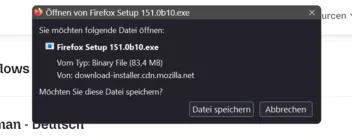
Lässt sich da was machen ?
Teste bitte.

Wo finde ich die erwähnte Übersetzungsfunktion im Anwendungsmenü?
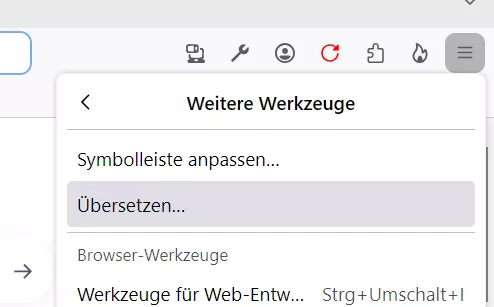

Und warum wird das nicht softwaremäßig verhindert
Vorweg, danke für die Rückmeldung, schön wenn es jetzt wieder funktioniert
Das ist dann eine Einstellung vom Betriebssystem, um die Fenster verschieben zu können.
In deinem Fall war es der Firefox
und das Problem war nicht weg.
Funktioniert es über diesen Eintrag über Start unten links?
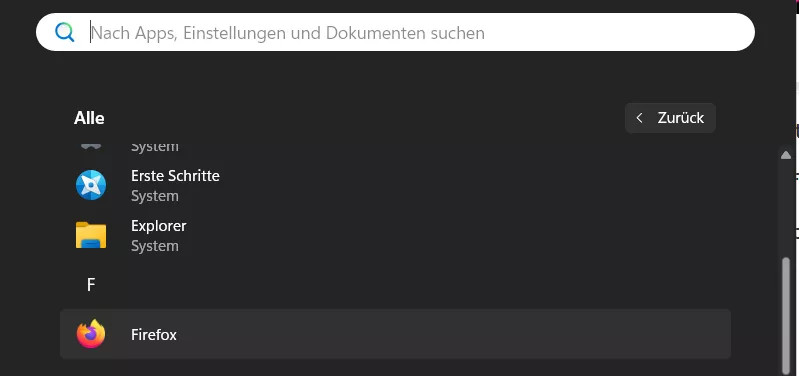

hattest du das schonmal verstellt.
Ups:
Das habe ich dann wohl nicht in Verbindung mit der anderen Ansicht in den Einstellungen gebracht.
Danke für den Hinweis.
Mozilla hat die Option noch nicht auf true gesetzt.
Ist hier in 2 Profilen auch auf true.
Und zu 100%: ICH habe das mit Sicherheit nicht selber engestellt

dass es dann zum Standard wird.
Evtl. kann Sören ja etwas dazu sagen, ob die Ansicht noch nicht für alle Nutzer erstellt wurde.
Wie kann das sein?
Bild 2 entspricht der Ansicht vom Fx 151.
Und du bist sicher, dass es wirklich ein Profil vom Nightly ist?
Hier sieht das in 2 Profilen vom Nightly so aus wie im Bild 1.
Ändert sich etwas im Fehlerbehebungsmodus?

wieder innerhalb der Kachelumrandung?
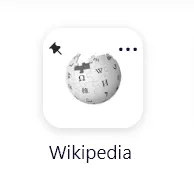
Teste bitte:
@-moz-document url(about:newtab), url(about:home) {

.nova-enabled .top-site-outer .icon-pin-small {
  inset-inline-start: 19px !important;
  inset-block-start: 5px !important;
}

.nova-enabled .top-site-outer .context-menu-button {
  inset-inline-end: 15px !important;
  inset-block-start: 0px !important;
}

.logo-and-wordmark-wrapper {
  display: none !important;
}

li.top-site-outer {
  margin-top: -10px !important;
  margin-bottom: 0px !important;
  margin-left: 0px !important;
}

.top-site-outer .tile .icon-wrapper {
  min-width: 75% !important;
  min-height: 75% !important;
}

.top-site-outer .title.pinned span {
  padding: 0 0px !important;
}

.nova-enabled .top-site-outer {
  min-width: 110px !important;
  margin-bottom: 20px !important;
}

.nova-enabled .top-site-outer .tile {
  width: 80px !important;
  height: 80px !important;
}

}