Beiträge von 2002Andreas
-
-

Muss erst mal forschen wieso.
user.js!?
-

auf false steht?
true wie schon gesagt.
Der Wert wurde doch extra mal dafür erstellt:
BeitragRE: extras_config_menu.uc.js in Fx 139 keine Funktion mehr
Ich denke, das Thema hat sich erledigt, da Mozilla für Nutzer von Scripts eine Ausnahme implementiert:
https://bugzilla.mozilla.org/show_bug.cgi?id=1958232 Sören Hentzschel
3. April 2025 um 15:48 Also so lassen

-

für den Rest wie z.B. Hogwarts, Enshrouded ?

Teste bitte:
CSS.toolbar-menupopup .bookmark-item[container] { --bookmark-item-icon: url("file:///C:/Users/weiss/AppData/Roaming/Mozilla/Firefox/Profiles/i3gghgwc.default/chrome/Icons/Computer_File_064.gif") !important; }Und so pauschal für alle Ordner:
-
die Links weiterhin blau.

Und damit?
CSS
Alles anzeigen[data-l10n-id="urlbar-group-firefox-suggest"]:before, .urlbarView-title { color: white !important; } .urlbar-background { background-color: grey !important; } #urlbar-input { color: white !important; } .urlbarView-results[wrap] > .urlbarView-row { &[has-url] > .urlbarView-row-inner > .urlbarView-url, &[has-explanation] > .urlbarView-row-inner > .urlbarView-explanation { color: orange !important; } } .urlbar[breakout][breakout-extend] { & > .urlbar-background { @media (prefers-reduced-motion: no-preference) { [breakout-extend-animate] > & { background-color: grey !important; } } } -

die Extra Suchleiste ?
Du meinst diese?
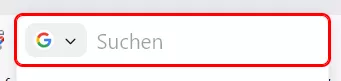
Wenn ja, dann teste bitte:
-
Kann man die Farbe der LInks (derzeit blau)
Teste bitte:
CSS
Alles anzeigen.urlbarView-results[wrap] > .urlbarView-row { &[has-url] > .urlbarView-row-inner > .urlbarView-url, &[has-explanation] > .urlbarView-row-inner > .urlbarView-explanation { color: orange !important; } } .urlbar[breakout][breakout-extend] { & > .urlbar-background { @media (prefers-reduced-motion: no-preference) { [breakout-extend-animate] > & { background-color: grey !important; } } } #urlbarView-row-88:before, .urlbarView-title { color: white !important; } -

oder sonst wohin leiten
Richtig. Wichtig ist eben nur, dass sich das Icon dann auch in dem Ordner befindet.
Darum meine Frage an ihn:
Hast du in beiden Ordnern Icons die gleichen Symbole drin?
-

mit dem falschen Link zum Icon das funkt.
So wie ich das sehe nutzt/hast du 2 Profile.
Profiles/c612nnc8.default-release/chrome/Icons
und:
Profiles/gluhjsdy.Ramo-1786208475618/chrome/Icons
Hast du in beiden Ordnern Icons die gleichen Symbole drin?
-
mit dem Backup-Script ein Backup machen.
Das solltest du mind. 1x die Woche machen, dann gibt es keine Panik, wenn du mal wieder auf den falschen Button geklickt hast
Einfach wieder einfügen dann.
-
Wenn jetzt alles wieder funktioniert, dann könntest du den Ordner auf dem Desktop wieder löschen.
Oder ihn als Backup an anderer Stelle sichern.
-
-
-
welcher der aktuelle profil ist?
about:profiles in die Adressleiste eingeben...dann wird dir das angezeigt.
-
und alle dateien reinkopiert.
Am besten ist es, du öffnest den neuen Profilordner und entfernst alle Dateien daraus.
Dann den Ordner auf dem Desktop öffnen...alle Dateien kopieren..und in den alten Ordner wieder einfügen.
-
ich versuchs mal.
Mach es ganz in Ruhe, dann klappt das auch.
Wenn du die Daten in das neue Profil einfügst, dann muss der Firefox dabei beendet sein!
-
habe ich Firefox bereinigen klickt und sieht komisch aus
Dann sollte sich auf deinem Desktop ein neuer Ordner Alte Firefox-Daten befinden.
Das war dein alter Profilordner.
-
Darf ich Dich dazu mal kurz privat ansprechen?
Na klar.
-
darauf bin ich absolut nicht gekommen
Und ich war zu faul...darum musste die KI ran
Freut mich aber, wenn du damit zufrieden bist was sie geliefert hat.
-
die Länge der Tabs automatisch der Länge des Tablabels
Meinst du das so?

Wenn ja, dann sagt die KI
 CSS
Alles anzeigen/* ========================================================= Firefox – Tabbreite automatisch an Tab-Label anpassen Datei: chrome/userChrome.css ========================================================= */ /* --------------------------------------------------------- 1. Normale Tabs --------------------------------------------------------- */ .tabbrowser-tab:not([pinned]) { /* * Tab darf seine Breite selbst bestimmen */ flex: 0 0 auto !important; /* * Keine von Firefox vorgegebene feste Breite */ width: auto !important; min-width: 70px !important; max-width: none !important; } /* --------------------------------------------------------- 2. Inhalt des Tabs --------------------------------------------------------- */ .tabbrowser-tab:not([pinned]) .tab-content { width: auto !important; min-width: 0 !important; max-width: none !important; /* * Etwas Abstand zwischen Label und Tab-Rand */ padding-inline: 8px !important; } /* --------------------------------------------------------- 3. Tab-Label --------------------------------------------------------- */ .tabbrowser-tab:not([pinned]) .tab-label-container { width: auto !important; min-width: 0 !important; max-width: none !important; /* * Verhindert, dass Firefox das Label künstlich * auf eine bestimmte Breite begrenzt. */ flex: 0 0 auto !important; } .tabbrowser-tab:not([pinned]) .tab-label { width: auto !important; max-width: none !important; /* * Label darf seine natürliche Breite verwenden */ overflow: visible !important; text-overflow: clip !important; } /* --------------------------------------------------------- 4. Schließen-Button --------------------------------------------------------- */ .tabbrowser-tab:not([pinned]) .tab-close-button { flex: 0 0 auto !important; margin-inline-start: 6px !important; } /* --------------------------------------------------------- 5. Aktiver Tab --------------------------------------------------------- */ .tabbrowser-tab[selected="true"]:not([pinned]) { /* * Auch der aktive Tab passt sich seinem Label an */ width: auto !important; max-width: none !important; } /* --------------------------------------------------------- 6. Angeheftete Tabs nicht verändern --------------------------------------------------------- */ .tabbrowser-tab[pinned] { flex: 0 0 var(--tab-pinned-width) !important; } /* --------------------------------------------------------- 7. Tab-Leiste darf horizontal scrollen --------------------------------------------------------- */ #tabbrowser-tabs { overflow-x: auto !important; } /* --------------------------------------------------------- 8. Scrollbar der Tab-Leiste ausblenden --------------------------------------------------------- */ #tabbrowser-tabs > .tabbrowser-arrowscrollbox { scrollbar-width: none !important; } #tabbrowser-tabs > .tabbrowser-arrowscrollbox::-webkit-scrollbar { display: none !important; }oder auch so:
CSS
Alles anzeigen/* ============================================================ Firefox – dynamische Tabbreite nach Label ============================================================ */ /* ------------------------------------------------------------ Grundeinstellung für normale Tabs ------------------------------------------------------------ */ .tabbrowser-tab:not([pinned]) { flex: 0 1 auto !important; width: auto !important; min-width: 50px !important; max-width: 320px !important; } /* ------------------------------------------------------------ Tab-Inhalt darf seine natürliche Breite behalten ------------------------------------------------------------ */ .tabbrowser-tab:not([pinned]) .tab-content { width: auto !important; min-width: 0 !important; max-width: none !important; padding-inline: 7px !important; } /* ------------------------------------------------------------ Label-Container ------------------------------------------------------------ */ .tabbrowser-tab:not([pinned]) .tab-label-container { flex: 0 1 auto !important; width: auto !important; min-width: 0 !important; max-width: none !important; } /* ------------------------------------------------------------ Das eigentliche Label ------------------------------------------------------------ */ .tabbrowser-tab:not([pinned]) .tab-label { display: block !important; width: auto !important; min-width: 0 !important; max-width: 290px !important; /* * Lange Titel werden abgeschnitten statt den Tab * unendlich breit werden zu lassen. */ overflow: hidden !important; text-overflow: ellipsis !important; white-space: nowrap !important; } /* ------------------------------------------------------------ Schließen-Button ------------------------------------------------------------ */ .tabbrowser-tab:not([pinned]) .tab-close-button { flex: 0 0 auto !important; margin-inline-start: 5px !important; } /* ------------------------------------------------------------ Aktiver Tab ------------------------------------------------------------ */ .tabbrowser-tab[selected="true"]:not([pinned]) { flex: 0 1 auto !important; width: auto !important; min-width: 50px !important; max-width: 320px !important; } /* ------------------------------------------------------------ Angeheftete Tabs bleiben normal ------------------------------------------------------------ */ .tabbrowser-tab[pinned] { flex: 0 0 var(--tab-pinned-width) !important; } /* ------------------------------------------------------------ Tab-Leiste ------------------------------------------------------------ */ #tabbrowser-tabs { overflow-x: auto !important; } /* ------------------------------------------------------------ Keine sichtbare Scrollbar ------------------------------------------------------------ */ #tabbrowser-tabs > .tabbrowser-arrowscrollbox { scrollbar-width: none !important; } #tabbrowser-tabs > .tabbrowser-arrowscrollbox::-webkit-scrollbar { display: none !important; }Kannst das ja mal testen wenn du magst.