

Hallo zusammen.
Vielen Dank nochmals für Eure ganze Hilfe.
CSS Code habe ich jetzt soweit fertig.
Paar Kleinigkeiten muss ich noch machen dann passt es.
Mfg.
Endor
Hallo zusammen.
Vielen Dank nochmals für Eure ganze Hilfe.
CSS Code habe ich jetzt soweit fertig.
Paar Kleinigkeiten muss ich noch machen dann passt es.
Mfg.
Endor
Herzlichen Glückwunsch zum Geburtstag, Road-Runner!
Vor allem viel Gesundheit wünsche ich Dir.
Mfg.
Endor

Wenn solche Fehler auftreten, ist es empfehlenswert sie im Forum der Filterlisten zu melden. Da reicht es aus, bloß einmal auszutesten welche Filterliste schuld ist und es damit zu melden.
Genau das habe ich gemacht.
Und hat ja auch funktioniert.
Mfg.
Endor
Ja hat auch funktioniert.
Fanboy hat eine Änderung in die Listen eingebaut.
Einfach Filterlisten nochmals aktualisieren.
Hier passt es jetzt jedenfalls wieder.
Mfg.
Endor
Herzlichen Glückwunsch zum Geburtstag, AngelOfDarkness!
Vor allem viel Gesundheit wünsche ich Dir.
Mfg.
Endor
Hallo zusammen.
Danke für Eure Hilfe.
Heute Morgen sieht es aus als ob die noch was geändert haben.
Paar Kleinigkeiten hatte ich gestern Abend noch angepasst.
Wenn alles passt, kommt morgen ein neuer CSS Code für den Wetterfuchs
da ist dann alles dabei. Musste auch bei Wetterkontor kleinere Anpassungen
machen usw.
Frage, bei Mittelklick - daswetter.com habt ihr da eine Cookie Abfrage?
Kam hier gestern ein paar mal. Habe versucht das per CSS zu entfernen
aber dann ging die Seite nicht mehr.
Mfg.
Endor
Danke milupo.
Könntest Du bitte mal diesen neuen CSS Code Teil dafür testen.
Vorhandenen Absatz im CSS Code damit ersetzen.
@-moz-document domain(www.msn.com) {


html{scrollbar-width: none !important;}


#onetrust-consent-sdk, .unitSwitchContainer-DS-EntryPoint1-1,
#header, div.sectionContainer-DS-EntryPoint1-1:nth-child(4), .root-DS-EntryPoint1-1 > div:nth-child(6),
.oneFooter-DS-EntryPoint1-1 , div.sectionContainer-DS-EntryPoint1-1:nth-child(3),
.feedback_link_default-DS-EntryPoint1-1.button-DS-EntryPoint1-3, .weather_alerts_link-DS-EntryPoint1-1,
.profile_signInLink-DS-EntryPoint1-1, button.chevron-DS-EntryPoint1-1:nth-child(2),
button.chevron-DS-EntryPoint1-1:nth-child(3), .weather_feedback_entry-DS-EntryPoint1-1,
.adsContent-DS-EntryPoint1-1{display: none! important;}


.weather_alerts_title-DS-EntryPoint1-1{
margin-top: 50px !important;
margin-left: -150px !important;
max-width: 200px !important;
word-wrap: break-word !important;}


.weather_alerts_level-DS-EntryPoint1-1{
margin-left: 70px !important;
margin-top: -20px !important;
pointer-events: none !important;}


body{margin-top: -125px !important;}


.weather-section{margin-top: 40px !important;}


.weatherAdscontainer-DS-EntryPoint1-1{margin-top: 35px !important;}


a.chevron-DS-EntryPoint1-1:nth-child(3) {
margin-right: -35px !important;}


a.chevron-DS-EntryPoint1-1:nth-child(1){
margin-left: -35px !important;}
}Danke im Voraus für die MÜhe.
Mfg.
Endor
Hallo zusammen.
Bitte tut mir einen Gefallen, macht einem Doppelklick
auf den Wetterfuchsbutton. Dann sollte sich das Fenster mit dem
Wetterbericht von https://www.msn.com öffnen.
Wie sieht es da bei euch aus. Bei mir ist da heute alles leer.
Habe es hier bereits repariert.
Wenn es bei Euch auch so ist wie bei mir schiebe ich dann den
neuen CSS Code Teil rüber.
Vielen Dank für Eure Hilfe.
Mfg.
Endor
Ist hier genau so wie bei Boersenfeger gewesen.
Habe beide Listen deaktiviert. Dann geht es wieder.
Das müsste man FanBoy melden. Mal sehen.
Mfg.
Endor

EDIT: mein Fehler es bezieht sich auf Version 1.4.3b0 aber ich habe ja Version 2.4.2
und finde es daher nirgens.
Vielleicht kann trotzdem jemand erklären für was das ist.
Boersenfeger bezieht sich auf das Edit in Zitronellas Beitrag und da steht eben 2.4.2
und nur das war gemeint.
Zu Zitronellas Frage kann ich leider auch nichts sagen, wüste aber auch gern wo man diese Regel einfügen müsste.
Mfg.
Endor
Und wie sieht es mit der 1.4.4 aus, die ist eben per Update gekommen?
Hier jedenfalls keine Probleme damit.
Mfg.
Endor
Kleine Spielerei für about:newtab
Auf den verschiedenen Kacheln, gibt es ja oben in der Rechten Ecke das drei Punkte Symbol
mit Kontextmenü. Da waren früher ja Symbole bei den Menüeinträgen.
Seit Firefox 88 sind die ja entfernt worden. Habe die hier wieder eingebaut.
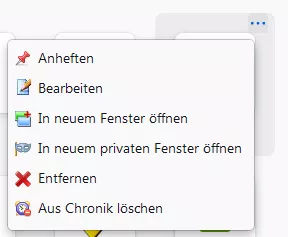
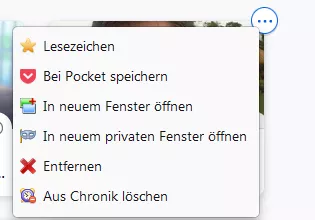
CSS Code:
    /* AGENT_SHEET */
    @-moz-document url(about:newtab),
                   url(about:home){
    span[data-l10n-id="newtab-menu-pin"]{
    appearance: none !important;
    background: url("..//icons/New-Tab/pin.png") no-repeat !important;
    margin-left: -12px !important;
    min-height: 24px !important;
    padding-left:30px !important;
    padding-top: 2px !important;
    background-position:7px 2px!important;}

    span[data-l10n-id="newtab-menu-unpin"]{
    appearance: none !important;
    background: url("..//icons/New-Tab/un-pin.png") no-repeat !important;
    margin-left: -12px !important;
    min-height: 24px !important;
    padding-left:30px !important;
    padding-top: 2px !important;
    background-position:7px 2px!important;}

    span[data-l10n-id="newtab-menu-edit-topsites"]{
    appearance: none !important;
    background: url("..//icons/New-Tab/Bild97.png") no-repeat !important;
    margin-left: -12px !important;
    min-height: 24px !important;
    padding-left:30px !important;
    padding-top: 2px !important;
    background-position:7px 1px!important;}

    span[data-l10n-id="newtab-menu-dismiss"]{
    appearance: none !important;
    background: url("..//icons/New-Tab/loeschen.png") no-repeat !important;
    margin-left: -12px !important;
    min-height: 24px !important;
    padding-left:30px !important;
    padding-top: 2px !important;
    background-position:7px 3px!important;}

    span[data-l10n-id="newtab-menu-open-new-window"]{
    appearance: none !important;
    background: url("..//icons/New-Tab/Neues-Fenster.png") no-repeat !important;
    margin-left: -12px !important;
    min-height: 24px !important;
    padding-left:30px!important;
    padding-top: 2px !important;
    background-position:7px 3px!important;}

    span[data-l10n-id="newtab-menu-open-new-private-window"]{
    appearance: none !important;
    background: url("..//icons/New-Tab/privat.png") no-repeat !important;
    margin-left: -12px !important;
    min-height: 24px !important;
    padding-left:30px!important;
    padding-top: 2px !important;
    background-position:7px 3px!important;}

    span[data-l10n-id="newtab-menu-remove-download"],
    span[data-l10n-id="newtab-menu-delete-history"]{
    appearance: none !important;
    background: url("..//icons/New-Tab/loeschen2.png") no-repeat !important;
    margin-left: -12px !important;
    min-height: 24px !important;
    padding-left:30px!important;
    padding-top: 2px !important;
    background-position:7px 3px!important;}

    span[data-l10n-id="newtab-menu-bookmark"]{
    appearance: none !important;
    background: url("..//icons/New-Tab/Lesezeichen.png") no-repeat !important;
    margin-left: -12px !important;
    min-height: 24px!important;
    padding-left:30px!important;
    padding-top: 2px !important;
    background-position:7px 3px!important;}

    span[data-l10n-id="newtab-menu-remove-bookmark"]{
    appearance: none !important;
    background: url("..//icons/New-Tab/Lesezeichen-loeschen.png") no-repeat !important;
    margin-left: -12px !important;
    min-height: 24px!important;
    padding-left:30px!important;
    padding-top: 2px !important;
    background-position:8px 3px!important;}

    span[data-l10n-id="newtab-menu-open-file"]{
    appearance: none !important;
    background: url("..//icons/New-Tab/Datei.png") no-repeat !important;
    margin-left: -12px !important;
    min-height: 24px!important;
    padding-left:30px!important;
    padding-top: 2px !important;
    background-position:7px 3px!important;}

    span[data-l10n-id="newtab-menu-show-file"]{
    appearance: none !important;
    background: url("..//icons/New-Tab/Ordner.png") no-repeat !important;
    margin-left: -12px !important;
    min-height: 24px!important;
    padding-left:30px!important;
    padding-top: 2px !important;
    background-position:7px 3px!important;}

    span[data-l10n-id="newtab-menu-go-to-download-page"]{
    appearance: none !important;
    background: url("..//icons/New-Tab/Download-Site.png") no-repeat !important;
    margin-left: -12px !important;
    min-height: 24px!important;
    padding-left:30px!important;
    padding-top: 2px !important;
    background-position:7px 3px!important;}

    span[data-l10n-id="newtab-menu-copy-download-link"]{
    appearance: none !important;
    background: url("..//icons/New-Tab/Download-Link.png") no-repeat !important;
    margin-left: -12px !important;
    min-height: 24px!important;
    padding-left:30px!important;
    padding-top: 2px !important;
    background-position:7px 3px!important;}

    span[data-l10n-id="newtab-menu-save-to-pocket"]{
    appearance: none !important;
    background: url("..//icons/New-Tab/Pocket.png") no-repeat !important;
    margin-left: -12px !important;
    min-height: 24px!important;
    padding-left:30px!important;
    padding-top: 2px !important;
    background-position:7px 3px!important;}

    li.separator:nth-child(n+1){display: none !important;}
}Symbole: New-Tab.zip
Hinweis, die Symbole sind in obiger Zip Datei in einem Ordner New-Tab
enthalten. Diesen Ordner im Icons Ordner im Profilordner speichern.
Sonst funktioniert der CSs Code nicht, da ich die Symbole aus diesem Ordner verlinkt habe.
Mfg.
Endor
Hallo 2002Andreas
Habe die neue Version mal bei mir auf Github hochgeladen:
https://github.com/Endor8/userChr…ster/Firefox-90
Hoffe, es ist Dir recht.
Vielen Dank nochmals für Deine Hilfe.
Funktioniert auch in Firefox 91 und 92.
Mfg.
Endor
Ich kann bestätigen, dass das Script hier auch nicht mehr funktioniert.
Lösung habe ich aber leider auch keine gefunden.
Da müssen wir wohl mal wieder auf aborix hoffen.
Mfg.
Endor
Musste den Code für about:third-party nochmals aktualisieren.
Siehe hier: RE: About Seiten mit CSS Codes anpassen
An dieser Stelle mal wieder, vielen Dank an FuchsFan für den Hinweis usw.
:klasse:
Mfg.
Endor
Hier eine aktualisierte Version für about:privatebrowsing:
    @-moz-document url(about:privatebrowsing) {

    html{background:#ffffff!important;}

    body{
    margin-left: auto !important;
    margin-right: auto !important;
    justify-content: center!important;
    align-items: center!important;
    max-width: 1000px !important;
    min-height: 94vh !important;
    max-height: 94vh !important;
    margin-top: 20px !important;
    margin-bottom: 20px !important;
    padding-bottom: 20px !important;
    padding-top: 15px !important;
    padding-left: 50px !important;
    padding-right: 50px !important;
    background-color: #fffff0 !important;
    border-left-color:  lightblue!important;
    border-top-color:  lightblue!important;
    border-right-color:  dodgerblue!important;
    border-bottom-color:  dodgerblue!important;
    border-radius: 20px !important;
    border-width:  4px !important;
    border-style: outset !important;}

    body:hover{
    border-left-color:  #bbddff !important;
    border-top-color:  #bbddff !important;
    border-right-color:  #11508d !important;
    border-bottom-color:  #11508d !important;}

    body:before {
    content: "Endors Firefox - Privates Fenster";
    margin-top: -55px !important;
    margin-bottom: 50px !important;
    font-weight:bold !important;
    font-size: 20px !important;
    color:red !important;
    margin-left: 0px !important;
    padding-right: 20px !important;}

    p.showNormal{
    color: #8d20ae !important;
    font-size: 18px !important;
    font-weight: bold !important; }

    .info{
    margin-left: auto !important;
    margin-right: auto !important;
    justify-content: center!important;
    align-items: center !important;
    margin-top: 20px !important;
    margin-bottom: 20px !important;
    padding-bottom: 20px !important;
    padding-top: 15px !important;
    padding-left: 50px !important;
    padding-right: 50px !important;
    background-color: #ffffff !important;
    border-left-color:  lightblue!important;
    border-top-color:  lightblue!important;
    border-right-color:  dodgerblue!important;
    border-bottom-color:  dodgerblue!important;
    border-radius: 20px !important;
    border-width:  4px !important;
    border-style: outset !important;}

    #fake-editable,
    #search-handoff-button,
    .fake-textbox,
    .search-inner-wrapper{border-radius: 22px !important;}


    .wordmark {
    fill: crimson !important;
    }

    .info > h1:nth-child(1){
    color: crimson !important;
    margin-left: 30px !important;
    }

    .info > p:nth-child(2),
    #private-browsing-myths{
    color: black !important;
    margin-left: 30px !important;
    }

    #private-browsing-myths{
    appearance:none!important;
    background: #F0F0F0  url("..//icons/Bild93.png")no-repeat !important;
    margin-top: 50px !important;
    padding-bottom: 4px!important;
    padding-top: 4px!important;
    padding-left:35px!important;
    padding-right:20px!important;
    border-left-color:  lightblue!important;
    border-top-color:  lightblue!important;
    border-right-color:  dodgerblue!important;
    border-bottom-color:  dodgerblue!important;
    border-style: outset !important;
    border-width:2px !important;
    font-size:14px!important;
    text-decoration:none!important;
    background-position:10px 6px!important;
    border-radius:14px!important;
    color:black !important;}

    #private-browsing-myths:hover{
    appearance:none!important;
    background: #B2EDFA url("..//icons/Bild93.png")no-repeat !important;
    font-size:14px!important;
    border-style: outset !important;
    border-width:2px !important;
    border-left-color:  #bbddff !important;
    border-top-color:  #bbddff !important;
    border-right-color:  #11508d !important;
    border-bottom-color:  #11508d !important;
    text-decoration:none!important;
    padding-right:20px!important;
    padding-left:35px!important ;
    background-position:10px 6px!important;    }

    #startPrivateBrowsing{
    appearance:none!important;
    background: #F0F0F0  url("..//icons/Bild93.png")no-repeat !important;
    margin-top: 50px !important;
    padding-bottom: 4px!important;
    padding-top: 2px!important;
    padding-left:35px!important;
    padding-right:20px!important;
    border-left-color:  lightblue!important;
    border-top-color:  lightblue!important;
    border-right-color:  dodgerblue!important;
    border-bottom-color:  dodgerblue!important;
    border-style: outset !important;
    border-width:2px !important;
    font-size:14px!important;
    text-decoration:none!important;
    background-position:10px 6px!important;
    border-radius:14px!important;
    color:black !important;}


    #startPrivateBrowsing:hover{
    appearance:none!important;
    background: #B2EDFA url("..//icons/Bild93.png")no-repeat !important;
    font-size:14px!important;
    border-style: outset !important;
    border-width:2px !important;
    border-left-color:  #bbddff !important;
    border-top-color:  #bbddff !important;
    border-right-color:  #11508d !important;
    border-bottom-color:  #11508d !important;
    text-decoration:none!important;
    padding-right:20px!important;
    padding-left:35px!important ;
    background-position:10px 6px!important;}

    #private-browsing-vpn-link{
    appearance:none!important;
    background: #F0F0F0  url("..//icons/vpn.png")no-repeat !important;
    margin-top: 50px !important;
    padding-bottom: 5px!important;
    padding-top: 4px!important;
    padding-left:35px!important;
    padding-right:20px!important;
    border-left-color:  lightblue!important;
    border-top-color:  lightblue!important;
    border-right-color:  dodgerblue!important;
    border-bottom-color:  dodgerblue!important;
    border-style: outset !important;
    border-width:2px !important;
    font-size:14px!important;
    text-decoration:none!important;
    background-position:10px 6px!important;
    border-radius:14px!important;
    color:black !important;}

    #private-browsing-vpn-link:hover{
    appearance:none!important;
    background: #B2EDFA url("..//icons/vpn.png")no-repeat !important;
    font-size:14px!important;
    border-style: outset !important;
    border-width:2px !important;
    border-left-color:  #bbddff !important;
    border-top-color:  #bbddff !important;
    border-right-color:  #11508d !important;
    border-bottom-color:  #11508d !important;
    text-decoration:none!important;
    padding-right:20px!important;
    padding-left:35px!important ;
    background-position:10px 6px!important;}
}Symbole: 

Mfg.
Endor
Danke für den HInweis.
:klasse:
Habe es oben jetzt geändert.
Hallo 2002Andreas.
Ja dafür haben wir schon was:

Muss ich aber aktualisieren.
Trotzdem Danke für Deine Mühe.
Mfg.
Endor

