
Wie oben geschrieben, funktioniert es schon ab Firefox 95 beta nicht mehr.
Der Kontextmenüeintrag wird nicht angezeigt.
Danke für Deine Mühe.
Mfg.
Endor
Wie oben geschrieben, funktioniert es schon ab Firefox 95 beta nicht mehr.
Der Kontextmenüeintrag wird nicht angezeigt.
Danke für Deine Mühe.
Mfg.
Endor
Rechtsklick auf Seiteninhalt, oder Hauptkontextmenü ist gemeint.
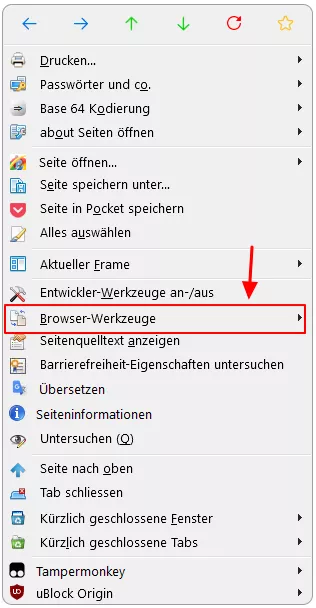
das ist die Version für Firefox 94.0.1.
//   WebDeveloper-Menu.uc.js

(function() {
   if (location != 'chrome://browser/content/browser.xhtml')
      return;
   setTimeout(function() {
      if (document.getElementById('menuWebDeveloperPopup').childElementCount <= 5) {
         // s. DevToolsStartup.prototype.initDevTools
         // https://dxr.mozilla.org/mozilla-central/source/devtools/shim/devtools-startup.js
         let { require } = Cu.import("resource://devtools/shared/Loader.jsm", {});
         require("devtools/client/framework/devtools-browser");
      };
      var dblMenu = document.getElementById('webDeveloperMenu').cloneNode(true);
      document.getElementById('contentAreaContextMenu').insertBefore(dblMenu, document.getElementById('context-viewsource'));
      dblMenu.id = 'context-' + dblMenu.id;
      var elements = dblMenu.getElementsByTagName('*');
      for (let elem of elements) {
         let origId = elem.id;
         if (origId) {
            elem.id = 'context-' + origId;
            if (elem.tagName == 'menuitem') {
               elem.setAttribute('oncommand', 'document.getElementById("' + origId + '").click();');
               let obs = document.createXULElement('observes');
               obs.setAttribute('element', origId);
               obs.setAttribute('attribute', 'checked');
               elem.appendChild(obs);
            };
         };
      };
   }, 100);
}());Mfg.
Endor
Prima, freut mich.

Hier dann der CSS Code dazu:
        /* AGENT_SHEET */
        @namespace url(http://www.w3.org/1999/xhtml);
        @-moz-document url("about:about") {

        html {background: #FFFFFF !important;}

        ul.columns {
        column-count: 3 !important;
        column-gap: 20px !important;
        margin: 0 !important;
        }

        body{
        background-color: #fffff0 !important;
        max-width: 1320px !important;
        min-height: 600px !important;
        height: auto !important;
        margin-top: 70px !important;
        margin-bottom: 30px !important;
        margin-left: 80px !important;
        padding-top: 45px !important;
        padding-left: 25px !important;
        padding-right: 25px !important;
        padding-bottom:  65px !important;
        border-left-color:  lightblue!important;
        border-top-color:  lightblue!important;
        border-right-color:  dodgerblue!important;
        border-bottom-color:  dodgerblue!important;
        border-radius: 20px !important;
        border-width:  4px !important;
        border-style: outset !important;}


        .container > h1:nth-child(1){
        margin-left: 150px !important;
        color: blue !important;
        font-size: 24px !important;
        font-weight: bold !important;}

        ul{list-style: none !important;}

        #abouts{
        min-width: 1120px !important;
        background-color: #ffffff !important;
        margin-left: -200px !important;
        margin-top: 25px !important;
        padding-top: 25px !important;
        padding-left: 25px !important;
        padding-right: 25px !important;
        padding-bottom:  25px !important;
        border-left-color:  lightblue!important;
        border-top-color:  lightblue!important;
        border-right-color:  dodgerblue!important;
        border-bottom-color:  dodgerblue!important;
        border-radius: 20px !important;
        border-width:  4px !important;
        border-style: outset !important;}

        p {margin-left: 160px !important; font-size:15px!important;}

        h1::before {
        content: "Endors Firefox:    ";
        font-weight:bold !important;
        color:red !important;
        margin-left: 80px !important;}

        a{
        text-decoration:none!important;
        color:black!important;}

        /* Breite der Schaltflächen */

        #abouts > li:nth-child(n+1){
        min-width: 170px !important;
        max-width: 170px !important;
        }

        /* Die ersten 14 */
        #abouts > li:nth-child(-n+14){
        appearance:none!important;
        background: #efefef url("..//icons/Bild3.png")no-repeat !important;
        color:transparent!important;
        font-size:14px!important;
        text-decoration:none!important;
        margin-top:3px!important;
        margin-bottom: 5px !important;
        margin-right:20px!important;
        margin-left: 55px !important;
        padding-right: 45px !important;
        padding-left:40px!important;
        padding-top: 1px!important;
        padding-bottom: 2px!important;
        border-left-color:  lightblue!important;
        border-top-color:  lightblue!important;
        border-right-color:  dodgerblue!important;
        border-bottom-color:  dodgerblue!important;
        border-style: outset !important;
        border-width:2px !important;
        background-position:14px 2px!important;
        border-radius:14px!important;}


        /* Die ersten 14 hover */

        #abouts > li:nth-child(-n+14):hover{
        appearance:none!important;
        background: #B2EDFA  url("..//icons/Bild3.png")no-repeat !important;
        color:transparent!important;
        font-size:14px!important;
        text-decoration:none!important;
        border-left-color:  #bbddff !important;
        border-top-color:  #bbddff !important;
        border-right-color:  #11508d !important;
        border-bottom-color:  #11508d !important;
        border-style: outset !important;
        border-width:2px !important;
        background-position:14px 2px!important;
        border-radius:14px!important;}


        /* Die mittleren 14 */

        #abouts > li:nth-child(n+15){
        appearance:none!important;
        background: #efffbf url("..//icons/Bild3.png")no-repeat !important;
        color:transparent!important;
        font-size:14px!important;
        text-decoration:none!important;
        margin-top:3px!important;
        margin-bottom: 5px !important;
        margin-right:5px!important;
        margin-left: 70px !important;
        padding-right: 25px !important;
        padding-left:40px!important;
        padding-top: 1px!important;
        padding-bottom: 2px!important;
        border-left-color:  #79d279 !important;
        border-top-color:  #79d279 !important;
        border-right-color:  #009900 !important;
        border-bottom-color:  #009900 !important;
        border-style: outset !important;
        border-width:2px !important;
        background-position:14px 2px!important;
        border-radius:14px!important;}


        /* Die mittleren 14 hover */

        #abouts > li:nth-child(n+15):hover{
        appearance:none!important;
        background: #B2EDFA  url("..//icons/Bild3.png")no-repeat !important;
        color:transparent!important;
        font-size:14px!important;
        text-decoration:none!important;
        border-left-color:  #bbddff !important;
        border-top-color:  #bbddff !important;
        border-right-color:  #11508d !important;
        border-bottom-color:  #11508d !important;
        border-style: outset !important;
        border-width:2px !important;
        background-position:14px 2px!important;
        border-radius:14px!important;}


        /* Die letzten 14 */

        #abouts > li:nth-child(n+30){
        appearance:none!important;
        background: cornsilk url("..//icons/Bild3.png")no-repeat !important;
        color:transparent!important;
        font-size:14px!important;
        margin-top:3px!important;
        margin-bottom: 5px !important;
        margin-right:45px!important;
        padding-left:40px!important;
        padding-top: 1px!important;
        padding-bottom: 2px!important;
        border-left-color:  #ffb2b2 !important;
        border-top-color:  #ffb2b2 !important;
        border-right-color:  #8d0000 !important;
        border-bottom-color:  #8d0000 !important;
        border-style: outset !important;
        border-width:2px !important;
        background-position:14px 2px!important;
        border-radius:14px!important;}

        /* Die letzten 14 hover */

        #abouts > li:nth-child(n+30):hover{
        appearance:none!important;
        background: #B2EDFA url("..//icons/Bild3.png")no-repeat !important;
        color:transparent!important;
        font-size:14px!important;
        border-left-color:  #bbddff !important;
        border-top-color:  #bbddff !important;
        border-right-color:  #11508d !important;
        border-bottom-color:  #11508d !important;
        border-style: outset !important;
        border-width:2px !important;
        background-position:14px 2px!important;
        border-radius:14px!important;}
}Edit: Ich habe bei den Mittleren Schaltfläche noch die Randfarben geändert.
Hatte ich vergessen.
Mfg.
Endor
Mein Vorschlag dazu:
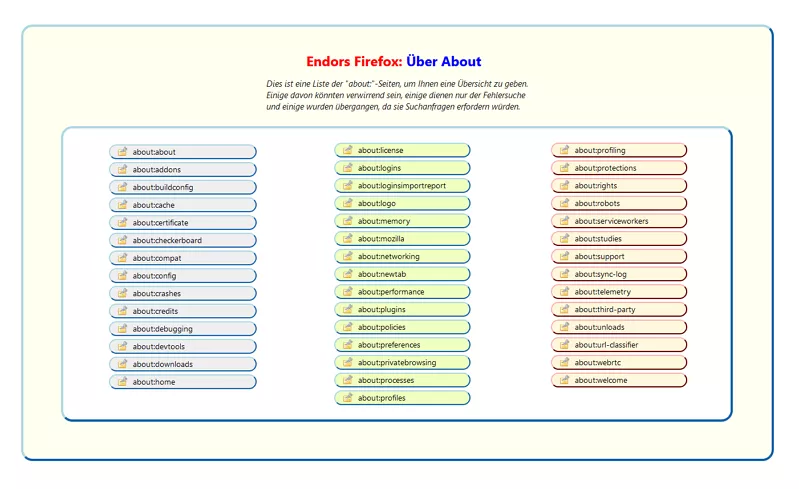
Was sagt ihr dazu?
Mfg.
Endor

Bei 3 Spalten fände ich 3 verschiedene Farben schöner
Finde ich auch.
Danke für den CSS Code Schnipsel.
Mfg.
Endor
Hallo zusammen.
Da das mehrere Scripte betrifft, habe ich mal begonnen
ein paar anzupassen und hoch zu laden:

Bei diesem Script hier habe ich auch die Änderung gemacht aber es
funktioniert trotzdem nicht. Es clont das gleichnamige Menü von Extras
ins Rechtsklick Kontextmenü. Im aktuellen Firefox 94.0.1 funktioniert es
in Beta und Nightly nicht mehr. Ist das bei Euch auch so?
Script:
//   WebDeveloper-Menu.uc.js

(function() {
   if (location != 'chrome://browser/content/browser.xhtml')
      return;
   setTimeout(function() {
      if (document.getElementById('menuWebDeveloperPopup').childElementCount <= 5) {
         // s. DevToolsStartup.prototype.initDevTools
         // https://dxr.mozilla.org/mozilla-central/source/devtools/shim/devtools-startup.js
         let { require } = Cu.import("resource://devtools/shared/loader/Loader.jsm", {});
         require("devtools/client/framework/devtools-browser");
      };
      var dblMenu = document.getElementById('webDeveloperMenu').cloneNode(true);
      document.getElementById('contentAreaContextMenu').insertBefore(dblMenu, document.getElementById('context-viewsource'));
      dblMenu.id = 'context-' + dblMenu.id;
      var elements = dblMenu.getElementsByTagName('*');
      for (let elem of elements) {
         let origId = elem.id;
         if (origId) {
            elem.id = 'context-' + origId;
            if (elem.tagName == 'menuitem') {
               elem.setAttribute('oncommand', 'document.getElementById("' + origId + '").click();');
               let obs = document.createXULElement('observes');
               obs.setAttribute('element', origId);
               obs.setAttribute('attribute', 'checked');
               elem.appendChild(obs);
            };
         };
      };
   }, 100);
}());Mfg.
Endor
Das kann ich jetzt so gar nicht sagen, da ich hier immer alles Benutzerdefiniert speichere.
Und die Dateien bleibt dann auch nach dem Leeren der Liste erhalten.
Mfg.
Endor
Also hier funktioniert die Schaltfläche zum löschen.
Das ist die hier verwendete Version, die akuellste verfügbare:
// ==UserScript==
// @name           ucjsDownloadsStatusModoki.uc.js
// @namespace      http://space.geocities.yahoo.co.jp/gl/alice0775
// @description    Downloads Status Modoki
// @include        main
// @compatibility  Firefox 73+
// @author         Alice0775
// @note           ucjsDownloadsStatusModoki.uc.js.css Code muss über die userChrome.css Datei geladen werden
// @version        2019/12/11 fix for 73 Bug 1601094 - Rename remaining .xul files to .xhtml in browser
// @version        2019/10/20 12:30 workaround Bug 1497200: Apply Meta CSP to about:downloads, Bug 1513325 - Remove textbox binding
// @version        2019/09/08 19:30 fix scrollbox
// @version        2019/05/21 08:30 fix 69.0a1 Bug 1551320 - Replace all createElement calls in XUL documents with createXULElement
// @version        2018/10/27 12:00 fix for 64+
// @version        2018/06/12 21:00 fix for private window mode
// @version        2018/06/07 12:00 fix file name for history
// @version        2018/02/10 12:00 try catch error when DO_NOT_DELETE_HISTORY = true
// @version        2017/12/10 12:00 fix error when DO_NOT_DELETE_HISTORY = true
// @version        2017/12/10 12:00 remove workaround Bug 1279329. Disable btn while clear list is doing, close button styling for 57.
// @version        2016/06/10 12:00 modify style independent of font-family
// @version        2016/06/10 07:00 modify style of close button, fix typo
// @version        2016/06/10 00:00 Workaround Bug 1279329. adjust some padding
// @version        2015/05/08 00:00 remove padding due to Bug 1160734
// @version        2014/03/31 00:00 fix for browser.download.manager.showWhenStarting
// @version        2013/12/22 13:00 chromehidden
// @version        2013/12/19 17:10 rename REMEMBERHISTOTY to DO_NOT_DELETE_HISTORY
// @version        2013/12/16 23:28 fixed initialize numDls
// @version        2013/12/16 23:24 open only download added
// @version        2013/12/16 23:10 open only download started
// @version        2013/12/16 21:20 modify css Windows7 Aero
// @version        2013/12/16 21:00 modify css
// @version        2013/12/16 19:30 add autocheck false
// @version        2013/12/16 18:31 fix pref name
// @version        2013/12/16 18:30
// @note
// ==/UserScript==
var ucjsDownloadsStatusModoki = {
  _summary: null,
  _list: null,

  get downloadsStatusModokiBar() {
    delete downloadsStatusModokiBar;
    return this.downloadsStatusModokiBar = document.getElementById("downloadsStatusModokiBar");
  },

  get toggleMenuitem() {
    delete toggleMenuitem;
    return this.toggleMenuitem = document.getElementById("toggle_downloadsStatusModokiBar");
  },

  init: function() {
    if (document.documentElement.getAttribute("chromehidden") !="" )
      return;

    XPCOMUtils.defineLazyModuleGetter(window, "Downloads",
              "resource://gre/modules/Downloads.jsm");

    var style = `
      @namespace url(http://www.mozilla.org/keymaster/gatekeeper/there.is.only.xul);
      #ucjsDownloadsStatusModoki {
        width: 100%;
        max-height: 100px;
        height: 39px;
      }
     `.replace(/\s+/g, " ");
    var sspi = document.createProcessingInstruction(
      'xml-stylesheet',
      'type="text/css" href="data:text/css,' + encodeURIComponent(style) + '"'
    );
    document.insertBefore(sspi, document.documentElement);
    sspi.getAttribute = function(name) {
      return document.documentElement.getAttribute(name);
    };


    var toolbar = document.createXULElement("vbox");
    toolbar.setAttribute("id", "downloadsStatusModokiBar");
    toolbar.setAttribute("collapsed", true);

    var bottombox = document.getElementById("browser-bottombox");
    bottombox.appendChild(toolbar);
    var browser = toolbar.appendChild(document.createXULElement("browser"));
    browser.setAttribute("disablehistory", true);
    browser.setAttribute("remote", false);
    browser.setAttribute("id", "ucjsDownloadsStatusModoki");
    browser.addEventListener("load", function(event){ucjsDownloadsStatusModoki.onload(event)}, true);
    browser.setAttribute("src", "chrome://browser/content/downloads/contentAreaDownloadsView.xhtml?StatusModoki");
    var menuitem = document.createXULElement("menuitem");
    menuitem.setAttribute("id", "toggle_downloadsStatusModokiBar");
    menuitem.setAttribute("type", "checkbox");
    menuitem.setAttribute("autocheck", false);
    menuitem.setAttribute("label", "Download Leiste");
    menuitem.setAttribute("checked", false);
    menuitem.setAttribute("accesskey", "D");
    menuitem.setAttribute("oncommand", "ucjsDownloadsStatusModoki.toggleDownloadsStatusModokiBar()");
    var ref = document.getElementById("menu_customizeToolbars");
    ref.parentNode.insertBefore(menuitem, ref.previousSibling);

    // Ensure that the DownloadSummary object will be created asynchronously.
    if (!this._summary) {
      Downloads.getSummary(Downloads.ALL).then(summary => {
        this._summary = summary;
        return this._summary.addView(this);
      }).then(null, Cu.reportError);
    }
    if (!this._list) {
      Downloads.getList(Downloads.ALL).then(list => {
        this._list = list;
        return this._list.addView(this);
      }).then(null, Cu.reportError);
    }

    window.addEventListener("unload", this, false);
  },

  uninit: function() {
    window.removeEventListener("unload", this, false);
    if (this._summary) {
      this._summary.removeView(this);
    }
    if (this._list) {
      this._list.removeView(this);
    }
  },

  handleEvent: function(event) {
    switch (event.type) {
      case "unload":
        this.uninit();
        break;
    }
  },

  toggleDownloadsStatusModokiBar: function() {
    var collapsed = this.downloadsStatusModokiBar.collapsed;
    this.downloadsStatusModokiBar.collapsed = !collapsed;
    this.toggleMenuitem.setAttribute("checked", collapsed);
  },

  openDownloadsStatusModoki: function() {
    this.downloadsStatusModokiBar.collapsed = false;
    this.toggleMenuitem.setAttribute("checked", true);
  },

  hideDownloadsStatusModoki: function() {
    this.downloadsStatusModokiBar.collapsed = true;
    this.toggleMenuitem.setAttribute("checked", false);
  },

  onDownloadAdded: function (aDownload) {
    Cu.import("resource://gre/modules/Services.jsm");
    var showWhenStarting = true;
    try {
      showWhenStarting = Services.prefs.getBoolPref("userChrome.downloadsStatusModoki.showWhenStarting");
    } catch(e) {}
    this.numDls = 0;
    if (showWhenStarting) {
      if (this._list) {
        this._list.getAll().then(downloads => {
          for (let download of downloads) {
            if (!download.stopped)
              this.numDls++;
          }
          if (this.numDls > 0)
            this.openDownloadsStatusModoki(false);
        }).then(null, Cu.reportError);
      }
    }
  },

  onSummaryChanged: function () {
    Cu.import("resource://gre/modules/Services.jsm");
    if (!this._summary)
      return;
    if (this._summary.allHaveStopped || this._summary.progressTotalBytes == 0) {
      var closeWhenDone = false;
      try {
        closeWhenDone = Services.prefs.getBoolPref("userChrome.downloadsStatusModoki.closeWhenDone");
      } catch(e) {}
      if (closeWhenDone) {
        this.hideDownloadsStatusModoki();
      }
    }
  },


  // chrome://browser/content/downloads/contentAreaDownloadsView.xhtml
  onload: function(event) {
    var doc = event.originalTarget;
    var win = doc.defaultView;
    doc.documentElement.setAttribute("ucjsDownloadsStatusModoki", "true");

    var button = doc.createXULElement("button");
    button.setAttribute("label", "Löschen");
    button.setAttribute("id", "ucjs_clearListButton");
    button.setAttribute("accesskey", "L");
    var ref = doc.getElementById("downloadCommands");
    var vbox = doc.createXULElement("vbox");
    var box = vbox.appendChild(doc.createXULElement("hbox"));
    box.appendChild(button);
    box.appendChild(doc.createXULElement("spacer")).setAttribute("flex", 1);
    var textbox = doc.createElementNS("http://www.w3.org/1999/xhtml", "input");
    textbox.setAttribute("id", "downloadFilter");
    textbox.setAttribute("clickSelectsAll", true);
    textbox.setAttribute("type", "search");
    textbox.setAttribute("placeholder", "Suchen...");
    box.appendChild(textbox);
    var closebtn = doc.createXULElement("toolbarbutton");
    closebtn.setAttribute("id", "ucjsDownloadsStatusModoki-closebutton");
    closebtn.setAttribute("class", "close-icon");
    closebtn.setAttribute("tooltiptext", "Download-Leiste schließen");
    box.appendChild(closebtn);
    ref.parentNode.insertBefore(vbox, ref);
    doc.getElementById("ucjs_clearListButton").addEventListener("command", function(event) {
        win.ucjsDownloadsStatusModoki_clearDownloads();
      });
    doc.getElementById("downloadFilter")
            .addEventListener("input", function(event) {
        win.ucjsDownloadsStatusModoki_doSearch(event.target.value);
      });
    doc.getElementById("ucjsDownloadsStatusModoki-closebutton")
            .addEventListener("command", function(event) {
        win.ucjsDownloadsStatusModoki_doClose();
      });

/*
    // xxx Bug 1279329 "Copy Download Link" of context menu in Library is grayed out
    var listBox = doc.getElementById("downloadsRichListBox");
    var placesView = listBox._placesView;
    if (placesView) {
      var place = placesView.place;
      placesView.place= null;
      placesView.place = place;
    }
*/
    win.ucjsDownloadsStatusModoki_clearDownloads = function ucjs_clearDownloads() {
      var DO_NOT_DELETE_HISTORY = true; /* custmizable true or false */
      var richListBox = doc.getElementById("downloadsRichListBox");

      Cu.import("resource://gre/modules/Services.jsm");
      var places = [];
      function addPlace(aURI, aTitle, aVisitDate) {
        places.push({
          uri: aURI,
          title: aTitle,
          visits: [{
            visitDate: (aVisitDate || Date.now()) * 1000,
            transitionType: Ci.nsINavHistoryService.TRANSITION_LINK
          }]
        });
      }
      function moveDownloads2History() {
        if (DO_NOT_DELETE_HISTORY &&
            !PrivateBrowsingUtils.isWindowPrivate(window)) {
          try {
            for (let element of richListBox.childNodes) {
              let download = element._shell.download;
              let aURI = makeURI(download.source.url);
              // let aTitle = document.getAnonymousElementByAttribute(element, "class", "downloadTarget").value
              let aTitle = download.target.path;
              aTitle = aTitle.match( /[^\\]+$/i )[0];
              aTitle = aTitle.match( /[^/]+$/i )[0];

              let aVisitDate = download.endTime || download.startTime;
              addPlace(aURI, aTitle, aVisitDate)
            }
          } catch(ex) {}
        }

        // Clear List
        richListBox._placesView.doCommand('downloadsCmd_clearDownloads');

        if (DO_NOT_DELETE_HISTORY &&
            !PrivateBrowsingUtils.isWindowPrivate(window)) {
          try {
            if (places.length > 0) {
              var asyncHistory = Components.classes["@mozilla.org/browser/history;1"]
                       .getService(Components.interfaces.mozIAsyncHistory);
                asyncHistory.updatePlaces(places);
            }
          } catch(ex) {}
        }
      }
      var btn = doc.getElementById("ucjs_clearListButton");
      btn.setAttribute("disabled", true);
      moveDownloads2History();
      btn.removeAttribute("disabled");

      // close toolbar
      var closeWhenDone = false;
      try {
        closeWhenDone = Services.prefs.getBoolPref("userChrome.downloadsStatusModoki.closeWhenDone");
      } catch(e) {}
      if (closeWhenDone) {
        top.ucjsDownloadsStatusModoki.hideDownloadsStatusModoki();
      }
    };

    win.ucjsDownloadsStatusModoki_doSearch = function ucjs_doSearch(filterString) {
      var richListBox = doc.getElementById("downloadsRichListBox");
      richListBox._placesView.searchTerm = filterString;
    };

    win.ucjsDownloadsStatusModoki_doClose = function ucjs_doClose() {
      top.ucjsDownloadsStatusModoki.hideDownloadsStatusModoki();
    };

  }

}
ucjsDownloadsStatusModoki.init();Mfg.
Endor
Leider sagt die Browserkonsole nichts zu diesem Script.
Bei klick auf die Schaltfläche tut sich einfach nichts.
Interessant wird es, wenn ich über Extras - Browser-Werkzeuge die
Browser-Werkzeuge öffnen diese dann schließe funktioniert das Script
wieder bis zum Neustart von Nightly. Keine Ahnung woran das liegt.
Mfg.
Endor
Ja kann ich auch bestätigen.
Im aktuellen Nightly geht es nicht mehr.
Hoffen wir, dass aborix da was machen kann.
Mfg.
Endor
Hallo edvoldi .
Nein, da habe ich keine Symbole.
Sieht hier so aus:
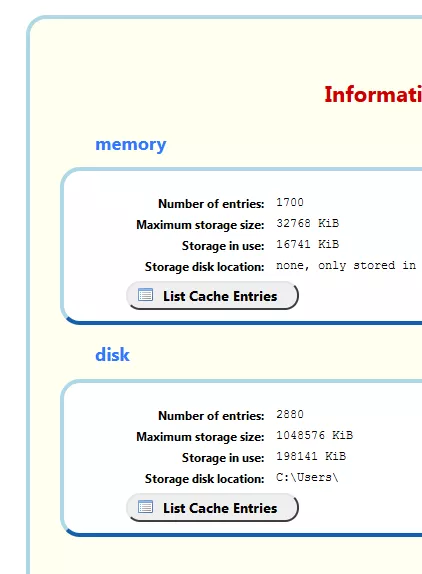
Da hast Du wohl mal eine Änderung gemacht.
Mfg.
Endor
Freut mich wenn es passt.
Mfg.
Endor
Hallo omar1979
Es gibt ein Plugin für Notepad++
Color picker vielleicht wäre das etwas für Dich:
Ich selbst verwende es nicht.
Mfg.
Endor
Mal wieder etwas neues:
about:unloads
        @namespace url(http://www.w3.org/1999/xhtml);

        @-moz-document url(about:unloads) {

        html{background: white !important;}

        h1:before {
        content: "Endors Firefox:    ";
        font-weight:bold !important;
        color:red !important;
        margin-left:500px !important;
        margin-right: 15px !important;
        padding-top: 100px !important;}

        h1{
        color: #cc0000 !important;
        font-size: 22px !important;
        font-weight: bold !important;
        margin-bottom: 20px !important;}

        h2, body > table:nth-child(n+1) > tbody:nth-child(1) > tr:nth-child(1){color: #3377ff !important;}

        body {
        min-height: 93vh !important;
        background-color: #fffff0 !important;
        max-width: 1420px !important;
        margin-left: 25px !important;
        margin-top: 25px !important;
        padding-top: 35px !important;
        padding-left: 25px !important;
        padding-right: 25px !important;
        border-left-color:  lightblue!important;
        border-top-color:  lightblue!important;
        border-right-color:  dodgerblue!important;
        border-bottom-color:  dodgerblue!important;
        border-radius: 20px !important;
        border-width:  4px !important;
        border-style: outset !important;}

        #button-unload {
        margin-top: 15px !important;
        text-decoration:none !important;
        display: inline-block !important;
        padding-left: 55px !important;
        padding-right: 35px !important;
        padding-top: 5px  !important;
        padding-bottom: 5px !important;
        color: black !important;
        background: #efefef url("..//icons/Fuchs4.png") no-repeat !important;
        background-position:16px 1px!important;
        border-left-color:  #E6E5E5 !important;
        border-top-color:  #E6E5E5 !important;
        border-right-color:  #5C5B5B !important;
        border-bottom-color:  #5C5B5B !important;
        border-width:1px !important;
        border-style: outset !important;
        border-radius:22px!important;}

        #button-unload:hover{
        background: #CFE6F1 url("..//icons/Fuchs4.png") no-repeat !important;
         background-position:16px 1px!important;
        border-left-color:  #e4e3e3 !important;
        border-top-color:  #e4e3e3 !important;
        border-right-color:  #5c5b5b !important;
        border-bottom-color:  #5c5b5b !important;
        border-width:1px !important;
        border-style: outset !important;
        border-radius:22px!important;}

        body > p:nth-child(3) > a:nth-child(1){
        text-decoration:none !important;
        padding-left: 55px !important;
        padding-right: 35px !important;
        padding-top: 3px  !important;
        padding-bottom: 5px !important;
        color: black !important;
        background: #efefef url("..//icons/general-20.png") no-repeat !important;
        background-position:16px 2px!important;
        border-left-color:  #E6E5E5 !important;
        border-top-color:  #E6E5E5 !important;
        border-right-color:  #5C5B5B !important;
        border-bottom-color:  #5C5B5B !important;
        border-width:1px !important;
        border-style: outset !important;
        border-radius:22px!important;}


        body > p:nth-child(3) > a:nth-child(1):hover{
        background: #CFE6F1 url("..//icons/general-20.png") no-repeat !important;
         background-position:16px 2px!important;
        border-left-color:  #e4e3e3 !important;
        border-top-color:  #e4e3e3 !important;
        border-right-color:  #5c5b5b !important;
        border-bottom-color:  #5c5b5b !important;
        border-width:1px !important;
        border-style: outset !important;
        border-radius:22px!important;}

        body > p:nth-child(3) > a:nth-child(1)

        td{background: #FFFFFF !important;}
        td:hover{background: #ffeb99 !important;}

        th {background-color: #ee7621 !important;}
        th:hover {background-color: #b54f06 !important;}

        /* .build-platform-table > tbody:nth-child(1) > tr:nth-child(1) > th:nth-child(1){
        border-top-left-radius:24px !important; border-top-right-radius:24px !important;
        min-width: 200px !important; padding-left: 20px !important;}

        .build-platform-table > tbody:nth-child(1) > tr:nth-child(2) > td:nth-child(1){
        border-bottom-right-radius:24px !important; border-bottom-left-radius:24px !important;
        min-width: 200px !important; padding-left: 20px !important; padding-top: 5px!important;
        padding-bottom: 8px !important;}

        .build-platform-table,
        .build-platform-table > tbody:nth-child(1),
        .container > table:nth-child(7) > tbody:nth-child(1),
        .container > table:nth-child(7) {border-radius:22px!important;}

        .container > table:nth-child(7) > tbody:nth-child(1) > tr:nth-child(1) > th:nth-child(1)
        {border-top-left-radius:24px !important; padding-top: 8px !important; padding-left: 13px !important;}

        .container > table:nth-child(7) > tbody:nth-child(1) > tr:nth-child(1) > th:nth-child(3)
        {border-top-right-radius:24px !important;}

        .container > table:nth-child(7) > tbody:nth-child(1) > tr:nth-child(4) > td:nth-child(3)
        {border-bottom-right-radius:24px !important;}

        .container > table:nth-child(7) > tbody:nth-child(1) > tr:nth-child(4) > td:nth-child(1)
        {border-bottom-left-radius:24px !important; padding-bottom: 8px !important; padding-left: 12px !important;}

        .container > table:nth-child(7) > tbody:nth-child(1) > tr:nth-child(2) > td:nth-child(1),
        .container > table:nth-child(7) > tbody:nth-child(1) > tr:nth-child(3) > td:nth-child(1){
        padding-left: 12px !important;} */


}Symbole: 

Das Symbol general-20.png braucht es erst ab Firefox 95 Beta.
Mfg.
Endor
Hallo zusammen.
Vielen Dank für den Hinweis.
Habe das Script mal aktualisiert.
https://github.com/Endor8/userChr…ut-config.uc.js
Mfg.
Endor
Reinhold Roth ist tot.
31 Jahr nach seinem schweren Motorrad Unfall.

R.I.P.
Mfg.
Endor