1. Nachrichten
  2. Forum
    1. Unerledigte Themen
    2. Forenregeln
  3. Spenden
  • Anmelden
  • Registrieren
  • Suche
Alles
  • Alles
  • Artikel
  • Seiten
  • Forum
  • Erweiterte Suche
  1. camp-firefox.de
  2. Boersenfeger

Beiträge von Boersenfeger

  • about:addons mit einigen Fehlern in 150.0 Nightly

    • Boersenfeger
    • 24. Februar 2026 um 16:19

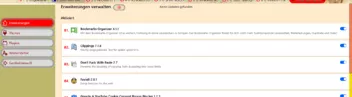
    Moin, nach dem heutigen UpDate fehlen mir in about:addons zum einen rechts die Buttons: Einstellungen, deinstallieren etc und auf der linken Seite geht die Hintergrundfarbe dort, wo die Buttons Erweiterungen, Themes, Plugins etc. sind, nicht mehr bis zum oberen Rand. Nach meinen hoffnungslosen Versuchen, den Code zu ändern, lege ich ihn nun in eure bewährten Hände. :)


    CSS
        /*  Addons-Manager Nightly */
    
    /*  Versionsnummer der Addons wird angezeigt */
    
         @-moz-document url-prefix(chrome://mozapps/content/extensions/aboutaddons.html),
        url-prefix(chrome://mozapps/content/extensions/extensions.xhtml), url-prefix(about:addons){
            
         div:not([current-view="updates"]) .addon-name-link[title]::after,
        div:not([current-view="updates"]) .addon-name[title]::after {
        display: block !important;
        content: attr(title) !important;
        margin-top: -22px !important;
        } 
        
        /*restore version number */
        div:not([current-view="updates"]) .addon-name-link[title]:not([data-l10n-args])::after,
        div:not([current-view="updates"]) .addon-name[title]:not([data-l10n-args])::after {
          display: block !important;
          content: attr(title) !important;
          margin-top: -22px !important;
        }
    
    /*  Hintergrund der Button auf der rechten Seite */
    
        addon-list addon-card:not([expanded="true"]) panel-list * {
          background-color: antiquewhite !important;
          color: black !important;
          font-weight: bold !important;
        }
        
        addon-list.monochromatic-addon-list section addon-card div.card.addon addon-options panel-list {
          background: blanchedalmond !important;     
        }
        
        @supports -moz-bool-pref("browser.in-content.dark-mode") 
         @media (prefers-color-scheme: dark) 
         addon-list addon-card:not([expanded="true"]) panel-list *,
         .more-options-menu panel-item {
         background: black !important;
         color: white !important;
        
        }
        
        
        addon-list panel-item {
          margin: 0 1px !important;
          box-shadow: inset 0 0 3px 3px grey;
        }
        
       
    /*  Reduce Size of default Buttons */
    
        link:is([href$="panel-item.css"],[href$="panel-list.css"]) ~ button {
          width: unset !important;
          padding: 10px 24px !important; /* 5px ist die Höhe der rechten Button */
         
        }
        
    /*  Entfernt den Drei-Punkte-Button aus dem Container */
    
        addon-card .more-options-button {
          display: none !important;
        }
    
    /*  Remove Button Icon */
    
        addon-list panel-item {
          --icon: unset !important;
        
        }
        
    /*  Restore Buttons */
        
        addon-list .more-options-menu :is(addon-options,plugin-options) panel-list {
          position: relative !important;
          display: block !important;
          overflow: hidden !important;
          margin-top: -25px;
          background: unset !important;
          border: unset !important;
          box-shadow: unset !important;
          min-width: unset !important;
          width: unset !important;     
        }
    
        div.arrow.top + div.list {
          display: flex !important;
          flex-flow: row wrap !important;
          justify-content: flex-start !important;
        } 
        
         div[role="presentation"].list {
          display: flex !important;
          flex-flow: row wrap !important;
          justify-content: flex-start !important;
        }
    
        panel-item[action="preferences"] {
          order: -1;
        }
        
        panel-item[badged] {
          border: 1px solid Highlight !important;
        }
        
        panel-item[badged]::after,
        :host([badged]) button::after,
        link:is([href$="panel-item.css"],[href$="panel-list.css"]) ~ button::after,
        :is(addon-options,plugin-options) button::after {
          display: none !important;
          content: unset !important;
        }
        
        addon-page-options panel-list {
          min-width: unset !important;
          width: auto !important;
          max-width: 300px !important;
          z-index: 1000 !important;      
        }
        
        addon-page-options panel-list panel-item {
          min-width: 280px !important;
          width: 280px !important;     
        }
        
        .sticky-container {
          z-index: 1000 !important;
        }
        
        link:-is([href$="panel-item.css"],[href$="panel-list.css"]) ~ button label[accesskey] {
          padding-inline-start: 0px !important;
          padding-top: 3px !important;
          padding-bottom: 3px !important;
          min-width: 260px !important;
          width: 260px !important;      
        }
    
        addon-page-options panel-list panel-item[accesskey][checked] {
          background: url("chrome://global/skin/icons/check.svg") 5px no-repeat !important;
        }
            
        addon-list addon-card:not([expanded="true"]) panel-list {     
          display: block !important;   
          box-shadow: none !important; 
          border: none !important;
          right: 45px !important; /* Abstand der Button bei Erweiterungen vom rechten Rand */     
        }
    
    /*  Abstand zwischen den Containern */  
        
        addon-card .addon { 
        margin: 5px !important; 
        }
    
    /*  Höhe der Container */
        
        addon-list[type="extension"]{ 
        --card-padding: 19px }
        addon-card .addon-card-collapsed { 
        margin-bottom: 2px !important; /* Button rechts Abstand vom oberen Rand */   
        }    
    
    /*  Abstand der Button vom rechten Rand bei Themes, Plugins, Wörterbücher, usw.*/
        
        addon-list:is([type="theme"],[type="plugin"],[type="dictionary"]) 
        addon-card:not([expanded="true"]) 
        panel-list {
        right: 55px !important;
        }
    
    /*  Abstand der Button vom oberen Rand bei Plugins, Wörterbücher, usw. */
        
        addon-list addon-card:not([expanded="true"]) panel-list {
        margin-top: -42px !important;
        }
    
    /*  Abstand der Button vom oberen Rand bei Themes */
        
        addon-list:is([type="theme"]) addon-card:not([expanded="true"]) panel-list {
          margin-top: -46px !important;
          margin-left: -100px !important;
        }
        
    /*  Entfernung Bereich Farbgebungen */
    
        addon-list.monochromatic-addon-list {
        display: none !important;
        }    
    
    /*  Ausdehnung der Container zum rechten Rand */    
    
        .addon.card {
        width: 1400px;
        }
    
        input[type="checkbox"].toggle-button {
          margin-right: 430px !important; /* blauer Button -Deaktivieren/Aktivieren- Abstand vom rechten Rand */
        }
        
    /*  Nummerierung der installierten Erweiterungen im AddonsManager */
    
        body {
        counter-reset: section !important;                   
        }
        #main > addon-list:nth-child(1) > section:nth-child(2) > addon-card:nth-child(n+1) > div:nth-child(1) > div:nth-child(2)::before {
        font-size:18px!important;  
        color: red !important;
        font-weight: bold !important;
        counter-increment: section;                 
        content: counter(section, decimal-leading-zero)". ";
        margin-left: -8px !important;
        padding-right: 8px !important; 
        margin-top:4px!important;
        }
        
    /*  Abstand der Button zum linken Rand */
        
        #categories > .category, #preferencesButton, #helpButton, #addonsButton {
          margin-left: 5px !important; 
        }
    
        #categories > .category:not([disabled]){
          background-color: gainsboro !important;/*Hintergrundfarbe vom Button*/
          margin-top: 2px !important; /*Abstand zum Button darüber*/
          border-radius: 60px !important;/*Rundung vom Button*/
          box-shadow: inset 0 0 5px 5px #888;
        }
        
    /*  Aktiver Button rot, Schrift weiß */
        
        #categories > .category[selected]{
          color: white !important;
          background-color: red !important;
          margin-top: 1px !important;
          border-radius: 60px !important;
          box-shadow: inset 0 0 5px 5px #888; 
        }
    
    /*  Hintergrund der Button blau, Schrift weiß bei hover mit der Maus */
        
        #categories > .category:hover, #preferencesButton:hover, #helpButton:hover, #addonsButton:hover {
          color: white !important;
          background-color: blue !important;
          margin-top: 1px !important;
          border-radius: 60px !important;
          box-shadow: inset 0 0 5px 5px #888;      
        }
            
    /*  Optionen-Button */
    
        button.more-options-button:nth-child(1) {
    
        position: absolute !important;
        left: 19% !important;
        margin-top: -10px !important;
        }
    
    /*  Bei "Themes" die Grafiken ausblenden */
        
        .card-heading-image {
        display: none !important;
        }
          
        
    /*  Erweiterungssuche ausblenden */
    
        .main-search {
        display: none !important;
        }
        
    /*  Ausblenden Firefox Optionen */
    
        #preferencesButton,
        #help-button {
        display: none !important;
    	}
        
    /*  Kategorien in abgerundeten Buttons */
    
        #preferencesButton,
        #addonsButton,
        #helpButton,
        #category-availableUpdates {
        background-color: red !important;
        margin-top:5px !important;
        border-radius:60px !important;
        }    
    
    /*  Add-ons entdecken entfernt */
    
        .category[name="discover"] {
        display:none!important;
        }
        
    /*  Privatmodus und empfohlene Erweiterungen Icons entfernen */
    
        .addon-badge-recommended,
        .addon-badge-private-browsing-allowed {
        display:none !important; 
        }
    
    
    /*  Umrandung bei Hover breiter Rand und andere Farbe */
    
        :root {
        --card-outline-color: LimeGreen !important;
        }
    	}
        
        @-moz-document url-prefix(chrome://mozapps/content/extensions/aboutaddons.html),
        url-prefix(about:addons) {
    
       #sidebar {
        background: darkkhaki !important;
        }
        .main-search,
        .sticky-container,
        .main-heading,
        #content {
        background: blanchedalmond !important;
        font-size: 15px !important;
        }
        richlistbox.list > richlistitem.addon {
        background:white!important;
        margin-left:-20px !important;
        margin-top:  7px !important;
        }
        #list-view > #addon-list .description-container {
        margin-left: 350px !important;
        margin-top: -10px !important;
        border-radius:60px !important;
        padding: 5px 8px 2px 7px !important; 
        }    
        #list-view > #addon-list .addon.addon-view {
        padding: 5px 80px 2px 7px !important;
        border-radius:60px !important;
        }
    
    /*  Kategorien nicht angeklickt, Text dunkelrot */
    
        *|*.category {
        color:darkred!important;
        }
    
    /*  Kategorien hover Hintergrund + Schrift */
    
        *|*.category:hover {
        color:white!important;
        background:red!important;
        }
    	}
    
    /*  Einstellungen-Fenster verbreitern */
        
       @-moz-document url-prefix(chrome://mozapps/content/extensions/aboutaddons.html),
        url-prefix(chrome://mozapps/content/extensions/extensions.xhtml), url-prefix(about:addons) { 
    	
        .pane-container{
        width: 900px !important;
        }                      
        
    /*  Unter Plugins Nachfragen ob aktiviert werden soll entfernt */
    
        #main > div:nth-child(1) > addon-list:nth-child(1) > section:nth-child(2) > addon-card:nth-child(2) > div:nth-child(1) > plugin-options:nth-child(5) > panel-list:nth-child(1) > panel-item:nth-child(1),
        #main > div:nth-child(1) > addon-list:nth-child(1) > section:nth-child(2) > addon-card:nth-child(3) > div:nth-child(1) > plugin-options:nth-child(5) > panel-list:nth-child(1) > panel-item:nth-child(1) {
        display: none !important;
        }
        
    /*  Button mit dem Zahnrad */
    
      .page-options-menu > .more-options-button{
          fill: red !important; /* rotes Zahnrad */ 
          border: 1px solid grey !important; /* farbige Umrandung */
          border-radius: 15px !important; /* Abrundung */
          width: 60px !important; /* Länge des Button */
          height: 30px ! important; /* Höhe des Button */
          box-shadow: inset 0 0 2px 2px grey; /* innerer Schatten */
        } 
        
    /*  Button oben mit dem Zahnrad bei Hover */
    
        .page-options-menu > .more-options-button:hover {
          fill: lime !important; /* Farbe des Zahnrades */
        }
    
    /*   Aussehen des Menü hinter dem Zahnrad */
    
        link:is([href$="panel-item.css"],[href$="panel-list.css"]) ~ button label[accesskey] {
          margin-left: 6% ! important;
          min-width: 50px !important;
          width: 175px !important; /* Länge der einzelnen Felder */
          background: white ! important; /* Farbe des Hintergrundes */
        }
        
        link:is([href$="panel-item.css"],[href$="panel-list.css"]) ~ button label[accesskey]:hover {
          background: lightyellow !important;    
        }  
        .sticky-container {
          z-index: 1000 !important;
        }
    
         button:focus {
         background: none !important;
     }
     
        addon-page-options panel-list panel-item {
          width: 425px !important; /* Länge der aktivierten Menü-Leiste */
          background: none ! important;
          padding-right: 15px !important;
        }
        
        addon-page-options panel-list panel-item:hover {
          width: 425px !important; 
          background: lime ! important;
          color: red !important;
        }    
    
        addon-page-options panel-list {
          min-width: unset !important;
          width: auto !important;
          max-width: 450px !important; /* Ausdehnung der Felder nach rechts */ 
          background: #f8f8ff ! important; /* farbiger Hintergrund des Feldes */
          padding-left: 8px !important; /* Ausdehnung nach links */
          padding-right: 3px !important; /* Ausdehnung nach rechts */
          z-index: 1000 !important;
        }
        
    /*  Hintergrund der Box Updates automatisch aktualisieren */
        addon-page-options panel-list panel-item[accesskey][checked] {
          background: gold !important;
        }           
        
    /*  Zurückbutton bei geöffnetem Menü Einstellung/Verwalten */
    
        .back-button {
          background-color: silver !important;/*Hintergrundfarbe vom Button*/
          width: 60px !important;
          border-radius: 60px !important;/*Rundung vom Button*/
          box-shadow: inset 0 0 3px 3px #888;
        }
        
        .back-button:hover {
          color: white !important;
          background-color: dodgerblue !important;
          border-radius: 60px !important;
          box-shadow: inset 0 0 3px 3px #888;
        }    
    
    /*  Icons des Stern-Kontextmenü */
    
        #page-options > panel-list:nth-child(1) > panel-item:nth-child(1)::before {
         content: '';
         display: block;
         width: 16px;
         height: 16px;
         background: url("..//icons/Bild5.png") no-repeat !important;
         background-size: 16px 16px !important;
         margin-left: 15px;
         margin-right: -31px;}
    
        #page-options > panel-list:nth-child(1) > panel-item:nth-child(2)::before {
         content: '';
         display: block;
         width: 16px;
         height: 16px;
         background: url("..//icons/Bild61.png") no-repeat !important;
         background-size: 16px 16px !important;
         margin-left: 15px;
         margin-right: -31px;}
     
        #page-options > panel-list:nth-child(1) > panel-item:nth-child(4)::before {
          content: '';
         display: block;
         width: 16px;
         height: 16px;
         background: url("..//icons/Bild3.png") no-repeat !important;
         background-size: 16px 16px !important;
         margin-left: 15px;
         margin-right: -31px;}
    
        #page-options > panel-list:nth-child(1) > panel-item:nth-child(5)::before {
         content: '';
         display: block;
         width: 16px;
         height: 16px;
         background: url("..//icons/Bild66.ico") no-repeat !important;
         background-size: 16px 16px !important;
         margin-left: 15px;
         margin-right: -31px;}
    
        #page-options > panel-list:nth-child(1) > panel-item:nth-child(7) {
         fill: transparent !important;}
         
        #page-options > panel-list:nth-child(1) > panel-item:nth-child(7)::before {
         content: '';
         display: block;
         width: 16px;
         height: 16px;
         background: url("..//icons/Bild62.png") no-repeat !important;
         background-size: 18px 18px !important;
         margin-left: 16px;
         margin-right: -32px;
         margin-bottom: 3px;}
        
        #page-options > panel-list:nth-child(1) > panel-item:nth-child(7):not([checked])::before {
         content: '';
         font-size: 14px;
         padding-left: 0px !important;
         padding-top: 1px !important;
         padding-bottom: 2px !important;
         display: block;
         width: 16px;
         height: 16px;
         background: url("..//icons/Bild63.png") no-repeat !important;
         background-size: 18px 18px !important;
         margin-left: 15px;
         margin-right: -32px;
         margin-bottom: 3px;}
        
        #page-options > panel-list:nth-child(1) > panel-item:nth-child(8)::before {
         content: '';
         display: block;
         width: 16px;
         height: 16px;
         background: url("..//icons/Bild64.png") no-repeat !important;
         background-size: 16px 16px !important;
         margin-left: 15px;
         margin-right: -31px;}
    
        #page-options > panel-list:nth-child(1) > panel-item:nth-child(10)::before {
         content: '';
         display: block;
         width: 16px;
         height: 16px;
         background: url("..//icons/Bild67.png") no-repeat !important;
         background-size: 16px 16px !important;
         margin-left: 15px;
         margin-right: -31px;}    
         
    	}
    /*        About:addons  - Optionen Schaltfläche */
        
        @-moz-document url("about:addons"){
        
        #utils-updateNow{
        appearance: none !important;
        background: url("..//icons/Bild5.png") no-repeat !important;
        min-height: 24px!important;
        padding-top: 5px! important;
        padding-left:28px!important;
        background-position:6px 5px!important;}
    
        #utils-updateNow:hover{
        appearance: none !important;
        margin-right: -1px !important;
        background: #ecf0f6 url("..//icons/Bild5.png") no-repeat !important;    
        border-width: thin !important;
        border-radius: 4px !important;
        border-color: #aecff7 !important;
        border-style: solid !important;
        min-height: 24px!important;
        padding-top: 5px! important;
        padding-left:28px!important;
        background-position:6px 5px!important;}
    
        #utils-viewUpdates{
        appearance: none !important;
        background: url("..//icons/Bild61.png") no-repeat !important;
        min-height: 24px!important;
        padding-top: 5px! important;
        padding-left:28px!important;
        background-position:6px 5px!important;}
    
        #utils-viewUpdates:hover{
        appearance: none !important;
        margin-right: -1px !important;
        background: #ecf0f6 url("..//icons/Bild61.png") no-repeat !important;    
        border-width: thin !important;
        border-radius: 4px !important;
        border-color: #aecff7 !important;
        border-style: solid !important;
        min-height: 24px!important;
        padding-top: 5px! important;
        padding-left:28px!important;
        background-position:6px 5px!important;}
    
        #utils-installFromFile{
        appearance: none !important;
        background: url("..//icons/Bild3.png") no-repeat !important;
        min-height: 24px!important;
        padding-top: 5px! important;
        padding-left:28px!important;
        background-position:6px 5px!important;}
    
        #utils-installFromFile:hover{
        appearance: none !important;
        margin-right: -1px !important;
        background: #ecf0f6 url("..//icons/Bild3.png") no-repeat !important;    
        border-width: thin !important;
        border-radius: 4px !important;
        border-color: #aecff7 !important;
        border-style: solid !important;
        min-height: 24px!important;
        padding-top: 5px! important;
        padding-left: 28px!important;
        background-position: 6px 5px!important;}
    
        #utils-autoUpdateDefault[type="checkbox"][checked="true"]>.menu-iconic-left{
        appearance: none !important;
        background: url("..//icons/Bild62.png")no-repeat !important;
        height:15px!important;
        padding-top:1px!important;
        margin-left:5px !important;}
    
        #utils-autoUpdateDefault[type="checkbox"][checked="true"]>.menu-iconic-text {
        padding-left: 12px !important;}
    
        #utils-autoUpdateDefault[type="checkbox"][checked="false"]>.menu-iconic-left{
        appearance: none !important;
        background: url("..//icons/Bild63.png")no-repeat !important;
        height: 15px!important;
        padding-top: 1px!important;
        margin-left: 7px !important;}
    
        #utils-autoUpdateDefault[type="checkbox"][checked="false"]>.menu-iconic-text{
        padding-left: 10px !important;}
    
        #utils-resetAddonUpdatesToAutomatic{
        appearance: none !important;
        background: url("..//icons/Bild64.png") no-repeat !important;
        min-height: 24px!important;
        padding-top: 5px! important;
        padding-left: 28px!important;
        background-position: 6px 5px!important;}
    
        #utils-resetAddonUpdatesToAutomatic:hover{
        appearance: none !important;
        margin-right: -1px !important;
        background: #ecf0f6 url("..//icons/Bild64.png") no-repeat !important;    
        border-width: thin !important;
        border-radius: 4px !important;
        border-color: #aecff7 !important;
        border-style: solid !important;
        min-height: 24px!important;
        padding-top: 5px! important;
        padding-left: 28px!important;
        background-position: 6px 5px!important;}
    
        #utils-resetAddonUpdatesToManual{
        appearance: none !important;
        background: url("..//icons/Bild65.png") no-repeat !important;
        min-height: 24px!important;
        padding-top: 5px! important;
        padding-left: 28px!important;
        background-position: 6px 5px!important;}
    
        #utils-resetAddonUpdatesToManual:hover{
        appearance: none !important;
        margin-right: -1px !important;
        background: #ecf0f6 url("..//icons/Bild65.png") no-repeat !important;    
        border-width: thin !important;
        border-radius: 4px !important;
        border-color: #aecff7 !important;
        border-style: solid !important;
        min-height: 24px!important;
        padding-top: 5px! important;
        padding-left: 28px!important;
        background-position: 6px 5px!important;}    
    
        #utils-debugAddons{
        appearance: none !important;
        background: url("..//icons/Bild66.ico") no-repeat !important;
        min-height: 24px!important;
        padding-top: 5px! important;
        padding-left: 28px!important;
        background-position: 6px 5px!important;}
    
        #utils-debugAddons:hover{
        appearance: none !important;
        margin-right: -1px !important;
        background: #ecf0f6 url("..//icons/Bild66.ico") no-repeat !important;    
        border-width: thin !important;
        border-radius: 4px !important;
        border-color: #aecff7 !important;
        border-style: solid !important;
        min-height: 24px!important;
        padding-top: 5px! important;
        padding-left: 28px!important;
        background-position: 6px 5px!important;}    
    
        #manage-shortcuts{
        appearance: none !important;
        background: url("..//icons/Bild67.png") no-repeat !important;
        min-height: 24px!important;
        padding-top: 5px! important;
        padding-left: 28px!important;
        background-position: 6px 5px!important;}
    
        #manage-shortcuts:hover{
        appearance: none !important;
        margin-right: -1px !important;
        background: #ecf0f6 url("..//icons/Bild67.png") no-repeat !important;    
        border-width: thin !important;
        border-radius: 4px !important;
        border-color: #aecff7 !important;
        border-style: solid !important;
        min-height: 24px!important;
        padding-top: 5px! important;
        padding-left: 28px!important;
        background-position: 6px 5px!important;}
        
        #empty-addons-message {
        display: none !important;
        }
        }
    	
    	/* @-moz-document url-prefix(chrome://browser/content/browser.xhtml)*/
    	
    	{
        /*both*/
    
        #unified-extensions-area .unified-extensions-item-message-deck .unified-extensions-item-message,
        .unified-extensions-list .unified-extensions-item-message-deck,
        menupopup#unified-extensions-context-menu .unified-extensions-context-menu-report-extension,
        menupopup#unified-extensions-context-menu .unified-extensions-context-menu-remove-extension
        {
        display: none !important;
        }
    
    
        /*grid*/
    
        #unified-extensions-view
        width: unset !important;
        }
    
        #unified-extensions-area,
        .unified-extensions-list
        {
            display: grid !important;
            grid-template-columns: repeat(3, 1fr) !important;
            width: 200px !important;
        }
    
        #unified-extensions-panel toolbaritem.unified-extensions-item
        {
            max-width: unset !important;
            width:  62px !important;
            height: 30px !important;
            background-color: rgba(80, 80, 80, 0.6) !important;
            margin: 1px !important;
            border-radius: 4px !important;
            border: 1px solid #666 !important;
            padding: 0 2px !important;
        }
    
        .unified-extensions-list .unified-extensions-item
        {
            max-width: unset !important;
            width:  56px !important;
            height: 28px !important;
            background-color: rgba(67, 67, 94, 0.6) !important;
            margin: 1px !important;
            border-radius: 4px !important;
            border: 1px solid #666 !important;
            padding: 0 2px !important;
        }
    
        .unified-extensions-item-action-button
        {
            overflow: visible !important;
            max-height: 24px !important;
        }
    
        .unified-extensions-item[unified-extensions="true"] .webextension-browser-action > .toolbarbutton-badge-stack
        {
            margin-inline-end: 0 !important;
        }
    
        .unified-extensions-item .unified-extensions-item-menu-button.subviewbutton
        {
            margin-inline-start: 0 !important;
        }
    
        .unified-extensions-item-menu-button.subviewbutton > .toolbarbutton-icon
        {
            padding: unset !important;
        }
    
        .toolbaritem-combined-buttons:is(:not([cui-areatype="toolbar"]),
        [overflowedItem="true"]) > toolbarbutton:not(.toolbarbutton-1)[disabled]
        {
            opacity: 1 !important;
        }
    
        /*hover name regular*/
    
        #unified-extensions-area .subviewbutton
        {
            padding: 2px !important;
        }
    
        #unified-extensions-area .unified-extensions-item image.toolbarbutton-icon
        {
            opacity: 1 !important;
            margin-left:  2px !important;
            padding: 0 !important;
            height: 16px !important;
            width: 16px !important;
        }
    
        #unified-extensions-area .unified-extensions-item:hover .unified-extensions-item-menu-button image.toolbarbutton-icon
        {
            margin-left:  0 !important;
        }
    
        #unified-extensions-area .unified-extensions-item .unified-extensions-item-action-button
        {
            width: 26px !important;    
            margin-right: 6px !important; 
        }
    
        #unified-extensions-area .unified-extensions-item:hover .unified-extensions-item-action-button[disabled="true"]
        {
            opacity: 1 !important;
        }
    
        #unified-extensions-area .unified-extensions-item:not(hover) .unified-extensions-item-contents .unified-extensions-item-name
        {
            display: none !important;
        }
    
        #unified-extensions-area .unified-extensions-item:hover .unified-extensions-item-contents .unified-extensions-item-name
        {
            display: block !important;
            position: relative;
            top: -8px;
            left: 0px;
            background: #eee;
            color: #000;
            border-radius: 3px;
            width: 120px !important;
            min-height: 18px !important;
            z-index: 999 !important;
           
        }
    
        #unified-extensions-panel toolbaritem.unified-extensions-item:nth-of-type(3n-2):hover .unified-extensions-item-contents .unified-extensions-item-name
        {
            left: -20px !important;
        }
    
        #unified-extensions-panel toolbaritem.unified-extensions-item:nth-of-type(3n-1):hover .unified-extensions-item-contents .unified-extensions-item-name
        {
            left: -70px !important;
        }
    
        #unified-extensions-panel toolbaritem.unified-extensions-item:nth-of-type(3n):hover .unified-extensions-item-contents .unified-extensions-item-name
        {
            left: -120px !important;
        }
    
    
        /*hover name unified*/
    
        .unified-extensions-list .unified-extensions-item-action-button:hover
        {
            background-color: rgba(251, 251, 254, 0.09) !important;
        }
    
        .unified-extensions-list .subviewbutton
        {
            padding: 2px !important;
            margin: 0 !important;
        }
    
        .toolbaritem.unified-extensions-item .unified-extensions-list 
        {
            margin: 0 0 0 8px !important;
        }
        
        .unified-extensions-item-icon
        {
            opacity: 0.5;
        }
    
        .unified-extensions-list image.unified-extensions-item-icon
        {
            opacity: 1 !important;
            margin-left: 2px !important;
            padding: 0 !important;
            height: 16px !important;
            width: 16px !important;
        }
    
        .unified-extensions-list .unified-extensions-item image.toolbarbutton-icon
        {
            margin-left:  4px !important;
        }
    
        .unified-extensions-list .unified-extensions-item .unified-extensions-item-action-button
        {
            width: 26px !important;
            margin-right: 4px !important;
        }
    
        .unified-extensions-list .unified-extensions-item .unified-extensions-item-action-button:not(hover) .unified-extensions-item-contents label
        {
            display: none !important;
        }
    
        .unified-extensions-list .unified-extensions-item .unified-extensions-item-action-button:hover .unified-extensions-item-contents label
        {
            display: block !important;
            position: relative;
            top: -10px;
            left: 0px;
            background: #eee;
            color: #000;
            border-radius: 3px;
            width: 120px !important;
            min-height: 18px !important;
        }
    
        .unified-extensions-list .unified-extensions-item:nth-of-type(3n-2) .unified-extensions-item-action-button:hover .unified-extensions-item-contents label
        {
            left: -5px !important;
        }
    
        .unified-extensions-list .unified-extensions-item:nth-of-type(3n-1) .unified-extensions-item-action-button:hover .unified-extensions-item-contents label
        {
            left: -60px !important;
        }
    
        .unified-extensions-list .unified-extensions-item:nth-of-type(3n) .unified-extensions-item-action-button:hover .unified-extensions-item-contents label
        {
            left: -110px !important;
        }

    Alles anzeigen
  • Symbole in den Kontextmenüs [ Update ]

    • Boersenfeger
    • 22. Februar 2026 um 14:33
    Zitat von Endor

    Einen Fehler habe ich noch.
    Ich verwende dieses Script:

    Code
    // ==UserScript==
    // @name           UndoListInTabmenuToo
    // @namespace      http://space.geocities.yahoo.co.jp/gl/alice0775
    // @description    UndoListInTabmenuToo.uc.js
    // @include        main
    // @compatibility  Firefox 140
    // @author         Alice0775
    // @version        2025/09/05 mark '*' for current index in the tooltip
    // @version        2025/08/06 fix tooltip bug due to the change of 25/01/05
    // @version        2025/07/26 add List All Tabs menu
    // @version        2025/01/05 remove redundant menuitems
    // @version        2025/01/05 fix bug
    // @version        2024/12/22 fix Bug 1936336 - Disallow inline event handlers
    // @version        2024/08/23 Bug 1690613 - Allow access to url/title/favIconUrl without "tabs" permission in session API
    // @version        2023/06/16 08:00 Bug 1819675 - Expand recently closed tabs to include all Windows
    // @version        2022/05/10 fix ref to context-media-eme-separator
    // @version        2021/12/09 remove JSON.parse (Bug 1733425)
    // @version        2021/04/25 fix 1689378
    // @version        2019/11/14 remove eval
    // @version        2019/06/30 10:00 Bug 1555060 Convert <tabs> to a custom element
    // @version        2019/06/24 23:00 wait for gBrowser initialized
    // @version        2019/05/21 08:30 fix 69.0a1 Bug 1551320 - Replace all createElement calls in XUL documents with createXULElement
    // @version        2018/05/10 60
    // @version        2017/11/18 nsIPrefBranch to nsIPrefBranch
    // @version        2010/09/18 00:00 4.0b7pre
    // @version        2009/02/03 13:00 Tab-Verlauf im Tooltip anzeigen
    // @Note           Fügt die UndoClose-Tab-Liste zu Tabs und Kontextmenüs hinzu
    // @OriginalCode   Orginalcode aus browser.js für populateUndoSubmenu verwenden
    // @version        2018/05/09 15:00 61
    // ==/UserScript==
    // @version        2010/03/26 13:00  Minefield/3.7a4pre Bug 554991 -  allow tab context menu to be modified by normal XUL overlays
    // @version        2010/03/15 00:00  Minefield/3.7a4pre Bug 347930 -  Tab strip should be a toolbar instead
    // @version        2009/09/09 15:00 Mittelklick-Handhabung
    // @version        2009/09/03 22:00 Firefox3.7a1pre Funktion wurde wieder hergestellt. (Bug 489925. getElementById should not return anonymous nodes)
    // @version        2009/08/22 00:00 Firefox3.6 Ändern des stringbandle
    // @version        2009/04/24 00:00 #394759 [Firefox:Session Restore]-Add undo close window feature
    // @version        2008/10/12 18:00 Fx3.0.4pre Mittelklick-Popupmenü wurde nicht geschlossen und andere Korrekturen
    // @version        2007/10/05 10:00
    
    var UndoListInTabmenu = {
    // -- config --
      TABCONTEXTMENU : true , //Im Tabkontextmenü: anzeigen: true, nicht anzeigen: false
      CONTEXTMENU    : true,  //Im Hauptkontextmenü: anzeigen: true , nicht anzeigen: false
    // -- config end--
      ss: null,
    
      get tabContext() {
        return document.getElementById("tabContextMenu");
      },
    
      get navigatorBundle() {
        return Services.strings.createBundle(
               "chrome://browser/locale/browser.properties"
               );
      },
    
      init: function(){
    
        if (this.TABCONTEXTMENU){
          //Tabkontextmenü
          var tabContext = this.tabContext;
          this.makePopup(tabContext, null, "tabContextUndoList");
        }
        if (this.CONTEXTMENU){
          //Hauptkontextmenü
          var contextMenu = document.getElementById("contentAreaContextMenu");
          var refItem = document.getElementById("context-media-eme-separator");
          this.makePopup(contextMenu, refItem, "ContextUndoList");
        }
        // get closed-tabs from nsSessionStore
        this._ss = SessionStore;
    
      },
    
      makePopup: function(popup, refItem, id){
        var menu;
        //label
        const locale = "de";
        
        // "Recently Closed Windows"
        menu = document.createXULElement("menu");
        menu.setAttribute("id", "historyUndoWindowMenu3");
        menu.setAttribute("label", "K\u00FCrzlich geschlossene Fenster");
        menu.setAttribute("accesskey", "F");
        menu.setAttribute("disabled", "false");
        popup.insertBefore(menu, refItem);
    
        menupopup = document.createXULElement("menupopup");
        menu.appendChild(menupopup);
        menupopup.setAttribute("id", "historyUndoWindowPopup3");
        //menu.setAttribute("onpopupshowing", "UndoListInTabmenu.populateUndoWindowSubmenu(this);");
        menupopup.addEventListener("popupshowing", (event) => UndoListInTabmenu.populateUndoWindowSubmenu(event.currentTarget));
    
        //Liste kürzlich geschossener Tabs
        const LABELTEXT = "K\u00FCrzlich geschlossene Tabs";    //create menu
        menu = document.createXULElement("menu");
        menu.setAttribute("label", LABELTEXT);
        menu.setAttribute("accesskey", "T");
        if (id)
          menu.setAttribute("id", id);
        //menu.setAttribute("disabled", true);
        var menupopup = document.createXULElement("menupopup");
        menupopup.addEventListener("popupshowing", () => UndoListInTabmenu.populateUndoSubmenu(menupopup));
        //menupopup.setAttribute("onpopupshowing", "UndoListInTabmenu.populateUndoSubmenu(this);");
        menu.appendChild(menupopup);
        popup.insertBefore(menu, refItem);
    
        //All tabs menu
        menu = document.createXULElement("menuitem");
        menu.setAttribute("label", "Alle Tabs auflisten");
        menu.setAttribute("accesskey", "A");
        popup.insertBefore(menu, refItem);
        menu.addEventListener("command", (event) => {document.getElementById("alltabs-button").click()})
    
    
        //add event listener
        popup.addEventListener('popupshowing',function(event) {
          UndoListInTabmenu.toggleRecentlyClosedWindows(document.getElementById("historyUndoWindowMenu3"));
          // no restorable tabs, so make sure menu is disabled, and return
          if (UndoListInTabmenu._ss.getClosedTabCount(window) == 0) {
            menu.setAttribute("disabled", true);
            //menu.setAttribute("hidden", true);
            return;
          }
          menu.removeAttribute("disabled");
          //menu.setAttribute("hidden", false);
        },false);
      },
    
      /**
       * Populate when the history menu is opened (Fx3.6)
       */
      populateUndoSubmenu: function(undoPopup) {
    		while (undoPopup.hasChildNodes()) {
    			undoPopup.removeChild(undoPopup.firstChild);
    		}
    		var utils = RecentlyClosedTabsAndWindowsMenuUtils;
    		var tabsFragment = utils.getTabsFragment(
    		  window,
          "menuitem",
          /* aPrefixRestoreAll = */ true,
          "menu-history-reopen-all-tabs"
        );
    		undoPopup.appendChild(tabsFragment);
    
        // populate tab historis for tooltip
        var undoItems = UndoListInTabmenu._ss.getClosedTabDataForWindow(window);
        for (var i = 0; i < undoItems.length; i++) {
          var entries = undoItems[i].state.entries;
          var tooltiptext = "";
          for (var j = entries.length - 1; j > -1; j--){
            if (j != entries.length - 1)
              tooltiptext += "\n";
            if (undoItems[i].state.index - 1 !== j) {
              tooltiptext += parseInt(j + 1, 10) + ". " + entries[j].title;
            } else {
              tooltiptext += "*" + ". " + entries[j].title;
            }
          }
          undoPopup.childNodes[i].setAttribute("tooltiptext", tooltiptext);
        }
    
        // "Append Clear undo close tb list"
        undoPopup.appendChild(document.createXULElement("menuseparator"));
    
        let m = undoPopup.appendChild(document.createXULElement("menuitem"));
        m.setAttribute("label", "Liste der letzten Tabs l\u00F6schen");
        m.setAttribute("accesskey", "l");
        m.addEventListener("command", function() {
          let prefs = Services.prefs;
          let max_undo = prefs.getIntPref("browser.sessionstore.max_tabs_undo");
          prefs.setIntPref("browser.sessionstore.max_tabs_undo", 0);
          prefs.setIntPref("browser.sessionstore.max_tabs_undo", max_undo);
        }, false);
      },
    
      toggleRecentlyClosedWindows: function PHM_toggleRecentlyClosedWindows(menu) {
        // enable/disable the Recently Closed Windows sub menu
        // no restorable windows, so disable menu
        if (this._ss.getClosedWindowCount() == 0)
          menu.setAttribute("disabled", true);
        else
          menu.removeAttribute("disabled");
      },
    
      /**
       * Populate when the history menu is opened
       */
      populateUndoWindowSubmenu: function PHM_populateUndoWindowSubmenu(undoPopup) {
    		while (undoPopup.hasChildNodes()) {
    			undoPopup.removeChild(undoPopup.firstChild);
    		}
    		let utils = RecentlyClosedTabsAndWindowsMenuUtils;
    		let windowsFragment = utils.getWindowsFragment(
          window,
          "menuitem",
          /* aPrefixRestoreAll = */ true,
          "menu-history-reopen-all-windows"
        );
        undoPopup.appendChild(windowsFragment);
        undoPopup.firstChild.setAttribute("accesskey", "R");
    
        // "Append Clear undo close window list"
        undoPopup.appendChild(document.createXULElement("menuseparator"));
    
        m = undoPopup.appendChild(document.createXULElement("menuitem"));
        m.setAttribute("label", "Liste der kürzlich geschlossenen Fenster l\u00F6schen");
        m.setAttribute("accesskey", "L");
        m.addEventListener("command", function() {
          for (let i = SessionStore.getClosedWindowCount() -1; i >= 0; i--)
            SessionStore.forgetClosedWindow(i);
        }, false);
      }
    };
    
    // We should only start the redirection if the browser window has finished
    // starting up. Otherwise, we should wait until the startup is done.
    if (gBrowserInit.delayedStartupFinished) {
      UndoListInTabmenu.init();
    } else {
      let delayedStartupFinished = (subject, topic) => {
        if (topic == "browser-delayed-startup-finished" &&
            subject == window) {
          Services.obs.removeObserver(delayedStartupFinished, topic);
          UndoListInTabmenu.init();
        }
      };
      Services.obs.addObserver(delayedStartupFinished,
                               "browser-delayed-startup-finished");
    }
    Alles anzeigen

    Endor

    Hier werkelt eine neuere Version des Scripts:

    Code
    // ==UserScript==
    // @name           UndoListInTabmenuToo
    // @namespace      http://space.geocities.yahoo.co.jp/gl/alice0775
    // @description    UndoListInTabmenuToo.uc.js
    // @include        main
    // @author         Alice0775
    // @compatibility  Firefox 149
    // @version        2026/01/16 00:00 fix bug
    // @version        2026/01/13 00:00 compatibility 149 from 148
    // @version        2026/01/07 Bug 2008041 - Make XUL disabled / checked attributes html-style boolean attributes.
    // @version        2025/09/05 mark '*' for current index in the tooltip
    // @version        2025/08/06 fix tooltip bug due to the change of 025/01/05
    // @version        2025/07/26 add List All Tabs menu
    // @version        2025/01/05 remove redundant menuitems
    // @version        2025/01/05 fix bug
    // @version        2024/12/22 fix Bug 1936336 - Disallow inline event handlers
    // @version        2024/08/23 Bug 1690613 - Allow access to url/title/favIconUrl without "tabs" permission in session API
    // @version        2023/06/16 08:00 Bug 1819675 - Expand recently closed tabs to include all Windows
    // @version        2022/05/10 fix ref to context-media-eme-separator
    // @version        2021/12/09 remove JSON.parse (Bug 1733425)
    // @version        2021/04/25 fix 1689378
    // @version        2019/11/14 remove eval
    // @version        2019/06/30 10:00 Bug 1555060 Convert <tabs> to a custom element
    // @version        2019/06/24 23:00 wait for gBrowser initialized
    // @version        2019/05/21 08:30 fix 69.0a1 Bug 1551320 - Replace all createElement calls in XUL documents with createXULElement
    // @version        2018/05/10 60
    // @version        2017/11/18 nsIPrefBranch to nsIPrefBranch
    // @version        2010/09/18 00:00 4.0b7pre
    // @version        2009/02/03 13:00 ツールチップにタブ内履歴を表示するようにした
    // @Note           タブやコンテキストメニューにもUndoClose Tab Listを追加するもの
    // @OriginalCode   browser.jsからpopulateUndoSubmenuを拝借し, ごにょごにょした
    // @version        2018/05/09 15:00 61
    // ==/UserScript==
    // @version        2010/03/26 13:00  Minefield/3.7a4pre Bug 554991 -  allow tab context menu to be modified by normal XUL overlays
    // @version        2010/03/15 00:00  Minefield/3.7a4pre Bug 347930 -  Tab strip should be a toolbar instead
    // @version        2009/09/09 15:00 中クリック処理
    // @version        2009/09/03 22:00 Firegox3.7a1preで動かなくなっていたのを修正(Bug 489925. getElementById should not return anonymous nodes)
    // @version        2009/08/22 00:00 Firegox3.6 stringbandleの変更による
    // @version        2009/04/24 00:00 #394759 [Firefox:Session Restore]-Add undo close window feature
    // @version        2008/10/12 18:00 Fx3.0.4pre中クリックしたときメニューポップアップが閉じないおよびその他fix
    // @version        2007/10/05 10:00
    
    var UndoListInTabmenu = {
    // -- config --
      TABCONTEXTMENU : true ,  // Im Hauptkontextmenü: anzeigen: true , nicht anzeigen: false
      CONTEXTMENU    : true,  // Im Hauptkontextmenü: anzeigen: true , nicht anzeigen: false
    // -- config end--
      ss: null,
    
      get tabContext() {
        return document.getElementById("tabContextMenu");
      },
    
      get navigatorBundle() {
        return Services.strings.createBundle(
               "chrome://browser/locale/browser.properties"
               );
      },
    
      init: function(){
    
        if (this.TABCONTEXTMENU){
          
          var tabContext = this.tabContext;
          this.makePopup(tabContext, null, "tabContextUndoList");
        }
        if (this.CONTEXTMENU){
          
          var contextMenu = document.getElementById("contentAreaContextMenu");
          var refItem = document.getElementById("context-media-eme-separator");
          this.makePopup(contextMenu, refItem, "ContextUndoList");
        }
        // Geschlossene Tabs dem NS-Sitzungsspeicher entnehmen
        this._ss = SessionStore;
    
      },
    
        makePopup: function(popup, refItem, id){
        var menu;
        //label
        const locale = "en";
        
        //Liste kürzlich geschlossener Tabs
        const LABELTEXT = "K\u00FCrzlich geschlossene Tabs";    //Menü erstellen
        menu = document.createXULElement("menu");
        menu.setAttribute("label", LABELTEXT);
        menu.setAttribute("accesskey", "L");
        if (id)
          menu.setAttribute("id", id);
        //menu.setAttribute("disabled", true);
        var menupopup = document.createXULElement("menupopup");
        menupopup.addEventListener("popupshowing", () => UndoListInTabmenu.populateUndoSubmenu(menupopup));
        //menupopup.setAttribute("onpopupshowing", "UndoListInTabmenu.populateUndoSubmenu(this);");
        menu.appendChild(menupopup);
        popup.insertBefore(menu, refItem);
    	
        //Tabs Menü
        menu = document.createXULElement("menuitem");
        menu.setAttribute("label", "Alle Tabs auflisten");
        menu.setAttribute("accesskey", "A");
        popup.insertBefore(menu, refItem);
        menu.addEventListener("command", (event) => {document.getElementById("alltabs-button").click()})
    
    	//Eventlistener hinzufügen
        popup.addEventListener('popupshowing',function(event) {
          UndoListInTabmenu.toggleRecentlyClosedWindows(document.getElementById("historyUndoWindowMenu3"));
          // no restorable tabs, so make sure menu is disabled, and return
          if (UndoListInTabmenu._ss.getClosedTabCount(window) == 0) {
            menu.setAttribute("disabled", true);
            //menu.setAttribute("hidden", true);
            return;
          }
          menu.removeAttribute("disabled");
          //menu.setAttribute("hidden", false);
        },false);
      },
    
      toggleRecentlyClosedTabs: function toggleRecentlyClosedTabs(menu) {
        // enable/disable the Recently Closed Windows sub menu
        // no restorable windows, so disable menu
        menu.toggleAttribute("disabled", this._ss.getClosedTabCount(window) == 0);
      },
    
    
      /**
       * Befüllen, wenn das Chronik-Menü geöffnet ist
       */
      populateUndoSubmenu: function(undoPopup) {
    		while (undoPopup.hasChildNodes()) {
    			undoPopup.removeChild(undoPopup.firstChild);
    		}
    		var utils = RecentlyClosedTabsAndWindowsMenuUtils;
    		var tabsFragment = utils.getTabsFragment(
    		  window,
          "menuitem",
          /* aPrefixRestoreAll = */ true,
          "menu-history-reopen-all-tabs"
        );
    		undoPopup.appendChild(tabsFragment);
    
        // populate tab historis for tooltip
        var undoItems = UndoListInTabmenu._ss.getClosedTabDataForWindow(window);
        for (var i = 0; i < undoItems.length; i++) {
          var entries = undoItems[i].state.entries;
          var tooltiptext = "";
          for (var j = entries.length - 1; j > -1; j--){
            if (j != entries.length - 1)
              tooltiptext += "\n";
            if (undoItems[i].state.index - 1 !== j) {
              tooltiptext += parseInt(j + 1, 10) + ". " + entries[j].title;
            } else {
              tooltiptext += "*" + ". " + entries[j].title;
            }
          }
          undoPopup.childNodes[i].setAttribute("tooltiptext", tooltiptext);
        }
    
       // "Liste geschlossener Tabs l\u00F6schen anfügen"
        undoPopup.appendChild(document.createXULElement("menuseparator"));
    
        let m = undoPopup.appendChild(document.createXULElement("menuitem"));
        m.setAttribute("label", "Clear undo close tab list");
        m.setAttribute("accesskey", "C");
        m.addEventListener("command", function() {
          let prefs = Services.prefs;
          let max_undo = prefs.getIntPref("browser.sessionstore.max_tabs_undo");
          prefs.setIntPref("browser.sessionstore.max_tabs_undo", 0);
          prefs.setIntPref("browser.sessionstore.max_tabs_undo", max_undo);
        }, false);
      },
    
      toggleRecentlyClosedWindows: function PHM_toggleRecentlyClosedWindows(menu) {
        // enable/disable the Recently Closed Windows sub menu
        // no restorable windows, so disable menu
        if (this._ss.getClosedWindowCount() == 0)
          menu.setAttribute("disabled", true);
        else
          menu.removeAttribute("disabled");
      },
      
      /**
       * Beim Öffnen des Verlaufsmenüs ausfüllen
       */
      populateUndoWindowSubmenu: function PHM_populateUndoWindowSubmenu(undoPopup) {
    		while (undoPopup.hasChildNodes()) {
    			undoPopup.removeChild(undoPopup.firstChild);
    		}
    		let utils = RecentlyClosedTabsAndWindowsMenuUtils;
    		let windowsFragment = utils.getWindowsFragment(
          window,
          "menuitem",
          /* aPrefixRestoreAll = */ true,
          "menu-history-reopen-all-windows"
        );
        undoPopup.appendChild(windowsFragment);
        undoPopup.firstChild.setAttribute("accesskey", "R");
    
        // "Anhängen Löschen Rückgängig Fenster schließen Liste"
        undoPopup.appendChild(document.createXULElement("menuseparator"));
    
        m = undoPopup.appendChild(document.createXULElement("menuitem"));
        m.setAttribute("label", "Clear undo close window list");
        m.setAttribute("accesskey", "C");
        m.addEventListener("command", function() {
          for (let i = SessionStore.getClosedWindowCount() -1; i >= 0; i--)
            SessionStore.forgetClosedWindow(i);
        }, false);
      }
    };
    
    // Wir sollten die Weiterleitung nur starten, wenn das Browserfenster den Startprozess abgeschlossen hat
    // Ansonsten sollten wir warten, bis der Start abgeschlossen ist
    
    if (gBrowserInit.delayedStartupFinished) {
      UndoListInTabmenu.init();
    } else {
      let delayedStartupFinished = (subject, topic) => {
        if (topic == "browser-delayed-startup-finished" &&
            subject == window) {
          Services.obs.removeObserver(delayedStartupFinished, topic);
          UndoListInTabmenu.init();
        }
      };
      Services.obs.addObserver(delayedStartupFinished,
                               "browser-delayed-startup-finished");
    }
    Alles anzeigen

    LG
    Boersenfeger

  • web.de Firefox 147.0.4

    • Boersenfeger
    • 20. Februar 2026 um 15:54

    Nutzt du sogenannte Sicherheitstipps, die du in irgendeiner PC-Zeitung oder im Internet aufgesammelt hast?

  • Der Glückwunsch-Thread

    • Boersenfeger
    • 20. Februar 2026 um 15:23

    Wow, vielen Dank für deine Glückwünsche und Würdigung. Da werde ich ja ganz verlegen... :D

  • userCSSloader.uc.js mag nicht die Styles laden

    • Boersenfeger
    • 17. Februar 2026 um 17:56

    Oh... Frag vielleicht mal im Thread nach, der in Zeile 8 hinterlegt ist. Ich bin ja auch nur ahnungslos und Konsument.

  • userCSSloader.uc.js mag nicht die Styles laden

    • Boersenfeger
    • 17. Februar 2026 um 14:43

    Moin, ich nutze die modifizierte Datei....

    JavaScript
     /* UserCSSLoader
     * original author: Griever -
     * https://github.com/Griever/userChromeJS/tree/master/UserCSSLoader
     *
     * Enhancements and several other changes including German translation
     * and configuration section by users aborix, Endor, bege, Speravir of
     * Camp Firefox forum - https://www.camp-firefox.de/forum/ - latest version:
     * https://www.camp-firefox.de/forum/thema/138814/?postID=1278991#post1278991
     */
    
    /****** Bedienungsanleitung ******
    
    CSS-Ordner im Chrome-Ordner erstellen, CSS-Dateien dort ablegen - speichern.
    Diejenigen, deren Dateiname mit "xul-" beginnen, diejenigen, die mit ".as.css"
    enden, sind AGENT_SHEET, alle anderen außer USER_SHEET werden gelesen. Da der
    Inhalt der Datei nicht überprüft wird, darauf achten, die Angabe von @namespace
    nicht zu vergessen!
    
    Schaltfläche oder Menü wird in Navigationsleiste eingefügt (einstellbar, siehe
    Variable "position" in unten anschließender Konfiguration).
    
    Dateiordner, Dateimanager und Texteditor können in der unten anschließenden
    Konfiguration geändert werden. Die Verwendung des in "view_source.editor.path"
    angegebenen Editors ist möglich.
    
    Linksklick auf Stil, zum Aktivieren/Deaktivieren
    Mittelklick auf Stil zum Aktivieren/Deaktivieren, ohne Menü zu schließen
    Rechtsklick auf Stil zum Öffnen im Editor
    Strg+Linksklick zum Anzeigen im Dateimanager
    
    Die Tastenkombinationen können im Menü eingeblendet werden, dazu nach 
    "acceltext" suchen und den Zeilenkommentar "//" entfernen.
    
    Ein Symbol für die Schaltfläche muss in der "userChrome.css" festgelegt werden,
    Pfad zum Bild (PNG nur als Beispiel):
    * relativ zur userChrome.css
        background-image: url("Relativer/Pfad/zum/CSS_Symbol.png");
    * eine absolute Pfadangabe zum Symbol muss mit File-Protokoll-Präfix erfolgen:
        background-image: url("file:///Absoluter/Pfad/zum/CSS_Symbol.png");
    
    #usercssloader-menu-item {
    	background-image: url("Relativer/Pfad/zum/CSS_Symbol.png");
    	background-position: center;
    	background-repeat: no-repeat;
    	background-size: 16px;
    
    	&:hover {
    		background-color: var(--toolbarbutton-hover-background);
    	}
    
    	& #usercssloader-menu > .menu-text[value="CSS"] {
    		opacity: 0;
    		width: calc(2 * var(--toolbarbutton-inner-padding) + 16px);
    		height: calc(2 * var(--toolbarbutton-inner-padding) + 16px);
    	}
    }
    
    **** Anleitung Ende ****/
    
    (function(){
    
    /***** Konfiguration *****/
    /* Position: als frei verschiebbare-Schaltfläche = 0, als Menü anzeigen = 1 */
    let position = 0;//1
    /* Dateimanager festlegen, Beispiele:
     *    let fileManager = "C:\\Programme\\FreeCommanderXE\\FreeCommander.exe";
     *    let fileManager = "C:\\Programme\\totalcmd\\TOTALCMD.EXE";
     * auch möglich:
     *    let fileManager = "C:\\Windows\\explorer.exe";
     * Bleibt Parameter leer, wird Standardmanager des Systems ohne Parameter
     * verwendet mit leicht eingeschränkter Funktionalität. */
    let fileManager = "";
    /* eventuelle Parameter für den Dateimanager, Beispiele:
     *    let fileManagerParam = "/T";//FreeCommander oder Totalcommander
     *    let fileManagerParam = "/select,";//Windows Explorer, mit Komma korrekt!
     */
    let fileManagerParam = "";
    /* manche Manager benötigen den Parameter nach der Pfadangabe,
       dann "fileManagerParamPost" auf true setzen */
    let fileManagerParamPost = false;
    /* eigener Texteditor mit Pfad - Standard leer, dann wird Wert aus
     * Einstellung "view_source.editor.path" verwendet mit Warnmeldung,
     * wenn auch dieser leer ist, Beispiel:
     *    let customEditor = "C:\\Windows\\System32\\notepad.exe"; */
    let customEditor = "";
    /* Unterordner für die CSS-Dateien */
    let cssFolder = "CSS";
    /* Menüeintrag zum Bearbeiten der userChrome.css anzeigen (true)
       oder verstecken (false) */
    let showUserChromeCSS = true;
    /* Menüeintrag zum Bearbeiten der userContent.css anzeigen (true)
       oder verstecken (false) */
    let showUserContentCSS = true;
    /* zusätzlich Chrome-Ordner im Untermenü anzeigen (true)
       oder verstecken (false) */
    let showChrome = true;
    /***** Ende der Konfiguration *****/
    
    // Wenn beim Start ein weiteres Fenster (zweites Fenster) vorhanden ist, beenden
    let list = Services.wm.getEnumerator("navigator:browser");
    while(list.hasMoreElements()){ if(list.getNext() != window) return; }
    
    if (window.UCL) {
    	window.UCL.destroy();
    	delete window.UCL;
    }
    
    let menutooltip = "Linksklick: an/aus, Menü schließt\nMittelklick: an/aus, Menü bleibt offen\nRechtsklick: bearbeiten";
    if (fileManager !== "") {
    		menutooltip = menutooltip + "\nStrg+Rechtsklick: im Dateimanager anzeigen";
    }
    
    window.UCL = {
    	AGENT_SHEET : Ci.nsIStyleSheetService.AGENT_SHEET,
    	USER_SHEET  : Ci.nsIStyleSheetService.USER_SHEET,
    	AUTHOR_SHEET: Ci.nsIStyleSheetService.AUTHOR_SHEET,
    	readCSS: {},
    	get disabled_list() {
    		let obj = [];
    		try {
    			obj = decodeURIComponent(this.prefs.getCharPref("disabled_list")).split("|");
    		} catch(e) {}
    		delete this.disabled_list;
    		return this.disabled_list = obj;
    	},
    	get prefs() {
    		delete this.prefs;
    		return this.prefs = Services.prefs.getBranch("UserCSSLoader.");
    	},
    	get styleSheetServices() {
    		delete this.styleSheetServices;
    		return this.styleSheetServices = Cc["@mozilla.org/content/style-sheet-service;1"].getService(Ci.nsIStyleSheetService);
    	},
    	get FOLDER() {
    		let aFolder;
    		try {
    			// UserCSSLoader.FOLDER verwenden
    			let folderPath = this.prefs.getCharPref("FOLDER");
    			aFolder = Cc["@mozilla.org/file/local;1"].createInstance(Ci.nsIFile);
    			aFolder.initWithPath(folderPath);
    		} catch (e) {
    			aFolder = Services.dirsvc.get("UChrm", Ci.nsIFile);
    			aFolder.appendRelativePath(cssFolder);
    		}
    		if (!aFolder.exists() || !aFolder.isDirectory()) {
    			aFolder.create(Ci.nsIFile.DIRECTORY_TYPE, 0o664);
    		}
    		delete this.FOLDER;
    		return this.FOLDER = aFolder;
    	},
    	get CHRMFOLDER() {
    			let cFolder;
    			try {
    					// UserCSSLoader.CHRMFOLDER verwenden
    					let CHRMfolderPath = this.prefs.getCharPref("CHRMFOLDER");
    					cFolder = Cc["@mozilla.org/file/local;1"].createInstance(Ci.nsIFile);
    					cFolder.initWithPath(CHRMfolderPath);
    			} catch (e) {
    					cFolder = Services.dirsvc.get("UChrm", Ci.nsIFile);
    			}
    			if (!cFolder.exists() || !cFolder.isDirectory()) {
    					cFolder.create(Ci.nsIFile.DIRECTORY_TYPE, 0o664);
    			}
    			delete this.CHRMFOLDER;
    			return this.CHRMFOLDER = cFolder;
    	},
    
    	init: function() {
    		const cssmenu = $C("menu", {
    			id: "usercssloader-menu",
    			label: "CSS",
    			tooltiptext: "UserCSSLoader\n\nLinksklick: Stylesheets anzeigen\nMittelklick: Styles importieren",
    			accesskey: "Y"
    		});
    		cssmenu.addEventListener("click", (event) => { if (event.button === 1) UCL.rebuild(); });
    		const menupopup = $C("menupopup", {
    			id: "usercssloader-menupopup"
    		});
    		cssmenu.appendChild(menupopup);
    
    		let menu = $C("menu", {
    			label: "Style-Loader-Menü",
    			id: "style-loader-menu",
    			accesskey: "S",
    			//acceltext: "S"
    		});
    		menupopup.appendChild(menu);
    		menupopup.appendChild($C("menuseparator"));
    
    		let mp = $C("menupopup", { id: "usercssloader-submenupopup" });
    		menu.appendChild(mp);
    		let rebuildItem = $C("menuitem", {
    			label: "Styles importieren",
    			accesskey: "I",
    			//acceltext: "I"
    		});
    		rebuildItem.addEventListener("command", () => UCL.rebuild());
    		mp.appendChild(rebuildItem);
    		mp.appendChild($C("menuseparator"));
    		//
    		let createCSS = $C("menuitem", {
    			label: "CSS-Datei erstellen",
    			accesskey: "D",
    			//acceltext: "D"
    		});
    		createCSS.addEventListener("command", () => UCL.create());
    		mp.appendChild(createCSS);
    		let openFolder = $C("menuitem", {
    			label: "CSS-Ordner öffnen",
    			accesskey: "O",
    			//acceltext: "O"
    		});
    		openFolder.addEventListener("command", () => UCL.openCSSFolder());
    		mp.appendChild(openFolder);
    		if (showChrome) {
    				let openChromeFolder = $C("menuitem", {
    					label: "Chrome-Ordner öffnen",
    					accesskey: "X",
    					//acceltext: "X"
    				});
    				openChromeFolder.addEventListener("command", () => UCL.openCHRMFolder());
    				mp.appendChild(openChromeFolder);
    		}
    		if (showUserChromeCSS || showUserContentCSS)// wenigstens eine der beiden Variablen muss …
    				mp.appendChild($C('menuseparator'));// … true sein, damit Trennlinie angezeigt wird
    		if (showUserChromeCSS) {
    				let editChromeItem = $C("menuitem", {
    					label: "userChrome.css bearbeiten"
    				});
    				editChromeItem.addEventListener("command", () => UCL.editUserCSS("userChrome.css"));
    				mp.appendChild(editChromeItem);
    		}
    		if (showUserContentCSS) {
    				let editContentItem = $C("menuitem", {
    					label: "userContent.css bearbeiten"
    				});
    				editContentItem.addEventListener("command", () => UCL.editUserCSS("userContent.css"));
    				mp.appendChild(editContentItem);
    		}
    
    		CustomizableUI.createWidget({
    			id: 'usercssloader-menu-item',
    			type: 'custom',
    			defaultArea: CustomizableUI.AREA_NAVBAR,
    			onBuild: function(aDocument) {
    				let toolbaritem = aDocument.createXULElement('toolbaritem');
    				toolbaritem.id = 'usercssloader-menu-item';
    				toolbaritem.className = 'chromeclass-toolbar-additional';
    				return toolbaritem;
    			}
    		});
    		$('usercssloader-menu-item').appendChild(cssmenu);
    
    		if (position === 1) {
    				let refNode = $('helpMenu');
    				refNode.parentNode.insertBefore(cssmenu, refNode.nextSibling);
    		}
    
    		// Stile neu laden, ohne Menü zu öffnen
    		let key = $C("key", {
    			id: "usercssloader-rebuild-key",
    			key: "R",
    			modifiers: "alt",
    		});
    		key.addEventListener("command", () => UCL.rebuild());
    		$("mainKeyset").appendChild(key);
    
    		this.rebuild();
    		this.initialized = true;
    		window.addEventListener("unload", this, false);
    	},
    	uninit: function() {
    		const dis = [];
    		for (let x of Object.keys(this.readCSS)) {
    			if (!this.readCSS[x].enabled)
    				dis.push(x);
    		}
    		this.prefs.setCharPref("disabled_list", encodeURIComponent(dis.join("|")));
    		window.removeEventListener("unload", this, false);
    	},
    	destroy: function() {
    		var i = document.getElementById("usercssloader-menu");
    		if (i) i.parentNode.removeChild(i);
    		var i = document.getElementById("usercssloader-rebuild-key");
    		if (i) i.parentNode.removeChild(i);
    		this.uninit();
    	},
    	handleEvent: function(event) {
    		switch(event.type){
    			case "unload": this.uninit(); break;
    		}
    	},
    	rebuild: function() {
    		let ext = /\.css$/i;
    		let not = /\.uc\.css/i;
    		let files = this.FOLDER.directoryEntries.QueryInterface(Ci.nsISimpleEnumerator);
    
    		while (files.hasMoreElements()) {
    			let file = files.getNext().QueryInterface(Ci.nsIFile);
    			if (!ext.test(file.leafName) || not.test(file.leafName)) continue;
    			let CSS = this.loadCSS(file);
    			CSS.flag = true;
    		}
    		for (let leafName of Object.keys(this.readCSS)) {
    			const CSS = this.readCSS[leafName];
    			if (!CSS.flag) {
    				CSS.enabled = false;
    				delete this.readCSS[leafName];
    			}
    			delete CSS.flag;
    			this.rebuildMenu(leafName);
    		}
    		if (this.initialized) {
    			if (typeof(StatusPanel) !== "undefined")
    				StatusPanel._label = "Styles importiert";
    			else
    				XULBrowserWindow.statusTextField.label = "Styles importiert";
    		}
    	},
    	loadCSS: function(aFile) {
    		let CSS = this.readCSS[aFile.leafName];
    		if (!CSS) {
    			CSS = this.readCSS[aFile.leafName] = new CSSEntry(aFile);
    			if (this.disabled_list.indexOf(CSS.leafName) === -1) {
    				CSS.enabled = true;
    			}
    		} else if (CSS.enabled) {
    			CSS.enabled = true;
    		}
    		return CSS;
    	},
    	rebuildMenu: function(aLeafName) {
    		let CSS = this.readCSS[aLeafName];
    		let menuitem = document.getElementById("usercssloader-" + aLeafName);
    		if (!CSS) {
    			if (menuitem)
    				menuitem.parentNode.removeChild(menuitem);
    			return;
    		}
    
    		if (!menuitem) {
    			menuitem = $C("menuitem", {
    				label: aLeafName,
    				id: "usercssloader-" + aLeafName,
    				class: "usercssloader-item " + (CSS.SHEET == this.AGENT_SHEET? "AGENT_SHEET" : CSS.SHEET == this.AUTHOR_SHEET? "AUTHOR_SHEET": "USER_SHEET"),
    				type: "checkbox",
    				autocheck: "false",
    				tooltiptext: menutooltip
    			});
    			menuitem.addEventListener("command", () => UCL.toggle(aLeafName));
    			menuitem.addEventListener("click", (event) => UCL.itemClick(event));
    			menuitem.addEventListener("mouseup", (event) => { if (event.button === 1) event.preventDefault(); });
    			document.getElementById("usercssloader-menupopup").appendChild(menuitem);
    		}
    		menuitem.setAttribute("checked", CSS.enabled);
    	},
    	toggle: function(aLeafName) {
    		let CSS = this.readCSS[aLeafName];
    		if (!CSS || event.ctrlKey) return;
    		CSS.enabled = !CSS.enabled;
    		this.rebuildMenu(aLeafName);
    	},
    	itemClick: function(event) {
    		let label = event.currentTarget.getAttribute("label");
    		event.preventDefault();
    		event.stopPropagation();
    		if (event.button === 0) {
    				return;
    		} else if (event.button === 1) {
    				this.toggle(label);
    		} else if (event.button === 2) {
    				if (event.ctrlKey) {
    						UCL.showFile(label);
    				} else {
    				closeMenus(event.target);
    				this.edit(this.getFileFromLeafName(label));
    				}
    		}
    	},
    	getFileFromLeafName: function(aLeafName) {
    		let f = this.FOLDER.clone();
    		f.QueryInterface(Ci.nsIFile); // use appendRelativePath
    		f.appendRelativePath(aLeafName);
    		return f;
    	},
    	showFile: function(fname) {
    		if (fileManager !== "") {
    				const PathSep = AppConstants.platform === "win" ? "\\" : "/";
    				let target= this.FOLDER.path + PathSep + fname;
    				let file = Cc['@mozilla.org/file/local;1'].createInstance(Ci.nsIFile);
    				let process = Cc['@mozilla.org/process/util;1'].createInstance(Ci.nsIProcess);
    				let args = (!fileManagerParamPost) ? [fileManagerParam,target] :
    				           [target,fileManagerParam];
    				file.initWithPath(fileManager);
    				process.init(file);
    				// Verzeichnis mit anderem Dateimanager öffnen
    				process.run(false, args, args.length);
    		} else {
    				// Verzeichnis mit Dateimanager des Systems öffnen
    				this.FOLDER.launch();
    		}
    	},
    	openCSSFolder:function(){
    		if (fileManager !== "") {
    				let target = this.FOLDER.path;
    				let file = Cc['@mozilla.org/file/local;1'].createInstance(Ci.nsIFile);
    				let process = Cc['@mozilla.org/process/util;1'].createInstance(Ci.nsIProcess);
    				let args = (!fileManagerParamPost) ? [fileManagerParam,target,] :
    				           [target,fileManagerParam];
    				file.initWithPath(fileManager);
    				process.init(file);
    				// Verzeichnis mit anderem Dateimanager öffnen
    				process.run(false, args, args.length);
    		} else {
    				// Verzeichnis mit Dateimanager des Systems öffnen
    				this.FOLDER.launch();
    		}
    	},
    	openCHRMFolder:function(){
    		if (fileManager !== "") {
    				let target = this.CHRMFOLDER.path;
    				let file = Cc['@mozilla.org/file/local;1'].createInstance(Ci.nsIFile);
    				let process = Cc['@mozilla.org/process/util;1'].createInstance(Ci.nsIProcess);
    				let args = (!fileManagerParamPost) ? [fileManagerParam,target,] :
    				           [target,fileManagerParam];
    				file.initWithPath(fileManager);
    				process.init(file);
    				// Verzeichnis mit anderem Dateimanager öffnen
    				process.run(false, args, args.length);
    		} else {
    				// Verzeichnis mit Dateimanager des Systems öffnen
    				this.CHRMFOLDER.launch();
    		}
    	},
    	editUserCSS: function(aLeafName) {
    		let file = Services.dirsvc.get("UChrm", Ci.nsIFile);
    		file.appendRelativePath(aLeafName);
    		this.edit(file);
    	},
    	edit: function(aFile) {
    		let editor = (customEditor !== "") ? customEditor : Services.prefs.getCharPref("view_source.editor.path");
    		if (!editor) return alert('In der Konfiguration einen Texteditor festlegen ("customEditor") oder\n unter about:config im vorhandenen Schalter "view_source.editor.path"\n den vollständigen Editorpfad eintragen.');
    		try {
    			let UI = Cc["@mozilla.org/intl/scriptableunicodeconverter"].createInstance(Ci.nsIScriptableUnicodeConverter);
    			UI.charset = window.navigator.platform.toLowerCase().indexOf("win") >= 0? "Shift_JIS": "UTF-8";
    			let path = UI.ConvertFromUnicode(aFile.path);
    			let app = Cc["@mozilla.org/file/local;1"].createInstance(Ci.nsIFile);
    			app.initWithPath(editor);
    			let process = Cc["@mozilla.org/process/util;1"].createInstance(Ci.nsIProcess);
    			process.init(app);
    			process.run(false, [path], 1);
    		} catch (e) {}
    	},
    	create: function(aLeafName) {
    		if (!aLeafName) aLeafName = prompt("Name des Styles", dateFormat(new Date(), "%Y_%m%d_%H%M%S"));
    		if (aLeafName) aLeafName = aLeafName.replace(/\s+/g, " ").replace(/[\\/:*?\"<>|]/g, "");
    		if (!aLeafName || !/\S/.test(aLeafName)) return;
    		if (!/\.css$/.test(aLeafName)) aLeafName += ".css";
    		let file = this.getFileFromLeafName(aLeafName);
    		this.edit(file);
    	},
    	UCrebuild: function() {
    		let re = /^file:.*\.uc\.css(?:\?\d+)?$/i;
    		let query = "?" + new Date().getTime();
    		Array.slice(document.styleSheets).forEach(function(css){
    			if (!re.test(css.href)) return;
    			if (css.ownerNode) {
    				css.ownerNode.parentNode.removeChild(css.ownerNode);
    			}
    			let pi = document.createProcessingInstruction('xml-stylesheet','type="text/css" href="'+ css.href.replace(/\?.*/, '') + query +'"');
    			document.insertBefore(pi, document.documentElement);
    		});
    		UCL.UCcreateMenuitem();
    	},
    	UCcreateMenuitem: function() {
    		let sep = $("usercssloader-ucseparator");
    		let popup = sep.parentNode;
    		if (sep.nextSibling) {
    			let range = document.createRange();
    			range.setStartAfter(sep);
    			range.setEndAfter(popup.lastChild);
    			range.deleteContents();
    			range.detach();
    		}
    
    		let re = /^file:.*\.uc\.css(?:\?\d+)?$/i;
    		Array.slice(document.styleSheets).forEach(function(css) {
    			if (!re.test(css.href)) return;
    			let fileURL = decodeURIComponent(css.href).split("?")[0];
    			let aLeafName = fileURL.split("/").pop();
    			let m = $C("menuitem", {
    				label: aLeafName,
    				tooltiptext: fileURL,
    				id: "usercssloader-" + aLeafName,
    				type: "checkbox",
    				autocheck: "false",
    				checked: "true",
    			});
    			m.css = css;
    			m.addEventListener("command", function() {
    				if (!event.ctrlKey) {this.setAttribute("checked", !(this.css.disabled = !this.css.disabled));}
    			});
    			m.addEventListener("mouseup", function(event) {
    				if (event.button === 1) event.preventDefault();
    			});
    			m.addEventListener("click", function(event) {
    				UCL.UCItemClick(event);
    			});
    			popup.appendChild(m);
    		});
    	},
    	UCItemClick: function(event) {
    		if (event.button === 0) return;
    		event.preventDefault();
    		event.stopPropagation();
    
    		if (event.button === 1) {
    			event.target.doCommand();
    		}
    		else if (event.button === 2) {
    			closeMenus(event.target);
    			let fileURL = event.currentTarget.getAttribute("tooltiptext");
    			let file = Services.io.getProtocolHandler("file").QueryInterface(Ci.nsIFileProtocolHandler).getFileFromURLSpec(fileURL);
    			this.edit(file);
    		}
    	},
    };
    
    function CSSEntry(aFile) {
    	this.path = aFile.path;
    	this.leafName = aFile.leafName;
    	this.lastModifiedTime = 1;
    	this.SHEET = /^xul-|\.as\.css$/i.test(this.leafName) ?
    		Ci.nsIStyleSheetService.AGENT_SHEET:
    		/\.author\.css$/i.test(this.leafName)?
    			Ci.nsIStyleSheetService.AUTHOR_SHEET:
    			Ci.nsIStyleSheetService.USER_SHEET;
    }
    CSSEntry.prototype = {
    	sss: Cc["@mozilla.org/content/style-sheet-service;1"].getService(Ci.nsIStyleSheetService),
    	_enabled: false,
    	get enabled() {
    		return this._enabled;
    	},
    	set enabled(isEnable) {
    		let aFile = Cc["@mozilla.org/file/local;1"].createInstance(Ci.nsIFile)
    		aFile.initWithPath(this.path);
    
    		let isExists = aFile.exists(); // true, wenn die Datei bereits existiert
    		let lastModifiedTime = isExists ? aFile.lastModifiedTime : 0;
    		let isForced = this.lastModifiedTime != lastModifiedTime; //true, wenn es eine Änderung in der Datei gibt
    
    		let fileURL = Services.io.getProtocolHandler("file").QueryInterface(Ci.nsIFileProtocolHandler).getURLSpecFromActualFile(aFile);
    		let uri = Services.io.newURI(fileURL, null, null);
    
    		if (this.sss.sheetRegistered(uri, this.SHEET)) {
    			// Wenn diese Datei bereits gelesen wurde
    			if (!isEnable || !isExists) {
    				this.sss.unregisterSheet(uri, this.SHEET);
    			}
    			else if (isForced) {
    				// Nach Stornierung erneut einlesen
    				this.sss.unregisterSheet(uri, this.SHEET);
    				this.sss.loadAndRegisterSheet(uri, this.SHEET);
    			}
    		} else {
    			// Datei wurde nicht gelesen
    			if (isEnable && isExists) {
    				this.sss.loadAndRegisterSheet(uri, this.SHEET);
    			}
    		}
    		if (this.lastModifiedTime !== 1 && isEnable && isForced) {
    			log(this.leafName + " wurde aktualisiert");
    		}
    		this.lastModifiedTime = lastModifiedTime;
    		return this._enabled = isEnable;
    	},
    };
    
    UCL.init();
    
    function $(id) { return document.getElementById(id); }
    function $A(arr) { return Array.slice(arr); }
    function $C(name, attr) {
    	const el = document.createXULElement(name);
    	if (attr) Object.keys(attr).forEach(function(n) { el.setAttribute(n, attr[n]) });
    	return el;
    }
    function dateFormat(date, format) {
    	format = format.replace("%Y", ("000" + date.getFullYear()).substr(-4));
    	format = format.replace("%m", ("0" + (date.getMonth()+1)).substr(-2));
    	format = format.replace("%d", ("0" + date.getDate()).substr(-2));
    	format = format.replace("%H", ("0" + date.getHours()).substr(-2));
    	format = format.replace("%M", ("0" + date.getMinutes()).substr(-2));
    	format = format.replace("%S", ("0" + date.getSeconds()).substr(-2));
    	return format;
    }
    
    function log(mes) { console.log(mes); }
    })();
    Alles anzeigen
  • In memoriam

    • Boersenfeger
    • 17. Februar 2026 um 14:27

    Billy Steinberg Schöpfer von vielen Popsongs ist im Alter von 74 Jahren gestorben.

    Auszug:
    Like a Virgin Madonna
    True Colors Cindy Lauper
    Eternal Flame Bangles
    So emotional Whitney Houston

    RIP auch wg Jesse Jackson :(

  • Firefox 147.0.4 ist raus

    • Boersenfeger
    • 16. Februar 2026 um 16:32

    Neue Version 147.0.4 ist verfügbar.

  • Frage zu Downloadhelper

    • Boersenfeger
    • 14. Februar 2026 um 16:58

    Vielleicht wird das irgendwo anders gespeichert? Welcher ist denn dein Downloadordner für sonstige Downloads?

  • Wetterfuchsbutton Script für userChrome.js

    • Boersenfeger
    • 14. Februar 2026 um 10:48

    Mira_Belle + Endor

    Vielen lieben Dank! Hier ist jetzt auch wieder alles hübsch. Jetzt muss nur noch das Wetter gut werden... :P

  • [defekt] Yay! Another Speed dial!

    • Boersenfeger
    • 12. Februar 2026 um 17:00
    Zitat von Mira_Belle

    Ich schrieb schon, GermanFreme hat ein Handycap!
    Das alles ging hier zu schnell und er war in Panik!

    OK, das war mir nicht bekannt, woher auch. Ich nehme alles zurück und mach mich davon...

  • [defekt] Yay! Another Speed dial!

    • Boersenfeger
    • 12. Februar 2026 um 15:43
    Zitat von GermanFreme82

    Es muss gehen, egal wie. Bitte Bitte Bitte Bitte Bitte Bitte Bitte Bitte Bitte Bitte

    // Keine Ahnung, was das mit Respekt uns gegenüber zu tun hat.

    Du möchtest zunächst die alte Version installieren und probieren, ob diese noch funktioniert! Hast du dies durchgeführt?

    Hast du den Entwickler mittlerweile angeschrieben?

    Du arbeitest leider nicht strukturiert an der Fehlerbehebung.

  • [defekt] Yay! Another Speed dial!

    • Boersenfeger
    • 12. Februar 2026 um 14:54

    Gehe vielleicht mal draussen um den Block und atme tief durch.

    Deine Lesezeichen sind auch noch vorhanden (Favoriten heißen die Dinger im Edge)

    Bitte schreibe nicht wie ein Kleinkind, Danke!

  • Der Glückwunsch-Thread

    • Boersenfeger
    • 12. Februar 2026 um 14:49

    Danke Dir :P

  • Der Glückwunsch-Thread

    • Boersenfeger
    • 12. Februar 2026 um 11:41

    Auch Euch lieben Dank! :)

  • FF Profil auf einer anderen Partition, startet nicht nach Reboot

    • Boersenfeger
    • 11. Februar 2026 um 17:37

    Es gibt auf reddit einige Beiträge zum Thema, vielleicht schaust du dich da mal um

    Aus der Community firefox auf Reddit
    Entdecke diesen Beitrag und mehr aus der Community firefox
    www.reddit.com
  • Der Glückwunsch-Thread

    • Boersenfeger
    • 11. Februar 2026 um 16:09

    Ihr Lieben, ganz herzlichen Dank für eure Glückwünsche, hat mich sehr gefreut! :)

  • Firefox 147.0.3 verfügbar

    • Boersenfeger
    • 6. Februar 2026 um 13:18
    Zitat von schlingo

    Hallo :)

    dieses Update habe ich ohne Suche bereits gestern Abend automatisch erhalten.

    Da ich quasi nur im Nightly unterwegs bin, kriege ich das so dann nicht mit. :P

  • Mozilla veröffentlicht Firefox 147.0.3

    • Boersenfeger
    • 5. Februar 2026 um 18:39

    Danke für die flotte Erklärung! :thumbup:

  • Firefox 147.0.3 verfügbar

    • Boersenfeger
    • 5. Februar 2026 um 18:38

    Ich danke herzlich, da war meine automatische Softwaresuche nach Aktualisierung wohl zu fix... :P

Unterstütze uns!

Jährlich (2026)

76,1 %

76,1% (589,79 von 775 EUR)

Jetzt spenden
  1. Kontakt
  2. Datenschutz
  3. Impressum
Community-Software: WoltLab Suite™
Mastodon