1. Nachrichten
  2. Forum
    1. Unerledigte Themen
    2. Forenregeln
  3. Spenden
  • Anmelden
  • Registrieren
  • Suche
Alles
  • Alles
  • Artikel
  • Seiten
  • Forum
  • Erweiterte Suche
  1. camp-firefox.de
  2. Boersenfeger

Beiträge von Boersenfeger

  • userChrome.js Scripte für den Fuchs (Diskussion)

    • Boersenfeger
    • 9. März 2022 um 14:54

    Ach jeh,

    mit dem neuen CSS gibts bei mir Probleme.

    Ich nutze ja ein Script für eine Statuszeile, an deren Ende bisher die Downloads eingeblendet wurden. Mit dem neuen CSS poppt jetzt aber eine weitere Zeile unter der Statuszeile auf, dort werden nun die Downloads angezeigt und diese verschwindet auch nicht mehr, wenn der Download beendet ist. Mich dünkt, es bedurfte schon damals eine Anpassung der CSS, damit das bei mir lief... wenn sich da nochmal jemand versuchen mag?

    Edit: Zum Schließen nach dem Download war diese Änderung zu erledigen: false auf true

    JavaScript
     // close toolbar
          var closeWhenDone = true;
          try {
            closeWhenDone = Services.prefs.getBoolPref("userChrome.downloadsStatusModoki.closeWhenDone");
          } catch(e) {}
          if (closeWhenDone) {
            top.ucjsDownloadsStatusModoki.hideDownloadsStatusModoki();
          }
        };

    Jetzt so

    CSS
    /*Alte Version*/
    /* DownloadStatusModoki CSS */
    
    @charset "utf-8";
        /*@version       2020/03/13 fix for 74, broken listitem orient due to Bug 1606130
        /*@version       2019/12/11 fix for 73 Bug 1601094 - Rename remaining .xul files to .xhtml in browser */
        /*@version       2019/10/20 12:30*/
        
    html#main-window vbox#downloadsStatusModokiBar
    { 
      display: flex !important; 
      position: absolute !important;
      right: -180px !important;
    }
    #contentAreaDownloadsView[ucjsDownloadsStatusModoki] { 
      -moz-box-orient: horizontal !important; 
      /*background-color: rgba(0,0,0,0) !important;*/
      border-top: 1px solid black !important; 
      background-image:  linear-gradient( rgba(192,192,192,1), rgba(255,255,255,1) ),  none !important; 
      padding: 0 !important; 
    } 
      
    #contentAreaDownloadsView[ucjsDownloadsStatusModoki] > stack:first-child {
    }
    
    #contentAreaDownloadsView[ucjsDownloadsStatusModoki] #downloadsRichListBox { 
      background-color: rgba(0,0,0,0) !important;
      overflow-y: auto !important; 
      scrollbar-width: thin;
      border: none !important;
      min-height: 32px !important;
      max-height: 32px !important; 
      height: 32px !important;
      max-width: 210px !important;
    } 
    
    #contentAreaDownloadsView[ucjsDownloadsStatusModoki] *|*:root
    {
      --downloads-item-height: 28px !important;
    }
    #contentAreaDownloadsView[ucjsDownloadsStatusModoki] richlistitem { 
      min-width:200px !important;
      max-width:200px !important;
      font-size: 10px !important;
      margin-top: -1px !important;
      min-height: 28px !important;
      max-height: 28px !important; 
      height: 28px !important;
      display:-moz-inline-box !important;
     } 
    
    #contentAreaDownloadsView[ucjsDownloadsStatusModoki] richlistitem vbox { 
      height: 16px !important;
    } 
    
    #contentAreaDownloadsView[ucjsDownloadsStatusModoki] .downloadTypeIcon { 
      height:16px !important;
      width: 16px !important;
      -moz-margin-end: 1px !important;
      -moz-margin-start: 1px !important;
       padding-right: 1px !important;
       padding-left: 1px !important;
    } 
    
    #contentAreaDownloadsView[ucjsDownloadsStatusModoki] .downloadTarget { 
      margin-top:1px !important;
      padding-bottom:16px !important;
      max-width: calc(100% - 51px) !important; 
      min-width: calc(100% - 51px) !important; 
    } 
    
    #contentAreaDownloadsView[ucjsDownloadsStatusModoki] .download-state[state="0"] * .downloadTarget,
    #contentAreaDownloadsView[ucjsDownloadsStatusModoki] .download-state[state="4"] * .downloadTarget { 
      padding-bottom:0px !important;
    } 
    
    #contentAreaDownloadsView[ucjsDownloadsStatusModoki] #downloadsListEmptyDescription
    {
        color: red !important;
        margin-top: 6px !important;
    }
    
    #contentAreaDownloadsView[ucjsDownloadsStatusModoki] .downloadTarget:-moz-system-metric(windows-default-theme) { 
      margin-top:2px !important;
    } 
    
    #contentAreaDownloadsView[ucjsDownloadsStatusModoki] *|*.downloadProgress { 
        margin-top: 2px !important;
        border: none !important;
        padding-top: 1px !important;
        padding-bottom: 1px !important;
    } 
    
    #contentAreaDownloadsView[ucjsDownloadsStatusModoki] *|*.downloadProgress::-moz-progress-bar { 
        margin-top: -1px !important;
    } 
    
    
    #contentAreaDownloadsView[ucjsDownloadsStatusModoki] *|*.downloadProgress:not([paused])::-moz-progress-bar { 
        background-color: lime !important;
    } 
    
    #contentAreaDownloadsView[ucjsDownloadsStatusModoki] .downloadDetails { 
      margin-top:-10px !important;
    } 
    
    #contentAreaDownloadsView[ucjsDownloadsStatusModoki]  .download-state:not(:-moz-any([state="-1"], [state="5"], [state="0"], [state="4"], [state="7"]))      .downloadDetails {
       margin-top:-17px !important;
    }
    
    #contentAreaDownloadsView[ucjsDownloadsStatusModoki] richlistitem[selected] .downloadDetails { 
      opacity: 1 !important;
    } 
    
    #contentAreaDownloadsView[ucjsDownloadsStatusModoki] .downloadButton { 
      padding: 0 !important;
      margin: 0 !important;
    } 
    
    #contentAreaDownloadsView[ucjsDownloadsStatusModoki] button > .button-box { 
      -moz-padding-start: 0px !important;
      -moz-padding-end: 1px !important;
      padding-right: 0 !important; 
      padding-left: 0 !important; 
      margin-top: -2px !important;
    } 
    
    #contentAreaDownloadsView[ucjsDownloadsStatusModoki] #downloadFilter { 
        display: none !important;
        /* width: 150px; 
         min-height: 23px !important;
         max-height: 23px !important; 
         height: 23px !important;*/
    } 
    
    #contentAreaDownloadsView[ucjsDownloadsStatusModoki] #ucjs_clearListButton {
        /*display:none !important;*/
        /*margin-top: -15px !important;*/
        /*height: 20px !important;*/
        min-width: 62px !important;
        max-width: 62px !important;
        min-height: 20px !important;
        max-height: 20px !important; 
        
    }
    #ucjs_clearListButton>#label
    
    #new-toolbar { height: 28px !important; -moz-window-dragging: no-drag !important; }
    Alles anzeigen
    CSS
    /* Neue Version */
    /* DownloadStatusModoki CSS */
    
    @charset "utf-8";
    /*@version       2022/02/16 Bug 1747422 - Remove preprocessor variable use from downloads CSS*/
    /*@version       2020/03/13 fix for 74, broken listitem orient due to Bug 1606130
    /*@version       2019/12/11 fix for 73 Bug 1601094 - Rename remaining .xul files to .xhtml in browser */
    /*@version        2019/10/20 12:30*/
    
    #contentAreaDownloadsView[ucjsDownloadsStatusModoki] { 
      -moz-box-orient: horizontal; 
      background-color: -moz-dialog !important;
      padding: 0 !important; 
    } 
    
    #contentAreaDownloadsView[ucjsDownloadsStatusModoki] > stack:first-child {
    }
    
    #contentAreaDownloadsView[ucjsDownloadsStatusModoki] #downloadsListBox { 
      background-color: -moz-dialog !important; 
      display:inline-block !important; 
      overflow-y: auto !important; 
      scrollbar-width: thin;
      border: none !important; 
    } 
    
    #contentAreaDownloadsView[ucjsDownloadsStatusModoki] *|*:root
    {
      --downloads-item-height: 38px; 
    }
    #contentAreaDownloadsView[ucjsDownloadsStatusModoki] richlistitem:not([hidden]) { 
      min-width:200px !important;
      max-width:200px !important;
      font-size: 13px !important;
      border-width: 0 1px 0 0 !important;
      border-style: solid !important;
      border-color: black !important;
      height: 38px !important; 
      display:-moz-inline-box !important; 
    
     } 
    
    #contentAreaDownloadsView[ucjsDownloadsStatusModoki] richlistitem vbox { 
    } 
    
    #contentAreaDownloadsView[ucjsDownloadsStatusModoki] .downloadTypeIcon { 
      height:16px !important;
      width: 16px !important;
      -moz-margin-end: 1px !important;
      -moz-margin-start: 1px !important;
       padding-right: 1px !important;
       padding-left: 1px !important;
    } 
    
    #contentAreaDownloadsView[ucjsDownloadsStatusModoki] .downloadTarget { 
      margin-top:1px !important;
      padding-bottom:16px !important;
      max-width: calc(100% - 51px) !important; 
      min-width: calc(100% - 51px) !important; 
    } 
    
    #contentAreaDownloadsView[ucjsDownloadsStatusModoki] .download-state[state="0"] * .downloadTarget,
    #contentAreaDownloadsView[ucjsDownloadsStatusModoki] .download-state[state="4"] * .downloadTarget { 
      padding-bottom:0px !important;
    } 
    
    #contentAreaDownloadsView[ucjsDownloadsStatusModoki] .downloadTarget:-moz-system-metric(windows-default-theme) { 
      margin-top:2px !important;
      /*padding-bottom:10px;  windows7 ?*/
    } 
    #contentAreaDownloadsView[ucjsDownloadsStatusModoki] *|*.downloadProgres { 
        border: none !important;
    } 
    #contentAreaDownloadsView[ucjsDownloadsStatusModoki] *|*.downloadProgress:not([paused])::-moz-progress-bar { 
        background-color: lime !important;
    } 
    
    #contentAreaDownloadsView[ucjsDownloadsStatusModoki] .downloadDetails { 
      margin-top:-12px !important;
    } 
    
    #contentAreaDownloadsView[ucjsDownloadsStatusModoki]  .download-state:not(:-moz-any([state="-1"], [state="5"], [state="0"], [state="4"], [state="7"]))      .downloadDetails {
       margin-top:-17px !important;
    }
    
    #contentAreaDownloadsView[ucjsDownloadsStatusModoki] richlistitem[selected] .downloadDetails { 
      opacity: 1 !important;
    } 
    
    #contentAreaDownloadsView[ucjsDownloadsStatusModoki] .downloadButton { 
      padding: 0 !important;
      margin: 0 !important;
    } 
    
    #contentAreaDownloadsView[ucjsDownloadsStatusModoki] button > .button-box { 
      -moz-padding-start: 0px !important;
      -moz-padding-end: 1px !important;
      padding-right: 0 !important; 
      padding-left: 0 !important; 
    } 
    
    #contentAreaDownloadsView[ucjsDownloadsStatusModoki] #downloadFilter { 
     width: 150px; 
    } 
    Alles anzeigen
    JavaScript
    /* Statusleiste für Firefox */
    
    // https://www.camp-firefox.de/forum/viewtopic.php?p=1052187&sid=d4e33b574226439c26dfb45629b71369#p1052187
    // entwickelt von aborix 
    // Anpassung für DownloadStatusModoki: https://www.camp-firefox.de/forum/thema/129854-downloadstatusmodoki-uc-js-umbasteln/?postID=1136067#post1136067 
    
    (function() {
    
      if (location != AppConstants.BROWSER_CHROME_URL)
        return;
      
      var css =`
        #new-toolbar {
        height: 28px; 
        direction: rtl;
        -moz-window-dragging: no-drag;
        /* border-top: 1px solid black !important; 
        background-image:  linear-gradient( rgba(192,192,192,1), rgba(255,255,255,1) ),  none; } */
        `; 
      var sss = Cc['@mozilla.org/content/style-sheet-service;1'].getService(Ci.nsIStyleSheetService);
      var uri = makeURI('data:text/css;charset=UTF=8,' + encodeURIComponent(css));
      sss.loadAndRegisterSheet(uri, sss.AUTHOR_SHEET);
      
      var tb = document.createXULElement('toolbar');
      tb.id = 'new-toolbar';
      tb.setAttribute('customizable', true);
      tb.setAttribute('mode', 'icons');
    
      var vbox  = document.createXULElement('vbox');
      document.getElementById('navigator-toolbox').parentNode.parentNode.insertBefore(
      vbox, document.getElementById('browser-bottombox'));
      vbox.style.backgroundColor = '#ffe4c4';
      vbox.appendChild(tb);
    
      CustomizableUI.registerArea('new-toolbar', {legacy: true});
      CustomizableUI.registerToolbarNode(tb);  
       
    })();
    
    setTimeout(function() {
        if (window.__SSi == 'window0')
          return;
        let tabbar = document.getElementById('TabsToolbar');     
        let tab = gBrowser.selectedTab;
        tabbar.style.display = '-moz-box';
        duplicateTabIn(tab, 'tab');
        gBrowser.moveTabTo(gBrowser.selectedTab, tab._tPos);
        gBrowser.removeTab(tab);
        tabbar.style.display = ''; 
      }, 1500);
    Alles anzeigen

    Soll ich noch die neue Version des Scripts anhängen, dann bitte melden!

  • userChrome.js Scripte für den Fuchs (Diskussion)

    • Boersenfeger
    • 9. März 2022 um 10:13

    Danke, ich wusste gar nicht das es ein UpDate gibt.. hier funktionierte alles trotzdem..

  • Anzeige auf markt.de

    • Boersenfeger
    • 7. März 2022 um 17:40

    Vielleicht einfach mal nur den Cache leeren

    Teste mit der Tastenkombi STRG+F5.

  • Hardwarebeschleunigung

    • Boersenfeger
    • 7. März 2022 um 17:38

    OK, manche Software trägt in einer user.js Dinge ein, die du da nicht haben willst... ;)

  • Hardwarebeschleunigung

    • Boersenfeger
    • 7. März 2022 um 17:26

    Ja, sorry, die meinte ich....

    Diese hattest du selber erstellt?

  • Hardwarebeschleunigung

    • Boersenfeger
    • 7. März 2022 um 16:55

    Kleine Nachfrage:

    Was steht in der Datei user.js in deinem Profil-Ordner?

    Geändert!

  • Kritisches Sicherheits-Update: Mozilla veröffentlicht Firefox 97.0.2

    • Boersenfeger
    • 7. März 2022 um 16:20
    Zitat von .DeJaVu

    Naja, dann hätte er sich aber auch wenig mehr Mühe machen können als so einen lapidaren Satz.

    Was ist denn "gleiches"?

    Wenn du es noch brauchst.... ^^

    Gleiches meint, das auch bei TB diese Sicherheitslücke mit TB 91.6.2 gestopft wurde, obwohl mit 91.7.0 bereits die nächste Default-Version als beta vorliegt...

  • Ich komme mit meinen Anpassungen nicht weiter

    • Boersenfeger
    • 6. März 2022 um 11:10

    Stimmt, allerdings sollte man sich auf das Ausgangsproblem beziehen!

    Ob Minor oder Major, es ist ein Sicherheits-Update!!

    2 User meinen mich kritisieren zu müssen, weil ich auf ein, in meinen Augen, wichtiges UpDate hinweise.

    Der TO hat sich auf die konkrete Nachfrage, was für ein Text in seinem CSS vorhanden ist, nicht gemeldet.

    Vielleicht hält man nun einfach mal die Füße bis dahin still!?

  • Ich komme mit meinen Anpassungen nicht weiter

    • Boersenfeger
    • 6. März 2022 um 11:04

    Äh, noch jemand, der sich einmischt...

    Lies mal:

    Artikel

    Kritisches Sicherheits-Update: Mozilla veröffentlicht Firefox 97.0.2

    Mozilla hat mit Firefox 97.0.2 ein wichtiges Sicherheits-Update für seinen Browser veröffentlicht. Dieses behebt zwei Sicherheitsprobleme, von denen bekannt ist, dass diese bereits ausgenutzt werden.
    Sören Hentzschel
    5. März 2022 um 13:05

  • Kritisches Sicherheits-Update: Mozilla veröffentlicht Firefox 97.0.2

    • Boersenfeger
    • 6. März 2022 um 10:26

    BTW: Gleiches gilt auch für Thunderbird...

  • Ich komme mit meinen Anpassungen nicht weiter

    • Boersenfeger
    • 6. März 2022 um 10:23

    Heinrich Was mängelst DU dich eigentlich hier ein?

    Ich schaue nicht auf die Uhr, wenn ich auf eine Anfrage antworte.

    Zum Zeitpunkt meiner Antwort, war das wichtige Sicherheitsupdate aktuell.

  • Sicherheits-Update Thunderbird 91.6.2 veröffentlicht?

    • Boersenfeger
    • 6. März 2022 um 10:20

    BTW: Die Version TB 91.7.0 liegt schon in der Pipeline. Die Version 91.6.2 wurde noch vorher veröffentlicht, weil damit das Hochrisiko der bestehenden zitierten Sicherheitslücke geschlossen wurde.

  • Ich komme mit meinen Anpassungen nicht weiter

    • Boersenfeger
    • 5. März 2022 um 14:06

    Mache zunächst ein UpDate auf 97.0.2

    Ferner.. was soll dieser Code in Zeile 212 ?

    Code
    <img src="https://www.camp-firefox.de/images/smilies/emojione/1f618.png" alt=":*" class="smiley" srcset="https://www.camp-firefox.de/images/smilies/emojione/1f618@2x.png 2x" loading="eager" data-tooltip="kiss" aria-label="kiss" id="wscSmiley_0_0" width="23" height="23"> 
  • Addons-Manager anpassen

    • Boersenfeger
    • 5. März 2022 um 12:45
    Zitat von 2002Andreas

    Teste bitte:

    Vielen Dank! :) :thumbup:

  • Addons-Manager anpassen

    • Boersenfeger
    • 4. März 2022 um 18:07

    :) :thumbup:

  • Kann Firefox für Android Nightly nicht mehr aktualisieren

    • Boersenfeger
    • 4. März 2022 um 17:53

    Ich nutze Nightly Android und da kommt jeden Tag 2 x ein UpDate..

    Version derzeit: 99.0a1 (Build #2015866731) f7f475b83+

    2022-03-04T05:10:30.635100

  • Addons-Manager anpassen

    • Boersenfeger
    • 4. März 2022 um 16:56

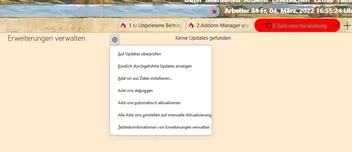
    Das Zahnrad hat bei Hover keine Farbe und im Kontextmenü gibts keine Icons..

    Kann man was machen?

    CSS
        /*  Addons-Manager Nightly */
    
    /*  Versionsnummer der Addons wird angezeigt */
    
         @-moz-document url-prefix(chrome://mozapps/content/extensions/aboutaddons.html),
        url-prefix(chrome://mozapps/content/extensions/extensions.xhtml), url-prefix(about:addons) {
            
    /*     div:not([current-view="updates"]) .addon-name-link[title]::after,
        div:not([current-view="updates"]) .addon-name[title]::after {
        display: block !important;
        content: attr(title) !important;
        margin-top: -22px !important;
        } */
        
        /*restore version number */
        div:not([current-view="updates"]) .addon-name-link[title]:not([data-l10n-args])::after,
        div:not([current-view="updates"]) .addon-name[title]:not([data-l10n-args])::after {
          display: block !important;
          content: attr(title) !important;
          margin-top: -22px !important;
        }
    
    /*  Hintergrund der Button auf der rechten Seite */
    
        addon-list addon-card:not([expanded="true"]) panel-list * {
          background-color: antiquewhite !important;
          color: black !important;
          font-weight: bold !important;
        }
        
        addon-list.monochromatic-addon-list section addon-card div.card.addon addon-options panel-list {
          background: blanchedalmond !important;     
        }
        
        @supports -moz-bool-pref("browser.in-content.dark-mode") 
         @media (prefers-color-scheme: dark) 
         addon-list addon-card:not([expanded="true"]) panel-list *,
         .more-options-menu panel-item {
         background: black !important;
         color: white !important;
        
        }
        
        
        addon-list panel-item {
          margin: 0 1px !important;
          box-shadow: inset 0 0 3px 3px grey;
        }
        
       
    /*  Reduce Size of default Buttons */
    
        link:is([href$="panel-item.css"],[href$="panel-list.css"]) ~ button {
          width: unset !important;
          padding: 10px 24px !important; /* 5px ist die Höhe der rechten Button */
         
        }
        
    /*  Entfernt den Drei-Punkte-Button aus dem Container */
    
        addon-card .more-options-button {
          display: none !important;
        }
    
    /*  Remove Button Icon */
    
        addon-list panel-item {
          --icon: unset !important;
        
        }
        
    /*  Restore Buttons */
        
        addon-list .more-options-menu :is(addon-options,plugin-options) panel-list {
          position: relative !important;
          display: block !important;
          overflow: hidden !important;
          margin-top: -25px;
          background: unset !important;
          border: unset !important;
          box-shadow: unset !important;
          min-width: unset !important;
          width: unset !important;     
        }
    
    /*     div.arrow.top + div.list {
          display: flex !important;
          flex-flow: row wrap !important;
          justify-content: flex-start !important;
        } */
        
         div[role="presentation"].list {
          display: flex !important;
          flex-flow: row wrap !important;
          justify-content: flex-start !important;
        }
    
        panel-item[action="preferences"] {
          order: -1;
        }
        
        panel-item[badged] {
          border: 1px solid Highlight !important;
        }
        
        panel-item[badged]::after,
        :host([badged]) button::after,
        link:is([href$="panel-item.css"],[href$="panel-list.css"]) ~ button::after,
        :is(addon-options,plugin-options) button::after {
          display: none !important;
          content: unset !important;
        }
        
        addon-page-options panel-list {
          min-width: unset !important;
          width: auto !important;
          max-width: 300px !important;
          z-index: 1000 !important;      
        }
        
        addon-page-options panel-list panel-item {
          min-width: 280px !important;
          width: 280px !important;     
        }
        
        .sticky-container {
          z-index: 1000 !important;
        }
        
        link:-is([href$="panel-item.css"],[href$="panel-list.css"]) ~ button label[accesskey] {
          padding-inline-start: 0px !important;
          padding-top: 3px !important;
          padding-bottom: 3px !important;
          min-width: 260px !important;
          width: 260px !important;      
        }
    
        addon-page-options panel-list panel-item[accesskey][checked] {
          background: url("chrome://global/skin/icons/check.svg") 5px no-repeat !important;
        }
            
        addon-list addon-card:not([expanded="true"]) panel-list {     
          display: block !important;   
          box-shadow: none !important; 
          border: none !important;
          right: 45px !important; /* Abstand der Button bei Erweiterungen vom rechten Rand */     
        }
    
    /*  Abstand zwischen den Containern */  
        
        addon-card .addon { 
        margin: 5px !important; 
        }
    
    /*  Höhe der Container */
        
        addon-list[type="extension"]{ 
        --card-padding: 19px }
        addon-card .addon-card-collapsed { 
        margin-bottom: 2px !important; /* Button rechts Abstand vom oberen Rand */   
        }    
    
    /*  Abstand der Button vom rechten Rand bei Themes, Plugins, Wörterbücher, usw.*/
        
        addon-list:is([type="theme"],[type="plugin"],[type="dictionary"]) 
        addon-card:not([expanded="true"]) 
        panel-list {
        right: 55px !important;
        }
    
    /*  Abstand der Button vom oberen Rand bei Plugins, Wörterbücher, usw. */
        
        addon-list addon-card:not([expanded="true"]) panel-list {
        margin-top: -42px !important;
        }
    
    /*  Abstand der Button vom oberen Rand bei Themes */
        
        addon-list:is([type="theme"]) addon-card:not([expanded="true"]) panel-list {
          margin-top: -46px !important;
          margin-left: -100px !important;
        }
        
    /*  Entfernung Bereich Farbgebungen */
    
        addon-list.monochromatic-addon-list {
        display: none !important;
        }    
    
    /*  Ausdehnung der Container zum rechten Rand */    
    
        .addon.card {
        width: 1560px;
        }
    
        input[type="checkbox"].toggle-button {
          margin-right: 430px !important; /* blauer Button -Deaktivieren/Aktivieren- Abstand vom rechten Rand */
        }
        
    /*  Nummerierung der installierten Erweiterungen im AddonsManager */
    
        body {
        counter-reset: section !important;                   
        }
        #main > addon-list:nth-child(1) > section:nth-child(2) > addon-card:nth-child(n+1) > div:nth-child(1) > div:nth-child(2)::before {
        font-size:18px!important;  
        color: red !important;
        font-weight: bold !important;
        counter-increment: section;                 
        content: counter(section, decimal-leading-zero)". ";
        margin-left: -8px !important;
        padding-right: 8px !important; 
        margin-top:4px!important;
        }
        
    /*  Abstand der Button zum linken Rand */
        
        #categories > .category, #preferencesButton, #helpButton, #addonsButton {
          margin-left: 5px !important; 
        }
    
        #categories > .category:not([disabled]){
          background-color: gainsboro !important;/*Hintergrundfarbe vom Button*/
          margin-top: 2px !important; /*Abstand zum Button darüber*/
          border-radius: 60px !important;/*Rundung vom Button*/
          box-shadow: inset 0 0 5px 5px #888;
        }
        
    /*  Aktiver Button rot, Schrift weiß */
        
        #categories > .category[selected]{
          color: white !important;
          background-color: red !important;
          margin-top: 1px !important;
          border-radius: 60px !important;
          box-shadow: inset 0 0 5px 5px #888; 
        }
    
    /*  Hintergrund der Button blau, Schrift weiß bei hover mit der Maus */
        
        #categories > .category:hover, #preferencesButton:hover, #helpButton:hover, #addonsButton:hover {
          color: white !important;
          background-color: blue !important;
          margin-top: 1px !important;
          border-radius: 60px !important;
          box-shadow: inset 0 0 5px 5px #888;      
        }
            
    /*  Optionen-Button */
    
        button.more-options-button:nth-child(1) {
    
        position: absolute !important;
        left: 19% !important;
        margin-top: -10px !important;
        }
    
    /*  Bei "Themes" die Grafiken ausblenden */
        
        .card-heading-image {
        display: none !important;
        }
          
        
    /*  Erweiterungssuche ausblenden */
    
        .main-search {
        display: none !important;
        }
        
    /*  Ausblenden Firefox Optionen */
    
        #preferencesButton,
        #help-button {
        display: none !important;
    }
        
    /*  Kategorien in abgerundeten Buttons */
    
        #preferencesButton,
        #addonsButton,
        #helpButton,
        #category-availableUpdates {
        background-color: red !important;
        margin-top:5px !important;
        border-radius:60px !important;
        }    
    
    /*  Add-ons entdecken entfernt */
    
        .category[name="discover"] {
        display:none!important;
        }
        
    /*  Privatmodus und empfohlene Erweiterungen Icons entfernen */
    
        .addon-badge-recommended,
        .addon-badge-private-browsing-allowed {
        display:none !important; 
        }
    
    
    /*  Umrandung bei Hover breiter Rand und andere Farbe */
    
        :root {
        --card-outline-color: LimeGreen !important;
        }
        
        @-moz-document url-prefix(chrome://mozapps/content/extensions/aboutaddons.html),
        url-prefix(about:addons) {
    
       #sidebar {
        background: darkkhaki !important;
        }
        
        .main-search,
        .sticky-container,
        .main-heading,
        #content {
        background: blanchedalmond !important;
        font-size: 15px !important;
        }
        richlistbox.list > richlistitem.addon {
        background:white!important;
        margin-left:-20px !important;
        margin-top:  7px !important;
        }
        #list-view > #addon-list .description-container {
        margin-left: 350px !important;
        margin-top: -10px !important;
        border-radius:60px !important;
        padding: 5px 8px 2px 7px !important; 
        }    
        #list-view > #addon-list .addon.addon-view {
        padding: 5px 80px 2px 7px !important;
        border-radius:60px !important;
        }
    
    /*  Kategorien nicht angeklickt, Text dunkelrot */
    
        *|*.category {
        color:darkred!important;
        }
    
    /*  Kategorien hover Hintergrund + Schrift */
    
        *|*.category:hover {
        color:white!important;
        background:red!important;
        }
    
    /*  Einstellungen-Fenster verbreitern */
        
        @-moz-document url-prefix(aboutpreferences){
        .pane-container{
        width: 900px !important;
        }                      
        
    /*  Unter Plugins Nachfragen ob aktiviert werden soll entfernt */
    
        #main > div:nth-child(1) > addon-list:nth-child(1) > section:nth-child(2) > addon-card:nth-child(2) > div:nth-child(1) > plugin-options:nth-child(5) > panel-list:nth-child(1) > panel-item:nth-child(1),
        #main > div:nth-child(1) > addon-list:nth-child(1) > section:nth-child(2) > addon-card:nth-child(3) > div:nth-child(1) > plugin-options:nth-child(5) > panel-list:nth-child(1) > panel-item:nth-child(1) {
        display: none !important;
        }
        
    /*  Button mit dem Zahnrad */
    
        .page-options-menu > .more-options-button {
          fill: red !important; /* rotes Zahnrad */ 
          border: 1px solid grey !important; /* farbige Umrandung */
          border-radius: 15px !important; /* Abrundung */
          width: 60px !important; /* Länge des Button */
          height: 30px ! important; /* Höhe des Button */
          box-shadow: inset 0 0 2px 2px grey; /* innerer Schatten */
        } 
        
    /*  Button oben mit dem Zahnrad bei Hover */
    
        .page-options-menu > .more-options-button:hover {
          fill: lime !important; /* Farbe des Zahnrades */
        }
    
    /*   Aussehen des Menü hinter dem Zahnrad */
    
        link:is([href$="panel-item.css"],[href$="panel-list.css"]) ~ button label[accesskey] {
          margin-left: 6% ! important;
          min-width: 350px !important;
          width: 375px !important; /* Länge der einzelnen Felder */
          background: white ! important; /* Farbe des Hintergrundes */
        }
        
        link:is([href$="panel-item.css"],[href$="panel-list.css"]) ~ button label[accesskey]:hover {
          background: lightyellow !important;    
        }  
        .sticky-container {
          z-index: 1000 !important;
        }
    
         button:focus {
         background: none !important;
     }
     
        addon-page-options panel-list panel-item {
          width: 425px !important; /* Länge der aktivierten Menü-Leiste */
          background: none ! important;
          padding-right: 15px !important;
        }
        
        addon-page-options panel-list panel-item:hover {
          width: 425px !important; 
          background: lime ! important;
          color: red !important;
        }    
    
        addon-page-options panel-list {
          min-width: unset !important;
          width: auto !important;
          max-width: 450px !important; /* Ausdehnung der Felder nach rechts */ 
          background: #f8f8ff ! important; /* farbiger Hintergrund des Feldes */
          padding-left: 8px !important; /* Ausdehnung nach links */
          padding-right: 3px !important; /* Ausdehnung nach rechts */
          z-index: 1000 !important;
        }
        
    /*  Hintergrund der Box Updates automatisch aktualisieren */
        addon-page-options panel-list panel-item[accesskey][checked] {
          background: gold !important;
        }           
        
    /*  Zurückbutton bei geöffnetem Menü Einstellung/Verwalten */
        .back-button {
          background-color: silver !important;/*Hintergrundfarbe vom Button*/
          width: 60px !important;
          border-radius: 60px !important;/*Rundung vom Button*/
          box-shadow: inset 0 0 3px 3px #888;
        }
        
        .back-button:hover {
          color: white !important;
          background-color: dodgerblue !important;
          border-radius: 60px !important;
          box-shadow: inset 0 0 3px 3px #888;
        }    
    
    /*  Icons des Stern-Kontextmenü */
    
        #page-options > panel-list:nth-child(1) > panel-item:nth-child(1)::before {
         content: '';
         display: block;
         width: 16px;
         height: 16px;
         background: url("..//icons/Bild5.png") no-repeat !important;
         background-size: 16px 16px !important;
         margin-left: 15px;
         margin-right: -31px;}
    
        #page-options > panel-list:nth-child(1) > panel-item:nth-child(2)::before {
         content: '';
         display: block;
         width: 16px;
         height: 16px;
         background: url("..//icons/Bild61.png") no-repeat !important;
         background-size: 16px 16px !important;
         margin-left: 15px;
         margin-right: -31px;}
     
        #page-options > panel-list:nth-child(1) > panel-item:nth-child(4)::before {
          content: '';
         display: block;
         width: 16px;
         height: 16px;
         background: url("..//icons/Bild3.png") no-repeat !important;
         background-size: 16px 16px !important;
         margin-left: 15px;
         margin-right: -31px;}
    
        #page-options > panel-list:nth-child(1) > panel-item:nth-child(5)::before {
         content: '';
         display: block;
         width: 16px;
         height: 16px;
         background: url("..//icons/Bild66.ico") no-repeat !important;
         background-size: 16px 16px !important;
         margin-left: 15px;
         margin-right: -31px;}
    
        #page-options > panel-list:nth-child(1) > panel-item:nth-child(7) {
         fill: transparent !important;}
         
        #page-options > panel-list:nth-child(1) > panel-item:nth-child(7)::before {
         content: '';
         display: block;
         width: 16px;
         height: 16px;
         background: url("..//icons/Bild62.png") no-repeat !important;
         background-size: 18px 18px !important;
         margin-left: 16px;
         margin-right: -32px;
         margin-bottom: 3px;}
        
        #page-options > panel-list:nth-child(1) > panel-item:nth-child(7):not([checked])::before {
         content: '';
         font-size: 14px;
         padding-left: 0px !important;
         padding-top: 1px !important;
         padding-bottom: 2px !important;
         display: block;
         width: 16px;
         height: 16px;
         background: url("..//icons/Bild63.png") no-repeat !important;
         background-size: 18px 18px !important;
         margin-left: 15px;
         margin-right: -32px;
         margin-bottom: 3px;}
        
        #page-options > panel-list:nth-child(1) > panel-item:nth-child(8)::before {
         content: '';
         display: block;
         width: 16px;
         height: 16px;
         background: url("..//icons/Bild64.png") no-repeat !important;
         background-size: 16px 16px !important;
         margin-left: 15px;
         margin-right: -31px;}
    
        #page-options > panel-list:nth-child(1) > panel-item:nth-child(10)::before {
         content: '';
         display: block;
         width: 16px;
         height: 16px;
         background: url("..//icons/Bild67.png") no-repeat !important;
         background-size: 16px 16px !important;
         margin-left: 15px;
         margin-right: -31px;}    
         }
         
    /*        About:addons  - Optionen Schaltfläche */
        
        @-moz-document url("about:addons"){
        
        #utils-updateNow{
        appearance: none !important;
        background: url("..//icons/Bild5.png") no-repeat !important;
        min-height: 24px!important;
        padding-top: 5px! important;
        padding-left:28px!important;
        background-position:6px 5px!important;}
    
        #utils-updateNow:hover{
        appearance: none !important;
        margin-right: -1px !important;
        background: #ecf0f6 url("..//icons/Bild5.png") no-repeat !important;    
        border-width: thin !important;
        border-radius: 4px !important;
        border-color: #aecff7 !important;
        border-style: solid !important;
        min-height: 24px!important;
        padding-top: 5px! important;
        padding-left:28px!important;
        background-position:6px 5px!important;}
    
        #utils-viewUpdates{
        appearance: none !important;
        background: url("..//icons/Bild61.png") no-repeat !important;
        min-height: 24px!important;
        padding-top: 5px! important;
        padding-left:28px!important;
        background-position:6px 5px!important;}
    
        #utils-viewUpdates:hover{
        appearance: none !important;
        margin-right: -1px !important;
        background: #ecf0f6 url("..//icons/Bild61.png") no-repeat !important;    
        border-width: thin !important;
        border-radius: 4px !important;
        border-color: #aecff7 !important;
        border-style: solid !important;
        min-height: 24px!important;
        padding-top: 5px! important;
        padding-left:28px!important;
        background-position:6px 5px!important;}
    
        #utils-installFromFile{
        appearance: none !important;
        background: url("..//icons/Bild3.png") no-repeat !important;
        min-height: 24px!important;
        padding-top: 5px! important;
        padding-left:28px!important;
        background-position:6px 5px!important;}
    
        #utils-installFromFile:hover{
        appearance: none !important;
        margin-right: -1px !important;
        background: #ecf0f6 url("..//icons/Bild3.png") no-repeat !important;    
        border-width: thin !important;
        border-radius: 4px !important;
        border-color: #aecff7 !important;
        border-style: solid !important;
        min-height: 24px!important;
        padding-top: 5px! important;
        padding-left:28px!important;
        background-position:6px 5px!important;}
    
        #utils-autoUpdateDefault[type="checkbox"][checked="true"]>.menu-iconic-left{
        appearance: none !important;
        background: url("..//icons/Bild62.png")no-repeat !important;
        height:15px!important;
        padding-top:1px!important;
        margin-left:5px !important;}
    
        #utils-autoUpdateDefault[type="checkbox"][checked="true"]>.menu-iconic-text {
        padding-left: 12px !important;}
    
        #utils-autoUpdateDefault[type="checkbox"][checked="false"]>.menu-iconic-left{
        appearance: none !important;
        background: url("..//icons/Bild63.png")no-repeat !important;
        height:15px!important;
        padding-top:1px!important;
        margin-left:7px !important;}
    
        #utils-autoUpdateDefault[type="checkbox"][checked="false"]>.menu-iconic-text{
        padding-left: 10px !important;}
    
        #utils-resetAddonUpdatesToAutomatic{
        appearance: none !important;
        background: url("..//icons/Bild64.png") no-repeat !important;
        min-height: 24px!important;
        padding-top: 5px! important;
        padding-left:28px!important;
        background-position:6px 5px!important;}
    
        #utils-resetAddonUpdatesToAutomatic:hover{
        appearance: none !important;
        margin-right: -1px !important;
        background: #ecf0f6 url("..//icons/Bild64.png") no-repeat !important;    
        border-width: thin !important;
        border-radius: 4px !important;
        border-color: #aecff7 !important;
        border-style: solid !important;
        min-height: 24px!important;
        padding-top: 5px! important;
        padding-left:28px!important;
        background-position:6px 5px!important;}
    
        #utils-resetAddonUpdatesToManual{
        appearance: none !important;
        background: url("..//icons/Bild65.png") no-repeat !important;
        min-height: 24px!important;
        padding-top: 5px! important;
        padding-left:28px!important;
        background-position:6px 5px!important;}
    
        #utils-resetAddonUpdatesToManual:hover{
        appearance: none !important;
        margin-right: -1px !important;
        background: #ecf0f6 url("..//icons/Bild65.png") no-repeat !important;    
        border-width: thin !important;
        border-radius: 4px !important;
        border-color: #aecff7 !important;
        border-style: solid !important;
        min-height: 24px!important;
        padding-top: 5px! important;
        padding-left:28px!important;
        background-position:6px 5px!important;}    
    
        #utils-debugAddons{
        appearance: none !important;
        background: url("..//icons/Bild66.ico") no-repeat !important;
        min-height: 24px!important;
        padding-top: 5px! important;
        padding-left:28px!important;
        background-position:6px 5px!important;}
    
        #utils-debugAddons:hover{
        appearance: none !important;
        margin-right: -1px !important;
        background: #ecf0f6 url("..//icons/Bild66.ico") no-repeat !important;    
        border-width: thin !important;
        border-radius: 4px !important;
        border-color: #aecff7 !important;
        border-style: solid !important;
        min-height: 24px!important;
        padding-top: 5px! important;
        padding-left:28px!important;
        background-position:6px 5px!important;}    
    
        #manage-shortcuts{
        appearance: none !important;
        background: url("..//icons/Bild67.png") no-repeat !important;
        min-height: 24px!important;
        padding-top: 5px! important;
        padding-left:28px!important;
        background-position:6px 5px!important;}
    
        #manage-shortcuts:hover{
        appearance: none !important;
        margin-right: -1px !important;
        background: #ecf0f6 url("..//icons/Bild67.png") no-repeat !important;    
        border-width: thin !important;
        border-radius: 4px !important;
        border-color: #aecff7 !important;
        border-style: solid !important;
        min-height: 24px!important;
        padding-top: 5px! important;
        padding-left:28px!important;
        background-position:6px 5px!important;}
        
        #empty-addons-message {
        display: none !important;
        }
        }
    Alles anzeigen

    Ab Zeile 366 gibts was zum Zahnrad, allerdings wird derzeit nichts angezeigt.

  • Der Glückwunsch-Thread

    • Boersenfeger
    • 4. März 2022 um 16:49

    Da hat aber einer Minderwertigkeitskomplexe... solche Typen gibts leider immer mehr und überall... X(

  • Der Glückwunsch-Thread

    • Boersenfeger
    • 4. März 2022 um 15:14

    ...von mir auch mal ohne besonderen Hinweis auf die Gesundheit... ^^

  • Der Glückwunsch-Thread

    • Boersenfeger
    • 3. März 2022 um 10:26

    ---ebenfalls und vor allem viel Gesundheit wünscht Boersenfeger :)

Unterstütze uns!

Jährlich (2026)

76,1 %

76,1% (589,79 von 775 EUR)

Jetzt spenden
  1. Kontakt
  2. Datenschutz
  3. Impressum
Community-Software: WoltLab Suite™
Mastodon