1. Nachrichten
  2. Forum
    1. Unerledigte Themen
    2. Forenregeln
  3. Spenden
  • Anmelden
  • Registrieren
  • Suche
Alles
  • Alles
  • Artikel
  • Seiten
  • Forum
  • Erweiterte Suche
  1. camp-firefox.de
  2. juzzlukin

Beiträge von juzzlukin

  • Custom buttons not recognized, do not appear on toolbar

    • juzzlukin
    • 6. April 2026 um 01:24
    Zitat von Horstmann

    Please Post the script in question for reference.

    I figured it out. I downloaded about 40 Alice scripts to test. I have English translations for 15 that I found useful. I can list them if anyone is interested.

    Around 20 others either did not work, or did not display at all. Others were now obsolete, replaced by default buttons.

    I'm going to check our the Aris repository to see if some will now work for me.

    That space problem is fixed. I was doing a trial and error method of testing the button activation files to see which file was responsible, and it fixed itself. I'm still trying to figure out which file it was.

    I now have 2 restart buttons. I prefer this one, because it does not have a cache clearing option
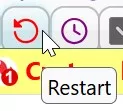
    But this one has the "R" icon I like. If possible, can I post the codes to get instruction on how to do the change?

    Thanks

  • Custom buttons not recognized, do not appear on toolbar

    • juzzlukin
    • 4. April 2026 um 01:16
    Zitat von Mira_Belle

    I'll take a closer look at your other scripts this weekend and test them as well.

    Hi,

    I just downloaded many of the Alice scripts. So far, the ones I have added to the Chrome folder are working.

    But some of their titles are in German. I tried to edit one of them, but did not see a reference to the title. Can you help?

  • Custom buttons not recognized, do not appear on toolbar

    • juzzlukin
    • 3. April 2026 um 20:15
    Zitat von Horstmann

    Glad to hear you're making progress with the JS setup. :)

    As for the menu, I don't know your CSS/JS that might be responsible for it.

    It's actually the other way around. Some component of the custom button install has nullified certain portions of the my_userChrome.css file.

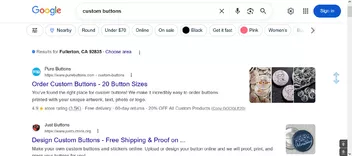
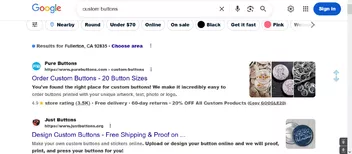
    This image is without the custom button install. The search field at the top has bold font

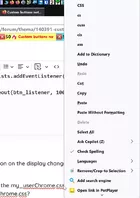
    This is with the custom buttons enabled. Now, as we see, the search field font is no longer bold, but many other areas are bold

    In general, I actually don't mind the bold, but I want that search that search field to remain bold, and would also like to change the font. Currently, It looks like Arial black. It's a little heavy. I would prefer something like Arial Bold,, Segoe UI Bold, or Tahoma Bold.

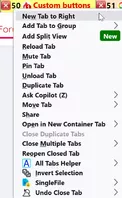
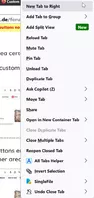
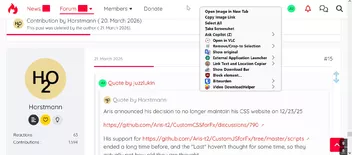
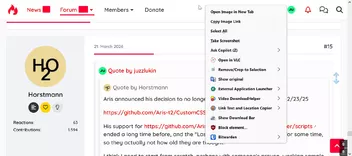
    This is an example my context menus without the custom buttons enabled, contrasting the other image I posted

    With the custom button enabled, all of my Firefox context menus have that large gap in space.

  • Custom buttons not recognized, do not appear on toolbar

    • juzzlukin
    • 3. April 2026 um 02:26
    Zitat von Horstmann
    Zitat von juzzlukin

    Unfortunately, the about addons button is on the toolbar, but does not work

    You could try this for about:addons:

    JavaScript
    // Firefox button JavaScript
    
    // Name: about_addons_button.uc.js
    // Description: Button to open about:addons in new tab
    
    // After script changes, restart with Clear StartUp Cache => about:support
    
    (function() {
    if (location.href !== 'chrome://browser/content/browser.xhtml')
        return;
    
    // == User settings ==>
    
    // Button ID, always use unique value
        const btn_id = 'about_addons_btn';
    
    // Label, tooltip
        const btn_label = 'Addons Button';
        const btn_tooltip = 'about:addons';
    
    // Button function
        function btn_function(e) {
           if (e.button === 0) {
              openTrustedLinkIn('about:addons', 'tab');
           }
         };
    
    // Icon
        // false = use Firefox Icon, true = Custom Icon
        const use_custom_btn_icon = false;
    
        // Firefox icon, or any absolute file path if use_custom_btn_icon = false
        const fx_btn_icon = 'chrome://mozapps/skin/extensions/extension.svg';
    
        // Custom icon file
        const custom_btn_icon = 'flower-satt32.png';
    
        // Custom Icons expected in profile-name/chrome/icons folder ('icons' folder needs to be created)
        // Path to icons folder named 'icons' inside profile folder
        const btn_iconPath = '/chrome/icons/';
    
    // <== User settings end ==
    
        // Get path to profile folder
        const btn_curProfDir = PathUtils.toFileURI(PathUtils.join(PathUtils.profileDir));
        // Apply icon
        let btn_icon = btn_curProfDir + btn_iconPath + custom_btn_icon;
        if (!use_custom_btn_icon) {
            btn_icon = fx_btn_icon;
        };
    
        // Button
        try {
            CustomizableUI.createWidget({
                id: btn_id,
                defaultArea: CustomizableUI.AREA_NAVBAR,
                label: btn_label,
                tooltiptext: btn_tooltip,
                onCreated: (this_button) => {
                    this_button.style.MozContextProperties = 'fill, stroke, fill-opacity, stroke-opacity';
                    this_button.style.listStyleImage = 'url(' + btn_icon + ')';
                    this_button.style.minWidth = 'fit-content';
                }
            });
        } catch(e) { };
        // Apply event listener and function
        (function btn_listener() {
            const btn_exists = document.getElementById(btn_id);
            if (btn_exists) {
                btn_exists.addEventListener('click', btn_function);
            } else {
                setTimeout(btn_listener, 100);
            }
        })();
    })();
    Alles anzeigen

    Beautiful. Thanks.

    Do you have any instruction on the display changes I posted that happened after the custom button repairs?

    They dominated some of the my_userChrome.css settings. How do I edit my_userChrome.css to shorten the large spaces? I would also like to test a font change as well?

  • Custom buttons not recognized, do not appear on toolbar

    • juzzlukin
    • 1. April 2026 um 23:12
    Zitat von Horstmann

    Rumor has it, someone else has been maintaining some of Aris' JS for a while, but what do I know.

    Either way, a bunch of his scripts have been updated 5 months or less ago, as you can see in that repo, and a bunch of your scripts - those which you uploaded - are outdated versions that no longer work.

    Most current JS codes should work fine with any functional script loading method.

    I'm using this simple script loader, as featured in that somewhat confusing local thread, which appears to be working fine with my stuff and has been for a long time, last tested on some 149 Nighlty.

    For more complex applications, which you also seem to use, you could take a look at this topic, but that's beyond my comprehension.

    Before I begin, please forgive me for not responding sooner. I did not realize that I had to activate notifications in "Manage Account". Sorry for the grammatical errors. The translator wasn't always kind.

    That said, your suggestions and Mira_Belle led me to precisely what I needed. I wish I had seen them sooner.

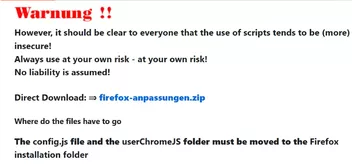
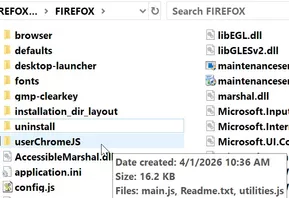
    Originally, my scripts source was xiaoxiaoflood firefox-scripts. Along with the collection of toolbar scripts, the user must configure the Firefox install directory. I moved the config-prefs.js and config.js files to their assigned locations, but the main difference between the xiaoxiaoflood and Endor collections is the userChromeJS folder, originally placed in the Chrome folder, must now be moved to the Firefox install folder. ***That was supposed to say "userChromeJS folder".

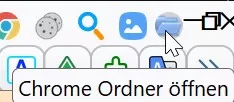
    I now have the return of my "Restart" and Chrome folder opener" buttons, and I will be testing a bunch more

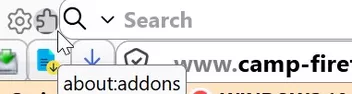
    Unfortunately, the about addons button is on the toolbar, but does not work

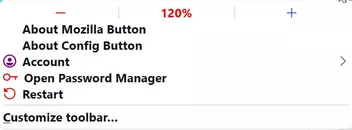
    There has also been an unexpected side effect. All of my menus displays changed from this

    to this

  • Custom buttons not recognized, do not appear on toolbar

    • juzzlukin
    • 20. März 2026 um 21:25
    Zitat von Horstmann
    Zitat von juzzlukin

    I only took a quick look at your scripts from #7; most of them are outdated, contain code that is no longer working, a few link to non-existing icons, etc.. As Mira suggested, go to the Aris repo and replace all your scripts coming from there with the latest versions.

    Aris announced his decision to no longer maintain his CSS website on 12/23/25

    https://github.com/Aris-t2/CustomCSSforFx/discussions/790

    His support for https://github.com/Aris-t2/CustomJSforFx/tree/master/scripts ended a long time before that, and the "Last commit dates" haven't changed for quite some time, so they do not actually reflect how old they are.

    Zitat von Horstmann

    As for userChrome.js, I use a different script loader, I assume you'll need to follow Mira's advice above for that.

    Aside from the Aris scripts,. and whether they can be updated, doesn't the fact that, since I had two scripts that worked until v148 indicate whatever changed in v148 invalidated the userChrome.js?

    I did not realize there were later scripts on the Alice web page in the sub folders. I tried the latest userChrome.js there, and the replaceAndGoSearch.uc.js scrpit, but, it did not work.

    I think I need to start from scratch, perhaps with someone's proven, working sample script loader and and a button script that I can test.

    Not only that, but the Fx install folder contents must be modified. This folder fx-folder.zip xiaoxiaoflood https://github.com/xiaoxiaoflood/firefox-scripts (see Download this zip file) contains two files; config-prefs.js must be added to the FIREFOX\defaults\pref folder; config.js must be placed in the main Install folder (see attached). I suspect they may need alterations as well. fx-folder.zip

    Alles anzeigen
  • Custom buttons not recognized, do not appear on toolbar

    • juzzlukin
    • 20. März 2026 um 01:59
    Zitat von Mira_Belle

    juzzlukin
    On Aris's page => https://github.com/Aris-t2/CustomJSforFx/tree/master/scripts
    there are already several updated scripts that you can use.

    And Alice also has a few scripts available in their updated versions.

    Here is the “userChrome.js” file

    Mira_Belle

    All of my .js button scripts, except for two, come from Aris. Those other two are the only ones that worked, up until the release of FF148: RestartFirefoxButton_Movable.uc.js by xiaoxiaoflood, and rebuild_userChrome.uc.js, By Sporif.

    Please see attachment

    CHROME ACTIVE BUTTONS.zip

    i tried the userChrome.js scripts, with the replaceAndGoSearch.uc.js button. I saw no change. Can you suggest a button that would you know should work?

    Zitat von Horstmann
    Zitat von juzzlukin

    Is there a way to fully translate these pages to English? I tried to use your script, and Horstmann's script, but they don't appear. Perhaps I'm doing something wrong?

    Do any Scripts work for you in your updated Firefox versions, or does any CSS work?
    As Mira suggested, make sure to use current versions of your scripts and script loader.

    Btw., the replies #4 and #5 are about a different matter, please ignore.

    Those image I posted are examples of my CSS.

    Bilder

    • TOOLBAR.jpg
      • 47,89 kB
      • 1.919 × 90
  • Custom buttons not recognized, do not appear on toolbar

    • juzzlukin
    • 19. März 2026 um 01:33
    Zitat von Horstmann
    Zitat von Mira_Belle
    JavaScript
    // Restart_Firefox.uc.js
    
                    button.style.color = '#ff0000'; // Farbe für das SVG-Icon setzen
                    button.style.paddingLeft = '5px';
                    button.style.paddingTop = '3px';

    Vorschlag:

    Das hier mal kurz in die userChrome.css packen zum testen, das zeigt den sichtbaren Teil der meisten Buttons (zB bei hover):

    I tested the first script. Unsuccessful for me. Should I test it in 149 beta?

    Zitat von Horstmann
    CSS
    .toolbarbutton-icon {
        outline: 1px solid green !important;
        outline-offset: -1px !important;
    }

    Dann deinen Button in die Lesezeichenleiste ziehen, und schauen was mit der Leistehöhe passiert, danach auch mal in das Überhangmenü schieben, her dann auch die Textfarbe beachten. :/
    Nicht so dolle, oder? ;)

    Für das Icon würde ich button.style.fill statt button.style.color empfehlen, um das Icon zu verschieben reines CSS, zB sowas (outline nur zum testen):

    CSS
    toolbar #restart-button2a .toolbarbutton-icon {
        outline: 1px solid red !important;
        outline-offset: -1px !important;        
        padding-block: calc(var(--toolbarbutton-inner-padding) + 1px) 
                       calc(var(--toolbarbutton-inner-padding) - 1px) !important;
    }
  • Custom buttons not recognized, do not appear on toolbar

    • juzzlukin
    • 19. März 2026 um 01:02
    Zitat von Mira_Belle

    Compress the JS files into a ZIP file, then you can upload them.


    JavaScript
    // Restart_Firefox.uc.js
    // Das Script erstellt einen Button, der einen Neustart des Browsers auslöst .
    
    // Source file https://www.camp-firefox.de/forum/thema/140072/?postID=1282691#post1282691
    
    /* ----------------------------------------------------------------------------------- */
    /*     Zu beachten ist, dass die Grafiken sich im richtigen Ordner befinden müssen     */
    /*            %appdata%\Mozilla\Firefox\Profiles\"Profilname"\chrome\icons             */
    /* ----------------------------------------------------------------------------------- */
    
    // Linksklick 	if (event.button == 0)
    // Mittelklick 	if (event.button == 1)
    // Rechtsklick 	if (event.button == 2)
    
    (function() {
    
      if (location.href !== 'chrome://browser/content/browser.xhtml')
        return;
    
      const
      // ■■ START UserConfiguration ■■■■■■■■■■■■■■■■■■■■■■■■■■■■■■■■
               id = 'restart-button2a', // Id des Buttons
            label = 'Neustart', // Bezeichnung des Buttons
      tooltiptext = 'Neustart (inkl. Script Cache leeren) ausrichten',
      // ■■ END UserConfiguration ■■■■■■■■■■■■■■■■■■■■■■■■■■■■■■■■■■
      curProfDir = PathUtils.toFileURI(PathUtils.join(PathUtils.profileDir));
    
        try {
            CustomizableUI.createWidget({
                id: id,
                defaultArea: CustomizableUI.AREA_NAVBAR,
                label: label,
                tooltiptext: tooltiptext,
    
                onCreated: (button) => {
                    button.style.MozContextProperties = 'fill, stroke, fill-opacity';
                    button.style.listStyleImage = 'url(chrome://browser/skin/sync.svg)';
                    button.style.minWidth = 'fit-content';
                    button.style.color = '#ff0000'; // Farbe für das SVG-Icon setzen
                    button.style.paddingLeft = '5px';
                    button.style.paddingTop = '3px';
                }         
            });
        } catch(e) { };
    
      (function add_restart_button_listener() {
        const button = document.getElementById('restart-button2a');
    
        if (button) {
          button.addEventListener('click', (event) => {
            // rechte Maus – Neustart
            if (event.button === 2) {
              Services.startup.quit(
                Ci.nsIAppStartup.eRestart | Ci.nsIAppStartup.eAttemptQuit
              );
            }
            // linke Maus – Neustart mit Löschung des Start-Caches
            if (event.button === 0) {
              event.preventDefault();
              Services.appinfo.invalidateCachesOnRestart();
              Services.startup.quit(
                Ci.nsIAppStartup.eRestart | Ci.nsIAppStartup.eAttemptQuit
              );
            }
            // Mittelklick
            if (event.button === 1) {
              openTrustedLinkIn("about:config", "tab");
            }
          });
        } else {
          // Button existiert noch nicht → später erneut versuchen
          setTimeout(add_restart_button_listener, 100);
        }
      })();
    
    })();
    Alles anzeigen

    Sorry I didn't respond earlier. Firefox has been randomly crashing. I'm trying to solve that as well. Having a Restart button would be helpful with that as well.

    Is there a way to fully translate these pages to English? I tried to use your script, and Horstmann's script, but the don't appear. Perhaps I'm doing something wrong?

    Here is the .js collection CHROME.zip

  • Custom buttons not recognized, do not appear on toolbar

    • juzzlukin
    • 14. März 2026 um 22:34

    I originally posted here Custom toolbars buttons have no icons, and thanks to all who responded, but the problems were never resolved,

    Up until FF148, two buttons were recognized & still working, but not now

    Here one that was still working before FF148.

    JavaScript
    (function() {
        if (location != 'chrome://browser/content/browser.xul' && location != 'chrome://browser/content/browser.xhtml')
            return;
    
        try {
            CustomizableUI.createWidget({
                id: 'restart-button',
                type: 'custom',
                defaultArea: CustomizableUI.AREA_NAVBAR,
                    onBuild: function(aDocument) {
                        var toolbaritem = aDocument.createElementNS('http://www.mozilla.org/keymaster/gatekeeper/there.is.only.xul', 'toolbarbutton');
                        toolbaritem.onclick = event => onClick(event);
                        var props = {
                            id: 'restart-button',
                            class: 'toolbarbutton-1 chromeclass-toolbar-additional',
                            label: 'Restart',
                            tooltiptext: 'Restart (with middle click userChrome.js cache is emptied)',
                                        style: 'list-style-image: url(chrome://browser/skin/sync.svg)'
                        };
                        for(var p in props)
                            toolbaritem.setAttribute(p, props[p]);
                        return toolbaritem;
                    }
            });
        } catch(e) {};
    
        function onClick(event) {
            if(event.button == 1)
                Services.appinfo.invalidateCachesOnRestart();
            else if(event.button == 2) 
                return;
    
            let cancelQuit = Cc["@mozilla.org/supports-PRBool;1"].createInstance(Ci.nsISupportsPRBool);
            Services.obs.notifyObservers(cancelQuit, "quit-application-requested", "restart");
            if(!cancelQuit.data) 
                Services.startup.quit(Services.startup.eAttemptQuit | Services.startup.eRestart);
        }
    })();
    Alles anzeigen

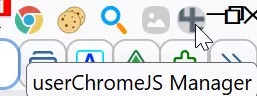
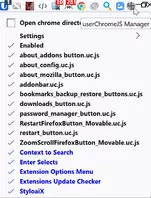
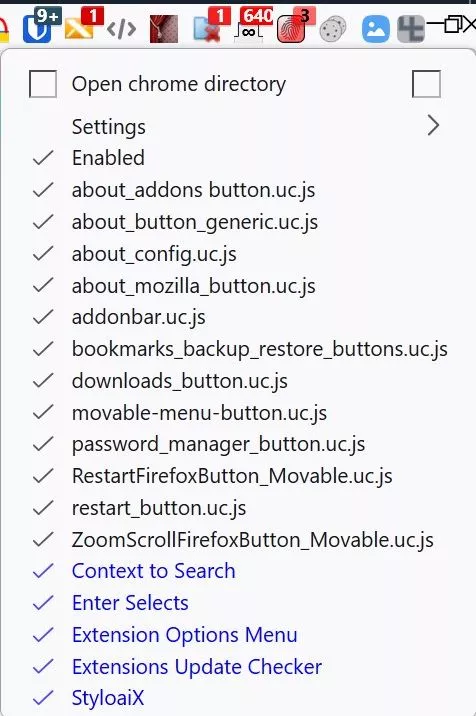
    Here's the other one, but I don't know which .js file by name that represents it. I reverted back to v147..04 so I could post the image. Of course, we see all the other scripts were in use at one time.

    I was ask to publish the scripts last time, but there are 15 of them. Instead of posting their contents, can I upload the .js files somehow?:)

  • Yahoo login successful everywhere but Firefox

    • juzzlukin
    • 23. Januar 2026 um 21:04

    This image is one of a series of similar messages I get. Incredibly, this has even after a 2-step verification is competed.

    I have no problem with Yahoo in Chrome. No problem with the Yahoo email mobile app.

    I am not a Chrome fan, but It is not unusual for me to have to use Chrome to avoid random website behavior issues with Firefox.

    Bilder

    • YAHOO FIRE.jpg
      • 28,05 kB
      • 602 × 496
  • Custom toolbars buttons have no icons

    • juzzlukin
    • 13. Oktober 2025 um 00:50

    Hello everyone, and thanks for the wonderful responses.

    Sorry for not getting back here until now, but I've had several other problems with Firefox since, including one related to this thread.

    3-4 weeks ago all but one my custom buttons from CustomJSforFx stopped working, meaning that, although they are listed here, they no longer display in Firefox.

    Only my RestartFirefoxButton_Movable.uc.js, from the following source, still

    operates


    Restart Button for Firefox. An updated version of https://github.com/Endor8/userChrome.js/tree/master/restartfirefoxbutton_movable. Middle click also empties the script cache.
    Restart Button for Firefox. An updated version of https://github.com/Endor8/userChrome.js/tree/master/restartfirefoxbutton_movable. Middle click also empties…
    gist.github.com

    Nothing in my Chrome folder related to these buttons has been altered. I initially thought it had something to do with the CustomJSforFx script_loader, but the one in the repository there is two years old.

    Zitat von Endor

    Hi juzzlukin

    Remove this line:

    Code
    ChromeUtils.importESModule("resource:///modules/CustomizableUI.sys.mjs");

    than the script works again.

    Kind Regards
    Endor

    Hi Endor,

    I assume that instruction was for the icon fix? I just tried it, but the button did not appear.


    Zitat von juzzlukin

    Hello everyone, and thanks for the wonderful responses.

    Sorry for not getting back here until now, but I've had several other problems with Firefox since, including one related to this thread.

    3-4 weeks ago all but one my custom buttons from CustomJSforFx stopped working, meaning that, although they are listed here, they no longer display in Firefox.

    Only my RestartFirefoxButton_Movable.uc.js, from the following source, still

    works

    https://gist.github.com/Sporif/ad6e917…c8918c#comments

    Nothing in my Chrome folder related to these buttons has been altered. I initially thought it had something to do with the CustomJSforFx script_loader, but the one in the repository there is two years old.

    Zitat von Endor

    Hi juzzlukin

    Remove this line:

    Code
    ChromeUtils.importESModule("resource:///modules/CustomizableUI.sys.mjs");

    than the script works again.

    Kind Regards
    Endor

    Hi Endor,

    I assume that instruction was for the icon fix? I just tried it, but the button did not appear.

    Alles anzeigen
  • Custom toolbars buttons have no icons

    • juzzlukin
    • 6. September 2025 um 02:19

    I use the buttons from here CustomJSforFx

    .

    I believe there is a way to edit the buttons to point towards a desired icon, but I can't figure our how to do it.

Unterstütze uns!

Jährlich (2026)

69,4 %

69,4% (538,17 von 775 EUR)

Jetzt spenden
  1. Kontakt
  2. Datenschutz
  3. Impressum
Community-Software: WoltLab Suite™
Mastodon