1. Nachrichten
  2. Forum
    1. Unerledigte Themen
    2. Forenregeln
  3. Spenden
  • Anmelden
  • Registrieren
  • Suche
Alles
  • Alles
  • Artikel
  • Seiten
  • Forum
  • Erweiterte Suche
  1. camp-firefox.de
  2. Mira_Belle

Beiträge von Mira_Belle

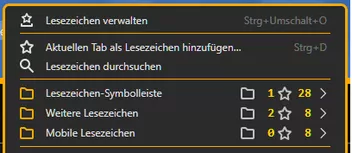
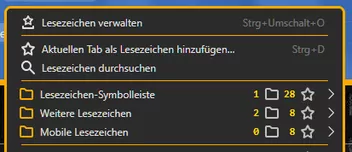
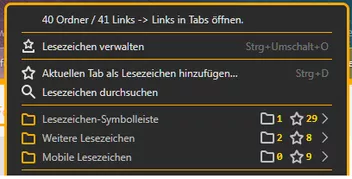
  • Nur die Anzeige der Ordner/Lesezeichenanzahl in einer anderen Farbe darstellen

    • Mira_Belle
    • 21. April 2025 um 20:41
    Zitat von Mira_Belle

    Und dann hast Du auch noch jene, bei der die Icons als background-images eingebunden werden.
    Ich bin gespannt.

    Ok, ich bin ungeduldig!
    Aber wenn DAS klappt, werde ich mein Problem mit den Grafikgrößen wieder los!
    Denn ich habe die original SVG nur in width="1344" height="1339" vorliegen.
    Bisher arbeite ich mit einer "Notlösung".

  • Nur die Anzeige der Ordner/Lesezeichenanzahl in einer anderen Farbe darstellen

    • Mira_Belle
    • 21. April 2025 um 19:51

    Dharkness Hast Du außer den Symbolen noch etwas ......
    AH, Hostmann ist da ein kleiner Fauxpas unterlaufen!

    Ersetze mal

    JavaScript
            //let strCountOut1 = "" + menuCount + "";      //  Has no brackets
            //let strCountOut1 = "(" + menuCount + ")";    //  Has round brackets
            let strCountOut1 = "[" + menuCount + "]";      //  Has square brackets
            bmContent.setAttribute('data-value1', strCountOut1);
    
            //let strCountOut2 = "" + menuCount + "";        //  Has no brackets
            //let strCountOut2 = "(" + menuCount + ")";      //  Has round brackets
            let strCountOut2 = "[" + menuitemCount + "]";    //  Has square brackets
            bmContent.setAttribute('data-value2', strCountOut2);

    durch

    JavaScript
            //let strCountOut1 = "" + menuCount + "";      //  Has no brackets
            //let strCountOut1 = "(" + menuCount + ")";    //  Has round brackets
            let strCountOut1 = "[" + menuCount + "]";      //  Has square brackets
            bmContent.setAttribute('data-value1', strCountOut1);
    
            //let strCountOut2 = "" + menuitemCount + "";        //  Has no brackets
            //let strCountOut2 = "(" + menuitemCount + ")";      //  Has round brackets
            let strCountOut2 = "[" + menuitemCount + "]";    //  Has square brackets
            bmContent.setAttribute('data-value2', strCountOut2);

    Aktiviere nun Deine gewünschte Anzeige.

  • Nur die Anzeige der Ordner/Lesezeichenanzahl in einer anderen Farbe darstellen

    • Mira_Belle
    • 21. April 2025 um 19:32

    @Horstmann Erst einmal vielen Dank für diese tolle Version.

    Habe etwas gespielt und es funktioniert wie von mir gewünscht.

    Bin nun hin- und hergerissen, welche Version ich nun benutzen soll.

    Und dann hast Du auch noch jene, bei der die Icons als background-images eingebunden werden.
    Ich bin gespannt.

  • Windows 11

    • Mira_Belle
    • 21. April 2025 um 18:54

    .DeJaVu hat recht.
    Und wir müssen nicht endlos diskutieren.

  • Nur die Anzeige der Ordner/Lesezeichenanzahl in einer anderen Farbe darstellen

    • Mira_Belle
    • 21. April 2025 um 18:48

    Fein, was zum Spielen!

    Zitat von Horstmann

    Ich hätte auch noch eine CSS Test-Variante mit den Icons separat zu den Zahlen als background-image , falls du damit spielen willst

    Und ja, genau die hätte ich gerne, denn mit den Icons als background-images habe ich mir bisher die Zähne ausgebissen.

  • Nur die Anzeige der Ordner/Lesezeichenanzahl in einer anderen Farbe darstellen

    • Mira_Belle
    • 20. April 2025 um 22:50

    So, hier eine meiner Versionen, natürlich zusammen geklaut und geschustert.

    JavaScript
    // BookmarkCount.uc.js
    
    /* ******************************************************************************************************************* */
    /* Author BrokenHeart               => https://www.camp-firefox.de/forum/thema/136572/?postID=1229536#post1229536 **** */
    /* Correction from BrokenHeart      => https://www.camp-firefox.de/forum/thema/136572/?postID=1229696#post1229696 **** */
    /* Extension from Sören Henschel    => https://www.camp-firefox.de/forum/thema/136572/?postID=1229555#post1229555 **** */
    /* Customized by Mira inspired by grisu2099     ********************************************************************** */
    /* Source                           => https://www.camp-firefox.de/forum/thema/136572/?postID=1229875#post1229883 **** */
    /* Customized by Mira inspired by Horstmann     ********************************************************************** */
    /* Source                           => https://www.camp-firefox.de/forum/thema/136572/?postID=1229993#post1229993 **** */
    /* Adjustments for 139 and customized by Mira inspired by Horstmann     ********************************************** */
    /* Source                           => https://www.camp-firefox.de/forum/thema/136572/?postID=1270038#post1270038 **** */
    /* ******************************************************************************************************************* */
    /* Version 1.01                     => https://www.camp-firefox.de/forum/thema/136572/?postID=1230128#post1230128 **** */
    /* Version 1.02                     => https://www.camp-firefox.de/forum/thema/136572/?postID=1230334#post1230334 **** */
    /* Version 1.03                     => https://www.camp-firefox.de/forum/thema/136572/?postID=1270113#post1270113 **** */
    /* ******************************************************************************************************************* */
    /* Custom Counter in the Bookmarks for folders and links ************************************************************* */
    /* ******************************************************************************************************************* */
    
    (function() {
    
        if (!window.gBrowser)
            return;
    
        setTimeout(function() {
            setFunction();
        },50);
    
    
        //Custom icons in profile/chrome/icons folder
        let ProfilePath = PathUtils.toFileURI(PathUtils.join(PathUtils.profileDir, 'chrome', 'icons'));
        let icon1 = "Test_3.svg"                    //  Custom  Folder Icon
        let icon2 = "bookmark-hollow.svg"           //  Custom  Link Icon
    
        let cs_font_size = 12
        let cs_font_weight = 900
        let cs_font_color = "#FFD700"
        let cs_icon_color = "#C0C0C0"
    
        function setFunction() {
    
            const css =`
    
                #bmContent {
                    display: flex !important;
                    margin-inline: auto 0 !important;
                    padding-left: 10px;                         / Abstand zwischen Label und Icon */
                    font-family:  Consolas, "Lucida Console", "Courier New", monospace !important;
                    font-size: ${cs_font_size}px !important;
                    font-weight: ${cs_font_weight} !important;
                }
    
                #bmContent::before {
                    content: url("${ProfilePath}/${icon1}")         /*  Custom icon  */
                            attr(data-value1);
                    width: calc(8px + 2.1em);                       /* Feste Breite rechter Counter für 2 Ziffern -> Icons auf gleicher Höhe */
                    justify-content: space-between;
                    align-items: center;
                    display: flex;
                /*    margin-inline: 5px;      */                       /* Abstand links für enge Popups, rechts zum 2ten Counter */
                    margin-right: 5px;                              /* Abstand 1. Zahl bis Icon */
                    
                    fill: ${cs_icon_color};                         /* Farbe des Icons */
                    color: ${cs_font_color};                        /* Farbe der 1. Zahl */
                }
    
                #bmContent::after {
                    content: url("${ProfilePath}/${icon2}")         /*  Custom icon  */
                            attr(data-value2);
                    width: calc(8px + 2.1em);                       /* Feste Breite rechter Counter für 2 Ziffern -> Icons auf gleicher Höhe */
                    align-items: center;
                    display: flex;
                    margin-inline: -4px;                            /* Abstand 2. Zahl bis Pfeil */
                    justify-content: space-between;
                    fill: ${cs_icon_color};                         /* Farbe des Icons */
                    color: ${cs_font_color};                        /* Farbe der 2. Zahl */
                }
    		`;
    
            const sss = Cc['@mozilla.org/content/style-sheet-service;1'].getService(Ci.nsIStyleSheetService);
            const uri = Services.io.newURI('data:text/css,' + encodeURIComponent(css));
            sss.loadAndRegisterSheet(uri, sss.AGENT_SHEET);
    
            let bmbMenu = document.getElementById('bookmarks-menu-button');
            let bookMenu = document.getElementById('bookmarksMenu');
            let persToolBar = document.getElementById('PersonalToolbar');
    
            if(bmbMenu)
                bmbMenu.addEventListener('popupshowing', onPopupShowing );
            if(bookMenu)
                bookMenu.addEventListener('popupshowing', onPopupShowing );
            if(persToolBar)
                persToolBar.addEventListener('popupshowing', onPopupShowing );
        }
    
        function onPopupShowing(aEvent) {
    
            let popup = aEvent.originalTarget;
    
            for (let item of popup.children) {
                if (item.localName != 'menu' || item.id?.startsWith('history'))
                    continue;
                setTimeout(() => {
                  let itemPopup = item.menupopup;
    			  itemPopup.hidden = true;
    			  itemPopup.collapsed = true;
                  itemPopup.openPopup();
                  itemPopup.hidePopup();
                  let menuitemCount = 0;
                  let menuCount = 0;
                  for (let subitem of itemPopup.children) {
                    if (subitem.classList.contains('bookmark-item') && !subitem.disabled && !subitem.hidden) {
                      if (subitem.localName == 'menuitem') {
                        menuitemCount++;
                      } else if (subitem.localName == 'menu') {
                        menuCount++;
                      }
                    }
                  }
    			  itemPopup.hidden = false;
    			  itemPopup.collapsed = false;
    
                  let bmCounta = item.childNodes[1];
                  bmCounta.innerHTML = " "
                  let bmContent = document.createElement("bmContent");
                  bmContent.id = "bmContent";
                  bmCounta.appendChild(bmContent);
    
                    //    let strCountOut1 = "[" + menuCount + "]";   //  Has square brackets
                    //    let strCountOut1 = + menuCount + "";   //  Has no brackets
                        let strCountOut1 = String(menuCount).padEnd(2, " ");
                        bmContent.setAttribute('data-value1', strCountOut1);
    
                    //    let strCountOut2 = "[" + menuitemCount + "]"; //  Has square brackets
                    //    let strCountOut2 = + menuitemCount + ""; //  Has no brackets
                        let strCountOut2 = String(menuitemCount).padEnd(2, "");
                        bmContent.setAttribute('data-value2', strCountOut2);
    
                }, 50);
            }
        }
    
    })();
    Alles anzeigen
  • Nur die Anzeige der Ordner/Lesezeichenanzahl in einer anderen Farbe darstellen

    • Mira_Belle
    • 20. April 2025 um 18:55

    Naja, Du hast da so einige Funktionen eingebaut,
    die ich z.B. gar nicht bräuchte.
    Somit würde der css-Teil um einiges kompakter werden.

    Aber ich finde Deine Ideen schon irgendwie nice.

    Was das JS angeht, wir machen da mal langsam. Das wird schon.

  • Nur die Anzeige der Ordner/Lesezeichenanzahl in einer anderen Farbe darstellen

    • Mira_Belle
    • 20. April 2025 um 09:52

    @Horstmann Wow 8|, css ist schon was Feines, wenn man es versteht!

    Ich muss mir das durch ausprobieren immer erst "ertasten", ok, nicht alles, aber vieles.

    Werde "Dein" Skript mal ausprobieren und zerpflücken.
    Danke schön.


    Nachtrag.

    Jetzt habe ich mir nur den Code und das Bild angeschaut und stelle fest, ich verstehe mehr als ich dachte.
    Werde dieses Skript meinen Bedürfnissen mal anpassen und schauen was geht.
    Wird aber ein paar Tage dauern, ist ja Ostern und da ist für so etwas keine Zeit.

  • Frohe Ostern

    • Mira_Belle
    • 19. April 2025 um 12:21

    Hi


    Allen Boardies ein frohes Ostern.

  • Nur die Anzeige der Ordner/Lesezeichenanzahl in einer anderen Farbe darstellen

    • Mira_Belle
    • 19. April 2025 um 12:16
    Zitat von Horstmann

    Ich meinte Zeilen 128 und 131, zB let strCountOut1 = menuCount; .

    Ah, dann lag ich doch richtig mit meiner Vermutung!

    Verschiedene Möglichkeiten! Ich habe DIE aber noch nicht alle im "neuen" Skript durch probiert.

    JavaScript
                  let strCountOut1 = + menuCount + '\xa0';
    //              let strCountOut1 = String(menuCount).padStart(2, '\xa0');    // rechtsbündig
    //              let strCountOut1 = String(menuCount).padEnd(2) + '\xa0';     // padEnd2 => zwei Stellen, plus Abstand              
    //              let strCountOut1 = String(menuCount).padStart(2, '\xa0'); 
                  bmContent.setAttribute('data-value1', strCountOut1);
    
                  let label2 = item.childNodes[4];  
                  label2.classList.add('countClass2');
    
                  let strCountOut2 = + menuitemCount + '\xa0';
    //              let strCountOut2 = String(menuitemCount).padStart(3, '\xa0');    // rechtsbündig
    //              let strCountOut2 = String(menuitemCount).padEnd(3, '\xa0');      // padEnd3 => drei Stellen, Abstand bei nur einer Ziffer
    //              let strCountOut2 = String(menuitemCount).padStart(3, '\xa0');
                  bmContent.setAttribute('data-value2', strCountOut2);
    Alles anzeigen
  • Nur die Anzeige der Ordner/Lesezeichenanzahl in einer anderen Farbe darstellen

    • Mira_Belle
    • 19. April 2025 um 08:46
    Zitat von Horstmann

    Und - das ist ein Test, kein fertiger Code!

    Aber eine nette Sache!

    Apropos String Dingens, habe gerade eben geschaut, was Du da meinen könntest.
    Denn ich ging wohl von was anderem aus!
    Und was soll ich sagen? Ich verstehe nur Bahnhof und weiß somit gar nicht, was genau Du meinst!
    Kannst Du die Zeilen im Code benennen, um die es geht?
    Eventuell raff ich es dann ja, vielleicht, möglicherweise.

  • Nur die Anzeige der Ordner/Lesezeichenanzahl in einer anderen Farbe darstellen

    • Mira_Belle
    • 18. April 2025 um 21:11
    Zitat von Horstmann

    Wobei du in deinem Code immer noch Strings (?) benutzt für die beiden Counter, in der Richtung werd ich wohl nicht basteln.

    Ich habe es einfach anders nicht hinbekommen!

  • Abstand der Lesezeichen

    • Mira_Belle
    • 18. April 2025 um 20:39

    -gRoBI- Aber immerhin gibt es eine Möglichkeit und es funktioniert!
    Versuch das mal beim Edge oder Chrome.

  • Nur die Anzeige der Ordner/Lesezeichenanzahl in einer anderen Farbe darstellen

    • Mira_Belle
    • 18. April 2025 um 19:51
    Zitat von Horstmann

    Und könnste einen Screenshot posten, bittebitte?

    Wie das jetzt bei mir ausschaut? Ist doch oben, aber unsere Beiträge haben sich wohl wieder einmal überschnitten.

    Zitat von Horstmann

    Was diese Variable angeht: hab einfach keine Ahnung wie das $ Zeug funktioniert, ehrlich gesagt.

    Ist eigentlich gar keine Hexerei!

    Definition einer Variabel =>
    let icon = Grafik.svg,
    oder
    let icon = Grafik.png

    Du siehst, die Datei mit Dateiendung!

    Es geht auch anders.
    Einfach nur => let icon = Grafik
    ohne Dateiendung!!

    Nun soll die Grafik eingebunden werden.
    url("${ProfilePath}/${Grafik}")
    Ich gehe davon aus, dass die Variabel für den Dateipfad festgelegt wurde.
    In diesem Fall würde eine Variabel aus dem ersten Beispiel passen.

    url("${ProfilePath}/${Grafik}")png
    Dies wäre dann für Fall zwei passen!

    Genau so verhält es sich eben auch bei Werten!
    Ist in der Deklaration schon eine Einheit angegeben, es ging hier um px,
    muss sie nicht in den Code => size: ${size} !important;.
    Ist sie nicht angegeben, dann eben doch! size: ${size}px !important;

    Und weil ich Variablen mag und sie so manches viel einfacher machen,
    benutze ich sie, wo ich nur kann,
    auch in css nutze ich sie, aber da sieht es etwas anders aus!!


    Dharkness Hättest Du mal beide Skripte zum Studieren für mich?
    Möchte sehen, was Du anders gemacht hast, als ich es gemacht habe,
    oder machen würde.

  • Nur die Anzeige der Ordner/Lesezeichenanzahl in einer anderen Farbe darstellen

    • Mira_Belle
    • 18. April 2025 um 19:06
    Zitat von Horstmann

    Aber das Wichtigste: funktioniert der Code im aktuellen Nightly?

    Ja. => Version 139.0a1 (2025-04-18)

  • Nur die Anzeige der Ordner/Lesezeichenanzahl in einer anderen Farbe darstellen

    • Mira_Belle
    • 18. April 2025 um 19:00
    Zitat von Horstmann

    Bei deinem Eintrag font-size: ${cs_font_size}px bin ich mir nicht sicher, was ist mit dem px ?

    Schau Dir die Deklaration der Variabel an. ;)
    Aber ich gebe Dir recht let cs_font_size = 14px wäre besser gewesen.

    Dharkness Schau mal, besser?

    @Horstmann So und noch etwas an "Deinem" Skript geschraubt und, tada,
    es passt!

    JavaScript
    (function() {
    
        if (!window.gBrowser)
            return;
    
        setTimeout(function() {
            setFunction();
        },50);
    
    
        //Custom icons in profile/chrome/icons folder
        let ProfilePath = PathUtils.toFileURI(PathUtils.join(PathUtils.profileDir, 'chrome', 'icons'));
        let icon1 = "Test_3.svg"    //  Custom  Folder Icon
        let icon2 = "bookmark-hollow.svg"          //  Custom  Link Icon
    
        let cs_font_size = 14
        let cs_font_weight = 900
        let cs_font_color = "#FFD700"
        let cs_icon_color = "#C0C0C0"
    
        function setFunction() {
    
            const css =`
    
            #bmContent {
                display: flex !important;
                margin-inline: auto 0 !important;
                font-family:  Consolas, "Lucida Console", "Courier New", monospace !important;
            	font-size: ${cs_font_size}px !important;
            	font-weight: ${cs_font_weight} !important;
            }
    
            #bmContent::before {
                content: url("${ProfilePath}/${icon1}") " "
                                  attr(data-value1);
                fill: ${cs_icon_color};
                color: ${cs_font_color};
                align-items: center;
                display: flex;
                justify-content: start;
                width: 32px;          
            }
    
            #bmContent::after {
                content: url("${ProfilePath}/${icon2}") " "
                                  attr(data-value2);
                fill: ${cs_icon_color};
                width: 50px;
                color: ${cs_font_color};
                align-items: center;
                display: flex;
                justify-content: end;
            }
    		`;
    
            const sss = Cc['@mozilla.org/content/style-sheet-service;1'].getService(Ci.nsIStyleSheetService);
            const uri = Services.io.newURI('data:text/css,' + encodeURIComponent(css));
            sss.loadAndRegisterSheet(uri, sss.AGENT_SHEET);
    
            let bmbMenu = document.getElementById('bookmarks-menu-button');
            let bookMenu = document.getElementById('bookmarksMenu');
            let persToolBar = document.getElementById('PersonalToolbar');
    
            if(bmbMenu)
                bmbMenu.addEventListener('popupshowing', onPopupShowing );
            if(bookMenu)
                bookMenu.addEventListener('popupshowing', onPopupShowing );
            if(persToolBar)
                persToolBar.addEventListener('popupshowing', onPopupShowing );
        }
    
        function onPopupShowing(aEvent) {
    
            let popup = aEvent.originalTarget;
    
            for (let item of popup.children) {
                if (item.localName != 'menu' || item.id?.startsWith('history'))
                    continue;
                setTimeout(() => {
                  let itemPopup = item.menupopup;
    			  itemPopup.hidden = true;
    			  itemPopup.collapsed = true;
                  itemPopup.openPopup();
                  itemPopup.hidePopup();
                  let menuitemCount = 0;
                  let menuCount = 0;
                  for (let subitem of itemPopup.children) {
                    if (subitem.classList.contains('bookmark-item') && !subitem.disabled && !subitem.hidden) {
                      if (subitem.localName == 'menuitem') {
                        menuitemCount++;
                      } else if (subitem.localName == 'menu') {
                        menuCount++;
                      }
                    }
                  }
    			  itemPopup.hidden = false;
    			  itemPopup.collapsed = false;
    
                  let bmCounta = item.childNodes[1];
                  bmCounta.innerHTML = " "
                  let bmContent = document.createElement("bmContent");
                  bmContent.id = "bmContent";
                  bmCounta.appendChild(bmContent);
    
        //    let strCountOut1 = + menuCount + " ";   //  Has square brackets
            let strCountOut1 = String(menuCount).padStart(2, " ")
            bmContent.setAttribute('data-value1', strCountOut1);
    
        //    let strCountOut2 = + menuitemCount + " "; //  Has square brackets
            let strCountOut2 = String(menuitemCount).padStart(2, " ")
            bmContent.setAttribute('data-value2', strCountOut2);
    
                }, 100);
            }
        }
    
    })();
    Alles anzeigen
  • Nur die Anzeige der Ordner/Lesezeichenanzahl in einer anderen Farbe darstellen

    • Mira_Belle
    • 18. April 2025 um 16:09

    @Horstmann Und gerade habe ich Deine Version zur Brust genommen.
    Sehr schön. Nur wie bekommt man da die Symbole vor zu "Zähler" (Zahlen)?

    Test mit meinen Anpassungen:

    JavaScript
    //bmcount testa neu C TEST!
    // basiert auf Sript von BrokenHeart
    //https://www.camp-firefox.de/forum/thema/136572-nur-die-anzeige-der-ordner-lesezeichenanzahl-in-einer-anderen-farbe-darstellen/?postID=1269879#post1269879
    
    (function() {
    
        if (!window.gBrowser)
            return;
    
        setTimeout(function() {
            setFunction();
        },50);
    
    
        //Custom icons in profile/chrome/icons folder
        let ProfilePath = PathUtils.toFileURI(PathUtils.join(PathUtils.profileDir, 'chrome', 'icons'));
        let icon1 = "Test_3.svg"    //  Custom  Folder Icon
        let icon2 = "bookmark-hollow.svg"          //  Custom  Link Icon
    
        let cs_font_size = 14
        let cs_font_weight = 900
        let cs_font_color = "#FFD700"
        let cs_icon_color = "#C0C0C0"
    
        function setFunction() {
    
            const css =`
    
            #bmContent {
                         display: flex !important;
                         margin-inline: auto 0 !important;
                         /*outline: 1px solid grey !important;
                         outline-offset: 3px !important;*/
                         font-family:  Consolas, "Lucida Console", "Courier New", monospace !important;
            		     font-size: ${cs_font_size}px !important;
            		     font-weight: ${cs_font_weight} !important;
                    }
    
                    #bmContent::before {
                         content: attr(data-value1) " "
                                  url("${ProfilePath}/${icon1}");
                         fill: ${cs_icon_color};
                         justify-content: end;
                         color: ${cs_font_color};
                         align-items: center;
                         display: flex;
                         margin-inline: 16px 8px;
    
            			      }
    
                    #bmContent::after {
                         content: attr(data-value2) " "
                                  url("${ProfilePath}/${icon2}");
                         fill: ${cs_icon_color};                              
                         width: calc(36px + 2.1em); /* Feste Breite rechter Counter für 3 Ziffern -> linke Icons auf gleicher Höhe */
                         color: ${cs_font_color};
                         align-items: center;
                         display: flex;
                         justify-content: end;
            			       }
    		`;
    
            const sss = Cc['@mozilla.org/content/style-sheet-service;1'].getService(Ci.nsIStyleSheetService);
            const uri = Services.io.newURI('data:text/css,' + encodeURIComponent(css));
            sss.loadAndRegisterSheet(uri, sss.AGENT_SHEET);
    
            let bmbMenu = document.getElementById('bookmarks-menu-button');
            let bookMenu = document.getElementById('bookmarksMenu');
            let persToolBar = document.getElementById('PersonalToolbar');
    
            if(bmbMenu)
                bmbMenu.addEventListener('popupshowing', onPopupShowing );
            if(bookMenu)
                bookMenu.addEventListener('popupshowing', onPopupShowing );
            if(persToolBar)
                persToolBar.addEventListener('popupshowing', onPopupShowing );
        }
    
        function onPopupShowing(aEvent) {
    
            let popup = aEvent.originalTarget;
    
            for (let item of popup.children) {
                if (item.localName != 'menu' || item.id?.startsWith('history'))
                    continue;
                setTimeout(() => {
                  let itemPopup = item.menupopup;
    			  itemPopup.hidden = true;
    			  itemPopup.collapsed = true;
                  itemPopup.openPopup();
                  itemPopup.hidePopup();
                  let menuitemCount = 0;
                  let menuCount = 0;
                  for (let subitem of itemPopup.children) {
                    if (subitem.classList.contains('bookmark-item') && !subitem.disabled && !subitem.hidden) {
                      if (subitem.localName == 'menuitem') {
                        menuitemCount++;
                      } else if (subitem.localName == 'menu') {
                        menuCount++;
                      }
                    }
                  }
    			  itemPopup.hidden = false;
    			  itemPopup.collapsed = false;
    
                  //let bmCounta = item.childNodes[1];
                  //bmCounta.classList.add('countClass');
    
                  let bmCounta = item.childNodes[1];
                  bmCounta.innerHTML = " "
                  let bmContent = document.createElement("bmContent");
                  bmContent.id = "bmContent";
                  bmCounta.appendChild(bmContent);
    
            let strCountOut1 = + menuCount + " ";   //  Has square brackets
            bmContent.setAttribute('data-value1', strCountOut1);
    
            let strCountOut2 = + menuitemCount + " "; //  Has square brackets
            bmContent.setAttribute('data-value2', strCountOut2);
    
                }, 100);
            }
        }
    
    })();
    Alles anzeigen
  • Nur die Anzeige der Ordner/Lesezeichenanzahl in einer anderen Farbe darstellen

    • Mira_Belle
    • 18. April 2025 um 15:36

    Hi @Horstmann

    Bin gerade fertig geworden mit einer "neuen" Variante, abgeleitet von #346

    Passt so weit ganz gut.

    JavaScript
    (function() {
    
        if (!window.gBrowser)
            return;
    
        setTimeout(function() {
            setFunction();
        },50);
    
    
        //Custom icons in profile/chrome/icons folder
        let ProfilePath = PathUtils.toFileURI(PathUtils.join(PathUtils.profileDir, 'chrome', 'icons'));
        let icon1 = "Test_3.svg"    //  Custom  Folder Icon
        let icon2 = "bookmark-hollow.svg"          //  Custom  Link Icon
    
        let cs_font_size = 14
        let cs_font_weight = 900
        let cs_font_color = "#FFD700"
        let cs_icon_color = "#C0C0C0"
    
    
        function setFunction() {
    
            const css =`
    
                .countClass {
                justify-content: space-between !important;
                }
    
                .countClass::after {
                    background-image: url(${ProfilePath}/${icon1}), url(${ProfilePath}/${icon2}) !important;
    				background-size: 16px !important;
    				background-repeat: no-repeat !important;
    				background-position: 8px, right 18px center !important;
                    content: attr(data-value) !important; 
    				font-family:  "Courier New", monospace !important;
    				font-size: ${cs_font_size}px !important;
    				font-weight: ${cs_font_weight} !important;
                    color: ${cs_font_color} !important;
    				width: 92px;
    				height: 14px;
                    margin-top: 4px;
                    fill: ${cs_icon_color} !important;
    			}
    		`;
    
            const sss = Cc['@mozilla.org/content/style-sheet-service;1'].getService(Ci.nsIStyleSheetService);
            const uri = Services.io.newURI('data:text/css,' + encodeURIComponent(css));
            sss.loadAndRegisterSheet(uri, sss.AGENT_SHEET);
    
            let bmbMenu = document.getElementById('bookmarks-menu-button');
            let bookMenu = document.getElementById('bookmarksMenu');
            let persToolBar = document.getElementById('PersonalToolbar');
            
            if(bmbMenu)
                bmbMenu.addEventListener('popupshowing', onPopupShowing ); 
            if(bookMenu)
                bookMenu.addEventListener('popupshowing', onPopupShowing ); 
            if(persToolBar)
                persToolBar.addEventListener('popupshowing', onPopupShowing ); 
        }
        
        function onPopupShowing(aEvent) {
            
            let popup = aEvent.originalTarget;
    
            for (let item of popup.children) {
                if (item.localName != 'menu' || item.id?.startsWith('history'))
                    continue;
                setTimeout(() => {
                  let itemPopup = item.menupopup;
    			  itemPopup.hidden = true;
    			  itemPopup.collapsed = true;
                  itemPopup.openPopup();
                  itemPopup.hidePopup();
                  let menuitemCount = 0;
                  let menuCount = 0;
                  for (let subitem of itemPopup.children) {
                    if (subitem.classList.contains('bookmark-item') && !subitem.disabled && !subitem.hidden) {
                      if (subitem.localName == 'menuitem') {
                        menuitemCount++;
                      } else if (subitem.localName == 'menu') {
                        menuCount++;
                      }
                    }
                  }
    			  itemPopup.hidden = false;
    			  itemPopup.collapsed = false;
                  
                  let label = item.childNodes[1];
                  label.classList.add('countClass');
                  let strCountOut = "\xa0" + "\xa0" + "\xa0" + String(menuCount).padStart(2, " ") + "\xa0" + "\xa0" + "\xa0" + String(menuitemCount).padStart(3, " ");
                  label.setAttribute('data-value', strCountOut);
    
                }, 100);
            }
        }
        
    })();
    Alles anzeigen
  • Nur die Anzeige der Ordner/Lesezeichenanzahl in einer anderen Farbe darstellen

    • Mira_Belle
    • 18. April 2025 um 12:40

    Sören Hentzschel Habe nun eine "neue" Grafik (SVG) meinen Wünschen entsprechend erstellt.
    Jetzt sieht das ganze schon etwas besser aus, finde ich.

    Das Skript ist das Gleiche #359 nur dass ich die Grafiken lokal von Platte lade
    und nicht aus dem Firefox heraus [url("chrome://global/skin/icons/xxx.svg")] geladen werden.

    Damit kann ich erst einmal leben, wobei es wirklich schöner wäre,
    wenn man per css direkt auf die "Grafiken" Einfluss nehmen könnte.
    Größe, Farbe (geht ja), Position.

    Denn so sieht es bei meinem derzeitigen Finalen Firefox aus.

    Der Code ist aber ganz anders und funktioniert so im Nightly leider nicht mehr!

    JavaScript
    // BookmarkCount.uc.js
    
    (function() {
    
        if (!window.gBrowser) return;
        
        setTimeout(function() {
            setFunction();
        },50);
    
        let profilePath = PathUtils.toFileURI(PathUtils.join(PathUtils.profileDir, 'chrome', 'icons'))
        let icon1 = "folder-fat.svg"                 /* "folder_org.svg" */
        let icon2 = "bookmark-hollow.svg"        /* "bookmark-hollow.svg" */
    
        let cs_font_size = 12
        let cs_font_weight = 900
        let cs_font_color = "#FFD700"
        let cs_icon_color = "#C0C0C0"


        function setFunction() {
    
            const css =`
    
                /* Default FX left margin ist 16px !! -->  CHANGE  */ 
    
                .countClass1 label {
                    margin-inline: 0px !important;    
                }
                
                /* Ordner container Inhalt zentriert -->  CHANGE  */
    
                hbox.menu-accel-container.countClass1 {
                    align-items: center !important;
    
                }
    
                .countClass1::before {
                    content: "";
                    background-image: url(${profilePath}/${icon1});     /*  Custom icon  */ 
                    background-repeat: no-repeat;
                    background-size: 16px;                              /* icon size */
                    background-position: center;
                    margin-left: 16px !important;                       /* Abstand links minimum für schmale Popus  CHANGE  */
                    margin-right: -1px !important;                      /* Abstand Icon "Ordner" bis zum "Zähler" */ 
                    height: 16px;
                    width: 16px;
                    fill: ${cs_icon_color};
                    fill-opacity: 1;
                }
                .countClass1::after {
                    content: attr(data-value1) !important;
                    font-family:  Consolas, "Lucida Console", "Courier New", monospace !important;
                    font-size: ${cs_font_size}px !important;
                    font-weight: ${cs_font_weight} !important;
                    color: ${cs_font_color} !important;                          /* Farbe des 1. Textes */
                    height: 14px;                                       /* height = font size Text zentriert CHANGE  */
                    width: 15px !important;                             /* Platzhalter für Anzahl der Stellen */
                    padding-left: 4px !important;                       /* height = font size Text zentriert CHANGE  */
                    margin-right: -4px !important;                      /* Abstand zum Icon "Links" rechts */
    
                /*    background-color: lightblue; */           /*  TEST  */
                }
                .countClass2::before {
                    content: "";
                    background-image: url(${profilePath}/${icon2});     /*  Custom icon  */
                    background-repeat: no-repeat;
                    background-size: 16px;                              /* icon size */
                    background-position: center;
                    margin-left: 4px !important;                        /* Abstand "Zähler 1" zum Icon2 */
                    margin-right: -1px !important;                      /* Abstand Icon "Links" bis zum "Zähler" */
                    height: 16px;
                    width: 16px;
                    fill: ${cs_icon_color};
                    fill-opacity: 1;
                }
                .countClass2::after {
                    content: attr(data-value2);
                    font-family:  Consolas, "Lucida Console", "Courier New", monospace !important;
                    font-size: ${cs_font_size}px !important;
                    font-weight: ${cs_font_weight} !important;
                    color: ${cs_font_color} !important;                          /* Farbe des 2. Textes */
                    height: 14px;                                       /* height = font size Text zentriert CHANGE  */
                    width: 15px !important;                             /* Platzhalter für Anzahl der Stellen (25px für 3 Stellen) */
                    padding-left: 4px !important;                       /* height = font size Text zentriert CHANGE  */
                    margin-right: -1px !important;                      /* Abstand zum Pfeil recht */
    
                /*    background-color: lightblue; */           /*  TEST  */
                }
                .countClass2 image {
                    order: 1;                                           /* Pfeil ganz nach rechts */
                }
            `;
        
            const sss = Cc['@mozilla.org/content/style-sheet-service;1'].getService(Ci.nsIStyleSheetService);
            const uri = Services.io.newURI('data:text/css,' + encodeURIComponent(css));
            sss.loadAndRegisterSheet(uri, sss.AGENT_SHEET);
    
            let bmbMenu = document.getElementById('bookmarks-menu-button');
            let bookMenu = document.getElementById('bookmarksMenu');
            let persToolBar = document.getElementById('PersonalToolbar');
            
            if(bmbMenu)
                bmbMenu.addEventListener('popupshowing', onPopupShowing ); 
            if(bookMenu)
                bookMenu.addEventListener('popupshowing', onPopupShowing ); 
            if(persToolBar)
                persToolBar.addEventListener('popupshowing', onPopupShowing ); 
        }
        
        function onPopupShowing(aEvent) {
            
            let popup = aEvent.originalTarget;
    
            for (let item of popup.children) {
                if (item.localName != 'menu' || item.id?.startsWith('history')) {
                    continue;
                }    
                setTimeout(() => {
                  let itemPopup = item.menupopup;
                  itemPopup.hidden = true;
                  itemPopup.collapsed = true;
                  itemPopup.openPopup();
                  itemPopup.hidePopup();
                  let menuitemCount = 0;
                  let menuCount = 0;
                  for (let subitem of itemPopup.children) {
                    if (subitem.classList.contains('bookmark-item') && !subitem.disabled && !subitem.hidden) {
                      if (subitem.localName == 'menuitem') {
                        menuitemCount++;
                      } else if (subitem.localName == 'menu') {
                        menuCount++;
                      }
                    }
                  }
                  itemPopup.hidden = false;
                  itemPopup.collapsed = false;
                  item.style.color = '#c0c0c0';
                  
                  let label1 = item.childNodes[3]; 
                  label1.classList.add('countClass1');
    
                  let strCountOut1 = + menuCount + '\xa0';
    //              let strCountOut1 = String(menuCount).padStart(2, '\xa0');    // rechtsbündig
    //              let strCountOut1 = String(menuCount).padEnd(2) + '\xa0';     // padEnd2 => zwei Stellen, plus Abstand              
    //              let strCountOut1 = String(menuCount).padStart(2, '\xa0'); 
                  label1.setAttribute('data-value1', strCountOut1);
    
                  let label2 = item.childNodes[4];  
                  label2.classList.add('countClass2');
    
                  let strCountOut2 = + menuitemCount + '\xa0';
    //              let strCountOut2 = String(menuitemCount).padStart(3, '\xa0');    // rechtsbündig
    //              let strCountOut2 = String(menuitemCount).padEnd(3, '\xa0');      // padEnd3 => drei Stellen, Abstand bei nur einer Ziffer
    //              let strCountOut2 = String(menuitemCount).padStart(3, '\xa0');
                  label2.setAttribute('data-value2', strCountOut2);
    
                }, 100);
            }
        }    
    })();
    Alles anzeigen
  • Nur die Anzeige der Ordner/Lesezeichenanzahl in einer anderen Farbe darstellen

    • Mira_Belle
    • 18. April 2025 um 09:33
    Zitat von Sören Hentzschel

    Sicher. Du musst natürlich die Grafiken über background-image und nicht über content einbinden, wenn background-size funktionieren soll.

    Danke Sören, das habe ich auch schon probiert, nur ...
    dann bekomme ich die Symbole nicht zwischen die Zahlen,
    weder vor noch hinter diese.
    lenny 's Beitrag zeigt, wie es mit dieser Version des Skriptes ausschaut! #360

    Es müsste eine Möglichkeit geben die Grafik in diesem Code unterzubekommen!

    Code
    let strCountOut1 = ` ${menuCount.toString().padStart(2, " ")} `;

    Z.B. müsste es eine Möglichkeit geben, so etwas

    CSS
                .countClass::befor {
                    background-image:url("chrome://global/skin/icons/folder.svg")
                    background-repeat: no-repeat;
                    background-size: 16px;
                    height: 16px;
                    width: 16px;
                    fill: ${cs_icon_color};
                    fill-opacity: 1;
                }

    in eine Variable zu packen und diese dann in die "Zeile" einzufügen.
    In etwa so:

    JavaScript
    let strCountOut1 = `${Symbol. ...().parameter((} ${menuCount.toString().padStart(2, " ")} `;

Unterstütze uns!

Jährlich (2026)

69,4 %

69,4% (538,17 von 775 EUR)

Jetzt spenden
  1. Kontakt
  2. Datenschutz
  3. Impressum
Community-Software: WoltLab Suite™
Mastodon