

Eben gehört R.I.P.
Beiträge von AdminFox
-
-
Torsten Michaelis gestorben. Viele kennen seine Stimme.
-
Das gab es bei mir zu gucken.
Bad Boys Ride or Die 2024
Roter Mohn 1956
Einer kam durch 1957 -
2002Andreas Danke Dir, Funktioniert.
-
Wie kann ich diesen Roten Balken die Farbe ändern?.
-


des Adressmenü klappte es nicht.
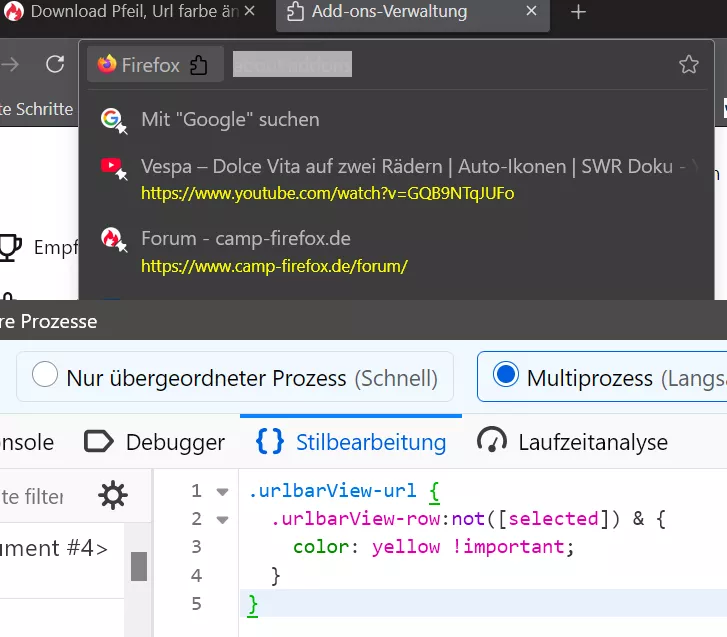
Danke der hat Funktioniert.
-
Die Farbe des Download Pfeils Code hat geklappt leider des Adressmenü klappte es nicht.
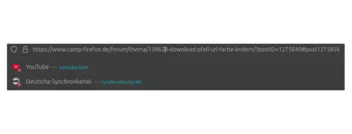
Türkis Farbe möchte ich ändern. -
Ich werde es Testen.
Danke euch.
-
Nutze kein Code für das Icon.
-
-
Hallo
Durch mein neues Theme hat sich der Download Pfeil die Farbe in Rot geändert wenn man was gedownloadet davor Standard Blau.
Und im Adressmenü die Links möchte die Standard Farbe haben.
Gibt es dafür css Code?.
Danke im voraus.
-
2002Andreas Frage soll ich diesen Eintrag löschen.
Code
Alles anzeigen"use strict"; /* *********************************************************************************************** README Aktivieren einer Einstellung > var ... auf 'true' setzen Deaktivieren einer Einstellung > var ... auf 'false' setzen Anpassungen vornehmen > Aendern von Werten - Farbe - Name: red, blue, transparent / Hexcode: #33CCFF, #FFF - Farbe - rgb(a): rgba(0,0,255,0.8) / hsl(a): hsla(240,100%,50%,0.8) // a = Sichtbarkeit - Zahlen: 1, 2, 3 ... 10, 11, 12 ... - Sichtbarkeit (in Dezimalzahlen): 0.0 bis 1.0 e.g. 1.4, 1,75 - Farbverlaeufe: linear-gradient(Richtung, Farbe, Farbe, Farbe) - Beispiel: linear-gradient(to right, blue, #33CCFF, rgba(0,0,255,0.8)) - Beispiel 2: Farbverlauf von links nach rechts - tranparent -> weiss mit 50%er Sichtbarkeit -> tranparent linear-gradient(to right,transparent,rgba(255,255,255,0.5),transparent) Info - Zu kleine Breitenwerte werden sich negativ auf einige Oberflaechenelemente auswirken (z.B. auf Menuelisten)! *********************************************************************************************** */ // Allgemeine Einstellungen // Scrollbars ausblenden var hide_scrollbars = false; /* Standard = false */ // Schaltflächen ausblenden var hide_scrollbar_buttons = false; /* Standard = false */ // benutzerdefinierte Breite var custom_scrollbar_width = true; /* Standard = false */ var custom_scrollbar_width_value = 8; /* 10-? // Standard = 17 (in px) */ // benutzerdefinierte Sichtbarkeit var custom_scrollbar_opacity = true; /* Standard = false */ var custom_opacity_value = "0.9"; /* Standard = 1.0 */ // "schwebende" Scrollbars / Scrollbars über dem Webinhalt var enable_floating_scrollbars = false; /* Standard = false */ // benutzerdefinierte Scrollbars var enable_custom_scrollbars = true; // benutzerdefinierte Hintergrundfarbe bzw. benutzerdefinierter Hintergrundverlauf var cs_background_color = "#CCCCCC"; /* Standard = #CCCCCC / Transparenter Hintergrund = transparent */ var cs_background_image = "linear-gradient(to right,transparent,rgba(255,255,255,0.5),transparent)"; /* Standard = none */ // benutzerdefinierte Schiebereglerfarbe bzw. benutzerdefinierter Schiebereglerfarbverlauf var cs_thumb_color = "#33CCFF"; /* Standard = #33CCFF */ var cs_thumb_image = "(to right,transparent,rgba(255,0,0,0.9),transparent)"; /* Standard = unset */ // benutzerdefinierte Schiebereglerfarbe (hover/ueber) bzw. benutzerdefinierter Schiebereglerfarbverlauf var cs_thumb_hover_color = "red"; /* Standard = #66FFFF */ var cs_thumb_hover_image = "rgba(255,0,0)"; /* Standard = unset */ // benutzerdefinierte Schiebereglerrundung var cs_thumb_roundness = 0; /* Standard = 0 (in px) */ // benutzerdefinierte Schiebereglerrandbreite var cs_thumb_border = 1; /* Standard = 0 (in px) */ // benutzerdefinierte Schiebereglerrandfarbe var cs_thumb_border_color = "#33CCFF"; /* default ##33CCFF */ // benutzerdefinierte Schaltflaechenfarbe bzw. benutzerdefinierter Schaltflaechenfarbverlauf var cs_buttons_color = "lightgrey"; /* Standard = #000000 */ var cs_buttons_image = "linear-gradient(to right,transparent,rgba(255,255,255,0.5),transparent)"; /* Standard = unset */ // benutzerdefinierte Schaltflaechenfarbe (hover/ueber) bzw. benutzerdefinierter Schaltflaechenfarbverlauf var cs_buttons_hover_color = "#000066"; /* Standard = #000066 */ var cs_buttons_hover_image = "linear-gradient(to right,transparent,rgba(255,255,255,0.5),transparent)"; /* Standard = unset */ // benutzerdefinierte Schaltflächenrundung var cs_buttons_roundness = 0; /* Standard = 0 (in px) */ /* ******************************************************************************************** */ /* ******************************************************************************************** */ /* ******************************************************************************************** */Und ist das auch ein Script?, was bewirkt es
CSS
Alles anzeigenComponents.utils.import("resource://gre/modules/Services.jsm"); var ss = Components.classes["@mozilla.org/content/style-sheet-service;1"].getService(Components.interfaces.nsIStyleSheetService); var custom_scrollbars = { init: function() { var uri = Services.io.newURI("data:text/css;charset=utf-8," + encodeURIComponent('\ \ @namespace html url("http://www.w3.org/1999/xhtml");\ \ scrollbar, scrollcorner {\ -moz-appearance: none !important;\ background-color: '+cs_background_color+' !important; \ background-image: '+cs_background_image+' !important; \ }\ scrollbar thumb {\ -moz-appearance: none !important;\ background-color: '+cs_thumb_color+' !important;\ background-image: '+cs_thumb_image+' !important;\ border-radius: '+cs_thumb_roundness+'px !important;\ border: '+cs_thumb_border+'px solid '+cs_thumb_border_color+' !important; \ }\ scrollbar thumb:hover, scrollbar thumb:active {\ -moz-appearance: none !important;\ background-color: '+cs_thumb_hover_color+' !important;\ background-image: '+cs_thumb_hover_image+' !important;\ }\ scrollbar scrollbarbutton {\ -moz-appearance: none !important;\ background-color: '+cs_buttons_color+' !important;\ background-image: '+cs_buttons_image+' !important;\ border-radius: '+cs_buttons_roundness+'px !important;\ }\ scrollbar scrollbarbutton:hover {\ -moz-appearance: none !important;\ background-color: '+cs_buttons_hover_color+' !important;\ background-image: '+cs_buttons_hover_image+' !important;\ }\ \ '), null, null); ss.loadAndRegisterSheet(uri, ss.AGENT_SHEET); } }; var scrollbar_buttons = { init: function() { var uri = Services.io.newURI("data:text/css;charset=utf-8," + encodeURIComponent('\ \ @namespace html url("http://www.w3.org/1999/xhtml");\ \ scrollbar scrollbarbutton {\ opacity: 0 !important;\ }\ scrollbar[orient="vertical"] scrollbarbutton {\ min-height: 1px !important;\ height: 1px !important;\ max-height: 1px !important;\ }\ scrollbar[orient="horizontal"] scrollbarbutton {\ min-width: 1px !important;\ width: 1px !important;\ max-width: 1px !important;\ }\ \ '), null, null); ss.loadAndRegisterSheet(uri, ss.AGENT_SHEET); } }; var scrollbar_width = { init: function() { var uri = Services.io.newURI("data:text/css;charset=utf-8," + encodeURIComponent('\ \ @namespace html url("http://www.w3.org/1999/xhtml");\ \ scrollbar[orient="vertical"] scrollbarbutton {\ min-width: 0 !important;\ width: '+custom_scrollbar_width_value+'px !important;\ max-width: '+custom_scrollbar_width_value+'px !important;\ }\ scrollbar[orient="horizontal"] scrollbarbutton {\ min-height: 0 !important;\ height: '+custom_scrollbar_width_value+'px !important;\ max-height: '+custom_scrollbar_width_value+'px !important;\ }\ \ '), null, null); ss.loadAndRegisterSheet(uri, ss.AGENT_SHEET); } }; var floating_scrollbars = { init: function() { var uri = Services.io.newURI("data:text/css;charset=utf-8," + encodeURIComponent('\ \ @namespace html url("http://www.w3.org/1999/xhtml");\ \ scrollbar {\ position: relative !important;\ z-index: 1000000000 !important;\ }\ scrollbar, scrollcorner {\ background-color: transparent !important; \ background-image: unset !important; \ }\ scrollbar[orient="vertical"] {\ -moz-margin-start: -'+custom_scrollbar_width_value+'px !important;\ width: '+custom_scrollbar_width_value+'px !important;\ }\ scrollbar[orient="horizontal"] {\ margin-top: -'+custom_scrollbar_width_value+'px !important;\ height: '+custom_scrollbar_width_value+'px !important;\ }\ \ '), null, null); ss.loadAndRegisterSheet(uri, ss.AGENT_SHEET); } }; var scrollbar_opacity = { init: function() { var uri = Services.io.newURI("data:text/css;charset=utf-8," + encodeURIComponent('\ \ @namespace html url("http://www.w3.org/1999/xhtml");\ \ scrollbar {\ opacity: '+custom_opacity_value+' !important;\ }\ \ '), null, null); ss.loadAndRegisterSheet(uri, ss.AGENT_SHEET); } }; var remove_scrollbars = { init: function() { var uri = Services.io.newURI("data:text/css;charset=utf-8," + encodeURIComponent('\ \ @namespace html url("http://www.w3.org/1999/xhtml");\ \ scrollbar, scrollcorner {\ display: none !important;\ visibility: collapse !important;\ }\ \ '), null, null); ss.loadAndRegisterSheet(uri, ss.AGENT_SHEET); } }; // oben aktivierte Einstellungen werden hier ausgefuehrt if(enable_custom_scrollbars==true) custom_scrollbars.init(); if(hide_scrollbar_buttons==true) scrollbar_buttons.init(); if(custom_scrollbar_width==true) scrollbar_width.init(); if(enable_floating_scrollbars==true) floating_scrollbars.init(); if(custom_scrollbar_opacity==true) scrollbar_opacity.init(); if(hide_scrollbars==true) remove_scrollbars.init(); Screenshot (53).png -
Das Script dann in die userContent.css einfügen.
Nein, auch da haben Skripte nichts zu suchen.
Um Skripte nutzen zu können bedarf es auch erst einer Vorbereitung:
BeitragFunktionelle Änderungen am Firefox durch Skripte
Als Ersatz für einige Erweiterungen bzw. Funktionen daraus kann man auch diverse Skripte benutzen.
( damit sind nicht optische Änderungen am Firefox gemeint)
Diese werden mit einer userChrome.css Datei erstellt.
Skripte werden als .uc.js Datei im Unterordner chrome gespeichert.
Hinweise:
Ab Firefox Version 139 kann der neue Eintrag in about:config:
security.allow_unsafe_dangerous_privileged_evil_evalauf true umgestellt werden, damit manche Skripte wieder funktionieren.
Hier der Gund dafür:
RE:… 2002Andreas15. November 2017 um 16:49 Ich habe es eben gelesen den Link dies habe ich schon gemacht wo ich damit Angefangen habe mit css usw. Mit deiner Hilfe, anderen hier aus dem Forum. damals 2017/2018.
ZitatSiehe meinen ersten Screenshot. Den habe ich mit deinem Code erstellt.
Wenn es bei dir funktioniert, dann hast du noch einen weiteren Code.
Ja, Danke.
-
2002Andreas Mein alter css Code für YouTube Vorschaubilder Funktionieren ja, wie kommst du das es nicht Funktioniert?.

-
2002Andreas treas Ich habe ein ähnliches Theme gefunden aus #5 zweites Bild.
Werde es mir durch Lesen.
-
Nicht gewusst das es ein Script ist, dann habe ich den css mit YouTube Vorschaubilder verkleinern doppelt ein mal in userChrome, css und userContent.css eingetragen dann muss ich den Eintrag in userChrome.css löschen.
Das Script dann in die userContent.css einfügen.
-
Bis gestern war alles gut, der zweite screen aus #5 ist bei mir als Standard Design.
CSS
Alles anzeigen/***** Abschnitt "Nur in der Browser-Oberfläche" *****/ @-moz-document url-prefix(chrome://browser/content/browser.xhtml) { /*** Tab-Schliessen-Button etwas kleiner ***/ .tab-close-button .toolbarbutton-icon {max-height: 15px !important; max-width: 15px !important;} } /* Pluszeiechen kleiner, größer machen*/ @-moz-document url-prefix(chrome://browser/content/browser.xhtml) { .tabs-newtab-button > .toolbarbutton-icon{ width: 08px!important;} } /* Adresseleiste verschieben */ @-moz-document url-prefix(chrome://browser/content/browser.xhtml) { #urlbar-container{ margin-left:100px!important;} } /* Adressleiste kleiner, größer machen */ @-moz-document url-prefix(chrome://browser/content/browser.xhtml){ #urlbar{ max-width:900px!important;} } /* Tab-Breite ändern */ .tabbrowser-tab:not([pinned]) { flex-grow: 0 !important; min-width: 130px !important; } /* Icons verschieben */ @-moz-document url-prefix(chrome://browser/content/browser.xhtml) { #urlbar-container{ margin-left:380px; max-width:5000px} } /* Menütext Schriftfarbe ändern */ .toolbarbutton-text { -moz-appearance: none !important; color: #000000 !important; } /* Lesezeichen Symbolleiste Schriftfarbe */ toolbarbutton.bookmark-item .toolbarbutton-text{ color:#ADD8E6 !important} /* Hamburgermenü entfernen */ #PanelUI-button { display: none !important; } /* Lesezeichen Symbolleiste mehrzeilig */ @-moz-document url-prefix(chrome://browser/content/browser.xhtml) { #personal-bookmarks { display:block; } #PersonalToolbar { display:block; min-height: 0px!important; max-height: 300px!important ; } #personal-bookmarks #PlacesToolbar > hbox { display: -moz-stack !important; left:0px; right:0px; width: 100%; } #personal-bookmarks #PlacesToolbar #PlacesToolbarItems { overflow-x:visible; overflow-y:visible; } #personal-bookmarks #PlacesToolbar #PlacesToolbarItems > box { display:block; } #personal-bookmarks #PlacesToolbar > .bookmark-item { visibility: visible !important; } #personal-bookmarks #PlacesToolbar .chevron { display:none; } #personal-bookmarks #PlacesToolbar > hbox > hbox { overflow-x:hidden; overflow-y:hidden; } #personal-bookmarks #PlacesToolbar #PlacesToolbarDropIndicator[collapsed="true"] { display:none; } #personal-bookmarks #PlacesToolbar #PlacesToolbarDropIndicator { display:none; } #personal-bookmarks #PlacesToolbar toolbarbutton.bookmark-item { padding-top: 2px; padding-bottom: 2px; padding-left: 3px; padding-right: 3px; } #personal-bookmarks #PlacesToolbar toolbarbutton.bookmark-item:hover:active:not([disabled="true"]), #personal-bookmarks #PlacesToolbar toolbarbutton.bookmark-item[open="true"] { padding-top: 2px !important; padding-bottom: 2px !important; -moz-padding-start: 4px; -moz-padding-end: 2px; } #personal-bookmarks #PlacesToolbar toolbarseparator { -moz-appearance: none !important; visibility: visible !important; display:inline; text-shadow: none !important; border-left: 3px solid ThreeDShadow !important; border-right: 3px solid ThreeDHighlight !important; vertical-align: middle; } #personal-bookmarks toolbarbutton.bookmark-item[dragover][open] { -moz-appearance: toolbarbutton;} } /* Link ausblenden */ #statuspanel,#statuspanel-label{ display:none!important} /* Lesezeichen Symbolleiste Schriftgröße ändern */ #PersonalToolbar .toolbarbutton-text { font-size: 20px !important; } /* Lesezeichenmenü Schriftgröße ändern */ #PlacesToolbarItems .bookmark-item menupopup menuitem.menuitem-iconic:nth-child(n+1){ font-size:20px!important; } /* Lesezeichenpopupmenü Schriftgröße ändern */ #PlacesToolbarItems .bookmark-item menupopup menuitem.menuitem-iconic:nth-child(n+1), #PlacesToolbarItems .bookmark-item menupopup menu.menu-iconic:nth-child(n+1), #PlacesToolbarItems .bookmark-item:nth-child(2) > menupopup:nth-child(n+1) > menu:nth-child(n+2) > menupopup:nth-child(n+1){ font-size:16px!important; } /* Anderes Ordnersymbol (16 x 16 Pixel) verwenden, * C:\Users\Mirko Milosevic\AppData\Roaming\Mozilla\Firefox\Profiles\o2y1hda3.Mirko Milosevic\chrome\icons * * */ treechildren::-moz-tree-image(container), .bookmark-item[container="true"] { list-style-image: url('icons/folder-yellow.png') !important; } /* Favoriten Stern Farbe ändern */ #star-button { fill: yellow !important; } /* Runde Adresseleiste */ #urlbar{ border-radius: 80px !important; } /* Runde Tabs */ #TabsToolbar .tabbrowser-tab{ background: !important; border-radius: 80px !important; border:none!important; } .tab-background[selected="true"] { background: !important; border-radius: 80px !important; border:none!important; } .tabbrowser-tab::after, .tabbrowser-tab::before { margin-inline-start: 0px!important; border-left: 0px solid!important; border-image:none!important; border-image-slice: 0!important; width: 0px!important; box-sizing: border-box; opacity: 0!important; } .tab-line[selected=true] { display:none!important } /* Markierung Text in der Url Adresse Farbe ändern */ #urlbar-input::selection { background-color: #FA9852 !important; } } /* Farbe für aktiven Tab-Rahmen */ /* Aktiver Tab Hintergrund orange */ .tab-background[selected="true"]{ background: #1F4168!important; } /* Kontextmenü Hintergrund ändern */ menupopup > menu, menupopup, popup > menu, popup, #context-navigation{ -moz-appearance: none !important; color: !important; background-color: #000000 !important; } menuitem { color: !important; } /* YouTube Vorschaubilder verkleinern */ ytd-rich-section-renderer.style-scope:nth-child(n+3) > div:nth-child(1) > ytd-rich-shelf-renderer:nth-child(1) > div:nth-child(1) > div:nth-child(2), ytd-rich-grid-row.style-scope:nth-child(n+1), ytd-rich-grid-row.style-scope:nth-child(n+1) > div:nth-child(n+1) > ytd-rich-item-renderer:nth-child(n+1) { max-width: 2000px !important; margin: 0 auto!important; } "use strict"; /* *********************************************************************************************** README Aktivieren einer Einstellung > var ... auf 'true' setzen Deaktivieren einer Einstellung > var ... auf 'false' setzen Anpassungen vornehmen > Aendern von Werten - Farbe - Name: red, blue, transparent / Hexcode: #33CCFF, #FFF - Farbe - rgb(a): rgba(0,0,255,0.8) / hsl(a): hsla(240,100%,50%,0.8) // a = Sichtbarkeit - Zahlen: 1, 2, 3 ... 10, 11, 12 ... - Sichtbarkeit (in Dezimalzahlen): 0.0 bis 1.0 e.g. 1.4, 1,75 - Farbverlaeufe: linear-gradient(Richtung, Farbe, Farbe, Farbe) - Beispiel: linear-gradient(to right, blue, #33CCFF, rgba(0,0,255,0.8)) - Beispiel 2: Farbverlauf von links nach rechts - tranparent -> weiss mit 50%er Sichtbarkeit -> tranparent linear-gradient(to right,transparent,rgba(255,255,255,0.5),transparent) Info - Zu kleine Breitenwerte werden sich negativ auf einige Oberflaechenelemente auswirken (z.B. auf Menuelisten)! *********************************************************************************************** */ // Allgemeine Einstellungen // Scrollbars ausblenden var hide_scrollbars = false; /* Standard = false */ // Schaltflächen ausblenden var hide_scrollbar_buttons = false; /* Standard = false */ // benutzerdefinierte Breite var custom_scrollbar_width = true; /* Standard = false */ var custom_scrollbar_width_value = 8; /* 10-? // Standard = 17 (in px) */ // benutzerdefinierte Sichtbarkeit var custom_scrollbar_opacity = true; /* Standard = false */ var custom_opacity_value = "0.9"; /* Standard = 1.0 */ // "schwebende" Scrollbars / Scrollbars über dem Webinhalt var enable_floating_scrollbars = false; /* Standard = false */ // benutzerdefinierte Scrollbars var enable_custom_scrollbars = true; // benutzerdefinierte Hintergrundfarbe bzw. benutzerdefinierter Hintergrundverlauf var cs_background_color = "#CCCCCC"; /* Standard = #CCCCCC / Transparenter Hintergrund = transparent */ var cs_background_image = "linear-gradient(to right,transparent,rgba(255,255,255,0.5),transparent)"; /* Standard = none */ // benutzerdefinierte Schiebereglerfarbe bzw. benutzerdefinierter Schiebereglerfarbverlauf var cs_thumb_color = "#33CCFF"; /* Standard = #33CCFF */ var cs_thumb_image = "(to right,transparent,rgba(255,0,0,0.9),transparent)"; /* Standard = unset */ // benutzerdefinierte Schiebereglerfarbe (hover/ueber) bzw. benutzerdefinierter Schiebereglerfarbverlauf var cs_thumb_hover_color = "red"; /* Standard = #66FFFF */ var cs_thumb_hover_image = "rgba(255,0,0)"; /* Standard = unset */ // benutzerdefinierte Schiebereglerrundung var cs_thumb_roundness = 0; /* Standard = 0 (in px) */ // benutzerdefinierte Schiebereglerrandbreite var cs_thumb_border = 1; /* Standard = 0 (in px) */ // benutzerdefinierte Schiebereglerrandfarbe var cs_thumb_border_color = "#33CCFF"; /* default ##33CCFF */ // benutzerdefinierte Schaltflaechenfarbe bzw. benutzerdefinierter Schaltflaechenfarbverlauf var cs_buttons_color = "lightgrey"; /* Standard = #000000 */ var cs_buttons_image = "linear-gradient(to right,transparent,rgba(255,255,255,0.5),transparent)"; /* Standard = unset */ // benutzerdefinierte Schaltflaechenfarbe (hover/ueber) bzw. benutzerdefinierter Schaltflaechenfarbverlauf var cs_buttons_hover_color = "#000066"; /* Standard = #000066 */ var cs_buttons_hover_image = "linear-gradient(to right,transparent,rgba(255,255,255,0.5),transparent)"; /* Standard = unset */ // benutzerdefinierte Schaltflächenrundung var cs_buttons_roundness = 0; /* Standard = 0 (in px) */ /* ******************************************************************************************** */ /* ******************************************************************************************** */ /* ******************************************************************************************** */ Components.utils.import("resource://gre/modules/Services.jsm"); var ss = Components.classes["@mozilla.org/content/style-sheet-service;1"].getService(Components.interfaces.nsIStyleSheetService); var custom_scrollbars = { init: function() { var uri = Services.io.newURI("data:text/css;charset=utf-8," + encodeURIComponent('\ \ @namespace html url("http://www.w3.org/1999/xhtml");\ \ scrollbar, scrollcorner {\ -moz-appearance: none !important;\ background-color: '+cs_background_color+' !important; \ background-image: '+cs_background_image+' !important; \ }\ scrollbar thumb {\ -moz-appearance: none !important;\ background-color: '+cs_thumb_color+' !important;\ background-image: '+cs_thumb_image+' !important;\ border-radius: '+cs_thumb_roundness+'px !important;\ border: '+cs_thumb_border+'px solid '+cs_thumb_border_color+' !important; \ }\ scrollbar thumb:hover, scrollbar thumb:active {\ -moz-appearance: none !important;\ background-color: '+cs_thumb_hover_color+' !important;\ background-image: '+cs_thumb_hover_image+' !important;\ }\ scrollbar scrollbarbutton {\ -moz-appearance: none !important;\ background-color: '+cs_buttons_color+' !important;\ background-image: '+cs_buttons_image+' !important;\ border-radius: '+cs_buttons_roundness+'px !important;\ }\ scrollbar scrollbarbutton:hover {\ -moz-appearance: none !important;\ background-color: '+cs_buttons_hover_color+' !important;\ background-image: '+cs_buttons_hover_image+' !important;\ }\ \ '), null, null); ss.loadAndRegisterSheet(uri, ss.AGENT_SHEET); } }; var scrollbar_buttons = { init: function() { var uri = Services.io.newURI("data:text/css;charset=utf-8," + encodeURIComponent('\ \ @namespace html url("http://www.w3.org/1999/xhtml");\ \ scrollbar scrollbarbutton {\ opacity: 0 !important;\ }\ scrollbar[orient="vertical"] scrollbarbutton {\ min-height: 1px !important;\ height: 1px !important;\ max-height: 1px !important;\ }\ scrollbar[orient="horizontal"] scrollbarbutton {\ min-width: 1px !important;\ width: 1px !important;\ max-width: 1px !important;\ }\ \ '), null, null); ss.loadAndRegisterSheet(uri, ss.AGENT_SHEET); } }; var scrollbar_width = { init: function() { var uri = Services.io.newURI("data:text/css;charset=utf-8," + encodeURIComponent('\ \ @namespace html url("http://www.w3.org/1999/xhtml");\ \ scrollbar[orient="vertical"] scrollbarbutton {\ min-width: 0 !important;\ width: '+custom_scrollbar_width_value+'px !important;\ max-width: '+custom_scrollbar_width_value+'px !important;\ }\ scrollbar[orient="horizontal"] scrollbarbutton {\ min-height: 0 !important;\ height: '+custom_scrollbar_width_value+'px !important;\ max-height: '+custom_scrollbar_width_value+'px !important;\ }\ \ '), null, null); ss.loadAndRegisterSheet(uri, ss.AGENT_SHEET); } }; var floating_scrollbars = { init: function() { var uri = Services.io.newURI("data:text/css;charset=utf-8," + encodeURIComponent('\ \ @namespace html url("http://www.w3.org/1999/xhtml");\ \ scrollbar {\ position: relative !important;\ z-index: 1000000000 !important;\ }\ scrollbar, scrollcorner {\ background-color: transparent !important; \ background-image: unset !important; \ }\ scrollbar[orient="vertical"] {\ -moz-margin-start: -'+custom_scrollbar_width_value+'px !important;\ width: '+custom_scrollbar_width_value+'px !important;\ }\ scrollbar[orient="horizontal"] {\ margin-top: -'+custom_scrollbar_width_value+'px !important;\ height: '+custom_scrollbar_width_value+'px !important;\ }\ \ '), null, null); ss.loadAndRegisterSheet(uri, ss.AGENT_SHEET); } }; var scrollbar_opacity = { init: function() { var uri = Services.io.newURI("data:text/css;charset=utf-8," + encodeURIComponent('\ \ @namespace html url("http://www.w3.org/1999/xhtml");\ \ scrollbar {\ opacity: '+custom_opacity_value+' !important;\ }\ \ '), null, null); ss.loadAndRegisterSheet(uri, ss.AGENT_SHEET); } }; var remove_scrollbars = { init: function() { var uri = Services.io.newURI("data:text/css;charset=utf-8," + encodeURIComponent('\ \ @namespace html url("http://www.w3.org/1999/xhtml");\ \ scrollbar, scrollcorner {\ display: none !important;\ visibility: collapse !important;\ }\ \ '), null, null); ss.loadAndRegisterSheet(uri, ss.AGENT_SHEET); } }; // oben aktivierte Einstellungen werden hier ausgefuehrt if(enable_custom_scrollbars==true) custom_scrollbars.init(); if(hide_scrollbar_buttons==true) scrollbar_buttons.init(); if(custom_scrollbar_width==true) scrollbar_width.init(); if(enable_floating_scrollbars==true) floating_scrollbars.init(); if(custom_scrollbar_opacity==true) scrollbar_opacity.init(); if(hide_scrollbars==true) remove_scrollbars.init(); Screenshot (53).png -
Bei dem ist alles Weiß da ich kein Helles Theme nutze.

Habe ein altes Bild gefunden mit dem altem Theme was ich bisher nutze.
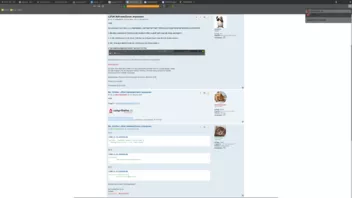
Siehst du den Unterschied?. Ist jetzt das gleiche Theme, leider wurde es Heller.
-
ups habe den screen vergessen.
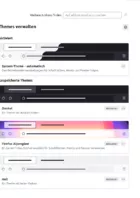
Ist zu Hell.
-
Hallo
Nach dem Update auf Firefox 141 ist mein System-Theme – automatisch auf ein mal Hell und davor war das etwas Dunkler wurde da was geändert?.
Wie kann ich es zurück auf das alte Theme?.