Herzlichen Dank 

Beiträge von robotest
-
-
für Unterordner funktioniert der Code bei mir leider nicht.
-
2002Andreas Vielen Dank
Zitat
Das hat aber nichts mit diesem uralten Thread/Thema zu tun.Sorry, werde in Zukunft darauf achten.

-
-
Hallo, funktioniert bei mir leider nicht mehr richtig.
Kann bitte jemand nachschauen?
(Firefox Version 110.0b2, Win7 x32)
ZitatAlles anzeigenBreitere Menues "Lesezeichen" und "Gehe"
(Standardbreite ist 25em, mehr als 42em wirken sich offenbar nicht aus
*/
menu.bookmark-item,
menuitem.bookmark-item {
max-width: 16em ! important;
}
-
ich bin für jede Hilfe sehr dankbar,
Danke dir auch, sorry, dass ich mich so unklar ausgedrückt habe.
Bitte um Geduld, wird schon, irgendwann.

-
-
Hallo,
funktioniert bei mir leider nicht mehr richtig.
Kann bitte jemand helfen?
(Firefox Version 109.0b9 / Win7x32)
-
Wollte nur sagen, dass mit FF102.0b2 wieder alles in Ordnung ist, keine "weiße Flecken".
Gruß
-
milupo im Fehlerbehebungsmodus ist alles gut.
Adressleiste_verschiebbar.uc.js
Code
Alles anzeigen(function() { if (location != 'chrome://browser/content/browser.xhtml') return; // Adressleiste verschiebbar try { CustomizableUI.createWidget({ id: 'ucjs_urlbar-item', type: 'custom', defaultArea: CustomizableUI.AREA_NAVBAR, onBuild: function(aDocument) { var toolbaritem = aDocument.createElementNS('http://www.mozilla.org/keymaster/gatekeeper/there.is.only.xul', 'toolbaritem'); toolbaritem.id = 'ucjs_urlbar-item'; toolbaritem.className = 'chromeclass-toolbar-additional'; toolbaritem.setAttribute('label', 'Adressleiste'); return toolbaritem; } }); } catch(e) { }; document.getElementById('ucjs_urlbar-item').appendChild(document.getElementById('urlbar-container')); // Vor/Zuruck-Schaltflachen verschiebbar try { CustomizableUI.createWidget({ id: 'ucjs_back-item', type: 'custom', defaultArea: CustomizableUI.AREA_NAVBAR, onBuild: function(aDocument) { var toolbaritem = aDocument.createElementNS('http://www.mozilla.org/keymaster/gatekeeper/there.is.only.xul', 'toolbaritem'); toolbaritem.id = 'ucjs_back-item'; toolbaritem.className = 'chromeclass-toolbar-additional'; toolbaritem.setAttribute('label', 'Zuruck'); return toolbaritem; } }); } catch(e) { }; document.getElementById('ucjs_back-item').appendChild(document.getElementById('back-button')); try { CustomizableUI.createWidget({ id: 'ucjs_forward-item', type: 'custom', defaultArea: CustomizableUI.AREA_NAVBAR, onBuild: function(aDocument) { var toolbaritem = aDocument.createElementNS('http://www.mozilla.org/keymaster/gatekeeper/there.is.only.xul', 'toolbaritem'); toolbaritem.id = 'ucjs_forward-item'; toolbaritem.className = 'chromeclass-toolbar-additional'; toolbaritem.setAttribute('label', 'Vor'); return toolbaritem; } }); } catch(e) { }; document.getElementById('ucjs_forward-item').appendChild(document.getElementById('forward-button')); // Mehr-Werkzeuge-Schaltflache verschiebbar try { CustomizableUI.createWidget({ id: 'ucjs_overflow-item', type: 'custom', defaultArea: CustomizableUI.AREA_NAVBAR, onBuild: function(aDocument) { var toolbaritem = aDocument.createElementNS('http://www.mozilla.org/keymaster/gatekeeper/there.is.only.xul', 'toolbaritem'); toolbaritem.id = 'ucjs_overflow-item'; toolbaritem.className = 'chromeclass-toolbar-additional'; toolbaritem.setAttribute('label', 'Mehr Werkzeuge'); return toolbaritem; } }); } catch(e) { }; document.getElementById('ucjs_overflow-item').appendChild(document.getElementById('nav-bar-overflow-button')); // Menuleiste verschiebbar try { CustomizableUI.createWidget({ id: 'ucjs_menubar-item', type: 'custom', defaultArea: CustomizableUI.AREA_MENUBAR, onBuild: function(aDocument) { var toolbaritem = aDocument.createElementNS('http://www.mozilla.org/keymaster/gatekeeper/there.is.only.xul', 'toolbaritem'); toolbaritem.id = 'ucjs_menubar-item'; toolbaritem.className = 'chromeclass-toolbar-additional'; toolbaritem.setAttribute('label', 'Menuleiste'); return toolbaritem; } }); } catch(e) { }; document.getElementById('ucjs_menubar-item').appendChild(document.getElementById('main-menubar')); })();Und +:
ZitatBei dir hat der aktive Tab einen Rahmen, hier nicht mit dem Code
Wenn ich diese Datei, lösche dann gibt es keinen Ramen:
addonStartup.json.lz4
-
Das hier nur mit diesem Code:
.tabbrowser-tab:not([selected="true"]) {
  background-color: #BDBDBD !important; }

Und hier mit allen:

milupo ja, der neuer ist länger:
CSS
Alles anzeigen/* Firefox userChrome.css tweaks ********************************************************/ /* Github: https://github.com/aris-t2/customcssforfx ************************************/ /****************************************************************************************/ /* NOTE ********************************************************************************/ /* Variables are set inside '.\config\' folders CSS files, if complete package is used! */ :root { --classic_squared_tabs_tab_height: 26px; --classic_squared_tabs_tab_default_loading_icon_color: #0A84FF; --classic_squared_tabs_active_tab: linear-gradient(to top,#f9f9fa,#f9f9fa,#f9f9fa); --classic_squared_tabs_hovered_tabs: linear-gradient(to top,#cac7c1,#d5d2cc,#e8e6e2); --classic_squared_tabs_other_tabs: linear-gradient(to top,#aeaba5,#c1beb7,#c9c6be); --classic_squared_tabs_unloaded_tabs: linear-gradient(to top,#aeaba5,#c1beb7,#c9c6be); --classic_squared_tabs_lwt-dark_active_tab: inherit; --classic_squared_tabs_lwt-dark_hovered_tabs: linear-gradient(hsla(0,0%,80%,.5), hsla(0,0%,60%,.5) 80%); --classic_squared_tabs_lwt-dark_other_tabs: linear-gradient(hsla(0,0%,60%,.5), hsla(0,0%,45%,.5) 80%); --classic_squared_tabs_lwt-bright_active_tab: inherit; --classic_squared_tabs_lwt-bright_hovered_tabs: linear-gradient(hsla(0,0%,60%,.6), hsla(0,0%,45%,.6) 80%); --classic_squared_tabs_lwt-bright_other_tabs: linear-gradient(hsla(0,0%,40%,.6), hsla(0,0%,30%,.6) 80%); --classic_squared_tabs-border_size: 1px; --classic_squared_tabs-border1: #5f7181; --classic_squared_tabs-border2: rgba(0,0,0,.2); --classic_squared_tabs-border3: rgba(0,0,0,.5); --classic_squared_tabs-border-radius: 3px; --classic_squared_tabs_new_tab_icon_color: black; --classic_squared_tabs_tab_text_color: black; --classic_squared_tabs_tab_text_shadow: transparent; --tab-min-height: var(--classic_squared_tabs_tab_height) !important; --mltabs-newtab-height: calc( var(--classic_squared_tabs_tab_height) + 1px ) !important; --tab-min-height_tnot: calc( var(--classic_squared_tabs_tab_height) - 1px ) !important; /* for tabs_below_navigation_toolbar_alt.css */ --tab_below_navigation_toolbar_bottom_padding: var(--classic_squared_tabs_tab_height) !important; --tab_below_main_content_bottom_margin: calc(2px + var(--classic_squared_tabs_tab_height)) !important; --tab_below_main_content_toolbar_height: calc(1px + var(--classic_squared_tabs_tab_height)) !important; --tab_below_main_content_top_margin: 0 !important; /* variables for tabs below navigation toolbar option on macOS */ --tab_below_navigation_toolbar_bottom_padding_macOS: var(--classic_squared_tabs_tab_height) !important; --tab_below_navigation_toolbar_toolbox_top_padding_macOS: calc(-2px + var(--classic_squared_tabs_tab_height)) !important; /* variables for tab_close_at_tabs_start.css */ --ctb_start_padding: 2px !important; --ctb_width: 14px !important; --ctb_start_margin: -4px !important; --ctb_end_margin: 12px !important; } /* remove default tab colors */ #TabsToolbar:not(:-moz-lwtheme) .tabbrowser-tab[visuallyselected="true"], #TabsToolbar:not(:-moz-lwtheme) .tabbrowser-tab, #TabsToolbar:not(:-moz-lwtheme) .tabbrowser-tab .tab-background { background: unset !important; border: unset !important; } /*******************************************/ /**** default themes tab colors [start] ****/ /*******************************************/ /* black tab text color */ #TabsToolbar:not(:-moz-lwtheme) .tabbrowser-tab { color: var(--classic_squared_tabs_tab_text_color) !important; text-shadow: 1px 1px 1px var(--classic_squared_tabs_tab_text_shadow) !important; } /* default tabs color */ #TabsToolbar:not(:-moz-lwtheme) :is(.tabs-newtab-button,#tabs-newtab-button), #TabsToolbar:not(:-moz-lwtheme) .tabbrowser-tab .tab-content { background-image: var(--classic_squared_tabs_other_tabs) !important; } /* selected tabs color */ #TabsToolbar:not(:-moz-lwtheme) .tabbrowser-tab .tab-content[selected="true"] { background-image: var(--classic_squared_tabs_active_tab) !important; } /* hovered tabs color */ #TabsToolbar:not(:-moz-lwtheme) :is(.tabs-newtab-button,#tabs-newtab-button):hover, #TabsToolbar:not(:-moz-lwtheme) .tabbrowser-tab:hover .tab-content:not([selected="true"]) { background-image: var(--classic_squared_tabs_hovered_tabs) !important; } /* unloaded/pending tabs color */ #TabsToolbar:not(:-moz-lwtheme) .tabbrowser-tab[pending] .tab-content { background-image: var(--classic_squared_tabs_unloaded_tabs) !important; } /* tab border color */ #TabsToolbar:not(:-moz-lwtheme) :is(.tabs-newtab-button,#tabs-newtab-button), #TabsToolbar:not(:-moz-lwtheme) .tabbrowser-tab .tab-content { border-top: var(--classic_squared_tabs-border_size) solid var(--classic_squared_tabs-border1) !important; border-left: var(--classic_squared_tabs-border_size) solid var(--classic_squared_tabs-border1) !important; border-right: var(--classic_squared_tabs-border_size) solid var(--classic_squared_tabs-border1) !important; } #TabsToolbar :is(.tabs-newtab-button,#tabs-newtab-button) { border-top: var(--classic_squared_tabs-border_size) solid var(--classic_squared_tabs-border2) !important; border-left: var(--classic_squared_tabs-border_size) solid var(--classic_squared_tabs-border2) !important; border-right: var(--classic_squared_tabs-border_size) solid var(--classic_squared_tabs-border2) !important; } #TabsToolbar .tabbrowser-tab:not(:-moz-lwtheme):not([selected]) .tab-content { border-top: var(--classic_squared_tabs-border_size) solid var(--classic_squared_tabs-border3) !important; border-left: var(--classic_squared_tabs-border_size) solid var(--classic_squared_tabs-border3) !important; border-right: var(--classic_squared_tabs-border_size) solid var(--classic_squared_tabs-border3) !important; } /* new tab icon color */ #TabsToolbar:not(:-moz-lwtheme) :is(.tabs-newtab-button,#tabs-newtab-button) { fill: var(--classic_squared_tabs_new_tab_icon_color) !important; color: var(--classic_squared_tabs_new_tab_icon_color) !important; } /*******************************************/ /***** default themes tab colors [end] *****/ /*******************************************/ /********************************************/ /******* lw-themes tab colors [start] *******/ /********************************************/ /* lightweight theme tab colors*/ .tabbrowser-tab[selected]:-moz-lwtheme-darktext .tab-content { background-image: var(--classic_squared_tabs_lwt-dark_active_tab) !important; } :is(.tabs-newtab-button,#tabs-newtab-button):-moz-lwtheme-darktext, .tabbrowser-tab:not([selected]):-moz-lwtheme-darktext .tab-content { background-image: var(--classic_squared_tabs_lwt-dark_other_tabs) !important; } :is(.tabs-newtab-button,#tabs-newtab-button):hover:-moz-lwtheme-darktext, .tabbrowser-tab:not([selected]):hover:-moz-lwtheme-darktext .tab-content { background-image: var(--classic_squared_tabs_lwt-dark_hovered_tabs) !important; } .tabbrowser-tab[selected]:-moz-lwtheme-brighttext .tab-content { background-image: var(--classic_squared_tabs_lwt-bright_active_tab) !important; } :is(.tabs-newtab-button,#tabs-newtab-button):-moz-lwtheme-brighttext, .tabbrowser-tab:not([selected]):-moz-lwtheme-brighttext .tab-content { background-image: var(--classic_squared_tabs_lwt-bright_other_tabs) !important; } :is(.tabs-newtab-button,#tabs-newtab-button):hover:-moz-lwtheme-brighttext, .tabbrowser-tab:not([selected]):hover:-moz-lwtheme-brighttext .tab-content { background-image: var(--classic_squared_tabs_lwt-bright_hovered_tabs) !important; } .tabbrowser-tab:not([selected]):not(:hover):-moz-lwtheme-brighttext { background: unset !important; } .tabbrowser-tab[selected]:-moz-lwtheme-darktext .tab-content { border-top: 1px solid rgba(0,0,0,.5) !important; border-left: 1px solid rgba(0,0,0,.4) !important; border-right: 1px solid rgba(0,0,0,.4) !important; } .tabbrowser-tab[selected]:-moz-lwtheme-brighttext .tab-content { border-top: 1px solid rgba(255,255,255,.6) !important; border-left: 1px solid rgba(255,255,255,.2) !important; border-right: 1px solid rgba(255,255,255,.2) !important; } #TabsToolbar:-moz-lwtheme :is(.tabs-newtab-button,#tabs-newtab-button):-moz-lwtheme-darktext, .tabbrowser-tab .tab-content:-moz-lwtheme-darktext { border-top: 1px solid rgba(0,0,0,.2) !important; border-left: 1px solid rgba(0,0,0,.2) !important; border-right: 1px solid rgba(0,0,0,.2) !important; } #TabsToolbar:-moz-lwtheme :is(.tabs-newtab-button,#tabs-newtab-button):-moz-lwtheme-brighttext, .tabbrowser-tab .tab-content:-moz-lwtheme-brighttext { border-top: 1px solid rgba(255,255,255,.6) !important; border-left: 1px solid rgba(255,255,255,.2) !important; border-right: 1px solid rgba(255,255,255,.2) !important; } @media (-moz-content-prefers-color-scheme: dark) { .tabbrowser-tab[selected]:-moz-lwtheme .tab-content { background-image: var(--classic_squared_tabs_lwt-bright_active_tab) !important; } :is(.tabs-newtab-button,#tabs-newtab-button):-moz-lwtheme, .tabbrowser-tab:not([selected]):-moz-lwtheme .tab-content { background-image: var(--classic_squared_tabs_lwt-bright_other_tabs) !important; } :is(.tabs-newtab-button,#tabs-newtab-button):hover:-moz-lwtheme, .tabbrowser-tab:not([selected]):hover:-moz-lwtheme .tab-content { background-image: var(--classic_squared_tabs_lwt-bright_hovered_tabs) !important; } .tabbrowser-tab:not([selected]):not(:hover):-moz-lwtheme { background: unset !important; } .tabbrowser-tab[selected]:-moz-lwtheme .tab-content { border-top: 1px solid rgba(255,255,255,.6) !important; border-left: 1px solid rgba(255,255,255,.2) !important; border-right: 1px solid rgba(255,255,255,.2) !important; } #TabsToolbar:-moz-lwtheme :is(.tabs-newtab-button,#tabs-newtab-button):-moz-lwtheme, .tabbrowser-tab .tab-content:-moz-lwtheme { border-top: 1px solid rgba(255,255,255,.6) !important; border-left: 1px solid rgba(255,255,255,.2) !important; border-right: 1px solid rgba(255,255,255,.2) !important; } } @media (-moz-content-prefers-color-scheme: light) { .tabbrowser-tab[selected]:-moz-lwtheme .tab-content { background-image: var(--classic_squared_tabs_lwt-dark_active_tab) !important; } :is(.tabs-newtab-button,#tabs-newtab-button):-moz-lwtheme, .tabbrowser-tab:not([selected]):-moz-lwtheme .tab-content { background-image: var(--classic_squared_tabs_lwt-dark_other_tabs) !important; } :is(.tabs-newtab-button,#tabs-newtab-button):hover:-moz-lwtheme, .tabbrowser-tab:not([selected]):hover:-moz-lwtheme .tab-content { background-image: var(--classic_squared_tabs_lwt-dark_hovered_tabs) !important; } .tabbrowser-tab[selected]:-moz-lwtheme .tab-content { border-top: 1px solid rgba(0,0,0,.5) !important; border-left: 1px solid rgba(0,0,0,.4) !important; border-right: 1px solid rgba(0,0,0,.4) !important; } #TabsToolbar:-moz-lwtheme :is(.tabs-newtab-button,#tabs-newtab-button):-moz-lwtheme, .tabbrowser-tab .tab-content:-moz-lwtheme { border-top: 1px solid rgba(0,0,0,.2) !important; border-left: 1px solid rgba(0,0,0,.2) !important; border-right: 1px solid rgba(0,0,0,.2) !important; } } /********************************************/ /******** lw-themes tab colors [end] ********/ /********************************************/ /* tab line & tab background*/ .tabbrowser-tab:-moz-lwtheme[selected] .tab-line[selected=true] { height: 0px !important; } .tabbrowser-tab > .tab-stack > .tab-background > .tab-line[selected=true], .tabbrowser-tab:hover > .tab-stack > .tab-background > .tab-line:not([selected=true]) { background-color: rgba(0,0,0,.2); opacity: 0 !important; } .tabbrowser-tab .tab-background[selected=true] { border-image: unset !important; border-image-slice: 0 !important; } /* .tabbrowser-tab:not([selected]) .tab-background{ display: none !important; } */ .tab-background { margin-block: unset !important; } .tabbrowser-tab:hover > .tab-stack > .tab-background:not([selected=true]) { background-color: rgba(0,0,0,.0) !important; } /* tab top border roundness */ #TabsToolbar :is(.tabs-newtab-button,#tabs-newtab-button), #TabsToolbar .tabbrowser-tab, #TabsToolbar .tabbrowser-tab .tab-stack, #TabsToolbar .tabbrowser-tab .tab-background, #TabsToolbar .tabbrowser-tab .tab-content { border-top-left-radius: var(--classic_squared_tabs-border-radius) !important; border-top-right-radius: var(--classic_squared_tabs-border-radius) !important; } /* loading animation color */ #TabsToolbar:not(:-moz-lwtheme) .tabbrowser-tab, #TabsToolbar:not(:-moz-lwtheme) .tabbrowser-tab:not([visuallyselected=true]) { --tab-loading-fill: var(--classic_squared_tabs_tab_default_loading_icon_color) !important; } .tab-throbber[busy]::before, .tab-throbber[progress]::before { fill: var(--classic_squared_tabs_tab_default_loading_icon_color) !important; } /* space between tabs */ :is(.tabs-newtab-button,#tabs-newtab-button), .tabbrowser-tab:not([pinned]) { margin-inline-start: 0px !important; } /* width of new tab tab */ #TabsToolbar :is(.tabs-newtab-button,#tabs-newtab-button){ min-width: 0px !important; width: 28px !important; margin-bottom: -1px !important; } /* size of new tab tabs '+' icon */ #TabsToolbar :is(.tabs-newtab-button,#tabs-newtab-button) .toolbarbutton-icon{ min-width: 0px !important; min-height: 0px !important; width: 14px !important; height: 14px !important; margin: 0px !important; margin-bottom: 0px !important; padding: 0px !important; background: unset !important; box-shadow: unset !important; } /*tab favicon position*/ .tabbrowser-tab:not([pinned]):not([locked]) .tab-throbber, .tabbrowser-tab:not([pinned]) .tab-icon-image{ margin-inline-start:-6px !important; } /* reduce minimum tab height */ #tabbrowser-tabs, #tabbrowser-tabs > .tabbrowser-arrowscrollbox, .tabbrowser-tabs[positionpinnedtabs] > .tabbrowser-tab[pinned] { min-height: var(--classic_squared_tabs_tab_height) !important; } #TabsToolbar #tabbrowser-tabs[overflow="true"] .tabbrowser-tab[pinned] { min-height: calc( var(--classic_squared_tabs_tab_height) - 1px ) !important; max-height: calc( var(--classic_squared_tabs_tab_height) - 1px ) !important; } /* Windows 10 fix */ @media (-moz-platform: windows-win10), (-moz-os-version: windows-win10) { .titlebar-button { padding-top: 7px !important; padding-bottom: 7px !important; } } /*pinned tabs*/ #TabsToolbar .tab-content[pinned] { padding: 0 6px !important; } /* remove top line above tabs for lw-themes */ #main-window:-moz-lwtheme #browser-panel{ border: unset !important; box-shadow: unset !important; } /* hide tab separators and borders set by Firefox */ .tabbrowser-tab::after, .tabbrowser-tab::before { opacity: 0 !important; border-image: unset !important; border-image-slice: unset !important; width: unset !important; } #tabbrowser-tabs[movingtab] > .tabbrowser-tab[beforeselected]:not([last-visible-tab])::after, .tabbrowser-tab:not([selected]):not([afterselected-visible]):not([afterhovered]):not([first-visible-tab]):not(:hover)::before, #tabbrowser-tabs:not([overflow]) > .tabbrowser-tab[last-visible-tab]:not([selected]):not([beforehovered]):not(:hover)::after { content: unset !important; display: unset !important; } .tabbrowser-tab::after, .tabbrowser-tab::before { border-left: unset !important; border-image: unset !important; border-image-slice: unset !important; border-top-left-radius: 3px !important; border-top-right-radius: 3px !important; } :root[tabsintitlebar]:not([extradragspace]) #toolbar-menubar[autohide=true] ~ #TabsToolbar > #tabbrowser-tabs > .tabbrowser-tab::after, :root[tabsintitlebar]:not([extradragspace]) #toolbar-menubar[autohide=true] ~ #TabsToolbar > #tabbrowser-tabs > .tabbrowser-tab::before, .tabbrowser-tab:hover::before, .tabbrowser-tab[last-visible-tab]:hover::after, #tabbrowser-tabs:not([movingtab]) > .tabbrowser-tab[afterhovered]::before { border-image: unset !important; border-image-slice: unset !important; border-top-left-radius: 3px !important; border-top-right-radius: 3px !important; } .tabbrowser-tab, .tab-stack, .tab-background { border: unset !important; } /* remove titlebar placerholders */ #TabsToolbar .titlebar-placeholder[type="pre-tabs"], #TabsToolbar .titlebar-placeholder[type="post-tabs"]{ opacity: 0 !important; } #TabsToolbar .titlebar-spacer[type="pre-tabs"], #TabsToolbar .titlebar-spacer[type="post-tabs"] { display: none !important; } /* make sure toolbar buttons do not increase toolbar height */ #TabsToolbar toolbarbutton .toolbarbutton-badge-stack, #TabsToolbar > toolbarpaletteitem, #TabsToolbar > toolbarbutton { min-height: unset !important; padding: unset !important; margin: 0 2px !important; } #TabsToolbar > toolbarpaletteitem .toolbarbutton-icon, #TabsToolbar > toolbarbutton .toolbarbutton-icon { min-width: 16px !important; width: unset !important; min-height: 16px !important; height: unset !important; padding: unset !important; margin: unset !important; } #TabsToolbar toolbarbutton .toolbarbutton-badge-stack .toolbarbutton-icon { width: 16px !important; height: 16px !important; } #TabsToolbar-customization-target > toolbarpaletteitem toolbarbutton .toolbarbutton-icon, #TabsToolbar-customization-target > toolbarbutton .toolbarbutton-icon { padding: unset !important; height: unset !important; width: unset !important; } /* indicator for multiselected tabs */ .tabbrowser-tab[multiselected="true"] .tab-stack .tab-content { box-shadow: inset 2px 0 0 Highlight, inset -2px 0 0 Highlight, inset 0 2px 0 Highlight, inset 0 -2px 0 Highlight !important; } /* remove non-required icon pending */ .tab-icon-pending { display: none !important; } /* Fx65+ fixes */ #main-window[sizemode="maximized"][tabsintitlebar] #TabsToolbar { margin-top: -1px !important; } #main-window #navigator-toolbox #titlebar #TabsToolbar > .toolbar-items { padding-top: 0 !important; margin-top: 0 !important; } @media (-moz-platform: windows-win10), (-moz-os-version: windows-win10) { #main-window[sizemode="maximized"] .titlebar-buttonbox-container { margin-inline-end: -2px !important; } } #scrollbutton-up, #scrollbutton-down { width: unset !important; height: unset !important; padding: unset !important; } .tab-background, .tab-stack { min-height: unset !important; } #tabbrowser-tabs[overflow="true"] .tabbrowser-tab[pinned] :is(.tab-background,.tab-stack) { min-height: var(--tab-min-height) !important; } .tab-close-button { margin-inline-end: -6px !important; margin-inline-start: 2px !important; width: 14px !important; height: 14px !important; padding: 2px !important; border-radius: unset !important; } .tabbrowser-tab[visuallyselected=true]:hover, #tabbrowser-tabs:not([closebuttons=activetab]) > #tabbrowser-arrowscrollbox > .tabbrowser-tab:not([visuallyselected=true]):hover { --tab-label-mask-size: unset !important; } .tabbrowser-tab { padding-inline: initial !important; } .tab-background:-moz-lwtheme { border-radius: initial !important; margin-block: initial !important; } .tab-secondary-label { display: none !important; } /* Lightweight theme on tabs */ #tabbrowser-tabs:not([movingtab]) > #tabbrowser-arrowscrollbox > .tabbrowser-tab > .tab-stack > .tab-background[multiselected=true]:-moz-lwtheme, #tabbrowser-tabs:not([movingtab]) > #tabbrowser-arrowscrollbox > .tabbrowser-tab > .tab-stack > .tab-background[selected=true]:-moz-lwtheme { background-color: var(--tab-selected-bgcolor, var(--toolbar-bgcolor)) !important; } #main-window:not([lwtheme-image="true"]) #tabbrowser-tabs:not([movingtab]) > #tabbrowser-arrowscrollbox > .tabbrowser-tab > .tab-stack > .tab-background[multiselected=true]:-moz-lwtheme, #main-window:not([lwtheme-image="true"]) #tabbrowser-tabs:not([movingtab]) > #tabbrowser-arrowscrollbox > .tabbrowser-tab > .tab-stack > .tab-background[selected=true]:-moz-lwtheme { background-image: var(--toolbar-bgimage) !important; } /* restore border between navigation toolbar and tabs toolbar */ #nav-bar:not(:-moz-lwtheme) { box-shadow: 0 calc(-1 * var(--tabs-navbar-shadow-size)) 0 var(--classic_squared_tabs-border2) !important; } /* remove active tabs left and right tab border color when using lw-themes */ :root:not([lwtheme-mozlightdark]) #TabsToolbar:not([brighttext]) #tabbrowser-tabs:not([noshadowfortests]) .tabbrowser-tab:is([visuallyselected=true], [multiselected]) > .tab-stack > .tab-background:-moz-lwtheme, :root:not([lwtheme-mozlightdark]) #TabsToolbar[brighttext] #tabbrowser-tabs:not([noshadowfortests]) .tabbrowser-tab:is([visuallyselected=true], [multiselected]) > .tab-stack > .tab-background:-moz-lwtheme { box-shadow: unset !important; } @media (-moz-platform: windows-win7), (-moz-os-version:windows-win7) { #tabs-newtab-button:-moz-lwtheme, .tabbrowser-tab:-moz-lwtheme { color: var(--lwt-tab-text, var(--toolbar-color)) !important; fill: var(--lwt-tab-text, var(--toolbar-color)) !important; } } /* Fx 97+ height fix */ #tabbrowser-tabs:not([secondarytext-unsupported]) .tab-label-container { height: unset !important; } -
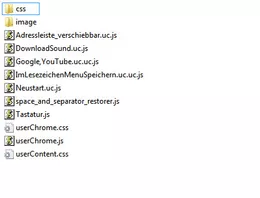
Nein, nur diese hier:
-
-
Danke 2002Andreas,
hat er tatsächlich, hat leider nicht geholfen

-
Danke .DeJaVu,
mit anderen Themen dasselbe und auf einem anderen Rechner auch.
Früher habe ich das hier benutzt:
profile\Chrome\css\tabs\classic_squared_tabs.css
CSS.tabs-newtab-button:-moz-lwtheme-darktext, .tabbrowser-tab:not([selected]):-moz-lwtheme-darktext .tab-content { background-image: linear-gradient(hsla(0,0%,60%,.5), hsla(0,0%,45%,.5) 80%) !important; }in userChrome.css:
Vielleicht weiß jemand warum der nicht mehr funktioniert

-
-
-
Hallo 2002Andreas,
ohne ist alles weiß, sieht man nichts.
Hier ist andere Farbe:

Kannst du, bitte, mehrere Tabs öffnen, wie bei mir?
-
-