



Der Eintrag ist immer vorhanden bei Klick auf Eigenschaften.
Läuft bei Dir Windows 11?
Der Eintrag ist immer vorhanden bei Klick auf Eigenschaften.
Läuft bei Dir Windows 11?
Nur bei 2 Icons passt es nicht.
1x das Fx Logo
1x ein weißes Blatt.
Sind das Verknüpfungen (.lnk) und keine Internetverknüpfungen (.url)? Schaue dazu in den Eigenschaften im Register Allgemein nach.

Das Symbol wird durch den Dateityp gestellt, und der wird von Firefox belegt, also bekommst du das Firefox-Symbol. Wünschst du es anders, musst du die Eigenschaften dieser (jeder) Verknüpfung anpassen.
Hm, hier wird das Favicon der jeweiligen Website angezeigt, guckst Du da ↓.
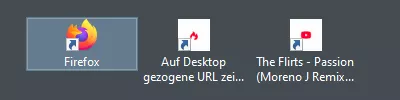
Links Firefox selbst und dann weiter über das Camp zu Youtube.

Dazu hatte ich auch nichts gefunden, deshalb nutze ich dieses.
Etwas vergleichbares habe ich schon, ist aber kein Ersatz für obiges Script.
Hallo zusammen,
sagt mal, gibt es eigentlich schon ein in Fx > 138 funktionierende Version von addons_ver_day_updatecheck.uc.js?
// ==UserScript==
// @name           addons_ver_day_updatecheck.uc.js
// @description    Bei about:addons beim Titel der Erweiterung Versionsinfo und
//                 Installationsdatum hinzufügen
// @update         Anpassung zur Verwendung der ESM-Module mit der Dateiendung .sys.mjs //                 von milupo
// @include        main
// ==/UserScript==

if (typeof window === "undefined" || globalThis !== window) {
    this.EXPORTED_SYMBOLS = ["AboutAddonsVerboseChild"];
    ChromeUtils.defineESModuleGetters(this, { AddonManager: "resource://gre/modules/AddonManager.sys.mjs", });
    try {
        ChromeUtils.registerWindowActor("AboutAddonsVerbose", {
            child: {
                moduleURI: __URI__,
                events: {
                    DOMDocElementInserted: {},
                },
            },
            matches: ["about:addons"],
        });
    } catch (e) {Cu.reportError(e);}
    this.AboutAddonsVerboseChild = class extends JSWindowActorChild {
        handleEvent({type}) {
            if (type !== "DOMDocElementInserted") return;
            const win = this.contentWindow;
            const doc = win.document;
            doc.addEventListener("view-loaded", () => {
                const addons = doc.querySelectorAll(".addon-name");
                for (let addon of addons) {
                    const addonId = decodeURI(addon.querySelector("a")?.href.slice("addons://detail/".length));
                    if (addonId) AddonManager.getAddonByID(addonId).then(result => {
                        const {version, updateDate} = result;
                        const info = doc.createElement("span");
                        info.style.color = "indianred"; // Erweitert
                        info.style.fontSize = "1.05rem";
                        info.style.fontStyle = "normal";
                        info.style.fontWeight = "600";
                        info.style.marginInlineEnd = "8px";
                        info.textContent = `${version} - ${updateDate.toLocaleDateString("de-DE")}`;
                        addon.insertAdjacentElement("afterend", info);
                    }).catch(err => Cu.reportError(err));
                }
            });
        }
    };
}
else {
    try {
        const fileHandler = Services.io.getProtocolHandler("file").QueryInterface(Ci.nsIFileProtocolHandler);
        const scriptFile = fileHandler.getFileFromURLSpec(Components.stack.filename);
        const resourceHandler = Services.io.getProtocolHandler("resource").QueryInterface(Ci.nsIResProtocolHandler);
        if (!resourceHandler.hasSubstitution("about-addons-verbose-ucjs")) {
            resourceHandler.setSubstitution("about-addons-verbose-ucjs", Services.io.newFileURI(scriptFile.parent));
        }
        ChromeUtils.import(`resource://about-addons-verbose-ucjs/${scriptFile.leafName}?${scriptFile.lastModifiedTime}`);
    } catch (e) {Cu.reportError(e)}
}

    // ChromeUtils.defineModuleGetter(this, "AddonManager", "resource://gre/modules/AddonManager.jsm"); - Zeile 11
// const addonId = addon.querySelector("a")?.href.slice("addons://detail/".length); - Zeile 31Und da steht dann auch: Video speichern
Genau.
Lädt man das Video herunter, läuft es überall, W10, Linux. Nur im Firefox (bei mir einziger Browser) nicht.
Andere Videos laufen auch nicht, aber z.B. Elster frisst Maus oder auch Star auf der Essensuche, die sind aber auch zusätzlich mit <video type="video/ogg" src="elster.ogg" width="426" height="240" poster="../pics/elster_frisst.jpg" controls /> eingebunden, teste es halt so auch mal bei der Amselfütterung.

Ist es möglich im Firefox-Ordner ein Passwort für mein E-Mail-Programm
Du hast es in dem Mail-Programm aktualisiert?
wiederherzustellen bzw. wiederzufinden?
Wenn es in Firefox für den Zugriff über die Website verwendet wird und noch nicht aktualisiert, solltest Du es im Fx eigenen Passwort-Manager, wenn es denn dort gespeichert ist, auslesen können.
In der linken Spalte den Mail-Anbieter heraussuchen und dann rechts das Passwort anzeigen lassen, das Auge bei Passwort und wenn es das richtige Passwort ist auf Kopieren klicken und für Dein E-Mail-Programm verwenden.
Ich kann keinen erkennen
Ich schon, siehe oben, aber den konntest Du natürlich nicht erkennen, aber danke fürs drüber schauen. 
Mit eigenem Pfad und Icon sieht das hier so aus:
Mittlerweile ist der Button da, aber ohne Icon, siehst Du da ↓ einen Fehler?
// Button_Verzeichnisse.uc.js
// Linksklick öffnet Profilordner
// Mittelklick öffnet Installationsordner
// Rechtsklick öffnet Ordner chrome

(function() {
    if (!window.gBrowser)
        return;

    try {
        CustomizableUI.createWidget({
            id: 'buttonOrdner',
            type: 'custom',
            defaultArea: CustomizableUI.AREAS,
            onBuild: function(aDocument) {
                var toolbaritem = aDocument.createElementNS('http://www.mozilla.org/keymaster/gatekeeper/there.is.only.xul', 'toolbarbutton');
                var props = {
                    id: 'buttonOrdner',
                    class: 'toolbarbutton-1 chromeclass-toolbar-additional',
                    removable: true,
                    // Name im AnpassungFenster
                    label: 'Ordner aufrufen',
                    // Name bei MausHover wenn in Symbolleiste
                    tooltiptext: 'Links Profilordner / Mitte Installationsordner / Rechts Ordner chrome',
                    // style: 'list-style-image: url("file:///C:/FoxIcons2/ordner2.png")',
                    style: 'list-style-image: url("file:///H:/Profile/Firefox/Fx57-H-Default/chrome/red-circle-icon.png")',
            };
            for (var p in props)
            toolbaritem.setAttribute(p, props[p]);

            return toolbaritem;

            }
        });
    } catch(e) { };

    document.getElementById('buttonOrdner').addEventListener('click', event => {
        if (event.button == 0) {
            uProfMenu.prefDirOpen('ProfD');
        }
        if (event.button == 1) {
            uProfMenu.prefDirOpen('CurProcD');
        }
        if (event.button == 2) {
            Services.dirsvc.get("UChrm", Ci.nsIFile).launch();
        }
    });
})();Grml, was so ein kleiner dummer Fehler, es fehlt icons/ im Pfad, so anrichten kann. 
Hier habe ich eines der Scripte, dass ich mir angepasst habe. Die Icon-Lösung habe ich neu eingefügt, weil sie hier in einem zentralen Verzeichnis (auf C:) hinterlegt sind. Teste es bitte mal, ob es nun deinen Vorstellungen entspricht. Fehler werden auch nicht angezeigt.
Hm, hier wird leider kein Button erzeugt, es wird auch nichts in der Konsole angezeigt. 

Nur ein Versuch

Die Datei heißt ja irgendwas mit V, nehme ich an.
Setze doch einfach mal 0-"Skriptname" davor und teste dann noch mal.
Der Versuch hat schon zum Ziel geführt, Dankeschön, nun kann ich die andern Buttons auch noch einmal testen. 
Natürlich nicht!
So weit so gut, mit welchem Script für eine vertikale Toolbar läuft das Script, mit dem ↓ läuft es hier nicht?
// 'Vertical Add-on Bar' script for Firefox by Aris
//
// no 'close' button
// 'toggle' toolbar with 'Ctr + Alt + /' on Windows/Linux or 'Cmd + Alt + /' on macOS
// optional toggle button hides the toolbar temporarily, it gets restored on every restart
// 'Vertical Add-on Bar' entry is only visible in toolbars context menu when in customizing mode
//
// flexible spaces on toolbar work 'vertically'
// toolbar can be on the left or on the right
// toolbar is display horizontally in customizing mode

// [!] Fix for WebExtensions with own windows by 黒仪大螃蟹 (for 1-N scripts)

// Components.utils.import("resource:///modules/CustomizableUI.jsm");
ChromeUtils.importESModule("resource:///modules/CustomizableUI.sys.mjs");


var AddonbarVertical = {
  init: function() {

    if (location != 'chrome://browser/content/browser.xhtml')
      return;

    /* blank tab workaround */
    try {
      if(gBrowser.selectedBrowser.getAttribute('blank')) gBrowser.selectedBrowser.removeAttribute('blank');
    } catch(e) {}

    var addonbar_v_label = 'Vertical Add-on Bar'; // toolbar name
    var button_label = 'Toggle vertical Add-on Bar'; // Toggle button name
    var addonbar_v_togglebutton = true; // display toggle button for vertical toolbar (true) or not (false)
    var addonbar_v_on_the_left = false; // display vertical toolbar on the left (true) or the right (false)
    var style_addonbar_v = true; // apply default toolbar appearance/colors to vertical add-on bar
    var addonbar_v_width = '22px'; // toolbar width
    var compact_buttons = true; // compact button size (true) or default button size (false)

    try {
     if(document.getElementById('toolbox_abv') == null && document.getElementById('addonbar_v') == null) {
      var toolbox_abv = document.createXULElement('toolbox');
      toolbox_abv.setAttribute('orient','horizontal');
      toolbox_abv.setAttribute('id','toolbox_abv');
      toolbox_abv.setAttribute('insertbefore','sidebar-box');

      var tb_addonbarv = document.createXULElement('toolbar');
      tb_addonbarv.setAttribute('id','addonbar_v');
      tb_addonbarv.setAttribute('customizable','true');
      tb_addonbarv.setAttribute('class','toolbar-primary chromeclass-toolbar browser-toolbar customization-target');
      tb_addonbarv.setAttribute('mode','icons');
      tb_addonbarv.setAttribute('iconsize','small');
      tb_addonbarv.setAttribute('toolboxid','navigator-toolbox');
      tb_addonbarv.setAttribute('orient','vertical');
      tb_addonbarv.setAttribute('flex','1');
      tb_addonbarv.setAttribute('context','toolbar-context-menu');
      tb_addonbarv.setAttribute('toolbarname', addonbar_v_label);
      tb_addonbarv.setAttribute('label', addonbar_v_label);
      tb_addonbarv.setAttribute('lockiconsize','true');
      tb_addonbarv.setAttribute('defaultset','spring');

      toolbox_abv.appendChild(tb_addonbarv);

      CustomizableUI.registerArea('addonbar_v', {legacy: true});

      setTimeout(function(){
        CustomizableUI.registerArea('addonbar_v', {legacy: true});
      },2000);

      CustomizableUI.registerToolbarNode(tb_addonbarv);

      if(addonbar_v_on_the_left) {
        document.getElementById('browser').insertBefore(toolbox_abv,document.getElementById('browser').firstChild);
      }
      else {
        document.getElementById('browser').appendChild(toolbox_abv);
      }

        var observer = new MutationObserver(function(mutations) {
        mutations.forEach(function(mutation) {
          try {
            if(document.querySelector('#browser').getAttribute('hidden') || document.querySelector('#main-window').getAttribute('customizing')) {
              document.querySelector('#addonbar_v').setAttribute('orient','horizontal');
              document.querySelector('#navigator-toolbox').appendChild(document.querySelector('#addonbar_v'));
            }
            else  {
              document.querySelector('#addonbar_v').setAttribute('orient','vertical');
              document.querySelector('#toolbox_abv').appendChild(document.querySelector('#addonbar_v'));

            }
          } catch(e){}
        });
      });

      observer.observe(document.querySelector('#main-window'), { attributes: true, attributeFilter: ['customizing'] });

      try {
        Services.prefs.getDefaultBranch('browser.vaddonbar.').setBoolPref('enabled',true);
        setToolbarVisibility(document.getElementById('addonbar_v'), Services.prefs.getBranch('browser.vaddonbar.').getBoolPref('enabled'));
        setToolbarVisibility(document.getElementById('toolbox_abv'), Services.prefs.getBranch('browser.vaddonbar.').getBoolPref('enabled'));
      } catch(e) {}

      if(addonbar_v_togglebutton) {

        CustomizableUI.createWidget({
            id: 'togglebutton_addonbar_v', // button id
            defaultArea: CustomizableUI.AREA_NAVBAR,
            removable: true,
            label: button_label, // button title
            tooltiptext: button_label, // tooltip title
            onClick: function(event) {
              if(event.button==0) {
                var windows = Services.wm.getEnumerator(null);
                while (windows.hasMoreElements()) {
                  var win = windows.getNext();

                  var vAddonBar = win.document.getElementById('addonbar_v');
                  setToolbarVisibility(vAddonBar, vAddonBar.collapsed);

                  var vAddonBarBox = win.document.getElementById('toolbox_abv');
                  setToolbarVisibility(vAddonBarBox, vAddonBarBox.collapsed);

                  Services.prefs.getBranch('browser.vaddonbar.').setBoolPref('enabled',!vAddonBar.collapsed);

                  if(!vAddonBar.collapsed)
                    win.document.querySelector('#togglebutton_addonbar_v').setAttribute('checked','true');
                  else win.document.querySelector('#togglebutton_addonbar_v').removeAttribute('checked');
                }
              }
            },
            onCreated: function(button) {
              if(Services.prefs.getBranch('browser.vaddonbar.').getBoolPref('enabled'))
                button.setAttribute('checked','true');
              return button;
            }

        });
      }

      // Press 'Ctr + Alt + /' on Windows/Linux and 'Cmd + Alt + /' on macOS to toggle vertical add-on bar
      var key = document.createXULElement('key');
      key.id = 'key_toggleVAddonBar';
      key.setAttribute('key', '/');
      key.setAttribute('modifiers', 'accel,alt');
      key.addEventListener('command', () => {
      var windows = Services.wm.getEnumerator(null);
        while (windows.hasMoreElements()) {
          var win = windows.getNext();
          var vAddonBar = win.document.getElementById('addonbar_v');
          setToolbarVisibility(vAddonBar, vAddonBar.collapsed);
          var vAddonBarBox = win.document.getElementById('toolbox_abv');
          setToolbarVisibility(vAddonBarBox, vAddonBarBox.collapsed);
          Services.prefs.getBranch('browser.vaddonbar.').setBoolPref('enabled',!vAddonBar.collapsed);
          if(!vAddonBar.collapsed)
            win.document.querySelector('#togglebutton_addonbar_v').setAttribute('checked','true');
            else win.document.querySelector('#togglebutton_addonbar_v').removeAttribute('checked');
          }
        });
      // key.setAttribute('oncommand',`
       //  var windows = Services.wm.getEnumerator(null);
        // while (windows.hasMoreElements()) {
          // var win = windows.getNext();
          // var vAddonBar = win.document.getElementById('addonbar_v');
          // setToolbarVisibility(vAddonBar, vAddonBar.collapsed);
          // var vAddonBarBox = win.document.getElementById('toolbox_abv');
          // setToolbarVisibility(vAddonBarBox, vAddonBarBox.collapsed);
          // Services.prefs.getBranch('browser.vaddonbar.').setBoolPref('enabled',!vAddonBar.collapsed);
          // if(!vAddonBar.collapsed)
            // win.document.querySelector('#togglebutton_addonbar_v').setAttribute('checked','true');
          // else win.document.querySelector('#togglebutton_addonbar_v').removeAttribute('checked');
        // }
      // `);
      document.getElementById('mainKeyset').appendChild(key);

     }
    } catch(e) {}

    // style toolbar & toggle button
    var addonbar_v_style = '';
    var togglebutton_addonbar_v_style = '';

    if(style_addonbar_v) {
      var end_border =`
        #addonbar_v { \
            border-inline-end: 1px solid var(--sidebar-border-color,rgba(0,0,0,0.1)) !important; \
        } \
      `;

      if(!addonbar_v_on_the_left) {
        end_border =`
          #addonbar_v { \
            border-inline-start: 1px solid #B2B2B2 !important; \
          } \
        `;
      }

      addonbar_v_style =` \
        #addonbar_v { \
          appearance: none !important; \
          background-color: var(--toolbar-bgcolor); \
          background-image: var(--toolbar-bgimage); \
          background-clip: padding-box; \
          color: var(--toolbar-color, inherit); \
          padding-bottom: 1px !important; \
        } \
        :root[lwtheme] #addonbar_v { \
          background: var(--lwt-accent-color) !important; \
        } \
        :root[lwtheme][lwtheme-image='true'] #addonbar_v { \
          background: var(--lwt-header-image) !important; \
          background-position: 0vw 50vh !important; \
        } \
        #main-window:not([customizing]) #toolbox_abv:not([collapsed='true']), \
        #main-window:not([customizing]) #addonbar_v:not([collapsed='true']) { \
          min-width: `+addonbar_v_width+`; \
          width: `+addonbar_v_width+`; \
          max-width: `+addonbar_v_width+`; \
        } \
        #main-window[chromehidden='menubar toolbar location directories status extrachrome '] #toolbox_abv:not([collapsed='true']), \
        #main-window[chromehidden='menubar toolbar location directories status extrachrome '] #addonbar_v:not([collapsed='true']), \
        #main-window[sizemode='fullscreen'] #toolbox_abv:not([collapsed='true']), \
        #main-window[sizemode='fullscreen'] #addonbar_v:not([collapsed='true']) { \
          min-width: 0px; \
          width: 0px; \
          max-width: 0px; \
        } \
        #main-window[customizing] #addonbar_v { \
          outline: 1px dashed !important; \
          outline-offset: -2px !important; \
        } \
        #addonbar_v toolbarbutton { \
          min-height: 20px !important; \
          max-height: 20px !important; \
          min-width: 20px !important; \
          max-width: 20px !important; \
          background-color: #474747 !important; \
          margin: 1px 1px 0 1px !important; \
        } \
        #addonbar_v toolbar .toolbarbutton-1 { \
          min-height: 22px !important; \
          max-height: 22px !important; \
          min-width: 22px !important; \
          max-width: 22px !important; \
          background-color: #474747 !important; \
          margin: 1px 1px 0 1px !important; \
        } \
        #addonbar_v toolbarbutton:hover, \
        #addonbar_v toolbar .toolbarbutton-1:hover { \
          background-color: #D1E2F2 !important; \
          color: #000 !important; \
          fill: #000 !important; \
        } \
        #addonbar_v toolbarbutton#uc-restart { \
          background-color: #F20 !important; \
        } \
        #addonbar_v toolbarbutton#uc-restart image { \
          fill: #FFF !important; \
        } \
        #addonbar_v toolbarbutton#uc-restart:hover { \
          background-color: #D1E2F2 !important; \
        } \
        #addonbar_v toolbarbutton#uc-restart:hover image { \
          fill: #F20 !important; \
        } \
        #addonbar_v toolbarbutton#privatebrowsing-button { \
          background-color: #8000D7 !important; \
        } \
        #addonbar_v toolbarbutton#privatebrowsing-button image { \
          fill: #FFF !important; \
        } \
        #addonbar_v toolbarbutton#privatebrowsing-button:hover { \
          background-color: #D1E2F2 !important; \
        } \
        #addonbar_v toolbarbutton#privatebrowsing-button:hover image { \
          fill: #8000D7 !important; \
        } \
        #addonbar_v toolbarbutton#restart-button { \
          background-color: #F20 !important; \
        } \
        #addonbar_v toolbarbutton#restart-button:hover { \
          background-color: #D1E2F2 !important; \
        } \
        #addonbar_v #cookieautodelete_kennydo_com-browser-action { \
          min-height: 33px !important; \
        } \
        #addonbar_v #cookieautodelete_kennydo_com-browser-action > .toolbarbutton-badge-stack { \
          margin-top: -13px !important; \
        } \
        #addonbar_v #cookieautodelete_kennydo_com-browser-action > .toolbarbutton-badge-stack .toolbarbutton-badge { \
          min-width: 18px !important; \
          border-radius: 0px !important; \
          margin-top: 20px !important; \
          margin-right: 1px !important; \
        } \
        #addonbar_v #cookieautodelete_kennydo_com-browser-action:hover > .toolbarbutton-badge-stack .toolbarbutton-badge { \
          background-color: #D1E2F2 !important; \
          color: #000 !important; \
        } \
        #addonbar_v > toolbarbutton#restart-button .toolbarbutton-icon { \
          margin: 3px !important; \
        } \
        #addonbar_v > toolbarbutton#print-toolbarbutton { \
          border-radius: 0 !important; \
          border: 0 !important; \
          background-color: #474747 !important; \
        } \
        #addonbar_v > toolbarbutton#print-toolbarbutton:hover { \
          background-color: #D1E2F2 !important; \
        } \
        #unified-extensions-button[hidden]{ \
            visibility: visible !important; \
            display: flex !important; \
        } \
        #addonbar_v toolbaritem separator { \
            display: none !important; \
        } \
        #main-window:not([customizing]) #addonbar_v > toolbaritem { \
          writing-mode: vertical-rl !important; \
          text-orientation: mixed !important; \
          transform: rotate(0deg) !important; \
        } \
        #main-window:not([customizing]) #addonbar_v > toolbaritem menupopup { \
          max-height: 170px !important; \
          max-width: 170px !important; \
          transform: rotate(-90deg) !important; \
        } \
        #main-window:not([customizing]) #addonbar_v > toolbaritem .toolbarbutton-badge { \
          transform: rotate(-90deg) !important; \
          position: absolute !important; \
          padding: 1px 2px !important; \
          top: -4px !important; \
        } \
        #main-window:not([customizing]) #addonbar_v #search-container, \
        #main-window:not([customizing]) #addonbar_v #wrapper-search-container { \
          flex: unset !important; \
        } \
        #main-window:not([customizing]) #addonbar_v #search-container { \
          min-width: unset !important; \
          width: unset !important; \
          height: 100px !important; \
          &[width] { \
            flex: unset !important; \
          } \
        } \
        #main-window:not([customizing]) #addonbar_v #zoom-reset-button > .toolbarbutton-text { \
          min-width: unset !important; \
          min-height: unset !important; \
        } \
        #main-window:not([customizing]) #addonbar_v #zoom-reset-button:not([label]) { \
          display: none !important; \
        } \
        #main-window:not([customizing]) #addonbar_v .toolbarbutton-combined-buttons-dropmarker > .toolbarbutton-icon { \
          width: unset !important; \
          height: 16px !important; \
        } \
        #addonbar_v #aboutabout-ToolBarButton:hover {\
          list-style-image: url("file:///H:/Profile/Firefox/Fx57-H-Default/chrome/icons/a-a-b.png") !important; \
        } \
        `+end_border+`
      `;
    }

    var addonbar_right = '';

    if(!addonbar_v_on_the_left) {
        addonbar_right =`
          #toolbox_abv{ \
            order: 10 !important; \
          } \
        `;
    }

    if(addonbar_v_togglebutton) {
      togglebutton_addonbar_v_style =`
        #togglebutton_addonbar_v .toolbarbutton-icon { \
          list-style-image: url('chrome://browser/skin/sidebars.svg'); \
          fill: #FF3322; \
        } \
        #togglebutton_addonbar_v[checked] .toolbarbutton-icon { \
          list-style-image: url('chrome://browser/skin/sidebars.svg'); \
          fill: #00A600; \
        } \
        /*#togglebutton_addonbar_v .toolbarbutton-icon { \
          list-style-image: url('chrome://browser/skin/forward.svg'); \
          fill: red; \
        } \
        #togglebutton_addonbar_v[checked] .toolbarbutton-icon { \
          fill: green; \
        } \
        #togglebutton_addonbar_v { \
          background: url('chrome://browser/skin/back.svg') no-repeat; \
          background-size: 35% !important; \
          background-position: 10% 70% !important; \
        } \
        #togglebutton_addonbar_v[checked] { \
          transform: rotate(180deg) !important; \
          background: url('chrome://browser/skin/back.svg') no-repeat; \
          background-position: 10% 30% !important; \
        }*/ \
      `;
    }

    var compact_buttons_code = '';

    if(compact_buttons)
      compact_buttons_code = `
        #addonbar_v toolbarbutton .toolbarbutton-icon { \
          padding: 0 !important; \
          width: 16px !important; \
          height: 16px !important; \
        } \
        #addonbar_v .toolbarbutton-badge-stack { \
          padding: 0 !important; \
          margin: 0 !important; \
          width: 16px !important; \
          min-width: 16px !important; \
          height: 16px !important; \
          min-height: 16px !important; \
        } \
        #addonbar_v toolbarbutton .toolbarbutton-badge { \
          margin-top: 0px !important; \
          font-size: 8px !important; \
        } \
      `;

    var uri = Services.io.newURI('data:text/css;charset=utf-8,' + encodeURIComponent(''+addonbar_v_style + togglebutton_addonbar_v_style + addonbar_right + compact_buttons_code), null, null);

    var sss = Components.classes['@mozilla.org/content/style-sheet-service;1'].getService(Components.interfaces.nsIStyleSheetService);
    sss.loadAndRegisterSheet(uri, sss.AGENT_SHEET);

  }

}

/* initialization delay workaround */
document.addEventListener('DOMContentLoaded', AddonbarVertical.init(), false);
/* Use the below code instead of the one above this line, if issues occur */
/* setTimeout(function(){
  AddonbarVertical.init();
},2000);
*/Neue, von mir angepasste Version.
Frage zu den Zeilen 6-7: Müssen die Profile wirklich in %APPDATA% liegen, oder können die auch auf anderen Laufwerken liegen?
probiert mal folgende Version:
Das sieht doch fein aus, funktioniert hier vollständig, Dankeschön.

C:\Users\User\AppData\Local\Mozilla
Wichtig -> Profil
Das Profil ist doch nicht in Local, sondern in APPDATA\Roaming, oder?
Mit der Änderung von Inline-Eventhandler in die Methode mit addEventListener ist es wenigstens möglich in Fx 138 die drei Aktionen aus dem Symbol in der Symbolleiste auszuführen
Das ist doch schon mal ein Anfang.

Kein Wunder. Das Script in Beitrag #5 ist ja auch ganz offensichtlich für Thunderbird, u.a. an „messenger.xhtml“ und „mail-toolbox“ zu sehen.
Das hatte ich zwischenzeitlich auch gesehen und passend geändert, zusätzlich auch die Zeilen 179 und 182, denn die zielen auch auf Thunderbird, aber es gibt noch immer eine Zeile mit onklick und daran scheitere ich. 
Und nun?
Das Script baut mir hier keinen Button.

Was sagt denn die Konsole zu dem Skript?
Hm, wenn das ↓ Script funktionieren würde, könnte ich es Dir auch sagen. 
//  browserkonsole.uc.js

(function() {

    if (location != 'chrome://browser/content/browser.xhtml')
        return;

    try {
        CustomizableUI.createWidget({
            id: 'browser-konsole-button-2',
            type: 'custom',
            defaultArea: CustomizableUI.AREA_NAVBAR,
            onBuild: function(aDocument) {
                var toolbaritem = aDocument.createElementNS('http://www.mozilla.org/keymaster/gatekeeper/there.is.only.xul', 'toolbarbutton');
                var props = {
                    id: 'browser-konsole-button-2',
                    class: 'toolbarbutton-1 chromeclass-toolbar-additional',
                    label: 'Browser-Konsole',
                    tooltiptext: 'Browser-Konsole öffnen',
                    style: 'list-style-image: url(data:image/png;base64,iVBORw0KGgoAAAANSUhEUgAAABAAAAAQCAYAAAAf8/9hAAAABGdBTUEAAK/INwWK6QAAABl0RVh0U29mdHdhcmUAQWRvYmUgSW1hZ2VSZWFkeXHJZTwAAADaSURBVHjaYvz//z8DJYAJn+SFuYy+IEyWAUCN0/iEGDaBMIhNkgFQDZlK2gwMIAxi4zIElwsyDWwRHCg7kygD8DkXmxwTVtsdeBgYmFExWAyLK5iw2sAqCMZZvbEMAcXOcD42VzBh2O5lBFQsCsbPnz9nePLkCZwPlkNzBROm7SJw/PjxY4YfP36giKG7ghGWEoGC/w2Cw4lKfRfWrmQwSP7PCHcB3ES0gNO2vsyganoWQxxZD9gFYNvDkknKAxdWzQW7gomBQsACpacDTcwkUe90lEAkFwAEGACHlFPNBrHqNAAAAABJRU5ErkJggg==)',
                oncommand:'document.getElementById("menu_browserConsole").click();'
                };
                for (var p in props)
                    toolbaritem.setAttribute(p, props[p]);
                return toolbaritem;
            }
        });
        CustomizableUI.registerToolbarNode(tb);
       } catch(e) { };

    function onCommand() {
        var document = event.target.ownerDocument;
        if (!document.getElementById('menu_browserConsole')) {
            let { require } = Cu.import("resource://devtools/shared/loader/Loader.jsm", {});
            require("resource://devtools/client/webconsole/browser-console-manager");
        };
        document.getElementById('menu_browserConsole').click();
    };

})();P.S.:
Auf dem normalen Weg aufgerufen sagt die Konsole nichts.
