

User und Beitrag bitte löschen.
Beiträge von BarbaraZ-
-
-
Lieber Büsen,
von mir nachträglich die besten Glückwünsche.
Ich hoffe, Du konntest den gestrigen Tag in vollen Zügen genießen. -
Büssen, es sei dir gestattet. Danke Dir
An Sören Hentzschel , die allerbesten Glückwünsche zum Geburtstag.
-
Moin,
vielen lieben Dank für die lieben und netten Geburtstagsgrüße.

Bin im Moment nur sporadisch on, da wir zur Zeit Handwerker im Haus haben und zeitweilig Strom abgestellt wird.
-
Hier unbedingt User und Beiträge löschen:
Der Inhalt kann nicht angezeigt werden, da er nicht mehr verfügbar ist. -
Moinsen nach Braunschweig an Börsi.
Die besten Glückwünsche zum Geburtstag. Ich hoffe, Du hast Muße und kannst den Tag genießen.
-
Hallo Andreas,
ersteres war gemeint und klappt perfekt. Danke schön.

-
Für mich sind hier die Abstände der Icon zu groß.

Wie bekomme ich die Abstände dazwischen verringert?
-
offtopic
Einfach mal eine Verständnisfrage. Wozu dient die userChromeShadow.css?
Diese ist bei mir komplett leer. Benötige ich diese dann überhaupt?
Sorry sind zwei Fragen geworden.
-
Mit der Änderung von Milupo aus Beitrag #12 sieht es so aus:
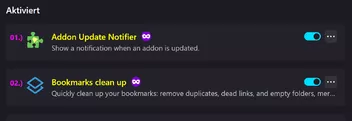
Hier der Code dazu:
JavaScript
Alles anzeigen// ==UserScript== // @name addons_ver_day_updatecheck.uc.js // @description Bei about:addons beim Titel der Erweiterung Versionsinfo und // Installationsdatum hinzufügen // @update Anpassung zur Verwendung der ESM-Module mit der Dateiendung .sys.mjs // von milupo // @include main // ==/UserScript== if (typeof window === "undefined" || globalThis !== window) { this.EXPORTED_SYMBOLS = ["AboutAddonsVerboseChild"]; ChromeUtils.defineESModuleGetters(this, { AddonManager: "resource://gre/modules/AddonManager.sys.mjs", }); try { ChromeUtils.registerWindowActor("AboutAddonsVerbose", { child: { esModuleURI: __URI__, events: { DOMDocElementInserted: {}, }, }, matches: ["about:addons"], }); } catch (e) {Cu.reportError(e);} this.AboutAddonsVerboseChild = class extends JSWindowActorChild { handleEvent({type}) { if (type !== "DOMDocElementInserted") return; const win = this.contentWindow; const doc = win.document; doc.addEventListener("view-loaded", () => { const addons = doc.querySelectorAll(".addon-name"); for (let addon of addons) { const addonId = decodeURI(addon.querySelector("a")?.href.slice("addons://detail/".length)); if (addonId) AddonManager.getAddonByID(addonId).then(result => { const {version, updateDate} = result; const info = doc.createElement("span"); info.style.color = "yellow"; // Erweitert info.style.fontSize = "1rem"; info.style.fontStyle = "normal"; info.style.fontWeight = "600"; info.style.marginInlineEnd = "8px"; info.textContent = `${version} - ${updateDate.toLocaleDateString("de-DE")}`; addon.insertAdjacentElement("afterend", info); }).catch(err => Cu.reportError(err)); } }); } }; } else { try { const fileHandler = Services.io.getProtocolHandler("file").QueryInterface(Ci.nsIFileProtocolHandler); const scriptFile = fileHandler.getFileFromURLSpec(Components.stack.filename); const resourceHandler = Services.io.getProtocolHandler("resource").QueryInterface(Ci.nsIResProtocolHandler); if (!resourceHandler.hasSubstitution("about-addons-verbose-ucjs")) { resourceHandler.setSubstitution("about-addons-verbose-ucjs", Services.io.newFileURI(scriptFile.parent)); } ChromeUtils.importESModule(`resource://about-addons-verbose-ucjs/${scriptFile.leafName}?${scriptFile.lastModifiedTime}`); } catch (e) {Cu.reportError(e)} }Und hier der Code mit dem es klappt:
JavaScript
Alles anzeigen// ==UserScript== // @name addons_ver_day_updatecheck.uc.js // @description Bei about:addons beim Titel der Erweiterung Versionsinfo und // Installationsdatum hinzufügen // @update Anpassung zur Verwendung der ESM-Module mit der Dateiendung .sys.mjs // von milupo // @include main // ==/UserScript== if (typeof window === "undefined" || globalThis !== window) { this.EXPORTED_SYMBOLS = ["AboutAddonsVerboseChild"]; ChromeUtils.defineESModuleGetters(this, { AddonManager: "resource://gre/modules/AddonManager.sys.mjs", }); try { ChromeUtils.registerWindowActor("AboutAddonsVerbose", { child: { moduleURI: __URI__, events: { DOMDocElementInserted: {}, }, }, matches: ["about:addons"], }); } catch (e) {Cu.reportError(e);} this.AboutAddonsVerboseChild = class extends JSWindowActorChild { handleEvent({type}) { if (type !== "DOMDocElementInserted") return; const win = this.contentWindow; const doc = win.document; doc.addEventListener("view-loaded", () => { const addons = doc.querySelectorAll(".addon-name"); for (let addon of addons) { const addonId = decodeURI(addon.querySelector("a")?.href.slice("addons://detail/".length)); if (addonId) AddonManager.getAddonByID(addonId).then(result => { const {version, updateDate} = result; const info = doc.createElement("span"); info.style.color = "yellow"; // Erweitert info.style.fontSize = "1rem"; info.style.fontStyle = "normal"; info.style.fontWeight = "600"; info.style.marginInlineEnd = "8px"; info.textContent = `${version} - ${updateDate.toLocaleDateString("de-DE")}`; addon.insertAdjacentElement("afterend", info); }).catch(err => Cu.reportError(err)); } }); } }; } else { try { const fileHandler = Services.io.getProtocolHandler("file").QueryInterface(Ci.nsIFileProtocolHandler); const scriptFile = fileHandler.getFileFromURLSpec(Components.stack.filename); const resourceHandler = Services.io.getProtocolHandler("resource").QueryInterface(Ci.nsIResProtocolHandler); if (!resourceHandler.hasSubstitution("about-addons-verbose-ucjs")) { resourceHandler.setSubstitution("about-addons-verbose-ucjs", Services.io.newFileURI(scriptFile.parent)); } ChromeUtils.import(`resource://about-addons-verbose-ucjs/${scriptFile.leafName}?${scriptFile.lastModifiedTime}`); } catch (e) {Cu.reportError(e)} }Daher erst einmal Danke für Eure Gedanken.
-
Da bin ich komplett überfordert.
Ich denke, es findet sich bestimmt jemand, die/der Hilfe leistet.
-
Vielen Dank an Sören. Klappt perfekt.
-
Danke klappt nur bedingt.
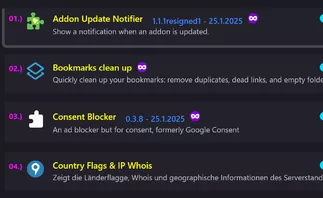
Bei einigen klappt es, bei einigen nicht.
Hier mit Anpassung:
JavaScript
Alles anzeigen// ==UserScript== // @name addons_ver_day_updatecheck.uc.js // @description Bei about:addons beim Titel der Erweiterung Versionsinfo und // Installationsdatum hinzufügen // @update Anpassung zur Verwendung der ESM-Module mit der Dateiendung .sys.mjs // von milupo // @include main // ==/UserScript== if (typeof window === "undefined" || globalThis !== window) { this.EXPORTED_SYMBOLS = ["AboutAddonsVerboseChild"]; ChromeUtils.defineESModuleGetters(this, { AddonManager: "resource://gre/modules/AddonManager.sys.mjs", }); try { ChromeUtils.registerWindowActor("AboutAddonsVerbose", { child: { moduleURI: __URI__, events: { DOMDocElementInserted: {}, }, }, matches: ["about:addons"], }); } catch (e) {Cu.reportError(e);} this.AboutAddonsVerboseChild = class extends JSWindowActorChild { handleEvent({type}) { if (type !== "DOMDocElementInserted") return; const win = this.contentWindow; const doc = win.document; doc.addEventListener("view-loaded", () => { const addons = doc.querySelectorAll(".addon-name"); for (let addon of addons) { const addonId = addon.querySelector("a")?.href.slice("addons://detail/".length); if (addonId) AddonManager.getAddonByID(addonId).then(result => { const {version, updateDate} = result; const info = doc.createElement("span"); info.style.color = "yellow"; // Erweitert info.style.fontSize = "1rem"; info.style.fontStyle = "normal"; info.style.fontWeight = "600"; info.style.marginInlineEnd = "8px"; info.textContent = `${version} - ${updateDate.toLocaleDateString("de-DE")}`; addon.insertAdjacentElement("afterend", info); }).catch(err => Cu.reportError(err)); } }); } }; } else { try { const fileHandler = Services.io.getProtocolHandler("file").QueryInterface(Ci.nsIFileProtocolHandler); const scriptFile = fileHandler.getFileFromURLSpec(Components.stack.filename); const resourceHandler = Services.io.getProtocolHandler("resource").QueryInterface(Ci.nsIResProtocolHandler); if (!resourceHandler.hasSubstitution("about-addons-verbose-ucjs")) { resourceHandler.setSubstitution("about-addons-verbose-ucjs", Services.io.newFileURI(scriptFile.parent)); } ChromeUtils.import(`resource://about-addons-verbose-ucjs/${scriptFile.leafName}?${scriptFile.lastModifiedTime}`); } catch (e) {Cu.reportError(e)} } -
Es wird die aktuelle Version und das Datum der Installation nicht mehr angezeigt.
Hier hakt es:
JavaScript
Alles anzeigen// ==UserScript== // @name addons_ver_day_updatecheck.uc.js // @description Bei about:addons beim Titel der Erweiterung Versionsinfo und // Installationsdatum hinzufügen // @update Anpassung zur Verwendung der ESM-Module mit der Dateiendung .sys.mjs // von milupo // @include main // ==/UserScript== if (typeof window === "undefined" || globalThis !== window) { this.EXPORTED_SYMBOLS = ["AboutAddonsVerboseChild"]; ChromeUtils.defineModuleGetter(this, "AddonManager", "resource://gre/modules/AddonManager.jsm"); try { ChromeUtils.registerWindowActor("AboutAddonsVerbose", { child: { moduleURI: __URI__, events: { DOMDocElementInserted: {}, }, }, matches: ["about:addons"], }); } catch (e) {Cu.reportError(e);} this.AboutAddonsVerboseChild = class extends JSWindowActorChild { handleEvent({type}) { if (type !== "DOMDocElementInserted") return; const win = this.contentWindow; const doc = win.document; doc.addEventListener("view-loaded", () => { const addons = doc.querySelectorAll(".addon-name"); for (let addon of addons) { const addonId = addon.querySelector("a")?.href.slice("addons://detail/".length); if (addonId) AddonManager.getAddonByID(addonId).then(result => { const {version, updateDate} = result; const info = doc.createElement("span"); info.style.color = "yellow"; // Erweitert info.style.fontSize = "1rem"; info.style.fontStyle = "normal"; info.style.fontWeight = "600"; info.style.marginInlineEnd = "8px"; info.textContent = `${version} - ${updateDate.toLocaleDateString("de-DE")}`; addon.insertAdjacentElement("afterend", info); }).catch(err => Cu.reportError(err)); } }); } }; } else { try { const fileHandler = Services.io.getProtocolHandler("file").QueryInterface(Ci.nsIFileProtocolHandler); const scriptFile = fileHandler.getFileFromURLSpec(Components.stack.filename); const resourceHandler = Services.io.getProtocolHandler("resource").QueryInterface(Ci.nsIResProtocolHandler); if (!resourceHandler.hasSubstitution("about-addons-verbose-ucjs")) { resourceHandler.setSubstitution("about-addons-verbose-ucjs", Services.io.newFileURI(scriptFile.parent)); } ChromeUtils.import(`resource://about-addons-verbose-ucjs/${scriptFile.leafName}?${scriptFile.lastModifiedTime}`); } catch (e) {Cu.reportError(e)} } -
Wer mag sich mal meines UserCSSLoader.uc.js Skriptes annehmen?
Sind etliche oncommand-Befehle drin.
HTML
Alles anzeigen// ==UserScript== // @name UserCSSLoader // @description CSS Codes - Styles laden und verwalten // @namespace http://d.hatena.ne.jp/Griever/ // @author Griever // @include main // @license MIT License // @compatibility Firefox 4 - 115* // @charset UTF-8 // @version 0.0.4r4 // @note Fx92: getURLSpecFromFile() -> getURLSpecFromActualFile() // @note AUTHOR_SHEET Unterstützung hinzugefügt, wichtig: Dateiendung muss .author.css sein! // @note Version 0.0.4.g ermoeglicht "Styles importieren" per Mittelklick und Verwendung // @note eines anderen Dateimanager (s. vFileManager in Zeile 53) // @note Frei verschiebbare Schaltfläche eingebaut von aborix // @note 0.0.4 Remove E4X // @note CSSEntry-Klasse erstellt // @note Style-Test-Funktion überarbeitet // @note Wenn die Datei gelöscht wurde, CSS beim Neu erstellen und Löschen des Menüs abbrechen // @note uc einlesen .uc.css temporäre Korrespondenz zum erneuten Lesen // ==/UserScript== /****** Bedienungsanleitung ****** CSS-Ordner im Chrome-Ordner erstellen, CSS-Dateien dort ablegen - speichern. Diejenigen, deren Dateiname mit "xul-" beginnen, diejenigen, die mit ".as.css" enden, sind AGENT_SHEET, alle andere außer USER_SHEET werden gelesen. Da der Inhalt der Datei nicht überprüft wird, darauf achten, @namespace Angabe nicht zu vergessen! CSS-Menü wird zur Menüleiste hinzugefügt Linksklick auf Stil, zum aktivieren/deaktivieren Mittelklick auf Stil zum aktivieren/deaktivieren, ohne Menü zu schließen Rechtsklick auf Stil zum Öffnen im Editor Verwenden des in "view_source.editor.path" angegebenen Editors Ordner kann geändert werden, indem ein Pfad in "UserCSSLoader.FOLDER" eingefügt wird **** Anleitung Ende ****/ (function(){ let { classes: Cc, interfaces: Ci, utils: Cu, results: Cr } = Components; // Wenn beim Start ein anderes Fenster angezeigt wird (das zweite Fenster), wird es beendet let list = Services.wm.getEnumerator("navigator:browser"); while(list.hasMoreElements()){ if(list.getNext() != window) return; } if (window.UCL) { window.UCL.destroy(); delete window.UCL; } const XULNS = "http://www.mozilla.org/keymaster/gatekeeper/there.is.only.xul"; window.UCL = { // vFileManager: ''C:\\TotalCommander\\TOTALCMD64.EXE'', vFileManager: 'C:\\TotalCommander\\TOTALCMD64.EXE', USE_UC: "UC" in window, AGENT_SHEET: Ci.nsIStyleSheetService.AGENT_SHEET, USER_SHEET : Ci.nsIStyleSheetService.USER_SHEET, AUTHOR_SHEET: Ci.nsIStyleSheetService.AUTHOR_SHEET, readCSS : {}, get disabled_list() { let obj = []; try { obj = decodeURIComponent(this.prefs.getCharPref("disabled_list")).split("|"); } catch(e) {} delete this.disabled_list; return this.disabled_list = obj; }, get prefs() { delete this.prefs; return this.prefs = Services.prefs.getBranch("UserCSSLoader.") }, get styleSheetServices(){ delete this.styleSheetServices; return this.styleSheetServices = Cc["@mozilla.org/content/style-sheet-service;1"].getService(Ci.nsIStyleSheetService); }, get FOLDER() { let aFolder; try { // UserCSSLoader.FOLDER verwenden let folderPath = this.prefs.getCharPref("FOLDER"); aFolder = Cc["@mozilla.org/file/local;1"].createInstance(Ci.nsIFile) aFolder.initWithPath(folderPath); } catch (e) { aFolder = Services.dirsvc.get("UChrm", Ci.nsIFile); aFolder.appendRelativePath("CSS"); } if (!aFolder.exists() || !aFolder.isDirectory()) { aFolder.create(Ci.nsIFile.DIRECTORY_TYPE, 0664); } delete this.FOLDER; return this.FOLDER = aFolder; }, get CHRMFOLDER() { let bFolder; try { // UserCSSLoader.CHRMFOLDER verwenden let CHRMfolderPath = this.prefs.getCharPref("CHRMFOLDER"); bFolder = Cc["@mozilla.org/file/local;1"].createInstance(Ci.nsIFile) bFolder.initWithPath(CHRMfolderPath); } catch (e) { bFolder = Services.dirsvc.get("UChrm", Ci.nsIFile); } if (!bFolder.exists() || !bFolder.isDirectory()) { bFolder.create(Ci.nsIFile.DIRECTORY_TYPE, 0664); } delete this.CHRMFOLDER; return this.CHRMFOLDER = bFolder; }, getFocusedWindow: function() { let win = document.commandDispatcher.focusedWindow; if (!win || win == window) win = content; return win; }, init: function() { const cssmenu = $C("menu", { id: "usercssloader-menu", label: "CSS", tooltiptext: "UserCSSLoader\n\nLinksklick: Stylesheets anzeigen\nMittelklick: Styles importieren", accesskey: "C", onclick: "if (event.button == 1) UCL.rebuild()" }); const menupopup = $C("menupopup", { id: "usercssloader-menupopup" }); cssmenu.appendChild(menupopup); let menu = $C("menu", { label: "Style Loader Menü", accesskey: "M" }); menupopup.appendChild(menu); let mp = $C("menupopup", { id: "usercssloader-submenupopup" }); menu.appendChild(mp); mp.appendChild($C("menuitem", { label: "Styles importieren", accesskey: "R", acceltext: "Alt + R", oncommand: "UCL.rebuild();" })); mp.appendChild($C("menuseparator")); const menuitem = $C('menuitem', { label: 'CSS Datei erstellen', accesskey: 'D' }); menuitem.addEventListener('command', () => { UCL.create(); }) mp.appendChild($C('menuseparator')); mp.appendChild(menuitem); mp.appendChild($C("menuitem", { label: "CSS Ordner öffnen", accesskey: "O", oncommand: "UCL.openFolder();" })); mp.appendChild($C("menuitem", { label: "Chrome Ordner öffnen", accesskey: "c", oncommand: "UCL.openCHRMFolder();" })); mp.appendChild($C("menuitem", { label: "userChrome.css bearbeiten", hidden: false, oncommand: "UCL.editUserCSS(\'userChrome.css\');" })); mp.appendChild($C("menuitem", { label: "userContent.css bearbeiten", hidden: false, oncommand: "UCL.editUserCSS(\'userContent.css\');" })); mp.appendChild($C("menuseparator")); mp.appendChild($C("menuitem", { label: "Style Test (Chrome)", id: "usercssloader-test-chrome", hidden: true, accesskey: "C", oncommand: "UCL.styleTest(window);" })); mp.appendChild($C("menuitem", { label: "Style Test (Web)", id: "usercssloader-test-content", hidden: true, accesskey: "W", oncommand: "UCL.styleTest();" })); mp.appendChild($C("menuitem", { label: "Styles dieser Seite auf userstyles.org finden", accesskey: "S", oncommand: "UCL.searchStyle();" })); menu = $C("menu", { label: ".uc.css", accesskey: "U", hidden: !UCL.USE_UC }); menupopup.appendChild(menu); mp = $C("menupopup", { id: "usercssloader-ucmenupopup" }); menu.appendChild(mp); mp.appendChild($C("menuitem", { label: "Importieren(.uc.js)", oncommand: "UCL.UCrebuild();" })); mp.appendChild($C("menuseparator", { id: "usercssloader-ucseparator" })); if (window.__SSi == "window0") { CustomizableUI.createWidget({ id: 'usercssloader-menu-item', type: 'custom', defaultArea: CustomizableUI.AREA_NAVBAR, onBuild: function(aDocument) { let toolbaritem = aDocument.createElementNS('http://www.mozilla.org/keymaster/gatekeeper/there.is.only.xul', 'toolbaritem'); toolbaritem.id = 'usercssloader-menu-item'; toolbaritem.className = 'chromeclass-toolbar-additional'; return toolbaritem; } }); } $('usercssloader-menu-item').appendChild(cssmenu); let refNode = $('helpMenu'); refNode.parentNode.insertBefore(cssmenu, refNode.nextSibling); $("mainKeyset").appendChild($C("key", { id: "usercssloader-rebuild-key", oncommand: "UCL.rebuild();", key: "R", modifiers: "alt", })); this.rebuild(); this.initialized = true; if (UCL.USE_UC) { setTimeout(function() { UCL.UCcreateMenuitem(); }, 1000); } window.addEventListener("unload", this, false); }, uninit: function() { const dis = []; for (let x of Object.keys(this.readCSS)) { if (!this.readCSS[x].enabled) dis.push(x); } this.prefs.setCharPref("disabled_list", encodeURIComponent(dis.join("|"))); window.removeEventListener("unload", this, false); }, destroy: function() { var i = document.getElementById("usercssloader-menu"); if (i) i.parentNode.removeChild(i); var i = document.getElementById("usercssloader-rebuild-key"); if (i) i.parentNode.removeChild(i); this.uninit(); }, handleEvent: function(event) { switch(event.type){ case "unload": this.uninit(); break; } }, rebuild: function() { let ext = /\.css$/i; let not = /\.uc\.css/i; let files = this.FOLDER.directoryEntries.QueryInterface(Ci.nsISimpleEnumerator); while (files.hasMoreElements()) { let file = files.getNext().QueryInterface(Ci.nsIFile); if (!ext.test(file.leafName) || not.test(file.leafName)) continue; let CSS = this.loadCSS(file); CSS.flag = true; } for (let leafName of Object.keys(this.readCSS)) { const CSS = this.readCSS[leafName]; if (!CSS.flag) { CSS.enabled = false; delete this.readCSS[leafName]; } delete CSS.flag; this.rebuildMenu(leafName); } if (this.initialized) { if (typeof(StatusPanel) !== "undefined") StatusPanel._label = "Style importiert"; else XULBrowserWindow.statusTextField.label = "Styles importieren"; } }, loadCSS: function(aFile) { var CSS = this.readCSS[aFile.leafName]; if (!CSS) { CSS = this.readCSS[aFile.leafName] = new CSSEntry(aFile); if (this.disabled_list.indexOf(CSS.leafName) === -1) { CSS.enabled = true; } } else if (CSS.enabled) { CSS.enabled = true; } return CSS; }, rebuildMenu: function(aLeafName) { var CSS = this.readCSS[aLeafName]; var menuitem = document.getElementById("usercssloader-" + aLeafName); if (!CSS) { if (menuitem) menuitem.parentNode.removeChild(menuitem); return; } if (!menuitem) { menuitem = $C("menuitem", { label : aLeafName, id : "usercssloader-" + aLeafName, class : "usercssloader-item " + (CSS.SHEET == this.AGENT_SHEET? "AGENT_SHEET" : CSS.SHEET == this.AUTHOR_SHEET? "AUTHOR_SHEET": "USER_SHEET"), type : "checkbox", autocheck : "false", oncommand : "UCL.toggle('"+ aLeafName +"');", onmouseup : "if (event.button == 1) event.preventDefault();", onclick : "UCL.itemClick(event);" }); document.getElementById("usercssloader-menupopup").appendChild(menuitem); } menuitem.setAttribute("checked", CSS.enabled); }, toggle: function(aLeafName) { var CSS = this.readCSS[aLeafName]; if (!CSS) return; CSS.enabled = !CSS.enabled; this.rebuildMenu(aLeafName); }, itemClick: function(event) { if (event.button == 0) return; event.preventDefault(); event.stopPropagation(); let label = event.currentTarget.getAttribute("label"); if (event.button == 1) { this.toggle(label); } else if (event.button == 2) { closeMenus(event.target); this.edit(this.getFileFromLeafName(label)); } }, getFileFromLeafName: function(aLeafName) { let f = this.FOLDER.clone(); f.QueryInterface(Ci.nsIFile); // use appendRelativePath f.appendRelativePath(aLeafName); return f; }, styleTest: function(aWindow) { aWindow || (aWindow = this.getFocusedWindow()); new CSSTester(aWindow, function(tester){ if (tester.saved) UCL.rebuild(); }); }, searchStyle: function() { let word; try { word = gBrowser.currentURI.host; } catch { word = gBrowser.currentURI.spec; } openWebLinkIn("https://userstyles.org/styles/search/" + word, "tab", {}); }, openFolder:function(){ if (this.vFileManager.length != 0) { var file = Cc['@mozilla.org/file/local;1'].createInstance(Ci.nsIFile); var process = Cc['@mozilla.org/process/util;1'].createInstance(Ci.nsIProcess); var args=[this.FOLDER.path]; file.initWithPath(this.vFileManager); process.init(file); // Verzeichnis mit anderem Dateimanager öffnen process.run(false, args, args.length); } else { // Verzeichnis mit Dateimanager des Systems öffnen this.FOLDER.launch(); } }, openCHRMFolder:function(){ if (this.vFileManager.length != 0) { var file = Cc['@mozilla.org/file/local;1'].createInstance(Ci.nsIFile); var process = Cc['@mozilla.org/process/util;1'].createInstance(Ci.nsIProcess); var args=[this.vFMParameter,this.CHRMFOLDER.path]; file.initWithPath(this.vFileManager); process.init(file); // Verzeichnis mit anderem Dateimanager öffnen process.run(false, args, args.length); } else { // Verzeichnis mit Dateimanager des Systems öffnen this.CHRMFOLDER.launch(); } }, editUserCSS: function(aLeafName) { let file = Services.dirsvc.get("UChrm", Ci.nsIFile); file.appendRelativePath(aLeafName); this.edit(file); }, edit: function(aFile) { var editor = Services.prefs.getCharPref("view_source.editor.path"); if (!editor) return alert("Unter about:config den vorhandenen Schalter:\n view_source.editor.path mit dem Editorpfad ergänzen"); try { var UI = Components.classes["@mozilla.org/intl/scriptableunicodeconverter"].createInstance(Components.interfaces.nsIScriptableUnicodeConverter); UI.charset = window.navigator.platform.toLowerCase().indexOf("win") >= 0? "Shift_JIS": "UTF-8"; var path = UI.ConvertFromUnicode(aFile.path); var app = Components.classes["@mozilla.org/file/local;1"].createInstance(Components.interfaces.nsIFile); app.initWithPath(editor); var process = Components.classes["@mozilla.org/process/util;1"].createInstance(Components.interfaces.nsIProcess); process.init(app); process.run(false, [path], 1); } catch (e) {} }, create: function(aLeafName) { if (!aLeafName) aLeafName = prompt("Name des Styles", dateFormat(new Date(), "%Y_%m%d_%H%M%S")); if (aLeafName) aLeafName = aLeafName.replace(/\s+/g, " ").replace(/[\\/:*?\"<>|]/g, ""); if (!aLeafName || !/\S/.test(aLeafName)) return; if (!/\.css$/.test(aLeafName)) aLeafName += ".css"; let file = this.getFileFromLeafName(aLeafName); this.edit(file); }, UCrebuild: function() { let re = /^file:.*\.uc\.css(?:\?\d+)?$/i; let query = "?" + new Date().getTime(); Array.slice(document.styleSheets).forEach(function(css){ if (!re.test(css.href)) return; if (css.ownerNode) { css.ownerNode.parentNode.removeChild(css.ownerNode); } let pi = document.createProcessingInstruction('xml-stylesheet','type="text/css" href="'+ css.href.replace(/\?.*/, '') + query +'"'); document.insertBefore(pi, document.documentElement); }); UCL.UCcreateMenuitem(); }, UCcreateMenuitem: function() { let sep = $("usercssloader-ucseparator"); let popup = sep.parentNode; if (sep.nextSibling) { let range = document.createRange(); range.setStartAfter(sep); range.setEndAfter(popup.lastChild); range.deleteContents(); range.detach(); } let re = /^file:.*\.uc\.css(?:\?\d+)?$/i; Array.slice(document.styleSheets).forEach(function(css) { if (!re.test(css.href)) return; let fileURL = decodeURIComponent(css.href).split("?")[0]; let aLeafName = fileURL.split("/").pop(); let m = $C("menuitem", { label : aLeafName, tooltiptext : fileURL, id : "usercssloader-" + aLeafName, type : "checkbox", autocheck : "false", checked : "true", oncommand : "this.setAttribute('checked', !(this.css.disabled = !this.css.disabled));", onmouseup : "if(event.button == 1) event.preventDefault();", onclick : "UCL.UCItemClick(event);" }); m.css = css; popup.appendChild(m); }); }, UCItemClick: function(event) { if (event.button == 0) return; event.preventDefault(); event.stopPropagation(); if (event.button == 1) { event.target.doCommand(); } else if (event.button == 2) { closeMenus(event.target); let fileURL = event.currentTarget.getAttribute("tooltiptext"); let file = Services.io.getProtocolHandler("file").QueryInterface(Components.interfaces.nsIFileProtocolHandler).getFileFromURLSpec(fileURL); this.edit(file); } }, }; function CSSEntry(aFile) { this.path = aFile.path; this.leafName = aFile.leafName; this.lastModifiedTime = 1; this.SHEET = /^xul-|\.as\.css$/i.test(this.leafName) ? Ci.nsIStyleSheetService.AGENT_SHEET: /\.author\.css$/i.test(this.leafName)? Ci.nsIStyleSheetService.AUTHOR_SHEET: Ci.nsIStyleSheetService.USER_SHEET; } CSSEntry.prototype = { sss: Components.classes["@mozilla.org/content/style-sheet-service;1"] .getService(Components.interfaces.nsIStyleSheetService), _enabled: false, get enabled() { return this._enabled; }, set enabled(isEnable) { var aFile = Components.classes["@mozilla.org/file/local;1"].createInstance(Components.interfaces.nsIFile) aFile.initWithPath(this.path); var isExists = aFile.exists(); // Wenn die Datei existiert true var lastModifiedTime = isExists ? aFile.lastModifiedTime : 0; var isForced = this.lastModifiedTime != lastModifiedTime; // Wenn es eine Änderung in der Datei gibt true var fileURL = Services.io.getProtocolHandler("file").QueryInterface(Components.interfaces.nsIFileProtocolHandler).getURLSpecFromActualFile(aFile); var uri = Services.io.newURI(fileURL, null, null); if (this.sss.sheetRegistered(uri, this.SHEET)) { // Wenn diese Datei bereits gelesen wurde if (!isEnable || !isExists) { this.sss.unregisterSheet(uri, this.SHEET); } else if (isForced) { // Nach Stornierung erneut einlesen this.sss.unregisterSheet(uri, this.SHEET); this.sss.loadAndRegisterSheet(uri, this.SHEET); } } else { // Datei wurde nicht gelesen if (isEnable && isExists) { this.sss.loadAndRegisterSheet(uri, this.SHEET); } } if (this.lastModifiedTime !== 1 && isEnable && isForced) { log(this.leafName + " wurde aktualisiert"); } this.lastModifiedTime = lastModifiedTime; return this._enabled = isEnable; }, }; function CSSTester(aWindow, aCallback) { this.win = aWindow || window; this.doc = this.win.document; this.callback = aCallback; this.init(); } CSSTester.prototype = { sss: Components.classes["@mozilla.org/content/style-sheet-service;1"] .getService(Components.interfaces.nsIStyleSheetService), preview_code: "", saved: false, init: function() { this.dialog = openDialog( "data:text/html;charset=utf8,"+encodeURIComponent('<!DOCTYPE HTML><html lang="de"><head><title>CSSTester</title></head><body></body></html>'), "", "width=550,height=400,dialog=no"); this.dialog.addEventListener("load", this, false); }, destroy: function() { this.preview_end(); this.dialog.removeEventListener("unload", this, false); this.previewButton.removeEventListener("click", this, false); this.saveButton.removeEventListener("click", this, false); this.closeButton.removeEventListener("click", this, false); }, handleEvent: function(event) { switch(event.type) { case "click": if (event.button != 0) return; if (this.previewButton == event.currentTarget) { this.preview(); } else if (this.saveButton == event.currentTarget) { this.save(); } else if (this.closeButton == event.currentTarget) { this.dialog.close(); } break; case "load": var doc = this.dialog.document; doc.body.innerHTML = '\ <style type="text/css">\ :not(input):not(select) { padding: 0px; margin: 0px; }\ table { border-spacing: 0px; }\ body, html, #main, #textarea { width: 100%; height: 100%; }\ #textarea { font-family: monospace; }\ </style>\ <table id="main">\ <tr height="100%">\ <td colspan="4"><textarea id="textarea"></textarea></td>\ </tr>\ <tr height="40">\ <td><input type="button" value="Vorschau" id="Vorschau"/></td>\ <td><input type="button" value="Speichern" id="Speichern"/></td>\ <td width="80%"><span class="log"></span></td>\ <td><input type="button" value="Schließen" id="Schliessen"/></td>\ </tr>\ </table>\ '; this.textbox = doc.querySelector("textarea"); this.previewButton = doc.querySelector('input[value="Vorschau"]'); this.saveButton = doc.querySelector('input[value="Speichern"]'); this.closeButton = doc.querySelector('input[value="Schließen"]'); this.logField = doc.querySelector('.log'); var code = "@namespace url(" + this.doc.documentElement.namespaceURI + ");\n"; code += this.win.location.protocol.indexOf("http") === 0? "@-moz-document domain(" + this.win.location.host + ") {\n\n\n\n}": "@-moz-document url(" + this.win.location.href + ") {\n\n\n\n}"; this.textbox.value = code; this.dialog.addEventListener("unload", this, false); this.previewButton.addEventListener("click", this, false); this.saveButton.addEventListener("click", this, false); this.closeButton.addEventListener("click", this, false); this.textbox.focus(); let p = this.textbox.value.length - 3; this.textbox.setSelectionRange(p, p); break; case "unload": this.destroy(); this.callback(this); break; } }, preview: function() { var code = this.textbox.value; if (!code || !/\:/.test(code)) return; code = "data:text/css;charset=utf-8," + encodeURIComponent(this.textbox.value); if (code == this.preview_code) return; this.preview_end(); var uri = Services.io.newURI(code, null, null); this.sss.loadAndRegisterSheet(uri, Ci.nsIStyleSheetService.AGENT_SHEET); this.preview_code = code; this.log("Preview"); }, preview_end: function() { if (this.preview_code) { let uri = Services.io.newURI(this.preview_code, null, null); this.sss.unregisterSheet(uri, Ci.nsIStyleSheetService.AGENT_SHEET); this.preview_code = ""; } }, save: function() { var data = this.textbox.value; if (!data) return; var fp = Cc["@mozilla.org/filepicker;1"].createInstance(Ci.nsIFilePicker); fp.init(window, "", Ci.nsIFilePicker.modeSave); fp.appendFilter("CSS Files","*.css"); fp.defaultExtension = "css"; if (window.UCL) fp.displayDirectory = UCL.FOLDER; var res = fp.show(); if (res != fp.returnOK && res != fp.returnReplace) return; var suConverter = Cc["@mozilla.org/intl/scriptableunicodeconverter"].createInstance(Ci.nsIScriptableUnicodeConverter); suConverter.charset = "UTF-8"; data = suConverter.ConvertFromUnicode(data); var foStream = Cc["@mozilla.org/network/file-output-stream;1"].createInstance(Ci.nsIFileOutputStream); foStream.init(fp.file, 0x02 | 0x08 | 0x20, 0664, 0); foStream.write(data, data.length); foStream.close(); this.saved = true; }, log: function() { this.logField.textContent = dateFormat(new Date(), "%H:%M:%S") + ": " + $A(arguments); } }; UCL.init(); function $(id) { return document.getElementById(id); } function $A(arr) { return Array.slice(arr); } function $C(name, attr) { var el = document.createXULElement(name); if (attr) Object.keys(attr).forEach(function(n) { if(n == "oncommand") { el.addEventListener('command', function(event) { Function(attr[n])(); }); } else if(n == "onclick") { el.addEventListener('click', function(event) { Function(attr[n])(); }); } else if(n == "onmouseup") { el.addEventListener('mouseup', function(event) { Function(attr[n])(); }); } else { el.setAttribute(n, attr[n]); } }); return el; } function dateFormat(date, format) { format = format.replace("%Y", ("000" + date.getFullYear()).substr(-4)); format = format.replace("%m", ("0" + (date.getMonth()+1)).substr(-2)); format = format.replace("%d", ("0" + date.getDate()).substr(-2)); format = format.replace("%H", ("0" + date.getHours()).substr(-2)); format = format.replace("%M", ("0" + date.getMinutes()).substr(-2)); format = format.replace("%S", ("0" + date.getSeconds()).substr(-2)); return format; } function log() { Application.console.log(Array.slice(arguments)); } })();Schon mal ein Danke für Kontrolle und Anpassung.
-
So, Fehler gefunden.
Es war die Verlinkung im vFileManager zum TotalCommander, die nicht passte.
Sorry für unnötige Arbeit.
-
Aber ja,
ich stelle nochmal beide rein.
CSS
Alles anzeigen// ==UserScript== // @name extras_config_menu.uc.js // @compatibility Firefox 5*.* // @include main // @version 1.0.20190504 // @edit @aborix 7/21 CSS Dateien als Untermenü eingefügt // @edit @2002Andreas 8/21 Shadow CSS Dateien als Untermenü + Ordner eingefügt // @edit @BrokenHeart 1/25 Anpass. wg. Änderung der Sicherheitsrichtlinien bei 'inlineEvents' // ==/UserScript== var uProfMenu = { // Beginn der Konfiguration // In der folgenden Zeile (11) den Pfad zum Texteditor eintragen (unter Ubuntu 10.04 z.B.: '/usr/bin/gedit'). Bei Fehleintrag wird view_source.editor.path ausgelesen: //TextOpenExe: 'C:\\Program Files (x86)\\Notepad++\\notepad++.exe', TextOpenExe: 'E:\\Notepad++\\notepad++.exe', // Falls gewuenscht, in Zeile 15 einen Dateimanager eintragen (komplett leer lassen fuer Dateimanager des Systems) Beispiele: // vFileManager: 'C:\\TotalCommander\\Totalcmd64.exe', vFileManager: 'C:\\TotalCommander\\Totalcmd64.exe', // In der folgenden Zeile (19) 'menu' eintragen, damit es unter "Extras" als Menue erscheint, sonst die id des gewuenschten // Elements *nach* dem der Button erscheinen soll (z.B. 'urlbar', 'searchbar', 'undoclosetab-button','abp-toolbarbutton') // Bitte nicht so etwas wie die Menue- oder Navigationsleiste (sondern einen Menuepunkt oder einen Button mit id auf diesen Leisten) eintragen: warpmenuto: 'urlbar-container', // Unter Linux sollte/kann versucht werden, die userChromeJS-Skripte zu sortieren, unter Windows ist das evtl. nicht noetig (die Sortierung wird Gross- und Kleinschreibung *nicht* beruecksichtigen - dazu wird die sort()-Funktion entsprechend mit einer Vergleichsfunktion aufgerufen) sortScripts: 0, // 1 zum Erzwingen der Sortierung // Einbindung GM-Skripte-Ordner (0: nein, 1: Greasemonkey [Profil-Verzeichnis], 2: UserScriptLoader [Chrome-Verzeichnis], 3: Scriptish [Profil-Verzeichnis]): gmOrdner: 0, // Einbindung CSS-Ordner (0: nein, 1: UserCSSLoader-Ordner im Chrome-Verzeichnis): cssOrdner: 0, // In Zeile 30 gueltige about:Adressen eintragen, die ebenfalls aufgerufen werden sollen. // - Zum Ausblenden: abouts: [], // - Damit die about:-Seiten nicht als Untermenue, sondern direkt als Menuepunkte aufgefuehrt werden, muss das erste Element '0' sein: // abouts: ['0','about:about','about:addons','about:cache','about:config','about:support'], abouts: ['about:about','about:debugging#/runtime/this-firefox','about:cache','about:config','about:crashes','about:downloads','about:home','about:logins','about:memory','about:support','about:preferences','about:performance','about:profiles'], // Die normalen Firefox-Einstellungen auch zur Verfuegung stellen (0: nein, 1: ja): showNormalPrefs: 0, // Stellt "Skriptliste in Zwischenablage" zur Verfuegung (1: ja, 2: mit getrennter Nummerierung, 3: mit gemeinsamer Nummerierung) oder nicht (0): enableScriptsToClip: 1, // Um den Eintrag "Neustart" zu erzwingen (falls z.B. das andere Skript zu spaet eingebunden und nicht erkannt wird), auf 1 setzen: enableRestart: 0, // Ende der Konfiguration init: function() { if (this.warpmenuto.toLowerCase() == 'menu') { // aufgrund des gewaehlten warpmenuto als Untermenue von Extras anlegen var zielmenu = document.getElementById('menu_ToolsPopup'); if (zielmenu==null) { userChrome.log("extras_config_menu.uc.js findet Zielmenue nicht, evtl. weil ein anderes Fenster als das Hauptfenster " + "geoeffnet wurde. Falls dieser Fehler auch im Hauptfenster auftritt, bitte die vorgehende Definition " + "von 'zielmenu' kontrollieren."); return } var menu = zielmenu.appendChild(this.createME("menu","Config Men\u00FC",0,0,"ExtraConfigMenu")); menu.setAttribute("class","menu-iconic"); menu.setAttribute("ondblclick","openTrustedLinkIn('about:config', 'tab');"); } else { /* // als Button nach dem per warpmenuto gewaehlten Element anlegen (s. Kommentar ueber warpmenuto im Konfigurationsabschnitt) var zielmenu = document.getElementById(this.warpmenuto); if (zielmenu==null) { userChrome.log("extras_config_menu.uc.js findet Zielpunkt '"+this.warpmenuto+"' nicht, evtl. weil ein anderes Fenster als das Hauptfenster " + "geoeffnet wurde. Falls dieser Fehler auch im Hauptfenster auftritt, bitte die vorgehende Definition " + "von 'warpmenuto' kontrollieren."); return; } var menu = zielmenu.parentNode.insertBefore(document.createXULElement('toolbarbutton'), zielmenu.nextSibling); menu.setAttribute("id", "ExtraConfigMenu-button"); menu.setAttribute("class", "toolbarbutton-1"); menu.setAttribute("type", "menu"); menu.setAttribute("tooltiptext", "Extra Config Menü\nMittelklick \öffnet about:config"); menu.setAttribute("onclick", "if (event.button === 2 && !this.open) {openTrustedLinkIn('about:config','tab')};"); } */ // als verschiebbaren Button anlegen if (window.__SSi == "window0") { CustomizableUI.createWidget({ id: "ExtraConfigMenu-button", defaultArea: CustomizableUI.AREA_NAVBAR, label: "Extra Config Menü", tooltiptext: "Extra Config Menü\nRechtsklick \öffnet about:config" }); } var menu = document.getElementById("ExtraConfigMenu-button"); menu.setAttribute("type", "menu"); menu.addEventListener('click', function(event) { if (event.button == 2 && !this.open) { openTrustedLinkIn("about:config", "tab"); event.preventDefault(); }; },true); } //ab hier ist alles gleich, egal ob Button oder Menue var css = " \ #ExtraConfigMenu, #ExtraConfigMenu-button { \ list-style-image: url(data:image/png;base64,iVBORw0KGgoAAAANSUhEUgAAABAAAAAQCAYAAAAf8/9hAAACnElEQVR4Xm2RzYtbZRSHn/fr3pvJzTB3qiNM2k2pMBUGhEHaqsUqdeFGQalCobgREaFu/B/cqCtxVSjoQhBEQRBmIfWDKgNGJUPt0Nhah9JJ4iSd5E6+bu5972tAO4SS5/DjXZ1znsMrNiq1eikMQqYYJCmjxNH5+zdW777L0J5KKl9VPmnf+ut9KWkwhbheuzNcOVYOmGKc5iRO0r1ykeXCx0h7kt4fC3z5wfqbQnAJwQHa5S7jAZSRuJ0mkf81cheobhBXZa+ri1uptQjHAZoZCEC1PiPgDuwxCfwerBU7b73zXn//3usCcdt4HkZ7SGZg431U51NUCgwlO3cV/bVXhR/6p9ut+nP9QYeNn7/n8qUPZxvQ/Q6VVWHk4ZqWRvlJjpx9hcGfW2wO95N2q8m3618A2WwDt/0RplSAXsBed57eyossHl5GYdHacG3zGpADM06wjQ1UUIN+CLHPvfAxojPnKLiE+bDE1R9+5GatAmgPeGCAteQ7l5GBhGSyuROyd/gFouUyWkqEErR2mwXAAA8BRS0AgMQBjSra30ZkEeDzz9Dn4ZcvMO51SMcJcTdGChmA0ABA6cAgzyG3I8jLEBylV4fWoaeIc0V7t0Uv7pFbC+CA+28mp/8+SwXKnMVmz1O9HpE+eobMZdjcoY1GIHD/NwIdoH1fBaNguzlg88pVyoUi4vTbFI8eJxsNAIfSkrliESllH/L0v0jktNNomFGv1TFrL3Fo9QSMR3jaEEXzLC09gjaKp595No0WjyCEB4zRclICUMDxtRMce/wJ1MIi2SglXShhfI/cOjxPoZRmbq4gXzt/gVrtBrdvbiG+Wf+p/mvll1BpiVAGhCDPxuAUDotz4HKHlIJON6bRbL4hhPjcMx5mkn8BBLEUrsVZbq0AAAAASUVORK5CYII=); \ margin-top: 0px !important; \ opacity: 1 !important;\ } \ #ExtraConfigMenu-button > dropmarker, #ExtraConfigMenu-button > hbox > .toolbarbutton-menu-dropmarker { \ display: none !important; \ }"; var sss = Cc['@mozilla.org/content/style-sheet-service;1'].getService(Ci.nsIStyleSheetService); var uri = makeURI('data:text/css;charset=UTF=8,' + encodeURIComponent(css)); sss.loadAndRegisterSheet(uri,sss.AGENT_SHEET); menu.addEventListener('popupshowing', function(event) { uProfMenu.getScripts(0); uProfMenu.getCss(3); uProfMenu.getCss(4); uProfMenu.getCss(5); },true); var menupopup = menu.appendChild(this.createME("menupopup",0,0,0,"ExtraConfigMenu-popup")); // Anlegen von Untermenues fuer userChromeJS-Skripte und CSS-Dateien (befuellen spaeter) var submenu = menupopup.appendChild(this.createME("menu","Meine Scripte",0,0,"submenu-ucjs")); var submenupopup = submenu.appendChild(this.createME("menupopup",0,0,0,"submenu-ucjs-items")); // var submenu = menupopup.appendChild(this.createME("menu","uc.xul",0,0,"submenu-ucxul")); // var submenupopup = submenu.appendChild(this.createME("menupopup",0,0,0,"submenu-ucxul-items")); var submenu = menupopup.appendChild(this.createME("menu","css",0,0,"submenu-css")); var submenupopup = submenu.appendChild(this.createME("menupopup",0,0,0,"submenu-css-items")); var submenu = menupopup.appendChild(this.createME("menu","CSSShadow",0,0,"submenu-CSSShadow")); var submenupopup = submenu.appendChild(this.createME("menupopup",0,0,0,"submenu-CSSShadow-items")); var submenu = menupopup.appendChild(this.createME("menu","cssweb",0,0,"submenu-cssweb")); var submenupopup = submenu.appendChild(this.createME("menupopup",0,0,0,"submenu-cssweb-items")); if (this.enableScriptsToClip) menupopup.appendChild(this.createME("menuitem","Skriptliste in Zwischenablage","uProfMenu.getScripts(1)","uProfMenu_clipboard",0)); // Ende Anlegen von Untermenues menupopup.appendChild(document.createXULElement('menuseparator')); // Einbindung von Konfigdateien //menupopup.appendChild(this.createME("menuitem","Bild Url","uProfMenu.edit(0,'Bild Url.css');","uProfMenu_edit",0)); //menupopup.appendChild(this.createME("menuitem","config Einträge.css","uProfMenu.edit(0,'config Einträge.css');","uProfMenu_edit",0)); /*menupopup.appendChild(this.createME("menuitem","Forum.css","uProfMenu.edit(0,'./CSSWeb/Forum.css');","uProfMenu_edit",0)); */ menupopup.appendChild(this.createME("menuitem","userChrome.css","uProfMenu.edit(0,'userChrome.css');","uProfMenu_edit",0)); menupopup.appendChild(this.createME("menuitem","userChromeShadow.css","uProfMenu.edit(0,'userChromeShadow.css');","uProfMenu_edit",0)); menupopup.appendChild(this.createME("menuitem","userContent.css","uProfMenu.edit(0,'userContent.css');","uProfMenu_edit",0)); menupopup.appendChild(this.createME("menuitem","userChrome.js","uProfMenu.edit(0,'userChrome.js');","uProfMenu_edit",0)); menupopup.appendChild(this.createME("menuitem","prefs.js","uProfMenu.edit(1,'prefs.js');","uProfMenu_edit",0)); menupopup.appendChild(this.createME("menuitem","user.js","uProfMenu.edit(1,'user.js');","uProfMenu_edit"),0); // Ende Einbindung von Konfigdateien menupopup.appendChild(document.createXULElement('menuseparator')); // Einbindung von Ordnern switch (this.gmOrdner) { case 1: menupopup.appendChild(this.createME("menuitem","GM-skripty","uProfMenu.dirOpen(uProfMenu.getPrefDirectoryPath('ProfD')+uProfMenu.getDirSep()+'gm_scripts');","uProfMenu_folder"),0); break; case 2: menupopup.appendChild(this.createME("menuitem","USL-skripty","uProfMenu.dirOpen(uProfMenu.getPrefDirectoryPath('UChrm')+uProfMenu.getDirSep()+'UserScriptLoader');","uProfMenu_folder"),0); break; case 3: menupopup.appendChild(this.createME("menuitem","Skripty Scriptish","uProfMenu.dirOpen(uProfMenu.getPrefDirectoryPath('ProfD')+uProfMenu.getDirSep()+'scriptish_scripts');","uProfMenu_folder"),0); break; } menupopup.appendChild(this.createME("menuitem","CSS-Ordner ","uProfMenu.dirOpen(uProfMenu.getPrefDirectoryPath('UChrm')+uProfMenu.getDirSep()+'css');","uProfMenu_folder"),0); menupopup.appendChild(this.createME("menuitem","CSSShadow-Ordner","uProfMenu.dirOpen(uProfMenu.getPrefDirectoryPath('UChrm')+uProfMenu.getDirSep()+'CSSShadow');","uProfMenu_folder"),0); menupopup.appendChild(this.createME("menuitem","CSSWeb-Ordner","uProfMenu.dirOpen(uProfMenu.getPrefDirectoryPath('UChrm')+uProfMenu.getDirSep()+'CSSWeb');","uProfMenu_folder"),0); menupopup.appendChild(this.createME("menuitem","cssforum","uProfMenu.dirOpen(uProfMenu.getPrefDirectoryPath('UChrm')+uProfMenu.getDirSep()+'cssforum');","uProfMenu_folder"),0); menupopup.appendChild(this.createME("menuitem","Chromeordner","uProfMenu.prefDirOpen('UChrm');","uProfMenu_folder"),0); menupopup.appendChild(this.createME("menuitem","Profilordner","uProfMenu.prefDirOpen('ProfD');","uProfMenu_folder"),0); menupopup.appendChild(this.createME("menuitem","Icons-Ordner","uProfMenu.dirOpen(uProfMenu.getPrefDirectoryPath('UChrm')+uProfMenu.getDirSep()+'Icons');","uProfMenu_folder"),0); menupopup.appendChild(this.createME("menuitem","Installationsordner","uProfMenu.prefDirOpen('CurProcD');","uProfMenu_folder"),0); menupopup.appendChild(this.createME("menuitem","Addonordner","uProfMenu.dirOpen(uProfMenu.getPrefDirectoryPath('ProfD')+uProfMenu.getDirSep()+'extensions');","uProfMenu_folder"),0); menupopup.appendChild(this.createME("menuitem","Startup-Cacheordner","uProfMenu.dirOpen(uProfMenu.getPrefDirectoryPath('ProfLD')+uProfMenu.getDirSep()+'startupCache');","uProfMenu_folder"),0); /* menupopup.appendChild(this.createME("menuitem","Ordner about","uProfMenu.dirOpen(uProfMenu.getPrefDirectoryPath('UChrm')+uProfMenu.getDirSep()+'about');","uProfMenu_folder"),0); */ // Ende Einbindung von Ordnern // Einbindung von abouts if (this.abouts.length>0) { menupopup.appendChild(document.createXULElement('menuseparator')); // falls der erste Eintrag des Arrays = '0' ist, dann kein Untermenue anlegen, sondern direkt als Menuepunkte einbinden if (this.abouts[0]=='0') { for (var i = 1; i < this.abouts.length; i++) { menupopup.appendChild(this.createME("menuitem",this.abouts[i],"openTrustedLinkIn('"+this.abouts[i]+"','tab')","uProfMenu_about"),0); } } else { // der erste Eintrag des arrays ist ungleich '0', deshalb als Untermenue einrichten var submenu = menupopup.appendChild(this.createME("menu","uc.js",0,0,"submenu-about")); var submenupopup = submenu.appendChild(this.createME("menupopup",0,0,0,"submenu-about-items")); this.fillMenu("submenu-about","submenu-about-items", "about:",this.abouts,"uProfMenu_about",1); } } // Ende Einbindung von abouts // Separator, falls dieser nicht schon durch abouts generiert wurde und weitere Menuepunkte folgen werden if (this.abouts.length==0 && (this.showNormalPrefs || typeof(ToolRstartMod) != "undefined")) menupopup.appendChild(document.createXULElement('menuseparator')); // Falls gewuenscht (s. Konfigurationsabschnitt), Zugriff auf die normalen Einstellungen if (this.showNormalPrefs) menupopup.appendChild(this.createME("menuitem","Einstellungen","try{openOptionsDialog();}catch(e){openPreferences();}","uProfMenu_prefs"),0); // Falls addRestartButton installiert ist, Neustart zur Verfuegung stellen (addRestartButton 1.0.20120105mod erforderlich) if(typeof(ToolRstartMod) != "undefined" || this.enableRestart) menupopup.appendChild(this.createME("menuitem","Neustart", "try{ToolRstartMod.restartApp(false);} catch(e){alert(e);}","uProfMenu_restart"),0); }, getDirSep:function() { // Betriebssystem nach https://developer.mozilla.org/en/Code_snippets/Miscellaneous ermitteln var osString = Components.classes["@mozilla.org/xre/app-info;1"].getService(Components.interfaces.nsIXULRuntime).OS; var dirsep = "/"; switch(osString) { case "WINNT": dirsep = "\\"; break; case "Linux": dirsep = "/"; break; case "Darwin": dirsep = "/"; break; } return dirsep; }, edit:function(OpenMode,Filename){ var Path = ""; var dSep = this.getDirSep(); // die Trennzeichen zwischen Ordnern abhaengig vom Betriebssystem machen switch (OpenMode){ //Current is Chrome Directory case 0: var Path = this.getPrefDirectoryPath("UChrm") + dSep + Filename; break; //Current is Profile Directory case 1: var Path = this.getPrefDirectoryPath("ProfD") + dSep + Filename; break; //Current is Root case 2: var Path = Filename; break; //Current is CSS folder case 3: var Path = this.getPrefDirectoryPath("UChrm") + dSep + "CSS" + dSep + Filename; break; //Current is CSSWeb folder case 4: var Path = this.getPrefDirectoryPath("UChrm") + dSep + "CSSWeb" + dSep + Filename; break; //Current is CSSShadow folder case 5: var Path = this.getPrefDirectoryPath("UChrm") + dSep + "CSSShadow" + dSep + Filename; break; } this.launch(this.TextOpenExe,Path); }, dirOpen:function(Path){ if (this.vFileManager.length != 0) { var file = Cc['@mozilla.org/file/local;1'].createInstance(Ci.nsIFile); var process = Cc['@mozilla.org/process/util;1'].createInstance(Ci.nsIProcess); var args = [Path]; file.initWithPath(this.vFileManager); process.init(file); // Verzeichnis mit anderem Dateimanager oeffnen process.run(false, args, args.length); } else { // Verzeichnis mit Dateimanager des Systems oeffnen var dir = Cc["@mozilla.org/file/local;1"].createInstance(Ci.nsIFile); dir.initWithPath(Path); dir.launch(); } }, prefDirOpen:function(prefDir){ Path = this.getPrefDirectoryPath(prefDir); this.dirOpen(Path); }, getPrefDirectoryPath:function(str){ // get profile directory var file = Components.classes["@mozilla.org/file/directory_service;1"] .getService(Components.interfaces.nsIProperties) .get(str, Components.interfaces.nsIFile); if (str == 'CurProcD') { file = file.parent; }; return file.path; }, launch:function(RanPath,OpenPath){ var file = Components.classes["@mozilla.org/file/local;1"].createInstance(Components.interfaces.nsIFile); var proc = Components.classes["@mozilla.org/process/util;1"].createInstance(Components.interfaces.nsIProcess); var args = [OpenPath]; file.initWithPath(RanPath); // falls der im Konfigurationsabschnitt definierte Editor nicht gefunden wird, auf Einstellung in about:config ausweichen: if (!file.exists()) { var pref = Components.classes["@mozilla.org/preferences-service;1"].getService(Components.interfaces.nsIPrefBranch); RanPath = pref.getCharPref("view_source.editor.path"); file.initWithPath(RanPath); } proc.init(file); proc.run(false, args, args.length); }, stringComparison:function(a, b){ a = a.toLowerCase(); a = a.replace(/ä/g,"a"); a = a.replace(/ö/g,"o"); a = a.replace(/ü/g,"u"); a = a.replace(/ß/g,"s"); b = b.toLowerCase(); b = b.replace(/ä/g,"a"); b = b.replace(/ö/g,"o"); b = b.replace(/ü/g,"u"); b = b.replace(/ß/g,"s"); return(a==b)?0:(a>b)?1:-1; }, getScripts:function(iType) { // Arrays (jeweils ein Array fuer uc.js und uc.xul) nehmen Namen der gefundenen Skripte auf let ucJsScripts = []; let ucXulScripts = []; // Suchmuster, also die Dateierweiterungen uc.js und uc.xul let extjs = /\.uc\.js$/i; //let extxul = /\.uc\.xul$/i; let aFolder = Cc['@mozilla.org/file/local;1'].createInstance(Ci.nsIFile); aFolder.initWithPath(Services.dirsvc.get("UChrm", Ci.nsIFile).path); // files mit Eintraegen im Chrome-Ordner befuellen let files = aFolder.directoryEntries.QueryInterface(Ci.nsISimpleEnumerator); // Ordner bzw. files durchlaufen und kontrollieren, ob gesuchte Dateien dabei sind while (files.hasMoreElements()) { let file = files.getNext().QueryInterface(Ci.nsIFile); // keine gewuenschte Datei, deshalb continue //if (!extjs.test(file.leafName) && !extxul.test(file.leafName)) continue; // uc.js gefunden -> im Array ablegen if (extjs.test(file.leafName)) ucJsScripts.push(file.leafName); // uc.xul gefunden -> im Array ablegen //if (extxul.test(file.leafName)) ucXulScripts.push(file.leafName); } if (this.sortScripts) { ucJsScripts.sort(this.stringComparison); //ucXulScripts.sort(this.stringComparison); } // Aufruf der naechsten Methoden um die beiden Untermenues oder die Zwischenablage zu befuellen if (iType==0) { this.fillMenu("submenu-ucjs","submenu-ucjs-items", "Meine Scripte",ucJsScripts,"uProfMenu_ucjs",0); //this.fillMenu("submenu-ucxul","submenu-ucxul-items", "uc.xul",ucXulScripts,"uProfMenu_ucxul",0); } else { var result = this.fillClipboardValue(ucJsScripts,ucXulScripts); Components.classes["@mozilla.org/widget/clipboardhelper;1"].getService(Components.interfaces.nsIClipboardHelper).copyString(result); } }, getCss:function(iType) { // Array nimmt Namen der gefundenen css-Dateien auf let cssFiles = []; // Suchmuster, also die Dateierweiterung css let extcss = /\.css$/i; let aFolder = Cc['@mozilla.org/file/local;1'].createInstance(Ci.nsIFile); if (iType==3) { aFolder.initWithPath(Services.dirsvc.get("UChrm", Ci.nsIFile).path+this.getDirSep()+"CSS"); } else if (iType==4) { aFolder.initWithPath(Services.dirsvc.get("UChrm", Ci.nsIFile).path+this.getDirSep()+"CSSWeb"); } else if (iType==5) { aFolder.initWithPath(Services.dirsvc.get("UChrm", Ci.nsIFile).path+this.getDirSep()+"CSSShadow"); } // files mit Eintraegen im CSS- bzw. CSSWeb-Ordner befuellen let files = aFolder.directoryEntries.QueryInterface(Ci.nsISimpleEnumerator); // Ordner bzw. files durchlaufen und kontrollieren, ob gesuchte Dateien dabei sind while (files.hasMoreElements()) { let file = files.getNext().QueryInterface(Ci.nsIFile); // css gefunden -> im Array ablegen if (extcss.test(file.leafName)) cssFiles.push(file.leafName); } if (this.sortScripts) { cssFiles.sort(this.stringComparison); } // Untermenue befuellen if (iType==3) { this.fillMenu("submenu-css","submenu-css-items","Meine CSS-Dateien",cssFiles,"uProfMenu_css",3); } else if (iType==4) { this.fillMenu("submenu-cssweb","submenu-cssweb-items","Meine CSSWeb-Dateien",cssFiles,"uProfMenu_css",4); } else if (iType==5) { this.fillMenu("submenu-CSSShadow","submenu-CSSShadow-items","Meine CSSShadow-Dateien",cssFiles,"uProfMenu_css",5); } }, fillMenu:function(whichsubmenu, whichsubmenuitems, strlabel, scriptArray,sClass,sTyp) { // Beschriftung des Untermenues mit Anzahl der gefundenen Dateien ergaenzen var e = document.getElementById(whichsubmenu); e.setAttribute('label',strlabel + ' (' + scriptArray.length + ')'); var popup = document.getElementById(whichsubmenuitems); // zunaechst Untermenue zuruecksetzen while(popup.hasChildNodes()){ popup.removeChild(popup.firstChild); } // Untermenue endlich befuellen for (var i = scriptArray.length-1; i > -1; i--) { // Typunterscheidung (userChromeJS-Skript oder about: oder css) if (sTyp==0){ var mitem = this.createME("menuitem",scriptArray[i],"uProfMenu.edit(0,'"+scriptArray[i]+"')",sClass,0); mitem.addEventListener('click', function(event) { uProfMenu.openAtGithub(event,'"+scriptArray[i]+"'); event.preventDefault(); },true); mitem.setAttribute("tooltiptext"," Linksklick: Bearbeiten,\n Mittelklick: https://github.com/.../"+this.cleanFileName(scriptArray[i])+" oeffnen,\n Rechtsklick: Suche auf GitHub"); } else if (sTyp==1){ var mitem = this.createME("menuitem",scriptArray[i],"openTrustedLinkIn('"+scriptArray[i]+"','tab')",sClass,0); } else if (sTyp==3){ var mitem = this.createME("menuitem",scriptArray[i],"uProfMenu.edit(3,'"+scriptArray[i]+"')",sClass,0); } else if (sTyp==4){ var mitem = this.createME("menuitem",scriptArray[i],"uProfMenu.edit(4,'"+scriptArray[i]+"')",sClass,0); } else if (sTyp==5){ var mitem = this.createME("menuitem",scriptArray[i],"uProfMenu.edit(5,'"+scriptArray[i]+"')",sClass,0); } popup.insertBefore(mitem, popup.firstChild); } }, fillClipboardValue:function(sArray,xArray) { var retValue; var s = 0; var x = 0; s = sArray.length; x = xArray.length; switch(this.enableScriptsToClip) { case 1: retValue = "userChromeJS/uc.js ("+s+"):\n------------------------\n"+sArray.join("\n")+ "\n\nuserChromeJS/uc.xul ("+x+"):\n-------------------------\n"+xArray.join("\n"); break; default: retValue = "userChromeJS/uc.js ("+s+"):\n------------------------"; for (var i = 0; i < s ; i++) { j = i + 1; retValue = retValue + "\n" + j + ". " + sArray[i]; } retValue = retValue + "\n\nuserChromeJS/uc.xul ("+x+"):\n-------------------------"; if (this.enableScriptsToClip==2) s = 0; for (var i = 0; i < x ; i++) { j = i + s + 1; retValue = retValue + "\n" + j + ". " + xArray[i]; } break; } return retValue; }, createME:function(sTyp,sLabel,sCommand,sClass,sId) { // Anlegen von menuitem, menu oder menupop - fuer bestimmte Typen nicht eingesetzte Parameter werden als 0 uebergeben const XUL_NS = "http://www.mozilla.org/keymaster/gatekeeper/there.is.only.xul"; var m = document.createElementNS(XUL_NS, sTyp); switch (sTyp) { case "menuitem": // this.createME("menuitem","Label des Items","ZuzuweisenderCodeFueroncommand","GewuenschteKlasseDesItems",0) m.setAttribute('label', sLabel); m.setAttribute('class',sClass); m.addEventListener('command', function(event) { Function("return " + sCommand)(); }, true); break; case "menu": // this.createME("menu","Label des Menues",0,0,"GewuenschteIdDesMenues") m.setAttribute('label', sLabel); m.setAttribute('id', sId); break; case "menupopup": //this.createME("menupopup",0,0,0,"GewuenschteIdDesMenupopups"); m.setAttribute('id', sId); break; } return m; }, openAtGithub:function(e,sScript) { if (e.button==1){ // Mittelklick - Seite auf GitHub oeffnen (funktioniert nur, wenn Ordner- und bereinigter Dateiname [ohne Erweiterung] uebereinstimmen): var sUrl = "https://github.com/ardiman/userChrome.js/tree/master/"+this.cleanFileName(sScript); openWebLinkIn(sUrl, 'tab'); } if (e.button==2){ // Rechtsklick - Suche auf GitHub starten (funktioniert nur, wenn der Dateiname im Code hinterlegt ist): e.preventDefault(); var sUrl = "https://github.com/search?langOverride=&language=&q="+sScript+"&repo=&start_value=1&type=Code"; openWebLinkIn(sUrl, 'tab'); } }, cleanFileName:function(sName) { sName = sName.toLowerCase(); /* Das folgende Array enthaelt regulaere Ausdruecke, um ungueltige Zeichenfolgen entfernen: /Datei-Erweiterungen am Ende/, /"ucjs_" am Anfang/, /"_"gefolgtVonZahlUndDanachBeliebigenZeichen/ / "_fx"gefolgtVonZahl(en)/, /"-" oder "+" oder "."/, /"_v"gefolgtVonZahlen */ var regs = [/\.uc\.js$/,/\.uc\.xul$/,/^ucjs_/,/_\d.+/,/_fx\d+/,/[-+\.]/g,/_v\d+/]; for (var i = 0; i < regs.length; i++) { sName = sName.replace(regs[i],""); } return sName; } }; uProfMenu.init();Und hier:
CSS
Alles anzeigen#submenu-CSSShadow::before, #submenu-cssweb::before, #submenu-css::before, #submenu-ucjs::before { margin-right: 2px !important; margin-left: -5px !important; content: '' !important; display: block !important; width: 19px !important; height: 15px !important; background-image: url("data:image/png;base64,iVBORw0KGgoAAAANSUhEUgAAABAAAAAQCAYAAAAf8/9hAAADC0lEQVQ4jYWTa0wVBBiGXxHKLmyobUe3rFaOFBRcDAs1OM0WBsWEtZZQLSugUNSBI0wEFDAPMAQ6XGY5Qd2JDlK0qTDczDnDSmIoCmarcRiXgCmH2yE4l6c/xepH9Px+vmffj++T5uHbo7l+CeEh8fM5/4n9Qk1+0b43MFRYTq0urq0LtlrX/+/Q8MDAFvq7LBez42eeyypGg6Dm39DHX6G40lH/PQfPblnrGyZJsyNtz0wOdRr+FaiLf+LDS+WJB1XaNq2GHlR/GyVbMCamUWbZD13vgC0TT+9+sO3D1VnQLEn6Y+iXp+xtSTe4a5rBUc6d1nRWRr2J1mSwPT8HpgpgugrPeBXYK2Gigu4z7zNyJfO0JGnm3q9rGcrD4/gMt+0Q2LKhLw8G8sHxKZ67Zhg1M2sr4t7VNNoqkzgWG0C9Obxsbn1Xxwd4xo7jvBCHu8+Ep78Iek24bEdwdB2mtySWG4mPci76EW6ejMSabaBsT/SBucDQ2ZibDJqZOB/H1PepTLXuZLw1hYnz6UweXoOzdhH2muU07V3MriB/GvaGU53xaspcoL/mxWuuzmz6a40MWl+h3xJNX3EUM/Wv42kK5IfCeBICHyZ542M0ZoXSU7WBL46mvyZJmvoy6ZDz+ufYG2PpLAzgekkw3TufxNlSjftiKJc++YjYlYuo2+HPj/nBXMtfxzepy+luPRYhSaIjmYa3Q8d7zME07vKjPTUAR+Vu3B1bGT1jwrpNDJeu4ve8ZXTmLCEvxovcKB/aL1cHaOb2T0Hu796lvfCFse6KCHpLNjN7MgLXz+lw6wATV97jxI6Xydjsw5EEb7Zv8iYm2Hs2cvXCMUkbdM56Ytlk4UtwKwX31UCcLWFMn47A2RJDfZqRVQ/K9fhSTa7w08D9XuqSdFnS15LKJa2TJL21Qs0jmc/iyI1gLG8jwwWRmJ5fiqQ7kpokHZdUIGm3pG2SQsPCwh745xX73idlBfmqYf1iNS1ZoHpJOX/JmyQ9LclgMBgeMhqN3vP9k1dISIiPpIWSFswn/s2f5mHBqON1Ok8AAAAASUVORK5CYII=") !important; background-repeat: no-repeat !important; background-position: 0 0 !important; background-size: 15px 15px !important; } .uProfMenu_clipboard::before { margin-right: 2px !important; margin-left: -5px !important; content: '' !important; display: block !important; width: 19px !important; height: 15px !important; background-image: url("data:image/png;base64,iVBORw0KGgoAAAANSUhEUgAAABAAAAAQCAYAAAAf8/9hAAACHklEQVQ4jYXSQUhTcRzA8QdBhy7hpYPgxQ7VocPAXaZQCmMkKEUSqBA2WrjCUXhzAxM10LQZQ4NoOGswDCtcSbmM3HhaMicUtIWUDw0myDusMd97Y+a30zafG/WH7+3///D/wU8QBEF4t7aNazpBm2eVFne0bPYna7hnf6LlQDh8uqe+IKdVUhkNOa2WLZFM45rdwj7+oxRpfbhCKqMhSllWN3OFRCmLKGUJxXfRcvD6u4Lr1WYpcmnkE6mMpnt8EMkDseQeseQe/XNb9Ae+lQL5CwcTpSwL6wobO4pupCaXWArEt/d1Hf5FKL5L8OtvUhmNxsHlItB8vzxwGFlYV1hYV8oDclotC+SROwEzVq8BUcqWAo2Dy/8E4tv73Hx2nrvBVq48OoWcVv8POPx1OPx1dE4ZsXoNOF+2EIi66X7ejGWsknpnRA8kU3qgc8rITMxTKBB1437fjW9pCJvfQs29Y0Wg3hkhmVK5/KaY1WtgJuZhdN7B6LyDgTkbvcEOeoMdTIT7aJ+s5UzfUQqAJKt0hf/gTYA3AW2PTxOIuvF/HsG3NIRvaYiBOTsT4T5sfgsne6rQcloR2NhRuP4hV+jiRDWWsUoaHpzANFxB+2Qt44u9XHtqxuw5i/HW2+IITS4ROa0iySobO4qu/OaZhiu46mvggseAltP0mzi9uMWN0Sjnbn+kxh4qW7XzOFU9RzB1hbAOr/Ai8gtBEIS/L2O87ytW43AAAAAASUVORK5CYII=") !important; background-repeat: no-repeat !important; background-position: 0 0 !important; background-size: 15px 15px !important; } .uProfMenu_folder::before { margin-right: 2px !important; margin-left: -5px !important; content: '' !important; display: block !important; width: 19px !important; height: 15px !important; background-image: url("data:image/png;base64,iVBORw0KGgoAAAANSUhEUgAAABAAAAAQCAYAAAAf8/9hAAAB/0lEQVQ4jY2STWjTYBjHX69et4Dvrq2HwS47exRUPIR5Uzz4wcY8FC8exNExYZCuFQJtusuKbIVAP0gqSCfkJBOmBF5pcWHHQkmz1nQQqhDN5OXvofSL0G7/8+//e3ie9yXHx19xWK2Ccw4yJUEQIL9/gC9HRzAMA5ZljdiEJMH3fZRLxakCTauAcw7HtpGQJHDO4XkefN/vdxQli4wsw7HtkIQxNoQzsoz8/gHKpSI0rQLDMEZ8p9PG9uZGSGIYBjzPg+u6ME0TmlaBomTBOcdhtTo5MAiCkIQxhkajAVVV0em04dg2PM8DY2zyFuPZ3tzARbMJQghJPngBzjlUVYWqqnBdF5ZlIbeXm3ozQgghbjKFlihCpxT//D9I7uwiubMLRcmiXCoiCILZgno0gl6pAJ1SfLh7D89ff5pdGM/1JxZic/OoRyP4Xf0InVJ8e/rsaoKF9RPc3DrDtdvf8erdKXRK0SsV0BJFpAVh5oebKC+lznH/8XtYmQx0ShE0GnAePkJaENA7/RGWjJcXpS5W4rUhNJBcNJtor64hLQj4+/NsJFmOMSxK3WH5zsvPoQk6pahHI0OJTmmfWYnXJsrLMTZ1x4FksI4TfwOSLxhYWD/BUuocN25Jl146NjePliiivbqGX91un8/t5bD1NoF6rXalp8rIMkzTBCGE/Aej45/2D3b80gAAAABJRU5ErkJggg==") !important; background-repeat: no-repeat !important; background-position: 0 0 !important; background-size: 15px 15px !important; } menuitem.uProfMenu_ucjs::before, menuitem.uProfMenu_css::before, .uProfMenu_edit::before { margin-right: 2px !important; margin-left: -5px !important; content: '' !important; display: block !important; width: 19px !important; height: 15px !important; background-image: url("data:image/png;base64,iVBORw0KGgoAAAANSUhEUgAAABAAAAAQCAYAAAAf8/9hAAAByklEQVQ4jZ3Qz0uTARjA8adD/0qWF82KwNC62G1HrRgUL3iwOZU5XlHmeA/vYYsFY+/7TnROOnQNgs6RhFbLH9A7DV9ljg0Z+B4cbEO8CN8OG7wKbmgPfHlOz+fwiLQmbqyQMJYxrAxm+uoMK0PCWOad+QG5OHoyw+pajqkfIAaI1SYDQr/g6/ef6MmMh8zHTer1BsFvp3x06djU6imNeoP5uOkBs3qSWrWKvIf1BsT3wb8G3Z9AFkDMVhZICmrVKrN60gNULcGJ6yJJWCjC63Xo/Qy3MiCLIEsXsuDEdVG1hAeEIjGOKxUkBW9/dzhuAceVCqFIzAMm53SOSmXEhMdfOhwvgaThqFRmck73gICqUSwcIhbcznY4bgHFwiEBVfOAsVAEZ++g+bAsyEqbss2nOnsHjIUiHjAanGE77+A3tpBXOcTfppc53lhbbNsOo8EZD1AC02zsFNjMO9i7Dvm/V2fvOmzaDhs7BZTAtAcMK+PcfTDIvUfPLvfwKV19g3T1DVzqzv0BhpXxJhCOxqidnf9X4WgMCUdj/HFKpNLZa297v0wqnW0CE6qGb0ShdnZ+4z2haohvRKGnf4jeJ89vVE//EL4XCv8AU/F+h6m656UAAAAASUVORK5CYII=") !important; background-repeat: no-repeat !important; background-position: 0 0 !important; background-size: 15px 15px !important; } #submenu-about::before, .uProfMenu_about::before { margin-right: 2px !important; margin-left: -5px !important; content: '' !important; display: block !important; width: 19px !important; height: 15px !important; background-image: url("data:image/png;base64,iVBORw0KGgoAAAANSUhEUgAAABAAAAAQCAYAAAAf8/9hAAAC2ElEQVQ4jY2Se0wMABzHv2S9FHmkJjVxkmtCa/MIUa6a1jo9xKSRHJUpY3nMI4UeoqyHVrMe8yjXoiKrcGqLu5Yp1yGvKIm7SYjiOl//xW00379/n88f3+8PGCGygnSLQNGK0JFu/pmBuvxjzwMmMc7ZMF4VbGn2X5C644kPO1pKGg6E8E2kBVnqSNba8NlhE3ZGWtQtsDWdOqLgam7qHk3X66388Crw1l15W3yVgtGZhTwQF8AKicP7/Zt8AgBMH1FSeXKHffaT3o59rRrG3FfT5fJjmiXWEAFJdA1PrJPJZGMAwGu2mQfZbKoHn15sYlPU+XWo5oOWl3sG2fhxkHua39Eu7wERU054RHFV4EZl24Wc5HNiG5IFjnqCyEvXGss1Wsr7frCpb5CVPd8ZJ3/BmoZcajLXsGeXHe8EWlJV6Mkbp8c06MFKpdJKKG1l2ss+lnb381L3ALPbnvJHdTS1yULqioz5pdCKd/aOo2S2gPVVqbP0C8zPKjc4I6PH3S6GKt5yw612dqd5UysNIm8I2ZwSwmVz7Gls505YelGtlv2eVieNSCi5Vk1szqVR3j2OKn7Em9vmk7VZ/HnblVUnjhAOq4ng4zT330tvn5VUlIaKhwV8KOFR36W9EMUTW6U8u3MtmbOduhYxP5alULoe/Jxuz2+J5uxJMGTYcnMOw/1KufPPxnC2Z4jU0bERWlWaP1m8mEPtu0nVQX6tD2NOlJgbfW25I8qJQrEfjZ38CocFTdevW39OEZGqSFIxh7raRRw4705trR/LYpdwsmAeseUUUVxPi4wKjvfaPgRgJQCTYUnoNFzR7FvIb/Hu/JToRvVxb6a4TSBmLifWJRGxeTRLukhzT4kWMDwEwAOAvd4KpoDEdeKoarcpox9YG6IL42Z8wSyRFs5BOriE9GOasxLAMQBBAOYCMP7bJxsAGAtgEgABAFcA7gCWABACsBYIBEZ/Ar8AX7iDBFj3wIsAAAAASUVORK5CYII=") !important; background-repeat: no-repeat !important; background-position: 0 0 !important; background-size: 15px 15px !important; } :is(#submenu-CSSShadow, #submenu-cssweb, #submenu-css, #submenu-ucjs, .uProfMenu_clipboard, .uProfMenu_folder, menuitem.uProfMenu_ucjs, menuitem.uProfMenu_css, #submenu-about, menuitem.uProfMenu_edit, .uProfMenu_about):hover { background: red !important; border-width: thin !important; border-color: #aecff7 !important; border-style: solid !important; } menuitem.uProfMenu_edit, .uProfMenu_about, #ExtraConfigMenu-popup > menuitem, #ExtraConfigMenu-popup > menu, #submenu-css-items > menuitem , #submenu-CSSShadow-items > menuitem , #submenu-cssweb-items > menuitem , #submenu-ucjs-items > menuitem { padding-block: 0.5px !important; padding-inline-start: 14px !important; } -
Sollte im Prinzip egal sein. CSSWeb wird, wie man im CSS-Code sehen kann, im submenu mit cssweb angesteuert.
Ebenso wie der CSS Ordner. Wird ebenso im submenu auch mit Kleinschreibung css angesteuert.Ich denke, das kann nicht der Fehler sein.
-
Naja, im Ordner CSSForum habe ich auch Dateien. Die möchte ich schon gerne angezeigt bekommen. Beim cssweb klappt es ja auch.
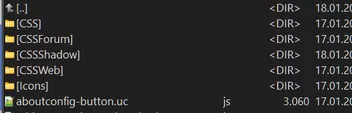
Shadow ist okay. Hatte nur einen Tippfehler bei der CSS-Datei.
-
Das ich dort einfach nur aus der "0" nicht "0.5" machen kann, sonder "0.5px" hätte ich auch drauf kommen können.
Vielen Dank, klappt.Nun habe ich noch versucht, mein cssForum, analog zum cssweb einzubauen.
#submenu-CSSShadow::before,
#submenu-cssweb::before,
#submenu-cssforum::before,
#submenu-css::before,
#submenu-ucjs::before {Der Aufruf klappt aber leider nicht.
Und der Inhalt von CSSShadow wird gar nicht aufgerufen.Was muss ich ändern?