

Treffer versenkt 
Vielen Dank!
Treffer versenkt
Vielen Dank!
Moin, seit neuestem, genauer nicht verifizierbar, habe ich in meinem Nightly die nachstehenden Menüpunkte im TabContextMenü
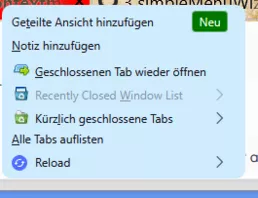
Ich nutze einen CSS für das Menü. Wie lauten die Einträge, wenn ich die 3 Menüpunkte ohne Icon ausblenden möchte?
Vielen Dank schon mal! 
/*AGENT_SHEET*/

/*********************************************************************************************
  simpleMenuWizard: userChrome.css tweaks to remove context menu items in Firefox.
  https://github.com/stonecrusher/simpleMenuWizard
**********************************************************************************************

/*** tab-context.css ***/
/*** When right-clicking on a tab ***/

* #tabContextMenu #context_openANewTab,                      /* New Tab                 */
* #tabContextMenu #context_moveTabToNewGroup,                /* Add Tab to New Group    */
* #tabContextMenu #context_moveTabToGroup,                   /* Add Tab to Group        */
* #tabContextMenu #context_ungroupTab,                       /* Remove from Group       */
* #tabContextMenu #context_ungroupTab + menuseparator,       /******** Separator ********/
* #tabContextMenu #context_reloadTab,                        /* Reload Tab              */
* #tabContextMenu #context_reloadSelectedTabs,               /* Reload Tabs             */
* #tabContextMenu #context_playTab,                          /* Play Tab                */
* #tabContextMenu #context_playSelectedTabs,                 /* Play Tabs               */
* #tabContextMenu #context_toggleMuteTab,                    /* Mute / Unmute Tab       */
* #tabContextMenu #context_toggleMuteSelectedTabs,           /* Mute / Unmute Tabs      */
* #tabContextMenu #context_unloadTab,                        /* Unload Tab              */
* #tabContextMenu #context_pinTab,                           /* Pin Tab                 */
* #tabContextMenu #context_unpinTab,                         /* Unpin Tab               */
* #tabContextMenu #context_pinSelectedTabs,                  /* Pin Tabs                */
* #tabContextMenu #context_unpinSelectedTabs,                /* Unpin Tabs              */
* #tabContextMenu #context_duplicateTab,                     /* Duplicate Tab           */
* #tabContextMenu #context_duplicateTabs,                    /* Duplicate Tabs          */
* #tabContextMenu #context_duplicateTabs + menuseparator,    /******** Separator ********/
* #tabContextMenu #context_bookmarkSelectedTabs,             /* Bookmark Tabs…          */
* #tabContextMenu #context_bookmarkTab,                      /* Bookmark Tab            */
* #tabContextMenu #context_moveTabOptions,                   /* Move Tab                */
* #tabContextMenu #context_moveToStart,                          /* Move to Start           */
* #tabContextMenu #context_moveToEnd,                            /* Move to End             */
* #tabContextMenu #context_openTabInWindow,                      /* Move to New Window      */
* #tabContextMenu #context_sendTabToDevice,                  /* Send Tab to Device      */
* #tabContextMenu #context_reopenInContainer,                /* Reopen in Container     */
/* #tabContextMenu #context_dummy,                                /* Send Tab to Device Submenu not yet supported */
* #tabContextMenu #context_selectAllTabs,                    /* Select All Tabs         */
* #tabContextMenu #context_selectAllTabs + menuseparator,    /******** Separator ********/
* #tabContextMenu #context_closeTab,                         /* Close Tab               */
* #tabContextMenu #context_closeDuplicateTabs,               /* Close Duplicate Tabs    */
* #tabContextMenu #context_closeTabOptions,                  /* Close Multiple Tabs     */
* #tabContextMenu #context_closeTabsToTheStart,                  /* Close Tabs to Left      */
* #tabContextMenu #context_closeTabsToTheEnd,                    /* Close Tabs to Right     */
* #tabContextMenu #context_closeOtherTabs,                       /* Close Other Tabs        */
/* #tabContextMenu #context_undoCloseTab,                     /* Undo Close Tab          */
* #tabContextMenu #context_undoCloseTab + menuseparator,     /******** Separator ********/
* #tabContextMenu #context_fullscreenAutohide,               /* Hide Toolbars           */
* #tabContextMenu #context_fullscreenExit,                   /* Exit Full Screen Mode   */

#leave_this_dummy_here
    { display:none !important; }

#context_toggleVerticalTabs,
#context_closeDuplicateTabs,
#context_moveTabToNewGroup,
#context_askChat,
.share-tab-url-item{
  display: none !important;
} BrokenHeart Nur zur Kenntnis: Ich benötige nur das Script aus #46. Alles Weitere will ich gar nicht haben. Falls also mit dieser Version im Laufe der Zeit wieder Probleme auftreten, würde ich dann auch nur genau danach fragen! Ansonsten wünsche ich allen ein geruhsames Weihnachtsfest ohne Probleme, ob mit dem Fuchs oder auch sonst...
BrokenHeart Vielen lieben Dank, für mich ist das wie ein Weihnachtsgeschenk! 
Wie müsste man denn da vorgehen um das Symbol anzupassen?
Upps, ich hatte das gestern eigentlich wieder aufgehoben. Hatte wohl nicht geklappt. Jetzt nochmal .. 

Die Nichtleerung nach Absenden der Suche ist auch noch ungelöst. Ist da schon jemand am rumtüfteln?
Das wäre mir aber noch fast wichtiger !
Korrekt, diesen Code_Schnipsel habe ich jetzt mal auskommentiert:
Nun ist die URL-Bar zwar nur noch lindgrün auf https-Seiten, aber die Suchleiste ist jetzt nicht mehr hellblau, sondern wieder leicht transparent und weiß.

Wie kann ich denn jetzt das Suchfeld ansprechen, damit es genauso, wie die URL-Bar aussieht?
Die Nichtleerung nach Absenden der Suche ist auch noch ungelöst. Ist da schon jemand am rumtüfteln?
Dass das Suchfeld jetzt hellblau ist, stört zwar, mir gehts aber vor allem darum, dass das Suchfeld nach Abschicken wieder leer ist.
Bitte darauf konzentrieren. Mittlerweile hat 2002Andreas auch einen Thread dazu aufgemacht. Ich würde meinen schließen und bitten das Problem DORT zu besprechen. Danke!
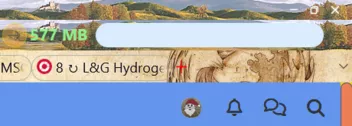
Moin, leider arbeitet mein Script nicht mehr korrekt um das Suchfeld nach dem Drücken der Eingabetaste zu leeren, ausserdem ist es jetzt hellblau hinterlegt, gestern war es noch wie erwartet.
	/* Suchfeld leeren nach 4 Sekunden */
	/* Author @aborix */

	setTimeout(function() {
	    if (location.href !== 'chrome://browser/content/browser.xhtml') return;
	if (!window.searchbar)
      return;
	var searchbar = document.getElementById('searchbar')
	if (!searchbar)
      return;
	var textbox = searchbar.textbox;
	var tId;
	textbox.addEventListener('input', function() {
      clearTimeout(tId);
      tId = setTimeout(function() {
         textbox.value = '';
         document.getElementById('searchbar').hidePopup();
      }, 4000);
	});
	}, 0);


/* Suchfeld sofort leeren nach Start der Suche */
/* Author @aborix */
/* Angepasst wieder durch Sören und milupo*/
/*https://www.camp-firefox.de/forum/thema/135558-skript-f%C3%BCr-suchfeld-leeren-nach-start-der-suche/?postID=1212807#post1212807 */

//https://www.camp-firefox.de/forum/thema/136363-offenbar-funktionieren-alle-benutzerskripte-nicht-mehr-im-nightly/?postID=1227649#post1227649

/* Suchfeld automatisch leeren */

    (function() {
    const lazy = {};

    ChromeUtils.defineESModuleGetters(lazy, {
    FormHistory: "resource://gre/modules/FormHistory.sys.mjs",
    });

    var searchbar = document.getElementById("searchbar");

    searchbar.doSearch = function(aData, aWhere, aEngine, aParams, aOneOff) {
    let textBox = this._textbox;

      if (aData && !PrivateBrowsingUtils.isWindowPrivate(window) && lazy.FormHistory.enabled) {
        lazy.FormHistory.update({
            op: "bump",
            fieldname: textBox.getAttribute("autocompletesearchparam"),
            value: aData,
        }, {
            handleError(aError) {
              Cu.reportError("Saving search to form history failed: " + aError.message);
            },
        });
      }

      let engine = aEngine || this.currentEngine;
      let submission = engine.getSubmission(aData, null, "searchbar");
      let telemetrySearchDetails = this.telemetrySearchDetails;
      this.telemetrySearchDetails = null;
      if (telemetrySearchDetails && telemetrySearchDetails.index == -1) {
        telemetrySearchDetails = null;
      }

      const details = {
        isOneOff: aOneOff,
        isSuggestion: (!aOneOff && telemetrySearchDetails),
        selection: telemetrySearchDetails,
      };
     // BrowserSearch.recordSearchInTelemetry(engine, "searchbar", details);

      let params = {
        postData: submission.postData,
      };
      if (aParams) {
        for (let key in aParams) {
          params[key] = aParams[key];
        }
      }
      openTrustedLinkIn(submission.uri.spec, "tab", params);

      this.value = '';

      this.currentEngine = this.engines ? this.engines[0] : this._engines[0];
    };

}());Gibts Abhilfe?
Dankeschön, bin jetzt aber offline.
BTW: Dieses neue Profil kannst du anschließend wieder entfernen, wenn es die gleichen Fehler wie dein altes bietet. Sollte das neue Profil allerdings korrekt die Webseiten darstellt, kannst du deine Lesezeichen und Passwörter dorthin kopieren. Aber zunächst teste das neue Profil!

.. Und nein, Windows 10 hat ganz sicher nicht mehr Macken, das sei dir versichert.
.. ist aber auch bereits veraltet!
Schau dir vielleicht mal diese TB Erweiterung an.
Über die Verwendung von Kaspersky Software solltest du aber nochmal dringend nachdenken.
Die Sicherheit im System vermittelt der integrierte Defender besser und du hast keine Fremdsoftware in diesem Bereich am Start. In der Vergangenheit kam es allein hier schon häufig zu Fehlern. Und Firefox an sich hat einen integrierten Passwort-Manager. Just my 2 Cents.

Teste bitte mal:
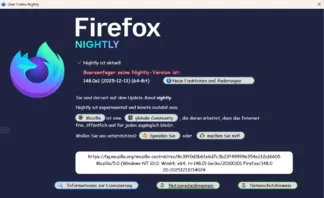
CSS/* About : Dialog */ @-moz-document url-prefix("chrome://browser/content/aboutDialog.xhtml") { #updateIcon { margin-top: -25px !important; } #aboutDialog, #aboutDialogContainer, #agent .textbox-input-box, #agent, #bottomBox, #clientBox, #leftBox, #trademark, #updateBox > vbox:nth-child(2) > hbox:nth-child(2), #updateButton, #version, #version::before { font-family: 'Comic Sans MS' !important; } #aboutDialog vbox, #aboutDialogContainer hbox, #clientBox vbox, #contributeDesc > label:nth-child(1), #contributeDesc > label:nth-child(2), #releasenotes, #trademark, #updateButton, label.bottom-link:nth-child(3), [href='about:credits'], [href='about:license'], [href='about:rights'], [href='https://www.mozilla.org/?utm_source=firefox-browser&utm_medium=firefox-desktop&utm_campaign=about-dialog'] { font-size: 15px !important; } #contributeDesc > label:nth-child(1), #contributeDesc > label:nth-child(2), #releasenotes, label.bottom-link:nth-child(3), [href='about:credits'], [href='about:license'], [href='about:rights'], [href='https://www.mozilla.org/?utm_source=firefox-browser&utm_medium=firefox-desktop&utm_campaign=about-dialog'] { text-decoration: none !important; } #aboutDialog, #aboutDialogContainer, #bottomBox, #clientBox, #trademark { background-color: #202340 !important; } #updateDeck::before { content: 'Boersenfeger seine Nightly-Version ist:'; font-size: 17px !important; font-weight: bold !important; color: #f08080 !important; margin-right: 6px !important; margin-left: 0px !important; } #version { font-size: 16px !important; margin-top: 30px !important; color: #fff !important; min-width: 250px !important; } #aboutDialog { max-height: 600px !important; min-width: 1100px !important; } #agent { appearance: none !important; margin: 50px 40px 84px -1px !important; max-height: 50px !important; padding: 5px 10px 0 10px !important; text-align: center !important; border-radius: 14px !important; max-width: 1300px !important; } #clientBox { margin-left: -50px !important; margin-right: 50px !important; } #agent .textbox-input-box { margin-top: 12px !important; margin-left: 12px !important; } #bottomBox { margin-left: 60px !important; margin-top: -15px !important; margin-bottom: 40px !important; } .text-blurb { min-width: 650px !important; } #updateBox > vbox:nth-child(2) > hbox:nth-child(2) { margin-top: -25px !important; margin-bottom: 20px !important; } #trademark { margin-top: 16px !important; margin-bottom: -40px !important; } #leftBox { margin-top: 60px !important; margin-left: 80px !important; max-width: 200px !important; min-width: 200px !important; } /* Build ID about Dialog css, Text mittig.*/ #rightBox textarea { background-color: white !important; color: black !important; text-align: center !important; margin-top: 30px !important; margin-bottom: 10px !important; min-width: 715px !important; min-height: 70px !important; } #icons > .icon { margin-top: 8px !important; } #updateButton { appearance: none !important; background: gainsboro url('file:///g:/Martin/A_INSTALLATIONSDATEIEN/Downloads/Icons/index1.gif') no-repeat !important; background-color: gainsboro !important; background-position: 13px 3px !important; min-width: 360px !important; padding-left: 30px !important; border-radius: 14px !important; border: 2px solid red!important; color: black !important; } #updateButton:hover { background-color: #b2edfa !important; } #updateButton .button-box { padding-top: 0 !important; padding-bottom: 0 !important; padding-start: 3px !important; padding-end: 3px !important; } #updateBox vbox description.text-blurb label.text-link { display: none !important; } [href='about:license'] { background: gainsboro url('file:///g:/Martin/A_INSTALLATIONSDATEIEN/Downloads/Icons/index1.gif') no-repeat !important; background-position: 10px 3px !important; color: black !important; margin: 0 30px 0 70px !important; padding: 0 20px 0 40px !important; border: 2px solid dodgerblue !important; border-radius: 14px !important; } [href='about:license']:hover { background-color: #b2edfa !important; } label.bottom-link:nth-child(2), label.bottom-link:nth-child(3) { background: gainsboro url('file:///g:/Martin/A_INSTALLATIONSDATEIEN/Downloads/Icons/index4.png') no-repeat !important; background-position: 10px 3px !important; color: black !important; margin: 0 30px 0 30px!important; padding: 0 20px 0 40px !important; border: 2px solid green!important; border-radius: 14px !important; } label.bottom-link:nth-child(2):hover, label.bottom-link:nth-child(3):hover { background-color: #b2edfa !important; } [href='https://www.mozilla.org/?utm_source=firefox-browser&utm_medium=firefox-desktop&utm_campaign=about-dialog'] { background: gainsboro url('file:///g:/Martin/A_INSTALLATIONSDATEIEN/Downloads/Icons/Fuchs2.png') no-repeat !important; background-position: 10px 3px !important; color: black !important; margin: 0 -2px 0 -2px !important; padding: 0 15px 0 35px!important; border: 2px solid cadetblue !important; border-radius: 14px !important; } [href='https://www.mozilla.org/?utm_source=firefox-browser&utm_medium=firefox-desktop&utm_campaign=about-dialog']:hover { background-color: #b2edfa !important; } [href='about:credits'] { background: gainsboro url('file:///g:/Martin/A_INSTALLATIONSDATEIEN/Downloads/Icons/index8.png') no-repeat !important; background-position: 10px 3px !important; color: black !important; margin: 0 5px 0 5px !important; padding:0 15px 0 35px !important; border: 2px solid cadetblue !important; border-radius: 14px !important; } [href='about:credits']:hover { background-color: #b2edfa !important; } #contributeDesc > label:nth-child(1) { background: gainsboro url('file:///g:/Martin/A_INSTALLATIONSDATEIEN/Downloads/Icons/index10.png') no-repeat !important; background-position: 10px 3px !important; color: black !important; margin: 0 3px 0 3px !important; padding: 0 15px 0 35px !important; border: 2px solid cadetblue !important; border-radius: 14px !important; } #contributeDesc > label:nth-child(1):hover { background-color: #b2edfa !important; } #contributeDesc > label:nth-child(2) { background: gainsboro url('file:///g:/Martin/A_INSTALLATIONSDATEIEN/Downloads/Icons/index9.png') no-repeat !important; background-position: 10px 3px !important; color: black !important; margin: 0 -2px 0 10px !important; padding: 0 15px 0 35px !important; border: 2px solid cadetblue !important; border-radius: 14px !important; } #contributeDesc > label:nth-child(2):hover { background-color: #b2edfa !important; } #releasenotes { background: gainsboro url('file:///g:/Martin/A_INSTALLATIONSDATEIEN/Downloads/Icons/index11.png') no-repeat !important; background-position: 10px 3px !important; color: black !important; margin: 0 20px 0 15px !important; padding: 0 25px 0 30px !important; border: 2px solid cadetblue !important; border-radius: 14px !important; margin-top: 25px !important; min-width: 310px !important; } #releasenotes:hover { background-color: #b2edfa !important; } }
Das sieht schon sehr gut aus. Allerdings fehlt es noch ein bisschen nach unten...
EDIT: Die Lösung ist: Zeile 84 Wert auf 800 erhöhen...
Danke an alle Beteiligten!
 RIP
RIP