Äh, wieso macht er jetzt doch weiter? 
Beiträge von Boersenfeger
-
-
Jo, das stimmt.... ist hier aber so gewollt, wobei meine Arbeitsroutine wohl eine andere ist und mein Desktop nicht so wie deiner aussieht.

Gerne, vielleicht kannst du ja was rausziehen aus dem Code..

-
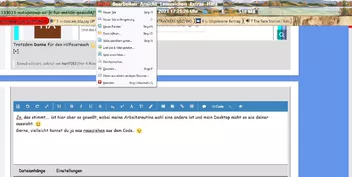
Ich nutze dieses für alle Menüs, von aborix getunt..
JavaScript
Alles anzeigen// ==UserScript== // @name AutoPopup.uc.js // @description Auto popup menulist/menupopup // @compatibility Firefox 72 // @author GOLF-AT, modified by gsf & aborix // @version 2019.11.22 // ==UserScript== (function() { const showDelay = 200; // delay of showing popups const hideDelay = 500; // delay of hiding popups const alwaysPop = false; // show popups also when window is not focused var overElt = null; var PopElt = null; var PopTimer = null; var HideTimer = null; // elements are CSS selector strings var blackIDs = []; // whitelist, and trigger action var whiteIDs = [ { id: 'omnibar-defaultEngine', popMemu: 'omnibar-engine-menu', run: function(overElem) { document.getElementById('omnibar-in-urlbar').click(0); } }, { id: 'ucjs_zoom_statuslabel', popMemu: 'ucjs_zoom-context', run: null }, { id: 'UserScriptLoader-icon', popMemu: 'UserScriptLoader-popup', run: null }, { id: 'readLater', popMemu: 'readLater-popup', run: null //function(overElem) {PopElt.popup();} }, { id: 'foxyproxy-toolbar-icon', popMemu: 'foxyproxy-toolbarbutton-popup', run: null } ]; var whitesInx = -1; const popupPos = ['after_start', 'end_before', 'before_start', 'start_before']; const searchBar = window.BrowserSearch ? BrowserSearch.searchBar : null; function IsButton(elt) { return elt && (elt.localName == 'toolbarbutton' || elt.localName == 'button'); } function IsWidgetBtn(elt) { return IsButton(elt) && ((elt.hasAttribute('widget-id') && elt.getAttribute('widget-type') == 'view') || elt.id == 'fxa-toolbar-menu-button' || elt.id == 'library-button' || elt.id == 'alltabs-button'); } function IsSearchBtn(elt) { return (elt && elt.className == 'searchbar-search-button') || whitesInx == 0; } function IsPanelMenuBtn(elt) { return elt && elt.id == 'PanelUI-menu-button'; } function IsDownloadBtn(elt) { return elt && elt.id == 'downloads-button'; } function IsMenuBtn(elt) { return IsPanelMenuBtn(elt) || IsDownloadBtn(elt) || IsWidgetBtn(elt) || (IsButton(elt) && getPopupMenu(elt)); } function IsOverflowBtn(elt) { return elt && elt.id == 'nav-bar-overflow-button'; } function IsUrlbarDropmarker(elt) { return elt && elt.classList && elt.classList.contains('urlbar-history-dropmarker'); } function IsCustomizationBtn(elt) { return IsButton(elt) && elt.className == 'customizationmode-button'; } function IsAutoComplete(elt) { try { return elt.getAttribute('type').substring(0, 12) == 'autocomplete'; } catch(e) { return false; } } function isBlackNode(elt) { return blackIDs.some(function(css) { try { var nodes = document.querySelectorAll(css); } catch(e) { return false; } for (var node of nodes) { if (node == elt) return true; } return false; }) } function getPopupNode(node) { if (whitesInx > -1 && PopElt) return PopElt; if (IsSearchBtn(node) || IsOverflowBtn(node) || node.id == 'sidebar-switcher-target') return node; var elt, isPop, s; for (; node != null; node = node.parentNode) { if (node == PopElt) return node; isPop = false; // node isn't popup node s = node.localName; if (s == 'menupopup' || s == 'popup' || s == 'menulist' || IsAutoComplete(node) || IsMenuBtn(node) || IsUrlbarDropmarker(node)) { isPop = true; } else if (s == 'dropmarker' && node.getAttribute('type') == 'menu' && node.parentNode.firstChild.localName == 'menupopup') { isPop = true; } else if (s == 'menu') { isPop = (node.parentNode.localName == 'menubar'); } else if (IsButton(node)) { for (elt = node; (elt = elt.nextSibling) != null;) { if (elt.localName == 'dropmarker' && elt.width > 0 && elt.height > 0) break; } if (elt) break; } if (isPop) break; } if (PopElt && node) { // whether node is child of PopElt for (elt = node.parentNode; elt != null; elt = elt.parentNode) { if (elt == PopElt) return PopElt; } } return isPop ? node : null; } function getPopupMenu(elt) { if (whitesInx > -1 && PopElt) return PopElt; var nodes = elt ? elt.childNodes : null; if (nodes) { for (let node of nodes) { if (node.localName == 'menupopup' || node.localName == 'panel') return node; } } var s = elt.getAttribute('popup'); return s ? document.getElementById(s) : null; } function getPopupPos(elt) { if (elt.id == 'bookmarks-menu-button') return null; var x, y, pos, i; for (pos = 0, x = elt.screenX, y = elt.screenY; elt != null; elt = elt.parentNode) { if (elt.localName == 'window' || !elt.parentNode) break; else if (elt.localName != 'toolbar' && elt.localName != 'hbox' && elt.localName != 'vbox'); else if (elt.height >= 3 * elt.width) { if (elt.height >= 45) { pos = 9; break; } } else if (elt.width >= 3 * elt.height) { if (elt.width >= 45) { pos = 8; break; } } } try { i = (pos & 1) ? // is pos odd? (x <= elt.width / 2 + elt.screenX ? 1 : 3) : (y <= elt.height / 2 + elt.screenY ? 0 : 2); } catch(e) { i = 0; } return popupPos[i]; } function AutoPopup() { PopTimer = null; if (!overElt) return; if (whitesInx > -1 && PopElt && whiteIDs[whitesInx].run) { whiteIDs[whitesInx].run(overElt); return; } if (!PopElt) PopElt = overElt; if (overElt.localName == 'dropmarker') { PopElt.showPopup(); } else if (overElt.localName == 'menulist') { overElt.open = true; } else if (IsPanelMenuBtn(overElt)) { PopElt = document.getElementById('appMenu-popup'); PanelUI.show(); } else if (IsWidgetBtn(overElt)) { PopElt = document.getElementById('customizationui-widget-panel'); if (overElt.hasAttribute('onmousedown')) overElt.dispatchEvent(new MouseEvent('mousedown')); else overElt.dispatchEvent(new UIEvent('command')); } else if (IsDownloadBtn(overElt)) { PopElt = document.getElementById('downloadsPanel'); DownloadsPanel.showPanel(); } else if (IsSearchBtn(overElt)) { searchBar.openSuggestionsPanel(); } else if (IsOverflowBtn(overElt)) { PopElt = document.getElementById('widget-overflow'); if (!overElt.open) overElt.click(); } else if (overElt.id == 'sidebar-switcher-target') { PopElt = document.getElementById('sidebarMenu-popup'); if (!overElt.classList.contains('active')) SidebarUI.toggleSwitcherPanel(); } else if (IsUrlbarDropmarker(overElt)) { PopElt = gURLBar.panel; if (!gURLBar.textbox.hasAttribute('open')) overElt.click(); } else { PopElt = getPopupMenu(overElt); if (IsCustomizationBtn(overElt)) overElt.open = true; else { try { let Pos = getPopupPos(overElt); PopElt.removeAttribute('hidden'); PopElt.openPopup(overElt, Pos, 0, 0, false, false, null); } catch(e) { PopElt = null; } } } } function HidePopup() { try { if (overElt.localName == 'dropmarker') { try { PopElt.parentNode.closePopup(); } catch(e) { try { PopElt.hidePopup(); } catch(e) { } } } else if (overElt.localName == 'menulist') PopElt.open = false; else if (PopElt.hidePopup) PopElt.hidePopup(); else if (PopElt.popupBoxObject) PopElt.popupBoxObject.hidePopup(); else if (IsSearchBtn(overElt)) searchBar.textbox.closePopup(); else if (IsPanelMenuBtn(overElt)) PanelUI.hide(); else if (IsUrlbarDropmarker(overElt)) if (gURLBar.textbox.hasAttribute('open')) overElt.click(); } catch(e) { } HideTimer = null; overElt = PopElt = null; } function MouseOver(e) { if (!alwaysPop && !document.hasFocus()) return; var popNode, n = e.originalTarget; whitesInx = -1; if (n.hasAttribute('id') && whiteIDs.some(function(k,i,me) { if (k.id == n.id) { overElt = n; whitesInx = i; PopElt = document.getElementById(k.popMemu); PopTimer = setTimeout(AutoPopup, showDelay); return true; } })) return; popNode = getPopupNode(e.originalTarget); if (!popNode || (popNode && popNode.disabled) || isBlackNode(popNode)) { MouseOut(); return; } if (HideTimer) { clearTimeout(HideTimer); HideTimer = null; } try { if (IsAutoComplete(popNode)) { return; }; for (var elt = popNode; elt != null; elt = elt.parentNode) { if (elt.localName == 'menupopup' || elt.localName == 'popup') return; } } catch(e) { } if (PopElt && popNode == PopElt && PopElt != overElt) return; if (overElt && popNode != overElt) HidePopup(); overElt = popNode; PopElt = null; PopTimer = setTimeout(AutoPopup, showDelay); } function MouseOut() { if (PopTimer) { clearTimeout(PopTimer); PopTimer = null; } if (!HideTimer && PopElt) HideTimer = setTimeout(HidePopup, hideDelay); } window.addEventListener('mouseover', MouseOver, false); })(); -
// Ergänzend: Du solltest dich vielleicht mal mit Sinn und Zweck der Masse deiner genutzten Erweiterungen beschäftigen. Viel Filter und Blockzeug macht Firefox langsam und ist der Sache eh nicht zuträglich.
Du schreibst selber, du hättest nicht viel Ahnung, woher dann also das Wissen/Notwendigkeit, diese Erweiterungen zu nutzen?
uBlockOrigin ist hilfreich!

Wenn man die Eingeweide (Profi-Modus) nicht kennt, nutzt es auch schon in den Default-Einstellungen.
-
Tach, entferne zunächst, getreu deinem Nutzernamen, mal alle Erweiterungen, du nutzt sehr viele filternde und beschränkende... damit kommt man vielleicht schon weiter.
-

// Es ist immer schwierig ein externes Theme und einwirkenden CSS-Code auf einen Nenner zu bringen. Wenn dann auch noch die Windows-Farbverwaltung ins Spiel kommt, wirds noch komplizierter. Aber wenn dann Proton komplett ist und man seine Einstellungen wieder auf Reihe hat, freut man sich über das Ergebnis.
-
// Ich möchte es im Beitrag sehen und nicht runterladen müssen, ganz einfach..
-
Biz Markie stirbt mit nur 57 Jahren an Diabeteskomplikationen.

Bekannt ggf. aus Men in Black II als beatboxender Postangestellter und als Gast auf dem Album Silium der deutschen HipHop Band Fünf Sterne Deluxe.
-
Just a Friend Biz Markie RIP
-
Der Boersenfeger liest jetzt diesen Thread und kann nur mitteilen, das das Script auch in Nightly-Version 92.a1 klaglos seinen Dienst verrichtet.
Hier der Code dafür:
JavaScript
Alles anzeigen// ==UserScript== // @name UserCSSLoader // @description CSS Codes - Styles laden und verwalten // @namespace https://d.hatena.ne.jp/Griever/ // @author Griever // @include main // @license MIT License // @compatibility Firefox 4 - 69* // @charset UTF-8 // @version 0.0.4g // @note Version 0.0.4.g ermoeglicht "Styles importieren" per Mittelklick und Verwendung // @note eines anderen Dateimanager (s. vFileManager in Zeile 53) // @note Frei verschiebbare Schaltfläche eingebaut von aborix // @note 0.0.4 Remove E4X // @note CSSEntry-Klasse erstellt // @note Style-Test-Funktion überarbeitet // @note Wenn die Datei gelöscht wurde, CSS beim Neu erstellen und Löschen des Menüs abbrechen // @note uc einlesen .uc.css temporäre Korrespondenz zum erneuten Lesen // ==/UserScript== /****** Bedienungsanleitung ****** Da der CSS-Ordner im Chrome-Ordner erstellt wurde, CSS-Dateien dort ablegen - speichern. Diejenigen, deren Dateiname mit "xul-" beginnen, diejenigen, die mit ".as.css" enden, sind AGENT_SHEET, andere außer USER_SHEET werden gelesen. Da der Inhalt der Datei nicht überprüft wird, darauf achten, @ Namespace Angabe nicht zu vergessen! CSS-Menü wird zur Menüleiste hinzugefügt Linksklick auf Stil, zum aktivieren/deaktivieren Mittelklick auf Stil zum aktivieren/deaktivieren, ohne Menü zu schließen Rechtsklick auf Stil zum Öffnen im Editor Verwenden des in "view_source.editor.path" angegebenen Editors Ordner kann geändert werden, indem ein Pfad in "UserCSSLoader.FOLDER" eingefügt wird **** Anleitung Ende ****/ (function(){ let { classes: Cc, interfaces: Ci, utils: Cu, results: Cr } = Components; if (!window.Services) Cu.import("resource://gre/modules/Services.jsm"); // Wenn beim Start ein anderes Fenster angezeigt wird (das zweite Fenster), wird es beendet let list = Services.wm.getEnumerator("navigator:browser"); while(list.hasMoreElements()){ if(list.getNext() != window) return; } if (window.UCL) { window.UCL.destroy(); delete window.UCL; } window.UCL = { vFileManager: 'H:\\Total Commander\\TOTALCMD64.EXE', //vFileManager: '', USE_UC: "UC" in window, AGENT_SHEET: Ci.nsIStyleSheetService.AGENT_SHEET, USER_SHEET : Ci.nsIStyleSheetService.USER_SHEET, readCSS : {}, get disabled_list() { let obj = []; try { obj = this.prefs.getCharPref("disabled_list").split("|"); } catch(e) {} delete this.disabled_list; return this.disabled_list = obj; }, get prefs() { delete this.prefs; return this.prefs = Services.prefs.getBranch("UserCSSLoader.") }, get styleSheetServices(){ delete this.styleSheetServices; return this.styleSheetServices = Cc["@mozilla.org/content/style-sheet-service;1"].getService(Ci.nsIStyleSheetService); }, get FOLDER() { let aFolder; try { // UserCSSLoader.FOLDER verwenden let folderPath = this.prefs.getCharPref("FOLDER"); aFolder = Cc["@mozilla.org/file/local;1"].createInstance(Ci.nsIFile) aFolder.initWithPath(folderPath); } catch (e) { aFolder = Services.dirsvc.get("UChrm", Ci.nsIFile); aFolder.appendRelativePath("CSS"); } if (!aFolder.exists() || !aFolder.isDirectory()) { aFolder.create(Ci.nsIFile.DIRECTORY_TYPE, 0664); } delete this.FOLDER; return this.FOLDER = aFolder; }, getFocusedWindow: function() { let win = document.commandDispatcher.focusedWindow; if (!win || win == window) win = content; return win; }, init: function() { const cssmenu = $C("menu", { id: "usercssloader-menu", label: "CSS", accesskey: "C", onclick: "if (event.button == 1) UCL.rebuild()" }); const menupopup = $C("menupopup", { id: "usercssloader-menupopup" }); cssmenu.appendChild(menupopup); let menu = $C("menu", { label: "Style Loader Menü", accesskey: "M" }); menupopup.appendChild(menu); let mp = $C("menupopup", { id: "usercssloader-submenupopup" }); menu.appendChild(mp); mp.appendChild($C("menuitem", { label: "Styles importieren", accesskey: "R", acceltext: "Alt + R", oncommand: "UCL.rebuild();" })); mp.appendChild($C("menuseparator")); mp.appendChild($C("menuitem", { label: "CSS Datei erstellen", accesskey: "D", oncommand: "UCL.create();" })); mp.appendChild($C("menuitem", { label: "CSS Ordner öffnen", accesskey: "O", oncommand: "UCL.openFolder();" })); mp.appendChild($C("menuitem", { label: "userChrome.css bearbeiten", hidden: false, oncommand: "UCL.editUserCSS(\'userChrome.css\');" })); mp.appendChild($C("menuitem", { label: "userContent.css bearbeiten", hidden: false, oncommand: "UCL.editUserCSS(\'userContent.css\');" })); mp.appendChild($C("menuseparator")); mp.appendChild($C("menuitem", { label: "Style Test (Chrome)", id: "usercssloader-test-chrome", hidden: true, accesskey: "C", oncommand: "UCL.styleTest(window);" })); mp.appendChild($C("menuitem", { label: "Style Test (Web)", id: "usercssloader-test-content", hidden: true, accesskey: "W", oncommand: "UCL.styleTest();" })); mp.appendChild($C("menuitem", { label: "Styles dieser Seite auf userstyles.org finden", accesskey: "S", oncommand: "UCL.searchStyle();" })); menu = $C("menu", { label: ".uc.css", accesskey: "U", hidden: !UCL.USE_UC }); menupopup.appendChild(menu); mp = $C("menupopup", { id: "usercssloader-ucmenupopup" }); menu.appendChild(mp); mp.appendChild($C("menuitem", { label: "Importieren(.uc.js)", oncommand: "UCL.UCrebuild();" })); mp.appendChild($C("menuseparator", { id: "usercssloader-ucseparator" })); CustomizableUI.createWidget({ id: 'usercssloader-menu-item', type: 'custom', defaultArea: CustomizableUI.AREA_NAVBAR, onBuild: function(aDocument) { let toolbaritem = aDocument.createElementNS('http://www.mozilla.org/keymaster/gatekeeper/there.is.only.xul', 'toolbaritem'); toolbaritem.id = 'usercssloader-menu-item'; toolbaritem.className = 'chromeclass-toolbar-additional'; return toolbaritem; } }); $('usercssloader-menu-item').appendChild(cssmenu); //let refNode = $('helpMenu'); //refNode.parentNode.insertBefore(cssmenu, refNode.nextSibling); $("mainKeyset").appendChild($C("key", { id: "usercssloader-rebuild-key", oncommand: "UCL.rebuild();", key: "R", modifiers: "alt", })); this.rebuild(); this.initialized = true; if (UCL.USE_UC) { setTimeout(function() { UCL.UCcreateMenuitem(); }, 1000); } window.addEventListener("unload", this, false); }, uninit: function() { const dis = []; for (let x of Object.keys(this.readCSS)) { if (!this.readCSS[x].enabled) dis.push(x); } this.prefs.setCharPref("disabled_list", dis.join("|")); window.removeEventListener("unload", this, false); }, destroy: function() { var i = document.getElementById("usercssloader-menu"); if (i) i.parentNode.removeChild(i); var i = document.getElementById("usercssloader-rebuild-key"); if (i) i.parentNode.removeChild(i); this.uninit(); }, handleEvent: function(event) { switch(event.type){ case "unload": this.uninit(); break; } }, rebuild: function() { let ext = /\.css$/i; let not = /\.uc\.css/i; let files = this.FOLDER.directoryEntries.QueryInterface(Ci.nsISimpleEnumerator); while (files.hasMoreElements()) { let file = files.getNext().QueryInterface(Ci.nsIFile); if (!ext.test(file.leafName) || not.test(file.leafName)) continue; let CSS = this.loadCSS(file); CSS.flag = true; } for (let leafName of Object.keys(this.readCSS)) { const CSS = this.readCSS[leafName]; if (!CSS.flag) { CSS.enabled = false; delete this.readCSS[leafName]; } delete CSS.flag; this.rebuildMenu(leafName); } if (this.initialized) { if (typeof(StatusPanel) !== "undefined") StatusPanel._label = "Style importiert"; else XULBrowserWindow.statusTextField.label = "Styles importieren"; } }, loadCSS: function(aFile) { var CSS = this.readCSS[aFile.leafName]; if (!CSS) { CSS = this.readCSS[aFile.leafName] = new CSSEntry(aFile); if (this.disabled_list.indexOf(CSS.leafName) === -1) { CSS.enabled = true; } } else if (CSS.enabled) { CSS.enabled = true; } return CSS; }, rebuildMenu: function(aLeafName) { var CSS = this.readCSS[aLeafName]; var menuitem = document.getElementById("usercssloader-" + aLeafName); if (!CSS) { if (menuitem) menuitem.parentNode.removeChild(menuitem); return; } if (!menuitem) { menuitem = document.createXULElement("menuitem"); menuitem.setAttribute("label", aLeafName); menuitem.setAttribute("id", "usercssloader-" + aLeafName); menuitem.setAttribute("class", "usercssloader-item " + (CSS.SHEET == this.AGENT_SHEET? "AGENT_SHEET" : "USER_SHEET")); menuitem.setAttribute("type", "checkbox"); menuitem.setAttribute("autocheck", "false"); menuitem.setAttribute("oncommand", "UCL.toggle('"+ aLeafName +"');"); menuitem.setAttribute("onclick", "UCL.itemClick(event);"); document.getElementById("usercssloader-menupopup").appendChild(menuitem); } menuitem.setAttribute("checked", CSS.enabled); }, toggle: function(aLeafName) { var CSS = this.readCSS[aLeafName]; if (!CSS) return; CSS.enabled = !CSS.enabled; this.rebuildMenu(aLeafName); }, itemClick: function(event) { if (event.button == 0) return; event.preventDefault(); event.stopPropagation(); let label = event.currentTarget.getAttribute("label"); if (event.button == 1) { this.toggle(label); } else if (event.button == 2) { closeMenus(event.target); this.edit(this.getFileFromLeafName(label)); } }, getFileFromLeafName: function(aLeafName) { let f = this.FOLDER.clone(); f.QueryInterface(Ci.nsIFile); // use appendRelativePath f.appendRelativePath(aLeafName); return f; }, styleTest: function(aWindow) { aWindow || (aWindow = this.getFocusedWindow()); new CSSTester(aWindow, function(tester){ if (tester.saved) UCL.rebuild(); }); }, searchStyle: function() { let word; try { word = gBrowser.currentURI.host; } catch { word = gBrowser.currentURI.spec; } openWebLinkIn("https://userstyles.org/styles/search/" + word, "tab", {}); }, openFolder:function(){ if (this.vFileManager.length != 0) { var file = Cc['@mozilla.org/file/local;1'].createInstance(Ci.nsIFile); var process = Cc['@mozilla.org/process/util;1'].createInstance(Ci.nsIProcess); var args=[this.FOLDER.path]; file.initWithPath(this.vFileManager); process.init(file); // Verzeichnis mit anderem Dateimanager öffnen process.run(false, args, args.length); } else { // Verzeichnis mit Dateimanager des Systems öffnen this.FOLDER.launch(); } }, editUserCSS: function(aLeafName) { let file = Services.dirsvc.get("UChrm", Ci.nsIFile); file.appendRelativePath(aLeafName); this.edit(file); }, edit: function(aFile) { var editor = Services.prefs.getCharPref("view_source.editor.path"); if (!editor) return alert("Unter about:config den vorhandenen Schalter:\n view_source.editor.path mit dem Editorpfad ergänzen"); try { var UI = Components.classes["@mozilla.org/intl/scriptableunicodeconverter"].createInstance(Components.interfaces.nsIScriptableUnicodeConverter); UI.charset = window.navigator.platform.toLowerCase().indexOf("win") >= 0? "Shift_JIS": "UTF-8"; var path = UI.ConvertFromUnicode(aFile.path); var app = Components.classes["@mozilla.org/file/local;1"].createInstance(Components.interfaces.nsIFile); app.initWithPath(editor); var process = Components.classes["@mozilla.org/process/util;1"].createInstance(Components.interfaces.nsIProcess); process.init(app); process.run(false, [path], 1); } catch (e) {} }, create: function(aLeafName) { if (!aLeafName) aLeafName = prompt("Name des Styles", dateFormat(new Date(), "%Y_%m%d_%H%M%S")); if (aLeafName) aLeafName = aLeafName.replace(/\s+/g, " ").replace(/[\\/:*?\"<>|]/g, ""); if (!aLeafName || !/\S/.test(aLeafName)) return; if (!/\.css$/.test(aLeafName)) aLeafName += ".css"; let file = this.getFileFromLeafName(aLeafName); this.edit(file); }, UCrebuild: function() { let re = /^file:.*\.uc\.css(?:\?\d+)?$/i; let query = "?" + new Date().getTime(); Array.slice(document.styleSheets).forEach(function(css){ if (!re.test(css.href)) return; if (css.ownerNode) { css.ownerNode.parentNode.removeChild(css.ownerNode); } let pi = document.createProcessingInstruction('xml-stylesheet','type="text/css" href="'+ css.href.replace(/\?.*/, '') + query +'"'); document.insertBefore(pi, document.documentElement); }); UCL.UCcreateMenuitem(); }, UCcreateMenuitem: function() { let sep = $("usercssloader-ucseparator"); let popup = sep.parentNode; if (sep.nextSibling) { let range = document.createRange(); range.setStartAfter(sep); range.setEndAfter(popup.lastChild); range.deleteContents(); range.detach(); } let re = /^file:.*\.uc\.css(?:\?\d+)?$/i; Array.slice(document.styleSheets).forEach(function(css) { if (!re.test(css.href)) return; let fileURL = decodeURIComponent(css.href).split("?")[0]; let aLeafName = fileURL.split("/").pop(); let m = document.createXULElement("menuitem"); m.setAttribute("label", aLeafName); m.setAttribute("tooltiptext", fileURL); m.setAttribute("id", "usercssloader-" + aLeafName); m.setAttribute("type", "checkbox"); m.setAttribute("autocheck", "false"); m.setAttribute("checked", "true"); m.setAttribute("oncommand", "this.setAttribute('checked', !(this.css.disabled = !this.css.disabled));"); m.setAttribute("onclick", "UCL.UCItemClick(event);"); m.css = css; popup.appendChild(m); }); }, UCItemClick: function(event) { if (event.button == 0) return; event.preventDefault(); event.stopPropagation(); if (event.button == 1) { event.target.doCommand(); } else if (event.button == 2) { closeMenus(event.target); let fileURL = event.currentTarget.getAttribute("tooltiptext"); let file = Services.io.getProtocolHandler("file").QueryInterface(Components.interfaces.nsIFileProtocolHandler).getFileFromURLSpec(fileURL); this.edit(file); } }, }; function CSSEntry(aFile) { this.path = aFile.path; this.leafName = aFile.leafName; this.lastModifiedTime = 1; this.SHEET = /^xul-|\.as\.css$/i.test(this.leafName) ? Ci.nsIStyleSheetService.AGENT_SHEET: Ci.nsIStyleSheetService.USER_SHEET; } CSSEntry.prototype = { sss: Components.classes["@mozilla.org/content/style-sheet-service;1"] .getService(Components.interfaces.nsIStyleSheetService), _enabled: false, get enabled() { return this._enabled; }, set enabled(isEnable) { var aFile = Components.classes["@mozilla.org/file/local;1"].createInstance(Components.interfaces.nsIFile) aFile.initWithPath(this.path); var isExists = aFile.exists(); // Wenn die Datei existiert true var lastModifiedTime = isExists ? aFile.lastModifiedTime : 0; var isForced = this.lastModifiedTime != lastModifiedTime; // Wenn es eine Änderung in der Datei gibt true var fileURL = Services.io.getProtocolHandler("file").QueryInterface(Components.interfaces.nsIFileProtocolHandler).getURLSpecFromFile(aFile); var uri = Services.io.newURI(fileURL, null, null); if (this.sss.sheetRegistered(uri, this.SHEET)) { // Wenn diese Datei bereits gelesen wurde if (!isEnable || !isExists) { this.sss.unregisterSheet(uri, this.SHEET); } else if (isForced) { // Nach Stornierung erneut einlesen this.sss.unregisterSheet(uri, this.SHEET); this.sss.loadAndRegisterSheet(uri, this.SHEET); } } else { // Datei wurde nicht gelesen if (isEnable && isExists) { this.sss.loadAndRegisterSheet(uri, this.SHEET); } } if (this.lastModifiedTime !== 1 && isEnable && isForced) { log(this.leafName + " wurde aktualisiert"); } this.lastModifiedTime = lastModifiedTime; return this._enabled = isEnable; }, }; function CSSTester(aWindow, aCallback) { this.win = aWindow || window; this.doc = this.win.document; this.callback = aCallback; this.init(); } CSSTester.prototype = { sss: Components.classes["@mozilla.org/content/style-sheet-service;1"] .getService(Components.interfaces.nsIStyleSheetService), preview_code: "", saved: false, init: function() { this.dialog = openDialog( "data:text/html;charset=utf8,"+encodeURIComponent('<!DOCTYPE HTML><html lang="ja"><head><title>CSSTester</title></head><body></body></html>'), "", "width=550,height=400,dialog=no"); this.dialog.addEventListener("load", this, false); }, destroy: function() { this.preview_end(); this.dialog.removeEventListener("unload", this, false); this.previewButton.removeEventListener("click", this, false); this.saveButton.removeEventListener("click", this, false); this.closeButton.removeEventListener("click", this, false); }, handleEvent: function(event) { switch(event.type) { case "click": if (event.button != 0) return; if (this.previewButton == event.currentTarget) { this.preview(); } else if (this.saveButton == event.currentTarget) { this.save(); } else if (this.closeButton == event.currentTarget) { this.dialog.close(); } break; case "load": var doc = this.dialog.document; doc.body.innerHTML = '\ <style type="text/css">\ :not(input):not(select) { padding: 0px; margin: 0px; }\ table { border-spacing: 0px; }\ body, html, #main, #textarea { width: 100%; height: 100%; }\ #textarea { font-family: monospace; }\ </style>\ <table id="main">\ <tr height="100%">\ <td colspan="4"><textarea id="textarea"></textarea></td>\ </tr>\ <tr height="40">\ <td><input type="button" value="Vorschau" id="Vorschau"/></td>\ <td><input type="button" value="Speichern" id="Speichern"/></td>\ <td width="80%"><span class="log"></span></td>\ <td><input type="button" value="Schließen" id="Schliessen"/></td>\ </tr>\ </table>\ '; this.textbox = doc.querySelector("textarea"); this.previewButton = doc.querySelector('input[value="Vorschau"]'); this.saveButton = doc.querySelector('input[value="Speichern"]'); this.closeButton = doc.querySelector('input[value="Schließen"]'); this.logField = doc.querySelector('.log'); var code = "@namespace url(" + this.doc.documentElement.namespaceURI + ");\n"; code += this.win.location.protocol.indexOf("http") === 0? "@-moz-document domain(" + this.win.location.host + ") {\n\n\n\n}": "@-moz-document url(" + this.win.location.href + ") {\n\n\n\n}"; this.textbox.value = code; this.dialog.addEventListener("unload", this, false); this.previewButton.addEventListener("click", this, false); this.saveButton.addEventListener("click", this, false); this.closeButton.addEventListener("click", this, false); this.textbox.focus(); let p = this.textbox.value.length - 3; this.textbox.setSelectionRange(p, p); break; case "unload": this.destroy(); this.callback(this); break; } }, preview: function() { var code = this.textbox.value; if (!code || !/\:/.test(code)) return; code = "data:text/css;charset=utf-8," + encodeURIComponent(this.textbox.value); if (code == this.preview_code) return; this.preview_end(); var uri = Services.io.newURI(code, null, null); this.sss.loadAndRegisterSheet(uri, Ci.nsIStyleSheetService.AGENT_SHEET); this.preview_code = code; this.log("Preview"); }, preview_end: function() { if (this.preview_code) { let uri = Services.io.newURI(this.preview_code, null, null); this.sss.unregisterSheet(uri, Ci.nsIStyleSheetService.AGENT_SHEET); this.preview_code = ""; } }, save: function() { var data = this.textbox.value; if (!data) return; var fp = Cc["@mozilla.org/filepicker;1"].createInstance(Ci.nsIFilePicker); fp.init(window, "", Ci.nsIFilePicker.modeSave); fp.appendFilter("CSS Files","*.css"); fp.defaultExtension = "css"; if (window.UCL) fp.displayDirectory = UCL.FOLDER; var res = fp.show(); if (res != fp.returnOK && res != fp.returnReplace) return; var suConverter = Cc["@mozilla.org/intl/scriptableunicodeconverter"].createInstance(Ci.nsIScriptableUnicodeConverter); suConverter.charset = "UTF-8"; data = suConverter.ConvertFromUnicode(data); var foStream = Cc["@mozilla.org/network/file-output-stream;1"].createInstance(Ci.nsIFileOutputStream); foStream.init(fp.file, 0x02 | 0x08 | 0x20, 0664, 0); foStream.write(data, data.length); foStream.close(); this.saved = true; }, log: function() { this.logField.textContent = dateFormat(new Date(), "%H:%M:%S") + ": " + $A(arguments); } }; UCL.init(); function $(id) { return document.getElementById(id); } function $A(arr) { return Array.slice(arr); } function $C(name, attr) { var el = document.createXULElement(name); if (attr) Object.keys(attr).forEach(function(n) { el.setAttribute(n, attr[n]) }); return el; } function dateFormat(date, format) { format = format.replace("%Y", ("000" + date.getFullYear()).substr(-4)); format = format.replace("%m", ("0" + (date.getMonth()+1)).substr(-2)); format = format.replace("%d", ("0" + date.getDay()).substr(-2)); format = format.replace("%H", ("0" + date.getHours()).substr(-2)); format = format.replace("%M", ("0" + date.getMinutes()).substr(-2)); format = format.replace("%S", ("0" + date.getSeconds()).substr(-2)); return format; } function log() { Application.console.log(Array.slice(arguments)); } })();Editor muss jeweils an Vorhandenes angepasst werden!
-
Es geht nur um den Profilordner, der Lesezeichenmanager funktioniert, da hatte ich dem Button nur das falsche Script zugeordnet..
Also bitte abtrennen...

-
Hoppala, das ergibt den gleichen Fehler...
-
Oha, Fehlleistung meinerseits

Es handelt sich um ein Script, das den Profilordner öffnen soll..
Allerdings finde ich den Namen dafür nicht....


Der Button für das o.a. eingefügte Script ist dieses

und das Script dazu funktioniert auch..
Sorry, für den Aufwand...

-
Oha, Fehlleistung meinerseits
Es handelt sich um ein Script, das den Profilordner öffnen soll..
Allerdings finde ich den Namen dafür nicht....

Der Button für das o.a. eingefügte Script ist dieses

und das Script dazu funktioniert auch..
Sorry, für den Aufwand...
-
-
Nee, gleiches Ergebnis
-
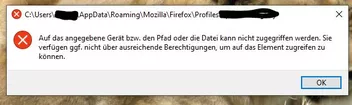
Das Script funktioniert hier nicht mehr mit dem aktuellen Nightly 92.0a1.
Ich erhalte beim Klick auf den Button eine Fehlermeldung, das der Zugriff auf den Profilordner nicht erlaubt sei. Kann das jemand bestätigen?
Hier nochmal das Script
JavaScript
Alles anzeigen/* Bookmarksmanager.uc.js */ (function() { if (location != AppConstants.BROWSER_CHROME_URL) return; try { CustomizableUI.createWidget({ id: 'bookmarks-manager-button', type: 'custom', defaultArea: CustomizableUI.AREA_NAVBAR, onBuild: function(aDocument) { var toolbaritem = aDocument.createElementNS('http://www.mozilla.org/keymaster/gatekeeper/there.is.only.xul', 'toolbarbutton'); var props = { id: 'bookmarks-manager-button', class: 'toolbarbutton-1 chromeclass-toolbar-additional', removable: true, label: 'Lesezeichen Manager', accesskey: 'e', tooltiptext: 'Lesezeichen Manager oeffnen', style: 'list-style-image: url(data:image/png;base64,iVBORw0KGgoAAAANSUhEUgAAABAAAAAQCAYAAAAf8/9hAAACnklEQVQ4y6XTPYgVVxTA8f/ce2fu7Mx7vuf6srsa425cxFWEiDwCgpXpErELIVYWVolYWGmdKoVdLGwUGwXFJggWwq42hpBmiUaW1f2I7Pfs+p6773Pm3jspXtwEIhLwNIdTnB/nHDjwgeGNXrhz2JfysPC8/9fgrLAmez7105lnAOpAZejxwYGBiud5QA78N3cyRymSLG6kHBmJ+G1ueX0KPgJQ8ytppbXZ/tt/N5Aax9gnEUndUm84Xm/aytuJVBxZzn3VT0lbjMkoFIskawmDQ4MALC8ts3vPx9STJcKoSK3r8/CP9vZKqhhJjh/sZyB2ZFlGuVxmYSFleLgHzBaa7N8/SDJxlXj3SZZ0lesT8h/Aw1Kr1dAGjDEYY+h2uyRJAkCapiTzk4TpS7orIbUdo3jYbUD4SqJ1gNaaMAzRWhMEvVprjQ588pVHxJ+eQDRnCESGr/41QeALCnFEHAustcRxTNZcIepOkdsO0eZLivYZQh2lsKtEafUmJ8p93LldOZ21my3lkdNoNChKhXMOYwx27QnmzXVk3y524qEKZTCzyD7H3uwpl6ot8u7wXVbnppX2JYU4Jo57QBAEtPZ9CYsvoPWAoOCBWAMrgBwVtbGdOp3X6+M27fyglPRQvsL3fZxz+L6PHxbRY5fJFg9g1r9DFTKgB+TOMvnnCMNbW9+7jHlVb6Zr1x5OC19CnoMQHtZZpFBIPlMXR2VZ7ehC6noGMN0eMtWz87MAaiZ583UcBkIJsX3ZABOkqLQa3j+mj7euEIBdpeEFKLGH8ItDv7fe+zA3btyr/vrkl32dcXHeJWxlk0y0fubzzgNOmSmemle02/c5AqDeBUgpyzNzy9+M7B3b6F94/qPd4FZ0mlmAdJwFUeJbIXu9fwFVCBajMWIWPQAAAABJRU5ErkJggg==)', oncommand: "openTrustedLinkIn('chrome://browser/content/places/places.xhtml', 'tab')" }; for (var p in props) toolbaritem.setAttribute(p, props[p]); return toolbaritem; } }); CustomizableUI.registerToolbarNode(tb); } catch(e) { }; }) (); -
Das Bild braucht Endung .jpg oder png!
-

Kann ich ihn seriös auf der Homepage von Notepad++ laden?
Jo, wenn du diese meinst!
-
Vielleicht ergänzend: Man sollte auch seine privaten Daten, wie etwa Bilder, Schriftstücke etc. regelmäßig auf externe Datenspeicher sichern...
Andere sichern gleich täglich das ganze System!