

Ich bin wieder still. hab wieder was falsch verstanden. 
Beiträge von omar1979
-
-
Beitrag
Re: zusätzliches Icon für die Anpassen-Seite
Dieses reicht dir nicht?
[attachment=0]Leer.JPG[/attachment] Boersenfeger
15. April 2018 um 16:47 BeitragRe: Problem Mauszeiger - leeres Feld statt Text
Danke für die schnelle Antwort!
Anbei mal ein screenshot - weißes Kästchen unter der roten Zeile (die Hand ist auf den shot leider nicht mehr sichtbar).
[attachment=0]Mauszeiger leer.jpg[/attachment] lucy703
3. Dezember 2010 um 12:42 eine von denn evtl?
-

Danke dort hat es geklappt aber das hat dazugefügt, dass diese Stelle zwischen den 2 blauen Ränder grösser wurde.
hatte den vorher kleiner. 
Du gibst eben viel zu schnell auf
Nein eigentlich bin ich ein Stuurkopf der nicht schnell aufgibt, aber habe lange getestet.
-

Nimm das Skript aus #36 anstatt
Und bei diesem wäre es auch gut, wenn man auch die Anzahl Ordner sehen könnte anstatt nur die von den Links.
aber funken tun sie beide zusammen
Danke dir.
-
Danke euch.
Und wie kann ich noch diese 2 Stellen kleiner machen?
Hab wieder selber versucht und nicht hingekriegt..


-
Ich glaube ich drücke mich nicht richtig aus.
Diese Code funkt auch nicht.
Naja macht nichts.. Weiter testen..
Im Bild sieht man: Menubar -> Ansicht -> Symbolleisten -> Menüleiste und ganz rechts Rechtsklick auf Menübar wieder Menüleiste. Meine Frage: Kann man das so machen, dass man für beide ein anderes Icon nehmen kann? Eigentlich will ich nur beide anders "Nennen" im "Ansicht.css" und im "Rechtsklick-Popups"
Das gilt natürlich auch für die Anderen wo dort sind. Beispiel: Immer anzeigen. Lesezeichen-Symbolleiste oder Symbolleiste anpassen... usw...
-
Zuerst ein Dankeschön an alle Beteiligten.
Nachdem einige Änderungen vorgenommen habe möchte ich den auf dem Bild markierten Abstand verkleinern.
Habe selber einiges versucht, aber ohne Erfolg. Nun bitte ich um Hilfe.
Besten Dank.
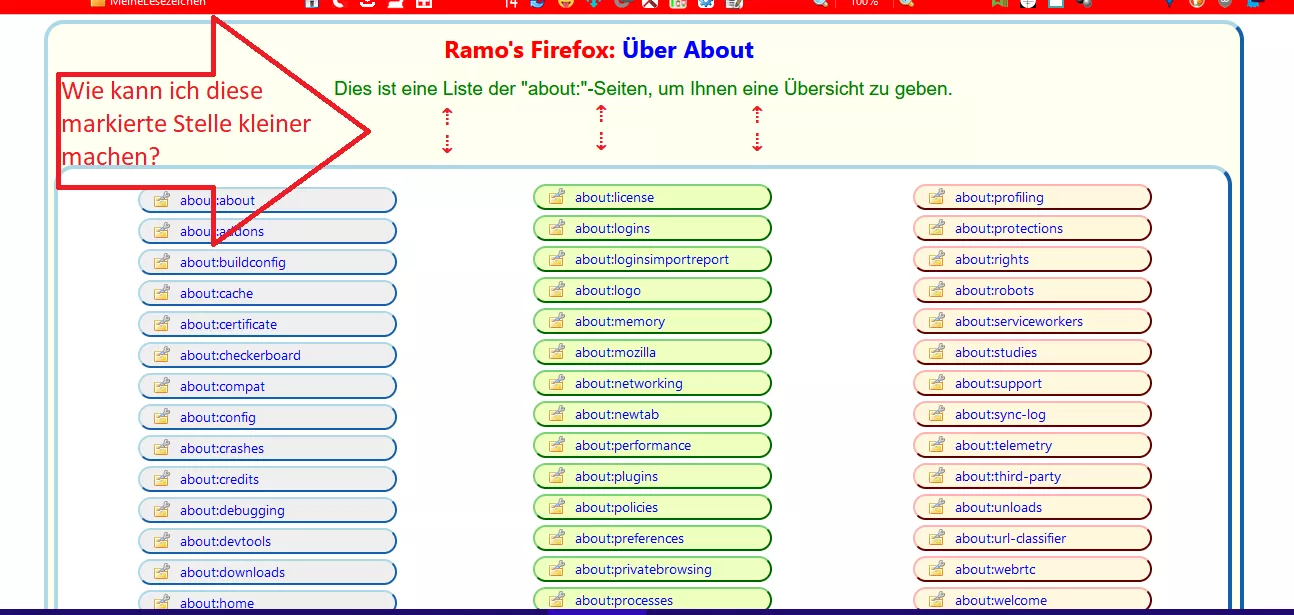
Übrigens das ist die Code:
CSS
Alles anzeigen/* AGENT_SHEET */ @namespace url(http://www.w3.org/1999/xhtml); @-moz-document url("about:about") { html {background: #FFFFFF !important;} ul.columns { column-count: 3 !important; column-gap: 20px !important; margin: 0 !important; } .container > p:nth-child(2) > em:nth-child(1) { font-size: 0 !important;/* display: none !important;*/ } .container > p:nth-child(2) > em:nth-child(1)::before { content: "Dies ist eine Liste der \"about:\"-Seiten, um Ihnen eine Übersicht zu geben."!important; font-family: Arial !important; font-style: normal !important; font-size: 19px !important; margin-left: -80px !important; margin-top: 10px !important; color: green !important; } /* #abouts { margin-top: 50px !important; } */ body{ background-color: #fffff0 !important; max-width: 1200px !important; min-height: 600px !important; height: auto !important; margin-top: 5px !important; margin-bottom: 10px !important; margin-left: 80px !important; padding-top: 10px !important; padding-left: 25px !important; padding-right: 25px !important; padding-bottom: 10px !important; border-left-color: lightblue!important; border-top-color: lightblue!important; border-right-color: dodgerblue!important; border-bottom-color: dodgerblue!important; border-radius: 20px !important; border-width: 4px !important; border-style: outset !important;} .container > h1:nth-child(1){ margin-left: 150px !important; color: blue !important; font-size: 24px !important; font-weight: bold !important;} ul{list-style: none !important;} #abouts{ min-width: 1120px !important; background-color: #ffffff !important; margin-left: -200px !important; margin-top: 25px !important; padding-top: 15px !important; padding-left: 25px !important; padding-right: 25px !important; padding-bottom: 15px !important; border-left-color: lightblue!important; border-top-color: lightblue!important; border-right-color: dodgerblue!important; border-bottom-color: dodgerblue!important; border-radius: 20px !important; border-width: 4px !important; border-style: outset !important;} p {margin-left: 160px !important; font-size:15px!important;} h1::before { content: "Ramo's Firefox: "; font-weight:bold !important; color:red !important; margin-left: 40px !important;} a{ text-decoration:none!important; color:blue!important;} /* Breite der Schaltflächen */ #abouts > li:nth-child(n+1){ min-width: 170px !important; max-width: 170px !important; } /* Die ersten 14 */ #abouts > li:nth-child(-n+14){ appearance:none!important; background: #efefef url("..//favicons/Bild3.png")no-repeat !important; color:transparent!important; font-size:14px!important; text-decoration:none!important; margin-top:3px!important; margin-bottom: 5px !important; margin-right:20px!important; margin-left: 55px !important; padding-right: 45px !important; padding-left:40px!important; padding-top: 1px!important; padding-bottom: 2px!important; border-left-color: lightblue!important; border-top-color: lightblue!important; border-right-color: dodgerblue!important; border-bottom-color: dodgerblue!important; border-style: outset !important; border-width:2px !important; background-position:14px 2px!important; border-radius:14px!important;} /* Die ersten 14 hover */ #abouts > li:nth-child(-n+14):hover{ appearance:none!important; background: #B2EDFA url("..//favicons/Bild3.png")no-repeat !important; color:transparent!important; font-size:14px!important; text-decoration:none!important; border-left-color: #bbddff !important; border-top-color: #bbddff !important; border-right-color: #11508d !important; border-bottom-color: #11508d !important; border-style: outset !important; border-width:2px !important; background-position:14px 2px!important; border-radius:14px!important;} /* Die mittleren 14 */ #abouts > li:nth-child(n+15){ appearance:none!important; background: #efffbf url("..//favicons/Bild3.png")no-repeat !important; color:transparent!important; font-size:14px!important; text-decoration:none!important; margin-top:3px!important; margin-bottom: 5px !important; margin-right:5px!important; margin-left: 70px !important; padding-right: 25px !important; padding-left:40px!important; padding-top: 1px!important; padding-bottom: 2px!important; border-left-color: #79d279 !important; border-top-color: #79d279 !important; border-right-color: #009900 !important; border-bottom-color: #009900 !important; border-style: outset !important; border-width:2px !important; background-position:14px 2px!important; border-radius:14px!important;} /* Die mittleren 14 hover */ #abouts > li:nth-child(n+15):hover{ appearance:none!important; background: #B2EDFA url("..//favicons/Bild3.png")no-repeat !important; color:transparent!important; font-size:14px!important; text-decoration:none!important; border-left-color: #bbddff !important; border-top-color: #bbddff !important; border-right-color: #11508d !important; border-bottom-color: #11508d !important; border-style: outset !important; border-width:2px !important; background-position:14px 2px!important; border-radius:14px!important;} /* Die letzten 14 */ #abouts > li:nth-child(n+30){ appearance:none!important; background: cornsilk url("..//favicons/Bild3.png")no-repeat !important; color:transparent!important; font-size:14px!important; margin-top:3px!important; margin-bottom: 5px !important; margin-right:45px!important; padding-left:40px!important; padding-top: 1px!important; padding-bottom: 2px!important; border-left-color: #ffb2b2 !important; border-top-color: #ffb2b2 !important; border-right-color: #8d0000 !important; border-bottom-color: #8d0000 !important; border-style: outset !important; border-width:2px !important; background-position:14px 2px!important; border-radius:14px!important;} /* Die letzten 14 hover */ #abouts > li:nth-child(n+30):hover{ appearance:none!important; background: #B2EDFA url("..//favicons/Bild3.png")no-repeat !important; color:transparent!important; font-size:14px!important; border-left-color: #bbddff !important; border-top-color: #bbddff !important; border-right-color: #11508d !important; border-bottom-color: #11508d !important; border-style: outset !important; border-width:2px !important; background-position:14px 2px!important; border-radius:14px!important;} } -
-
Teste mal:


viel viel mal. Sieht super aus!

Hoffentlich gefällts auch dem TE, der is heut so verdächtig still
Klar gefällts mir! Es ist super und genau so wie ich es wollte.
-
funken leider beide nicht. Danke.
-
-

Ich habe das ↓ dafür verwendet.
Danke dir.

Und kann man bei dem Menü Ansicht und bei dem Rechtsklick auf Menübar oder Toolbar für das "Menüleiste" nicht 2 separate Icons nehmen? Oder hat "Menüleiste" nur die Regel "#toggle_toolbar-menubar[checked="true"]>.menu-iconic-left{"?
Danke.
und zu dem hast du keine Antwort?
-
Und was muss ich machen, damit es 3 blöcke gibt, so dass man nicht Scrollen muss?
-
Hello..
Was muss ich machen, damit das Original-Icon nicht angezeigt wird?

Beispiel in dieser Code?
CSS
Alles anzeigen#toggle_toolbar-menubar[checked="true"]>.menu-iconic-left{ background-image: url("file:///C:/Users/askas/AppData/Roaming/Mozilla/Firefox/Profiles/use9514s.default-release/chrome/Rechtsklick-Icons/true.png") !important; margin-right: 3px !important; margin-left: -6px !important; content: '' !important; display: block !important; width: 19px !important; height: 15px !important; background-repeat: no-repeat !important; background-position: 0px 5px !important;} #toggle_toolbar-menubar[checked="false"]>.menu-iconic-left{ background-image: url("file:///C:/Users/askas/AppData/Roaming/Mozilla/Firefox/Profiles/use9514s.default-release/chrome/Rechtsklick-Icons/false.png") !important; margin-right: 3px !important; margin-left: -6px !important; content: '' !important; display: block !important; width: 19px !important; height: 15px !important; background-repeat: no-repeat !important; background-position: 0px 5px !important;}Und kann man bei dem Menü Ansicht und bei dem Rechtsklick auf Menübar oder Toolbar für das "Menüleiste" nicht 2 separate Icons nehmen? Oder hat "Menüleiste" nur die Regel "#toggle_toolbar-menubar[checked="true"]>.menu-iconic-left{"?
Danke.
-
einen zusätzlichen about-Eintrag erzeugt.
ahso.. Danke.

dann kommt about:sync dazu...
auch dir danke. Ich brauche das Sync nicht.
-

Dann frage ich mich, wieso .DeJaVu darauf kommt, dass es bei dir 42 sind.
Hab auch keine Ahnung.. mich nimmt aber wunder, warum Dharkness 44 hat.
-
Beispiel about:unloads dazugekommen.
das about:unloads ist schon dabei und es sind 43.
-
Das CSS muss über die userContent.css gleaden werden.
Danke dir. Stimmt ja es hat nicht mit Aussehen vom FF zu tun sondern mit Aussehen von einer Webseite. -
Die CSS-Code von Boersenfeger im Beitrag-Nr:
Funktioniert bei mir nicht. Hab es als CSS-Datei gespeichert und im userChrome.css geladen danach FF neugestartet.
Kann es sein dass es nur bei Nightly funktioniert?
-
Teste mal:
Danke aber hab gerade gemerkt, dass es nicht das ist.
In Beitrag #12 geht es um das Skript extras_config_menu.uc.js
ups.. Stimmt du hast recht es ist was anderes. Danke.
