Grrr,  . Bekomme es mit dem abschließenden Slash einfach nicht hin!
Weder hier noch bei der Seite der Tagesschau.
Aber ich habe auch in dem neuen Skript die Pfeile durch einen Slash ersetzen können.
Beiträge von Mira_Belle
-
-
Ah, verstehe. Werde mich der Sache, wenn ich Zeit habe, mal annehmen.
-
2002Andreas Witziges Skript.
Habe es mal so geändert, dass wieder „/“ angezeigt wird, anstatt des Pfeils.
Und ich habe in den Farbtopf gegriffen.
JavaScript
Alles anzeigen// ==UserScript== // @name dav_LinkifiesLocationBar // @name colored_addressbar.us.js // @version 2025.07.16 // @description dav_LinkifiesLocationBar // @shutdown dav_LinkifiesLocationBar.globalShutdown(); // ==/UserScript== /* Idea based on https://addons.mozilla.org/en-US/firefox/addon/locationbar%C2%B2/ https://github.com/simonlindholm/locationbar2 */ setTimeout(function() { if (location.href != 'chrome://browser/content/browser.xhtml') return; const colorizeExtensionFile = false, selectUrlbarText = true; function getWindow(){ return window; } function getMostRecentWindow(){ var win = Components.classes["@mozilla.org/appshell/window-mediator;1"] .getService(Components.interfaces.nsIWindowMediator) .getMostRecentWindow("navigator:browser"); return win; } var localWindow = getWindow(); localWindow.dav_LinkifiesLocationBar = {}; var style = ` @namespace url("http://www.mozilla.org/keymaster/gatekeeper/there.is.only.xul"); .claseLocationBar{ display: block; position: absolute; padding-top: 1.5px !important; height: 24px; width: 100%; line-height: 20px; white-space:nowrap; overflow:hidden; } .claseLocationBar span{ position: relative; margin: 0 1px; display: inline-block; } .claseLocationBar span:hover{ text-decoration: none; cursor: pointer; } /* .claseLocationBar span.pathname{ padding-left:9px; margin: 0 2px; } */ /* .claseLocationBar .pathname:after{ content:' '; display: block; position: absolute; border-style: solid; border-width: 4px 4px 4px 7px; border-color: transparent transparent transparent #ffaa00; top: 8px; left: 1px; } */ .claseLocationBar .label_pathname{ /* display: none; */ display: inline; font-weight: bold; color: #00aeff; } /************************************* *************** COLORS *************** *************************************/ .claseLocationBar span.protocol{ font-weight: normal; color: #00ff00; margin-right: -1px; } .claseLocationBar .subdomain { font-weight: bold; /* color: #cc00ff; */ color: #ff9900; } .claseLocationBar span.hostname{ font-weight: bold; color: #ff0000; margin-right: -5px; } .claseLocationBar span.port{ color: #ffff00; } .claseLocationBar span.pathname{ /* color: #00aeff; */ color: #ffff00; margin-left: -5px; margin-right: -5px; } .claseLocationBar span.hash{ color: #00ffff; margin-left: -1px; } .claseLocationBar span.search{ color: #00ff00; margin-left: -1px; } .claseLocationBar .extension{ color: cyan; } { black: #333333; blue: #336699; brown: #cc6633; green: #009900; orange: #ff9900; pink: #ff00cc; purple: #cc00ff; red: #cc0000; yellow: #ffff00; aliceblue: #f0f8ff !important; antiquewhite: #faebd7 !important; aquamarine: #7fffd4 !important; azure: #f0ffff !important; beige: #f5f5dc !important; bisque: #ffe4c4 !important; blanchedalmond: #ffebcd !important; blueviolet: #8a2be2 !important; brown: #a52a2a !important; burlywood: #deb887 !important; cadetblue: #5f9ea0 !important; chartreuse: #7fff00 !important; chocolate: #d2691e !important; coral: #ff7f50 !important; cornflowerblue: #6495ed !important; cornsilk: #fff8dc !important; crimson: #dc143c !important; cyan: #00ffff !important; darkblue: #00008b !important; darkcyan: #008b8b !important; darkgoldenrod: #b8860b !important; darkgray: #a9a9a9 !important; darkgreen: #006400 !important; darkgrey: #a9a9a9 !important; darkkhaki: #bdb76b !important; darkmagenta: #8b008b !important; darkolivegreen: #556b2f !important; darkorange: #ff8c00 !important; darkorchid: #9932cc !important; darkred: #8b0000 !important; darksalmon: #e9967a !important; darkseagreen: #8fbc8f !important; darkslateblue: #483d8b !important; darkslategray: #2f4f4f !important; darkslategrey: #2f4f4f !important; darkturquoise: #00ced1 !important; darkviolet: #9400d3 !important; deeppink: #ff1493 !important; deepskyblue: #00bfff !important; dimgray: #696969 !important; dimgrey: #696969 !important; dodgerblue: #1e90ff !important; firebrick: #b22222 !important; floralwhite: #fffaf0 !important; forestgreen: #228b22 !important; gainsboro: #dcdcdc !important; ghostwhite: #f8f8ff !important; gold: #ffd700 !important; goldenrod: #daa520 !important; greenyellow: #adff2f !important; grey: #808080 !important; honeydew: #f0fff0 !important; hotpink: #ff69b4 !important; indianred: #cd5c5c !important; indigo: #4b0082 !important; ivory: #fffff0 !important; khaki: #f0e68c !important; lavender: #e6e6fa !important; lavenderblush: #fff0f5 !important; lawngreen: #7cfc00 !important; lemonchiffon: #fffacd !important; lightblue: #add8e6 !important; lightcoral: #f08080 !important; lightcyan: #e0ffff !important; lightgoldenrodyellow: #fafad2 !important; lightgray: #d3d3d3 !important; lightgreen: #90ee90 !important; lightgrey: #d3d3d3 !important; lightpink: #ffb6c1 !important; lightsalmon: #ffa07a !important; lightseagreen: #20b2aa !important; lightskyblue: #87cefa !important; lightslategray: #778899 !important; lightslategrey: #778899 !important; lightsteelblue: #b0c4de !important; lightyellow: #ffffe0 !important; limegreen: #32cd32 !important; linen: #faf0e6 !important; magenta: #ff00ff !important; mediumaquamarine: #66cdaa !important; mediumblue: #0000cd !important; mediumorchid: #ba55d3 !important; mediumpurple: #9370db !important; mediumseagreen: #3cb371 !important; mediumslateblue: #7b68ee !important; mediumspringgreen: #00fa9a !important; mediumturquoise: #48d1cc !important; mediumvioletred: #c71585 !important; midnightblue: #191970 !important; mintcream: #f5fffa !important; mistyrose: #ffe4e1 !important; moccasin: #ffe4b5 !important; navajowhite: #ffdead !important; oldlace: #fdf5e6 !important; olivedrab: #6b8e23 !important; orange: #ffa500 !important; orangered: #ff4500 !important; orchid: #da70d6 !important; palegoldenrod: #eee8aa !important; palegreen: #98fb98 !important; paleturquoise: #afeeee !important; palevioletred: #db7093 !important; papayawhip: #ffefd5 !important; peachpuff: #ffdab9 !important; peru: #cd853f !important; pink: #ffc0cb !important; plum: #dda0dd !important; powderblue: #b0e0e6 !important; rebeccapurple: #663399 !important; rosybrown: #bc8f8f !important; royalblue: #4169e1 !important; saddlebrown: #8b4513 !important; salmon: #fa8072 !important; sandybrown: #f4a460 !important; seagreen: #2e8b57 !important; seashell: #fff5ee !important; sienna: #a0522d !important; skyblue: #87ceeb !important; slateblue: #6a5acd !important; slategray: #708090 !important; slategrey: #708090 !important; snow: #fffafa !important; springgreen: #00ff7f !important; steelblue: #4682b4 !important; tan: #d2b48c !important; thistle: #d8bfd8 !important; tomato: #ff6347 !important; turquoise: #40e0d0 !important; violet: #ee82ee !important; wheat: #f5deb3 !important; whitesmoke: #f5f5f5 !important; yellowgreen: #9acd32 !important; test-01: #565656 !important; test-02: #454545 !important; test-03: #3b3b3b !important; test-04: #292929 !important; test-05: #eb8e3e !important; test-06: #f5cba3 !important; test-07: #fc70a1 !important; test-08: #fdbcd2 !important; test-09: #619dbf !important; test-10: #a3c6da !important; test-11: #32a6a6 !important; test-12: #63d1d2 !important; test-13: #452370 !important; test-14: #6d36ae !important; test-15: #0b3e1f !important; test-16: #0f6130 !important; test-17: #082b47 !important; test-18: #0e4c7d !important; test-19: #6e0d14 !important; test-20: #aa1324 !important; } `; var stylexul = ` .urlbar-input-box[dav_LinkifiesLocationBar] #urlbar-input:focus ~ .claseLocationBar{ display: none !important; } .urlbar-input-box[dav_LinkifiesLocationBar] #urlbar-input:focus{ opacity: 1; } .urlbar-input-box[dav_LinkifiesLocationBar] #urlbar-input{ opacity: 0; } `; /* AGENT_SHEET: 0 USER_SHEET: 1 AUTHOR_SHEET: 2 */ var CSS_Loader = { sss: Components.classes["@mozilla.org/content/style-sheet-service;1"].getService(Components.interfaces.nsIStyleSheetService), load: function(cssCode) { this.unload(cssCode); var uri = Services.io.newURI("data:text/css;charset=utf-8," + encodeURIComponent(cssCode), null, null); this.sss.loadAndRegisterSheet(uri, this.sss.AGENT_SHEET); }, unload: function(cssCode) { var uri = Services.io.newURI("data:text/css;charset=utf-8," + encodeURIComponent(cssCode), null, null); if (this.sss.sheetRegistered(uri,this.sss.AGENT_SHEET)) { this.sss.unregisterSheet(uri,this.sss.AGENT_SHEET); } } } const CLIKS = { left: 0, middle: 1, right: 2 } function extend() { var copy, target = {}; for (var i = 0, l = arguments.length; i < l; i++) { var options = arguments[i]; for (var name in options) { copy = options[name]; if (copy !== undefined) { target[name] = copy; } } } return target; } var styleString = (style) => { return Object.keys(style).reduce((prev, curr) => { return `${prev += curr.split(/(?=[A-Z])/).join('-').toLowerCase()}:${style[curr]};` }, ''); }; function createElement(elto) { elto = extend({ attrArray: {}, evtListener: [], estilos: {} }, elto); var node = getWindow().document.createXULElement(elto.type); Object.keys(elto.attrArray).forEach(key => { if(key == "innerHTML"){ node.innerHTML = encodeHTML(elto.attrArray[key]); } else { node.setAttribute(key, elto.attrArray[key]); } }); elto.evtListener.forEach(evt => { node.addEventListener(evt.type, evt.funcion, false); }); let estilo = styleString(elto.estilos); if (estilo) { node.setAttribute("style", estilo); } return node; } function encodeHTML(text) { return decodeURI(text).replace(/&/g, '&') .replace(/</g, '<') .replace(/>/g, '>') .replace(/"/g, '"') .replace(/'/g, '''); } function appendPart(text, clase) { if (!text) return; if(clase == "pathname") { let sp = createElement({ type: "label", attrArray: { class: "label_pathname", innerHTML:"/" } }); divLocationBar.appendChild(sp); } let sp = createElement({ type: "span", attrArray: { class: clase, innerHTML:text }/* , evtListener: [{ type: "click", funcion: clickPart }] */ }); divLocationBar.appendChild(sp); sp.setAttribute("href", divLocationBar.textContent); return sp; } /* function clickPart(evt) { if (evt.button == CLIKS.right) return; let target = evt.target; if (target.className != "protocol") { let href = target.getAttribute("href"); var where = evt.button == CLIKS.middle || evt.ctrlKey ? "tab" : "current"; evt.view.openLinkIn(href, where, { allowThirdPartyFixup: true, targetBrowser: gBrowser.selectedBrowser, indicateErrorPageLoad: true, allowPinnedTabHostChange: true, disallowInheritPrincipal: true, allowPopups: false, triggeringPrincipal: Services.scriptSecurityManager.getSystemPrincipal() }); evt.stopPropagation(); } } */ function borraPrevio() { var divPrevio = localWindow.document.querySelector(".claseLocationBar"); if (divPrevio) { divPrevio.parentNode.removeChild(divPrevio) } } var debounce = (fn, ms = 0) => { let timeoutId; return function(...args) { clearTimeout(timeoutId); timeoutId = setTimeout(() => fn.apply(this, args), ms); }; }; var pintaLocation = debounce(pintaLocation_, 50); function pintaLocation_() { divLocationBar.innerHTML = ''; var urlBarInput = getWindow().document.querySelector("#urlbar-input").value; var urlGBrowser = gBrowser.currentURI.displaySpec; if(urlGBrowser.startsWith("about")){ divLocationBar.innerHTML = encodeHTML(urlBarInput); return; } var url = urlGBrowser.indexOf(urlBarInput) != -1 ? urlGBrowser : urlBarInput; try { var { protocol, hostname, port, pathname, hash, search } = new URL(url); } catch (e) { divLocationBar.innerHTML = encodeHTML(urlBarInput); return; } var partido = hostname.split("."); var subdomain; if(partido.length > 2 && !partido.every( v => v == v-0 )) //wir prüfen, ob es sich nicht um Zahlen handelt, denn dann handelt es sich um eine IP { subdomain = partido.splice(0, partido.length-2).join("."); hostname= partido.join("."); } appendPart(protocol + "//", "protocol"); if (subdomain) { appendPart(subdomain+".", "subdomain"); } appendPart(hostname, "hostname"); if (port) { appendPart(":" + port, "port"); } var arrayPathname = pathname.split("/"); var arrayPathnameLength = arrayPathname.length; arrayPathname.forEach((elto, index) => { if (elto) { let sp = appendPart(elto, "pathname"); if(colorizeExtensionFile && index == arrayPathnameLength-1) { let arrayDot = elto.split("."); if(arrayDot.length > 1) { let extension = arrayDot.pop(); sp.innerHTML = ""; sp.appendChild(createElement({ type: "locationBarTag", attrArray: { href:sp.getAttribute("href"), innerHTML: arrayDot.join(".") } })); sp.appendChild(createElement({ type: "locationBarTag", attrArray: { class: "extension", href:sp.getAttribute("href"), innerHTML: "."+extension } })); } } } }); appendPart(search, "search"); appendPart(hash, "hash"); } /******************* INIT ***************************/ var urlbarInput = getWindow().document.querySelector("#urlbar-input"); var timeMouseMove = -1; function hideDivLocatonBar(){ urlbarInput.focus(); } var divLocationBar = createElement({ type: "div", attrArray: { class: "claseLocationBar" }, evtListener: [{ type: "click", funcion: function(evt) { hideDivLocatonBar() if(selectUrlbarText){ urlbarInput.select(); } } },{ type: "mouseenter", funcion: function(evt) { //esto es el ratón entrando por encima if(evt.screenY == divLocationBar.screenY) { timeMouseMove = setTimeout(hideDivLocatonBar, 500); } } },{ type: "mouseleave", funcion: function(evt) { clearTimeout(timeMouseMove); } }] }); borraPrevio(); urlbarInput.parentNode.appendChild(divLocationBar); urlbarInput.parentNode.setAttribute("dav_LinkifiesLocationBar", true); urlbarInput.addEventListener("blur", pintaLocation); pintaLocation(); var last_displaySpec = ""; var intevalID = setInterval(function(){ //console.log("setInterval", intevalID, localWindow == window, localWindow == getMostRecentWindow()); let actual_displaySpec = gBrowser.currentURI.displaySpec; if(last_displaySpec != actual_displaySpec){ last_displaySpec = actual_displaySpec; pintaLocation(); } }, 50); CSS_Loader.load(style); CSS_Loader.load(stylexul); /******************* END INIT ***************************/ dav_LinkifiesLocationBar.shutdown = function(win){ borraPrevio(); clearTimeout(intevalID); urlbarInput.parentNode.removeAttribute("dav_LinkifiesLocationBar"); CSS_Loader.unload(style); CSS_Loader.unload(stylexul); urlbarInput.removeEventListener("blur", pintaLocation); } dav_LinkifiesLocationBar.globalShutdown = function(){ var wm = Components.classes["@mozilla.org/appshell/window-mediator;1"] .getService(Components.interfaces.nsIWindowMediator); var ws = wm.getEnumerator(null); while(ws.hasMoreElements()) { var w = ws.getNext(); w.dav_LinkifiesLocationBar.shutdown(w); } } }, 10); -
 Super
Super
Und Danke für die Rückmeldung.
-

Das funktioniert auch nicht mit den Werkzeugen als Vorschau, nur in der userChrome.css.
Ah!
Gesagt, getan.
lenny2 Funktioniert! Scrollleiste wird durch das Skript angepasst und verändertMuss wohl woanders bei Dir der Wurm drinn sein.
-

Ja, das habe ich auch.
Also da funktioniert es?
2002Andreas Danke für das CSS, aber eine Scrollbar erscheint da bei mir nicht.
Irgendeine andere Anpassung grätscht da wohl dazwischen.
Ist aber auch nicht schlimm.
Eventuell reicht ja schon die Einstellungsseite. -
Danke 2002Andreas
Vielleicht ist mein Firefox schon zu sehr "aufgebohrt", aber bei mir wird da keine Scrollbar angezeigt!
Und bei den Lesezeichen auch nicht! Da habe ich die Pfeile "hoch" und "runter".
Mh, ¯_(ツ)_/¯lenny2 Danke Dir.
Unter "Einstellungen" habe ich so kleine Fenster mit Scrollbalken!
Aber die werden durch das Skript angepasst und verändert.
Ist das bei Euch auch so?
Oder ist dort auch das beobachtete zu sehen? -
Oh Herr, habe ich total übersehen. Bitte um Entschuldigung.
-
Ist es Dir möglich eine Animation zu erstellen, damit ich sehen kann was Du meinst?
Denn ich stehe irgendwie auf dem Schlauch! -
Sören Hentzschel Nein! Ich wüsste nicht, welches Tool denn sonst gebraucht werden würde unter "Weitere Werkzeuge“
um der Sache auf den Grund gehen zu können und andere Werkzeuge erreicht man auch direkt in dieser Konsole. -
Strg + Umschalt + Alt + I öffnet direkt die Browser-Werkzeuge.
-

Hmm, gleiches Problem auf meiner Seite mit deinem Code.
 Komisch.
 -
@Horstmann Ich habe das Problem nicht mit dieser Anpassung.
Wenn Du schauen magst:JavaScript
Alles anzeigen// BookmarkCount.uc.js /* ******************************************************************************************************************* */ /* Author BrokenHeart => https://www.camp-firefox.de/forum/thema/136572/?postID=1229536#post1229536 **** */ /* Correction from BrokenHeart => https://www.camp-firefox.de/forum/thema/136572/?postID=1229696#post1229696 **** */ /* Extension from Sören Henschel => https://www.camp-firefox.de/forum/thema/136572/?postID=1229555#post1229555 **** */ /* Customized by Mira inspired by grisu2099 ********************************************************************** */ /* Source => https://www.camp-firefox.de/forum/thema/136572/?postID=1229875#post1229883 **** */ /* Customized by Mira inspired by Horstmann ********************************************************************** */ /* Source => https://www.camp-firefox.de/forum/thema/136572/?postID=1229993#post1229993 **** */ /* Adjustments for 139 and customized by Mira inspired by Horstmann ********************************************** */ /* Source => https://www.camp-firefox.de/forum/thema/136572/?postID=1270254#post1270254 **** */ /* Bugfixes for 'popupshowing' to 'popupshown'inspired by BrokenHeart & Horstmann ************************************ */ /* Source => https://www.camp-firefox.de/forum/thema/136572/?postID=1274881#post1274881 **** * /* ******************************************************************************************************************* */ /* Version 1.04a => https://www.camp-firefox.de/forum/thema/136572/?postID=1274881#post1274881 **** */ /* ******************************************************************************************************************* */ /* Custom Counter in the Bookmarks for folders and links ************************************************************* */ /* ******************************************************************************************************************* */ (function() { if (!window.gBrowser) return; setTimeout(function() { setFunction(); },10); let ProfilePath = PathUtils.toFileURI(PathUtils.join(PathUtils.profileDir, 'chrome', 'icons')); // ■■ START UserConfiguration ■■■■■■■■■■■■■■■■■■■■■■■■■■■■■■■■■■ //Custom icons in profile/chrome/icons folder let icon1 = "folder-fat.svg"; // Custom Folder Icon let icon2 = "bookmark-hollow.svg"; // Custom Link Icon let icon3 = "arrow-right.svg"; // Custom Arrow Icon // Custom settings let bm_font_size = 12; let cs_font_weight = 700; let bm_icon_size = 16; // NEU: Schriftfarben getrennt definieren //let cs_font_color_1 = "#FFA500"; // Farbe für Folder-Zähler (links) //let cs_font_color_2 = "#00FFFF"; // Farbe für Link-Zähler (rechts) let cs_font_color_1 = "#FFD700"; // Farbe für Folder-Zähler (links) let cs_font_color_2 = "#FFD700"; // Farbe für Link-Zähler (rechts) // NEU: Symbolfarben getrennt definieren //let cs_icon_color_1 = "#5fe575"; // Farbe für "Ordner", 1.Symbol //let cs_icon_color_2 = "#fbf328"; // Farbe für "Link", 2.Symbol //let cs_icon_color_3 = "#bbf700"; // Farbe für den Pfeil let cs_icon_color_1 = "#C0C0C0"; // Farbe für "Ordner", 1.Symbol let cs_icon_color_2 = "#C0C0C0"; // Farbe für "Link", 2.Symbol let cs_icon_color_3 = "#C0C0C0"; // Farbe für den Pfeil // Calculated settings let cs_font_size = `${bm_font_size}px`; let cs_icon_size = `${bm_icon_size}px`; let cs_width_one = `calc(${bm_icon_size}px + 1.4em)`; let cs_width_uno = `calc(${bm_icon_size}px)`; let cs_width_two = `calc(${bm_icon_size}px + 1.4em)`; let cs_width_due = `calc(${bm_icon_size}px)`; //let useStyle1 = true; // <- HIER Weiche setzen: true = Variante 1, false = Variante 2 let useStyle = 1; // <- HIER Weiche setzen: 0 = Symbole hinter den Zählern, 1 = Symbole vor den Zählern // ■■ END UserConfiguration ■■■■■■■■■■■■■■■■■■■■■■■■■■■■■■■■■■ // Symbole vor den Zählern let css_one = ` /* Counter #1 Folder */ #bmContent::before { content: attr(data-value1) !important; width: ${cs_width_one} !important; align-items: center !important; display: flex !important; justify-content: end !important; /*margin-inline: 16px 4px; */ /* min. Abstand links für enge Popups, rechts zum 2ten Counter */ margin-left: 16px !important; /* Abstand links minimum für schmale Popus CHANGE */ margin-right: -1px !important; /* Abstand Icon "Ordner" bis zum "Zähler" */ background-image: url("${ProfilePath}/${icon1}")!important; background-position: center right calc(${cs_width_one} - ${cs_icon_size}) !important; background-repeat: no-repeat !important; background-size: ${cs_icon_size} ${cs_icon_size} !important; color: ${cs_font_color_1} !important; /* Farbe der 1. Zahl */ fill: ${cs_icon_color_1} !important; /* Farbe des 1. Symbols */ } /* Counter #2 Links */ #bmContent::after { content: attr(data-value2) !important; width: ${cs_width_two} !important; align-items: center !important; display: flex !important; justify-content: end !important; /*margin-inline: -2px;*/ margin-left: 4px !important; /* Abstand "Zähler 1" zum Icon2 */ margin-right: -1px !important; /* Abstand Icon "Links" bis zum "Zähler" */ background-image: url("${ProfilePath}/${icon2}") !important; background-position: center right calc(${cs_width_two} - ${cs_icon_size}) !important; background-repeat: no-repeat !important; background-size: ${cs_icon_size} ${cs_icon_size} !important; color: ${cs_font_color_2} !important; /* Farbe der 2. Zahl */ fill: ${cs_icon_color_2} !important; /* Farbe des 2. Symbols */ } `; // Symbole hinter den Zählern let css_two = ` /* Counter #1 Folder */ #bmContent::before { content: attr(data-value1) !important; width: ${cs_width_one} !important; align-items: center !important; display: flex !important; justify-content: end !important; background-image: url("${ProfilePath}/${icon1}")!important; background-position: center right calc(${cs_width_uno} - ${cs_icon_size}) !important; background-repeat: no-repeat !important; background-size: ${cs_icon_size} ${cs_icon_size} !important; color: ${cs_font_color_1} !important; /* Farbe der 1. Zahl */ fill: ${cs_icon_color_1} !important; /* Farbe des 1. Symbols */ padding: 2px 20px 0px 10px !important; /* top | right | bottom | left */ /*margin-inline: 0px -10px; */ margin-left: 16px !important; /* Abstand links minimum für schmale Popus CHANGE */ margin-right: 12px !important; /* Abstand Icon "Ordner" bis zum "Zähler" */ } #bmContent::after { content: attr(data-value2) !important; width: ${cs_width_two} !important; align-items: center !important; display: flex !important; justify-content: end !important; /*justify-content: flex-end; */ background-image: url("${ProfilePath}/${icon2}")!important; background-position: center right calc(${cs_width_due} - ${cs_icon_size}) !important; background-repeat: no-repeat !important; background-size: ${cs_icon_size} ${cs_icon_size} !important; color: ${cs_font_color_2} !important; /* Farbe der 2. Zahl */ fill: ${cs_icon_color_2} !important; /* Farbe des 2. Symbols */ padding: 2px 22px 0 0 !important; /* top | right | bottom | left */ margin-left: -14px !important; /* Abstand "Zähler 1" zum Icon2 */ margin-right: -1px !important; /* Abstand Icon "Links" bis zum "Zähler" */ } `; function setFunction() { const css =` /* Counter rechtsbuendig */ #bmContent { display: flex !important; margin-inline: auto 0 !important; font-family: Consolas, "Lucida Console", "Courier New", monospace !important; font-size: ${cs_font_size} !important; font-weight: ${cs_font_weight} !important; height: ${cs_icon_size} !important; } /* Dynamisch gewählter before-Block */ ${useStyle ? css_one : css_two} /* Pfeil */ menupopup > menu::after { content: "" !important; background-image: url("${ProfilePath}/${icon3}")!important; height: ${cs_icon_size} !important; height: ${cs_icon_size} !important; fill: ${cs_icon_color_3} !important; } `; const sss = Cc['@mozilla.org/content/style-sheet-service;1'].getService(Ci.nsIStyleSheetService); const uri = Services.io.newURI('data:text/css,' + encodeURIComponent(css)); sss.loadAndRegisterSheet(uri, sss.AGENT_SHEET); let bmbMenu = document.getElementById('bookmarks-menu-button'); //--- LesezeichenmenüButton let bookMenu = document.getElementById('bookmarksMenu'); //--- Lesezeichenmenü let persToolBar = document.getElementById('PersonalToolbar'); //--- Lesezeichenleiste // let bmbMenuPop = document.getElementById('BMB_bookmarksPopup'); //--- extra für Mac erforderlich /* if(bmbMenu) { bmbMenu.addEventListener('popupshown', onPopupShowing ); //--- 'popupshowing' -> 'popupshown' } // if(bmbMenuPop) { // bmbMenuPop.addEventListener('popupshowing', onPopupShowing ); //--- extra für Mac erforderlich // } if(bookMenu) { bookMenu.addEventListener('popupshown', onPopupShowing ); //--- 'popupshowing' -> 'popupshown' } if(persToolBar) { persToolBar.addEventListener('popupshown', onPopupShowing ); //--- 'popupshowing' -> 'popupshown' } */ if(bmbMenu) { let bmbMenuPopup = document.getElementById('BMB_bookmarksPopup'); if(bmbMenuPopup) { bmbMenuPopup.openPopup(); bmbMenuPopup.hidePopup(); bmbMenuPopup.setAttribute("hasbeenopened","true"); } bmbMenu.addEventListener('popupshowing', onPopupShowing ); } if(bookMenu) { let bookMenuPopup = document.getElementById('bookmarksMenuPopup'); if(bookMenuPopup) { bookMenuPopup.openPopup(); bookMenuPopup.hidePopup(); bookMenuPopup.setAttribute("hasbeenopened","true"); } bookMenu.addEventListener('popupshowing', onPopupShowing ); } if(persToolBar) { persToolBar.addEventListener('popupshown', onPopupShowing ); //--- 'popupshowing' -> 'popupshown' } } function onPopupShowing(aEvent) { let popup = aEvent.originalTarget; for (let item of popup.children) { if (item.localName != 'menu' || item.id?.startsWith('history')) continue; setTimeout(() => { let itemPopup = item.menupopup; itemPopup.hidden = true; itemPopup.collapsed = true; itemPopup.openPopup(); itemPopup.hidePopup(); let menuitemCount = 0; let menuCount = 0; for (let subitem of itemPopup.children) { if (subitem.classList.contains('bookmark-item') && !subitem.disabled && !subitem.hidden) { if (subitem.localName == 'menuitem') { menuitemCount++; } else if (subitem.localName == 'menu') { menuCount++; } } } itemPopup.hidden = false; itemPopup.collapsed = false; // Neues Element für Zaehler let bmCounta = item.childNodes[1]; if (!bmCounta) return; // Falls undefiniert bmCounta.innerHTML = "" let bmContent = document.createElement("bmContent"); bmContent.id = "bmContent"; bmCounta.appendChild(bmContent); //let strCountOut1 = " " + menuCount + " "; // Has no brackets //let strCountOut1 = "(" + menuCount + ")"; // Has round brackets //let strCountOut1 = "[" + menuCount + "]"; // Has square brackets let strCountOut1 = String(menuCount).padEnd(2, " "); bmContent.setAttribute('data-value1', strCountOut1); //let strCountOut2 = " " + menuitemCount + " "; // Has no brackets //let strCountOut2 = "(" + menuitemCount + ")"; // Has round brackets //let strCountOut2 = "[" + menuitemCount + "]"; // Has square brackets // let strCountOut2 = String(menuitemCount).padEnd(2, " "); // bmContent.setAttribute('data-value2', strCountOut2); let strCountOut2 = (useStyle === 0) ? String(menuitemCount).padStart(4, "/ ") // (5, " | ") : String(menuitemCount).padEnd(2, " "); bmContent.setAttribute('data-value2', strCountOut2); }, 100); } } })();Liegt aber eventuell auch am CSS.
-
Waren meine Erklärungen nicht gut?
-
Es gibt schon einen Unterschied, ob die Updates automatisch erfolgen,
oder ob sie erzwungen werden und gleichzeitig der Cache geleert wird.
Sollte aber nur ganz selten, wenn überhaupt, und nur unter bestimmten Umständen gemacht werden.
.DeJaVu hatte es mal erklärt.
Habe aber selber rausgefunden, wie es geht. Danke.
Du musst schauen wie moz-extension://xxxxx.. bei Dir lautet!
Bei mir ist es z.B. moz-extension://8d0d7974-6e33-42f5-921f-231c8f10558b
Wie Du es rausfindest? Öffne manuell den uBlock und klicke auf die Zahnräder,
nun siehst Du in der Url wie ....
Ach und das Skript öffnet einfach nur direkt in einem neuen Tab die Seite mit den Filterlisten!
Den Cache leeren und Listen neuladen funktioniert anders. -
Mh, schade, hatte gehofft, es würden wirklich alle Listen zwangsweise auf den neuesten Stand gebracht!
Das Skript öffnet aber nur einen neuen Tab mit diesen.
Gibt es denn so eines? -
Boersenfeger Genau so, wie von Dir verwendet, konnte ich es hier im Board nicht finden.
-
Boersenfeger
Hier noch einmal eine kleine Erklärung.Mit "margin-inline: auto 0 !important;" im CSS verschiebst Du die "Counter", also Symbole & Zähler" etwas nach rechts.
Wenn der Wert positiv, rückt das alles etwas nach links, wenn negativ etwas weiter nach rechts.Schauen wir uns die Zeile 87 in Deinem Skript etwas genauer an!
let strCountOut = String(menuCount).padEnd(2, '\xa0') + "📁" + "\xa0" + String(menuitemCount).padEnd(3, '\xa0') + "⭐";
.padEnd => Zahlen werden linksbündig angeordnet.
.padStart => so werden sie rechtsbündig.
Die Zahl in der Klammer "reseviert" die Stellen, die so ein Zähler haben kann.
Also 2 für eine zweistellige Zahl, 3 entsprechend für eine dreistellige Zahl, usw.
'\xa0' in der Klammer steht für eine Leerstelle nach den Zahlen."\xa0" in der Variabel steht auch für eine Leerstelle! Damit kannst Du experimentieren, wenn Du magst.
Das Symbol ist klar, oder?
Mit diesem Wissen kann man nun an der Variabel herumexperimentieren, wenn man mag.
Also, mit let strCountOut = String(menuCount).padEnd(2, '\xa0') + "📁" + "\xa0" + String(menuitemCount).padEnd(3, '\xa0') + "⭐";
sieht der Counter so aus.
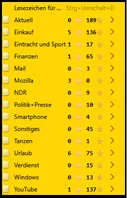
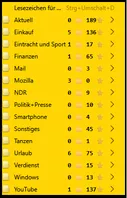
Zahlen sind vor den Symbolen und zwischen Zahlen und Symbolen sind ein Leerzeichen.
Man beachte, dass die Zahlen linksbündig sindMit let strCountOut = "📁" + String(menuCount).padStart(2, '\xa0') + "⭐" + String(menuitemCount).padStart(3, '\xa0');
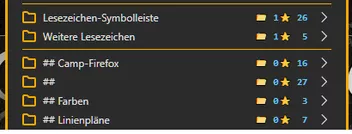
wird der Counter so dargestellt: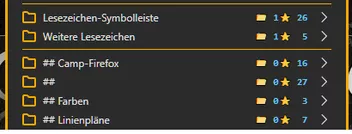
Zahlen sind hinter den Symbolen.
Wenn man jedoch noch ein "\xa0" vor dem Sternsymbol hinzufügt, kann man den Abstand zischen der Zahl und
dem Symbol etwas vergrößern. Denke, das würde schöner aussehen. ('\xa0') + "\xa0" + "⭐" + String)
Schaut man sich die Zahlen an, fällt auf, dass diese rechtsbündig sind!So, jetzt darf gebastelt werden,
und ich hoffe, dass die leidige Diskussion, was wer geschrieben und gemeint hat,
und wie andere das aufgefasst und verstanden haben, endet.Viel Spaß beim Ausprobieren.
-

Steht doch in #606 ganz deutlich drin...
Äh, nö!
Da steht:
... wenn die Zahlen alle rechtsbündig vor den > Zeichen andocken könnten.
D.h. einfach nur die Symbole und die Zähler vertauschen.
Aber das alleine hatte Boersenfeger wohl gar nicht gemeint!
Er wollte wohl, so wie ich es beschrieben habe Symbole und Zähler rechtsbündig!Aber wollen wir uns jetzt wirklich wegen so einem Quatsch in die Haare bekommen?
Boersenfeger kann sich nun aussuchen, wie genau der Counter dargestellt werden soll.
Counter rechts oder links, Zähler vor oder hinter die Symbole, alles da. -
Boersenfeger Bei der von Dir geposteten Version sind die Zähler linksbündig!
Bei "meinem" Skript sind die Zahlen rechtsbündig!Weitere Unterschiede!
Symbole bei Dir nach den Zählern, bei mir vor den Zählern.Kann aber niemand ahnen, dass Du nur die Counter, also Zähler und Symbole einfach nur nach rechts verschoben haben wolltest.
Ist aber egal, jetzt stehen Dir und anderen alle Optionen offen.