1. Nachrichten
  2. Forum
    1. Unerledigte Themen
    2. Forenregeln
  3. Spenden
  • Anmelden
  • Registrieren
  • Suche
Alles
  • Alles
  • Artikel
  • Seiten
  • Forum
  • Erweiterte Suche
  1. camp-firefox.de
  2. Mira_Belle

Beiträge von Mira_Belle

  • Nach Firefox-Update plötzlich weiße Schrift auf dunklem Hintergrund

    • Mira_Belle
    • 15. Januar 2022 um 12:53
    Zitat von sonstwer

    Mein obiger Beitrg bezieht sich auf der Einstelleung layout.css.prefers-color-scheme.content-override 2

    Und welches Theme nutzt Du?

    Windows Farbschema?

    Gruß

    Mira

    PS: Wie soll den jemand Dein Problem nachstellen können,

    wenn essenzielle Angaben nicht vorhanden sind?

    Benutzt Du überhaupt Windows und wenn ja,

    welche Version und Build!

  • Ich steh im Dunkeln und warte auch Licht

    • Mira_Belle
    • 15. Januar 2022 um 12:48

    Das Theme mine vocaloid stellt den Hintergrund der Pages (Seiten) auf dunkel.

    Eben getestet ohne Anpassungen.

    Gruß

    Mira

  • Nach Firefox-Update plötzlich weiße Schrift auf dunklem Hintergrund

    • Mira_Belle
    • 15. Januar 2022 um 11:31

    Leute, ihr müsst etwas genauer werden.

    Grundsätzlich ist es so, dass das BS erst einmal vorgibt, wie die Menüs (Popups) aussehen!

    Dann beeinflusst das ausgewählte Theme auch noch die Hintergrundfarbe.

    Und zum Chaos gehört dann noch, dass je na Kombi auch noch die anzuzeigende Page (Seite)

    von diesen Einstellungen beeinflusst wird.

    Gruß

    Mira

    Also, bei Fragen dieses Thema betreffend, scheint es ratsam zu sein,

    dass die Systemfarbe, das Theme und die Einstellung des Schalter layout.css.prefers-color-scheme.content-override

    angegeben wird.


  • Windows 10: wenn FF als Standard, öffnet Edge sich automatisch bei Windows Start

    • Mira_Belle
    • 15. Januar 2022 um 03:18

    Edge 97 öffnet sich automatisch beim Login!

    Hier des Rätzels Lösung.

    Yes, version 97 that dropped on Thursday 1/6 added two registry keys found at the below location.
    The AutoRunOnLogon is set to 1 by default, if you change it to 0 it fixes the issue.
    Our machines are set to only get updates from our WSUS servers, but this one bypassed if the
    machines were not behind a firewall that specifically blocked all of the Microsoft update servers.


    Path: HKEY_LOCAL_MACHINE\SOFTWARE\WOW6432Node\Microsoft\EdgeUpdate\Clients\
    {56EB18F8-B008-4CBD-B6D2-8C97FE7E9062}\Commands\on-logon-autolaunch

    Type: REG_DWORD

    Value Name: AutoRunOnLogon

    Value: 0 (zero)


    Mit dem Edge 97 hat man zwei Registrierungseinträge eingeführt,
    wobei ein AutoRunOnLogon-Wert automatisch auf 1 gesetzt wird und das Verhalten auslöst.


    Gruß
    Mira

    Quelle: https://www.borncity.com/blog/2022/01/1…sch-beim-login/

  • Mozilla veröffentlicht Firefox 96

    • Mira_Belle
    • 14. Januar 2022 um 15:29

    Firefox 96.0.1 steht zum Download bereit.

    <Link entfernt>

    Gruß
    Mira

  • Wie "Alte Firefox-Daten" in heute neu installierten Browser einbetten ?

    • Mira_Belle
    • 14. Januar 2022 um 15:26

    Die Version 96.0.1 ist raus.

    Ich glaube, damit sollte der Fehler behoben sein.

    Gruß

    Mira

  • About Seiten mit CSS Codes anpassen

    • Mira_Belle
    • 14. Januar 2022 um 15:20
    Zitat von 2002Andreas

    Und Beitrag 1038 der Code?

    Du Ungeduld Du. ;)

    Mit folgendem Code klappt es.

    CSS
    ul > li > a {
    display: block !important;
        margin-right: -15px !important;
    }
    
    :link {
       display: block !important;
       padding-left: 50px !important;
       margin-left: -45px !important;
    }

    Danke für die Hilfe.

    So, nächste Seite .... 8o

    Gruß

    Mira


    PS:

    Kleine Korrektur!

    margin-right von -15px auf -20px erhöht.

    Nun ist es perfekt.

  • About Seiten mit CSS Codes anpassen

    • Mira_Belle
    • 14. Januar 2022 um 15:06
    Zitat von grisu2099
    Zitat von Mira_Belle

    Nur wie "erweitere" ich den Link vor dem Text?

    Was meinst du damit? Soll die Schaltfläche eher so aussehen:

    als so:

    ???

    Alles anzeigen

    Weder noch.

    Es geht um den Button und dem "Verweis" (Link)

    Mittig steht ja bei mir der Text, z.B.

    Hinter diesem Text ist dank des Eintrags

    CSS
    ul > li > a {
    display: block !important;
        margin-right: -15px !important;
    }

    der "Verweis" (Link) aktiv, sodass ich nicht direkt auf den Text klicken muss.

    margin-right ermöglichte dies.

    Jedoch vor dem Text verändert sich zwar die Hintergrundfarbe,

    aber der "Verweis" (Link) ist nicht aktiv, da kann ich klicken so viel ich will.

    Es tut sich nichts.

    Arbeite ich hier mit margin-left verschiebt es den Text.

    Gruß

    Mira

  • About Seiten mit CSS Codes anpassen

    • Mira_Belle
    • 14. Januar 2022 um 13:50

    So,

    bleibt also nur noch die Geschichte mit der Schaltfläche!

  • About Seiten mit CSS Codes anpassen

    • Mira_Belle
    • 14. Januar 2022 um 13:21
    Zitat von 2002Andreas

    So wäre es aufgeräumt ;)

    CSS
    #abouts > li:nth-child(n+30) {
            background-color: #5b5b66 !important;        
            margin-top: 3px !important;
            margin-bottom: 5px !important;
            margin-right: 20px !important;
            margin-left: 55px !important;
            padding-right: 15px !important;
            padding-left: 40px !important;
            padding-top: 1px !important;
            padding-bottom: 2px !important;
            border-color: dodgerblue !important;
            border-style: outset !important;
            border-width: 3px !important;
            border-radius: 8px !important;
    }
    
    #abouts > li:nth-child(n+30) > a {
        color: yellow !important;    
    }
    Alles anzeigen

    Wobei die margin und padding Werte auch in einer Reihe stehen könnten:

    margin: 3px 20px 5px 55px !important:

    oben..rechts..unten..links

    Danke, aber das kommt später.

    Z.Z. beschäftige ich mich noch mit den Schaltflächen.

    Wie der Link auch hinter dem Text erweiter werden kann

    habe ich rausgefunden.

    CSS
    ul > li > a {
    display: block !important;
        margin-right: -15px !important;
    }

    Nur wie "erweitere" ich den Link vor dem Text?

    Denn wenn ich irgendwas mit margin-left mache,

    verschiebt sich ja der Text!

    Gruß

    Mira

    PS: Ich gehe jetzt erst mal putzen :D

    Fertig mit putzen!

    CSS
    @namespace url(http://www.w3.org/1999/xhtml);
    @-moz-document url("about:about") {
            
    html {
            background: #292c2f !important;
    }
            
    ul.columns {
            column-count: 3 !important;
            column-gap: 0 !important;
            margin: 0 !important;
    }
            
    body { 
            background-color: #292c2f !important;
            max-width: 1320px !important;
            min-height: 600px !important;
            height: auto !important; 
            margin: 4em auto !important;
            padding-top: 5px !important;
            padding-left: 25px !important;
            padding-right: 25px !important;
            padding-bottom:  25px !important;
            border-color: #5b5b66 !important;
            border-radius: 20px !important;
            border-width:  3px !important;
            border-style: outset !important;
    }     
         
    .container > h1:nth-child(1) {
            margin-block: 15px !important;
            text-align: center !important;
    padding-bottom:  15px !important;
            color: #ff9600 !important; 
            font-size: 24px !important; 
            font-weight: bold !important;
    }
            
    ul {
            list-style: none !important;
    }
    
    ul > li > a {
    display: block !important;
        margin-right: -15px !important;
    }
    
    #abouts {
            min-width: 1120px !important;
            background-color: #292c2f !important;
            margin-left: -200px !important;
            margin-top: 5px !important;
            padding-top: 15px !important;
            padding-left: 25px !important;
            padding-right: 25px !important;
            padding-bottom:  35px !important;
            border-color: #5b5b66 !important;
            border-radius: 20px !important;
            border-width:  3px !important;
            border-style: outset !important;
    }
            
    p {
            margin-left: 160px !important; 
            font-size:15px!important;
            color: #e1e1e1 !important;
    padding-bottom: 25px !important;       
    }
        
            a{
            text-decoration:none!important;
    }
                
            /* Breite der Schaltflächen */
    
    #abouts > li:nth-child(n+1) {
            min-width: 170px !important;
            max-width: 170px !important;
        display: block !important;
    
    }
          
            /* Die ersten 14 */
    
    #abouts > li:nth-child(-n+14) {
            background: #5b5b66 !important;        
            margin-top:3px!important;
            margin-bottom: 5px !important;
            margin-left: 55px !important;
            padding-right: 15px !important;
            padding-left: 40px !important;
            padding-top: 1px!important;
            padding-bottom: 2px!important;
            border-color: dodgerblue !important;
            border-style: outset !important;
            border-width:3px !important;
            border-radius:8px!important;
    }
    
    #abouts > li:nth-child(-n+14) > a {
        color: yellow !important;    
    }
    
            /* Die ersten 14 hover */
    
    #abouts > li:nth-child(-n+14):hover {
            background: #e1e1e1 !important;
    }
    
    #abouts > li:nth-child(-n+14):hover > a {
        color: red !important;    
    }
            
            /* Die mittleren 14 */
    
    #abouts > li:nth-child(n+15){
            background: #5b5b66 !important;        
            margin-top:3px!important;
            margin-bottom: 5px !important;
            margin-left: 55px !important;
            padding-right: 15px !important;
            padding-left: 40px !important;
            padding-top: 1px!important;
            padding-bottom: 2px!important;
            border-color: dodgerblue !important;
            border-style: outset !important;
            border-width:3px !important;
            border-radius:8px!important;
    }
    
    #abouts > li:nth-child(n+15) > a {
        color: yellow !important;    
    }
            /* Die mittleren 14 hover */
    
    #abouts > li:nth-child(n+15):hover {
            background: #e1e1e1 !important;
    }
    
    #abouts > li:nth-child(n+15):hover > a {
        color: red !important;    
    }
             
            /* Die letzten 14 */
    
    #abouts > li:nth-child(n+30){
            background: #5b5b66 !important;        
            margin-top:3px!important;
            margin-bottom: 5px !important;
            margin-left: 55px !important;
            padding-right: 15px !important;
            padding-left: 40px !important;
            padding-top: 1px!important;
            padding-bottom: 2px!important;
            border-color: dodgerblue !important;
            border-style: outset !important;
            border-width:3px !important;
            border-radius:8px!important;
    }
    
    #abouts > li:nth-child(n+30) > a {
        color: yellow !important;    
    }
    
            /* Die letzten 14 hover */
    
    #abouts > li:nth-child(n+30):hover {
            background: #e1e1e1 !important;
    }
    
    #abouts > li:nth-child(n+30):hover > a {
        color: red !important;    
    }
    
    
    }
    Alles anzeigen
    Zitat von 2002Andreas

    Und so wäre es noch kürzer:

    CSS
    #abouts > li:nth-child(-n+14) {
            background: #5b5b66 !important;        
            padding-left: 40px !important;
            border-color: dodgerblue !important;
            border-style: outset !important;
            border-width: 3px !important;
            border-radius: 8px !important;
    }

    Und nein Andreas

    kürzer geht es nicht.

    Es zerhaut mir sonst das Layout.

  • About Seiten mit CSS Codes anpassen

    • Mira_Belle
    • 14. Januar 2022 um 12:55
    Zitat von 2002Andreas

    Weil du sie falsch angesprochen hast ;)

    CSS
    #abouts > li:nth-child(-n+14) > a {
        color: yellow !important;    
    }

    Danke, das hat nun geklappt.

    Das ganze sieht nun in etwa so aus:

    CSS
    #abouts > li:nth-child(n+30){
            appearance:none!important;
            background: #5b5b66 !important;        
    /*        color:#e1e1e1!important;    */
    /*    text-decoration:none!important;    */
            margin-top:3px!important;
            margin-bottom: 5px !important;
            margin-right:20px!important;
            margin-left: 55px !important;
            padding-right: 15px !important;
            padding-left: 40px !important;
            padding-top: 1px!important;
            padding-bottom: 2px!important;
            border-color: dodgerblue !important;
            border-style: outset !important;
            border-width:3px !important;
            background-position:14px 2px!important;
            border-radius:8px!important;
    /*    display: block !important;    */
    }
    
    #abouts > li:nth-child(n+30) > a {
        color: yellow !important;    
    }
    
            /* Die letzten 14 hover */
    
    #abouts > li:nth-child(n+30):hover {
        appearance:none!important;
            background: #e1e1e1 !important;
    /*        color: #292c2f !important;    */
    /*    text-decoration:none!important;    */
            border-color: dodgerblue !important;
            border-style: outset !important;
            border-width:3px !important;
            background-position:14px 2px!important;
            border-radius:8px!important;
    /*    display: block !important;    */
    }
    
    #abouts > li:nth-child(n+30):hover > a {
        color: red !important;    
    }
    Alles anzeigen

    Auch das mit der "Schaltfläche" ist besser geworden,

    aber noch nicht so wie gewünscht!

    Zum Einen habe ich folgendes eingefügt:

    CSS
    ul > li > a {
    display: block !important;
    }

    Zum Anderen jenes, was den Unterstrich entfernte.

    CSS
            a{
            text-decoration:none!important;
    }

    Was die Schaltfläche betrifft, ist es nun so,

    vor dem Text kein Link.

    Hinter dem Text bis ca 5-10px bis zum Rand.


    Nachtrag:

    Zitat von 2002Andreas

    Mal so ganz allgemein für alle, der Zusatz:

    appearance: none !important;

    gehört nicht in einen Code der in der userContent.css eingetragen wird.

    Der ist wenn dann nur für die userChrome.css gedacht.


    Zitat

    Diese Funktion darf nicht in Webseiten, die via das Internet zugänglich sind, benutzt werden

    Alles anzeigen

    Oh. 8| Danke.

    Dann nehme ich diese Zeilen mal ganz schnell raus.

  • About Seiten mit CSS Codes anpassen

    • Mira_Belle
    • 14. Januar 2022 um 12:19
    Zitat von Dharkness

    Füge in #abouts > li bzw. in ul > li und #abouts > li> a bzw. in ul > li > a das → display: block !important; ein.

    Äh, danke, netter Versuch, aber ich verstehe nur Bahnhof. Sorry.

    Nachtrag: Also überall wo #abouts > li:nth-child (x+Zahl) steht?

    Auch beim ersten Eintrag ?

    CSS
    #abouts > li:nth-child(n+1) {
            min-width: 170px !important;
            max-width: 170px !important;
    }
    Zitat von grisu2099

    Stell mal deinen Code für die Seite hier ein - das wird dann einfacher...

    Mach ich!

    CSS
    @namespace url(http://www.w3.org/1999/xhtml);
    @-moz-document url("about:about") {
            
    html {
            background: #292c2f !important;
    }
            
    ul.columns {
            column-count: 3 !important;
            column-gap: 0 !important;
            margin: 0 !important;
    }
            
    body { 
            background-color: #292c2f !important;
            max-width: 1320px !important;
            min-height: 600px !important;
            height: auto !important; 
            margin: 4em auto !important;
            padding-top: 5px !important;
            padding-left: 25px !important;
            padding-right: 25px !important;
            padding-bottom:  25px !important;
            border-color: #5b5b66 !important;
            border-radius: 20px !important;
            border-width:  3px !important;
            border-style: outset !important;
    }     
         
    .container > h1:nth-child(1) {
            margin-block: 15px !important;
            text-align: center !important;
    padding-bottom:  15px !important;
            color: #ff9600 !important; 
            font-size: 24px !important; 
            font-weight: bold !important;
    }
            
    ul {
            list-style: none !important;
    }
                            
    #abouts {
            min-width: 1120px !important;
            background-color: #292c2f !important;
            margin-left: -200px !important;
            margin-top: 5px !important;
            padding-top: 15px !important;
            padding-left: 25px !important;
            padding-right: 25px !important;
            padding-bottom:  35px !important;
            border-color: #5b5b66 !important;
            border-radius: 20px !important;
            border-width:  3px !important;
            border-style: outset !important;
    }
            
    p {
            margin-left: 160px !important; 
            font-size:15px!important;
            color: #e1e1e1 !important;
    padding-bottom: 25px !important;       
    }
        
    /*    
            a{
            text-decoration:none!important;
            color:black!important;}
    */    
                
            /* Breite der Schaltflächen */
    
    #abouts > li:nth-child(n+1) {
            min-width: 170px !important;
            max-width: 170px !important;
    }
          
            /* Die ersten 14 */
    
    #abouts > li:nth-child(-n+14) {
            appearance:none!important;
            background: #5b5b66 !important;        
            color:#e1e1e1!important;
        text-decoration:none!important;
            margin-top:3px!important;
            margin-bottom: 5px !important;
            margin-right:20px!important;
            margin-left: 55px !important;
            padding-right: 15px !important;
            padding-left: 40px !important;
            padding-top: 1px!important;
            padding-bottom: 2px!important;
            border-color: dodgerblue !important;
            border-style: outset !important;
            border-width:3px !important;
            background-position:14px 2px!important;
            border-radius:8px!important;
    }
            /* Die ersten 14 hover */
    
    #abouts > li:nth-child(-n+14):hover {
        appearance:none!important;
            background: #e1e1e1 !important;
            color: #292c2f !important;
        text-decoration:none!important;
            border-color: dodgerblue !important;
            border-style: outset !important;
            border-width:3px !important;
            background-position:14px 2px!important;
            border-radius:8px!important;
    }
            
            /* Die mittleren 14 */
    
    #abouts > li:nth-child(n+15){
            appearance:none!important;
            background: #5b5b66 !important;        
            color:#e1e1e1!important;
        text-decoration:none!important;
            margin-top:3px!important;
            margin-bottom: 5px !important;
            margin-right:20px!important;
            margin-left: 55px !important;
            padding-right: 15px !important;
            padding-left: 40px !important;
            padding-top: 1px!important;
            padding-bottom: 2px!important;
            border-color: dodgerblue !important;
            border-style: outset !important;
            border-width:3px !important;
            background-position:14px 2px!important;
            border-radius:8px!important;
    }
    
            /* Die mittleren 14 hover */
    
    #abouts > li:nth-child(n+15):hover {
        appearance:none!important;
            background: #e1e1e1 !important;
            color: #292c2f !important;
        text-decoration:none!important;
            border-color: dodgerblue !important;
            border-style: outset !important;
            border-width:3px !important;
            background-position:14px 2px!important;
            border-radius:8px!important;
    }
             
            /* Die letzten 14 */
    
    #abouts > li:nth-child(n+30){
            appearance:none!important;
            background: #5b5b66 !important;        
            color:#e1e1e1!important;
        text-decoration:none!important;
            margin-top:3px!important;
            margin-bottom: 5px !important;
            margin-right:20px!important;
            margin-left: 55px !important;
            padding-right: 15px !important;
            padding-left: 40px !important;
            padding-top: 1px!important;
            padding-bottom: 2px!important;
            border-color: dodgerblue !important;
            border-style: outset !important;
            border-width:3px !important;
            background-position:14px 2px!important;
            border-radius:8px!important;
    }
    
            /* Die letzten 14 hover */
    
    #abouts > li:nth-child(n+30):hover {
        appearance:none!important;
            background: #e1e1e1 !important;
            color: #292c2f !important;
        text-decoration:none!important;
            border-color: dodgerblue !important;
            border-style: outset !important;
            border-width:3px !important;
            background-position:14px 2px!important;
            border-radius:8px!important;
    }
    
    
    }
    Alles anzeigen

    Ich weiß, da sind noch ein paar "Zeilen" Code, die ergeben nicht wirklich Sinn.

    Jedoch beißen sie sich nicht, deswegen räum ich später auf!

    Die definierten Textfarben innerhalb der "Schaltflächen" haben,

    warum auch immer keinen Einfluss!

    Da habe ich globale Farben manipuliert, um zu meinem gewünschten Ergebnis zu kommen.

    Ist also noch so einiges im Argen.

    Gruß

    Mira

  • About Seiten mit CSS Codes anpassen

    • Mira_Belle
    • 14. Januar 2022 um 01:40

    Danke Ihr lieben.

    Bin schon ganz gut vorangekommen, jedoch komme ich nun an meine Grenzen.

    Optisch finde ich es schon ganz gut, nur der Link ist leider nicht so breit wie das Feld!

    Dadurch wird die Schrift "unsichtbar", wenn man nicht auf der Schrift bleibt!

    Auch möchte ich den Unterstrich loswerden!

    Ich bekomme dies aber einfach nicht hin. Bei der "Über Firefox"-Seite funktionierte es irgendwie anders.

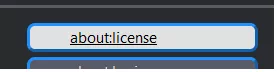
    Also so schauts aus, wenn der Mauszeiger direkt auf dem Text ist:

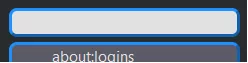
    Und so, wenn der Mauszeiger nur im Feld ist:

    Also der Text soll einmal nicht unterstrichen sein

    und einmal soll der ganze "Button" verlinken.

    Geht das?

    Gruß

    Mira

  • About Seiten mit CSS Codes anpassen

    • Mira_Belle
    • 13. Januar 2022 um 20:42
    Zitat von Boersenfeger

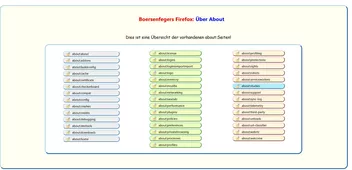
    Wie hast Du die drei Spalten hingezaubert?

    Gruß

    Mira

  • Wunsch: eine hauchdünner heller Rand beim dunklen Theme

    • Mira_Belle
    • 12. Januar 2022 um 20:33
    Zitat von hhmmppff

    Vielleicht mit Fenstertitel wie Standard, Übersetzen, ...

    Wie ginge das?

    O, o.

    Ich glaube, Du missverstehst da was.

    Oder ich.

    Ich dachte Dir geht es nur darum, dass Du die einzelnen Instanzen des FF unterscheiden kannst,

    wenn die Fenster, so wie im Bild, so unglücklich hintereinanderliegen.

    In einer Titelleiste wird nur der Titel des letzten geöffneten Tab angezeigt.

    Darauf hat man wohl keinen Einfluss!

    Aber es kann die Farbe der aktiven, sowie der passiven Instanz verändert werden,

    womit eine Unterscheidung der "Fenster" verbessert werden kann.

    In den Bildern von Dir, aber auch von Andreas, ist die Titelleiste ja "ausgeschaltet".

    Und gerade das, so finde ich, macht es doch schwierig, die einzelnen Instanzen (Fenster) auseinander zu halten.

    Wenn du z.B. dreimal Notepad öffnest und diese Fenster (Instanzen) so wie in den Bildern

    übereinander legst, kannst Du sie doch auch besser auseinander halten,

    eben weil sie eine Titelleiste haben und, weil sie unterschiedlicher Farbe sind.

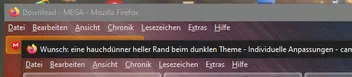
    Ich füge mal ein Bild ein, damit klarer wird, was ich meine.

    Gruß

    Mira

  • Wunsch: eine hauchdünner heller Rand beim dunklen Theme

    • Mira_Belle
    • 12. Januar 2022 um 13:03

    Es gäbe da auch die Möglichkeit über die Titelleiste die einzelnen Instanzen

    besser unterscheidbar zu machen.

    Wenn gewünscht, helfe ich da gerne.

    Gruß

    Mira

  • Aktiver Tab hat schwarze Umrandung

    • Mira_Belle
    • 12. Januar 2022 um 01:20

    Kleine Info!

    Ich hatte witzigerweise einen weißen Rand um meinen aktiven Tab.

    Aber dank der Veröffentlichung von Code und ein kleines bisschen Nachdenken

    habe ich für mich eine Lösung gefunden.

    CSS
        /* -------------------------------------------------*/
        /************* aktiven Tab einfärben ****************/
        /* -------------------------------------------------*/
    
        .tab-background[selected="true"] {                                                                                            
            background:rgba(255, 148, 0, 0.4) !important;                        /* Orange */                                                        
            box-shadow: inset  0px 0px 5px 0px #ff9400 !important;                /* Orange */
            border: hidden !important;                                            /* Rand ausblenden */
        }

    Man beachte letzte Zeile.

    Gruß

    Mira

  • Dialog Hilfe/Über Firefox

    • Mira_Belle
    • 10. Januar 2022 um 10:26

    :*

  • Dialog Hilfe/Über Firefox

    • Mira_Belle
    • 10. Januar 2022 um 10:01

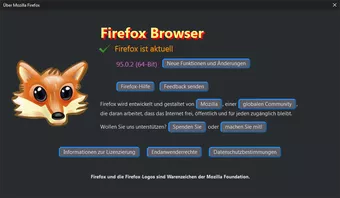
    Schaut nett aus.

    Aber Kritik sei erlaubt.

    Wie war das mit dunklem Hintergrund und dem hellen Rand um das Füchschen? ;)

    Und der Rahmen um den Text "Firefox wird ...." ist mM links zu nah am Text.

    Die linke untere Ecke schrappt ja das "die" fast weg.

    Aber so recht hab ich auch keine Idee wie das geändert besser aussehen könnte

    ohne gleich das komplette Design abändern zu müssen.

    Aber es ist ja Deine "Spielwiese" und somit sind solche Kleinigkeiten auch völlig OK.

    Verrätst Du mir, wie Du das "Dialog-Design by harff182" unten rechts in die Ecke gezaubert hast?

    Gruß

    Mira

  • Hilfedialog (Anpassungen)

    • Mira_Belle
    • 8. Januar 2022 um 00:50

    OK,

    habe ich korrigiert!

    Und es war doch mein Fehler!

    background-position

    Sorry.

    @harff182

    Hat mir keine Ruhe gelassen.

    Besser?

    Gruß

    Mira

Unterstütze uns!

Jährlich (2026)

69,4 %

69,4% (538,17 von 775 EUR)

Jetzt spenden
  1. Kontakt
  2. Datenschutz
  3. Impressum
Community-Software: WoltLab Suite™
Mastodon