Verstehe ich das richtig?
Hätte ich das usercssloader.uc.js Monster gehabt,
hätte ich ein ganz normales CSS schreiben können?
Grrr.
Verstehe ich das richtig?
Hätte ich das usercssloader.uc.js Monster gehabt,
hätte ich ein ganz normales CSS schreiben können?
Grrr.

Frage:
(Wie) kamm man die Scrollbars breiter bzw höher machen?
Das hier:
var custom_scrollbar_size_value = 17; // in px // default: custom_scrollbar_size_value = 17
führt bei Wertänderungen zu nix, weil die Variable nirgendwo mehr auftaucht...
Da war ich wohl etwas zu eifrig. Sorry.
Aber Danke für die Korrektur.
Habe den Code wieder eingepflegt.

Vor dem Lebensalter von ca 55 Jahren habe auch diese Probleme nicht verstanden, und alle Mitarbeiter welche damals die Ironie eingeschaltet hatten, saßen etwas Später selber mit einer Brille vorm PC...
Ob du etwas verstehst oder nicht, du wirst mir schon glauben müssen das diese und jene Einstellung mir wichtig ist!
Nein ICH kann weder programieren, noch CSS und wozu gibt es die Möglichkeit Tab in der Taskleiste anzuzeigen, so man dort nicht "hin und her" schalten könne. Das schaffe selbst ich...
Deine Antwort hat in etwa das Niveau "Zynismus ein" Warum für die paar Rollstuhlfahrer Aufzüge an Bahnhöfen bauen, es gibt doch immer zwei nette Herren die den tragen würden und ach es gäbe für die auch noch die Möglichkeit zuhause zu bleiben... "Zynismus aus"
Nun, ich bin "Älter", ich bin nicht eitel und trage Brille
und wenn Du geschaut hättest, ich bin auch noch nicht so lange dabei. 
Was aber fast einer Behinderung nahe kommt, ich bin blond. 
Es lag nicht in meinem Interesse, Dir derart auf den Schlips zu treten, dass Du Dich noch nach Wochen genötigt fühlt,
auf meinen Beitrag in derart zu antworten.
Hab' noch einen schönen Tag und vergiss es doch einfach.
Das Problem ist doch scheinbar gelöst.
Das fertige JavaScript 

"use strict";
/* Firefox 57+ userChrome.js tweaks - SCROLLBARS ********************************************** */
/* Original by Aris (aris-addons@gmx.net)****************************************************** */
/* Github: https://github.com/aris-t2/customscrollbarsforfx *********************************** */
/* ******************************************************************************************** */
/* Customized by Mira************************************************************************** */
/* https://www.camp-firefox.de/forum/thema/135133-custom-scrollbars-uc-js-anpassen/ *********** */
/* ******************************************************************************************** */
/* Custom Scrollbars for Firefox ************************************************************** */
/* version 1.0.6 ****************************************************************************** */
/* ******************************************************************************************** */
/* ***********************************************************************************************
 README

 !!! Wichtig !!!

 Die Einstellungen müssen auf 'false' gesetzt werden, damit dies auf aktuellen Firefox-Builds (102+) funktioniert

 about:config >
 widget.windows.overlay-scrollbars.enabled > false (Windows)
 widget.gtk.overlay-scrollbars.enabled > false (Linux/MacOSX)

 [!] 'Methode 2' ist erforderlich, um Firefox für benutzerdefinierte JavaScript-Dateien vorzubereiten
 [!] Die Datei 'custom_scrollbars.uc.js' gehört in den Firefox-Profilordner 'chrome'!
 -> Profilordner finden: Adressleiste > about:profiles > Wurzelordner > Ordner öffnen
 -> Datei zum Ordner \chrome\ hinzufügen (ggf. einen Ordner mit Namen "chrome" erstellen)

 [!] DER STARTUP-CACHE MUSS NACH JEDER ÄNDERUNG GELÖSCHT WERDEN!
 -> Ordner 'startupCache' finden: Adressleiste > about:profiles > Lokales Verzeichnis > Ordner öffnen > startupCache
 -> Firefox schließen
 -> Inhalt des 'startupCache'-Ordners löschen

Alternativ mit einem Javascipt!
 -> https://github.com/Endor8/userChrome.js/blob/master/Firefox%2087/RestartFirefoxButtonM.uc.js

 Aktivieren einer Einstellung > var ... auf 'true' setzen
 Deaktivieren einer Einstellung > var ... auf 'false' setzen
 Anpassungen vornehmen > Werte ändern
 - Farbe - Name: red, blue, transparent / Hexcode: #33CCFF, #FFF
 - Farbe - rgb(a): rgba(0,0,255,0.8) / hsl(a): hsla(240,100%,50%,0.8) // a = Sichtbarkeit (transparenz)
 - Zahlen: 1, 2, 3 ... 10, 11, 12 ...
 - Deckkraft (in Dezimalzahlen): 0.0 bis 1.0 z.B. 1.4, 1,75
 - Farbverläufe: linear-gradient(direction, color, color, color)
 - Beispiel für Farbverläufe: linear-gradient(to right, blue, #33CCFF, rgba(0,0,255,0.8))

 HINWEIS
 - Zu kleine Werte für die Scrollbar-Breite werden sich negativ auf einige Oberflaechenelemente auswirken!

*********************************************************************************************** */

// GENERAL SCROLLBAR SETTINGS
var custom_scrollbar_size_value = 16; // in px // default: custom_scrollbar_size_value = 17
var custom_opacity_value = "1.0"; // default: custom_opacity_value = "1.0"
// CUSTOM SCROLLBAR SETTINGS ("custom_scrollbar_" --> "cs_")
var cs_thumb_border = 1; // in px // default: cs_thumb_border = 0 // Rahmen des Sliders
var cs_thumb_roundness = 15; // in px // default: cs_thumb_roundness = 0 // Rundung des Sliders
var cs_thumb_minimal_size = 12; // in px
// CUSTOM SCROLLBAR COLORS/GRADIENTS
// - background
var cs_background_color = "#5b5b66"; // default: cs_background_color = "#DDDDDD"
var cs_background_image_vertical = "unset"; // default: cs_background_image_vertical = "unset"
var cs_background_image_horizontal = "unset"; // default: cs_background_image_horizontal = "unset"
// - corner
var cs_corner_background_color = "red"; // default: cs_corner_background_color = "#DDDDDD"
var cs_corner_background_image = "unset"; // default: cs_corner_background_image = "unset"
// - thumb/slider
var cs_thumb_color = "#bfbfbf"; // default: cs_thumb_color = "#33CCFF"
var cs_thumb_image_vertical = "unset"; // default: cs_thumb_image_vertical = "unset"
var cs_thumb_image_horizontal = "unset"; // default: cs_thumb_image_horizontal = "unset"
var cs_thumb_hover_color = "orange"; // default: cs_thumb_hover_color = "#66FFFF"
var cs_thumb_hover_image_vertical = "unset"; // default: cs_thumb_hover_image_vertical = "unset"
var cs_thumb_hover_image_horizontal = "unset"; // default: cs_thumb_hover_image_horizontal = "unset"
var cs_thumb_border_color = "#5b5b66"; // default: cs_thumb_border_color = "#33CCFF" "#5b5b66"
// - buttons
var cs_buttons_image_vertical = "unset"; // default: cs_buttons_image_vertical = "unset"
var cs_buttons_image_horizontal = "unset"; // default: cs_buttons_image_horizontal = "unset"
var cs_buttons_hover_color = "#bfbfbf"; // default: cs_buttons_hover_color = "#33CCFF"
var cs_buttons_hover_image_vertical = "unset"; // default: cs_buttons_hover_image_vertical = "unset"
var cs_buttons_hover_image_horizontal = "unset"; // default: cs_buttons_hover_image_horizontal = "unset"
var cs_color_arrow = "#bfbfbf";
var cs_color_arrow_hover = "orange";
var cs_width = 16;
var cs_height = 16;

/* ******************************************************************************************** */
/* ******************************************************************************************** */
/* ******************************************************************************************** */

// Scrollbar code

Components.utils.import("resource://gre/modules/Services.jsm");
var ss =  Components.classes["@mozilla.org/content/style-sheet-service;1"].getService(Components.interfaces.nsIStyleSheetService);

var custom_scrollbars = {

  init: function() {

    var uri = Services.io.newURI("data:text/css;charset=utf-8," + encodeURIComponent('\
      \
      @namespace html url("http://www.w3.org/1999/xhtml");\
      \
      scrollbar, scrollcorner, scrollbar thumb, \
      scrollbar[orient="vertical"] scrollbarbutton[type="increment"], \
      scrollbar[orient="vertical"] scrollbarbutton[type="decrement"], \
      scrollbar[orient="horizontal"] scrollbarbutton[type="increment"], \
      scrollbar[orient="horizontal"] scrollbarbutton[type="decrement"] {\
        -moz-appearance: none !important;\
        appearance: none !important;\
      }\
      scrollbar {\
        background-color: '+cs_background_color+' !important;\
      }\
      scrollbar[orient="vertical"] {\
        background-image: '+cs_background_image_vertical+' !important;\
      }\
      scrollbar[orient="horizontal"] {\
        background-image: '+cs_background_image_horizontal+' !important;\
      }\
      scrollcorner {\
        background-color: '+cs_corner_background_color+' !important;\
        background-image: '+cs_corner_background_image+' !important;\
      }\
      scrollbar thumb {\
        background-color: '+cs_thumb_color+' !important;\
        border-radius: '+cs_thumb_roundness+'px !important;\
        border: '+cs_thumb_border+'px solid '+cs_thumb_border_color+' !important;\
      }\
      scrollbar thumb[orient="vertical"] {\
        background-image: '+cs_thumb_image_vertical+' !important;\
        min-height: '+(cs_thumb_minimal_size+cs_thumb_roundness+cs_thumb_border)+'px !important;\
      }\
      scrollbar thumb[orient="horizontal"] {\
      background-image: '+cs_thumb_image_horizontal+' !important;\
      min-width: '+(cs_thumb_minimal_size+cs_thumb_roundness+cs_thumb_border)+'px !important;\
      }\
      scrollbar thumb:hover, scrollbar thumb:active {\
        background-color: '+cs_thumb_hover_color+' !important;\
      }\
      scrollbar thumb[orient="vertical"]:hover, scrollbar thumb[orient="vertical"]:active,\
      scrollbar thumb[orient="horizontal"]:hover, scrollbar thumb[orient="horizontal"]:active {\
        background-image: '+cs_thumb_hover_image_vertical+' !important;\
      }\
      scrollbar[orient="vertical"] scrollbarbutton[type="decrement"] {\
        mask-image: url("file:///C:/Users/ ... /chrome/icons/Chevron-up,_12.svg") !important;\
      }\
      scrollbar[orient="vertical"] scrollbarbutton[type="increment"] {\
        mask-image: url("file:///C:/Users/ ... /chrome/icons/Chevron-down,_12.svg") !important;\
      }\
      scrollbar[orient="horizontal"] scrollbarbutton[type="increment"] {\
        mask-image: url("file:///C:/Users/ ... /chrome/icons/Chevron-right,_12.svg") !important;\
      }\
      scrollbar[orient="horizontal"] scrollbarbutton[type="decrement"] {\
        mask-image: url("file:///C:/Users/ ... /chrome/icons/Chevron-left,_12.svg") !important;\
      }\
      scrollbarbutton[type="increment"],\
      scrollbar[orient="vertical"] scrollbarbutton[type="decrement"],\
      scrollbarbutton[type="increment"],\
      scrollbar[orient="horizontal"] scrollbarbutton[type="decrement"] {\
        \
        mask-repeat: no-repeat;\
        mask-position: center;\
        background-color: '+cs_color_arrow+';\
        width: '+cs_width+'px !important;\
        height: '+cs_height+'px !important;\
      }\
      scrollbarbutton[type="increment"]:hover,\
      scrollbar[orient="vertical"] scrollbarbutton[type="decrement"]:hover,\
      scrollbarbutton[type="increment"]:hover,\
      scrollbar[orient="horizontal"] scrollbarbutton[type="decrement"]:hover {\
        background-color: '+cs_color_arrow_hover+' !important;\
      }\
      \
    '), null, null);

    ss.loadAndRegisterSheet(uri, ss.AGENT_SHEET);

  }
};

// enable settings as configured above
custom_scrollbars.init();Kinder zu bekommen einfacher. 


Ich werd' Verrückt!
Ich habs!!!!!!
Es ist vollbracht.
Ich muss den Code noch ins Reine bringen, dann werde ich ihn noch nachreichen

Entferne einfach die Bedingung.
...
Vielen lieben Dank.
Es gibt fortschritte. 
Ich habe es geschafft, dass die "falschen" Symbole (Pfeile) nicht mehr angezeigt werden.
So weit, so gut.
NUR der (böde) Button ist jetzt noch zu sehen. 
Wenn ich jetzt nur wüsste, was ich nicht weis, ...
Wie kann ich nun den Button noch loswerden.
Nachtrag:
Das Codefragment!
      scrollbar[orient="vertical"] scrollbarbutton[sbattr="scrollbar-up-top"] {\
        mask-image: url("file:///C:/Users/.../chrome/icons/Chevron-up,_12.svg") !important;\
      }\
      scrollbar[orient="vertical"] scrollbarbutton[sbattr="scrollbar-down-top"] {\
        display: none;\
      }\
      scrollbar[orient="vertical"] scrollbarbutton[sbattr="scrollbar-down-bottom"] {\
        mask-image: url("file:///C:/Users/.../chrome/icons/Chevron-down,_12.svg") !important;\
      }\
      scrollbar[orient="vertical"] scrollbarbutton[sbattr="scrollbar-up-bottom"]\ {\
        display: none;\
}\Habe mal das JavaScript etwas "ausgedünnt"!
"use strict";
/* Firefox 57+ userChrome.js tweaks - SCROLLBARS ********************************************** */
/* Original by Aris (aris-addons@gmx.net)****************************************************** */
/* Github: https://github.com/aris-t2/customscrollbarsforfx *********************************** */
/* ******************************************************************************************** */
/* Customized by Mira************************************************************************** */
/* https://www.camp-firefox.de/forum/thema/135133-custom-scrollbars-uc-js-anpassen/ *********** */
/* ******************************************************************************************** */
/* Custom Scrollbars for Firefox ************************************************************** */
/* version 1.0.6 ****************************************************************************** */
/* ******************************************************************************************** */
/* ***********************************************************************************************
 README

 !!! Important !!!

 Preferences have to be set to false, for this to work on recent Firefox builds (102+)

 about:config >
 widget.windows.overlay-scrollbars.enabled > false (Windows)
 widget.gtk.overlay-scrollbars.enabled > false (Linux/MacOSX)


 [!] 'Method 2' is required to prepare Firefox for custom JavaScript files
 [!] 'custom_scrollbars.uc.js' file belongs into Firefox profiles 'chrome' folder!
 -> finding profile folder: address bar > about:profiles > Root Directory > Open Folder
 -> add file to \chrome\ folder (create one, if needed)
 [!] STARTUP CACHE HAS TO BE DELETED AFTER EVERY CHANGE!
 -> finding 'startupCache' folder: address bar > about:profiles > Local Directory > Open Folder > startupCache
 -> close Firefox
 -> delete 'startupCache' folders content
 ENABLING options > set var to true
 DISABLING options > set var to false
 Modifying appearance > change values
 - color - name: red, blue, transparent / hex code: #33CCFF, #FFF
 - color - rgb(a): rgba(0,0,255,0.8) / hsl(a): hsla(240,100%,50%,0.8)
 - numbers: 1, 2, 3 ... 10, 11, 12 ...
 - opacity: 0.0 to 1.0 e.g. 1.4, 1,75
 - gradients: linear-gradient(direction, color, color, color)
 - gradients example: linear-gradient(to right, blue, #33CCFF, rgba(0,0,255,0.8))
 - predefined gradients: transparent,rgba(255,255,255,0.5),transparent -> transparent,rgba(255,255,255,0.0),transparent
 - button size with arrow (descriptions for vertical scrollbars - analogous for horizontal scrollbars)
 -- 1: space above arrow = arrow height
 -- 1.5: space above arrow = 0.5 * arrow height
 -- 2: no space above arrow

 NOTE
 - This is a tiny collection of scrollbar tweaks, not a port of 'NewScrollbars' add-on!
 - Small scrollbar width values will corrupt some parts of the ui!

*********************************************************************************************** */
// GENERAL SCROLLBAR SETTINGS
var custom_scrollbar_size_value = 16; // in px // default: custom_scrollbar_size_value = 17
var custom_opacity_value = "1.0"; // default: custom_opacity_value = "1.0"
// floating scrollbars
// custom scrollbars
var enable_custom_scrollbars = true; // default: enable_custom_scrollbars = true
// CUSTOM SCROLLBAR SETTINGS ("custom_scrollbar_" --> "cs_")
var cs_thumb_border = 1; // in px // default: cs_thumb_border = 0 // Rahmen des Sliders
var cs_thumb_roundness = 15; // in px // default: cs_thumb_roundness = 0 // Rundung des Sliders
var cs_thumb_minimal_size = 12; // in px
// CUSTOM SCROLLBAR COLORS/GRADIENTS
// - background
var cs_background_color = "#5b5b66"; // default: cs_background_color = "#DDDDDD"
var cs_background_image_vertical = "unset"; // default: cs_background_image_vertical = "unset"
var cs_background_image_horizontal = "unset"; // default: cs_background_image_horizontal = "unset"
// - corner
var cs_corner_background_color = "red"; // default: cs_corner_background_color = "#DDDDDD"
var cs_corner_background_image = "unset"; // default: cs_corner_background_image = "unset"
// - thumb/slider
var cs_thumb_color = "#bfbfbf"; // default: cs_thumb_color = "#33CCFF"
var cs_thumb_image_vertical = "unset"; // default: cs_thumb_image_vertical = "unset"
var cs_thumb_image_horizontal = "unset"; // default: cs_thumb_image_horizontal = "unset"
var cs_thumb_hover_color = "orange"; // default: cs_thumb_hover_color = "#66FFFF"
var cs_thumb_hover_image_vertical = "unset"; // default: cs_thumb_hover_image_vertical = "unset"
var cs_thumb_hover_image_horizontal = "unset"; // default: cs_thumb_hover_image_horizontal = "unset"
var cs_thumb_border_color = "#5b5b66"; // default: cs_thumb_border_color = "#33CCFF" "#5b5b66"
// - buttons
var cs_buttons_image_vertical = "unset"; // default: cs_buttons_image_vertical = "unset"
var cs_buttons_image_horizontal = "unset"; // default: cs_buttons_image_horizontal = "unset"
var cs_buttons_hover_color = "#bfbfbf"; // default: cs_buttons_hover_color = "#33CCFF"
var cs_buttons_hover_image_vertical = "unset"; // default: cs_buttons_hover_image_vertical = "unset"
var cs_buttons_hover_image_horizontal = "unset"; // default: cs_buttons_hover_image_horizontal = "unset"
var cs_color_arrow = "#bfbfbf";
var cs_color_arrow_hover = "orange";
var cs_width = 16;
var cs_height = 16;
/* ******************************************************************************************** */
/* ******************************************************************************************** */
/* ******************************************************************************************** */
// Scrollbar code
Components.utils.import("resource://gre/modules/Services.jsm");
var ss =  Components.classes["@mozilla.org/content/style-sheet-service;1"].getService(Components.interfaces.nsIStyleSheetService);
var custom_scrollbars = {
  init: function() {
    var uri = Services.io.newURI("data:text/css;charset=utf-8," + encodeURIComponent('\
      \
      @namespace html url("http://www.w3.org/1999/xhtml");\
      \
      scrollbar, scrollcorner, scrollbar thumb, \
      scrollbar[orient="vertical"] scrollbarbutton[type="increment"], \
      scrollbar[orient="vertical"] scrollbarbutton[type="decrement"], \
      scrollbar[orient="horizontal"] scrollbarbutton[type="increment"], \
      scrollbar[orient="horizontal"] scrollbarbutton[type="decrement"] {\
        -moz-appearance: none !important;\
        appearance: none !important;\
      }\
      scrollbar {\
        background-color: '+cs_background_color+' !important;\
      }\
      scrollbar[orient="vertical"] {\
        background-image: '+cs_background_image_vertical+' !important;\
      }\
      scrollbar[orient="horizontal"] {\
        background-image: '+cs_background_image_horizontal+' !important;\
      }\
      scrollcorner {\
        background-color: '+cs_corner_background_color+' !important;\
        background-image: '+cs_corner_background_image+' !important;\
      }\
      scrollbar thumb {\
        background-color: '+cs_thumb_color+' !important;\
        border-radius: '+cs_thumb_roundness+'px !important;\
        border: '+cs_thumb_border+'px solid '+cs_thumb_border_color+' !important;\
      }\
      scrollbar thumb[orient="vertical"] {\
        background-image: '+cs_thumb_image_vertical+' !important;\
        min-height: '+(cs_thumb_minimal_size+cs_thumb_roundness+cs_thumb_border)+'px !important;\
      }\
      scrollbar thumb[orient="horizontal"] {\
      background-image: '+cs_thumb_image_horizontal+' !important;\
      min-width: '+(cs_thumb_minimal_size+cs_thumb_roundness+cs_thumb_border)+'px !important;\
      }\
      scrollbar thumb:hover, scrollbar thumb:active {\
        background-color: '+cs_thumb_hover_color+' !important;\
      }\
      scrollbar thumb[orient="vertical"]:hover, scrollbar thumb[orient="vertical"]:active {\
        background-image: '+cs_thumb_hover_image_vertical+' !important;\
      }\
      scrollbar thumb[orient="horizontal"]:hover, scrollbar thumb[orient="horizontal"]:active {\
        background-image: '+cs_thumb_hover_image_horizontal+' !important;\
      }\
      scrollbar[orient="vertical"] scrollbarbutton[type="increment"] {\
        mask-image: url("file:///C:/Users/.../chrome/icons/Chevron-down,_12.svg") !important;\
        mask-repeat: no-repeat;\
        mask-position: center;\
        display: block !important;\
        background-color: '+cs_color_arrow+';\
        content: url(" ") !important;\
        width: '+cs_width+'px !important;\
        height: '+cs_height+'px !important;\
      }\
      scrollbar[orient="vertical"] scrollbarbutton[type="decrement"] {\
        mask-image: url("file:///C:/Users/.../chrome/icons/Chevron-up,_12.svg") !important;\
        mask-repeat: no-repeat;\
        mask-position: center;\
        display: block !important;\
        background-color: '+cs_color_arrow+' !important;\
        content: url(" ") !important;\
        width: '+cs_width+'px !important;\
        height: '+cs_height+'px !important;\
      }\
      scrollbar[orient="horizontal"] scrollbarbutton[type="increment"] {\
        mask-image: url("file:///C:/Users/.../chrome/icons/Chevron-right,_12.svg") !important;\
        mask-repeat: no-repeat;\
        mask-position: center;\
        display: block !important;\
        background-color: '+cs_color_arrow+' !important;\
        content: url(" ") !important;\
        width: '+cs_width+'px !important;\
        height: '+cs_height+'px !important;\
      }\
      scrollbar[orient="horizontal"] scrollbarbutton[type="decrement"] {\
        mask-image: url("file:///C:/Users/.../chrome/icons/Chevron-left,_12.svg") !important;\
        mask-repeat: no-repeat;\
        mask-position: center;\
        display: block !important;\
        background-color: '+cs_color_arrow+' !important;\
        content: url(" ") !important;\
        width: '+cs_width+'px !important;\
        height: '+cs_height+'px !important;\
      }\
      scrollbar[orient="vertical"] scrollbarbutton[type="increment"]:hover {\
        background-color: '+cs_color_arrow_hover+' !important;\
      }\
      scrollbar[orient="vertical"] scrollbarbutton[type="decrement"]:hover {\
        background-color: '+cs_color_arrow_hover+' !important;\
      }\
      scrollbar[orient="horizontal"] scrollbarbutton[type="increment"]:hover {\
        background-color: '+cs_color_arrow_hover+'!important;\
      }\
      scrollbar[orient="horizontal"] scrollbarbutton[type="decrement"]:hover {\
        background-color: '+cs_color_arrow_hover+' !important;\
      }\
      \
    '), null, null);
    ss.loadAndRegisterSheet(uri, ss.AGENT_SHEET);
  }
};
// enable settings as configured above
if(enable_custom_scrollbars==true) custom_scrollbars.init();
Zwei Bitten hätte ich da.
Kann jemand diese Version so überarbeiten, dass die letzte Zeile,
also das if(enable_custom_scrollbars==true) custom_scrollbars.init();
nicht mehr gebraucht wird,
und ich bräuchte noch immer Hilfe den CSS-Code da
so unter zubringen, dass oben nur der Chevron-up zu sehen ist,
und unten entsprechend nur der Chevron-down .

Aber DAS ist das fehlende Puzzle.
Wo kommt denn der Schnipsel her?
Vielleicht kann man aus dem Zusammenhang erkennen/ableiten, was zu tun ist...
Aus FF selber!

Alles anzeigen
Frage:
Interessiert es Dich, daß statt den von Dir benutzten Pfaden wie:
url("file:///C:/Users/.../chrome/icons/Chevron-up,_Web_Fundamentals_new.svg")
auch sowas funktionieren könnte:
url("file:///../icons/Chevron-down,_Web_Fundamentals.svg")
Ich bevorzuge letzteren, den relativen Pfad, und bei mir hier funktionuckelt es...
Und ich hatte, warum auch immer, Probleme damit.
Deshalb nutze ich den "absoluten" Pfad.
Aber Danke für den Hinweis.
...Beim Stichwort "XML" drängelte sich mein Editor (Notepad++) in den Vordergrund.
Damit waren die Änderungen problemlos möglich.
...
Darauf bin ich gar nicht gekommen, habe mich aber auch nicht besonders mit dem Thema beschäftigt.
Mit Notepad++ macht man nichts anders, nur dass man nicht gleich das Resultat sieht, wie im FF.
Aber Danke für diesen Tipp.
Um hier
(RE: custom_scrollbars.uc.js anpassen)
mal wieder anzuknüpfen,
wie bekomme ich diesen Code unter?
@media (-moz-scrollbar-start-backward: 0) {
  scrollbarbutton[sbattr="scrollbar-up-top"] {
    display: none;
  }
}

@media (-moz-scrollbar-start-forward: 0) {
  scrollbarbutton[sbattr="scrollbar-down-top"] {
    display: none;
  }
}

@media (-moz-scrollbar-end-backward: 0) {
  scrollbarbutton[sbattr="scrollbar-up-bottom"] {
    display: none;
  }
}

@media (-moz-scrollbar-end-forward: 0) {
  scrollbarbutton[sbattr="scrollbar-down-bottom"] {
    display: none;
  }
}Und wo
Eventuell muss er auch noch etwas umgeschrieben werden,
Aber DAS ist das fehlende Puzzle.
Die Chevron-left,_Web_Fundamentals.svg
Original

Die Chevron-left,_Web_Fundamentals.svg
verändert, auf 12px mal 12px

Versuche es noch einmal.
Danke, nicht notwendig!
Ich finde schon, denn ich steige da z.Z. nicht durch!
Hier ein kurzes, knackiges Script, ohne Buttons, ohne Pfeile, Scrollbar nur bei mouseover zu sehen, css einfach zu verändern und in orange....
CSS/*HideScrollbar.uc.js*/ (function () { var css = ` .hidevscroll-scrollbar { appearance: none!important; margin-left: 4px!important; border: none!important; position: relative!important; background-color: transparent!important; padding: 0px!important; z-index: 3516351316854!important; } .hidevscroll-scrollbar[orient = "vertical"] { -moz-margin-start: -7px!important; min-width: 7px!important; } .hidevscroll-scrollbar[orient = "vertical"] thumb { min-height: 20px!important; } .hidevscroll-scrollbar thumb { appearance: none!important; border-width: 0px!important; border-radius: 0px!important; background-color: #f60!important; opacity: 0!important; transition: opacity 0.4s ease-in-out!important; -webkit-transform-style: preserve-3d!important; -webkit-backface-visibility: hidden!important; } .hidevscroll-scrollbar:hover thumb { background-color: #f60!important; opacity: 0.5!important; transition: opacity 0.06s ease-in-out!important; -webkit-transform-style: preserve-3d!important; -webkit-backface-visibility: hidden!important; } .hidevscroll-scrollbar thumb:active { background-color: #f60!important; opacity: 0.9!important; transition: opacity 0.06s ease-in-out!important; -webkit-transform-style: preserve-3d!important; -webkit-backface-visibility: hidden!important; } .hidevscroll-scrollbar scrollbarbutton, .hidevscroll-scrollbar gripper { display: none!important; } :not(select):not(hbox) > scrollbar { appearance: none!important; position: relative; background-color: transparent; background-image: none; z-index: 3516351316854; padding: 0px; } :not(select):not(hbox) > scrollbar[orient = "vertical"] { -moz-margin-start: -7px; min-width: 7px; max-width: 7px; } :not(select):not(hbox) > scrollbar[orient = "vertical"] thumb { min-height: 20px; } :not(select):not(hbox) > scrollbar[orient = "horizontal"] { margin-top: -7px; min-height: 7px; max-height: 7px; } :not(select):not(hbox) > scrollbar[orient = "horizontal"] thumb { min-width: 20px; } :not(select):not(hbox) > scrollbar thumb { appearance: none!important; border-width: 0px!important; border-radius: 0px!important; background-color: #f60!important; opacity: 0!important; transition: opacity 0.4s ease-in-out; -webkit-transform-style: preserve-3d; -webkit-backface-visibility: hidden; } :not(select):not(hbox) > scrollbar:hover thumb { background-color: #f60!important; opacity: 0.5!important; transition: opacity 0.1s ease-in-out; -webkit-transform-style: preserve-3d; -webkit-backface-visibility: hidden; } :not(select):not(hbox) > scrollbar thumb:active { background-color: #f60!important; opacity: 0.9!important; transition: opacity 0.06s ease-in-out; -webkit-transform-style: preserve-3d; -webkit-backface-visibility: hidden; } :not(select):not(hbox) > scrollbar scrollbarbutton, :not(select):not(hbox) > scrollbar gripper { display: none; } `, sss = Cc['@mozilla.org/content/style-sheet-service;1'].getService(Ci.nsIStyleSheetService), uri = makeURI('data:text/css;charset=UTF=8,' + encodeURIComponent(css)); sss.loadAndRegisterSheet(uri, sss.AGENT_SHEET); })();
Danke für dieses Script.
Ich verstehe dennoch nur Bahnhof!
Ich verstehe nicht, wie es funktioniert.
Bei dem von mir geänderten Aris-Script blicke ich ein wenig durch.
Alles was mir nur nocht feht, ist die Stelle an der ich festlegen kann, dass nur noch ein
und zwar der richtige Button sammt Pfeil erscheint.
Sollte mir das nicht gelingen, bzw. mir niemand dabei helfen können,
werde ich mich in einem gesonderten Thema dann mit "Deinem" Script beschäftigen.
Also, Du öffnest das Symbol mit dem Browser.
Dann klicks Du mit rechts darauf, worauf sich ein Kontextmenü öffnet.
Nun auf Untersuchen klicken, oder ganz einfach die Taste Q nutzen.
Es erscheint ein Fenster.

Ich habe betreffende Zeile schon ausgewählt!
Nun den Wert width= "18px" und den Wert height="30px" ändern,
z.B. width= "16px" und height="16px".
Wenn geschehen in der Menüleiste auf Datei/Seite speichern unter ... gehen
und speichern.
Fertig.
PS: Symbol öffnen, entweder Du gehst direkt auf die Page, oder Du hangelst Dich durch Deine Ordner.
Kannst aber auch das Dateiformat dauerhaft mit dem FF verknüpfen.
Macht es einfacher.

Ein wenig Fine-Tuning noch, dann meinen Code aufräumen/kommentieren und meinereiner is glücklich
DANKE für Deine Hartnäckigkeit...
Du kannst mit dem FF die Symbole unter zu Hilfenahme der Browserwerkzeugen in der Größe ändern,
dann schaute es noch schöner, bzw. einheitlicher aus.
Bitte mach aber ein neues Thema auf, wenn ich es Dir erklären soll.
Das mit den Symbolen habe ich nun hinbekommen!
Habe einfach mittels FF die Werte angepasst!
Nun habe ich nur noch das Problem, dass jeweils in den Scrollbars in den entgegengesetzten "Richtungen" beide
Symbole, ink. der entsprechenden Funktionen, sind (erscheinen).
Wenn dieses Problem gelöst wird/ist, dann wäre das Script fertig.
Hier DAS Script. (Welches angepasst und in Gebrauch ist)
"use strict";
/* Firefox 57+ userChrome.js tweaks - SCROLLBARS ********************************************** */
/* by Aris (aris-addons@gmx.net)*************************************************************** */
/* Github: https://github.com/aris-t2/customscrollbarsforfx *********************************** */
/* ******************************************************************************************** */
/* ******************************************************************************************** */
/* Custom Scrollbars for Firefox ************************************************************** */
/* version 1.0.6 ****************************************************************************** */
/* ******************************************************************************************** */
/* ***********************************************************************************************
 README

 !!! Important !!!

 Preferences have to be set to false, for this to work on recent Firefox builds (102+)

 about:config >
 widget.windows.overlay-scrollbars.enabled > false (Windows)
 widget.gtk.overlay-scrollbars.enabled > false (Linux/MacOSX)


 [!] 'Method 2' is required to prepare Firefox for custom JavaScript files
 [!] 'custom_scrollbars.uc.js' file belongs into Firefox profiles 'chrome' folder!
 -> finding profile folder: address bar > about:profiles > Root Directory > Open Folder
 -> add file to \chrome\ folder (create one, if needed)
 [!] STARTUP CACHE HAS TO BE DELETED AFTER EVERY CHANGE!
 -> finding 'startupCache' folder: address bar > about:profiles > Local Directory > Open Folder > startupCache
 -> close Firefox
 -> delete 'startupCache' folders content
 ENABLING options > set var to true
 DISABLING options > set var to false
 Modifying appearance > change values
 - color - name: red, blue, transparent / hex code: #33CCFF, #FFF
 - color - rgb(a): rgba(0,0,255,0.8) / hsl(a): hsla(240,100%,50%,0.8)
 - numbers: 1, 2, 3 ... 10, 11, 12 ...
 - opacity: 0.0 to 1.0 e.g. 1.4, 1,75
 - gradients: linear-gradient(direction, color, color, color)
 - gradients example: linear-gradient(to right, blue, #33CCFF, rgba(0,0,255,0.8))
 - predefined gradients: transparent,rgba(255,255,255,0.5),transparent -> transparent,rgba(255,255,255,0.0),transparent
 - button size with arrow (descriptions for vertical scrollbars - analogous for horizontal scrollbars)
 -- 1: space above arrow = arrow height
 -- 1.5: space above arrow = 0.5 * arrow height
 -- 2: no space above arrow

 NOTE
 - This is a tiny collection of scrollbar tweaks, not a port of 'NewScrollbars' add-on!
 - Small scrollbar width values will corrupt some parts of the ui!

*********************************************************************************************** */
// GENERAL SCROLLBAR SETTINGS
var hide_scrollbars = false; // default: hide_scrollbars = false
var hide_scrollbar_buttons = false; // default: hide_scrollbar_buttons = false
var custom_scrollbar_size = true; // default: custom_scrollbar_size = false
var custom_scrollbar_size_value = 16; // in px // default: custom_scrollbar_size_value = 17
var custom_scrollbar_opacity = false; // default: custom_scrollbar_opacity = false
var custom_opacity_value = "1.0"; // default: custom_opacity_value = "1.0"
// floating scrollbars
var enable_scrollbars_on_top_of_webcontent = false; // default: enable_scrollbars_on_top_of_webcontent = false // uses 'custom_scrollbar_size_value' inside its code
// custom scrollbars
var enable_custom_scrollbars = true; // default: enable_custom_scrollbars = true
// CUSTOM SCROLLBAR SETTINGS ("custom_scrollbar_" --> "cs_")
var cs_thumb_border = 1; // in px // default: cs_thumb_border = 0
var cs_thumb_roundness = 0; // in px // default: cs_thumb_roundness = 0
var cs_buttons_roundness = 0; // in px // default: cs_buttons_roundness = 0
var cs_buttons_as_arrows = false; // default: cs_buttons_as_arrows = false // uses 'custom_scrollbar_size_value' inside its code
var cs_arrows_on_buttons = true; // default: cs_arrows_on_buttons = true // uses 'custom_scrollbar_size_value' inside its code
// button size with arrow - 1: space above arrow = arrow height // 1.5: space above arrow = 0.5 * arrow height // 2: no space above arrow
var cs_arrows_on_buttons_buttons_size = 1; // default: cs_arrows_on_buttons_buttons_size = 1.5
// 'flat' scrollbars
var cs_ignore_color_gradients = false; // default: cs_ignore_color_gradients = false
var cs_thumb_minimal_size = 12; // in px
// CUSTOM SCROLLBAR COLORS/GRADIENTS
// - background
var cs_background_color = "#5b5b66"; // default: cs_background_color = "#DDDDDD"
var cs_background_image_vertical = "unset"; // default: cs_background_image_vertical = "unset"
var cs_background_image_horizontal = "unset"; // default: cs_background_image_horizontal = "unset"
// - corner
var cs_corner_background_color = "blue"; // default: cs_corner_background_color = "#DDDDDD"
var cs_corner_background_image = "unset"; // default: cs_corner_background_image = "unset"
// - thumb/slider
var cs_thumb_color = "#bfbfbf"; // default: cs_thumb_color = "#33CCFF"
var cs_thumb_image_vertical = "unset"; // default: cs_thumb_image_vertical = "unset"
var cs_thumb_image_horizontal = "unset"; // default: cs_thumb_image_horizontal = "unset"
var cs_thumb_hover_color = "orange"; // default: cs_thumb_hover_color = "#66FFFF"
var cs_thumb_hover_image_vertical = "unset"; // default: cs_thumb_hover_image_vertical = "unset"
var cs_thumb_hover_image_horizontal = "unset"; // default: cs_thumb_hover_image_horizontal = "unset"
var cs_thumb_border_color = "#5b5b66"; // default: cs_thumb_border_color = "#33CCFF" "#5b5b66"
// - buttons
var cs_buttons_image_vertical = "unset"; // default: cs_buttons_image_vertical = "unset"
var cs_buttons_image_horizontal = "unset"; // default: cs_buttons_image_horizontal = "unset"
var cs_buttons_hover_color = "#bfbfbf"; // default: cs_buttons_hover_color = "#33CCFF"
var cs_buttons_hover_image_vertical = "unset"; // default: cs_buttons_hover_image_vertical = "unset"
var cs_buttons_hover_image_horizontal = "unset"; // default: cs_buttons_hover_image_horizontal = "unset"
// unset background image color gradients -> flat scrollbars
if(cs_ignore_color_gradients==true)
    cs_background_image_vertical
    =cs_background_image_horizontal
    =cs_corner_background_image=cs_thumb_image_vertical
    =cs_thumb_image_horizontal
    =cs_thumb_hover_image_vertical
    =cs_thumb_hover_image_horizontal
    =cs_buttons_image_vertical
    =cs_buttons_image_horizontal
    =cs_buttons_hover_image_vertical
    =cs_buttons_hover_image_horizontal
    ="unset";
/* ******************************************************************************************** */
/* ******************************************************************************************** */
/* ******************************************************************************************** */
// Scrollbar code
Components.utils.import("resource://gre/modules/Services.jsm");
var ss =  Components.classes["@mozilla.org/content/style-sheet-service;1"].getService(Components.interfaces.nsIStyleSheetService);
var custom_scrollbars = {
  init: function() {
    var uri = Services.io.newURI("data:text/css;charset=utf-8," + encodeURIComponent('\
      \
      @namespace html url("http://www.w3.org/1999/xhtml");\
      \
      scrollbar, scrollcorner, scrollbar thumb, scrollbar scrollbarbutton[type="increment"], scrollbar scrollbarbutton[type="decrement"] {\
        -moz-appearance: none !important;\
        appearance: none !important;\
      }\
      scrollbar {\
        background-color: '+cs_background_color+' !important;\
      }\
      scrollbar[orient="vertical"] {\
        background-image: '+cs_background_image_vertical+' !important;\
      }\
      scrollbar[orient="horizontal"] {\
        background-image: '+cs_background_image_horizontal+' !important;\
      }\
      scrollcorner {\
        background-color: '+cs_corner_background_color+' !important;\
        background-image: '+cs_corner_background_image+' !important;\
      }\
      scrollbar thumb {\
        background-color: '+cs_thumb_color+' !important;\
        border-radius: '+cs_thumb_roundness+'px !important;\
        border: '+cs_thumb_border+'px solid '+cs_thumb_border_color+' !important;\
      }\
      scrollbar thumb[orient="vertical"] {\
        background-image: '+cs_thumb_image_vertical+' !important;\
        min-height: '+(cs_thumb_minimal_size+cs_thumb_roundness+cs_thumb_border)+'px !important;\
      }\
      scrollbar thumb[orient="horizontal"] {\
      background-image: '+cs_thumb_image_horizontal+' !important;\
      min-width: '+(cs_thumb_minimal_size+cs_thumb_roundness+cs_thumb_border)+'px !important;\
      }\
      scrollbar thumb:hover, scrollbar thumb:active {\
        background-color: '+cs_thumb_hover_color+' !important;\
      }\
      scrollbar thumb[orient="vertical"]:hover, scrollbar thumb[orient="vertical"]:active {\
        background-image: '+cs_thumb_hover_image_vertical+' !important;\
      }\
      scrollbar thumb[orient="horizontal"]:hover, scrollbar thumb[orient="horizontal"]:active {\
        background-image: '+cs_thumb_hover_image_horizontal+' !important;\
      }\
      scrollbar[orient="vertical"] scrollbarbutton[type="increment"] {\
        mask-image: url("file:///C:/Users/.../chrome/icons/Chevron-down,_Web_Fundamentals_new.svg") !important;\
        mask-repeat: no-repeat;\
        mask-position: center;\
        display: block !important;\
        background-color: red !important;\
        content: url("file:///C:/Users/.../chrome/icons/Chevron-down,_Web_Fundamentals_new.svg") !important;\
        width: 16px !important;\
        height: 16px !important;\
      }\
      scrollbar[orient="vertical"] scrollbarbutton[type="decrement"] {\
        mask-image: url("file:///C:/Users/.../chrome/icons/Chevron-up,_Web_Fundamentals_new.svg") !important;\
        mask-repeat: no-repeat;\
        mask-position: center;\
        display: block !important;\
        background-color: red !important;\
        content: url("file:///C:/Users/.../chrome/icons/Chevron-up,_Web_Fundamentals_new.svg") !important;\
        width: 16px !important;\
        height: 16px !important;\
      }\
      scrollbar[orient="horizontal"] scrollbarbutton[type="increment"] {\
        mask-image: url("file:///C:/Users/.../chrome/icons/Chevron-right,_Web_Fundamentals_new.svg") !important;\
        mask-repeat: no-repeat;\
        mask-position: center;\
        display: block !important;\
        background-color: red !important;\
        content: url("file:///C:/Users/.../chrome/icons/Chevron-right,_Web_Fundamentals_new.svg") !important;\
        width: 16px !important;\
        height: 16px !important;\
      }\
      scrollbar[orient="horizontal"] scrollbarbutton[type="decrement"] {\
        mask-image: url("file:///C:/Users/.../chrome/icons/Chevron-left,_Web_Fundamentals_new.svg") !important;\
        mask-repeat: no-repeat;\
        mask-position: center;\
        display: block !important;\
        background-color: red !important;\
        content: url("file:///C:/Users/.../chrome/icons/Chevron-left,_Web_Fundamentals_new.svg") !important;\
        width: 16px !important;\
        height: 16px !important;\
      }\
      scrollbar[orient="vertical"] scrollbarbutton[type="increment"]:hover {\
        background-color: lime !important;\
      }\
      scrollbar[orient="vertical"] scrollbarbutton[type="decrement"]:hover {\
        background-color: lime !important;\
      }\
      scrollbar[orient="horizontal"] scrollbarbutton[type="increment"]:hover {\
        background-color: lime !important;\
      }\
      scrollbar[orient="horizontal"] scrollbarbutton[type="decrement"]:hover {\
        background-color: lime !important;\
      }\
    '), null, null);
    ss.loadAndRegisterSheet(uri, ss.AGENT_SHEET);
  }
};
var cs_scrollbars_scrollbar_button_arrows = {
  init: function() {
    var uri = Services.io.newURI("data:text/css;charset=utf-8," + encodeURIComponent('\
      \
      @namespace html url("http://www.w3.org/1999/xhtml");\
      \
      scrollbar scrollbarbutton, \
      scrollbar[orient="vertical"] scrollbarbutton[type="increment"],\
      scrollbar[orient="vertical"] scrollbarbutton[type="decrement"],\
      scrollbar[orient="horizontal"] scrollbarbutton[type="increment"],\
      scrollbar[orient="horizontal"] scrollbarbutton[type="decrement"],\
      scrollbar[orient="vertical"] scrollbarbutton[type="increment"]:hover,\
      scrollbar[orient="vertical"] scrollbarbutton[type="decrement"]:hover,\
      scrollbar[orient="horizontal"] scrollbarbutton[type="increment"]:hover,\
      scrollbar[orient="horizontal"] scrollbarbutton[type="decrement"]:hover {\
        background-color: unset !important;\
        background-image: unset !important;\
        border-radius: 0px !important;\
      }\
      scrollbar[orient="vertical"] > scrollbarbutton[type="increment"] {\
        height: 16px !important;\
        width: 16px !important;\
      }\
        scrollbar[orient="vertical"] > scrollbarbutton[type="decrement"]{\
        height: 16px !important;\
        width: 16px !important;\
      }\
      scrollbar[orient="horizontal"] > scrollbarbutton[type="increment"] {\
        height: 16px !important;\
        width: 16px !important;\
      }\
      scrollbar[orient="horizontal"] > scrollbarbutton[type="decrement"] {\
        height: 16px !important;\
        width: 16px !important;\
      }\
      \
    '), null, null);
    ss.loadAndRegisterSheet(uri, ss.AGENT_SHEET);
  }
};
var cs_scrollbars_arrows_on_buttons = {
  init: function() {
    var uri = Services.io.newURI("data:text/css;charset=utf-8," + encodeURIComponent('\
      \
      @namespace html url("http://www.w3.org/1999/xhtml");\
      \
      scrollbar scrollbarbutton, \
      scrollbar[orient="vertical"] scrollbarbutton[type="increment"],\
      scrollbar[orient="vertical"] scrollbarbutton[type="decrement"],\
      scrollbar[orient="horizontal"] scrollbarbutton[type="increment"],\
      scrollbar[orient="horizontal"] scrollbarbutton[type="decrement"],\
      scrollbar[orient="vertical"] scrollbarbutton[type="increment"]:hover,\
      scrollbar[orient="vertical"] scrollbarbutton[type="decrement"]:hover,\
      scrollbar[orient="horizontal"] scrollbarbutton[type="increment"]:hover,\
      scrollbar[orient="horizontal"] scrollbarbutton[type="decrement"]:hover {\
        border-radius: 0px !important;\
      }\
      \
      scrollbar[orient="vertical"] > scrollbarbutton[type="increment"] {\
        height: 16px !important;\
        width: 16px !important;\
      }\
      scrollbar[orient="vertical"] > scrollbarbutton[type="decrement"] {\
        height: 16px !important;\
        width: 16px !important;\
      }\
      scrollbar[orient="horizontal"] > scrollbarbutton[type="increment"] {\
        height: 16px !important;\
        width: 16px !important;\
      }\
      scrollbar[orient="horizontal"] > scrollbarbutton[type="decrement"] {\
        height: 16px !important;\
        width: 16px !important;\
      }\
    '), null, null);
    ss.loadAndRegisterSheet(uri, ss.AGENT_SHEET);
  }
};
var scrollbar_buttons = {
  init: function() {
    var uri = Services.io.newURI("data:text/css;charset=utf-8," + encodeURIComponent('\
      \
      @namespace html url("http://www.w3.org/1999/xhtml");\
      \
      scrollbar scrollbarbutton {\
        opacity: 0 !important;\
      }\
      scrollbar[orient="vertical"] scrollbarbutton[type="increment"] {\
        min-height: 1px !important;\
        height: 1px !important;\
        max-height: 1px !important;\
      }\
      scrollbar[orient="vertical"] scrollbarbutton[type="decrement"] {\
        min-height: 1px !important;\
        height: 1px !important;\
        max-height: 1px !important;\
      }\
      scrollbar[orient="horizontal"] scrollbarbutton[type="increment"] {\
        min-width: 1px !important;\
        width: 1px !important;\
        max-width: 1px !important;\
      }\
      scrollbar[orient="horizontal"] scrollbarbutton[type="decrement"] {\
        min-width: 1px !important;\
        width: 1px !important;\
        max-width: 1px !important;\
      }\
      \
    '), null, null);
    ss.loadAndRegisterSheet(uri, ss.AGENT_SHEET);
  }
};
var scrollbar_size = {
  init: function() {
    var uri = Services.io.newURI("data:text/css;charset=utf-8," + encodeURIComponent('\
      \
      @namespace html url("http://www.w3.org/1999/xhtml");\
      \
      scrollbar[orient="vertical"] scrollbarbutton[type="increment"] {\
        min-width: 0 !important;\
        width: 16px !important;\
      }\
      scrollbar[orient="vertical"] scrollbarbutton[type="decrement"] {\
        min-width: 0 !important;\
        width: 16px !important;\
      }\
      scrollbar[orient="horizontal"] scrollbarbutton[type="increment"] {\
        min-height: 0 !important;\
        height: 16px !important;\
      }\
      scrollbar[orient="horizontal"] scrollbarbutton[type="decrement"] {\
        min-height: 0 !important;\
        height: 16px !important;\
      }\
      \
    '), null, null);
    ss.loadAndRegisterSheet(uri, ss.AGENT_SHEET);
  }
};
var floating_scrollbars = {
  init: function() {
    var uri = Services.io.newURI("data:text/css;charset=utf-8," + encodeURIComponent('\
      \
      @namespace html url("http://www.w3.org/1999/xhtml");\
      \
      scrollbar {\
        position: relative !important;\
        z-index: 1000000000 !important;\
      }\
      scrollbar[orient="vertical"],\
      scrollbar[orient="horizontal"],\
      scrollbar, scrollcorner {\
        background-color: transparent !important; \
        background-image: unset !important; \
      }\
      scrollbar[orient="vertical"] {\
        margin-inline-start: -0px !important;\
        width: 16px !important;\
      }\
      scrollbar[orient="horizontal"] {\
        margin-top: -0px !important;\
        height: 16px !important;\
      }\
      \
    '), null, null);
    ss.loadAndRegisterSheet(uri, ss.AGENT_SHEET);
  }
};
var scrollbar_opacity = {
  init: function() {
    var uri = Services.io.newURI("data:text/css;charset=utf-8," + encodeURIComponent('\
      \
      @namespace html url("http://www.w3.org/1999/xhtml");\
      \
      scrollbar {\
        opacity: 0.5 !important;\
      }\
      \
    '), null, null);
    ss.loadAndRegisterSheet(uri, ss.AGENT_SHEET);
  }
};
var remove_scrollbars = {
  init: function() {
    var uri = Services.io.newURI("data:text/css;charset=utf-8," + encodeURIComponent('\
      \
      @namespace html url("http://www.w3.org/1999/xhtml");\
      \
      scrollbar, scrollcorner {\
        display: none !important;\
        visibility: collapse !important;\
      }\
      \
    '), null, null);
    ss.loadAndRegisterSheet(uri, ss.AGENT_SHEET);
  }
};
// enable settings as configured above
if(enable_custom_scrollbars==true) custom_scrollbars.init();
if(cs_buttons_as_arrows==true && hide_scrollbars==false) cs_scrollbars_scrollbar_button_arrows.init();
if(cs_arrows_on_buttons==true && cs_buttons_as_arrows==false && hide_scrollbars==false) cs_scrollbars_arrows_on_buttons.init();
if(hide_scrollbar_buttons==true) scrollbar_buttons.init();
if(custom_scrollbar_size==true) scrollbar_size.init();
if(enable_scrollbars_on_top_of_webcontent==true) floating_scrollbars.init();
if(custom_scrollbar_opacity==true) scrollbar_opacity.init();
if(hide_scrollbars==true) remove_scrollbars.init();Wenn ich nur wüsste wo mein/der Fehler ist?

Ich denke nicht, dass es hier einen JavaScript-Experten benötigt. In erster Linie ist das ja alles CSS. JavaScript wird lediglich genutzt, um das CSS anzupassen und in die Website zu injizieren.
Dann bin ich halt bei CSS an meine bescheidenen Grenzen angekommen.
Das Resultat ist das Gleiche, das Script funktioniert nicht, wie gewünscht. 
Wenn es aber "nur" CSS bedarf, 2002Andreas, .DeJaVu, Speravir, Endor, HILFE Bitte.
Nächster Versuch, geht auch in die Hose!
"use strict";
/* Firefox 57+ userChrome.js tweaks - SCROLLBARS ********************************************** */
/* by Aris (aris-addons@gmx.net)*************************************************************** */
/* Github: https://github.com/aris-t2/customscrollbarsforfx *********************************** */
/* ******************************************************************************************** */
/* ******************************************************************************************** */
/* Custom Scrollbars for Firefox ************************************************************** */
/* version 1.0.6 ****************************************************************************** */
/* ******************************************************************************************** */
/* ***********************************************************************************************
 README

 !!! Important !!!

 Preferences have to be set to false, for this to work on recent Firefox builds (102+)

 about:config >
 widget.windows.overlay-scrollbars.enabled > false (Windows)
 widget.gtk.overlay-scrollbars.enabled > false (Linux/MacOSX)


 [!] 'Method 2' is required to prepare Firefox for custom JavaScript files
 [!] 'custom_scrollbars.uc.js' file belongs into Firefox profiles 'chrome' folder!
 -> finding profile folder: address bar > about:profiles > Root Directory > Open Folder
 -> add file to \chrome\ folder (create one, if needed)
 [!] STARTUP CACHE HAS TO BE DELETED AFTER EVERY CHANGE!
 -> finding 'startupCache' folder: address bar > about:profiles > Local Directory > Open Folder > startupCache
 -> close Firefox
 -> delete 'startupCache' folders content
 ENABLING options > set var to true
 DISABLING options > set var to false
 Modifying appearance > change values
 - color - name: red, blue, transparent / hex code: #33CCFF, #FFF
 - color - rgb(a): rgba(0,0,255,0.8) / hsl(a): hsla(240,100%,50%,0.8)
 - numbers: 1, 2, 3 ... 10, 11, 12 ...
 - opacity: 0.0 to 1.0 e.g. 1.4, 1,75
 - gradients: linear-gradient(direction, color, color, color)
 - gradients example: linear-gradient(to right, blue, #33CCFF, rgba(0,0,255,0.8))
 - predefined gradients: transparent,rgba(255,255,255,0.5),transparent -> transparent,rgba(255,255,255,0.0),transparent
 - button size with arrow (descriptions for vertical scrollbars - analogous for horizontal scrollbars)
 -- 1: space above arrow = arrow height
 -- 1.5: space above arrow = 0.5 * arrow height
 -- 2: no space above arrow

 NOTE
 - This is a tiny collection of scrollbar tweaks, not a port of 'NewScrollbars' add-on!
 - Small scrollbar width values will corrupt some parts of the ui!

*********************************************************************************************** */
// GENERAL SCROLLBAR SETTINGS
var hide_scrollbars = false; // default: hide_scrollbars = false
var hide_scrollbar_buttons = false; // default: hide_scrollbar_buttons = false
var custom_scrollbar_size = true; // default: custom_scrollbar_size = false
var custom_scrollbar_size_value = 16; // in px // default: custom_scrollbar_size_value = 17
var custom_scrollbar_opacity = false; // default: custom_scrollbar_opacity = false
var custom_opacity_value = "1.0"; // default: custom_opacity_value = "1.0"
// floating scrollbars
var enable_scrollbars_on_top_of_webcontent = false; // default: enable_scrollbars_on_top_of_webcontent = false // uses 'custom_scrollbar_size_value' inside its code
// custom scrollbars
var enable_custom_scrollbars = true; // default: enable_custom_scrollbars = true
// CUSTOM SCROLLBAR SETTINGS ("custom_scrollbar_" --> "cs_")
var cs_thumb_border = 1; // in px // default: cs_thumb_border = 0
var cs_thumb_roundness = 0; // in px // default: cs_thumb_roundness = 0
var cs_buttons_roundness = 0; // in px // default: cs_buttons_roundness = 0
var cs_buttons_as_arrows = false; // default: cs_buttons_as_arrows = false // uses 'custom_scrollbar_size_value' inside its code
var cs_arrows_on_buttons = true; // default: cs_arrows_on_buttons = true // uses 'custom_scrollbar_size_value' inside its code
// button size with arrow - 1: space above arrow = arrow height // 1.5: space above arrow = 0.5 * arrow height // 2: no space above arrow
var cs_arrows_on_buttons_buttons_size = 1; // default: cs_arrows_on_buttons_buttons_size = 1.5
// 'flat' scrollbars
var cs_ignore_color_gradients = false; // default: cs_ignore_color_gradients = false
var cs_thumb_minimal_size = 12; // in px
// CUSTOM SCROLLBAR COLORS/GRADIENTS
// - background
var cs_background_color = "#5b5b66"; // default: cs_background_color = "#DDDDDD"
var cs_background_image_vertical = "unset"; // default: cs_background_image_vertical = "unset"
var cs_background_image_horizontal = "unset"; // default: cs_background_image_horizontal = "unset"
// - corner
var cs_corner_background_color = "blue"; // default: cs_corner_background_color = "#DDDDDD"
var cs_corner_background_image = "unset"; // default: cs_corner_background_image = "unset"
// - thumb/slider
var cs_thumb_color = "#bfbfbf"; // default: cs_thumb_color = "#33CCFF"
var cs_thumb_image_vertical = "unset"; // default: cs_thumb_image_vertical = "unset"
var cs_thumb_image_horizontal = "unset"; // default: cs_thumb_image_horizontal = "unset"
var cs_thumb_hover_color = "orange"; // default: cs_thumb_hover_color = "#66FFFF"
var cs_thumb_hover_image_vertical = "unset"; // default: cs_thumb_hover_image_vertical = "unset"
var cs_thumb_hover_image_horizontal = "unset"; // default: cs_thumb_hover_image_horizontal = "unset"
var cs_thumb_border_color = "#5b5b66"; // default: cs_thumb_border_color = "#33CCFF" "#5b5b66"
// - buttons
var cs_buttons_image_vertical = "unset"; // default: cs_buttons_image_vertical = "unset"
var cs_buttons_image_horizontal = "unset"; // default: cs_buttons_image_horizontal = "unset"
var cs_buttons_hover_color = "#bfbfbf"; // default: cs_buttons_hover_color = "#33CCFF"
var cs_buttons_hover_image_vertical = "unset"; // default: cs_buttons_hover_image_vertical = "unset"
var cs_buttons_hover_image_horizontal = "unset"; // default: cs_buttons_hover_image_horizontal = "unset"
// unset background image color gradients -> flat scrollbars
if(cs_ignore_color_gradients==true)
    cs_background_image_vertical
    =cs_background_image_horizontal
    =cs_corner_background_image=cs_thumb_image_vertical
    =cs_thumb_image_horizontal
    =cs_thumb_hover_image_vertical
    =cs_thumb_hover_image_horizontal
    =cs_buttons_image_vertical
    =cs_buttons_image_horizontal
    =cs_buttons_hover_image_vertical
    =cs_buttons_hover_image_horizontal
    ="unset";
/* ******************************************************************************************** */
/* ******************************************************************************************** */
/* ******************************************************************************************** */
// Scrollbar code
Components.utils.import("resource://gre/modules/Services.jsm");
var ss =  Components.classes["@mozilla.org/content/style-sheet-service;1"].getService(Components.interfaces.nsIStyleSheetService);
var custom_scrollbars = {
    init: function() {
    var uri = Services.io.newURI("data:text/css;charset=utf-8," + encodeURIComponent('\
    \
    @namespace html url("http://www.w3.org/1999/xhtml");\
    \
    scrollbar, scrollcorner, scrollbar thumb, scrollbar scrollbarbutton[type="increment"], scrollbar scrollbarbutton[type="decrement"] {\
      -moz-appearance: none !important;\
      appearance: none !important;\
    }\
    scrollbar {\
      background-color: '+cs_background_color+' !important;\
    }\
    scrollbar[orient="vertical"] {\
      background-image: '+cs_background_image_vertical+' !important;\
    }\
    scrollbar[orient="horizontal"] {\
      background-image: '+cs_background_image_horizontal+' !important;\
    }\
    scrollcorner {\
      background-color: '+cs_corner_background_color+' !important;\
      background-image: '+cs_corner_background_image+' !important;\
    }\
    scrollbar thumb {\
      background-color: '+cs_thumb_color+' !important;\
      border-radius: '+cs_thumb_roundness+'px !important;\
      border: '+cs_thumb_border+'px solid '+cs_thumb_border_color+' !important;\
    }\
    scrollbar thumb[orient="vertical"] {\
      background-image: '+cs_thumb_image_vertical+' !important;\
      min-height: '+(cs_thumb_minimal_size+cs_thumb_roundness+cs_thumb_border)+'px !important;\
    }\
    scrollbar thumb[orient="horizontal"] {\
      background-image: '+cs_thumb_image_horizontal+' !important;\
      min-width: '+(cs_thumb_minimal_size+cs_thumb_roundness+cs_thumb_border)+'px !important;\
    }\
    scrollbar thumb:hover, scrollbar thumb:active {\
      background-color: '+cs_thumb_hover_color+' !important;\
    }\
    scrollbar thumb[orient="vertical"]:hover, scrollbar thumb[orient="vertical"]:active {\
      background-image: '+cs_thumb_hover_image_vertical+' !important;\
    }\
    scrollbar thumb[orient="horizontal"]:hover, scrollbar thumb[orient="horizontal"]:active {\
      background-image: '+cs_thumb_hover_image_horizontal+' !important;\
    }\
  scrollbar[orient="vertical"] scrollbarbutton[type="increment"] {\
    background-image: url("file:///C:/Users/.../chrome/icons/Chevron-down,_Web_Fundamentals.svg") !important;\
    display: block !important;\
    background-color: red !important;\
    content: url("file:///C:/Users/.../chrome/icons/Chevron-down,_Web_Fundamentals.svg") !important;\
    width: 16px !important;\
    height: 16px !important;\
    background-repeat: no-repeat !important;\
    -moz-context-properties: fill, fill-opacity;\
    fill: red;\
    }\
  scrollbar[orient="vertical"] scrollbarbutton[type="decrement"] {\
    background-image: url("file:///C:/Users/.../chrome/icons/Chevron-up,_Web_Fundamentals.svg") !important;\
    display: block !important;\
    background-color: red !important;\
    content: url("file:///C:/Users/.../chrome/icons/Chevron-up,_Web_Fundamentals.svg") !important;\
    width: 16px !important;\
    height: 16px !important;\
    background-repeat: no-repeat !important;\
    -moz-context-properties: fill, fill-opacity;\
    fill: red;\
    }\
  scrollbar[orient="horizontal"] scrollbarbutton[type="increment"] {\
    background-image: url("file:///C:/Users/.../chrome/icons/Chevron-right,_Web_Fundamentals.svg") !important;\
    display: block !important;\
    background-color: red !important;\
    content: url("file:///C:/Users/.../chrome/icons/Chevron-right,_Web_Fundamentals.svg") !important;\
    width: 16px !important;\
    height: 16px !important;\
    background-repeat: no-repeat !important;\
    -moz-context-properties: fill, fill-opacity;\
    fill: red;\
    }\
  scrollbar[orient="horizontal"] scrollbarbutton[type="decrement"] {\
    background-image: url("file:///C:/Users/.../chrome/icons/Chevron-left,_Web_Fundamentals.svg") !important;\
    display: block !important;\
    background-color: red !important;\
    content: url("file:///C:/Users/.../chrome/icons/Chevron-left,_Web_Fundamentals.svg") !important;\
    width: 16px !important;\
    height: 16px !important;\
    background-repeat: no-repeat !important;\
    -moz-context-properties: fill, fill-opacity;\
    fill: red;\
  }\
    scrollbar scrollbarbutton:hover {\
      background-color: '+cs_buttons_hover_color+' !important;\
    }\
    scrollbar[orient="vertical"] scrollbarbutton:hover {\
      background-image: '+cs_buttons_hover_image_vertical+' !important;\
    }\
    scrollbar[orient="horizontal"] scrollbarbutton:hover {\
      background-image: '+cs_buttons_hover_image_horizontal+' !important;\
    }\
    '), null, null);
    ss.loadAndRegisterSheet(uri, ss.AGENT_SHEET);
    }
};
var cs_scrollbars_scrollbar_button_arrows = {
  init: function() {
  var uri = Services.io.newURI("data:text/css;charset=utf-8," + encodeURIComponent('\
    \
    @namespace html url("http://www.w3.org/1999/xhtml");\
    \
    scrollbar scrollbarbutton, \
    scrollbar[orient="vertical"] scrollbarbutton[type="increment"],\
  scrollbar[orient="vertical"] scrollbarbutton[type="decrement"],\
    scrollbar[orient="horizontal"] scrollbarbutton[type="increment"],\
  scrollbar[orient="horizontal"] scrollbarbutton[type="decrement"],\
    scrollbar[orient="vertical"] scrollbarbutton:hover,\
    scrollbar[orient="horizontal"] scrollbarbutton:hover {\
      background-color: unset !important;\
      background-image: unset !important;\
      border-radius: 0px !important;\
    }\
    scrollbar[orient="vertical"] > scrollbarbutton[type="increment"] {\
      height: 16px !important;\
      width: 16px !important;\
    }\
  scrollbar[orient="vertical"] > scrollbarbutton[type="decrement"]{\
    height: 16px !important;\
    width: 16px !important;\
    }\
    scrollbar[orient="horizontal"] > scrollbarbutton[type="increment"] {\
    height: 16px !important;\
    width: 16px !important;\
    }\
  scrollbar[orient="horizontal"] > scrollbarbutton[type="decrement"] {\
    height: 16px !important;\
    width: 16px !important;\
    }\
    \
  '), null, null);
  ss.loadAndRegisterSheet(uri, ss.AGENT_SHEET);
  }
};
var cs_scrollbars_arrows_on_buttons = {
  init: function() {
  var uri = Services.io.newURI("data:text/css;charset=utf-8," + encodeURIComponent('\
    \
    @namespace html url("http://www.w3.org/1999/xhtml");\
    \
    scrollbar scrollbarbutton, \
    scrollbar[orient="vertical"] scrollbarbutton[type="increment"],\
  scrollbar[orient="vertical"] scrollbarbutton[type="decrement"],\
    scrollbar[orient="horizontal"] scrollbarbutton[type="increment"],\
  scrollbar[orient="horizontal"] scrollbarbutton[type="decrement"],\
    scrollbar[orient="vertical"] scrollbarbutton:hover,\
    scrollbar[orient="horizontal"] scrollbarbutton:hover {\
      border-radius: 0px !important;\
    }\
    \
    scrollbar[orient="vertical"] > scrollbarbutton[type="increment"] {\
    height: 16px !important;\
    width: 16px !important;\
    }\
  scrollbar[orient="vertical"] > scrollbarbutton[type="decrement"] {\
    height: 16px !important;\
    width: 16px !important;\
    }\
    scrollbar[orient="horizontal"] > scrollbarbutton[type="increment"] {\
    height: 16px !important;\
    width: 16px !important;\
    }\
  scrollbar[orient="horizontal"] > scrollbarbutton[type="decrement"] {\
    height: 16px !important;\
    width: 16px !important;\
    }\
  '), null, null);
  ss.loadAndRegisterSheet(uri, ss.AGENT_SHEET);
  }
};
var scrollbar_buttons = {
  init: function() {
  var uri = Services.io.newURI("data:text/css;charset=utf-8," + encodeURIComponent('\
    \
    @namespace html url("http://www.w3.org/1999/xhtml");\
    \
    scrollbar scrollbarbutton {\
      opacity: 0 !important;\
    }\
    scrollbar[orient="vertical"] scrollbarbutton[type="increment"] {\
      min-height: 1px !important;\
      height: 1px !important;\
      max-height: 1px !important;\
    }\
  scrollbar[orient="vertical"] scrollbarbutton[type="decrement"] {\
    min-height: 1px !important;\
    height: 1px !important;\
    max-height: 1px !important;\
    }\
    scrollbar[orient="horizontal"] scrollbarbutton[type="increment"] {\
      min-width: 1px !important;\
      width: 1px !important;\
      max-width: 1px !important;\
    }\
  scrollbar[orient="horizontal"] scrollbarbutton[type="decrement"] {\
    min-width: 1px !important;\
    width: 1px !important;\
    max-width: 1px !important;\
    }\
    \
  '), null, null);
  ss.loadAndRegisterSheet(uri, ss.AGENT_SHEET);
  }
};
var scrollbar_size = {
  init: function() {
  var uri = Services.io.newURI("data:text/css;charset=utf-8," + encodeURIComponent('\
    \
    @namespace html url("http://www.w3.org/1999/xhtml");\
    \
    scrollbar[orient="vertical"] scrollbarbutton[type="increment"] {\
      min-width: 0 !important;\
      width: 16px !important;\
    }\
  scrollbar[orient="vertical"] scrollbarbutton[type="decrement"] {\
    min-width: 0 !important;\
    width: 16px !important;\
    }\
    scrollbar[orient="horizontal"] scrollbarbutton[type="increment"] {\
      min-height: 0 !important;\
      height: 16px !important;\
    }\
  scrollbar[orient="horizontal"] scrollbarbutton[type="decrement"] {\
    min-height: 0 !important;\
    height: 16px !important;\
    }\
    \
  '), null, null);
  ss.loadAndRegisterSheet(uri, ss.AGENT_SHEET);
  }
};
var floating_scrollbars = {
  init: function() {
  var uri = Services.io.newURI("data:text/css;charset=utf-8," + encodeURIComponent('\
    \
    @namespace html url("http://www.w3.org/1999/xhtml");\
    \
    scrollbar {\
      position: relative !important;\
      z-index: 1000000000 !important;\
    }\
    scrollbar[orient="vertical"],\
    scrollbar[orient="horizontal"],\
    scrollbar, scrollcorner {\
      background-color: transparent !important; \
      background-image: unset !important; \
    }\
    scrollbar[orient="vertical"] {\
      margin-inline-start: -'+custom_scrollbar_size_value+'px !important;\
      width: '+custom_scrollbar_size_value+'px !important;\
    }\
    scrollbar[orient="horizontal"] {\
      margin-top: -'+custom_scrollbar_size_value+'px !important;\
      height: '+custom_scrollbar_size_value+'px !important;\
    }\
    \
  '), null, null);
  ss.loadAndRegisterSheet(uri, ss.AGENT_SHEET);
  }
};
var scrollbar_opacity = {
  init: function() {
  var uri = Services.io.newURI("data:text/css;charset=utf-8," + encodeURIComponent('\
    \
    @namespace html url("http://www.w3.org/1999/xhtml");\
    \
    scrollbar {\
      opacity: '+custom_opacity_value+' !important;\
    }\
    \
  '), null, null);
  ss.loadAndRegisterSheet(uri, ss.AGENT_SHEET);
  }
};
var remove_scrollbars = {
  init: function() {
  var uri = Services.io.newURI("data:text/css;charset=utf-8," + encodeURIComponent('\
    \
    @namespace html url("http://www.w3.org/1999/xhtml");\
    \
    scrollbar, scrollcorner {\
      display: none !important;\
      visibility: collapse !important;\
    }\
    \
  '), null, null);
  ss.loadAndRegisterSheet(uri, ss.AGENT_SHEET);
  }
};
// enable settings as configured above
if(enable_custom_scrollbars==true) custom_scrollbars.init();
if(cs_buttons_as_arrows==true && hide_scrollbars==false) cs_scrollbars_scrollbar_button_arrows.init();
if(cs_arrows_on_buttons==true && cs_buttons_as_arrows==false && hide_scrollbars==false) cs_scrollbars_arrows_on_buttons.init();
if(hide_scrollbar_buttons==true) scrollbar_buttons.init();
if(custom_scrollbar_size==true) scrollbar_size.init();
if(enable_scrollbars_on_top_of_webcontent==true) floating_scrollbars.init();
if(custom_scrollbar_opacity==true) scrollbar_opacity.init();
if(hide_scrollbars==true) remove_scrollbars.init();
Und weil Bilder mehr als tausend Worte sagen,
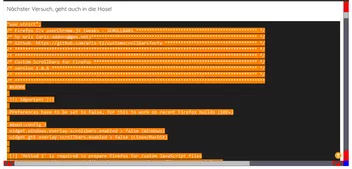
Wie man unschwer erkennen kann, die Symbole werden nicht an die Größe angepasst!
Die Schaltfächen (Buttons) werden nicht richtig ....
Und die Positionen der Buttons stimmen ja auch nicht.
Gibt es hier on Board denn wirklich kein JavaScipt-Experten?
Sören Hentzschel, 2002Andreas, .DeJaVu, Speravir, Endor.
Ihr seid hier die aktivsten User, kann jemand von Euch mir auf die Sprünge helfen,
oder kennt jemand von Euch jemanden, der sich mit Javascript auskennt?
Denn ich bin mit meiner "Unwissendheit" nun föllig am Ende
und habe keine Ahnung was ich noch ausprobieren könnte.
Ich bin mir absolut sicher, dass das Script so umgeschrieben werden kann,
dass es wie von mir gewünscht funktioniert.
Jedoch reichen meine "Erkenntnisse" einfach nicht aus um die zu bewerkstelligen.
Ich könnnt 
Und ich habe mir so eine Mühe gegeben.
Habe nun noch etwas weiter, nach dem Motto, denn Sie weiß nicht, was Sie tut, gebastelt.
Das Script schaut nun wie folgt aus.
"use strict";
/* Firefox 57+ userChrome.js tweaks - SCROLLBARS ********************************************** */
/* by Aris (aris-addons@gmx.net)*************************************************************** */
/* Github: https://github.com/aris-t2/customscrollbarsforfx *********************************** */
/* ******************************************************************************************** */
/* ******************************************************************************************** */
/* Custom Scrollbars for Firefox ************************************************************** */
/* version 1.0.6 ****************************************************************************** */
/* ******************************************************************************************** */
/* ***********************************************************************************************
 README

 !!! Important !!!

 Preferences have to be set to false, for this to work on recent Firefox builds (102+)

 about:config >
 widget.windows.overlay-scrollbars.enabled > false (Windows)
 widget.gtk.overlay-scrollbars.enabled > false (Linux/MacOSX)


 [!] 'Method 2' is required to prepare Firefox for custom JavaScript files
 [!] 'custom_scrollbars.uc.js' file belongs into Firefox profiles 'chrome' folder!
 -> finding profile folder: address bar > about:profiles > Root Directory > Open Folder
 -> add file to \chrome\ folder (create one, if needed)
 [!] STARTUP CACHE HAS TO BE DELETED AFTER EVERY CHANGE!
 -> finding 'startupCache' folder: address bar > about:profiles > Local Directory > Open Folder > startupCache
 -> close Firefox
 -> delete 'startupCache' folders content
 ENABLING options > set var to true
 DISABLING options > set var to false
 Modifying appearance > change values
 - color - name: red, blue, transparent / hex code: #33CCFF, #FFF
 - color - rgb(a): rgba(0,0,255,0.8) / hsl(a): hsla(240,100%,50%,0.8)
 - numbers: 1, 2, 3 ... 10, 11, 12 ...
 - opacity: 0.0 to 1.0 e.g. 1.4, 1,75
 - gradients: linear-gradient(direction, color, color, color)
 - gradients example: linear-gradient(to right, blue, #33CCFF, rgba(0,0,255,0.8))
 - predefined gradients: transparent,rgba(255,255,255,0.5),transparent -> transparent,rgba(255,255,255,0.0),transparent
 - button size with arrow (descriptions for vertical scrollbars - analogous for horizontal scrollbars)
 -- 1: space above arrow = arrow height
 -- 1.5: space above arrow = 0.5 * arrow height
 -- 2: no space above arrow

 NOTE
 - This is a tiny collection of scrollbar tweaks, not a port of 'NewScrollbars' add-on!
 - Small scrollbar width values will corrupt some parts of the ui!

*********************************************************************************************** */
// GENERAL SCROLLBAR SETTINGS
var hide_scrollbars = false; // default: hide_scrollbars = false
var hide_scrollbar_buttons = false; // default: hide_scrollbar_buttons = false
var custom_scrollbar_size = true; // default: custom_scrollbar_size = false
var custom_scrollbar_size_value = 16; // in px // default: custom_scrollbar_size_value = 17
var custom_scrollbar_opacity = false; // default: custom_scrollbar_opacity = false
var custom_opacity_value = "1.0"; // default: custom_opacity_value = "1.0"
// floating scrollbars
var enable_scrollbars_on_top_of_webcontent = false; // default: enable_scrollbars_on_top_of_webcontent = false // uses 'custom_scrollbar_size_value' inside its code
// custom scrollbars
var enable_custom_scrollbars = true; // default: enable_custom_scrollbars = true
// CUSTOM SCROLLBAR SETTINGS ("custom_scrollbar_" --> "cs_")
var cs_thumb_border = 1; // in px // default: cs_thumb_border = 0
var cs_thumb_roundness = 0; // in px // default: cs_thumb_roundness = 0
var cs_buttons_roundness = 0; // in px // default: cs_buttons_roundness = 0
var cs_buttons_as_arrows = false; // default: cs_buttons_as_arrows = false // uses 'custom_scrollbar_size_value' inside its code
var cs_arrows_on_buttons = true; // default: cs_arrows_on_buttons = true // uses 'custom_scrollbar_size_value' inside its code
// button size with arrow - 1: space above arrow = arrow height // 1.5: space above arrow = 0.5 * arrow height // 2: no space above arrow
var cs_arrows_on_buttons_buttons_size = 1; // default: cs_arrows_on_buttons_buttons_size = 1.5
// 'flat' scrollbars
var cs_ignore_color_gradients = false; // default: cs_ignore_color_gradients = false
var cs_thumb_minimal_size = 12; // in px
// CUSTOM SCROLLBAR COLORS/GRADIENTS
// - background
var cs_background_color = "#5b5b66"; // default: cs_background_color = "#DDDDDD"
var cs_background_image_vertical = "unset"; // default: cs_background_image_vertical = "unset"
var cs_background_image_horizontal = "unset"; // default: cs_background_image_horizontal = "unset"
// - corner
var cs_corner_background_color = "#DDDDDD"; // default: cs_corner_background_color = "#DDDDDD"
var cs_corner_background_image = "unset"; // default: cs_corner_background_image = "unset"
// - thumb/slider
var cs_thumb_color = "#bfbfbf"; // default: cs_thumb_color = "#33CCFF"
var cs_thumb_image_vertical = "unset"; // default: cs_thumb_image_vertical = "unset"
var cs_thumb_image_horizontal = "unset"; // default: cs_thumb_image_horizontal = "unset"
var cs_thumb_hover_color = "orange"; // default: cs_thumb_hover_color = "#66FFFF"
var cs_thumb_hover_image_vertical = "unset"; // default: cs_thumb_hover_image_vertical = "unset"
var cs_thumb_hover_image_horizontal = "unset"; // default: cs_thumb_hover_image_horizontal = "unset"
var cs_thumb_border_color = "#5b5b66"; // default: cs_thumb_border_color = "#33CCFF"
var cs_thumb_hover_border_color = "orange";
// - buttons
var cs_buttons_color = "#8c8ccf"; // default: cs_buttons_color = "#66FFFF"
var cs_buttons_image_vertical = "unset"; // default: cs_buttons_image_vertical = "unset"
var cs_buttons_image_horizontal = "unset"; // default: cs_buttons_image_horizontal = "unset"
var cs_buttons_hover_color = "#bfbfbf"; // default: cs_buttons_hover_color = "#33CCFF"
var cs_buttons_hover_image_vertical = "unset"; // default: cs_buttons_hover_image_vertical = "unset"
var cs_buttons_hover_image_horizontal = "unset"; // default: cs_buttons_hover_image_horizontal = "unset"
// - button arrows
var cs_arrows_on_buttons_color = "#5b5b66"; // default: cs_arrows_on_buttons_color = "#33CCFF"
var cs_arrows_on_buttons_hover_color = "orange"; // default: cs_arrows_on_buttons_hover_color = "#66FFFF"
// unset background image color gradients -> flat scrollbars
if(cs_ignore_color_gradients==true)
    cs_background_image_vertical
    =cs_background_image_horizontal
    =cs_corner_background_image=cs_thumb_image_vertical
    =cs_thumb_image_horizontal
    =cs_thumb_hover_image_vertical
    =cs_thumb_hover_image_horizontal
    =cs_buttons_image_vertical
    =cs_buttons_image_horizontal
    =cs_buttons_hover_image_vertical
    =cs_buttons_hover_image_horizontal
    ="unset";
/* ******************************************************************************************** */
/* ******************************************************************************************** */
/* ******************************************************************************************** */
// Scrollbar code
Components.utils.import("resource://gre/modules/Services.jsm");
var ss =  Components.classes["@mozilla.org/content/style-sheet-service;1"].getService(Components.interfaces.nsIStyleSheetService);
var custom_scrollbars = {
    init: function() {
    var uri = Services.io.newURI("data:text/css;charset=utf-8," + encodeURIComponent('\
    \
    @namespace html url("http://www.w3.org/1999/xhtml");\
    \
    scrollbar, scrollcorner, scrollbar thumb, scrollbar scrollbarbutton[type="increment"], scrollbar scrollbarbutton[type="decrement"] {\
      -moz-appearance: none !important;\
      appearance: none !important;\
    }\
    scrollbar {\
      background-color: '+cs_background_color+' !important;\
    }\
    scrollbar[orient="vertical"] {\
      background-image: '+cs_background_image_vertical+' !important;\
    }\
    scrollbar[orient="horizontal"] {\
      background-image: '+cs_background_image_horizontal+' !important;\
    }\
    scrollcorner {\
      background-color: '+cs_corner_background_color+' !important;\
      background-image: '+cs_corner_background_image+' !important;\
    }\
    scrollbar thumb {\
      background-color: '+cs_thumb_color+' !important;\
      border-radius: '+cs_thumb_roundness+'px !important;\
      border: '+cs_thumb_border+'px solid '+cs_thumb_border_color+' !important;\
    }\
    scrollbar thumb[orient="vertical"] {\
      background-image: '+cs_thumb_image_vertical+' !important;\
      min-height: '+(cs_thumb_minimal_size+cs_thumb_roundness+cs_thumb_border)+'px !important;\
    }\
    scrollbar thumb[orient="horizontal"] {\
      background-image: '+cs_thumb_image_horizontal+' !important;\
      min-width: '+(cs_thumb_minimal_size+cs_thumb_roundness+cs_thumb_border)+'px !important;\
    }\
    scrollbar thumb:hover, scrollbar thumb:active {\
      background-color: '+cs_thumb_hover_color+' !important;\
    }\
    scrollbar thumb[orient="vertical"]:hover, scrollbar thumb[orient="vertical"]:active {\
      background-image: '+cs_thumb_hover_image_vertical+' !important;\
    }\
    scrollbar thumb[orient="horizontal"]:hover, scrollbar thumb[orient="horizontal"]:active {\
      background-image: '+cs_thumb_hover_image_horizontal+' !important;\
    }\
    scrollbar[orient="vertical"] scrollbarbutton[type="increment"] {\
        mask-image: url("file:///C:/Users/.../chrome/icons/Chevron-down,_Web_Fundamentals.svg") !important;\
        mask-repeat: no-repeat;\
        mask-position: center;\
        display: block !important;\
        background-color: red !important;\
        content: ',' !important;\
        width: 16px !important;\
        height: 16px !important;\
    }\
    scrollbar[orient="vertical"] scrollbarbutton[type="decrement"] {\
        mask-image: url("file:///C:/Users/.../chrome/icons/Chevron-up,_Web_Fundamentals.svg") !important;\
        mask-repeat: no-repeat;\
        mask-position: center;\
        display: block !important;\
        background-color: red !important;\
        content: ',' !important;\
        width: 16px !important;\
        height: 16px !important;\
    }\
    scrollbar[orient="horizontal"] scrollbarbutton[type="increment"] {\
        mask-image: url("file:///C:/Users/.../chrome/icons/Chevron-left,_Web_Fundamentals.svg") !important;\
        mask-repeat: no-repeat;\
        mask-position: center;\
        display: block !important;\
        background-color: red !important;\
        content: ',' !important;\
        width: 16px !important;\
        height: 16px !important;\
    }\
    scrollbar[orient="horizontal"] scrollbarbutton[type="decrement"] {\
        mask-image: url("file:///C:/Users/.../chrome/icons/Chevron-right,_Web_Fundamentals.svg") !important;\
        mask-repeat: no-repeat;\
        mask-position: center;\
        display: block !important;\
        background-color: red !important;\
        content: ',' !important;\
        width: 16px !important;\
        height: 16px !important;\
    }\
    scrollbar scrollbarbutton:hover {\
      background-color: '+cs_buttons_hover_color+' !important;\
    }\
    scrollbar[orient="vertical"] scrollbarbutton:hover {\
      background-image: '+cs_buttons_hover_image_vertical+' !important;\
    }\
    scrollbar[orient="horizontal"] scrollbarbutton:hover {\
      background-image: '+cs_buttons_hover_image_horizontal+' !important;\
    }\
    '), null, null);
    ss.loadAndRegisterSheet(uri, ss.AGENT_SHEET);
    }
};
var cs_scrollbars_scrollbar_button_arrows = {
  init: function() {
  var uri = Services.io.newURI("data:text/css;charset=utf-8," + encodeURIComponent('\
    \
    @namespace html url("http://www.w3.org/1999/xhtml");\
    \
    scrollbar scrollbarbutton, \
    scrollbar[orient="vertical"] scrollbarbutton[type="increment"],\
    scrollbar[orient="vertical"] scrollbarbutton[type="decrement"],\
    scrollbar[orient="horizontal"] scrollbarbutton[type="increment"],\
    scrollbar[orient="horizontal"] scrollbarbutton[type="decrement"],\
    scrollbar[orient="vertical"] scrollbarbutton:hover,\
    scrollbar[orient="horizontal"] scrollbarbutton:hover {\
      background-color: unset !important;\
      background-image: unset !important;\
      border-radius: 0px !important;\
    }\
    scrollbar[orient="vertical"] > scrollbarbutton[type="increment"] {\
      height: 16px !important;\
      width: 16px !important;\
    }\
    scrollbar[orient="vertical"] > scrollbarbutton[type="decrement"]{\
        height: 16px !important;\
        width: 16px !important;\
      }\
    scrollbar[orient="horizontal"] > scrollbarbutton[type="increment"] {\
        height: 16px !important;\
        width: 16px !important;\
    }\
    scrollbar[orient="horizontal"] > scrollbarbutton[type="decrement"] {\
        height: 16px !important;\
        width: 16px !important;\
    }\
    \
  '), null, null);
  ss.loadAndRegisterSheet(uri, ss.AGENT_SHEET);
  }
};
var cs_scrollbars_arrows_on_buttons = {
  init: function() {
  var uri = Services.io.newURI("data:text/css;charset=utf-8," + encodeURIComponent('\
    \
    @namespace html url("http://www.w3.org/1999/xhtml");\
    \
    scrollbar scrollbarbutton, \
    scrollbar[orient="vertical"] scrollbarbutton[type="increment"],\
    scrollbar[orient="vertical"] scrollbarbutton[type="decrement"],\
    scrollbar[orient="horizontal"] scrollbarbutton[type="increment"],\
    scrollbar[orient="horizontal"] scrollbarbutton[type="decrement"],\
    scrollbar[orient="vertical"] scrollbarbutton:hover,\
    scrollbar[orient="horizontal"] scrollbarbutton:hover {\
      border-radius: 0px !important;\
    }\
    \
    scrollbar[orient="vertical"] > scrollbarbutton[type="increment"] {\
        height: 16px !important;\
        width: 16px !important;\
    }\
    scrollbar[orient="vertical"] > scrollbarbutton[type="decrement"] {\
        height: 16px !important;\
        width: 16px !important;\
    }\
    scrollbar[orient="horizontal"] > scrollbarbutton[type="increment"] {\
        height: 16px !important;\
        width: 16px !important;\
    }\
    scrollbar[orient="horizontal"] > scrollbarbutton[type="decrement"] {\
        height: 16px !important;\
        width: 16px !important;\
    }\
  '), null, null);
  ss.loadAndRegisterSheet(uri, ss.AGENT_SHEET);
  }
};
var scrollbar_buttons = {
  init: function() {
  var uri = Services.io.newURI("data:text/css;charset=utf-8," + encodeURIComponent('\
    \
    @namespace html url("http://www.w3.org/1999/xhtml");\
    \
    scrollbar scrollbarbutton {\
      opacity: 0 !important;\
    }\
    scrollbar[orient="vertical"] scrollbarbutton[type="increment"] {\
      min-height: 1px !important;\
      height: 1px !important;\
      max-height: 1px !important;\
    }\
    scrollbar[orient="vertical"] scrollbarbutton[type="decrement"] {\
        min-height: 1px !important;\
        height: 1px !important;\
        max-height: 1px !important;\
      }\
    scrollbar[orient="horizontal"] scrollbarbutton[type="increment"] {\
      min-width: 1px !important;\
      width: 1px !important;\
      max-width: 1px !important;\
    }\
    scrollbar[orient="horizontal"] scrollbarbutton[type="decrement"] {\
        min-width: 1px !important;\
        width: 1px !important;\
        max-width: 1px !important;\
      }\
    \
  '), null, null);
  ss.loadAndRegisterSheet(uri, ss.AGENT_SHEET);
  }
};
var scrollbar_size = {
  init: function() {
  var uri = Services.io.newURI("data:text/css;charset=utf-8," + encodeURIComponent('\
    \
    @namespace html url("http://www.w3.org/1999/xhtml");\
    \
    scrollbar[orient="vertical"] scrollbarbutton[type="increment"] {\
      min-width: 0 !important;\
      width: 16px !important;\
    }\
    scrollbar[orient="vertical"] scrollbarbutton[type="decrement"] {\
        min-width: 0 !important;\
        width: 16px !important;\
      }\
    scrollbar[orient="horizontal"] scrollbarbutton[type="increment"] {\
      min-height: 0 !important;\
      height: 16px !important;\
    }\
    scrollbar[orient="horizontal"] scrollbarbutton[type="decrement"] {\
        min-height: 0 !important;\
        height: 16px !important;\
      }\
    \
  '), null, null);
  ss.loadAndRegisterSheet(uri, ss.AGENT_SHEET);
  }
};
var floating_scrollbars = {
  init: function() {
  var uri = Services.io.newURI("data:text/css;charset=utf-8," + encodeURIComponent('\
    \
    @namespace html url("http://www.w3.org/1999/xhtml");\
    \
    scrollbar {\
      position: relative !important;\
      z-index: 1000000000 !important;\
    }\
    scrollbar[orient="vertical"],\
    scrollbar[orient="horizontal"],\
    scrollbar, scrollcorner {\
      background-color: transparent !important; \
      background-image: unset !important; \
    }\
    scrollbar[orient="vertical"] {\
      margin-inline-start: -'+custom_scrollbar_size_value+'px !important;\
      width: '+custom_scrollbar_size_value+'px !important;\
    }\
    scrollbar[orient="horizontal"] {\
      margin-top: -'+custom_scrollbar_size_value+'px !important;\
      height: '+custom_scrollbar_size_value+'px !important;\
    }\
    \
  '), null, null);
  ss.loadAndRegisterSheet(uri, ss.AGENT_SHEET);
  }
};
var scrollbar_opacity = {
  init: function() {
  var uri = Services.io.newURI("data:text/css;charset=utf-8," + encodeURIComponent('\
    \
    @namespace html url("http://www.w3.org/1999/xhtml");\
    \
    scrollbar {\
      opacity: '+custom_opacity_value+' !important;\
    }\
    \
  '), null, null);
  ss.loadAndRegisterSheet(uri, ss.AGENT_SHEET);
  }
};
var remove_scrollbars = {
  init: function() {
  var uri = Services.io.newURI("data:text/css;charset=utf-8," + encodeURIComponent('\
    \
    @namespace html url("http://www.w3.org/1999/xhtml");\
    \
    scrollbar, scrollcorner {\
      display: none !important;\
      visibility: collapse !important;\
    }\
    \
  '), null, null);
  ss.loadAndRegisterSheet(uri, ss.AGENT_SHEET);
  }
};
// enable settings as configured above
if(enable_custom_scrollbars==true) custom_scrollbars.init();
if(cs_buttons_as_arrows==true && hide_scrollbars==false) cs_scrollbars_scrollbar_button_arrows.init();
if(cs_arrows_on_buttons==true && cs_buttons_as_arrows==false && hide_scrollbars==false) cs_scrollbars_arrows_on_buttons.init();
if(hide_scrollbar_buttons==true) scrollbar_buttons.init();
if(custom_scrollbar_size==true) scrollbar_size.init();
if(enable_scrollbars_on_top_of_webcontent==true) floating_scrollbars.init();
if(custom_scrollbar_opacity==true) scrollbar_opacity.init();
if(hide_scrollbars==true) remove_scrollbars.init();Jedoch, wie sollte es anders sein, habe ich keine Ahnung ....
warum das Script tut was es tut.
So will ich das nicht. 
Der Button oben ist doppelt so lang (16*32), warum?

Und das Symbol ist auch das Falsche.
Unten schaut es schon besser aus!
Button hat richtige Größe und richtiges Symbol
und reagiert auch richtig

Und in der Scrollbar unten (left-right) haben die Buttons zwar die richtige Größe
und reagieren auch richtig,
aber die Symbole fehlen. 
Habe angefangen auch etwas zu entmüllen!
// GENERAL SCROLLBAR SETTINGS
var hide_scrollbars = false; // default: hide_scrollbars = false
var hide_scrollbar_buttons = false; // default: hide_scrollbar_buttons = false
var custom_scrollbar_size = true; // default: custom_scrollbar_size = false
var custom_scrollbar_size_value = 16; // in px // default: custom_scrollbar_size_value = 17
var custom_scrollbar_opacity = false; // default: custom_scrollbar_opacity = false
var custom_opacity_value = "1.0"; // default: custom_opacity_value = "1.0"
// floating scrollbars
var enable_scrollbars_on_top_of_webcontent = false; // default: enable_scrollbars_on_top_of_webcontent = false // uses 'custom_scrollbar_size_value' inside its code
// custom scrollbars
var enable_custom_scrollbars = true; // default: enable_custom_scrollbars = true
// CUSTOM SCROLLBAR SETTINGS ("custom_scrollbar_" --> "cs_")
var cs_thumb_border = 1; // in px // default: cs_thumb_border = 0
var cs_thumb_roundness = 0; // in px // default: cs_thumb_roundness = 0
var cs_buttons_roundness = 0; // in px // default: cs_buttons_roundness = 0
var cs_buttons_as_arrows = false; // default: cs_buttons_as_arrows = false // uses 'custom_scrollbar_size_value' inside its code
var cs_arrows_on_buttons = true; // default: cs_arrows_on_buttons = true // uses 'custom_scrollbar_size_value' inside its code
// button size with arrow - 1: space above arrow = arrow height // 1.5: space above arrow = 0.5 * arrow height // 2: no space above arrow
var cs_arrows_on_buttons_buttons_size = 1; // default: cs_arrows_on_buttons_buttons_size = 1.5
// 'flat' scrollbars
var cs_ignore_color_gradients = false; // default: cs_ignore_color_gradients = false
var cs_thumb_minimal_size = 12; // in px
// CUSTOM SCROLLBAR COLORS/GRADIENTS
// - background
var cs_background_color = "#5b5b66"; // default: cs_background_color = "#DDDDDD"
var cs_background_image_vertical = "unset"; // default: cs_background_image_vertical = "unset"
var cs_background_image_horizontal = "unset"; // default: cs_background_image_horizontal = "unset"
// - corner
var cs_corner_background_color = "blue"; // default: cs_corner_background_color = "#DDDDDD"
var cs_corner_background_image = "unset"; // default: cs_corner_background_image = "unset"
// - thumb/slider
var cs_thumb_color = "#bfbfbf"; // default: cs_thumb_color = "#33CCFF"
var cs_thumb_image_vertical = "unset"; // default: cs_thumb_image_vertical = "unset"
var cs_thumb_image_horizontal = "unset"; // default: cs_thumb_image_horizontal = "unset"
var cs_thumb_hover_color = "orange"; // default: cs_thumb_hover_color = "#66FFFF"
var cs_thumb_hover_image_vertical = "unset"; // default: cs_thumb_hover_image_vertical = "unset"
var cs_thumb_hover_image_horizontal = "unset"; // default: cs_thumb_hover_image_horizontal = "unset"
var cs_thumb_border_color = "#5b5b66"; // default: cs_thumb_border_color = "#33CCFF" "#5b5b66"
// - buttons
var cs_buttons_image_vertical = "unset"; // default: cs_buttons_image_vertical = "unset"
var cs_buttons_image_horizontal = "unset"; // default: cs_buttons_image_horizontal = "unset"
var cs_buttons_hover_color = "#bfbfbf"; // default: cs_buttons_hover_color = "#33CCFF"
var cs_buttons_hover_image_vertical = "unset"; // default: cs_buttons_hover_image_vertical = "unset"
var cs_buttons_hover_image_horizontal = "unset"; // default: cs_buttons_hover_image_horizontal = "unset"
// unset background image color gradients -> flat scrollbars
if(cs_ignore_color_gradients==true)
    cs_background_image_vertical
    =cs_background_image_horizontal
    =cs_corner_background_image=cs_thumb_image_vertical
    =cs_thumb_image_horizontal
    =cs_thumb_hover_image_vertical
    =cs_thumb_hover_image_horizontal
    =cs_buttons_image_vertical
    =cs_buttons_image_horizontal
    =cs_buttons_hover_image_vertical
    =cs_buttons_hover_image_horizontal
="unset";Nun geht es aber .... 
Bin eh mit meinem Latein am Ende.
Magst Du bitte Deinen kompletten Code einstellen?
Damit meinereiner immer alle von Dir getroffenen Einstellungen zum Nachvollziehen hat.
Mich interessiert diese Bastelei auch sehr und ich würde mir dann dafür einen extra Bastel-FF einrichten.
bis später...
"use strict";
/* Firefox 57+ userChrome.js tweaks - SCROLLBARS ********************************************** */
/* by Aris (aris-addons@gmx.net)*************************************************************** */
/* Github: https://github.com/aris-t2/customscrollbarsforfx *********************************** */
/* ******************************************************************************************** */
/* ******************************************************************************************** */
/* Custom Scrollbars for Firefox ************************************************************** */
/* version 1.0.6 ****************************************************************************** */
/* ******************************************************************************************** */
/* ***********************************************************************************************
 README

 !!! Important !!!

 Preferences have to be set to false, for this to work on recent Firefox builds (102+)

 about:config >
 widget.windows.overlay-scrollbars.enabled > false (Windows)
 widget.gtk.overlay-scrollbars.enabled > false (Linux/MacOSX)


 [!] 'Method 2' is required to prepare Firefox for custom JavaScript files
 [!] 'custom_scrollbars.uc.js' file belongs into Firefox profiles 'chrome' folder!
 -> finding profile folder: address bar > about:profiles > Root Directory > Open Folder
 -> add file to \chrome\ folder (create one, if needed)
 [!] STARTUP CACHE HAS TO BE DELETED AFTER EVERY CHANGE!
 -> finding 'startupCache' folder: address bar > about:profiles > Local Directory > Open Folder > startupCache
 -> close Firefox
 -> delete 'startupCache' folders content
 ENABLING options > set var to true
 DISABLING options > set var to false
 Modifying appearance > change values
 - color - name: red, blue, transparent / hex code: #33CCFF, #FFF
 - color - rgb(a): rgba(0,0,255,0.8) / hsl(a): hsla(240,100%,50%,0.8)
 - numbers: 1, 2, 3 ... 10, 11, 12 ...
 - opacity: 0.0 to 1.0 e.g. 1.4, 1,75
 - gradients: linear-gradient(direction, color, color, color)
 - gradients example: linear-gradient(to right, blue, #33CCFF, rgba(0,0,255,0.8))
 - predefined gradients: transparent,rgba(255,255,255,0.5),transparent -> transparent,rgba(255,255,255,0.0),transparent
 - button size with arrow (descriptions for vertical scrollbars - analogous for horizontal scrollbars)
 -- 1: space above arrow = arrow height
 -- 1.5: space above arrow = 0.5 * arrow height
 -- 2: no space above arrow

 NOTE
 - This is a tiny collection of scrollbar tweaks, not a port of 'NewScrollbars' add-on!
 - Small scrollbar width values will corrupt some parts of the ui!

*********************************************************************************************** */
// GENERAL SCROLLBAR SETTINGS
var hide_scrollbars = false; // default: hide_scrollbars = false
var hide_scrollbar_buttons = false; // default: hide_scrollbar_buttons = false
var custom_scrollbar_size = true; // default: custom_scrollbar_size = false
var custom_scrollbar_size_value = 17; // in px // default: custom_scrollbar_size_value = 17
var custom_scrollbar_opacity = false; // default: custom_scrollbar_opacity = false
var custom_opacity_value = "1.0"; // default: custom_opacity_value = "1.0"
// floating scrollbars
var enable_scrollbars_on_top_of_webcontent = false; // default: enable_scrollbars_on_top_of_webcontent = false // uses 'custom_scrollbar_size_value' inside its code
// custom scrollbars
var enable_custom_scrollbars = true; // default: enable_custom_scrollbars = true
// CUSTOM SCROLLBAR SETTINGS ("custom_scrollbar_" --> "cs_")
var cs_thumb_border = 1; // in px // default: cs_thumb_border = 0
var cs_thumb_roundness = 0; // in px // default: cs_thumb_roundness = 0
var cs_buttons_roundness = 0; // in px // default: cs_buttons_roundness = 0
var cs_buttons_as_arrows = true; // default: cs_buttons_as_arrows = false // uses 'custom_scrollbar_size_value' inside its code
var cs_arrows_on_buttons = false; // default: cs_arrows_on_buttons = true // uses 'custom_scrollbar_size_value' inside its code
// button size with arrow - 1: space above arrow = arrow height // 1.5: space above arrow = 0.5 * arrow height // 2: no space above arrow
var cs_arrows_on_buttons_buttons_size = 1.5; // default: cs_arrows_on_buttons_buttons_size = 1.5
// 'flat' scrollbars
var cs_ignore_color_gradients = false; // default: cs_ignore_color_gradients = false
var cs_thumb_minimal_size = 12; // in px
// CUSTOM SCROLLBAR COLORS/GRADIENTS
// - background
var cs_background_color = "#5b5b66"; // default: cs_background_color = "#DDDDDD"
var cs_background_image_vertical = "unset"; // default: cs_background_image_vertical = "unset"
var cs_background_image_horizontal = "unset"; // default: cs_background_image_horizontal = "unset"
// - corner
var cs_corner_background_color = "#DDDDDD"; // default: cs_corner_background_color = "#DDDDDD"
var cs_corner_background_image = "unset"; // default: cs_corner_background_image = "unset"
// - thumb/slider
var cs_thumb_color = "#bfbfbf"; // default: cs_thumb_color = "#33CCFF"
var cs_thumb_image_vertical = "unset"; // default: cs_thumb_image_vertical = "unset"
var cs_thumb_image_horizontal = "unset"; // default: cs_thumb_image_horizontal = "unset"
var cs_thumb_hover_color = "orange"; // default: cs_thumb_hover_color = "#66FFFF"
var cs_thumb_hover_image_vertical = "unset"; // default: cs_thumb_hover_image_vertical = "unset"
var cs_thumb_hover_image_horizontal = "unset"; // default: cs_thumb_hover_image_horizontal = "unset"
var cs_thumb_border_color = "#5b5b66"; // default: cs_thumb_border_color = "#33CCFF"
// - buttons
var cs_buttons_color = "#bfbfbf"; // default: cs_buttons_color = "#66FFFF"
var cs_buttons_image_vertical = "unset"; // default: cs_buttons_image_vertical = "unset"
var cs_buttons_image_horizontal = "unset"; // default: cs_buttons_image_horizontal = "unset"
var cs_buttons_hover_color = "#bfbfbf"; // default: cs_buttons_hover_color = "#33CCFF"
var cs_buttons_hover_image_vertical = "unset"; // default: cs_buttons_hover_image_vertical = "unset"
var cs_buttons_hover_image_horizontal = "unset"; // default: cs_buttons_hover_image_horizontal = "unset"
// - button arrows
var cs_arrows_on_buttons_color = "#5b5b66"; // default: cs_arrows_on_buttons_color = "#33CCFF"
var cs_arrows_on_buttons_hover_color = "orange"; // default: cs_arrows_on_buttons_hover_color = "#66FFFF"
// unset background image color gradients -> flat scrollbars
if(cs_ignore_color_gradients==true)
    cs_background_image_vertical
    =cs_background_image_horizontal
    =cs_corner_background_image=cs_thumb_image_vertical
    =cs_thumb_image_horizontal
    =cs_thumb_hover_image_vertical
    =cs_thumb_hover_image_horizontal
    =cs_buttons_image_vertical
    =cs_buttons_image_horizontal
    =cs_buttons_hover_image_vertical
    =cs_buttons_hover_image_horizontal
    ="unset";
/* ******************************************************************************************** */
/* ******************************************************************************************** */
/* ******************************************************************************************** */
// Scrollbar code
Components.utils.import("resource://gre/modules/Services.jsm");
var ss =  Components.classes["@mozilla.org/content/style-sheet-service;1"].getService(Components.interfaces.nsIStyleSheetService);
var custom_scrollbars = {
    init: function() {
    var uri = Services.io.newURI("data:text/css;charset=utf-8," + encodeURIComponent('\
    \
    @namespace html url("http://www.w3.org/1999/xhtml");\
    \
    scrollbar, scrollcorner, scrollbar thumb, scrollbar scrollbarbutton {\
      -moz-appearance: none !important;\
      appearance: none !important;\
    }\
    scrollbar {\
      background-color: '+cs_background_color+' !important;\
    }\
    scrollbar[orient="vertical"] {\
      background-image: '+cs_background_image_vertical+' !important;\
    }\
    scrollbar[orient="horizontal"] {\
      background-image: '+cs_background_image_horizontal+' !important;\
    }\
    scrollcorner {\
      background-color: '+cs_corner_background_color+' !important;\
      background-image: '+cs_corner_background_image+' !important;\
    }\
    scrollbar thumb {\
      background-color: '+cs_thumb_color+' !important;\
      border-radius: '+cs_thumb_roundness+'px !important;\
      border: '+cs_thumb_border+'px solid '+cs_thumb_border_color+' !important;\
    }\
    scrollbar thumb[orient="vertical"] {\
      background-image: '+cs_thumb_image_vertical+' !important;\
      min-height: '+(cs_thumb_minimal_size+cs_thumb_roundness+cs_thumb_border)+'px !important;\
    }\
    scrollbar thumb[orient="horizontal"] {\
      background-image: '+cs_thumb_image_horizontal+' !important;\
      min-width: '+(cs_thumb_minimal_size+cs_thumb_roundness+cs_thumb_border)+'px !important;\
    }\
    scrollbar thumb:hover, scrollbar thumb:active {\
      background-color: '+cs_thumb_hover_color+' !important;\
    }\
    scrollbar thumb[orient="vertical"]:hover, scrollbar thumb[orient="vertical"]:active {\
      background-image: '+cs_thumb_hover_image_vertical+' !important;\
    }\
    scrollbar thumb[orient="horizontal"]:hover, scrollbar thumb[orient="horizontal"]:active {\
      background-image: '+cs_thumb_hover_image_horizontal+' !important;\
    }\
    scrollbar scrollbarbutton {\
      background-color: '+cs_buttons_color+' !important;\
      border-radius: '+cs_buttons_roundness+'px !important;\
    }\
    scrollbar[orient="vertical"] scrollbarbutton {\
      background-image: '+cs_buttons_image_vertical+' !important;\
    }\
    scrollbar[orient="horizontal"] scrollbarbutton {\
      background-image: '+cs_buttons_image_horizontal+' !important;\
    }\
    scrollbar scrollbarbutton:hover {\
      background-color: '+cs_buttons_hover_color+' !important;\
    }\
    scrollbar[orient="vertical"] scrollbarbutton:hover {\
      background-image: '+cs_buttons_hover_image_vertical+' !important;\
    }\
    scrollbar[orient="horizontal"] scrollbarbutton:hover {\
      background-image: '+cs_buttons_hover_image_horizontal+' !important;\
    }\
    '), null, null);
    ss.loadAndRegisterSheet(uri, ss.AGENT_SHEET);
    }
};
var cs_scrollbars_scrollbar_button_arrows = {
  init: function() {
  var uri = Services.io.newURI("data:text/css;charset=utf-8," + encodeURIComponent('\
    \
    @namespace html url("http://www.w3.org/1999/xhtml");\
    \
    scrollbar scrollbarbutton, \
    scrollbar[orient="vertical"] scrollbarbutton,\
    scrollbar[orient="horizontal"] scrollbarbutton, \
    scrollbar[orient="vertical"] scrollbarbutton:hover,\
    scrollbar[orient="horizontal"] scrollbarbutton:hover {\
      background-color: unset !important;\
      background-image: unset !important;\
      border-radius: 0px !important;\
    }\
    scrollbar[orient="vertical"] > scrollbarbutton {\
      min-height: '+(custom_scrollbar_size_value/cs_arrows_on_buttons_buttons_size)+'px !important;\
      height: '+(custom_scrollbar_size_value/cs_arrows_on_buttons_buttons_size)+'px !important;\
      max-height: '+(custom_scrollbar_size_value/cs_arrows_on_buttons_buttons_size)+'px !important;\
      min-width: '+custom_scrollbar_size_value+'px !important;\
      width: '+custom_scrollbar_size_value+'px !important;\
      max-width: '+custom_scrollbar_size_value+'px !important;\
    }\
    scrollbar[orient="horizontal"] > scrollbarbutton {\
      min-width: '+(custom_scrollbar_size_value/cs_arrows_on_buttons_buttons_size)+'px !important;\
      width: '+(custom_scrollbar_size_value/cs_arrows_on_buttons_buttons_size)+'px !important;\
      max-width: '+(custom_scrollbar_size_value/cs_arrows_on_buttons_buttons_size)+'px !important;\
      min-height: '+custom_scrollbar_size_value+'px !important;\
      height: '+custom_scrollbar_size_value+'px !important;\
      max-height: '+custom_scrollbar_size_value+'px !important;\
    }\
    scrollbar[orient="vertical"] > scrollbarbutton[type="decrement"] {\
        mask-image: url("file:///C:/Users/.../chrome/icons/Chevron-up,_Web_Fundamentals.svg") !important;\
        mask-repeat: no-repeat;\
        mask-position: center;\
        height: 16px !important;\
        width: 16px !important;\
        display: block !important;\
        background-color: red !important;\
        content: ',' !important;\
      }\
      scrollbar[orient="vertical"] > scrollbarbutton[type="decrement"]:hover {\
        background-image: url("file:///C:/Users/.../chrome/icons/favicon_16.svg") !important;\
      }\
      scrollbar[orient="vertical"] > scrollbarbutton[type="increment"] {\
        mask-image: url("file:///C:/Users/.../chrome/icons/Chevron-down,_Web_Fundamentals.svg") !important;\
        mask-repeat: no-repeat;\
        mask-position: center;\
        height: 16px !important;\
        width: 16px !important;\
        display: block !important;\
        background-color: red !important;\
        content: ',' !important;\
      }\
      scrollbar[orient="vertical"] > scrollbarbutton[type="increment"]:hover {\
        background-image: url("file:///C:/Users/.../chrome/icons/favicon_16.svg") !important;\
      }\
    scrollbar[orient="horizontal"] > scrollbarbutton[type="decrement"] {\
      border-top: '+(custom_scrollbar_size_value/2)+'px solid transparent !important;\
      border-bottom: '+(custom_scrollbar_size_value/2)+'px solid transparent !important;\
      border-right: '+(custom_scrollbar_size_value/2)+'px solid '+cs_buttons_color+' !important;\
    }\
    scrollbar[orient="horizontal"] > scrollbarbutton[type="decrement"]:hover {\
      border-right: '+(custom_scrollbar_size_value/2)+'px solid '+cs_buttons_hover_color+' !important;\
    }\
    scrollbar[orient="horizontal"] > scrollbarbutton[type="increment"] {\
      border-top: '+(custom_scrollbar_size_value/2)+'px solid transparent !important;\
      border-bottom: '+(custom_scrollbar_size_value/2)+'px solid transparent !important;\
      border-left: '+(custom_scrollbar_size_value/2)+'px solid '+cs_buttons_color+' !important;\
    }\
    scrollbar[orient="horizontal"] > scrollbarbutton[type="increment"]:hover {\
      border-left: '+(custom_scrollbar_size_value/2)+'px solid '+cs_buttons_hover_color+' !important;\
    }\
    \
  '), null, null);
  ss.loadAndRegisterSheet(uri, ss.AGENT_SHEET);
  }
};
var cs_scrollbars_arrows_on_buttons = {
  init: function() {
  var uri = Services.io.newURI("data:text/css;charset=utf-8," + encodeURIComponent('\
    \
    @namespace html url("http://www.w3.org/1999/xhtml");\
    \
    scrollbar scrollbarbutton, \
    scrollbar[orient="vertical"] scrollbarbutton,\
    scrollbar[orient="horizontal"] scrollbarbutton, \
    scrollbar[orient="vertical"] scrollbarbutton:hover,\
    scrollbar[orient="horizontal"] scrollbarbutton:hover {\
      border-radius: 0px !important;\
    }\
    \
    scrollbar[orient="vertical"] > scrollbarbutton {\
      min-height: '+(custom_scrollbar_size_value/cs_arrows_on_buttons_buttons_size)+'px !important;\
      height: '+(custom_scrollbar_size_value/cs_arrows_on_buttons_buttons_size)+'px !important;\
      max-height: '+(custom_scrollbar_size_value/cs_arrows_on_buttons_buttons_size)+'px !important;\
      min-width: '+custom_scrollbar_size_value+'px !important;\
      width: '+custom_scrollbar_size_value+'px !important;\
      max-width: '+custom_scrollbar_size_value+'px !important;\
    }\
    scrollbar[orient="horizontal"] > scrollbarbutton {\
      min-width: '+(custom_scrollbar_size_value/cs_arrows_on_buttons_buttons_size)+'px !important;\
      width: '+(custom_scrollbar_size_value/cs_arrows_on_buttons_buttons_size)+'px !important;\
      max-width: '+(custom_scrollbar_size_value/cs_arrows_on_buttons_buttons_size)+'px !important;\
      min-height: '+custom_scrollbar_size_value+'px !important;\
      height: '+custom_scrollbar_size_value+'px !important;\
      max-height: '+custom_scrollbar_size_value+'px !important;\
    }\
    scrollbar[orient="vertical"] > scrollbarbutton[type="decrement"] {\
      border-left: '+(custom_scrollbar_size_value/2)+'px solid transparent !important;\
      border-right: '+(custom_scrollbar_size_value/2)+'px solid transparent !important;\
      border-bottom: '+(custom_scrollbar_size_value/2)+'px solid '+cs_arrows_on_buttons_color+' !important;\
    }\
    scrollbar[orient="vertical"] > scrollbarbutton[type="decrement"]:hover {\
      border-bottom: '+(custom_scrollbar_size_value/2)+'px solid '+cs_arrows_on_buttons_hover_color+' !important;\
    }\
    scrollbar[orient="vertical"] > scrollbarbutton[type="increment"] {\
      border-left: '+(custom_scrollbar_size_value/2)+'px solid transparent !important;\
      border-right: '+(custom_scrollbar_size_value/2)+'px solid transparent !important;\
      border-top: '+(custom_scrollbar_size_value/2)+'px solid '+cs_arrows_on_buttons_color+' !important;\
    }\
    scrollbar[orient="vertical"] > scrollbarbutton[type="increment"]:hover {\
      border-top: '+(custom_scrollbar_size_value/2)+'px solid '+cs_arrows_on_buttons_hover_color+' !important;\
    }\
    scrollbar[orient="horizontal"] > scrollbarbutton[type="decrement"] {\
      border-top: '+(custom_scrollbar_size_value/2)+'px solid transparent !important;\
      border-bottom: '+(custom_scrollbar_size_value/2)+'px solid transparent !important;\
      border-right: '+(custom_scrollbar_size_value/2)+'px solid '+cs_arrows_on_buttons_color+' !important;\
    }\
    scrollbar[orient="horizontal"] > scrollbarbutton[type="decrement"]:hover {\
      border-right: '+(custom_scrollbar_size_value/2)+'px solid '+cs_arrows_on_buttons_hover_color+' !important;\
    }\
    scrollbar[orient="horizontal"] > scrollbarbutton[type="increment"] {\
      border-top: '+(custom_scrollbar_size_value/2)+'px solid transparent !important;\
      border-bottom: '+(custom_scrollbar_size_value/2)+'px solid transparent !important;\
      border-left: '+(custom_scrollbar_size_value/2)+'px solid '+cs_arrows_on_buttons_color+' !important;\
    }\
    scrollbar[orient="horizontal"] > scrollbarbutton[type="increment"]:hover {\
      border-left: '+(custom_scrollbar_size_value/2)+'px solid '+cs_arrows_on_buttons_hover_color+' !important;\
    }\
    \
  '), null, null);
  ss.loadAndRegisterSheet(uri, ss.AGENT_SHEET);
  }
};
var scrollbar_buttons = {
  init: function() {
  var uri = Services.io.newURI("data:text/css;charset=utf-8," + encodeURIComponent('\
    \
    @namespace html url("http://www.w3.org/1999/xhtml");\
    \
    scrollbar scrollbarbutton {\
      opacity: 0 !important;\
    }\
    scrollbar[orient="vertical"] scrollbarbutton {\
      min-height: 1px !important;\
      height: 1px !important;\
      max-height: 1px !important;\
    }\
    scrollbar[orient="horizontal"] scrollbarbutton {\
      min-width: 1px !important;\
      width: 1px !important;\
      max-width: 1px !important;\
    }\
    \
  '), null, null);
  ss.loadAndRegisterSheet(uri, ss.AGENT_SHEET);
  }
};
var scrollbar_size = {
  init: function() {
  var uri = Services.io.newURI("data:text/css;charset=utf-8," + encodeURIComponent('\
    \
    @namespace html url("http://www.w3.org/1999/xhtml");\
    \
    scrollbar[orient="vertical"] scrollbarbutton {\
      min-width: 0 !important;\
      width: '+custom_scrollbar_size_value+'px !important;\
      max-width: '+custom_scrollbar_size_value+'px !important;\
    }\
    scrollbar[orient="horizontal"] scrollbarbutton {\
      min-height: 0 !important;\
      height: '+custom_scrollbar_size_value+'px !important;\
      max-height: '+custom_scrollbar_size_value+'px !important;\
    }\
    \
  '), null, null);
  ss.loadAndRegisterSheet(uri, ss.AGENT_SHEET);
  }
};
var floating_scrollbars = {
  init: function() {
  var uri = Services.io.newURI("data:text/css;charset=utf-8," + encodeURIComponent('\
    \
    @namespace html url("http://www.w3.org/1999/xhtml");\
    \
    scrollbar {\
      position: relative !important;\
      z-index: 1000000000 !important;\
    }\
    scrollbar[orient="vertical"],\
    scrollbar[orient="horizontal"],\
    scrollbar, scrollcorner {\
      background-color: transparent !important; \
      background-image: unset !important; \
    }\
    scrollbar[orient="vertical"] {\
      margin-inline-start: -'+custom_scrollbar_size_value+'px !important;\
      width: '+custom_scrollbar_size_value+'px !important;\
    }\
    scrollbar[orient="horizontal"] {\
      margin-top: -'+custom_scrollbar_size_value+'px !important;\
      height: '+custom_scrollbar_size_value+'px !important;\
    }\
    \
  '), null, null);
  ss.loadAndRegisterSheet(uri, ss.AGENT_SHEET);
  }
};
var scrollbar_opacity = {
  init: function() {
  var uri = Services.io.newURI("data:text/css;charset=utf-8," + encodeURIComponent('\
    \
    @namespace html url("http://www.w3.org/1999/xhtml");\
    \
    scrollbar {\
      opacity: '+custom_opacity_value+' !important;\
    }\
    \
  '), null, null);
  ss.loadAndRegisterSheet(uri, ss.AGENT_SHEET);
  }
};
var remove_scrollbars = {
  init: function() {
  var uri = Services.io.newURI("data:text/css;charset=utf-8," + encodeURIComponent('\
    \
    @namespace html url("http://www.w3.org/1999/xhtml");\
    \
    scrollbar, scrollcorner {\
      display: none !important;\
      visibility: collapse !important;\
    }\
    \
  '), null, null);
  ss.loadAndRegisterSheet(uri, ss.AGENT_SHEET);
  }
};
// enable settings as configured above
if(enable_custom_scrollbars==true) custom_scrollbars.init();
if(cs_buttons_as_arrows==true && hide_scrollbars==false) cs_scrollbars_scrollbar_button_arrows.init();
if(cs_arrows_on_buttons==true && cs_buttons_as_arrows==false && hide_scrollbars==false) cs_scrollbars_arrows_on_buttons.init();
if(hide_scrollbar_buttons==true) scrollbar_buttons.init();
if(custom_scrollbar_size==true) scrollbar_size.init();
if(enable_scrollbars_on_top_of_webcontent==true) floating_scrollbars.init();
if(custom_scrollbar_opacity==true) scrollbar_opacity.init();
if(hide_scrollbars==true) remove_scrollbars.init();Viel Spaß.