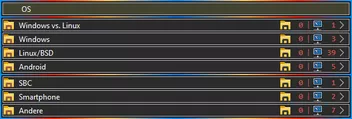
Funktioniert es denn jetzt?
Und wenn sei, sei doch so lieb und markiere die Fehler in deinen Screenshots in Gelb!
Bei dem vielen Blau und Rot, dick und dünn, bin ich mir nicht immer so sicher, was ich da zu sehen bekomme.
Funktioniert es denn jetzt?
Und wenn sei, sei doch so lieb und markiere die Fehler in deinen Screenshots in Gelb!
Bei dem vielen Blau und Rot, dick und dünn, bin ich mir nicht immer so sicher, was ich da zu sehen bekomme.
Off topping, sorry!
Du hast da so zwei ganz tolle Symbole, könntest Du sie mir zukommen lassen?
1. In der Adressleiste das dritte von links
und gleich das erste nach der Adressleiste, (Reload?)
@Horstmann
Oh, ich hätte da was!
Es geht um ein Skript, welches Icons in der Adresszeile einfügt!
Kannst ja mal reinschnuppern.
Es geht um diesen Teil!
var myPath = PathUtils.toFileURI(PathUtils.join(PathUtils.profileDir, 'chrome', 'icons'));  // Pfadangabe zum Profilordner
var myPrefix = "firefox_logo_2004.svg";  // Name (& Dateiendung) des anzuzeigenden Symbols
var mySuffix = ' ';  // Dateiendung des anzuzeigenden Symbols
var Symbol = myPath + myPrefix + mySuffix;
var i_icon = 'chrome://global/skin/icons/info.svg';
var sheet = 'chrome://global/skin/icons/Portrait.png';
var brand = 'chrome://branding/content/icon32.png';
var globe = 'chrome://global/skin/icons/defaultFavicon.svg';
var all = 'chrome://global/skin/icons/settings.svg';
var avatar = 'chrome://browser/skin/fxa/avatar-empty.svg';
var icon_for_pages_without_favicon = Symbol; // i_icon, sheet, brand, globe or all (colorized Fx channel icon)
(function() {
    if (location.href !== 'chrome://browser/content/browser.xhtml') return;
        let fav = document.createXULElement('image');
        fav.setAttribute('id', 'faviconid');
        fav.setAttribute('class', 'faviconclass');
    gBrowser.tabContainer.addEventListener('TabAttrModified',
    function() {
        let favicon = gBrowser.selectedTab.image;
        if (favicon && favicon.indexOf('icon32.png') === -1) {
            // if favicon is present and not 'icon32.png', set it as the source
            fav.src = favicon;
            var position = document.getElementById('identity-icon');
            position.parentNode.insertBefore(fav, position.previousSibling);
        }
        else {
            // if no favicon is present or it is 'icon32.png', set a custom one
            fav.src = icon_for_pages_without_favicon;
            var position = document.getElementById('identity-icon');
            position.parentNode.insertBefore(fav, position.previousSibling);
        }
    }, false);
    fav.style.height = '16px';
    fav.style.width  = '16px';
    fav.style.marginLeft  = '7px';
    fav.style.marginRight  = '3px';
fav.style.marginTop = '2px';Da wird erst geprüft, ob es ein Favicon gibt, und es wird genutzt,
oder, wenn es keines gibt, wird ein festgelegtes genommen.
Hier ist z.B. gerade Symbol, also ein Icon im Pfad ausgewählt.
Hier der Link zum kompletten Thread.
RE: Eigene Icons für about:xxx in der Urlbar, bzw. im Container
Sorry, habe ich leider überlesen, das mit den "neuen" Profilen.
Aber, wenn das Verhalten auch bei anderen Versionen des Firefox so ist, vermute ich eher den Fehler in Deinem BS!
Irgendeine "Sicherheitssoftware" installiert?
Erweiterungen in allen Firefoxinstallationen?
Auf jeden Fall würde ich vermuten, dass da ein anderes Programm reingrätscht.
Das ist aber das gleiche wie das von #230, nur mit 2 Änderungen provisorisch reingedrängt.
Das aktuelle Script von Mira_Belle ist hier, wenn ich das noch alles richtig überblicke.
Tust Du, glaube ich! 
Hast Du schon eine user.js in Verwendung?

Ich werde den FF komplett neu installieren, mit neuem Profil.
Deine Einsicht erfreut mich!
Wir alle hier werden Dir immer zur Seite stehen.
Danke, hat funktioniert.
Zur user.js, die werde ich erstmal rausnehmen und mich mit der Sicherheit von FF mal selber beschäftigen.
Wie gesagt, Vielen Dank.
Nur mit "löschen" oder "rausnehmen" ist es aber nicht getan!
Du musst die Änderungen, die diese Datei gemacht hat, alle händisch zurücknehmen 
Mein letzter Beitrag in diesem Thread!
Ich denke, es wird das gescheiteste sein, Du erstellst Dir ein neues Profil!
Fängst noch einmal ganz von vorne an.
Lässt aber das mit der user.js sein und schaust auch, dass Du keine Erweiterung installierst,
die Deinen User-Agent ständig ändert.
Wenn dann mit diesem Profil dann alles so weit Fehlerfrei klappt,
kannst Du dann an Deine individuellen Anpassungen per CSS gehen.
Nur wenn Du dazu bereit bist, werde ich, so weit mir möglich ist, weiter helfen.
Wie das 2002Andreas handhabt, ist seine Sache. 
AH
Nun verstehe ich Deinen Code! @Horstmann
Wenn omar1979 seinen Code
/* Menü-Separator von allen Menüs im Menübar entfernen*/
#main-menubar menuseparator {
  display: none !important;
  }
durch diesen ersetzt
erhält er das von ihm erwünschte Ergebnis.
Es werden ALLE Separatoren entfernt, bis auf den gewünschten
und das sogar in den Pop-ups!
Alles anzeigenHallo,
ich hoffe man reisst mir nicht den Kopf ab,aber ich komme nicht weiter.
Bin technisch leider nicht so versiert.
Ich hatte zuletzt FF 113 laufen, mit einer eigenen userchrome.css und einer user.js.
Die user.js habe ich von privacy-handbuch.de um Telemetry etc sicher abzuschalten bzw. zu sichern.
Die userchrome.css eigentlich nur um Tabs unter die Lesezeicheliste zu schieben und die Tabs zu verkleinern.
Nach dem Update funktioniert das aber nicht mehr so richtig, die Tabs hängen jetzt über dem normalen FF Menu.
Ich würde gerne wieder die Tabs kleiner haben und unter den Lesezeichen.
Vielleicht kann jemand helfen. Danke !
Ich kann Dir aus leidvoller Erfahrung glaubhaft versichern, dass diese Datei user.js von dort Sch...e ist!
Du wirst nicht umhinkommen ein neues Profil zu erstellen, oder alle Einstellungen, die durch diese verfluchte
user.js gemacht wurde, Händisch zurückzunehmen.
Kannst ja hier im Forum mal danach suchen, was ich für Schelte bezogen habe und was für ein Zinnober das war.
Zumal ich aber auch recht bockig war.
Was Dein Bestreben wegen der Telemetrie angeht, kann ich Dir versichern, das kannst Du alles sicher unter
Einstellungen deaktivieren!
Ich mach mal den Code lesbar. 
#titlebar {
-moz-box-ordinal-group: 100 !important;
}
/* space above tabs toolbar */
#main-window[tabsintitlebar][sizemode="maximized"] * #titlebar {
margin-top: -8px !important;
}
/* space for menubar above navigation toolbar (Firefox titlebar) */
#main-window[tabsintitlebar]:not([sizemode="fullscreen"]) #nav-bar {
margin-top: 40px !important;
}
#main-window[tabsintitlebar][sizemode="maximized"]:not([sizemode="fullscreen"]) #nav-
bar {
margin-top: 6px !important;
}
/* add 'drag' feature to space above navigation toolbar */
#main-window[tabsintitlebar] #navigator-toolbox,
#main-window[tabsintitlebar] #nav-bar {
-moz-window-dragging: drag !important;
}
/* move menubar to the top and extend its with to full window width */
#toolbar-menubar {
position: fixed !important;
width: 100vw !important;
-moz-window-dragging: drag !important;
}
/* move menubars / tab toolbars caption buttons to windows top right position */
#main-window[tabsintitlebar]:not([inDOMFullscreen="true"]) .titlebar-buttonbox-container {
position: fixed !important;
right: 0 !important;
visibility: visible !important;
display: block !important;
}
/* menubar postion after moving to the top */
#toolbar-menubar {
top: 10px !important;
}
/* Linux/macOS */
/* space above navigation toolbar (OS titlebar) */
/* set to '0', if no menubar is used */
#main-window:not([tabsintitlebar]):not([sizemode="fullscreen"]) #nav-bar {
margin-top: 18px !important;
}
/* menubar postion in maximized mode after moving to the top */
#main-window[tabsintitlebar][sizemode="maximized"] #toolbar-menubar {
top: 10px !important;
}
/* caption button position in maximized mode after moving to the top */
#main-window[tabsintitlebar]:not([inDOMFullscreen="true"]) .titlebar-buttonbox-container,
#main-window[tabsintitlebar][sizemode="maximized"]:not([inDOMFullscreen="true"])
.titlebar-buttonbox-container {
top: 4px !important;
}
/* Windows */
Media (-moz-os-version:windows-win10), (-moz-os-version:windows-win8), (-moz-os-
version:windows-win7) {
/* set to '0', if no menubar is used */
#main-window:not([tabsintitlebar]):not([sizemode="fullscreen"]) #nav-bar {
margin-top: 8px !important;
}
/* set to '0', if no menubar is used */
#main-window[tabsintitlebar][sizemode="maximized"]:not
([sizemode="fullscreen"]) #nav-bar {
margin-top: 4px !important;
}
#main-window[tabsintitlebar][sizemode="maximized"] #toolbar-menubar {
top: 8px !important;
}
#main-window[tabsintitlebar]:not([inDOMFullscreen="true"]) .titlebar-buttonbox-
container {
top: 0px !important;
}
#main-window[tabsintitlebar][sizemode="maximized"]:not
([inDOMFullscreen="true"]) .titlebar-buttonbox-container {
top: 8px !important;
}
}
/* hide line above navigation toolbar appearing in some cases */
#main-window:not([tabsintitlebar]) #nav-bar,
#main-window:not([tabsintitlebar]) #navigator-toolbox {
border-top: 0 !important;
box-shadow: unset !important;
}
/* tweaks for fullscreen mode */
#main-window[tabsintitlebar][sizemode="fullscreen"] * #TabsToolbar {
-moz-padding-start: 0px !important;
}
/* tweaks for fullscreen mode */
#main-window[tabsintitlebar][sizemode="fullscreen"]:not([inDOMFullscreen="true"])
.titlebar-buttonbox-container,
#main-window[tabsintitlebar][sizemode="fullscreen"] #toolbar-menubar[autohide="true"] ~
#TabsToolbar .titlebar-buttonbox-container,
#main-window[tabsintitlebar][sizemode="fullscreen"] #navigator-toolbox #PanelUI-button,
#main-window #TabsToolbar #window-controls {
display: none !important;
}
/* hide non-required items */
#TabsToolbar .private-browsing-indicator,
#TabsToolbar #window-controls,
#TabsToolbar *[type="caption-buttons"],
#TabsToolbar *[type="pre-tabs"],
#TabsToolbar *[type="post-tabs"] {
display: none !important;
}
/* Windows 7 extra tweaks */
Media (-moz-os-version: windows-win7) {
Media all and (-moz-windows-compositor) {
#main-window[tabsintitlebar]:not([inDOMFullscreen="true"]) * .titlebar-
buttonbox-container {
display: none !important;
}
}
Media not all and (-moz-windows-compositor) {
#main-window[tabsintitlebar]:not([inDOMFullscreen="true"]) .titlebar-buttonbox-
container {
top: -8px !important;
}
#main-window[tabsintitlebar][sizemode="maximized"]:not
([inDOMFullscreen="true"]) .titlebar-buttonbox-container {
top: 0px !important;
}
}
}
/* Windows 10 extra tweaks */
Media (-moz-os-version: windows-win10) {
#main-window:not([tabsintitlebar]) menubar > menu:not(:-moz-lwtheme):hover:not
([disabled="true"]),
#main-window:not([tabsintitlebar]) menubar > menu:not(:-moz-lwtheme)[_moz-
menuactive="true"]:not([disabled="true"]) {
background-color: Highlight !important;
color: HighlightText !important;
}
}
/* disable Mozillas tab jumping nonsense when moving tabs */
#navigator-toolbox[movingtab] > #titlebar > #TabsToolbar {
padding-bottom: unset !important;
}
#navigator-toolbox[movingtab] #tabbrowser-tabs {
padding-bottom: unset !important;
margin-bottom: unset !important;
}
#navigator-toolbox[movingtab] > #nav-bar {
margin-top: unset !important;
}


#context_toggleMuteTab,
#context_pinTab,
#context_duplicateTab,
#context_selectAllTabs,
#context_bookmarkTab,
#context_moveTabOptions,
#context_sendTabToDevice,
#context_closeTabsToTheEnd,
#context_closeOtherTabs{
display: none !important;
}


#context-sendpagetodevice,
#context-sep-sendpagetodevice {
display: none !important;
}


#context-sendlinktodevice,
#context-sep-sendlinktodevice {
display: none !important;
}


.tab-close-button {
display: -moz-box !important;
}


.tab-close-button {
color: blue !important;
}


/* Lesezeichen Sidebar - Ordnericon stehend blau */
@-moz-document url("chrome://browser/content/bookmarks/bookmarksPanel.xul"),
url("chrome://browser/content/history/history-panel.xul") {
treechildren::-moz-tree-image(container) {
list-style-image:
url('data:image/png;base64,iVBORw0KGgoAAAANSUhEUgAAABAAAAAQCAYAAAAf8/9hAAABNElEQVR42mNkoBAwgoiaRc82sTH99wWx//9nfPPq0yePqdkaZ4k2IG/hvf0sTP8dYIL/IQbh1fjnH8POKQlKHow1Cx+WfPr7J/Mfwz8lUpzOxMB0j5+FZTqjetrtR4zMDGJAt7CT5Pn/DD///2V4xSiT/fTaP0ag7Yz/STSA8SfTf6Z7jNJFb0/9+v9Xj4HxH4kGMP1kY2S+xKhZ93Hfjz+/rYAipBnAwPiTg4X1GKNF55dNX3/9dgcawEaiAb+42Fh3MrpP/b7s0/dfwcB4I80ARsZfvJxsaxnDF/6a9f7Lr4T///+xkqaf6bcAN9sCxrQ1f/tef/iZ+///fxbSDGD8I8zHPpnRqfxI4yc2jVoGaKokAfzn+X2nGWgQkwTQ+YZAAWYSDfjLyMR8nlRbMb1CqQEACmp1y80wWngAAAAASUVORK5CYII=')
!important; }
}


/* Lesezeichen verwalten - Ordnericon stehend blau */
@-moz-document url-prefix("chrome://browser/content/places/places.xul") {
treechildren::-moz-tree-image(container) {
list-style-image:
url('data:image/png;base64,iVBORw0KGgoAAAANSUhEUgAAABAAAAAQCAYAAAAf8/9hAAABNElEQVR42mNkoBAwgoiaRc82sTH99wWx//9nfPPq0yePqdkaZ4k2IG/hvf0sTP8dYIL/IQbh1fjnH8POKQlKHow1Cx+WfPr7J/Mfwz8lUpzOxMB0j5+FZTqjetrtR4zMDGJAt7CT5Pn/DD///2V4xSiT/fTaP0ag7Yz/STSA8SfTf6Z7jNJFb0/9+v9Xj4HxH4kGMP1kY2S+xKhZ93Hfjz+/rYAipBnAwPiTg4X1GKNF55dNX3/9dgcawEaiAb+42Fh3MrpP/b7s0/dfwcB4I80ARsZfvJxsaxnDF/6a9f7Lr4T///+xkqaf6bcAN9sCxrQ1f/tef/iZ+///fxbSDGD8I8zHPpnRqfxI4yc2jVoGaKokAfzn+X2nGWgQkwTQ+YZAAWYSDfjLyMR8nlRbMb1CqQEACmp1y80wWngAAAAASUVORK5CYII=')
!important; }
}


/* Lesezeichen - Ordnericon blau */
@-moz-document url-prefix("chrome://browser/content/browser.xul") {
.bookmark-item[container="true"] {
list-style-image:
url('data:image/png;base64,iVBORw0KGgoAAAANSUhEUgAAABAAAAAQCAYAAAAf8/9hAAABNElEQVR42mNkoBAwgoiaRc82sTH99wWx//9nfPPq0yePqdkaZ4k2IG/hvf0sTP8dYIL/IQbh1fjnH8POKQlKHow1Cx+WfPr7J/Mfwz8lUpzOxMB0j5+FZTqjetrtR4zMDGJAt7CT5Pn/DD///2V4xSiT/fTaP0ag7Yz/STSA8SfTf6Z7jNJFb0/9+v9Xj4HxH4kGMP1kY2S+xKhZ93Hfjz+/rYAipBnAwPiTg4X1GKNF55dNX3/9dgcawEaiAb+42Fh3MrpP/b7s0/dfwcB4I80ARsZfvJxsaxnDF/6a9f7Lr4T///+xkqaf6bcAN9sCxrQ1f/tef/iZ+///fxbSDGD8I8zHPpnRqfxI4yc2jVoGaKokAfzn+X2nGWgQkwTQ+YZAAWYSDfjLyMR8nlRbMb1CqQEACmp1y80wWngAAAAASUVORK5CYII=')
!important;
-moz-image-region: rect(0px 16px 16px 0px) !important; }


@-moz-document url-prefix(chrome://browser/content/browser.xul){


#back-button > .toolbarbutton-icon{
filter:none!important;
list-style-image:
url("data:image/png;base64,iVBORw0KGgoAAAANSUhEUgAAABEAAAA/CAYAAAAGyyO8AAAACXBIWXMAAAsTAAALEwEAmpwYAAAABGdBTUEAALGOfPtRkwAAACBjSFJNAAB6JQAAgIMAAPn/AACA6QAAdTAAAOpgAAA6mAAAF2+SX8VGAAANBElEQVR42mJsnLeagZPnH8O//wwM/xj+M/xmYGTgY2BgYOHkY2BhZGT+++dP4d/f/y1+fv9WChS+/x+oBoSu3n7A8P/fPwYQAAggJgbcgJWJialMRcugW0BcQuP3n3/CQMzw6u0zhgcvX6MoBAgg7IYwMnIyMbNUaumZtklISTP8/PlbmvH/f0lGsBQjGCMDgABiwtTPyM/BK1KjqGnUKCoqwPD5+3eGH3//CXz7+l3rw5//PP8ZGDlAvkXWCxBALKgGMInx8knWSanpZLMKCDDceveT4TcwsH4yszMw8wumcjAyqv/mkLr+883bF0Dl14D4EhD/BgggFiQDZDgFpBtEFbWTv3LzMNx+/YWBjZmJQZmbmUFfS43hp4qSMlCVMhMLC8OJEycZ3r85c/Lf798BQK0vAAIIYggjkzwTn3Qns5x2+AsWToZ3b74CI4CRgRXoCu5f/xgkubkZGDgYGf79Y2QQ5mFk4JaSY/h+6qT6ry9fOUHaAQKIBRhbKt/4ZLv/S2kEvAF699vH7wzMTJCA+//3H8Ozd38Zfr0GRTwDw5///xkU+TkZPn/5xvDt27dPv75+BccxQACx/Pj5q+wjr1zAb2Zuhj+fvzAwMTEDdQO1/AenCHBMQMz8DwxJRoYvQNe8+/6H4cu3b4y/vn0DWwYQQCzfPn448vPqaffP6mZy/xiZGP7/+snAyMIMxCxAcxjBcfAfqJGB8R+Y/5+FleHjj98MX77+YPj97TvYEIAAYgEGzqJ/ty99Yvj8qeevuony7z+/GP7++MbAzMoGDComcNiAaBAGmfgFKP/921eGb9+/Mfz6CnEJQACxAN0LTPL/N/y4e/Xn/48f+lh0zDQY//1l+PPhDQMoJhiB3mPi4AQbCk7GDH8Y/n3/AgoT9ndvP4A9ChBALP9BhgBt+/nv//aPt658Z3nzfgK/iYU+C9BLv799ZmBh42D49eUzw89vX8D56y8jK8ODU0cZnt1/+FFBUuQPKOQAAgBFALr/BAj89gAABP0ABAoDAA/+CMDy7OFq68T0kA8uNjUJCwkA/Pf1AOfPzPvp1tPfAwQE6RMLB+sU+/r1Fh4Xv0M4Le8EBAQAAoiF5/dnBl5WRgZxNqCz+QQYPvCyXHn87vOUB+eONP5R11Pg4+dj+Pr61TtZTqa1CjKi5xTEBF8J8fN8Anrv65+/f5nYgN4ECCBmO3sHcOCBnfrvP6OlhTnf768f2Dl+f//98P4D5e//mHj+f/rwUVeC77aplhIoCcj8/vtP6c+fP/zMzCwvgdo+AwQQegb8b2Zu8ebH95+XlaRENxkKc6z6duvyq79fP/FycLDJfPn2gxMYCc+ARcQNIH2Xg4Pjy38gAAggFvRc/OPHD6DDGN8CXXbKRFfjAzvrndc//vzVFBXkOyYiIrr/zdu3L4AJ8AdQ7x9OTs7fP3/+ZAAIIBY8hdIvbm7eK7Ii/M+4uDh4P3/78ZGPn/8D0BCEs///B9MAAQSMSFCxCExGUAFeLm4Gxr9/wXyQ3AdW9neffvx/9+cfMwMLMP2D/M+IZhtAADFrOzmB88Yndg6GH8zMDI9fvmB49+cvw29gqH8GlqGgNPkbmJOBCYLh64+fDJ9//2H4CUz+bP//MAgLCQHlfjIABBDLd2BiAyZwhu+srEAX/GG4cucOA4+wCLA0+8/w4+cPBub/DOxAdwsA7Xn79su3P/CikZWT4cS1ewy///xhAAggFkao84BlKJhmBRrGAGaD0uJ/YMLlaGBkY5b8/v1bHVD6ESNY1X+GJy/eMXwFZkAQHyCAcJb2////Y+Nk42mVklPO4eDlM/33758YKNjefn7D8O7zV4Yf34GuBGZKJmBYAAQQEw4DONjZeHtUlNSzRUREeIB+kATGhPAPYF769fcXw29gwCOX+AABhGHI/39/udjZ+SfLK6qn8AoKcn8D+vnX958Cv75+1v8HLAaAZSRG7AAEEAuaCzh5BKQXSsir+v7k4GJ/+vknw/ff/xneMXMx/uAWTWdkYrRm/Pfn47+P714ClW8GhuRxUOQBBBALkgFc/LwSa/lkVVzeM7KxfP3yG1gFMjKo8LAwaOopMfz8LacIdIH8L2Dxferi5X/Pbl0z+//nVwRQ63OAAAIbwggMRC4u0b1MUqqmr/8yMf/69YcBnPaAuq7/BRb0wAD8x8DGCMwKzCLcHMwMPAIMf/79Vfr36ye4pAIIIJAhbN/45M/8FVXV+fSLERjT/xigiRcMvgMTFwwAMx3DN8bf4AT369ev/0BDwOIAAcTy//u/ve/kFHQY/4IMgJTwUP+B0wOcCaU/A8P2248/DL9//mb4B8QgABBALD+/fCplvHL0yHc1S+Z/v39A/MAMLFuZIcH1nxFhCogCJj+Gn7+AZfBvoCG/IYYABBCwXmA48efNKxOGn/sOMSgb8/4BpgWGv78hpTuoDgLVOyAayv79h5fhN7CgBhnw7w/EqwABBIudC9/fPLNg+fxlD5O6scT/f38Y/4MVMIHqaIZ/8CoDkhn+AA358+sH49/fv8CaAQIIntiApf61rx9f2/68eOwuw98//0HVBsMvYB4GJrD/QE2/37/5//vDm3+/3rz49+P5g7+/vn19w8fN9YePi4sBIIBY2EG5lx3YzGJkB9YpjHd/vH7p+uPaj63sipqaoEr5/8/vDF/u3/r94/nDR8CGz1t2FoYvHKws3/6zMK2wNTP48AeY8wECiMXJSAccluAWEBBu37715ZfvP8s+3rs6lUVSQY6FlZXx368fb/j5uBfw8fKeEObjesrLy/Px+4/vjJ8+f2ICFtaMAAHE7OPrCyzl/zH8BbYAgFUAo6qauuCb1y+42f7+ef3x9Sv1f4zM/MAw+CwlwP1EWlyYC2ib5q8/f/T//fsv8v37jxffv3//BBBAGKW9nZ3dK6DEFVERod1SfOzz/7558pT53x9WYL4R/QVMZECL7gDT01lgiX8VWPZ8ApU/AAGEUVCDSm+g1z7yCfCflZaV/sB4+eobYHLX5mBjPamkonzoyeMnz4H18E9mZuZ/f//+/Q8KBoAAwlraAyWBOf4fg5CwyF02Zsa5rKxsXH////8sJir28/GjxxjqAQIIozwB2sAgKioKNgRYyzEIiYh8U1JReQPMKz+BmOE3NJUiA4AAYvb39wdrBLeIgAkKWCExsANLfpBrBPj5GaSlpRl8gYH/8uVLBnl5eQZQBQ5ig9T+g7aoAQKIBZTp2NjYwAIgiWvXroHZqqqq4DL0xcuXvMAwYIyPj/8ECi9TU1OGhw8fgl0JsxwggFhgNRkMgwwEVqVgZwPLVj4hISHHDx8+PH7+/Pk5aGOZQUpKiuH169fwchYggFiwF9T/QTYJyMrK2gkKCqpfuXLl7fv375mAmv6BNIJcAbMUBAACiAmbAUB/CwPDwklPT08BWPN/A4YPN9CrbKCABbkUHQAEEBMWA0SB4eGkoaEhC2okABPeP5Crvn79Kvnu3TtWWGAiA4AAYkE2AJj6xIEx4Aj0hjhQ0zegAaDS7i8XFxcv0CVmwPBRBwbmN6BBX4HeugXU9hmkFyCA4AELlJQBAntxcXGRz58/fwPFCDewOS4mJvZfWFiYGahGBKhG4suXL0xv3779/+bNG1D4XAY1tAECiAWawBSAIe4gICDAB4yJb8CYYQRFN9A14OgGuhAUgqBU9huo5j+Qzwm0iAcWHAABBAwCFlWg7TZAJ/MAbfkO9D/YAFBiA7kQ6CJ4LIDEQPJAw/8Dxf/CggIggFiAgtZAgwSAaeMz0AVMoAQEUowMYIEJokEJDmQwyJUwwwECiOXFixdXgJKGwMDkABryE2QTKHuDDENOiLCEBQxssCFAV8MNAQggFmDcX7x///5PoB/N5eTkuIAu+gYUY4KlB5BCJnATApIaQHkHZAgozcAMAQggFqAksKXw98a9e/f+AE23UlBQ4AZKfvv06RPYayBXAcML5LL/SIYwAi1jgRkCEEAs0PzwGxhlt69fv/4H6FcbZWVlfqDhX4D+ZwLlo6dPnzIDNbIBvc0MlGc+f/48w6tXr74AvQ4OLIAAYoH5ERi1f6Kiou5t2LDhPzAdWOjo6AgCi4Wfjx49Yjxz5szXjx8/PgZ68Ssw3fwAuvYHMKrvqampgWsvgABiiY2NBfsNlGv5+fn/79mz5y2Qf/vUqVNaBgYGXEDXgJL9BxUVlTt8fHw/gan2N9BL/4FhCOzJsIAC6h9AALEAJZDzzj+gxl/APPIGWPA8PHfunCLQW9xAjYzA2OMGhg03KIWCcjEwNYNaxZ9A+gACiAm5LIEGHLCF9ecpMAXfBWp+BIy5H8Cw4AJ6hQMYAd+BLnsL5L8EGv4RiP+BYg0ggLCVJyDTfgDD6QnQ5h+urq4fQNEJDPwnQPwWaNAfcDMV0hAHA4AAwtME/f93165dr86ePXteU1PzPKgTDWrvQzWjlAcAAQYAiOkcsy+Z7ykAAAAASUVORK5CYII=")
 !important;
-moz-image-region: rect(0px 16px 16px 0px) !important;}


#forward-button > .toolbarbutton-icon{
filter:none!important;
list-style-image:
url("data:image/png;base64,iVBORw0KGgoAAAANSUhEUgAAABAAAAA/CAYAAADpCUiCAAAACXBIWXMAAAsTAAALEwEAmpwYAAAABGdBTUEAALGOfPtRkwAAACBjSFJNAAB6JQAAgIMAAPn/AACA6QAAdTAAAOpgAAA6mAAAF2+SX8VGAAAM70lEQVR42mLsXLmagZldmIGL4TcDIwMcFP368cPpx48fOf+ZGB4y/mf4/5+RkeEfkKPM/o/hBhMDAx8Qf3rFyAAQQCwwHd/EFRn0pQQZmBjBxrB+fvvO+9G9O3zfvn7OBvKvAvE/BiwAIICY4Kz//xkuPHjJ8OHrD4bP334xyCkqMOgbGdly8PAuYmBgtAaqYMFmAEAAgQwAWckKwsxMjKy3X7xl/vDrL/O/Hz8Y1BXEGdT1jQ3Y+fgXMTAy+gDVsKEbABBAIFMFGBkZfYGaWZj+M/1nZGH59OH7L4MP/5gZWD7+YRCQEGOQ/Wug8Pj65XnfPnwo+M/AsBao5yvMAIAAYvnPxKzNKyi4UF1SiOH3n38Mv/7/Y/jDDLSImZnh9tc/DG9+/mIQ4BdjEFTXE/x348qcT1/fiACDaS5Q70eQAQABxPLtzx82eXEpBlM5YYZbX4CifxkYvv/5w/Di22+G5z/+M3wAGvrk+2cGYR5hBhYVXdb3d671sn55IfCfiXECUP87gABiefvm+9/3374zXPzwn2HX868M738DwxMYb3///QcHDiiQgM5m+PDuEwMXFx8Dh5w6A9v9v7X/v74SBMrWAQQQy48P3xhef//N8OzXf4aXv/4xfARi5v9AZ/z7C0RAGuil/3/+Ag35x/DmzRsGZl5+Bm4xFQbBC49ymP/+2wIQQCyf375heAl0LteX3wzvv/9k+PETmKD+/QFq/gPU+xdCAw36//sXMCJZGFj+MTIwP73F8PjJkxsc7OyPAAKI5cPXr4x/P31l+PjsLcO3T5+BGn4Dk8R/sGaw7UDN//78ZmBmY2dgYQR66PIJho93L5+Xk5VMvfHwxXWAAGK6+fgZ448P7xl+AAOOmeEPAzAuGZj+Am37+onh/5ePDP++fABq/Ae0+S/D5+N7GX5cO3Pyz9ePcXUZ8We9rE0YAAIAQQC+/wQ5Kinszb+40xft7RQA/PsGAP79AQgODwkHDAoJ/fj3AAYMDQAA+fgA5Mi8AAzt5MkiGRJ9FwwM4xQPDgFxXVP/AgBBAL7/BGVOO+Leho+SB8fpMQIEAwUD+/z7/x4kNPokLjYJCgkA+/LyAN3CvQAP9e3MMikfnhIMCQX6/PsW+/z89AAAAP0CiOXg3t3/A+2NXv7/9/8F0OdsLP//frr7j1vhMdD/39+8Yriyb88/if/fL9kZqO4R4OHi+Pvv3y9GRqaXIM2ghAQQQMBwYfr2++//m8CA4//3758RIxOjLDD+Zd49vM/w4Nzp/5KMPx+6melc4+XiABrJ8Aio7jxQ3ydYUgYIIBZgPvgD1HgLyH7Fw8Nz79f3b45f3701fHD2OoMSH9sLV2OD85yc7HeA6eog0///Z4BqP4FiCQYAAgg5i37g5uY+9uvH94cSnMwvA43VnCQEeZ/+/fPrIDBVXmZjY3v869cvjDIBIIBQ8jjQdGDS/f9UWphvkaiw0LbXbz/8f/D0/StRDs6/yLYiA4AAYmEGSvyDlmUsTIwMnxjZGb78Yvr17sWnZz9+gdLGfwZmoDwIg9T9QTMAIIBY3rKyMbD/ZwZznn3+xfATVLYADf314zfDH6DH2bgEGN79YmRgBKbIX7//MXD/+83AAczqQC+B9QAEEMt3JiYG5n8sYOf//PELWPCAnSMIshDooI//WDgYvgPlgCUqMLX+ZzBUVWbY//Ahw6z164BlGRMDQACxgJT/ZWRmEBTkZ/j9Fx5G4d8+fw77/f1bHhMT4xWwkUACaCADPz8/0JvALHHnDlCAmQEggMCBCCqy37PyMCjLCALLAbAhwr9//HB8/vjh9O+fP5ewMDGfRA1oYOHIygp2AUAAwUvln/8ZGR68+cTwl4mV4Q8jyx9xcXEGTW0da3Yu3hnALO3CgAMABBDcAJAzvwPLgscvXjN8/Pr9OygbS4mJMqro6Biw8/LN/PvvbzQ2AwACCOiF/2L///2r+PXnLzcTUNef3/9+/WJmMxf5BzT7+y8GFh4BBmkNXaVnt671f3j3mp+FmXkasgEAAcTyj5VDmV9QKstKQZoRVIj8AiaZP4zMLP9ZWRhe/fjL8O4HsCxg4WbgU9EW/XfnStvF2w8lgKFUBzMAIIBYmL59ZWOT4WPn5+ZmuA9MB1+AZd8vYD779vMPw5ff/xl+/gUVrv8ZWFnYGdgUdPjfP7heJvafWRgY36AqjwEggFg+vv/LIAAssp4Cbbvy4TfDV6AmUHQBa1OgUf8gRTIw5zL+ASYmJnYGVlkddrYHF9J+vv0syiHCFwkQQCx//n5g+PT9L8Prn/8ZPgGt/vEbqBgYVaDCFFQyA8MHaNg/aBn5H5zQWMW1WbivHwr5+uj1eoAAYvn3AViUA2sftm9AJ3/7yfDnz2+wAf//gQyAaAYbBCriQWmAT5iB+cYJhu+fP736+//7boAAYvn47wPDzw9fGD4zv2P49+Mr3NZ/IAPAmkEl8z9w9cLEzc/AdPXw/5+fXt9i5BWwYfnP/AYggFj+//r37/eX9wysHFwM/39+AzsTbivI2aBwAKU4dm6Gv5eP/Pv39ePpb1/fum9cMAtcNwIEEIssj/THW3cvf+BjZPgNrIGYGYEZn5GNjQtY1HEyAIt3RiZgUmFmYfh28ehf5i/vT4qL8GULsQqw/Pz1C5QI/wEEEEt6uv/tgtKqqP+fXjgCcwcH0Npf/4SlLRmkla2YWYClPDB1frl95g/rr69n5CTFJnFwsMh8+vznBxMT0weQCwACiKWzo4vFykgP6MP/r//9/cfJwsTw5dVftvevgLHwF1gffLx15S8n45+LynKS29hYWYDF+d9LQM2PX716BS6VAQKIxcTE5PuLFy9uAcs7HiDfGJgGFIGltMLvz8Cq7tnDf7zM/+7KSYufZ2UBF153gAEMKpW/5ubmglMiQACx/AECISGhu8+fP38CNPkuMJrt/3z/qvH+4dMfIrwcz1TkZY+zsTLf+fHz12EWFpZzwHTwA6SRj48PbABAALHA8jg4R///f46RifmBMDfHC34NRTsOdtZnXz9/Oerq73/t3LlzL96/f4+RGwECCF4q/wUmFFAqA6bid4aGhst9fb23rF+/gWH37j2ff/78CbMEAwAEEAtIAqRZQkICbAAzsIwE0ffvP/gMDBewRhAfpg4dAAQQCy8vL1iBlpYWXPDz588MV69eA5e8cnJywOT9hwGkjhlYGgMDHMwHF0JAfQABxCIlJQUOkO/fv8MNBSrgBQbYV3Z29l8ODg4MHz9+ZJCWlmYABjK48QEyANwIAWKAAGKBmQYyHaQACLiBNpuASrhv376dBRr8HWQTSB2I1tTUBBYwLGA+CAMEEDgQOTg4GFiBpSywcQ12ATA8QDW15tWrV9mAik6AmtIw54HCBRQWIM0gGiCAmCDN5P8MwIoVbABQwX9Qja2mpvZXR0dHC2i4HdAwXlylMkAAMSGX99AABcbaz39A+r+qqupvDQ0NNU5OTkegvBA2AwACiAVouwTQKepA/AcYmP+BXuEEhgH/169f/wHl/ktKSv4Aala4du0aOzA4DgHD6SWyAQABxAJ0ItAiVUug5p8gfwEV/wMGEtgVQEPA/hQQEPgBDDypW7duOQPFjgD1PYIZABBAwEbHf1CgfQY68ytQ71egIcDa7PM/UNSBDADhDx8+gMLom6KiogjQm45APSowAwACiAWo8B8opkCJB5RIkMME1qgA0cAAZgR67zvQS7wPHz60A7qMDeid6wABxALSCEpEMAzTAEssIC/AkjEwYBmBXv0BTGB87969MwPK3wAIIJZPwHYgyLkgDEw48IwFS/ewOAcZAvTmf2BBwn7hwoXvwOi+Dgy//wABBHYBMJv+B5YHKJqQcylIMzAM/gHVcZ05c+YHMNBPA5P2VSD7P0AAMQEDiA3oCi6g6WxAE9mAzgOlTkaQd758+cIAysrAaP339OlTrgMHDnwG+vtYfHz8FWDA/wK5DCCAmIGhyvrkyRMuoAt+3r9//yeQ/RsUO8CoZAIp4OLi+n/v3j2uU6dOfQSKndXW1r4P9OpvYN/hPyjhAQQQi7Ky8uPfv3//BbqEAxR+QOcC21DMSkBJUaBr/ly8eJHj8uXL74E2XgVG43tgtAIdy/kLaPBfYIwwAAQQC1AQlHa+g6oDoPP+gwIVaNMfUAwcP36c9caNG++AljwEqvsFNJgVmJg+pqenwwMJIIBA/gU5+SMkAbLwAw3hA2pm379/PzMwvj/p6uq+kZeX/wsM7L9AV70HuvQrMD3AyzeAAAKlRFAr9CswtJ8BJZ4LCwv/uHLlCvPLly9/mJqavgU68yPQvy8TEhJAyffjf3C9hwAAAQQrVP9DXfJm7dq13wIDA78AvcIHdPJ7oNNf3r59G1Q6/cWWGwECCL0//B8Y8l+BGm8Cow7YOP0LKhv+QxufWAFAgAEAUBtjxulwCvIAAAAASUVORK5CYII=")
 !important;
margin-left:-3px!important;
-moz-image-region: rect(0px 16px 16px 0px) !important;}
}


/*Flexibler Leerraum, die Breite ist anpassbar*/


toolbarpaletteitem[id^="wrapper-customizableui-special-spring"] {
min-width: 15px!important;
max-width: 15px!important;
}


toolbarspring {
-moz-box-flex: 1;
min-width: 15px!important;
max-width: 15px!important;
}


/*Urlbar Vorschläge ausblenden*/


#urlbar-results {
display: none !important;
}Den kannst Du ignorieren, der betrifft nur die Separatoren in den Pop-ups!
In etwa so sollte der zu ersetzende Code ausschauen!
#menu_FilePopup > menuseparator,
#menu_EditPopup > menuseparator,
#menu_viewPopup > menuseparator,
#sanitizeSeparator,
#startHistorySeparator,
#devToolsSeparator,
#prefSep,
#aboutSeparator,
#bookmarksMenuPopup > menuseparator:nth-child(4),
#bookmarksMenuPopup > menuseparator:nth-child(7),
#bookmarksMenuPopup > menuseparator:nth-child(11),
#bookmarksMenuPopup > menuseparator:nth-child(13) {
  display: none !important;
}Bei den Separatoren in dem Lesezeichenmenü #bookmarksMenuPopup > menuseparator:nth-child(X!)
kann es sein, dass die Werte X! andere sind, da musst Du halt mal schauen!
Du wirst diesen Code ersetzen müssen!
D.H. Du musst jeden Separator in Deinen Menüs einzeln ansprechen müssen,
also alle, die Du ausblenden willst, bis auf den Einen, den Du halt behalten willst.
Es sei denn, es gäbe eine Möglichkeit per CSS EINE Ausnahme für genau EIN Element zu definieren.
Glaube ich aber nicht!
Probier spasseshalber mal das:
JavaScript// BookmarkCount.uc.js /* ******************************************************************************************************************* */ /* Author BrokenHeart => https://www.camp-firefox.de/forum/thema/136572/?postID=1229536#post1229536 **** */ /* Correction from BrokenHeart => https://www.camp-firefox.de/forum/thema/136572/?postID=1229696#post1229696 **** */ /* Extension from Sören Henschel => https://www.camp-firefox.de/forum/thema/136572/?postID=1229555#post1229555 **** */ /* Customized by Mira inspired by grisu2099 ********************************************************************** */ /* Source => https://www.camp-firefox.de/forum/thema/136572/?postID=1229875#post1229883 **** */ /* Customized by Mira inspired by Horstmann ********************************************************************** */ /* Source => https://www.camp-firefox.de/forum/thema/136572/?postID=1229993#post1229993 **** */ /* ******************************************************************************************************************* */ /* Finaly Source => https://www.camp-firefox.de/forum/thema/136572/?postID=1230128#post1230128 **** */ /* ******************************************************************************************************************* */ /* Custom Counter in the Bookmarks for folders and links ************************************************************* */ /* ******************************************************************************************************************* */ (function() { if (!window.gBrowser) return; setTimeout(function() { setFunction(); },50); let profilePath = PathUtils.toFileURI(PathUtils.join(PathUtils.profileDir, 'chrome', 'icons')) let icon1 = "Folder.png" let icon2 = "Link.png" function setFunction() { const css =` .countClass1::before { content: ""; background-image: url(${profilePath}/${icon1}); background-repeat: no-repeat; background-size: 16px; /* icon size */ //background-position: center; margin-right: -10px !important; /* Abstand bis zum "Wert" der Ordner */ margin-left: 15px !important; /* Abstand bis zum Icon der Ordner */ height: 16px; width: 16px; fill: #c0c0c0; fill-opacity: 1; } .countClass1::after { content: attr(data-value1) !important; font-family: Consolas, "Lucida Console", "Courier New", monospace !important; font-size: 12px !important; font-weight: 900 !important; color: #FFB90F !important; padding-top: 1px !important; } .countClass2::before { content: ""; background-image: url(${profilePath}/${icon2}); background-repeat: no-repeat; background-size: 16px; /* icon size */ background-position: center; margin-right: 6px !important; /* Abstand bis zum "Wert" der Links */ margin-left: 10px !important; /* Abstand bis zum Icon der Links */ height: 16px; width: 16px; fill: #c0c0c0; fill-opacity: 1; } .countClass2::after { content: attr(data-value2); font-family: Consolas, "Lucida Console", "Courier New", monospace !important; font-size: 12px !important; font-weight: 900 !important; color: #FFD700 !important; margin-right: -6px !important; /* Abstand zum Pfeil rechts */ } .countClass2 image { order: 1; /* Pfeil hinter dem "Wert" der Links */ } /* Ergaenzungen */ .countClass1 label { margin-inline: 0px !important; } .menu-right.countClass2 { margin-inline: 0px !important; } `; const sss = Cc['@mozilla.org/content/style-sheet-service;1'].getService(Ci.nsIStyleSheetService); const uri = Services.io.newURI('data:text/css,' + encodeURIComponent(css)); sss.loadAndRegisterSheet(uri, sss.AGENT_SHEET); let newbarMenu = document.getElementById('fp-statusbar-1'); let bmbMenu = document.getElementById('bookmarks-menu-button'); let bookMenu = document.getElementById('bookmarksMenu'); let persToolBar = document.getElementById('PersonalToolbar'); if(newbarMenu) newbarMenu.addEventListener('popupshowing', onPopupShowing ); if(bmbMenu) bmbMenu.addEventListener('popupshowing', onPopupShowing ); if(bookMenu) bookMenu.addEventListener('popupshowing', onPopupShowing ); if(persToolBar) persToolBar.addEventListener('popupshowing', onPopupShowing ); } function onPopupShowing(aEvent) { let popup = aEvent.originalTarget; for (let item of popup.children) { if (item.localName != 'menu' || item.id?.startsWith('history')) { continue; } setTimeout(() => { let itemPopup = item.menupopup; itemPopup.hidden = true; itemPopup.collapsed = true; itemPopup.openPopup(); itemPopup.hidePopup(); let menuitemCount = 0; let menuCount = 0; for (let subitem of itemPopup.children) { if (subitem.classList.contains('bookmark-item') && !subitem.disabled && !subitem.hidden) { if (subitem.localName == 'menuitem') { menuitemCount++; } else if (subitem.localName == 'menu') { menuCount++; } } } itemPopup.hidden = false; itemPopup.collapsed = false; item.style.color = '#c0c0c0'; let label1 = item.childNodes[3]; label1.classList.add('countClass1'); let strCountOut1 = String(menuCount).padEnd(2) + '\xa0'; // padEnd2 => zwei Stellen, plus Abstand label1.setAttribute('data-value1', strCountOut1); let label2 = item.childNodes[4]; label2.classList.add('countClass2'); let strCountOut2 = String(menuitemCount).padEnd(3, '\xa0'); // padEnd3 => drei Stellen, Abstand bei nur einer Ziffer label2.setAttribute('data-value2', strCountOut2); }, 100); } } })(); //Fügt in den Lesezeichen Ordner ganz oben die Anzahl von Links und Unterordner hinzu. (function() { if (!window.gBrowser) return; function setFunction() { PlacesViewBase.prototype._mayAddCommandsItems = function PVB__mayAddCommandsItems(aPopup) { let hasMultipleURIs = false; let menuitemCount = 0; let menuCount = 0; if (aPopup._placesNode.childCount > 0) { for (let item of aPopup.children) { if (item._placesNode) { if (item.localName == 'menuitem') { menuitemCount++; } else if (item.localName == 'menu') { menuCount++; } } } if (menuitemCount > 0 || menuCount > 0) { hasMultipleURIs = true; } } if (!hasMultipleURIs) { aPopup.setAttribute("nofooterpopup", "true"); if (aPopup._endOptOpenAllInTabs) { aPopup.removeChild(aPopup._endOptOpenAllInTabs); aPopup._endOptOpenAllInTabs = null; aPopup.removeChild(aPopup._endOptSeparator); aPopup._endOptSeparator = null; } return; } aPopup.removeAttribute("nofooterpopup"); if (!aPopup._endOptOpenAllInTabs) { aPopup._endOptSeparator = document.createXULElement("menuseparator"); aPopup._endOptSeparator.className = "bookmarks-actions-menuseparator"; aPopup.insertBefore(aPopup._endOptSeparator, aPopup.firstChild); aPopup._endOptOpenAllInTabs = document.createXULElement("menuitem"); aPopup._endOptOpenAllInTabs.className = "openintabs-menuitem"; if (this.options?.extraClasses?.entry) { aPopup._endOptOpenAllInTabs.classList.add( this.options.extraClasses.entry ); } aPopup._endOptOpenAllInTabs.setAttribute( "oncommand", "PlacesUIUtils.openMultipleLinksInTabs(this.parentNode._placesNode, event, " + "PlacesUIUtils.getViewForNode(this));" ); aPopup._endOptOpenAllInTabs.setAttribute( "onclick", "checkForMiddleClick(this, event); event.stopPropagation();" ); aPopup.insertBefore(aPopup._endOptOpenAllInTabs, aPopup.firstChild); } let label = menuitemCount + " Link"; if (menuitemCount != 1) { label += "s"; } label += " / " + menuCount + " Ordner." if (menuitemCount == 1) { label += " -> Link in Tab öffnen." } else if (menuitemCount > 1) { label += " -> Links in Tabs öffnen." } aPopup._endOptOpenAllInTabs.setAttribute("label", label); } } setTimeout(function() { setFunction(); },50); })();
Was hast Du denn geändert?
omar1979 hat sein ganzes Lesezeichenmenü verbogen.Glaube nicht, dass der Fehler am Skript liegt, eher an einem der Maßnahmen, die er fürs Verbiegen verwendet.
Habe bei mir auf der Lesezeichenleiste einen Ordner erstellt, in diesem auch wieder einen
und dort mehrere Links abgelegt.
Schaut gut aus!
Also keinen Fehler entdeckt, sieht genau so aus, wie unter Lesezeichen,
und zwar so, wie ich das eben für die Lesezeichen eingestellt habe.
Jetzt habe ich mir Deine Screenshots noch mal angeschaut, was genau stimmt denn da nicht?
Und sehe ich das richtig, hast Du auch das Lesezeichenmenü angepasst?
Nur per CSS oder auch mittels Javascript?
Denn die zwei Menüpunkte Lesezeichen von HTML importieren…
& Lesezeichen nach HTML exportieren… gehören DA doch gar nicht hin!
Außerdem fehlen Diese Lesezeichen bearbeiten & Weitere Lesezeichen.
So wie im Grunde alle weiteren Lesezeichen
Du legst Deine Lesezeichen ALLE in einem Unterordner unter "Meine Lesezeichen" ab,
der dann auf Deine Zusatzleiste abgelegt ist?
Ist mir ehrlich gesagt zu hoch!
Wie legst Du die denn dann an? Jedes Mal über ein Menü, welches Du erst in diesem Ordner öffnen musst?
Auf welcher Leiste liegt den "Meine Lesezeichen"?
Und wie kommt das da hin?
Wenn ich Deine Einstellungen nachvollziehen kann, kann ich mir das auch mal angucken.
 Viele Wege führen nach Rom
Daran habe ich auch schon gedacht!
Auch hier müssen die Abstände angepasst werden.

So, das ↓ habe ich jetzt daraus gebaut, also noch einmal Dankeschön.
Code dazu, zack-zack!
Wollte nur mal sehen, wie genau du den Trennstrich nach dem ersten Zähler eingebaut hast; kann's mir zwar ungefähr vorstellen, wäre aber prima wenn du das Script nachreichen könntest.
z.B.
let strCountOut1 = + menuCount + '\xa0' + "|"
ganz weit unten im Skript.
Dann halt auch den Abstand noch anpassen.

Nur unter News.
 Entweder hätte ich etwas genauer lesen sollen,
oder halt auch mal weiter klicken sollen, als nur die Startseite zu betrachten.
Ja, funktioniert auch bei mir,
warum auch nicht?