


Die Deutsche Welle ist eine unabhängige, öffentlich-rechtliche Sendeanstalt.
Du wirst doch wohl auch noch an Osterhase und Weihnachtsmann glauben, ist mir aber auch egal.
Die Deutsche Welle ist eine unabhängige, öffentlich-rechtliche Sendeanstalt.
Du wirst doch wohl auch noch an Osterhase und Weihnachtsmann glauben, ist mir aber auch egal.

Wie gesagt, die Lösung habe ich schon einige Beiträge früher in diesem Thread geteilt, sogar in besser für diejenigen, für die die Schrift wirklich zu dünn ist,
In der Tat, das habe ich nicht mehr beachtet, funktioniert bestens. Danke!
was du ergänzt hast, ist überflüssig, weil das sowieso genau so umgesetzt ist, d.h. 2/3 deiner Anweisungen lösen nichts, die machen überhaupt nichts.
Auch das ist richtig, aber das habe ich nur mit eingefügt, damit es wunschgemäß geändert werden kann.
Auch für dich steht das Angebot, welches ebenfalls im letzten Beitrag stand, doch bitte einen Screenshot zu zeigen, damit ich sehen kann, ob bei dir tatsächlich objektiv ein Problem vorliegt.
Da kannst Du wettern wie Du willst, ich habe hier nur meine Meinung gesagt, und außerdem für mich eine Lösung gefunden.
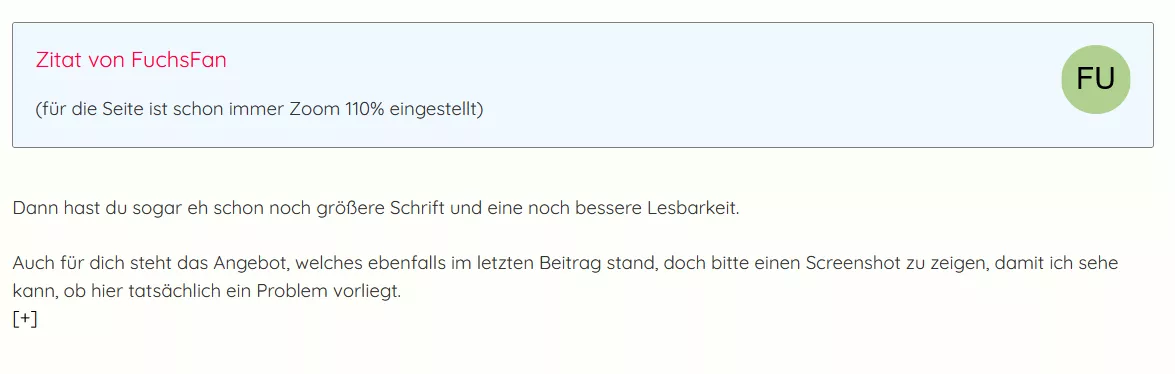
1. Original bei 110%
2. mit Code bei 110%
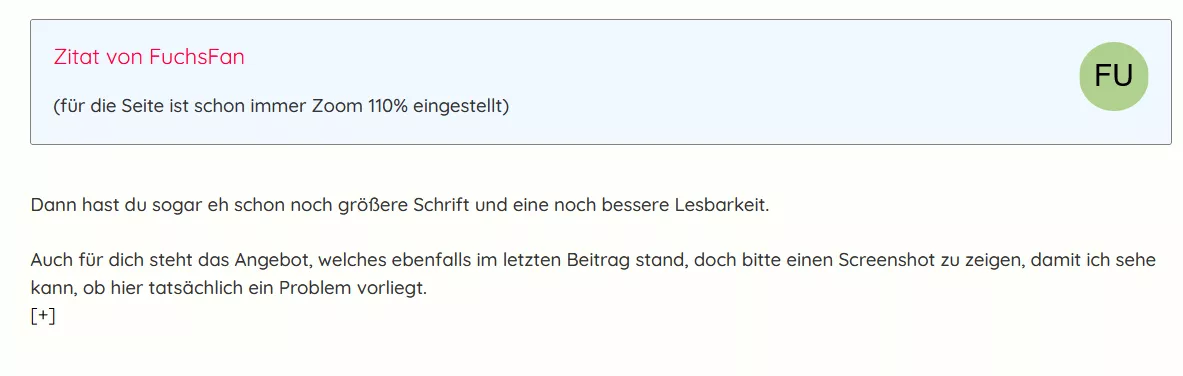
Hier die Schrift schlechter lesbar.
Da bin ich bei Dir, besonders dann, wenn ein heller Hintergrund gewählt wird. Es fehlt einfach mehr Kontrast, meine ich.
Damit in den Beiträgen der einzelnen Themen die Schrift für mich besser lesbar wird, so habe ich das mit dem Eintrag in die userContent.css gelöst:
@-moz-document domain("camp-firefox.de") {

/* Text angepasst in den Themen */
.jsQuoteMessageContainer div.messageContent div.messageBody div.messageText {
    font-weight: 500 !important;
    opacity: 1.0 !important;
    font-size: 17px !important;
}
}
(für die Seite ist schon immer Zoom 110% eingestellt)
Erst wenn ich auf 133% erhöhe, dann kommt die Scrollleiste.

Ich weiß zwar nicht, wieso es bei dir erst nicht und dann in der Nightly-Version doch wieder ging
Das kann ich auch heute noch nicht sagen, warum das so abgelaufen ist.
aber ich als Windows-Nutzer musste die Firefox-Einstellung widget.windows.overlay-scrollbars.enabled auf false setzen
Bisher ist in allen Versionen vom Fox der Wert auf true eingestellt, das Script arbeitet auch so fehlerfrei.
Danke, jetzt funktioniert es wie gewünscht. 

Ich glaube, dass es nie vorgesehen war, mit mehreren Fenstern zu funktionieren oder funktionierte das irgendwann einmal bei dir?
Da bin ich durch Zufall darauf gestoßen. Ich nutze BS Win11, Verknüpfungen für verschiedene Versionen von Firefox sind in der Taskleiste abgelegt. Es darf nur ein ganz kurzer Linksklick auf die Verknüpfung gemacht werden, ansonsten öffnen sich weitere Fenster. Das soll erst mit Win11 der Fall sein, bis Win10 konnte auch ein Doppelklick gemacht werden, es öffnete sich immer nur ein Fenster . Das ist aber erst in letzter Zeit so aufgetreten, habe schon versucht über Einstellungen die Reaktionszeit zu verändern, aber konnte nichts positives daraus machen.
Das kann ich so nicht bestätigen. Das Problem bei mir ist nur, dass das Skript aus dem Zweitfenster den Tab im Erstfenster schließt, das Skript im Erstfenster auch den Tab im Erstfenster, aber im Zweitfenster wird kein Tab geschlossen.
Danke, milupo, dass Du die Versuche unternommen hast. Da muss ich Dir zustimmen, auch wenn ich vier Fenster offen habe, es werden nur die Tabs im ersten Fenster geschlossen, egal von welchem Fenster aus ich das Schließen veranlasse. Es können dort beliebig viele Tabs geöffnet sein, der aktuelle wird immer geschlossen.
Das möchte ich ja nun geändert haben, ob es möglich ist kann ich nicht beurteilen. 
Ich nutze schon sehr lange dieses Script zum Schließen des aktuellen Tab. Öffne ich ein zweites Fenster, so verweigert das Script in beiden geöffneten Fenstern seinen Dienst. Gibt es dazu eine Möglichkeit das zu unterbinden?
// buttonCloseTab.uc.js - Button > Firefox Tabs schliessen
(function() {
    if (location != 'chrome://browser/content/browser.xhtml')
      return;

try {
    Components.utils.import("resource:///modules/CustomizableUI.jsm");
    CustomizableUI.createWidget({
        id: "fp-closetabs",
        defaultArea: CustomizableUI.AREA_NAVBAR,
        removable: true,
        label: "Aktuellen Tab schließen",
        tooltiptext: "Aktuellen Tab schließen",
        onClick: function() {
            BrowserCloseTabOrWindow();
        },
        onCreated: function(aNode) {
            aNode.style.listStyleImage = 'url(\'data:image/svg+xml;charset=utf-8,<svg xmlns="http://www.w3.org/2000/svg" color="brown" width="12" height="12" viewBox="0 0 16 16"><path fill="currentColor" fill-opacity="context-fill-opacity" d="M9.414 8l5.293-5.293a1 1 0 0 0-1.414-1.414L8 6.586 2.707 1.293a1 1 0 0 0-1.414 1.414L6.586 8l-5.293 5.293a1 1 0 1 0 1.414 1.414L8 9.414l5.293 5.293a1 1 0 0 0 1.414-1.414z"></path></svg>\')';
            return aNode;
        }
    });
    CustomizableUI.registerToolbarNode(tb);
} catch (e) {
    Components.utils.reportError(e);
};
})();
Das wäre mein aktueller Code dafür:
Den habe ich mal original übernommen, sieht dann ohne Sidebar so aus.
Mit Sidebar dann so:
Deshalb habe ich ja den Code-Schnipsel dazu eingefügt, dass die Button ständig auf dem eingestellten Level verharren.
Gefällt mir so sehr viel besser. 

Schön wenn du zufrieden bist,
Bis zur beta funktioniert es noch mit fixiert, werde das jetzt überall so anpassen.
Dann teste es mal mit:
Perfekt, Andreas, ich bedanke mich ganz herzlich. 
Teste bitte mal mit deaktivieren des letzten Eintrages von:
Das wollte ich eigentlich nicht machen, ist aber die Ursache, wie ich auch gerade festgestellt habe. Das habe ich deshalb eingefügt , damit die beiden Button immer dort fixiert bleiben, kommt das weg, dann ist bei einer geöffneten Sidebar eine Verschiebung da, was nicht mehr so passend ist.

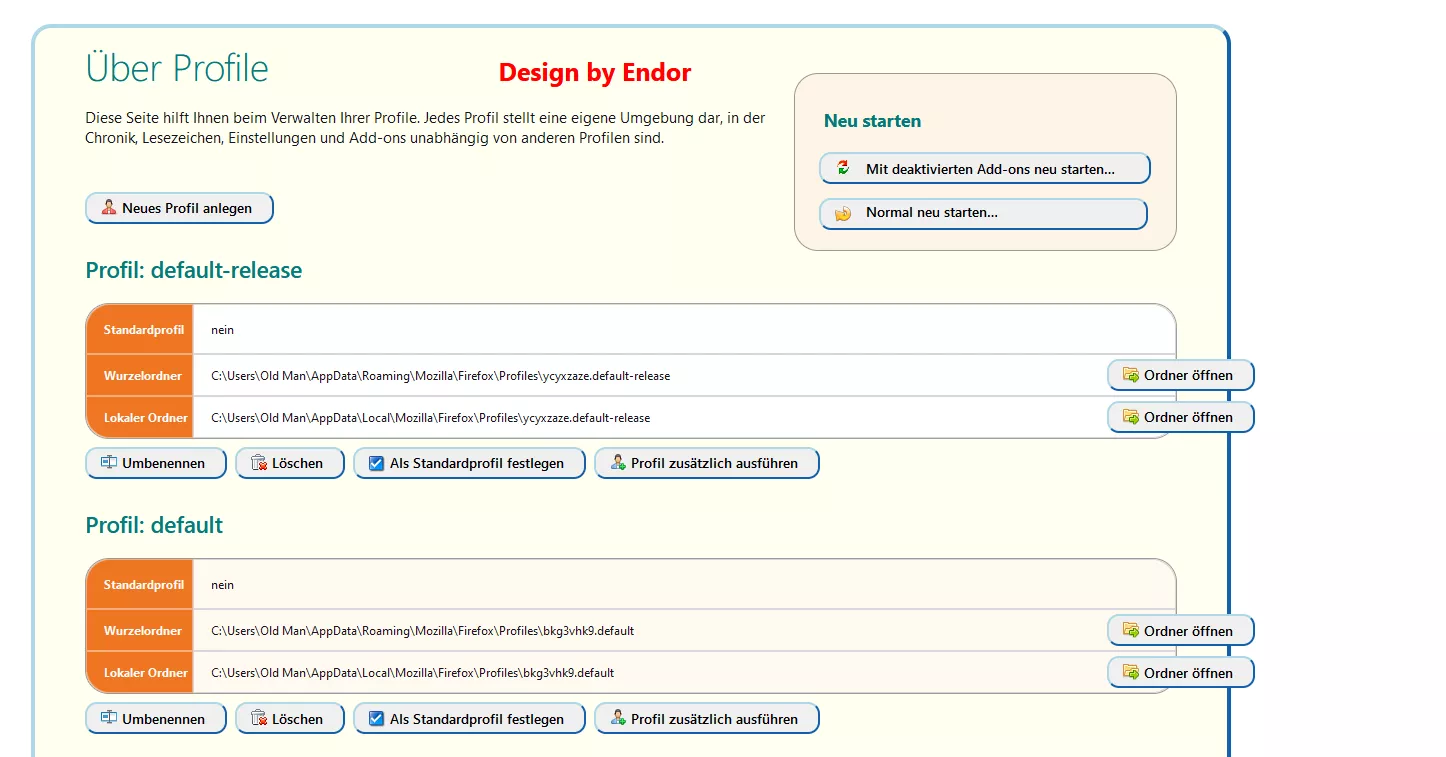
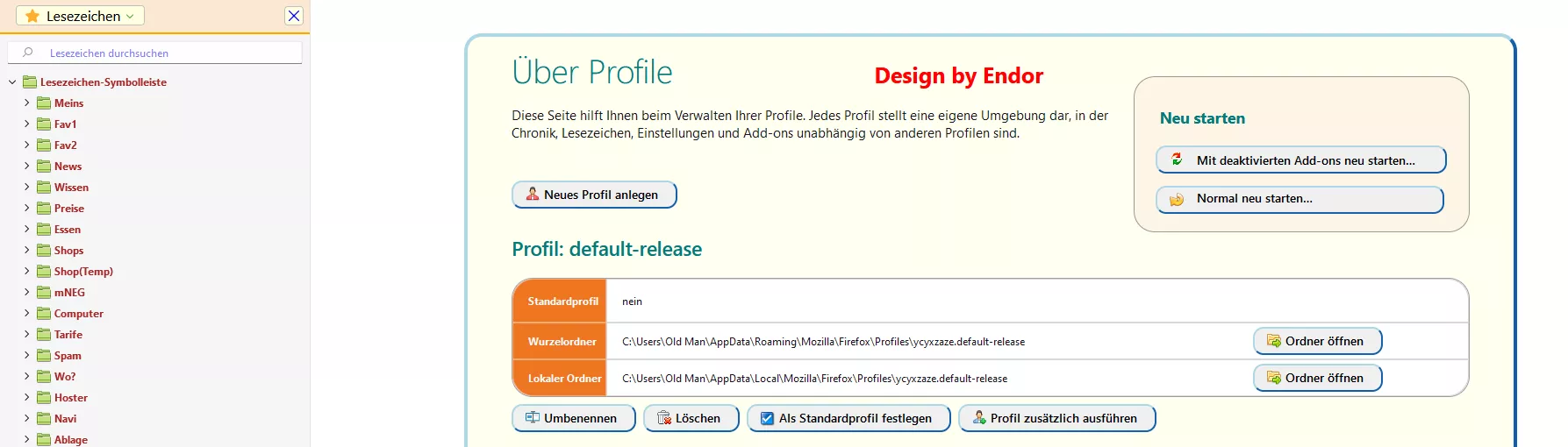
Mit Update auf Version 102 funktioniert die Scrollbar nicht mehr mit folgendem Code ( auch Scrollen mit der Maus nicht). Alle anderen Codes funktionieren dahingehend einwandfrei. Ich habe schon daran gearbeitet, aber finde keinen Zusammenhang. Woran kann es liegen?
    /* AGENT_SHEET */
    @namespace url(http://www.w3.org/1999/xhtml);
    @-moz-document url(about:profiles){

    html {
        background: gainsboro !important; }

    h1::after {content: "Design by Endor & FuchsFan 04.2022";
             margin-left: 60px;
             font-size: 17px;
             /* font-weight: bold; */
             color: dodgerblue; }

    #body {
         margin-left: 300px !important;
         min-width:1165px !important;
         max-width: 1165px !important;
         border: royalblue! important;
         background: #f8f8ff !important;
         border-width:  8px !important;
         box-shadow: 15px 15px 0px 0px #fdd342 inset !important;
         border-style: double !important;
         position: fixed !important;
    }

    .action-box{
        width: 33% !important; border-radius:24px !important;
        border: 2px solid coral! important;
    }

    #profiles > div > table{border-radius:15px !important;}

    #profiles > div > table > tbody > tr:nth-child(1) > th:nth-child(1){border-top-left-radius:15px !important;
    padding-top: 8px !important; padding-bottom: 8px !important;}
    #profiles > div > table > tbody > tr:nth-child(1) > td:nth-child(2){border-top-right-radius:15px !important;}

    #profiles > div > table > tbody > tr:nth-child(3) > th:nth-child(1){border-bottom-left-radius:15px !important;}

    #profiles > div > table > tbody > tr:nth-child(3) > td:nth-child(2){border-bottom-right-radius:15px !important;}

    th, td {padding-left: 17px !important;}

    hr{display: none !important;}
    h2{margin-top: 25px !important;}

    #restart-button{
    appearance:none!important;
    background: #F0F0F0  url("..//icons/Bild9.png")no-repeat !important;
    margin-left: 16px !important;
    padding-left:45px!important;
    padding-right: 148px !important;
    padding-bottom: 5px!important;
    background-position:14px 6px!important;
    font-size:14.0px!important;
    border-style: outset !important;
    border-left-color:  lightblue!important;
    border-top-color:  lightblue!important;
    border-right-color:  dodgerblue!important;
    border-bottom-color:  dodgerblue!important;
    border-width:2px !important;
    border-radius:20px !important;
    color:black !important;
    white-space: nowrap!important;
    overflow: hidden !important;
    text-overflow: ellipsis!important;
    }

    #restart-button:hover{
    appearance:none!important;
    background: #B2EDFA url("..//icons/Bild9.png")no-repeat !important;
    background-position:14px 6px!important;
    border-left-color:  #bbddff !important;
    border-top-color:  #bbddff !important;
    border-right-color:  #11508d !important;
    border-bottom-color:  #11508d !important;}

    #restart-in-safe-mode-button{
    appearance:none!important;
    background: #F0F0F0  url("..//icons/Bild10.png")no-repeat !important;
    margin-left: 15px !important;
    padding-left:45px!important;
    padding-right: 34px !important;
    background-position:14px 5px!important;
    font-size:14.0px!important;
    border-style: outset !important;
    border-left-color:  lightblue!important;
    border-top-color:  lightblue!important;
    border-right-color:  dodgerblue!important;
    border-bottom-color:  dodgerblue!important;
    border-width:2px !important;
    border-radius:20px !important;
    color:black !important;
    margin-bottom: 10px !important;
    white-space: nowrap!important;
    overflow: hidden !important;
    text-overflow: ellipsis!important;}

    #restart-in-safe-mode-button:hover{
    appearance:none!important;
    background: #B2EDFA url("..//icons/Bild10.png")no-repeat !important;
    background-position:14px 5px!important;
    border-left-color:  #bbddff !important;
    border-top-color:  #bbddff !important;
    border-right-color:  #11508d !important;
    border-bottom-color:  #11508d !important;}

    #create-button{
    appearance:none!important;
    background: #F0F0F0  url("..//icons/Bild11.png")no-repeat !important;
    padding-left:35px!important;
    padding-right:20px!important;
    background-position:14px 5px!important;
    font-size:14.0px!important;
    border-style: outset !important;
    border-left-color:  lightblue!important;
    border-top-color:  lightblue!important;
    border-right-color:  dodgerblue!important;
    border-bottom-color:  dodgerblue!important;
    border-width:2px !important;
    border-radius:20px !important;
    color:black !important; }

    #create-button:hover{
    appearance:none!important;
    background: #B2EDFA url("..//icons/Bild11.png")no-repeat !important;
    background-position:14px 5px!important;
    border-left-color:  #bbddff !important;
    border-top-color:  #bbddff !important;
    border-right-color:  #11508d !important;
    border-bottom-color:  #11508d !important;}

    .action-box > h3, h2, h1 {color: #057A7A !important;}


    #profiles > div:nth-child(n+1) > table > tbody > tr:nth-child(2) > td > button{
    appearance:none!important;
    background: #F0F0F0  url("..//icons/Bild12.png")no-repeat !important;
    margin-right: -200px !important;
    padding-left: 35px !important;
    padding-right:20px!important;
    background-position:14px 5px!important;
    font-size:14px!important;
    border-style: outset !important;
    border-left-color:  lightblue!important;
    border-top-color:  lightblue!important;
    border-right-color:  dodgerblue!important;
    border-bottom-color:  dodgerblue!important;
    border-width:2px !important;
    border-radius:20px !important;
    color:black !important;
    }

    #profiles > div:nth-child(n+1) > table > tbody > tr:nth-child(2) > td > button
    {position: absolute !important;    right: 264px !important; margin-top:-8px !important;}

    #profiles > div:nth-child(n+1) > table > tbody > tr:last-child > td > button
    {position: absolute !important;    right: 264px !important; margin-top:-8px !important;}


    #profiles > div:nth-child(-n+20) > table:nth-child(-n+20) > tbody:nth-child(1) > tr:nth-child(-n+20),
    #profiles > div:nth-child(-n+20) > table:nth-child(-n+20) > tbody:nth-child(1) > tr:nth-child(-n+20) > th:nth-child(-n+20)
    {height: 32px !important;}

    #profiles > div:nth-child(n+1) > table > tbody > tr:nth-child(2) > td > button:hover{
    appearance:none!important;
    background: #B2EDFA url("..//icons/Bild12.png")no-repeat !important;
    background-position:14px 5px!important;
    border-left-color:  #bbddff !important;
    border-top-color:  #bbddff !important;
    border-right-color:  #11508d !important;
    border-bottom-color:  #11508d !important;
    }


    #profiles > div:nth-child(n+1) > table > tbody > tr:last-child > td > button{
    appearance:none!important;
    background: #F0F0F0  url("..//icons/Bild12.png")no-repeat !important;
    margin-right: -200px !important;
    padding-left:35px!important;
    padding-right:20px!important;
    background-position:14px 5px!important;
    font-size: 14px!important;
    border-style: outset !important;
    border-left-color:  lightblue!important;
    border-top-color:  lightblue!important;
    border-right-color:  dodgerblue!important;
    border-bottom-color:  dodgerblue!important;
    border-width:2px !important;
    border-radius:20px !important;
    color:black !important;}

    #profiles > div:nth-child(n+1) > table > tbody > tr:last-child > td > button:hover{
    appearance:none!important;
    background: #B2EDFA url("..//icons/Bild12.png")no-repeat !important;
    background-position:14px 5px!important;
    border-left-color:  #bbddff !important;
    border-top-color:  #bbddff !important;
    border-right-color:  #11508d !important;
    border-bottom-color:  #11508d !important;}

    #profiles > div:nth-child(n+1) > button:nth-child(3){
    appearance:none!important;
    background: #F0F0F0  url("..//icons/Bild13.png")no-repeat !important;
    margin-top: 8px !important;
    padding-left:35px!important;
    padding-right:20px!important;
    background-position:14px 5px!important;
    font-size:14.0px!important;
    border-style: outset !important;
    border-left-color:  lightblue!important;
    border-top-color:  lightblue!important;
    border-right-color:  dodgerblue!important;
    border-bottom-color:  dodgerblue!important;
    border-width:2px !important;
    border-radius:20px !important;
    color:black !important;}

    #profiles > div:nth-child(n+1) > button:nth-child(3):hover{
    appearance:none!important;
    background: #B2EDFA url("..//icons/Bild13.png")no-repeat !important;
    background-position:14px 5px!important;
    border-left-color:  #bbddff !important;
    border-top-color:  #bbddff !important;
    border-right-color:  #11508d !important;
    border-bottom-color:  #11508d !important;}

    #profiles > div:nth-child(n+1) >button:nth-child(4){
    appearance:none!important;
    background: #F0F0F0  url("..//icons/Bild8.gif")no-repeat !important;
    margin-top: 8px !important;
    padding-left:35px!important;
    padding-right:20px!important;
    background-position:14px 5px!important;
    font-size:14.0px!important;
    border-style: outset !important;
    border-left-color:  lightblue!important;
    border-top-color:  lightblue!important;
    border-right-color:  dodgerblue!important;
    border-bottom-color:  dodgerblue!important;
    border-width:2px !important;
    border-radius:20px !important;
    color:black !important; }

    #profiles > div:nth-child(n+1) > button:nth-child(4):hover {
    appearance:none!important;
    background: #B2EDFA url("..//icons/Bild8.gif")no-repeat !important;
    background-position:14px 5px!important;
    border-left-color:  #bbddff !important;
    border-top-color:  #bbddff !important;
    border-right-color:  #11508d !important;
    border-bottom-color:  #11508d !important;}

    #profiles > div:nth-child(n+1) >button:nth-child(5){
    appearance:none!important;
    background: #F0F0F0  url("..//icons/Bild14.png")no-repeat !important;
    margin-top: 8px !important;
    padding-left:35px!important;
    padding-right:20px!important;
    background-position:14px 7px!important;
    font-size:14.0px!important;
    border-style: outset !important;
    border-left-color:  lightblue!important;
    border-top-color:  lightblue!important;
    border-right-color:  dodgerblue!important;
    border-bottom-color:  dodgerblue!important;
    border-width:2px !important;
    border-radius:20px !important;
    color:black !important; }

    #profiles > div:nth-child(n+1) >button:nth-child(5):hover{
    appearance:none!important;
    background: #B2EDFA url("..//icons/Bild14.png")no-repeat !important;
    background-position:14px 7px!important;
    border-left-color:  #bbddff !important;
    border-top-color:  #bbddff !important;
    border-right-color:  #11508d !important;
    border-bottom-color:  #11508d !important;}

    #profiles > div:nth-child(n+1) >button:nth-child(6){
    appearance:none!important;
    background: #F0F0F0  url("..//icons/Bild15.png")no-repeat !important;
    margin-top: 8px !important;
    padding-left:35px!important;
    padding-right:20px!important;
    background-position:14px 5px!important;
    font-size:14.0px!important;
    border-style: outset !important;
    border-left-color:  lightblue!important;
    border-top-color:  lightblue!important;
    border-right-color:  dodgerblue!important;
    border-bottom-color:  dodgerblue!important;
    border-width:2px !important;
    border-radius:20px !important;
    color:black !important; }

    #profiles > div:nth-child(n+1) >button:nth-child(6):hover{
    appearance:none!important;
    background: #B2EDFA url("..//icons/Bild15.png")no-repeat !important;
    background-position:14px 5px!important;
    border-left-color:  #bbddff !important;
    border-top-color:  #bbddff !important;
    border-right-color:  #11508d !important;
    border-bottom-color:  #11508d !important;}

    #action-box{background: #FDF5E6 !important;}
    #action-box > h3{margin-left: 4px !important;}

    #profiles > div:nth-child(odd) > table
    {background: #FFFFF0 !important;}

    td:hover{background: #ffeb99 !important;}

    th {background-color: #ee7621 !important;}
    th:hover {background-color: #b54f06 !important;}

    #profiles > div:nth-child(even) > table
    {background: #FFFAF0 !important;}
}Hat das schon jemand anders auch gehabt?
Auch hier zweimal, jetzt aber Ruhe.

Es kann m.M.n. nur mit Windows einen Zusammenhang geben in den neuen Versionen, keine Ahnung.
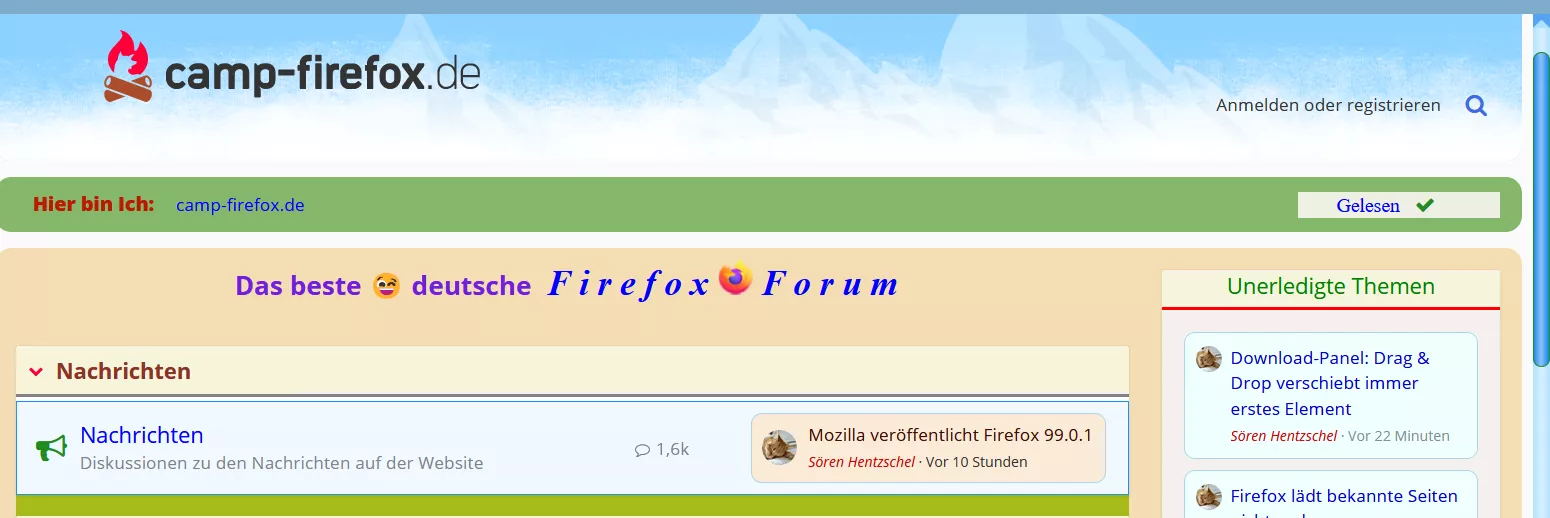
Mit dem heutigen Update ist in Nightly die Scrollbar wieder da. Hurrrraa!
Edit:
Auch mit der beta5 arbeitet das Script wieder normal.

Und warum funktioniert das Script dann bei mir unter Win11?
Darüber habe ich mir natürlich auch Gedanken gemacht, aber ich habe für mich keine andere Erklärung.
Welche Version 11 nutzt Du, hier die Pro-Version.
Naja, eine wirkliche Hilfe war das ja leider nicht.
Aber wieso denn nicht, auch der Versuch zählt.
So wie ich das sehe nicht wirklich per CSS
Ich habe es über Win11 gemacht (regedit), aber das zeigt nur dann Wirkung, wenn die Scrollbar dauerhaft eingeblendet bleibt.
Damit muss ich mich erst einmal zufrieden geben.
Trotzdem wäre es schön, wenn ich nur wüsste woran es hapert. Bis v99 alles bestens, ab v100 dann absolut nichts mehr. Es kann m.M.n. nur mit Windows einen Zusammenhang geben in den neuen Versionen, keine Ahnung.
Danke, Andreas, für Deine Hilfe.