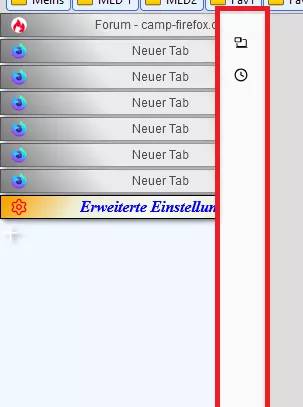
Meine sind auch nicht alle gleich.
Stimmt, aber so ist es ja bei mir auch, trotzdem passen sie sich den Button an, bis auf diese zwei Scripte.
Nein, ich meinte mit einem anderen Icon.
Kann nehmen was ich will, es ändert sich nicht.
Meine sind auch nicht alle gleich.
Stimmt, aber so ist es ja bei mir auch, trotzdem passen sie sich den Button an, bis auf diese zwei Scripte.
Nein, ich meinte mit einem anderen Icon.
Kann nehmen was ich will, es ändert sich nicht.
Sind die Icons evtl. zu klein, hast du es mal mit anderen getestet?
Ja, Andreas, mit 30px x 30px , trotzdem werden sie so klein angezeigt.
Mach doch mal bitte ein "Foto", vor der Benutzung, nach der Benutzung des Codes.
Bitte.
Bei 33px bleibt das Icon in kleiner Form, wie ich es schon mal gezeigt habe.
Jetzt mit 35px wäre m.M.n. die normale Größe, dabei ist auch der Button schon vergrößert ( dritter v. rechts).

Um es ganz krass zu machen, damit es zu sehen ist, hier eine Größe von 40px.

Und mit diesem Eintrag?
Ja, das Icon vergrößert sich, aber auch der Button insgesamt. Da greifen dann auch keine margin-Werte.
Man kann direkt im CSS-Teil des Skriptes, z.B. dir Größe genau dieses Symbols beeinflussen
und hat dann alles in einem Code.
Ja, das kann man, mit dem Nachteil, dass sich der gesamte Button dann mit vergrößert. Nun habe ich versucht über Größenanpassungen das zu ändern, aber automatisch verkleinert sich dann auch das icon wieder. Im Moment habe ich noch keine Lösung dafür.
Bei dem Script addons-update-button.uc.js verhält es sich auch so, die anderen machen da keine Probleme.
Das Aris Monster - genial wie es ist - hab ich aber schon zu oft durchgekämmt um das nochmal zu machen.
Die Version , die ich nutze, habe ich geändert, und immer so behalten (ohne Updates). Bisher selten mal ein Problemchen. ![]()
Könnte sein dass dann deine anderen Einstellungen für Icons auch für dieses Bild greifen, ohne zusätzliche Grössenangaben.
Danke, das schaue ich mir dann an.
und musste neu eingeschaltet werden:
War hier auch nicht so. ![]()
ich vermute du hast evtl. CSS am Laufen das die Icongrösse für manche Buttons ändert, aber nicht für alle.
Da liegst Du vollkommen richtig, in der Regel werden mit eingebunden, aber nicht alle, wie du andeutest.
Der Selektor von hier RE: Button um weiteres Profil zu öffnen. brachte es nicht.
Der war dann richtig:
#profileschange-button.toolbarbutton-1.chromeclass-toolbar-additional image.toolbarbutton-icon {
width: 38px !important;
height: 38px !important;
}
Und so #profileschange-button hast Du es ja auch im Script jetzt eingetragen, danke, Andreas.
![]()
Und was für ein Dateiformat hat Dein Symbol?
png-Datei, habe es aber auch mit jpg versucht, ändert nichts.
So funktioniert es nicht?
Sag mal bitte, wohin mit dem Code, gut wäre im Script.
Was kann ich machen, dass die Grafik im Button größer erscheint?
Eine Änderung der Pixelzahl (Vergrößerung) für die Grafik bringt nichts.
das wäre normal:
und so mit dem Script:
Da rattert dann die ganze Nacht das Hirn und man kommt einfach nicht zur Ruhe.
Kenne ich, aber dann unbedingt lernen, dass man auch abschalten kann. ![]()
Und wenn es geht auch mit Nightly's?
Es funktioniert. ![]()
Alles klar. Danke.
So, Endor, habe about:logins im Nightly mal zurecht gebastelt. Den Code hänge ich mal mit ran, eventuell kannst Du was gebrauchen.
@namespace url(http://www.w3.org/1999/xhtml);
@-moz-document url-prefix(about:logins) {
html {
background: black !important;
}
.no-logins.initialized body login-intro{
scrollbar-width: none !important;
}
/* alle Button der originale graue HG weg */
button,
button:hover {
--in-content-button-background: none !important;
--in-content-button-background-hover: none !important;
--in-content-button-background-active: none !important;
}
.column:before {
content: "Design by FuchsFan ... 07.2023";
margin-top: 15px !important;
font-size: 12px !important;
font-weight: 600 !important;
color: grey !important;
}
/* oben der Text "Zugangsdaten" */
.count {
color: #0f6acc !important;
font-size: 15px !important;
font-weight: bold !important;
padding-right: 20px !important;
}
/* Einträge in der Liste Abstand von links */
li[class="login-list-item"],
li[class="login-list-item selected"]{
padding-left: 25px !important;
}
/* erstes Feld linke Seite (bei Name u. Zugangsdaten) */
div.meta {
padding-left: 35px !important;
padding-top: 10px !important;
margin-top: -1px !important;
background-color: #fffff0 !important;
border-bottom: 2px solid orange !important;
border-top: 2px solid orange !important;
}
/* Hintergrundbox bei Button mit + Zeichen */
div.listHeader div.create-login-button-container {
background-color: lightblue !important;
margin: 3px 0 0 0 !important;
border: 2px solid coral !important;
box-shadow: none !important;
}
div.listHeader div.create-login-button-container:hover {
background-color: lightyellow !important;
margin: 3px 0 0 0 !important;
border: 2px solid blue !important;
box-shadow: none !important;
}
/* rechts die Box über der blauen Linie */
.header {
margin-top: 20px!important;
}
.header, li {
border-bottom: none !important;
box-shadow: none !important;
}
/* linke Seite unter den Einträgen Border */
div.container ol li#new-login-list-item.login-list-item.selected,
div.container ol section.login-list-section{
border-bottom: 1px solid silver !important;
box-shadow: none !important;
}
/* HG für das obere rechte Feld */
.initialized body header,
.login-selected.initialized body header{
border-bottom: 2px solid orange !important;
background: #fbe8d2 !important;
height: 52px !important;
}
/* HG für das linke obere Feld */
div.listHeader{
background-color: #fbe8d2 !important;
}
/* Suchfeld oben */
.filter,
login-filter {
appearance: none !important;
border-radius:24px !important;
margin-left: 5px !important;
margin-top: 2px !important;
min-width: 235px !important;
max-width: 235px !important;
}
/* HG des Suchfeldes */
input.filter{
background:#fffff0 !important;
}
body {
max-width: 1400px !important;
max-height: 800px !important;
margin-left: auto /* 350px */ !important;
margin-right: auto /* 350px */ !important;
border: 5px solid dodgerblue !important;
margin-top: 30px !important;
}
/* rechte Seite großes Feld */
html.official-branding.no-logins.initialized body section login-intro,
div.container {
max-height: 728px !important;
}
.time-created,
body > login-list:nth-child(2), li, .header, header,
.meta{
box-shadow: none !important;
}
/* rechte Seite großes Feld */
div.container {
background: conic-gradient(at 0% 50% , beige 20%, white 30%, #64BF15 60%) !important;
border-left: 2px solid silver !important;
}
/* links oben das erste Feld */
.meta {
background: conic-gradient(at 0% 50% , beige 20%, white 30%, #64BF15 60%) !important;
}
.meta:hover {
background: #ffe680 !important;
}
/* linke Seite die untere Box */
div.container ol{
background: conic-gradient(at 0% 50% , beige 20%, white 30%, #64BF15 60%) !important;
}
#login-sort label {
padding-left: 25px !important;
}
.login-list-item.selected {
background: #fff0b3 !important;
border-left: 2px!important;
}
.login-list-item.selected:hover {
background: #ffdb4d !important;
}
/* rechts die große Box */
html.initialized body login-item,
.login-selected.initialized body login-item {
margin-left: 30px !important;
}
/* links die große Box */
html.initialized body login-list.initialized.create-login-selected,
.login-selected.initialized body login-list.initialized {
margin-right: -40px !important;
min-width: 350px !important;
max-width: 350px !important;
border: 0px !important;
}
.login-list-item {
background-color: #FFFFF0 !important;
}
.login-list-item:hover {
background-color: #ffe680 !important;
}
.login-item-title {
color: #0066cc !important;
}
.favicon-wrapper,
.login-item-favicon-wrapper {
fill: #e69500 !important;
}
/* rechts blaue horizontale Linie */
div.container div.column div.header {
border-bottom: 2px solid dodgerblue !important;
margin-right: -200px !important;
}
/* Popup "Neue Zugangsdaten hinzufügen" Border-Radius bei den drei Boxen */
div.container div.column form div.detail-row label.detail-cell input{
border-radius: 24px !important;
}
/* Button links oben "Name" */
#login-sort {
background: #F0F0F0 url("..//icons/Bild86.png")no-repeat !important;
padding-left:40px !important;
padding-right: 5px !important;
padding-top: 4px!important;
padding-bottom: 0px!important;
background-position:10px 7px!important;
font-size:14.0px!important;
border-style: outset !important;
border-left-color: lightblue!important;
border-top-color: lightblue!important;
border-right-color: dodgerblue!important;
border-bottom-color: dodgerblue!important;
border-width:2px !important;
color:black !important;
margin-left: -15px !important;
max-width: 160px !important;
}
#login-sort:hover {
background: #B2EDFA url("..//icons/Bild86.png")no-repeat !important;
padding-left:40px!important ;
border-style: outset !important;
border-width:2px !important;
border-left-color: #bbddff !important;
border-top-color: #bbddff !important;
border-right-color: #11508d !important;
border-bottom-color: #11508d !important;
background-position:10px 5px!important;
}
/* Button bearbeiten */
.edit-button {
appearance:none!important;
height: 32px !important;
background: #F0F0F0 url("..//icons/Bild67.png")no-repeat !important;
margin-right: 20px !important;
padding: 0 5px 0 25px !important;
background-position:14px 7px!important;
font-size:14.0px!important;
border: 1px solid dodgerblue !important;
border-radius:16px !important;
color:black !important;
}
.edit-button:hover {
appearance:none!important;
background: #B2EDFA url("..//icons/Bild67.png")no-repeat !important;
border: 1px solid coral !important;
background-position:14px 7px!important;
padding: 0 5px 0 25px !important;
}
/* Text im Button verlagert */
button.ghost-button span {
margin-top: -3px !important;
}
/* Button "Entfernen" */
.delete-button {
appearance:none!important;
height: 32px !important;
background: #F0F0F0 url("..//icons/Bild8.gif")no-repeat !important;
padding: 0 5px 0 25px !important;
background-position:14px 7px!important;
font-size:14.0px!important;
border: 1px solid dodgerblue !important;
border-radius:16px !important;
color:black !important;
}
.delete-button:hover {
appearance:none!important;
background: #B2EDFA url("..//icons/Bild8.gif")no-repeat !important;
border: 1px solid coral !important;
background-position:14px 7px!important;
padding: 0 5px 0 25px !important;
}
/* Button "Kopieren" (Namen) */
div.detail-row login-command-button.copy-button.copy-username-button {
appearance:none!important;
height: 30px !important;
background: #F0F0F0 url("..//icons/Bild73.png")no-repeat !important;
padding: 0 5px 0 35px !important;
background-position:15px 6px!important;
background-size: 18px 18px !important;
font-size:14.0px!important;
border: 1px solid dodgerblue !important;
border-radius:16px!important;
color:black !important;
}
div.detail-row login-command-button.copy-button.copy-username-button:hover {
appearance:none!important;
background: #B2EDFA url("..//icons/Bild73.png")no-repeat !important;
padding: 0 5px 0 35px !important;
border: 1px solid coral !important;
background-position:15px 6px!important;
background-size: 18px 18px !important;
}
/* originale Icons in den Button ausgeblendet */
.ghost-button > img:nth-child(1) {
display: none !important;
}
/* Button "Kopieren" (Passwort) */
div.detail-row login-command-button.copy-button.copy-password-button {
appearance:none!important;
height: 30px !important;
background: #F0F0F0 url("..//icons/Bild74.png")no-repeat !important;
padding: 0 5px 0 35px !important;
background-position:15px 6px!important;
background-size: 18px 18px !important;
font-size:14.0px!important;
border: 1px solid dodgerblue !important;
border-radius:16px!important;
color:black !important;
}
div.detail-row login-command-button.copy-button.copy-password-button:hover {
appearance:none!important;
background: #B2EDFA url("..//icons/Bild74.png")no-repeat !important;
padding: 0 5px 0 35px !important;
border: 1px solid coral !important;
background-position:15px 6px!important;
background-size: 18px 18px !important;
}
/* Text im Button verlagert */
button:nth-child(3) > span:nth-child(1){
margin-top: -3px !important;
}
/* für Button "Kopieren" die Länge */
div.detail-row login-command-button.copy-button.copy-username-button,
div.detail-row login-command-button.copy-button.copy-password-button {
min-width: 120px !important;
}
/* Button "Adresse der Website" */
.origin-input {
appearance:none!important;
background: #F0F0F0 url("..//icons/Bild75.png")no-repeat !important;
padding: 2px 40px 6px 45px !important;
background-position:15px 5px!important;
background-size: 18px 18px !important;
font-size:14.0px!important;
border: 1px solid dodgerblue !important;
border-radius:16px!important;
color:black !important;
}
.origin-input:hover {
appearance:none!important;
background: #B2EDFA url("..//icons/Bild75.png")no-repeat !important;
padding: 2px 40px 6px 45px !important;
background-position:15px 5px!important;
background-size: 18px 18px !important;
font-size:14.0px!important;
border: 1px solid coral !important;
border-radius:16px!important;
color:black !important;
}
.fxaccounts-enable-button {
appearance:none!important;
background: #F0F0F0 url("..//icons/Bild83.png")no-repeat !important;
padding-left:35px!important;
padding-top: 2px!important;
padding-bottom: 4px!important;
background-position:10px 6px!important;
color:black!important;
font-size:14px!important;
text-decoration:none!important;
padding-right:25px!important;
border-left-color: lightblue!important;
border-top-color: lightblue!important;
border-right-color: dodgerblue!important;
border-bottom-color: dodgerblue!important;
border-style: outset !important;
border-width:2px !important;
border-radius:16px!important;
}
.fxaccounts-enable-button:hover {
appearance:none!important;
background: #B2EDFA url("..//icons/Bild83.png")no-repeat !important;
background-position:10px 6px!important;
border-style: outset !important;
border-width:2px !important;
border-left-color: #bbddff !important;
border-top-color: #bbddff !important;
border-right-color: #11508d !important;
border-bottom-color: #11508d !important;
}
/* Button "Speichern" im Menü "Neu" */
.save-changes-button {
appearance:none!important;
background: #F0F0F0 url("..//icons/Bild87.png")no-repeat !important;
padding: 0 25px 0 45px !important;
background-position:15px 6px!important;
background-size: 17px 17px !important;
font-size:14.0px!important;
border: 1px solid dodgerblue !important;
border-radius:16px!important;
color:black !important;
}
.save-changes-button:hover {
appearance:none!important;
background: #B2EDFA url("..//icons/Bild87.png")no-repeat !important;
padding: 0 25px 0 45px !important;
border: 1px solid coral !important;
background-position:15px 6px!important;
background-size: 17px 17px !important;
}
/* Button "Abbrechen" im Menü "Neu" */
.cancel-button {
appearance:none!important;
background: #F0F0F0 url("..//icons/Bild88.png")no-repeat !important;
padding: 0 25px 0 45px !important;
background-position:15px 6px!important;
background-size: 17px 17px !important;
font-size:14.0px!important;
border: 1px solid dodgerblue !important;
border-radius:16px!important;
color:black !important;
}
.cancel-button:hover {
appearance:none!important;
background: #B2EDFA url("..//icons/Bild88.png")no-repeat !important;
padding: 0 25px 0 45px !important;
border: 1px solid coral !important;
background-position:15px 6px!important;
background-size: 17px 17px !important;
}
/* Auge vor Passwort kopieren */
.reveal-password-checkbox {
fill: #0070ff !important;
}
.reveal-password-checkbox:hover {
fill: #c32148 !important;
}
/* Web-Adresse im Menü "Neu" linker Abstand */
div.container div.column form div.detail-row label.detail-cell input{
padding-left: 15px !important;
}
/* Überschrift im Menü "Neu" */
div.container div.column div.header h2.title span.new-login-title {
color: #006b3c !important;
}
/* das Welt-Icon davor */
div.container div.column div.header img.login-item-favicon {
fill: brown !important;
}
/* Drei-Punkte-Button oben rechts */
button.menu-button.ghost-button {
background-color: lightblue !important;
border: 2px solid orange !important;
border-radius: 0 !important;
fill: green !important;
}
button.menu-button.ghost-button:hover {
background-color: greenyellow !important;
border: 2px solid crimson !important;
fill: red !important;
}
/* Menü hinter Drei-Punkte-Button */
ul.menu button.menuitem-button {
background-color: beige !important;
border: 1px solid silver !important;
margin-top: 2px !important;
}
ul.menu button.menuitem-button:hover {
background-color: greenyellow !important;
border: 1px solid coral !important;
}
.meta-info:first-of-type::before {
border-top: none !important;
}
/* Popup-Menü hinter Dreipunkte-Button - die Button */
.menu {
border: 3px solid dodgerblue !important;
padding: 5px !important;
}
.menuitem-import-browser {
width: 100% !important;
height: 24px !important;
fill: green !important;
color: black!important;
}
.menuitem-export {
width: 100% !important;
height: 24px !important;
fill: orange !important;
color: black !important;
}
.menuitem-import {
width: 100% !important;
height: 24px !important;
fill: #cc3300!important;
color: black !important;
}
.menuitem-import-file {
width: 100% !important;
height: 24px !important;
fill: blue !important;
color: black !important;
}
.menuitem-remove-all-logins {
width: 100% !important;
height: 24px !important;
fill: #cc3300!important;
color: black !important;
margin-left: -1px !important;
}
.menuitem-help {
width: 100% !important;
height: 24px !important;
fill: blue!important;
color: black !important;
}
.menuitem-preferences {
width: 100% !important;
height: 24px !important;
fill: dodgerblue!important;
color: blue !important;
font-weight: 600 !important;
}
.menuitem-mobile[data-l10n-id="menu-menuitem-android-app"] {
width: 100% !important;
height: 24px !important;
fill: #33cc33!important;
color: black!important;
}
.menuitem-mobile[data-l10n-id="menu-menuitem-iphone-app"] {
width: 100% !important;
height: 24px !important;
fill: #9900ff!important;
color: black!important;
}
}
Alles anzeigen
Alles immer gaaanz in Ruhe
Danke, für die Nachhilfe! ![]()
Nicht mehr für Win 7
Danke! ![]()
Ich wollte schon den Schnellwaschgang einschalten, gut dass ich noch gefragt habe. ![]()
Nächste Woche ist also wirklich Schluss mit neuen Beta-Versionen.
Verstehe ich das jetzt richtig, es gibt dann überhaupt keine Beta mehr? ![]()